

🛠️ Free Technical SEO Tools on TechMitra
Optimize your crawlability and structured data with our suite of privacy-first, browser-based webmaster tools:
On-page content and off-page authority get most of the attention in SEO conversations, but neither matters if search engines can’t crawl, load, and index your site efficiently in the first place. Technical SEO is the foundation everything else sits on — and it’s usually invisible until something breaks.
This guide covers the core technical SEO checklist areas every site owner should know in 2026, using real, verifiable examples from running TechMitra — a 600+ page WordPress site — rather than just theory.
In this guide, we’ll cover:
Also read : What is SEO, What Are Its Different Types And Its Benefits? (2026 Guide)
What is Technical SEO?
Technical SEO covers everything that affects whether search engines and AI crawlers can access, crawl, render, and understand your site. It sits underneath both on-page and off-page SEO — great content and strong backlinks don’t help if the page is slow, blocked, or broken.
Technical SEO Vs On Page SEO : What’s the Difference?
These two get confused often, since both happen “on” your website — but they solve different problems.
On-Page SEO is about the content itself: does this specific page answer the search intent, is the keyword placed naturally, is the writing genuinely useful, are the headings clear. It’s optimization a writer or editor can do without touching any code.
Technical SEO is about whether that content can even be found, loaded, and processed in the first place: can crawlers reach the page, does it load fast enough, is it accidentally blocked, does the server respond quickly, is there a duplicate version competing with it. It’s optimization that usually requires touching hosting, caching, server configuration, or site infrastructure — the layer underneath the writing.
| On-Page SEO | Technical SEO | |
|---|---|---|
| Focus | Content quality and relevance | Site infrastructure and accessibility |
| Who typically handles it | Writers, editors, content strategists | Developers, site admins, technical SEOs |
| Example fix | Rewriting a meta description, adding a missing H2 | Fixing a robots.txt block, resolving a duplicate canonical |
| Where the work happens | Inside the post editor | Hosting panel, CDN settings, server config |
A simple way to think about it: on-page SEO makes a page worth ranking; technical SEO makes sure it’s even eligible to. A perfectly written article sitting behind a robots.txt block, or loading in 8 seconds, won’t rank no matter how good the writing is — and a technically flawless, lightning-fast page with thin, unhelpful content won’t rank either. Both layers have to work together, which is exactly why they’re covered as separate types of SEO rather than one combined discipline.
For the on-page side of this comparison in full depth, see our On-Page vs Off-Page SEO guide.
Site Speed, Core Web Vitals, and Caching
Google’s Core Web Vitals measure real user experience — loading speed, visual stability, and responsiveness (INP). Slow pages hurt rankings and, just as importantly, hurt conversions, since visitors abandon slow-loading pages before they ever read your content.
The current target thresholds are:
- LCP (Largest Contentful Paint): 2.5 seconds or less
- INP (Interaction to Next Paint): 200 milliseconds or less
- CLS (Cumulative Layout Shift): 0.1 or less
On TechMitra, speed is handled through a specific stack: Hostinger’s Business Plan for hosting, LiteSpeed Cache for page caching, and Cloudflare on top for edge delivery and security. One real, ongoing piece of this setup is LiteSpeed’s Guest Mode and Guest Optimization — configuration that serves cached pages to first-time (non-logged-in) visitors faster by skipping unnecessary checks that only matter for logged-in users like admins or commenters. Getting this configuration right, and keeping it compatible with Cloudflare’s own caching layer, has been a recurring piece of TechMitra’s technical maintenance — the two caching layers have to be configured to cooperate rather than conflict, or you risk serving stale pages or breaking dynamic elements like comment forms.
Security and Crawlability: What Cloudflare Actually Does
Technical SEO isn’t only about speed — it’s also about making sure your site stays up and reachable, since a site under attack or knocked offline can’t be crawled or indexed properly either.
On TechMitra, Cloudflare handles this layer. The site has faced over 10,000 daily bot attacks, handled entirely through Cloudflare’s security rules rather than heavy WordPress security plugins, which tend to slow sites down and add their own maintenance burden. This Cloudflare-first approach keeps the site both secure and fast — a plugin-heavy alternative would likely hurt Core Web Vitals in the process of trying to protect the site.
A few real configuration details worth knowing if you’re setting this up yourself:
- APO (Automatic Platform Optimization) compatibility with LiteSpeed — Cloudflare’s APO and a server-side cache like LiteSpeed can conflict if not configured carefully, since both are trying to cache and serve the same pages.
- Cache Everything exclusion rules — necessary for WooCommerce-powered sites (TechMitra’s sister site, CrochetMagic, runs WooCommerce), since aggressively caching cart and checkout pages breaks the shopping experience.
- Total TLS gaps — worth auditing periodically, since incomplete TLS/SSL coverage across subdomains can quietly create mixed-content warnings or trust issues that affect both users and crawlers.
None of this is set-and-forget. It’s an ongoing part of running technical infrastructure, not a one-time checklist item.
Also Read : Brevo Contact Form and Newsletter in WordPress — Without Installing Any Plugin (Not Even Brevo’s Own)
AI Crawlers and JavaScript Rendering
Search crawlers aren’t just Googlebot anymore. A growing list of AI crawlers now access sites separately: GPTBot and OAI-SearchBot (OpenAI/ChatGPT), ClaudeBot (Anthropic), PerplexityBot (Perplexity), and Googlebot itself for Google’s own AI Overviews. Your robots.txt file should be checked specifically for whether these are unintentionally blocked — it’s easy to write a broad disallow rule meant for one bot that accidentally catches all of them.
One important technical distinction: most AI crawlers don’t execute JavaScript. Google processes JavaScript in crawl, render, and index phases, so content that only appears after a script runs can still get indexed. GPTBot, OAI-SearchBot, and ClaudeBot generally rely on the initial HTML response instead. If your site is built heavily on client-side rendering (common with some page builders and JavaScript frameworks), content that only loads after JavaScript execution may be invisible to these AI crawlers even though Google sees it fine. For a WordPress/Elementor site like TechMitra, this mostly means double-checking that key content isn’t hidden behind interactions or lazy-loaded scripts that never fire for a non-JS crawler.
Crawl Budget
Crawl budget is the number of pages a search engine is willing and able to crawl on your site within a given period. It’s determined by two factors: how much load your server can handle without slowing down (crawl capacity), and how much the search engine actually wants to crawl your site based on its perceived value (crawl demand).
For most small-to-mid-sized sites, crawl budget isn’t a real constraint — it typically only becomes a bottleneck at the scale of tens of thousands of pages, or on sites cluttered with low-value URLs like filtered product listings or endless tag archives.
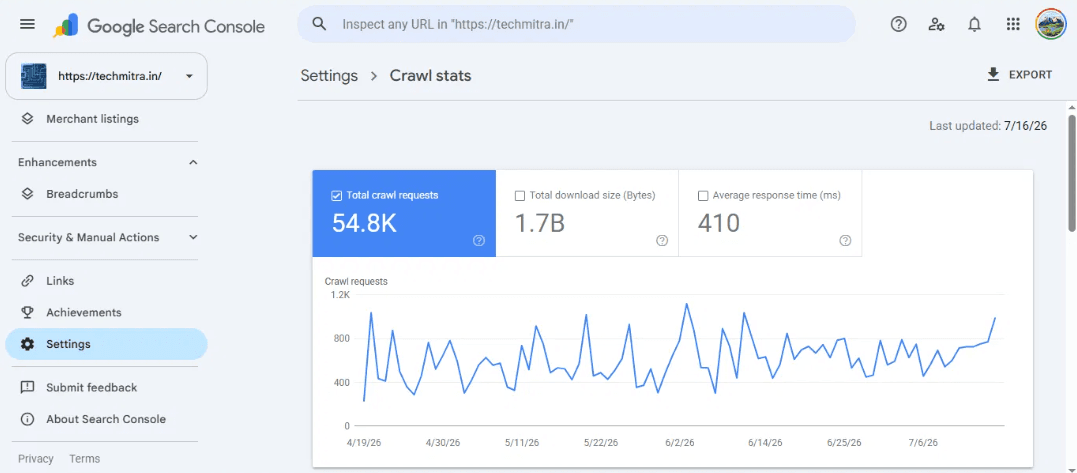
On TechMitra, checking this directly rather than assuming it’s a problem: Google Search Console’s Crawl Stats report shows Googlebot making around 54.8K crawl requests to the site over a recent 3-month period, with a healthy 410ms average response time. That’s a sign Google is crawling the site efficiently without hitting any capacity limits — at 600+ pages, TechMitra is well below the scale where crawl budget optimization becomes urgent, though it’s worth monitoring as the site grows.
IndexNow: Instant Indexing for Bing
IndexNow is an open protocol, launched by Microsoft and Yandex, that lets a website instantly notify participating search engines the moment a page is published or updated — instead of waiting for the search engine to discover the change on its own next crawl cycle. Bing, Yandex, Naver, and Seznam all support it.
One important clarification: Google does not support IndexNow, despite testing it since 2021. For Google specifically, you still need a properly submitted XML sitemap and Search Console monitoring — IndexNow only accelerates Bing, Yandex, and the other participating engines.
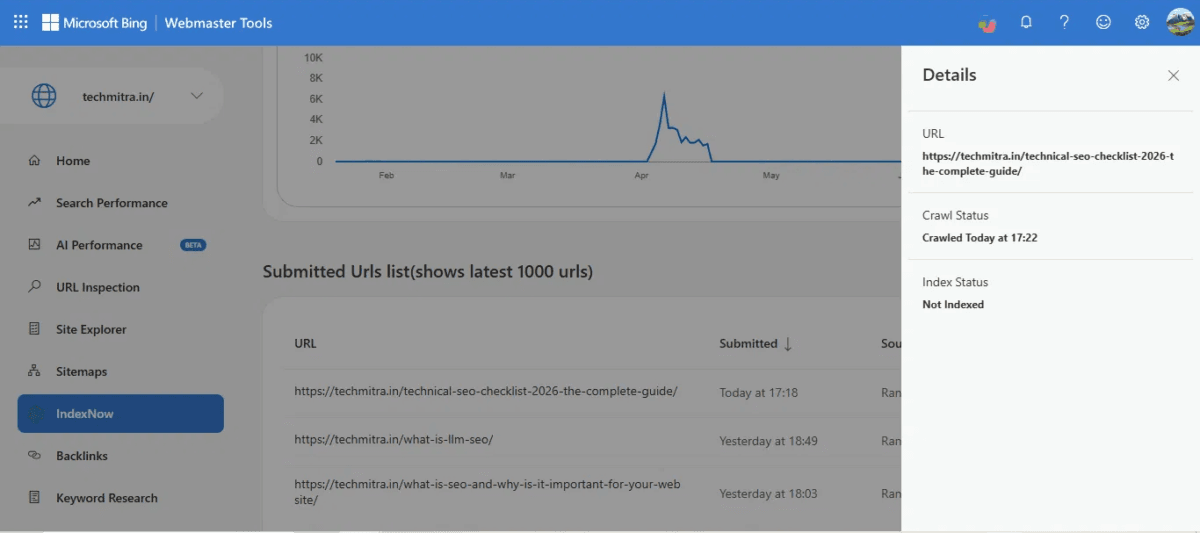
On TechMitra, this is directly measurable — and this very article is a live example, checked as it happened. Published at 5:18 PM, it was submitted via IndexNow immediately, and Bing Webmaster Tools showed the page crawled by 5:22 PM, about 4 minutes later.
How Google’s Crawl-to-Index Timeline Compares
Since Google doesn’t use IndexNow, its crawl-to-index process runs on its own separate timeline — driven by sitemap submission and Googlebot’s own discovery, rather than a push notification. It’s worth checking how that compares in practice, using the same real-time example.
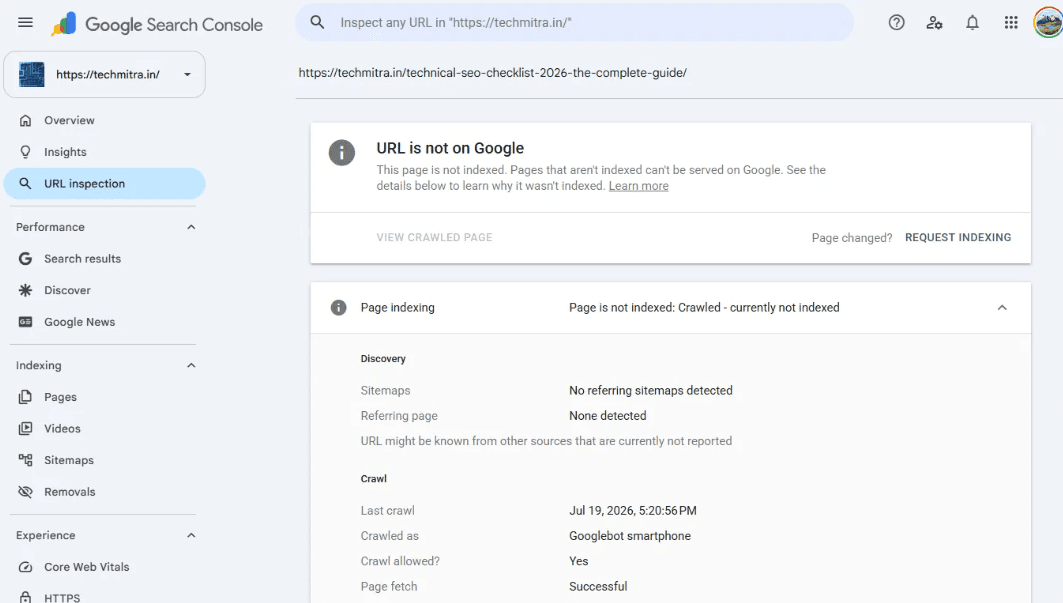
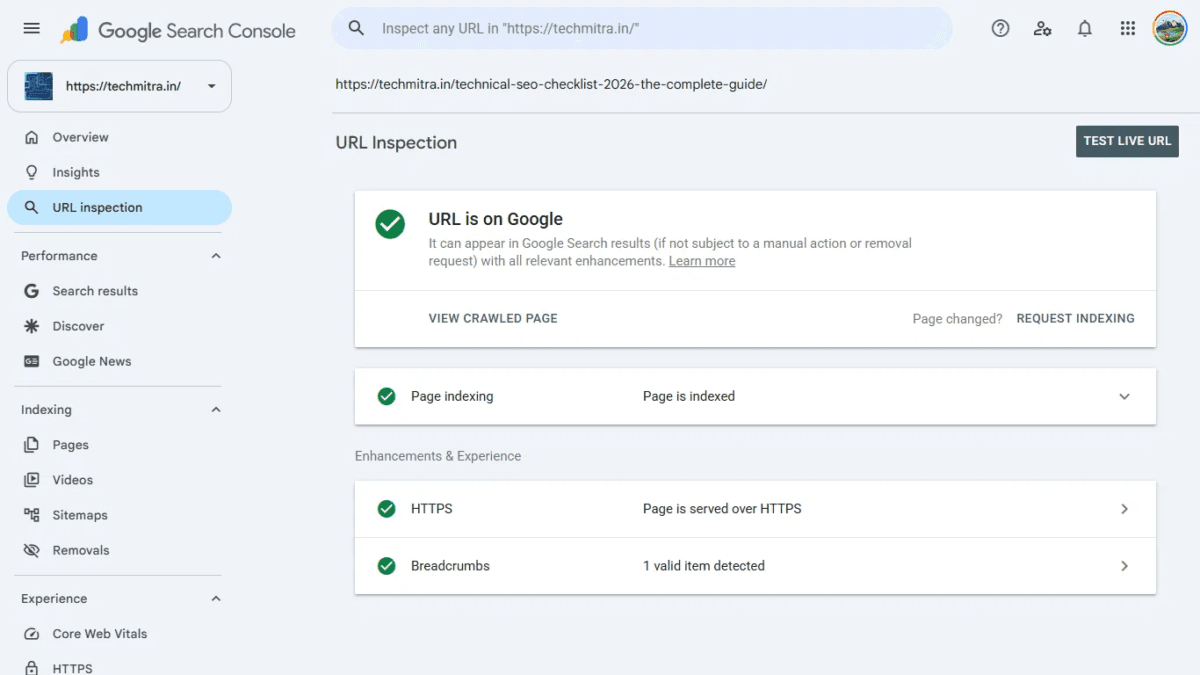
Checking this article’s own Google Search Console data: Googlebot reached the page by 5:20:56 PM, roughly 3 minutes after its 5:18 PM publish time — a crawl speed almost identical to Bing’s, despite having no IndexNow-style push mechanism behind it.
Where it gets interesting is indexing, not crawling. At the time of checking, Google had already fully indexed the page — about a minute after its crawl, putting Google’s total publish-to-indexed time at around 4 minutes. Bing, despite crawling at a similar speed and having IndexNow’s instant-notification advantage, was still showing “Not Indexed” at the same check. That’s a useful, honest reminder: fast crawling doesn’t guarantee fast indexing on either platform, IndexNow accelerates discovery rather than guaranteeing indexing, and the platform that finds your content first isn’t always the one that indexes it first. Bing’s average article citation performance (per TechMitra’s own AI Performance dashboard, which tracks Copilot citations) still makes it worth optimizing for — this was simply one snapshot, not a permanent pattern.
Canonical URLs and Duplicate Content
A canonical URL tells search engines which version of a page is the “master” copy when the same or similar content is reachable at multiple URLs — for example, through URL parameters, HTTP vs HTTPS, or www vs non-www variants. Without a clear canonical signal, search engines may split ranking signals across duplicate versions, or index the wrong one.
A real lesson from TechMitra: a backlink audit found the site’s Domain Rating had dropped from 24 to 20, traced back to a high-authority backlink that had been pointing at an article that was later deleted — leaving that link pointing at a dead page instead of live content. The fix was republishing the article at the same URL to restore the link’s value, rather than leaving it as a broken destination. It’s a useful reminder that duplicate and deleted-content issues aren’t just abstract technical concepts — they have a direct, measurable effect on authority metrics that took real time to notice and correct.
XML Sitemaps and Robots.txt
XML sitemaps are a structured list of your site’s pages that you submit directly to search engines, helping them discover content more systematically than crawling alone. Robots.txt does the opposite job — it tells crawlers which parts of your site not to bother crawling, like admin pages, internal search results, or duplicate parameter URLs.
Both matter, and both are easy to get subtly wrong:
- A sitemap listing pages that are actually blocked by robots.txt sends a contradictory signal
- Accidentally disallowing an important section of your site in robots.txt can quietly remove it from search results without any obvious error message
- Sitemaps should be kept clean — only real, indexable, canonical pages, not redirects or noindexed pages
Submitting your sitemap to both Bing Webmaster Tools and Google Search Console — and checking both periodically for crawl errors — remains one of the simplest, highest-value technical SEO habits.
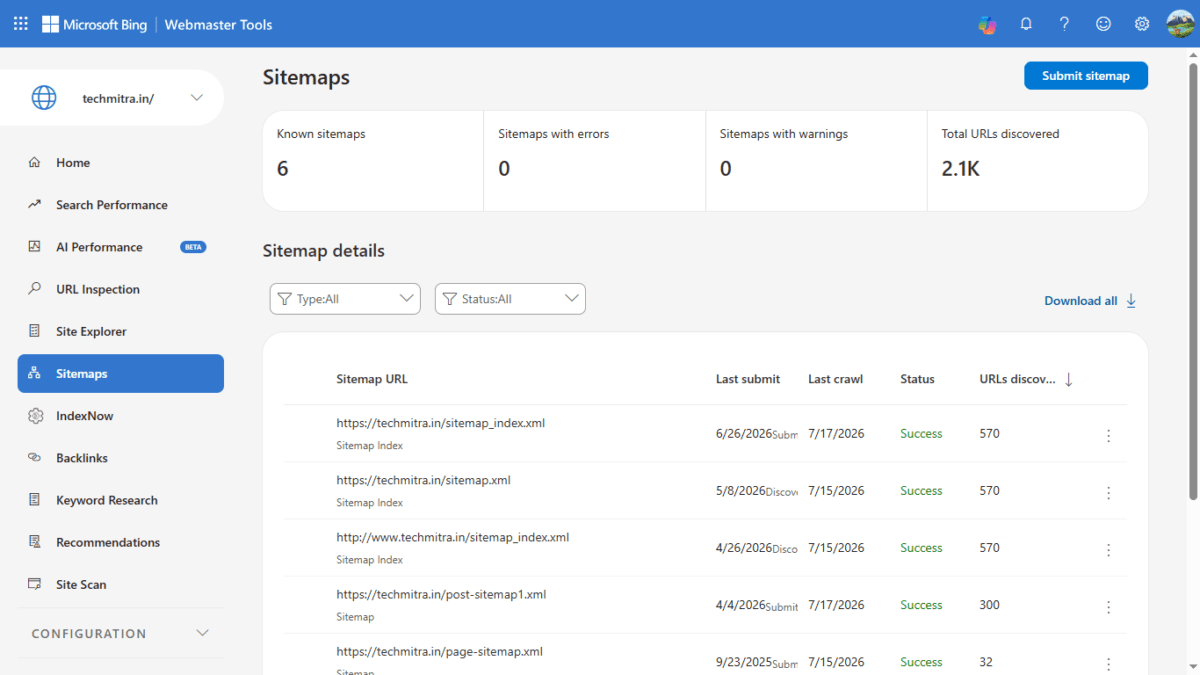
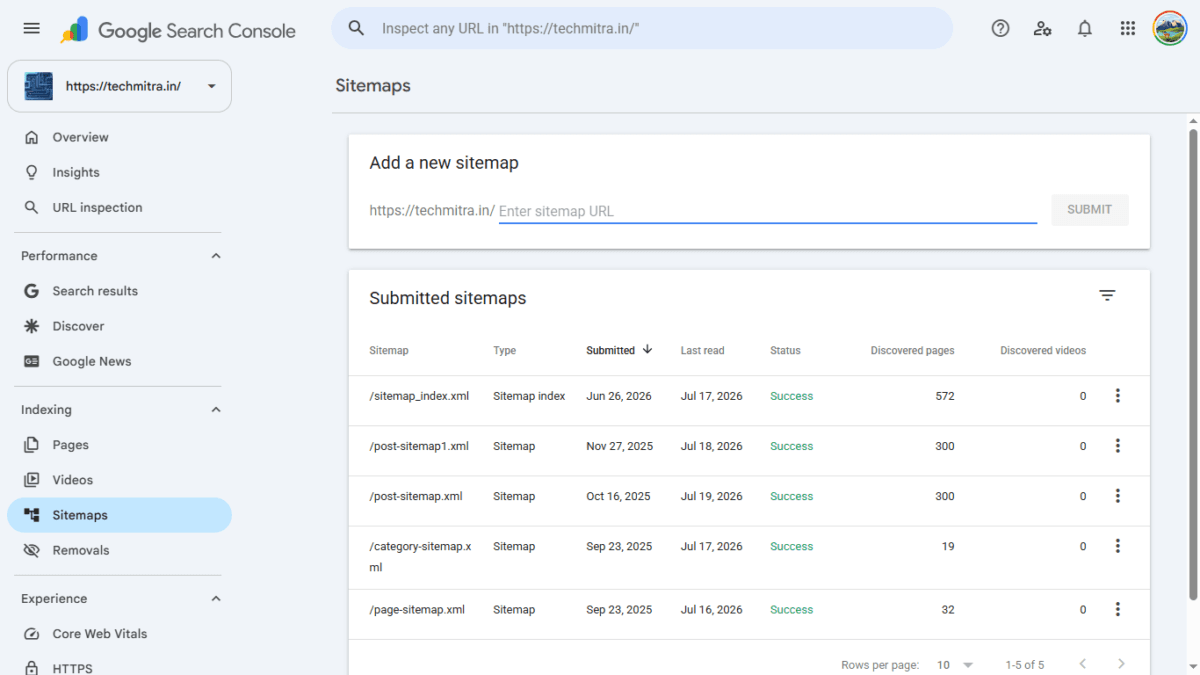
On TechMitra, all sitemaps are submitted cleanly to both Google Search Console and Bing Webmaster Tools with zero errors or warnings — Google Search Console shows 572 pages discovered through the main sitemap index, and Bing shows 2.1K total URLs discovered across all submitted sitemaps.
Entity Consistency Across Your Page
Search engines and AI systems don’t just read your body text — they cross-check your H1, meta title, meta description, URL slug, image alt text, and any structured data against each other to confirm what a page is actually about. When these drift apart — say, your H1 says one thing, your meta title says something slightly different, and your alt text describes something else entirely — it becomes harder for a search or AI system to confidently understand and reuse your content.
Practical habits that help:
- Use the same core name or phrase for your main topic across the H1, title tag, meta description, and URL
- Write alt text that actually reflects the image, not a generic filler phrase
- Keep structured data (schema) aligned with what’s visibly on the page — mismatched schema can get ignored or flagged
- If you fix a title or rename a core topic, check that supporting elements (alt text, internal link anchor text) get updated too, rather than drifting out of sync over time
Website Accessibility
Accessibility — making your site usable for people with visual, auditory, motor, or cognitive impairments — overlaps with technical SEO more than it might seem. Search engines can’t index what they can’t parse either, and several accessibility practices double as SEO fundamentals:
- Descriptive alt text on images (helps both screen readers and search engines understand image content)
- Clear heading structure (H1 → H2 → H3, used hierarchically, not just for visual styling)
- Transcripts for audio/video content
- Sufficient color contrast and readable font sizes
- Keyboard-navigable menus and forms
- Descriptive, unique page titles
Treating accessibility as a technical SEO checklist item — not just a legal/compliance concern — tends to improve both.
Hreflang (Brief Note)
Hreflang tags tell search engines which language and regional version of a page to show to which audience, for sites publishing the same content in multiple languages. For an English-first, India-focused site like TechMitra, this isn’t currently a priority — but it’s worth knowing about if you ever expand into a Hindi or regional-language version of your content, since serving the wrong-language version to the wrong audience is a common and avoidable mistake for multilingual sites.
Common Technical SEO Mistakes
- Blocking important pages in robots.txt by accident
- Letting backlinks point at deleted or broken pages instead of redirecting or republishing
- Running two caching layers (like a plugin cache and a CDN cache) without checking they’re compatible
- Ignoring Core Web Vitals until rankings are already affected
- Submitting a sitemap that doesn’t match what’s actually indexable
- Assuming Google supports IndexNow when it doesn’t
- Relying entirely on security plugins instead of edge-level protection, at the cost of site speed
- Accidentally blocking AI crawlers like GPTBot or OAI-SearchBot with an overly broad robots.txt rule
- Hiding important content behind JavaScript that non-Google AI crawlers can’t see
- Letting H1, meta title, and alt text drift out of sync on the same page
Final Thoughts
Technical SEO rarely gets credit when it’s working — it’s only noticed when something breaks. Speed, crawlability, and indexing infrastructure are the plumbing underneath every article, backlink, and AI citation a site earns. For a deeper look at how these technical fundamentals connect to on-page work, see our On-Page vs Off-Page SEO guide, and for how technical accessibility affects AI citation specifically, see our LLM SEO guide.
FAQs
Q1: What’s the difference between Technical SEO and On-Page SEO?
On-page SEO is about content — titles, keywords, structure. Technical SEO is about whether search engines can access and process that content in the first place.
Q2: Does Google support IndexNow?
No. Google has not adopted IndexNow as of 2026, despite testing it since 2021. Bing, Yandex, Naver, and Seznam do support it.
Q3: How do I know if crawl budget is a problem for my site?
Check Google Search Console’s Crawl Stats report. If your crawl request volume looks healthy relative to your site size and response times are fast, crawl budget usually isn’t your bottleneck — it typically only becomes one at a much larger scale.
Q4: Is a CDN like Cloudflare necessary for technical SEO?
Not strictly required, but it helps significantly with both speed (via edge caching) and uptime/security (via bot protection) — both of which affect crawlability and user experience.
Q5: What happens if I don’t set a canonical URL?
Search engines may index multiple versions of the same content separately, splitting ranking signals, or may pick a version you didn’t intend as the primary one.
Q6: Do AI crawlers see my site the same way Google does?
Not necessarily. Most AI crawlers, including GPTBot, OAI-SearchBot, and ClaudeBot, don’t execute JavaScript the way Google does — they rely mostly on the initial HTML response, so content that only appears after a script runs may be invisible to them.

Ayush Singhal is the founder and chief editor of TechMitra.in — a tech hub dedicated to simplifying gadgets, AI tools, and smart innovations for everyday users. With over 15 years of business experience, a Bachelor of Computer Applications (BCA) degree, and 5 years of hands-on experience running an electronics retail shop, Ayush brings real-world gadget knowledge and a genuine passion for emerging technology.
At TechMitra, he covers everything from AI breakthroughs and gadget reviews to app guides, mobile tips, and digital how-tos. His goal is simple — to make tech easy, useful, and enjoyable for everyone. When he’s not testing the latest devices or exploring AI trends, Ayush spends his time crafting tutorials that help readers make smarter digital choices.
📍 Based in Lucknow, India
💡 Focus Areas: Tech News • AI Tools • Gadgets • Digital How-Tos
📧 Contact: Get in touch →
🔗 Full Bio: https://techmitra.in/about-us/