

Last checked: 1 November 2026. Microsoft changes subscription prices, features and availability regularly. Always confirm the latest details on Microsoft’s checkout page before purchasing.
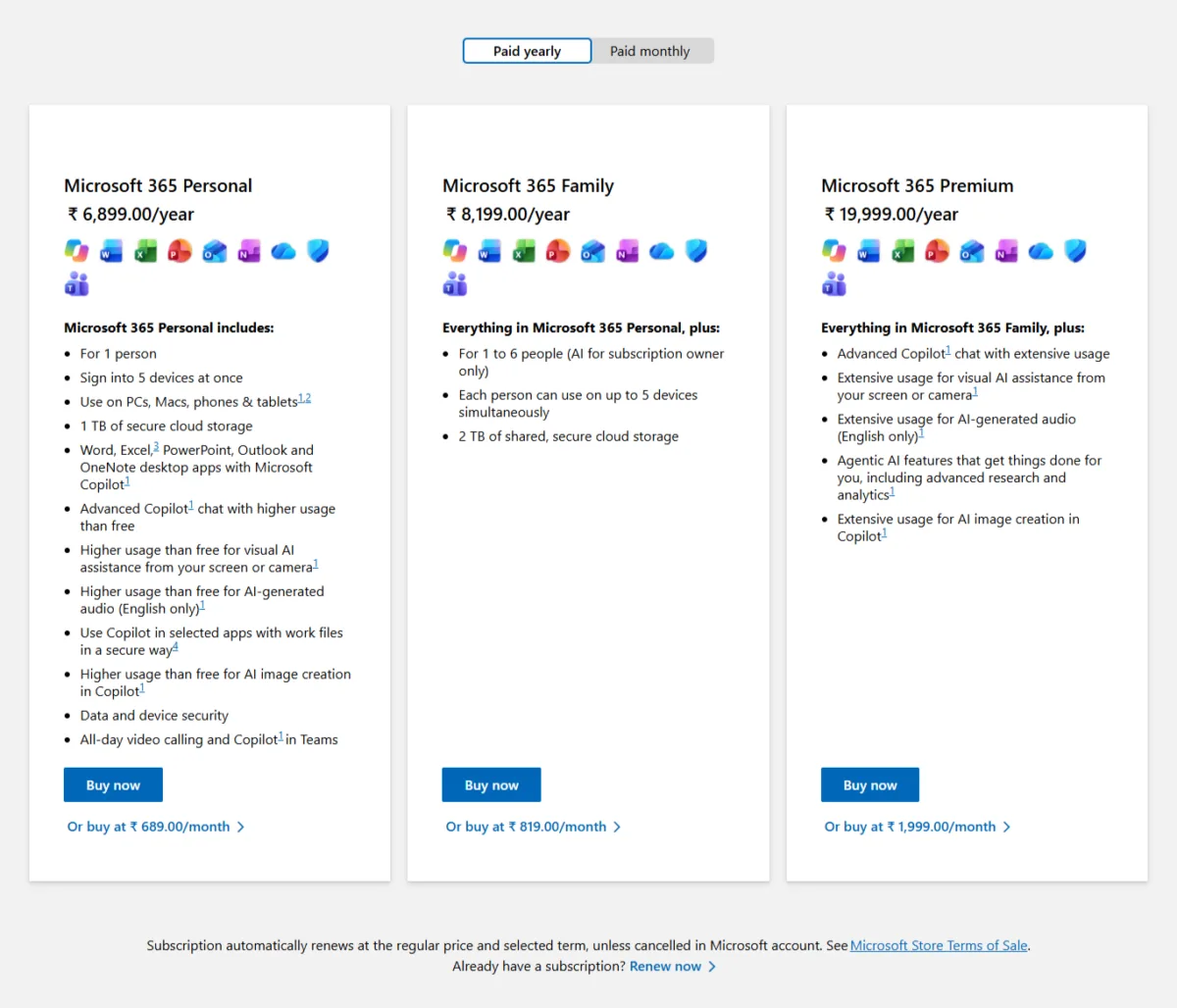
If you are planning to buy Microsoft 365 with Copilot in India, Microsoft offers four individual subscription options: Personal, Family, Premium and Pro. Prices start at ₹689 per month and go up to ₹9,999 per month, depending on the plan. But choosing the right subscription isn’t just about comparing prices. The plans differ in OneDrive storage, Copilot usage limits, AI features, device access and the number of people who can use the subscription.
For most individual users, Microsoft 365 Personal is a sensible starting point. Family is useful for households that need shared storage and Office apps, while Premium and Pro are designed for people who need more extensive AI capabilities. One important detail: Copilot AI benefits are available only to the subscription owner, even on Family, Premium and Pro plans that support up to six people.
Let’s compare Microsoft 365 plans and pricing and what you actually get with each subscription.
If you are also comparing Google’s AI subscription options, check our detailed guide to Google Gemini prices in India, covering AI Plus, Pro and Ultra plans.
Table of Contents
Also read : Microsoft Rewards in India: Points Guide, Levels and What You Can Redeem
Microsoft 365 prices in India (2026)
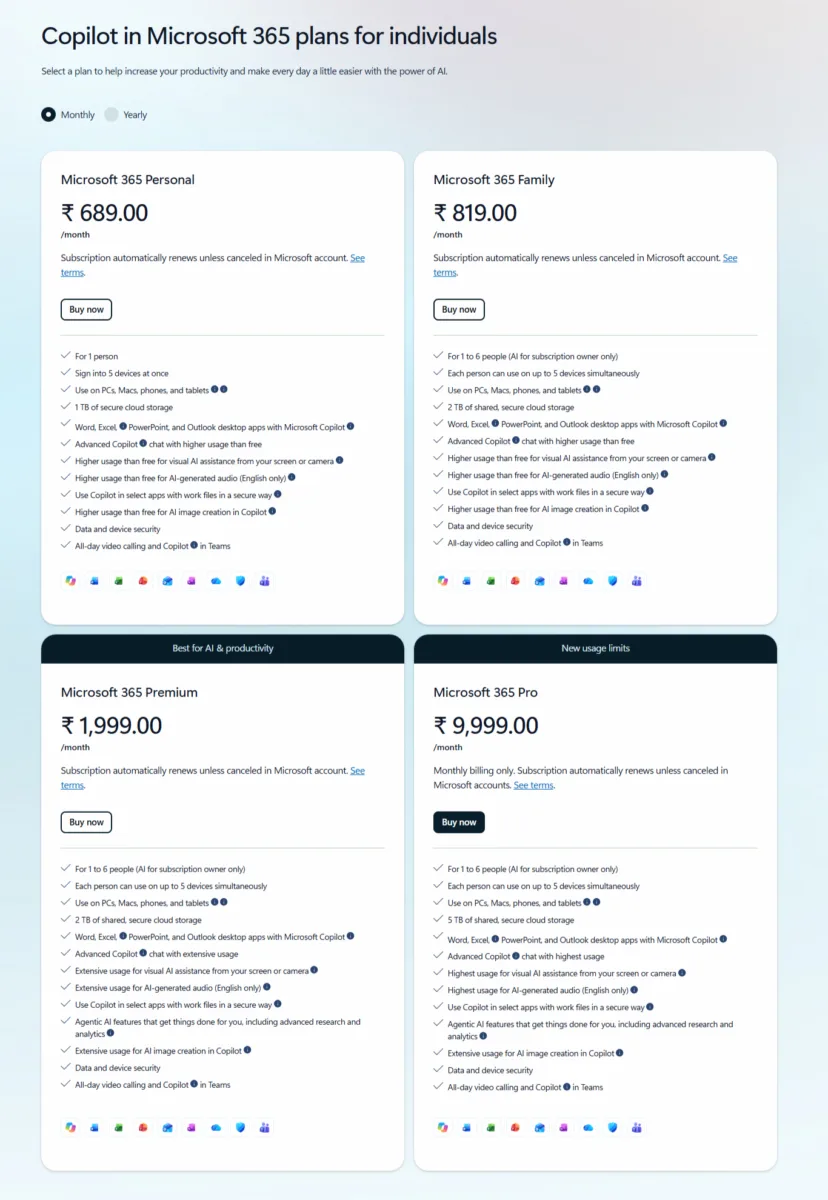
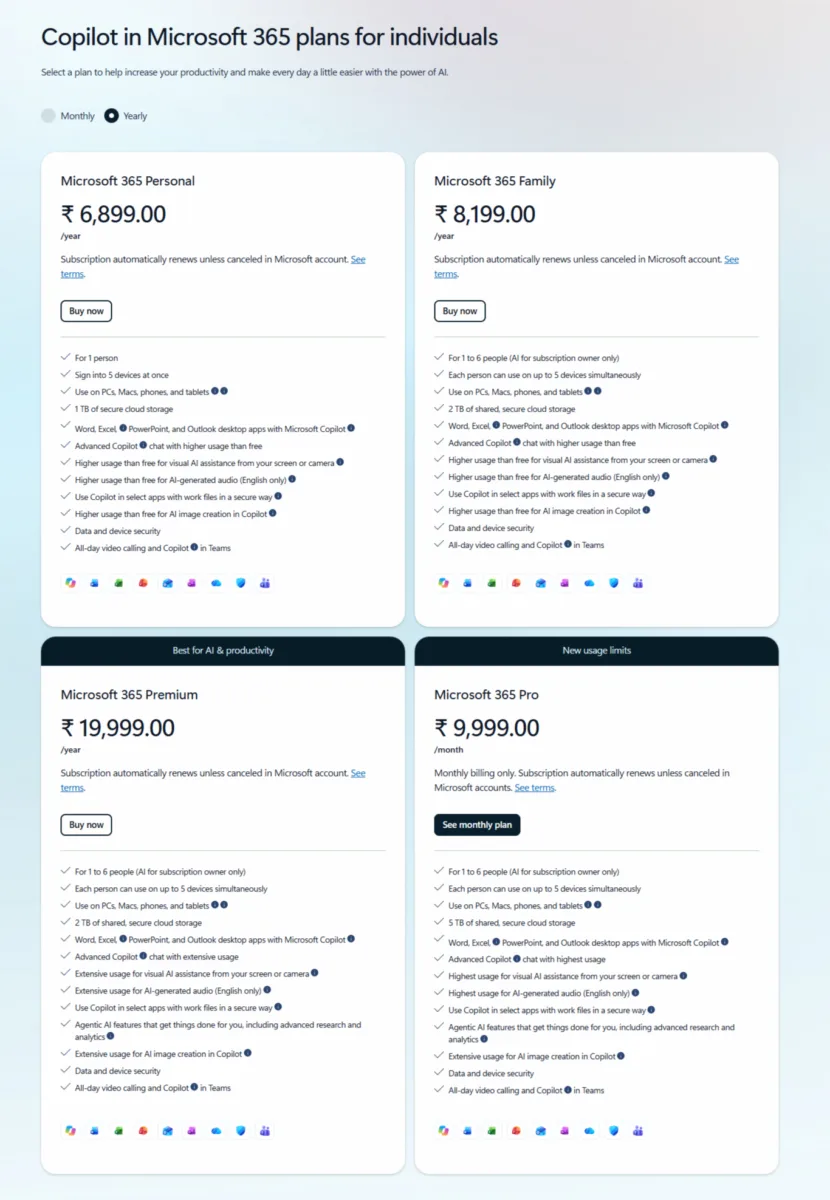
The following prices were displayed on Microsoft’s India website and checkout screens on 1 November 2026. Individual subscription prices include GST.
| Plan | Monthly billing | Yearly billing | Annual saving |
|---|---|---|---|
| Microsoft 365 Personal | ₹689 | ₹6,899 | ₹1,369 |
| Microsoft 365 Family | ₹819 | ₹8,199 | ₹1,629 |
| Microsoft 365 Premium | ₹1,999 | ₹19,999 | ₹3,989 |
| Microsoft 365 Pro | ₹9,999 | Not available | None |
Annual savings are calculated by comparing twelve monthly payments with the annual subscription price.
Effective monthly cost with yearly billing
Paying annually is cheaper than paying every month.
- Personal: Approximately ₹575 per month.
- Family: Approximately ₹683 per month.
- Premium: Approximately ₹1,667 per month.
- Pro: ₹9,999 per month, as only monthly billing is offered.
For example, choosing Personal with yearly billing saves ₹1,369 compared with paying ₹689 every month for twelve months.
Microsoft 365 subscription plans comparison
Here is a quick comparison of the main differences.
| Plan | Monthly billing | Yearly billing | Yearly saving | Effective per month (yearly) | People | Devices | Storage | Copilot usage | Agentic features | Copilot for other members | Refund window (India) |
|---|---|---|---|---|---|---|---|---|---|---|---|
| Microsoft 365 Personal | ₹689 | ₹6,899 | ₹1,369 | About ₹575 | 1 person | Up to 5 at once | 1 TB | Higher than free | Not listed | Not applicable | 30 days, full refund |
| Microsoft 365 Family | ₹819 | ₹8,199 | ₹1,629 | About ₹683 | Up to 6 | 5 per person | 2 TB shared | Higher than free | Not listed | No, owner only | 30 days, full refund |
| Microsoft 365 Premium | ₹1,999 | ₹19,999 | ₹3,989 | About ₹1,667 | Up to 6 | 5 per person | 2 TB shared | Extensive | Yes | No, owner only | 14 days, prorated |
| Microsoft 365 Pro | ₹9,999 | Monthly billing only | None | ₹9,999 | Up to 6 | 5 per person | 5 TB shared | Highest | Yes | No, owner only | 14 days, prorated* |
Prices as seen on 1 November 2026. Yearly saving is my calculation against twelve months of monthly billing. *Pro refund window is from Microsoft’s refund policy page; I did not see a Pro checkout.
Refunds are subject to Microsoft’s eligibility and cancellation rules. Premium and Pro have prorated refund provisions; Personal and Family do not offer prorated refunds in India.
What do you get with a Microsoft 365 subscription?
Microsoft 365 is more than an Office software subscription. It combines productivity applications, cloud storage, security features and AI-powered tools.
The exact features vary by plan, device, operating system and region.
1. Microsoft Office applications
All four plans include Microsoft productivity applications such as:
- Word
- Excel
- PowerPoint
- Outlook
- OneNote
- OneDrive
- Microsoft Teams
You can use these applications across supported Windows PCs, Macs, iPhones, iPads and Android devices. However, pay attention to the app descriptions before purchasing. During my examination of Microsoft’s Personal plan page, the Word app description displayed a web-and-mobile-only label. Microsoft also uses platform-specific availability descriptions for individual applications.
Therefore, don’t assume that every application listed on the subscription page has identical desktop functionality across all plans and devices. Check the individual app entitlements before subscribing.
2. Microsoft Copilot inside Office applications
One of the main reasons to purchase a Microsoft 365 subscription is Copilot integration.
Copilot can help you:
- Draft and rewrite documents in Word.
- Summarise lengthy documents and emails.
- Analyse information and work with data in Excel.
- Create presentations in PowerPoint.
- Draft and organise emails in Outlook.
- Work with notes and information in OneNote.
For example, you can ask Copilot to create a first draft of a report in Word, summarise information and help turn the content into a presentation.
The availability and usage limits of these capabilities depend on your subscription.
3. OneDrive cloud storage
Every plan includes OneDrive storage.
| Subscription | Storage |
|---|---|
| Personal | 1 TB |
| Family | 2 TB shared |
| Premium | 2 TB shared |
| Pro | 5 TB shared |
OneDrive lets you store documents, photos, videos and other files online. You can access your files across supported devices and keep important documents synchronized.
How does shared storage work?
Family, Premium and Pro share one storage allowance among up to six people, and each person signs in with their own Microsoft account. The Family plan provides 2 TB in total, so it does not mean everyone gets a separate 2 TB. Microsoft says new, expired and repurchased Family and Premium subscribers get 2 TB of pooled storage from 8 October 2026, so older subscriptions may differ. Check your own Microsoft account for your exact allowance.
For example, the Family subscription provides 2 TB of total storage, which can be distributed among family members. It does not mean that everyone has a separate 2 TB allowance.
4. Microsoft Defender and data protection
Microsoft also includes security-related benefits. Microsoft Defender provides protection features for supported Windows, macOS, Android and iOS devices.
Depending on the device and available features, these include:
- Device security and threat protection.
- Malware protection.
- Protection against suspicious activities.
- Personal data and device security.
- OneDrive ransomware detection and recovery features.
OneDrive also offers secure photo and file storage, with protection and recovery features that can help when files are affected by ransomware or accidental changes.
These benefits are useful if you store important personal documents, photographs and business files online.
5. AI features beyond Word and Excel
Copilot is also integrated into selected Windows applications and Microsoft services.
Microsoft highlights several additional AI-powered capabilities:
Windows Photos and Paint: AI-assisted photo editing and image creation in supported applications.
Notepad: AI assistance for working with text, including summarising and rewriting.
Microsoft Forms: Copilot can help create forms, surveys and polls.
Outlook: Copilot can assist with drafting emails and working with calendar information.
Microsoft Teams: Subscription benefits include video calling, with Copilot-related features.
Feature availability depends on the application, platform, region and subscription.
Microsoft 365 Personal: ₹689/month or ₹6,899/year
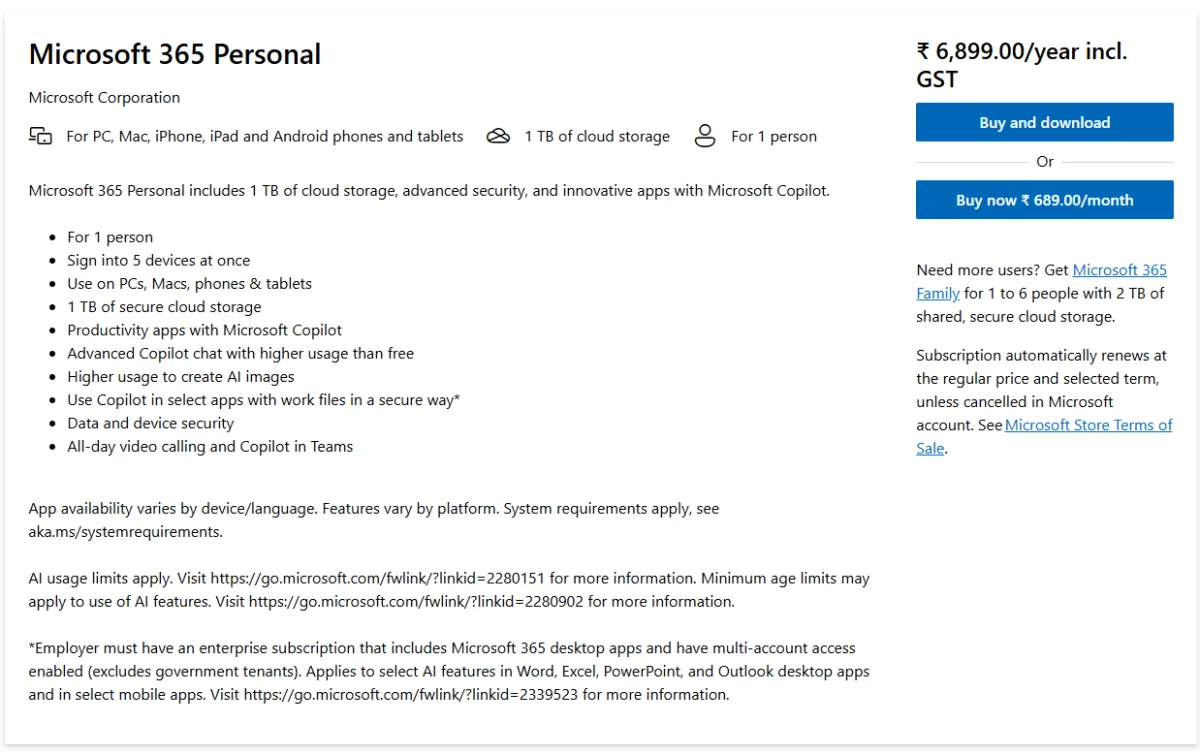
Microsoft 365 Personal is designed for one person who wants Office applications, cloud storage and Copilot features.
It includes:
- One user.
- Up to five devices signed in simultaneously.
- 1 TB of OneDrive storage.
- Word, Excel, PowerPoint and Outlook.
- Copilot integration in supported applications.
- Higher Copilot usage than the free version.
- AI image creation and visual assistance.
- Microsoft Defender security features.
- Secure cloud file storage.
- Teams video calling and Copilot benefits.
Personal is a good option for students, freelancers, bloggers and professionals who work independently. For example, a blogger can use Copilot to draft articles, summarise research, organise information and prepare documents.
The annual price of ₹6,899 makes it considerably cheaper than Premium.
Who should buy Microsoft 365 Personal?
Choose Personal if you:
- Are the only person using the subscription.
- Need Office applications on your devices.
- Want Copilot inside Word, Excel and PowerPoint.
- Need 1 TB of cloud storage.
- Don’t require Premium-exclusive AI features.
For most individual users, this is the most sensible starting point.
Microsoft 365 Family: ₹819/month or ₹8,199/year
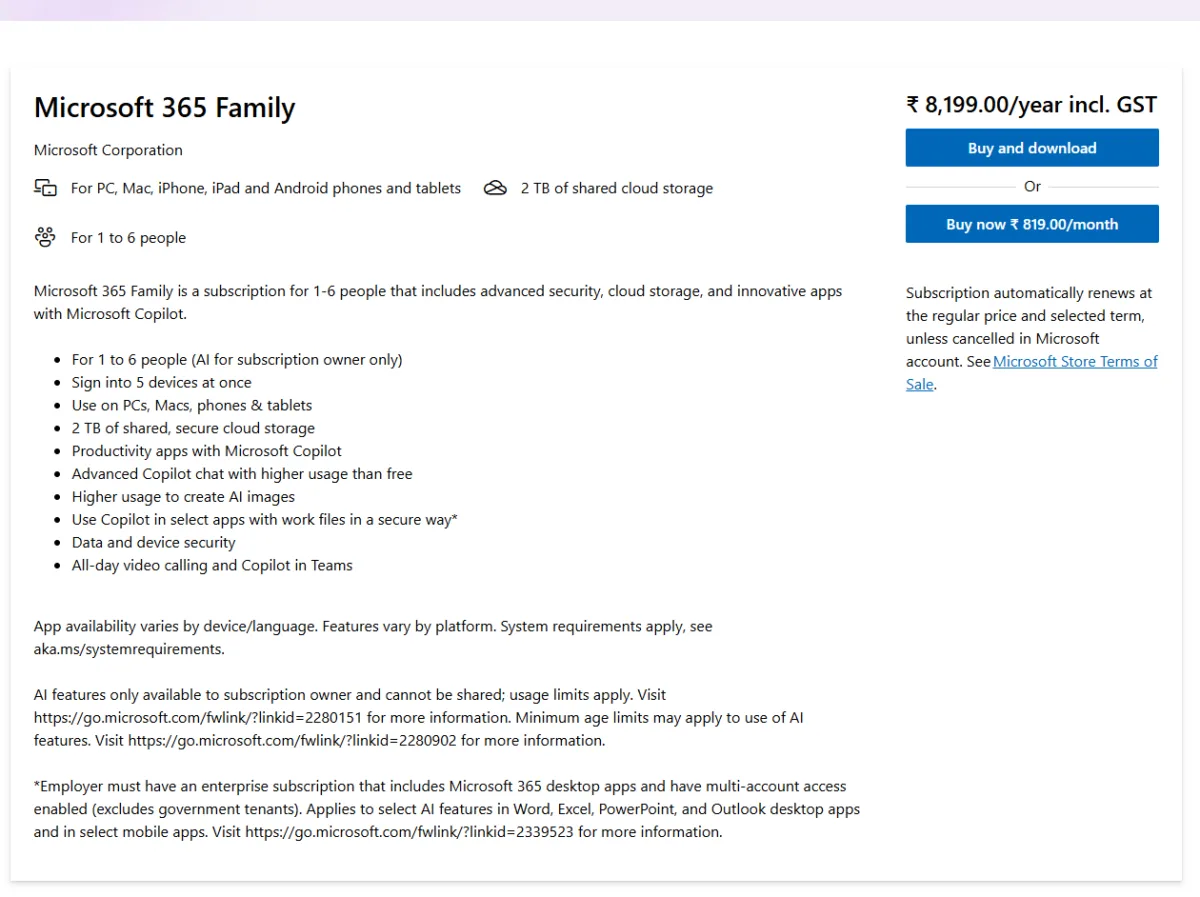
Microsoft 365 Family is designed for households that need Office applications and cloud storage for multiple people.
It supports up to six people, with each person able to use the subscription on up to five devices simultaneously.
Its benefits include:
- Up to six people.
- 2 TB of shared OneDrive storage.
- Separate Microsoft accounts for members.
- Office applications across supported devices.
- Copilot features for the subscription owner.
- Microsoft Defender security features.
- Secure cloud storage and file protection.
- Teams video calling.
Does every family member get Copilot?
No. This is one of the most important things to understand before buying Family. Microsoft’s FAQ explains that Copilot AI benefits inside Word, Excel, PowerPoint and Outlook are available only to the subscription owner. Other family members can use the shared subscription benefits, but they do not automatically receive the owner’s Copilot benefits.
Anyone who wants their own eligible Copilot benefits needs a separate qualifying subscription.
Is Family worth buying?
Consider this example:
- Personal yearly subscription: ₹6,899.
- Family yearly subscription: ₹8,199.
- Difference: ₹1,300 per year.
If you are the only person who needs Copilot, Personal is the better choice.
However, Family makes sense if other household members also need Office applications and cloud storage.
Microsoft 365 Premium: ₹1,999/month or ₹19,999/year
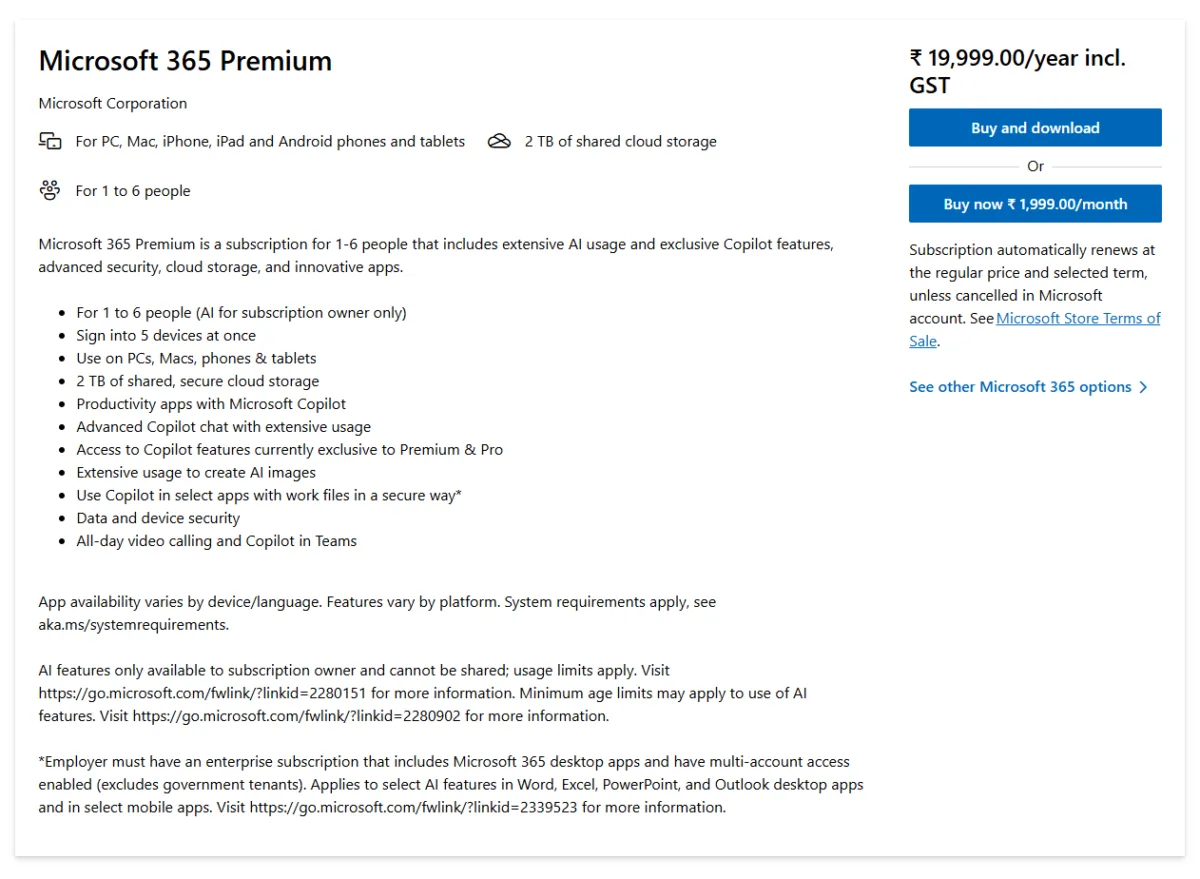
Microsoft 365 Premium is designed for people who need more extensive Copilot usage and additional AI capabilities.
It includes:
- Up to six people.
- 2 TB shared OneDrive storage.
- Office applications.
- Extensive Copilot usage.
- Advanced Copilot Chat.
- Extensive AI image-generation usage.
- Access to Copilot features exclusive to Premium and Pro.
- Agentic AI features.
- Microsoft Defender and data protection.
- Teams video calling.
What makes Premium different?
The main difference is its higher AI usage allowance and access to additional Copilot capabilities. Microsoft highlights features such as advanced research and analytics, which allow Copilot to perform more involved tasks. Premium is worth considering if you regularly use AI for research, document preparation, data analysis and productivity tasks.
However, it costs almost three times as much as Personal on annual billing.
My recommendation is to start with Personal if you are unsure whether you need Premium. Upgrade only when its additional capabilities justify the extra expense.
Microsoft 365 Pro: ₹9,999/month
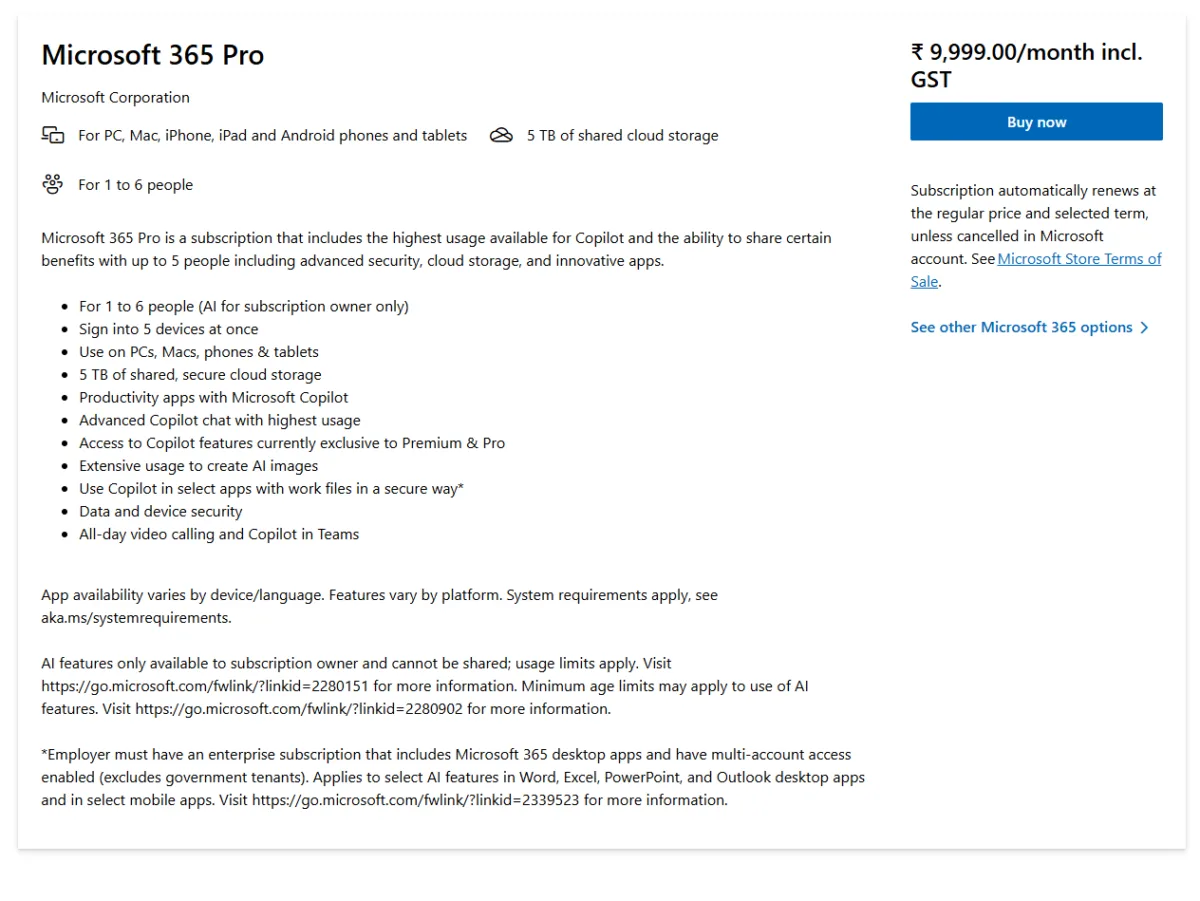
Microsoft 365 Pro is the highest-priced individual subscription among the four plans. Unlike Personal, Family and Premium, Pro is available with monthly billing only on the pricing page I checked.
It includes:
- Up to six people.
- Up to five devices per person simultaneously.
- 5 TB shared OneDrive storage.
- Highest Copilot usage levels.
- Access to exclusive Copilot capabilities.
- Advanced Copilot Chat.
- Agentic AI features.
- Extensive usage for AI image generation, and the highest usage for voice and vision.
- Microsoft Defender and security features.
- Microsoft Access for PC.
Who should choose Pro?
Pro is intended for users who need the highest available usage levels and additional AI capabilities. However, at ₹9,999 per month, it is a significant investment. For most students, freelancers and individual professionals, Personal or Premium will be more practical.
Also, check whether Pro is available through your preferred purchasing channel before subscribing. I could not find it in the Copilot app’s upgrade screen on 1 November 2026, although Microsoft’s India pricing page listed it.
Office Home 2024: A one-time purchase alternative
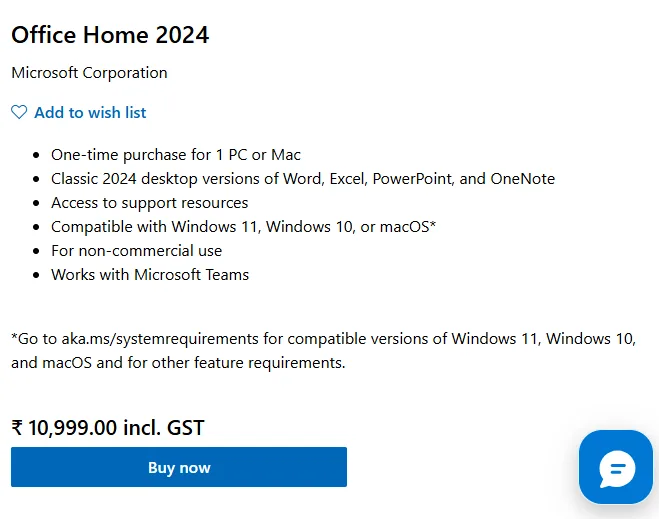
Microsoft also offers Office Home 2024 in India for ₹10,999, including GST, according to the checkout page I examined.
Unlike Microsoft 365, Office Home 2024 is a one-time purchase rather than a recurring subscription. It includes classic desktop versions of Word, Excel, PowerPoint and OneNote for one PC or Mac.
It is intended for non-commercial use and does not include the Microsoft 365 Copilot subscription benefits or OneDrive storage allowance discussed in this article.
If you only need traditional Office applications and don’t want a recurring subscription, Office Home 2024 may be worth considering.
However, if you want Copilot integration, cloud storage and ongoing subscription benefits, Microsoft 365 is the more suitable option.
Understanding Copilot AI usage limits
Not every Microsoft 365 subscription provides the same level of AI access.
Personal and Family provide higher Copilot usage than the free version, while Premium and Pro offer extensive or highest usage levels.
Microsoft also distinguishes between standard Copilot features and additional capabilities available with Premium and Pro.
Some of the capabilities highlighted in Microsoft’s AI documentation include:
- Advanced Copilot Chat.
- Researcher.
- Analyst.
- Voice and Vision.
- AI image generation.
- Audio Overview.
- Agentic AI features.
The availability and usage allowances differ between features and subscriptions.
When you reach a usage limit, the affected feature may become unavailable until the allowance resets.
Important: Don’t assume that every advanced feature is available in India simply because it appears in Microsoft’s global subscription comparison. Availability can depend on region, language, device and rollout status.
For example, Microsoft’s usage page lists Cowork as a preview feature available only in the US and Canada, and availability also varies by platform and device. Indian buyers should not choose Premium or Pro for that feature.
You can check the latest details in Microsoft’s AI usage limits documentation.
What changes as you move up?
The pricing page describes Personal and Family as “higher than free”, Premium as “extensive” and Pro as “highest”, but that is a simplification. Microsoft’s usage page breaks it down by feature, and the real differences are in specific features. Chat, deep reasoning and Pages are rated extensive on all four plans. Personal and Family get standard usage for voice, vision, Audio Overview and image generation. Premium raises Audio Overview and image generation to extensive and gives more usage for voice and vision. Pro matches Premium on those two and goes to the highest usage for voice and vision.
The bigger gap is agents. Researcher and Analyst are not available on Personal or Family, and both are extensive on Premium and Pro. Cowork, which carries out longer multi-step tasks for you, is a preview feature that Microsoft says is currently available only in the US and Canada, so Indian readers should not count on it. Where it is available, Premium has limited usage and Pro has the highest. <p style=”margin:0 0 6px;font-size:14px;”>Swipe the table sideways if it does not fit your screen.
| Copilot feature | Personal | Family | Premium | Pro |
|---|---|---|---|---|
| Chat | Extensive | Extensive | Extensive | Extensive |
| Deep reasoning | Extensive | Extensive | Extensive | Extensive |
| Pages | Extensive | Extensive | Extensive | Extensive |
| Audio Overview | Standard | Standard | Extensive | Extensive |
| Voice | Standard | Standard | More | Highest |
| Vision (screen or camera) | Standard | Standard | More | Highest |
| Image generation | Standard | Standard | Extensive | Extensive |
| Researcher | Not available | Not available | Extensive | Extensive |
| Analyst | Not available | Not available | Extensive | Extensive |
| Cowork (preview, US and Canada only) | Not available | Not available | Limited | Highest |
| Priority access | Yes (Cowork: US and Canada only) | Yes (Cowork: US and Canada only) | Yes (Cowork: US and Canada only) | Yes (Cowork: US and Canada only) |
Source: Microsoft Support, “How AI usage works across Microsoft 365 subscriptions for individuals” (last updated October 2026), checked 1 November 2026. Microsoft publishes usage labels, not numbers, and says limits can vary by feature, entry point and system conditions, and can change over time.
If you hit a limit, Microsoft says the feature becomes unavailable until your allowance resets. You can check what you have left in your Microsoft account under Services & subscriptions. For most people, the free Copilot app already covers casual questions, so the paid plans matter when you rely on Copilot inside Word, Excel, PowerPoint and Outlook every day.
Which Microsoft 365 Copilot plan should you choose?
Here is a quick recommendation based on your requirements.
| Your requirement | Recommended plan |
|---|---|
| One person using Office and Copilot | Personal |
| Students and freelancers | Personal |
| Multiple family members needing Office apps | Family |
| Higher AI usage and advanced AI features | Premium |
| Highest Copilot usage and additional storage | Pro |
Personal vs Family: Which is better?
Personal and Family are relatively close in price.
The yearly difference is just ₹1,300.
If you need the subscription only for yourself, Personal is sufficient.
If several family members need Office applications and cloud storage, Family is worth considering.
Remember that Copilot benefits are not shared with other members.
Personal vs Premium: Is Premium worth the extra money?
Premium costs ₹19,999 annually, compared with ₹6,899 for Personal.
That is an additional ₹13,100 per year.
Premium makes sense if you regularly use advanced AI features, need extensive usage allowances and benefit from the additional capabilities.
If your primary requirements are writing, spreadsheets, presentations and everyday Copilot assistance, Personal is a more economical option.
Microsoft 365 Pro was missing from the Copilot app
During my testing on 1 November 2026, the upgrade screen inside the Microsoft Copilot app displayed three individual subscriptions:
- Personal: ₹689/month.
- Family: ₹819/month.
- Premium: ₹1,999/month.
Microsoft 365 Pro was not displayed.
However, Pro was listed on Microsoft’s India subscription pricing page at ₹9,999 per month.
I could not complete a Pro purchase through the app, so I cannot confirm its availability through every purchasing channel.
The app also displayed monthly prices, while Microsoft’s website provided annual billing options for Personal, Family and Premium.
This is worth checking before purchasing.
Microsoft 365 business plans with Copilot in India
Microsoft also offers business subscriptions with Copilot capabilities.
These plans are different from Personal, Family, Premium and Pro.
The following prices were displayed on Microsoft’s India business pricing pages on 1 November 2026.
| Business plan | Price per user/month |
|---|---|
| Microsoft 365 Business Premium with Copilot | ₹2,660 |
| Microsoft 365 Business Standard with Copilot | ₹1,955 |
| Microsoft 365 Copilot Business add-on | ₹1,495.73 |
Prices are based on annual billing, with GST extra. The add-on price was displayed as a promotional offer.
Business Standard vs Business Premium
Both plans offer Microsoft 365 productivity applications and Copilot capabilities, but their security and management features differ.
Business Standard is suitable for organisations that need Office applications, email, collaboration and productivity tools.
Business Premium adds more advanced security and device-management capabilities, making it more suitable for organisations with additional IT and data-protection requirements.
What is Microsoft 365 Copilot Business add-on?
The Copilot Business add-on is intended for businesses that already have an eligible Microsoft 365 business subscription.
The ₹1,495.73 price displayed during my research was promotional, so businesses should check the applicable offer period, eligibility and renewal pricing.
It is not an add-on for individual Personal or Family subscriptions.
Microsoft also identifies certain advanced agentic capabilities, such as Cowork and Autopilot, as usage-based. Businesses should account for these potential additional costs when budgeting.
Refunds, cancellation and free trials in India
Before purchasing Microsoft 365, it is worth understanding Microsoft’s refund and cancellation conditions.
I checked Microsoft’s India checkout screens and its subscription refund policy on 1 November 2026.
The following refund windows were displayed:
| Subscription | Refund window | Refund type |
|---|---|---|
| Personal | Up to 30 days | Full refund, subject to eligibility |
| Family | Up to 30 days | Full refund, subject to eligibility |
| Premium | 14 days | Prorated refund |
| Pro | 14 days | Prorated refund |
Personal and Family refunds
Microsoft generally allows eligible Personal and Family subscribers in India to request a refund within 30 days of the first purchase or before the first recurring billing date, whichever comes first.
A refund of the most recent renewal charge may also be available within 30 days, subject to Microsoft’s conditions and account-level restrictions.
Prorated refunds are not available in India for these two plans.
Premium and Pro refunds
Premium and Pro follow a different refund policy.
In India, a prorated refund may be available if you cancel within 14 days of the first purchase.
A prorated refund means Microsoft calculates the refund based on the unused portion of the subscription.
Not every cancellation automatically qualifies for a refund. Microsoft determines eligibility during the cancellation process.
How to cancel Microsoft 365 subscription plans ?
To cancel your subscription:
- Sign in to your Microsoft account.
- Open Services & subscriptions.
- Find your Microsoft 365 subscription.
- Select Manage.
- Choose Cancel subscription.
- Follow the instructions.
If you want to avoid future automatic charges, turn off recurring billing at least two days before the next billing date.
If you purchased through the Apple App Store or Google Play, you need to manage cancellation and refund requests through the respective store.
Is a free trial available?
Microsoft’s product pages mention trial offers for eligible subscriptions.
However, during my checkout testing, I did not receive the expected one-month free trial for Personal, Family or Premium.
Trial availability can vary by account, region and promotional offer.
Therefore, don’t assume that every buyer will receive a free trial.
Three things to check before purchasing
Before subscribing, keep these points in mind.
1. Don’t use a VPN to purchase at another country’s price.
Microsoft’s Store Terms of Sale restrict using tools to hide or misrepresent your location when purchasing or redeeming products.
A regional pricing difference is not worth risking your subscription.
2. Check app and feature availability.
Microsoft features vary by device, operating system, language and region. Some AI capabilities may not be available to every subscriber.
3. Check automatic renewal.
Microsoft subscriptions automatically renew unless recurring billing is cancelled.
Review the renewal date and price before completing your purchase.
Frequently asked questions
Is Microsoft Copilot free?
Yes. Microsoft provides a free Copilot experience with limited usage and capabilities. Eligible Microsoft 365 subscriptions offer additional usage and deeper integration with productivity applications.
Is Copilot included in Microsoft 365 Personal?
Yes. Microsoft 365 Personal includes Copilot benefits for the subscription owner, including AI capabilities in supported Office applications. Usage limits apply.
Does Microsoft 365 Family share Copilot with all six members?
No. Copilot AI benefits are available only to the subscription owner. Other members receive the eligible shared subscription benefits but need their own qualifying subscription for Copilot.
Can family members use separate Microsoft accounts?
Yes. Members can manage their own OneDrive storage.” with They share the plan's storage allowance.
Is Microsoft 365 Personal suitable for freelancers?
Yes. Personal offers Office applications, 1 TB of storage and Copilot benefits. It can be useful for writing, spreadsheets, presentations, client documents and everyday productivity.
Is Microsoft 365 Premium worth buying?
Premium is worth considering if you regularly use AI features and need higher usage allowances and additional Copilot capabilities. For everyday productivity, Personal may be sufficient.
What is the difference between Microsoft Copilot and ChatGPT?
Both are AI assistants, but they have different ecosystems and integrations. Microsoft Copilot is closely integrated with Microsoft products such as Word, Excel, PowerPoint and Outlook, while ChatGPT offers its own tools and integrations. The best choice depends on your workflow.
Microsoft Copilot is not the only paid AI assistant available in India. If you are considering ChatGPT, read our comparison of ChatGPT Free, Go and Plus plans to understand which subscription offers the best value.
What happens when I reach my Copilot usage limit?
The affected AI feature may become temporarily unavailable until its usage allowance resets. Higher subscription tiers provide more extensive usage allowances, although limits still apply.
Can I use Microsoft 365 on multiple devices?
Yes. Personal supports up to five devices at once. Family, Premium and Pro support up to five devices per person simultaneously, subject to Microsoft’s account and device rules.
Can I share my OneDrive storage with family members?
Each person uses their own Microsoft account and manages their own storage.” with Each person signs in with their own Microsoft account and draws from the shared allowance.
Is Microsoft 365 Pro available in India?
Microsoft’s India pricing page displayed Pro at ₹9,999 per month on 1 November 2026. However, it was missing from the Copilot app’s upgrade screen during my testing. Check the official website for current purchase availability.
Do students get Microsoft 365 discounts?
Eligible students may qualify for Microsoft education offers. Some educational institutions also provide Microsoft 365 access. Availability and eligibility depend on the institution and region.
Final verdict: Which Microsoft 365 Copilot plan is best?
For most individual users in India, Microsoft 365 Personal at ₹6,899 per year is the best starting point.
It provides Office applications, 1 TB of OneDrive storage, security benefits and Copilot integration at a considerably lower price than Premium.
Choose Family if multiple people at home need Office applications and shared cloud storage. Remember that Copilot AI benefits remain restricted to the subscription owner.
Premium is suitable for heavier AI users who need more extensive usage and additional Copilot capabilities.
Pro is a specialist subscription for people who need the highest usage levels and additional storage. At ₹9,999 per month, it is difficult to recommend for ordinary individual use.
Before purchasing, compare the features you actually need rather than choosing a subscription simply because it offers the highest AI usage.
Prices, feature availability and subscription conditions in this article reflect the Microsoft pages and checkout screens examined on 1 November 2026. Always verify current terms before purchasing.

Ayush Singhal is the founder and chief editor of TechMitra.in — a tech hub dedicated to simplifying gadgets, AI tools, and smart innovations for everyday users. With over 15 years of business experience, a Bachelor of Computer Applications (BCA) degree, and 5 years of hands-on experience running an electronics retail shop, Ayush brings real-world gadget knowledge and a genuine passion for emerging technology.
At TechMitra, he covers everything from AI breakthroughs and gadget reviews to app guides, mobile tips, and digital how-tos. His goal is simple — to make tech easy, useful, and enjoyable for everyone. When he’s not testing the latest devices or exploring AI trends, Ayush spends his time crafting tutorials that help readers make smarter digital choices.
📍 Based in Lucknow, India
💡 Focus Areas: Tech News • AI Tools • Gadgets • Digital How-Tos
📧 Contact: Get in touch →
🔗 Full Bio: https://techmitra.in/about-us/