
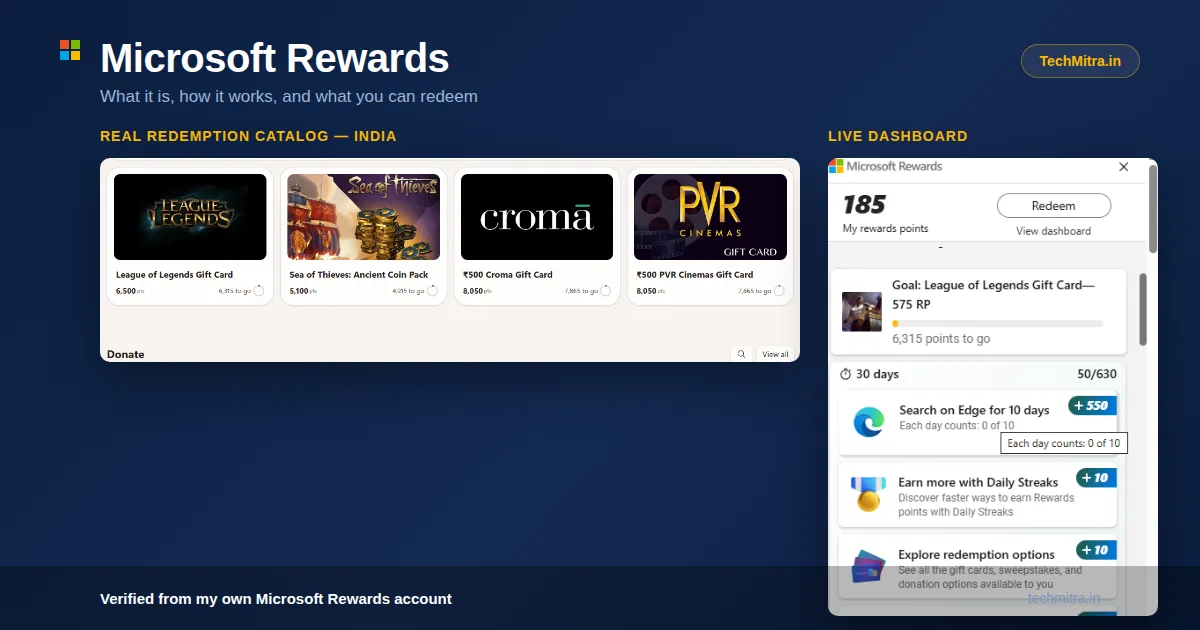
Microsoft Rewards is Microsoft’s loyalty program: you earn points for searching on Bing, browsing with Edge and buying qualifying products, then redeem them for rewards. In India, the redeem catalog is currently very limited, so this guide covers how Microsoft Rewards works, how fast you can realistically earn, and what you can redeem right now (checked October 6, 2026).
I checked my own dashboard to see exactly how this works. The redemption catalog varies by country, but in India it includes some options I didn’t expect — ₹500 Croma vouchers, PVR gift cards, Robux, and in-game currency. Here’s the full breakdown, based on what I found.
Table of Contents
Also Read : Microsoft Quietly Extends Windows 10 ESU Support to October 2027
About Microsoft Rewards?
Microsoft Rewards is Microsoft’s loyalty program — you earn points (“RP” or Rewards Points) for searching on Bing, using Microsoft Edge, completing daily/weekly activities, and playing games through Microsoft’s platforms. Those points can later be redeemed for gift cards, gaming currency, sweepstakes entries, or donations.
It’s tied to your Microsoft account, so if you’re signed into Windows, Edge, or Xbox with the same account, your points sync across all of them automatically.
You can see Microsoft’s own overview of the program here
Where to Find It
You don’t need to install anything extra, but you do need a Microsoft account — the same one you’d use for Outlook, Xbox, or Windows sign-in. Points won’t accumulate if you’re just using Bing or Edge as a guest; you have to actually be signed in.
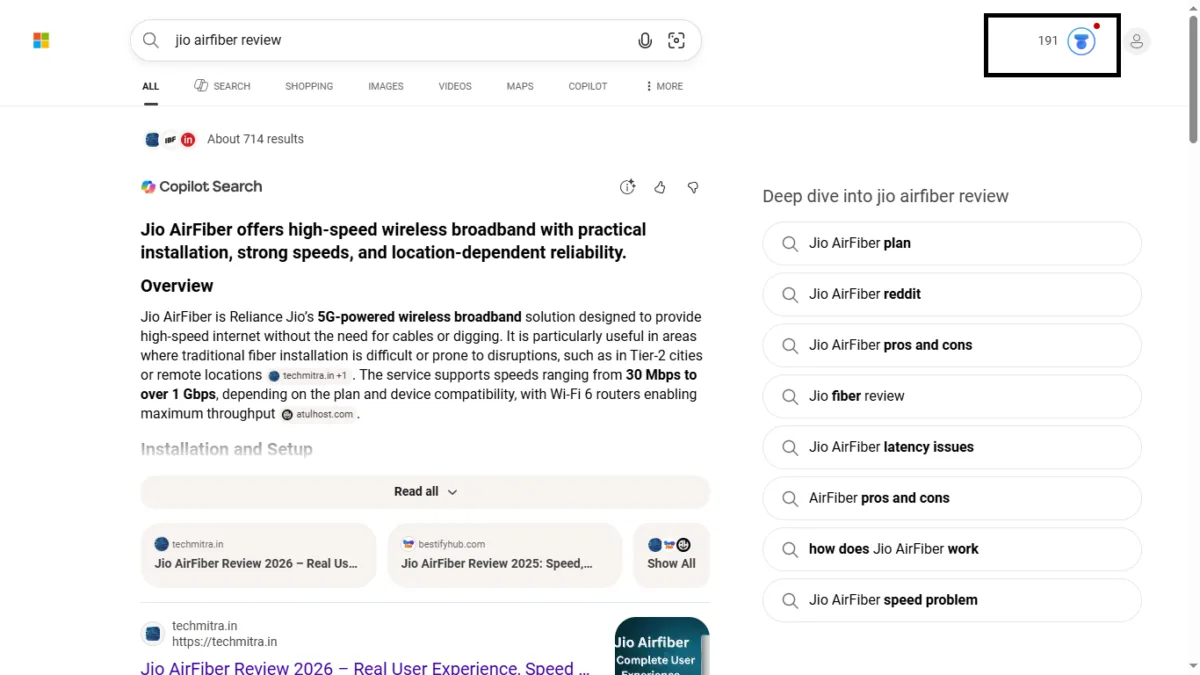
Once you’re signed in on Bing or Edge, the Rewards icon shows up right next to your profile photo in the top-right corner of the Bing search results page — a small circular icon with your current point count beside it.
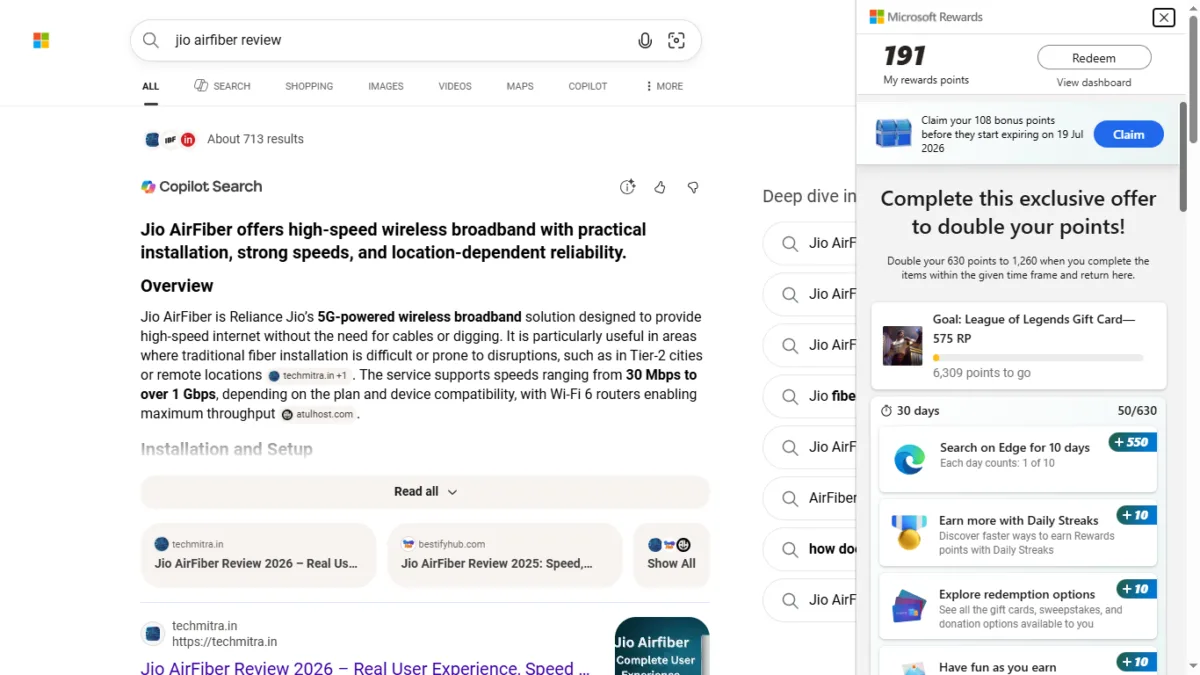
Clicking it opens a sidebar panel showing your total points, a “Redeem” shortcut, and your progress toward whatever goal you’ve set (in my case, a League of Legends gift card).
A Look Inside the Microsoft Rewards Dashboard
Once you click through, the full dashboard at rewards.bing.com shows a lot more than the sidebar preview. Here’s what mine looks like:
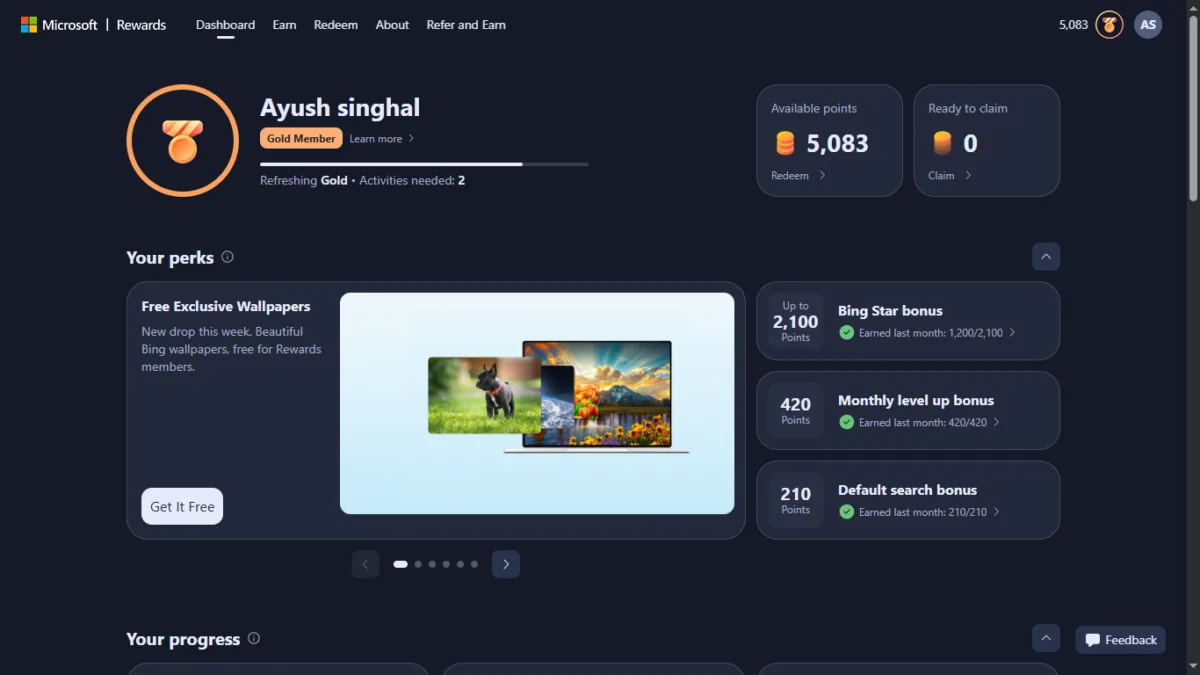
At the top, you get two separate numbers that trip a lot of people up: Available points (what you can redeem right now) and Ready to claim (points that have been earned but haven’t posted to your balance yet — mine had 108 points sitting in this pending state). There’s also a visible progress bar toward the next status tier — I’m currently at Member level with 423 points to go before reaching Silver.
Below that, the “Your Perks” section breaks down exactly where your points are coming from:
- Bing Star bonus — up to 300 points, tied to consistent Bing usage across the month
- Monthly level up bonus — a bonus tied to your current tier (60 points shown on my dashboard)
- Default search bonus — a smaller, standard bonus for regular searching (30 points)
There’s also a Daily streak tracker and a Stamp bonus (worth 1,000 points on completion) further down the page — both reward consistency over single big pushes, reinforcing that this program is built for people who search normally over time, not for one-off grinding sessions.
Don’t let your bonuses expire. Monthly bonuses become available within the first 5 days of each month. You have to claim them before they expire, which is usually about 30 days after they appear. Check your dashboard early in the month. Points shown as “Ready to claim” are not in your balance until you claim them. [verify on your dashboard]
Member vs. Silver vs. Gold: What Each Tier Actually Gets You
The “About” section of the dashboard breaks down exactly what each tier unlocks — and the jump between them is bigger than I expected:
| Benefit | Member | Silver | Gold |
|---|---|---|---|
| Points earned per month to reach the level | — | 500 | 750 |
| Level-up activities per month | — | — | 2 |
| Bing search daily limit (3 points per search) | 15 | 30 | 60 |
| Microsoft Store hardware, points per dollar spent | 1x | 10x | 10x |
| Xbox games and add-ons at Microsoft Store, per dollar, up to | 4x | 4x | 4x |
| Monthly level bonus | 60 | 180 | 420 |
| Default search bonus (per month) | 30 | 90 | 210 |
| Bing Star bonus (per month, up to) | 300 | 900 | 2,100 |
| Exclusive earning offers | No | Yes | Yes |
| Redemption discount coupon (points) | — | 100 |
Gold’s daily search cap is 4x Member’s (60 vs 15), and its monthly bonuses are up to 7x (for example, the Bing Star bonus of 2,100 vs 300). To reach Gold you need 750 points a month and 2 level-up activities. You can find them under Earn → Level up.
How to Earn Microsoft Rewards Points in India
Microsoft Rewards gives you points for four main things: searching on Bing, browsing with Microsoft Edge, playing on Xbox, and buying qualifying products from the Microsoft Store. You need to be signed in with your Microsoft account for any of them to count.
Figures below are from the India About page as of October 6, 2026. Ways to earn and daily limits vary by country and can change.
1. Search on Bing
This is the main earning method for most people. You get 3 points per search, up to a daily limit set by your level:
- Member: 15 points a day (5 searches)
- Silver: 30 points a day (10 searches)
- Gold: 60 points a day (20 searches)
Searching more than the limit earns nothing extra, so 500 searches in one sitting won’t speed anything up.
2. Use Microsoft Edge
Using Edge as your browser on desktop and mobile earns extra points. On my dashboard, the biggest single offer was “Search on Edge for 10 days” worth 550 points. Offers like this rotate, so check the Earn page for what’s active for you.
3. Daily streaks and small offers
Your dashboard also shows smaller one-time or recurring items, such as keeping a daily streak, visiting the redeem page, taking quizzes, and setting a redemption goal. Each is worth only a few points, but they add up. These change often, so I’d treat them as examples rather than a fixed list.
4. Monthly bonuses
Your level unlocks bonuses that are paid out once a month:
| Bonus | Member | Silver | Gold |
|---|---|---|---|
| Monthly level bonus | 60 | 180 | 420 |
| Default search bonus | 30 | 90 | 210 |
| Bing Star bonus (up to) | 300 | 900 | 2,100 |
Claim them on time. Monthly bonuses become available within the first 5 days of the month, and you must claim them before they expire, usually about 30 days later. Check your dashboard early each month. Points marked “Ready to claim” are not in your balance until you claim them.
The default search bonus appears to be tied to setting Bing as your default search engine. [verify: expand “How does the Default Search Bonus work?” on the About page and describe it accurately]
5. Xbox and Microsoft Store
- Xbox: Check your points and earn through the Rewards hub on the Xbox console, mobile app or PC app (for players 18 and older in supported regions).
- Microsoft Store: Qualifying purchases of games and game add-ons earn points, and select hardware purchases earn 1x (Member) or 10x (Silver and Gold) points per dollar spent. Subscriptions and gift card purchases don’t qualify, and purchases only count toward one Rewards offer at a time.
- Game Pass: Silver and Gold members with an active Game Pass subscription can earn up to 40 points per dollar on qualifying content, though availability varies by country.
6. Level up to earn faster
Moving up a level raises your daily search limit and your monthly bonuses:
- Silver: Earn 500 points in a month.
- Gold: Earn 750 points in a month and complete 2 level-up activities. You can find these under Earn → Level up.
Gold’s daily search limit is 4x Member’s, and its monthly bonuses are up to 7x.
How long will it take?
At the daily search limits alone, a ₹500 gift card (8,050 points) takes roughly 18 months at Member level, 9 months at Silver, and 4.5 months at Gold. Bonuses and offers shorten that. See the point values and gift card table below.
Microsoft Rewards Point Value in India (Points to Rupees Calculator)
If you are earning Microsoft Rewards points in India, you might be wondering: How much are my points actually worth in Indian Rupees (₹)?
Unlike direct cash platforms, Microsoft Rewards in India uses a gift card redemption model (such as ₹500 Croma or PVR vouchers). Based on current redemption options, here is the exact valuation breakdown.
The Point Conversion Formula
💡 Quick Rule of Thumb:
In India, 1,000 Microsoft Rewards Points approx. ₹62.11.
To calculate your balance quickly, divide your total points by 16.1.
💡 Quick Rule of Thumb:
In India, 1,000 Microsoft Rewards Points ≈ ₹62.11.
To calculate your balance quickly, divide your total points by 16.1:
Rupees (₹) = Total Points16.1
Microsoft Rewards Points to INR Conversion Table
Here is a ready-reckoner conversion table showing how much your points are worth:
- 1,000 Points: ₹62 (Partial progress)
- 5,000 Points: ₹310 (Partial progress)
- 8,050 Points: ₹500 (₹500 Gift Card — Croma / PVR / Shopping Cards)
- 10,000 Points: ₹621 (Partial progress)
- 16,100 Points: ₹1,000 (Equivalent to 2x ₹500 Gift Cards)
- 20,000 Points: ₹1,242 (Partial progress)
- 24,150 Points: ₹1,500 (Equivalent to 3x ₹500 Gift Cards)
What is the Minimum Points Required to Redeem in India?
To claim your first reward in India, you need a minimum of 8,050 points for a ₹500 gift card.
How long does a ₹500 gift card take?
A ₹500 Croma or PVR card costs 8,050 points. Daily Bing search points are capped by tier, so searching alone takes roughly:
- Member (15 points/day, about 450 a month): around 18 months
- Silver (30 points/day, about 900 a month): around 9 months
- Gold (60 points/day, about 1,800 a month): around 4.5 months
These are searching-only estimates. Monthly bonuses, the Edge search streak, and one-time offers shorten the time, but how much depends on your account, so treat them as a bonus rather than a promise. Tier benefits and caps can change. Microsoft labels the tier system a pilot program.
Also Read : Microsoft Is Merging Copilot and Microsoft 365 Copilot Into One App — Here’s Everything Changing
What You Can Redeem in India
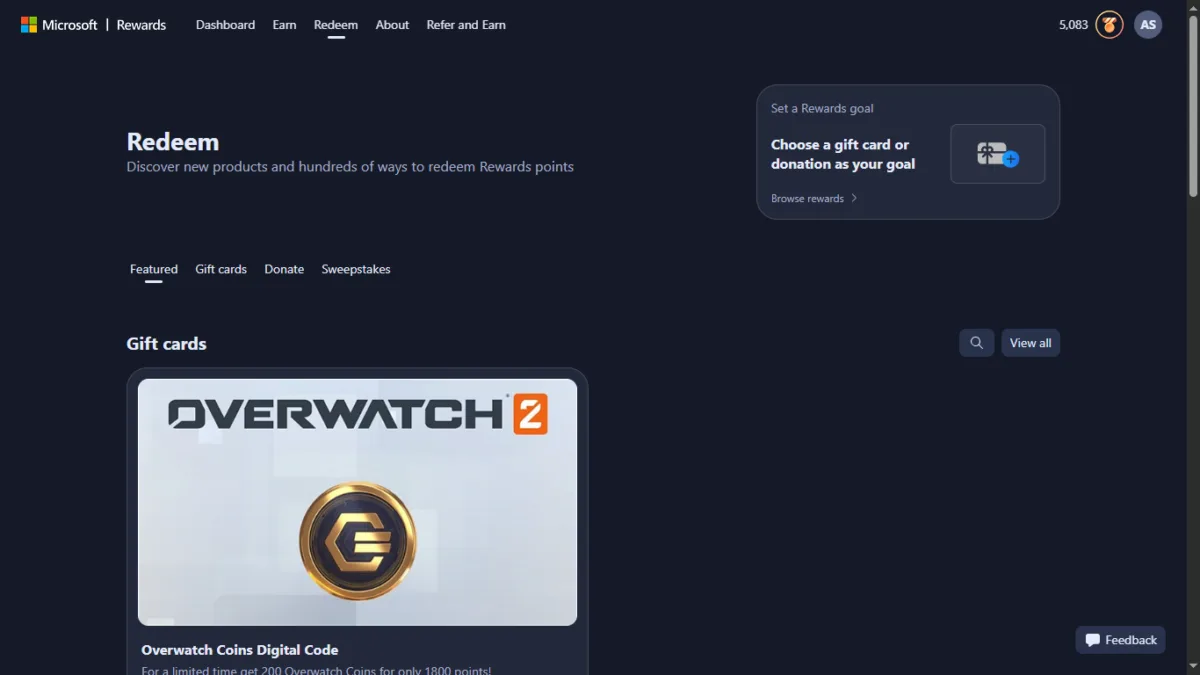
What You Can Redeem in India (as of October 6, 2026)
The Redeem page has four tabs: Featured, Gift cards, Donate and Sweepstakes. When I checked from India on this date:
- Gift cards: Only the Overwatch Coins Digital Code was available, at 10,000 points. It’s useful only if you play Overwatch.
- Donate: “Nothing to show right now.”
- Sweepstakes: “Nothing to show right now.”
India’s catalog has previously listed Croma and PVR Cinemas gift cards (₹500 for 8,050 points), Roblox, League of Legends, Sea of Thieves and Amazon Pay cards. Many readers have reported these out of stock for months, and Microsoft has not published restock dates. If they return, the point values in the table below will apply again.
My advice: Earn points as a side effect of searches you already do, but don’t plan around a specific reward. Check the Redeem page before you commit, since stock can change without notice.
Keep your points from expiring. Points expire after 12 consecutive months without earning or redeeming, so staying active is what protects your balance when nothing is in stock.
Also Read : Microsoft Copilot Vision AI: Your PC’s New Digital Eye for Real-Time Smart Assistance
Is It Actually Worth It?
Let’s do the real math. My dashboard showed 185 points from normal browsing — most of it from the Edge search streak. At that pace, hitting 8,050 points for a ₹500 Croma voucher would take somewhere around 8–10 weeks of consistent daily searching, assuming you keep hitting the streak bonus every cycle.
That’s not “free money” territory — it’s more like a small, slow-accumulating perk for something you’re already doing (searching the web, browsing with Edge). If you were going to use Bing and Edge anyway, there’s no reason to leave these points on the table. But it’s not worth changing your workflow purely to chase rewards — the point-to-rupee ratio isn’t generous enough for that.
Where it does make sense: if you’re a student or casual gamer, the Robux and gaming gift card options are a low-effort way to fund small in-game purchases without spending real money, purely as a side effect of searches you’d do anyway.
Also Read : Google Updated New Android Backup Storage Policy & Controls.
A Brief History of Microsoft Rewards
Microsoft Rewards didn’t start out as a competitive play against Google — it’s been around in some form for over a decade, quietly evolving alongside Bing and Windows.
The program traces back to 2010, when Microsoft launched Bing Rewards, letting users earn credits simply for searching on Bing. In 2016, Microsoft rebranded and expanded it into Microsoft Rewards, broadening it beyond search to include Xbox activity, Microsoft Store purchases, and a wider set of redemption options.
India’s relationship with the program has been less straightforward. Microsoft briefly ran a Bing Microsoft Rewards beta in India starting March 2016, but shut it down that same September as the global rebrand rolled out — India didn’t make the initial cut for Microsoft Rewards. It wasn’t until Microsoft’s broader international expansion, extending the program to well over 200 countries including India, that Indian users got proper access again.
More recently, Microsoft has introduced a three-tier status system — Member, Silver, and Gold — visible on my own dashboard’s “About” page, which goes well beyond the older Level 1/Level 2 structure still described on Microsoft’s general marketing pages. This looks like a newer rollout, possibly region-specific or still being phased in, but the numbers on my account are concrete: Silver requires 500 points earned in a month, Gold requires 750. Each tier raises your daily Bing search point cap (15 → 30 → 60), your monthly bonuses, and unlocks perks like redemption discount coupons that Member-level accounts don’t get. More on exactly how these tiers work in the dashboard section below.
Also Read : Claude AI Pricing in India: How It Compares to ChatGPT and Gemini (July 2026)
Why Microsoft Is Doing This
There’s a bigger context here worth mentioning. Microsoft has been pushing Bing and Edge harder over the past couple of years — tying in Copilot, AI-powered search summaries, and now a real financial incentive layer through Rewards. Paying users in redeemable points to search on Bing instead of Google is a direct play for search market share, not just a customer-retention gimmick. If Bing keeps closing the gap on AI-assisted search relevance while offering tangible rewards Google doesn’t, it’s a genuine competitive pressure point — one worth watching if you care about how search engines evolve in India over the next few years.
TechMitra’s take: Over the past month of using Bing regularly for my own searches, one thing has stood out — Bing surfaces genuine, independent blog content far more often than Google does. Google’s results for most queries lean heavily toward large, established authority sites, while Bing seems more willing to show smaller, focused blogs alongside the big names. Whether that’s a deliberate ranking philosophy or a side effect of Bing still building out its index, it’s a noticeably different search experience — and combined with Rewards, it’s part of why Bing feels worth a genuine second look right now, not just as a rewards-farming tool.
FAQs
Is Microsoft Rewards available in India?
Yes, you can join Microsoft Rewards in India and earn points. Redemption is the limited part: as of October 6, 2026, the India Redeem page only offered Overwatch Coins, while gift cards like Croma, PVR and Roblox were out of stock. Check the Redeem page before you plan around a reward.
Do I need to install anything?
No installation needed, but you must sign in with a Microsoft account on Bing.com or Microsoft Edge — points don’t accrue if you’re browsing without being signed in.
How fast can I actually earn a reward?
It depends on your tier and how many bonuses you claim. Searching alone, a ₹500 card takes roughly 4.5 to 18 months, depending on your level. See the estimates above.
Can points expire?
Yes — Microsoft Rewards points expire if your account has no earning or redemption activity for 12 months.
Final Verdict
Microsoft Rewards is still free to join, and earning points costs nothing extra if you already use Bing and Edge. In India right now, though, it works more as a way to earn game currency than rupee-value rewards. Earn passively, don’t plan around a specific reward, and check the Redeem page before you save up.

Ayush Singhal is the founder and chief editor of TechMitra.in — a tech hub dedicated to simplifying gadgets, AI tools, and smart innovations for everyday users. With over 15 years of business experience, a Bachelor of Computer Applications (BCA) degree, and 5 years of hands-on experience running an electronics retail shop, Ayush brings real-world gadget knowledge and a genuine passion for emerging technology.
At TechMitra, he covers everything from AI breakthroughs and gadget reviews to app guides, mobile tips, and digital how-tos. His goal is simple — to make tech easy, useful, and enjoyable for everyone. When he’s not testing the latest devices or exploring AI trends, Ayush spends his time crafting tutorials that help readers make smarter digital choices.
📍 Based in Lucknow, India
💡 Focus Areas: Tech News • AI Tools • Gadgets • Digital How-Tos
📧 Contact: Get in touch →
🔗 Full Bio: https://techmitra.in/about-us/