

Image : Windows 10 ESU Extended to 2027 — How to Enroll in India
Microsoft had previously ended support for Windows 10. At the time of the announcement, the company advised users whose PCs did not meet the minimum hardware requirements for Windows 11 to either enroll in the Windows 10 Consumer Extended Security Updates (ESU) programme or replace their devices. The ESU programme was originally scheduled to end permanently in October 2026. Now, Microsoft has quietly extended it by another year. This move could benefit millions of users — including many in India — who are still running Windows 10 on older hardware.
Extended Security Updates Until October 2027
Windows 10 PCs will now continue to receive security updates until October 12, 2027. Microsoft confirmed that eligible users can enrol in the Windows 10 Consumer Extended Security Updates (ESU) programme and receive critical patches for an additional year.
In an official support document, Microsoft noted that users already enrolled in the ESU programme do not need to take any action — their coverage will continue automatically until October 12, 2027.
This extension gives users with older PCs more time to plan their upgrade to Windows 11 or transition to a new device, without leaving their current system exposed to security threats in the meantime.
Also Read : Windows 10 End of Life Has Passed: Install Chrome OS Flex and Revive Your Old Laptop for Free
Windows 10 ESU Cost Options: Free vs. Paid
Microsoft has introduced flexible pricing for ESU enrolment, allowing many users to stay protected without spending anything. There are three ways to enrol:
Free — Sync PC Settings to OneDrive
You can enrol at no cost if you are signed into your PC with a Microsoft account and have Windows Backup (Sync PC Settings) turned on. Microsoft waives the fee entirely when your settings are already syncing to the cloud. You must remain signed in with your Microsoft account to keep this active.
Microsoft Rewards Points
You can redeem 1,000 Microsoft Rewards points to cover the enrolment cost — another zero-rupee option if you have accumulated points.
Paid — One-Time Purchase
If you prefer to use a local Windows account without cloud syncing, you will need to make a one-time payment of $30 USD (approximately ₹2,500, plus applicable taxes). This option allows you to revert to a local account after the purchase is complete.
Both free and paid options provide the same security coverage through October 12, 2027. One ESU licence linked to your Microsoft account covers up to 10 devices.
Enrolment Details and Device Eligibility
Microsoft has confirmed that users can enrol at any time until the programme concludes on October 12, 2027. However, the company warns that devices remain more vulnerable to viruses and malware prior to enrolment, so it is advisable to enrol as soon as possible.
To be eligible, your device must meet the following requirements:
- Running Windows 10 version 22H2 (Home, Pro, Pro Education, or Workstations edition)
- Have the latest Windows updates installed
- Be signed in with a Microsoft account (not a child account)
How to Enrol and Verify Your Status
Here is how to check your enrolment status or complete the process on your Windows 10 PC:
- Press Win + I or click the gear icon in the Start menu to open Settings
- Go to Update & Security
- Select Windows Update from the left-hand menu
- Click Check for updates
- If your device is eligible, you will see an ESU prompt — click Enrol now
- Sign in with your Microsoft account when prompted
- Choose your preferred enrolment method (Free/Rewards/Paid)
Once enrolled, you will see a confirmation screen similar to the one below:
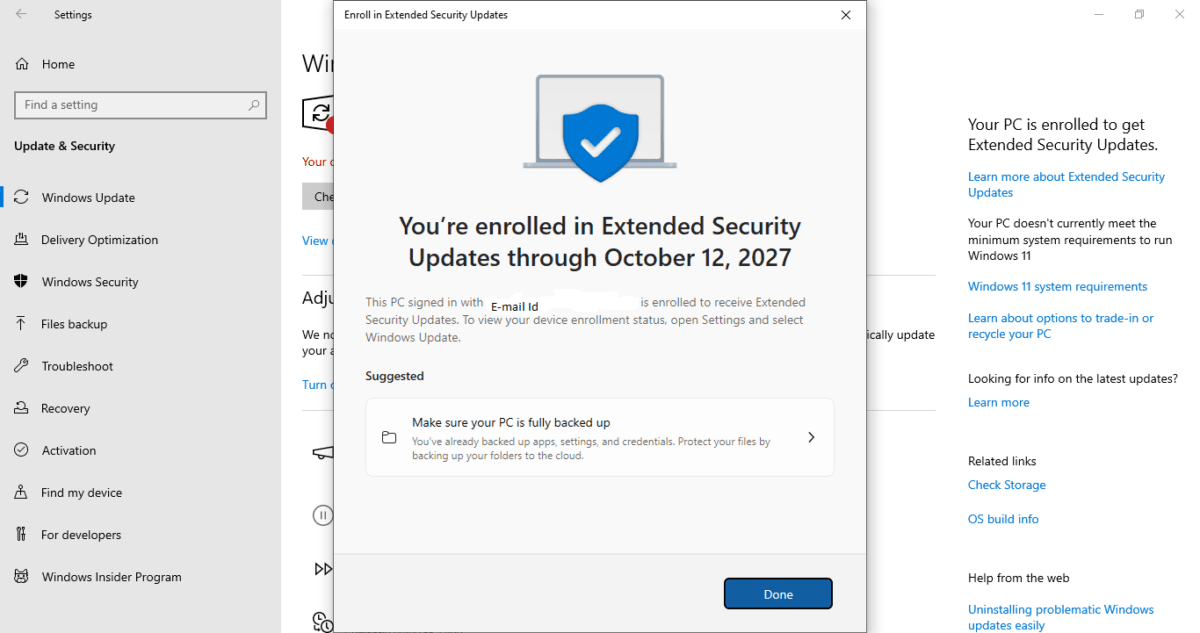
The screen confirms your PC is enrolled to receive Extended Security Updates through October 12, 2027, linked to your Microsoft account.
More details can be checked here
Also Read : How to Speed Up a Slow Windows 11 PC (Also Works on Windows 10): The Ultimate Guide
The Bottom Line
Microsoft’s decision to extend the consumer ESU programme to October 2027 is welcome news for Windows 10 users — particularly those on older PCs that do not qualify for Windows 11. In India, where hardware upgrades are often deferred due to cost, this one-year extension gives users a meaningful window to plan their next move without compromising on security.
If your PC already has PC Settings syncing enabled via your Microsoft account, enrolment is completely free and takes just a few clicks. That said, this is a temporary measure — October 2027 will be a hard deadline, and planning your upgrade well before that date remains the smart long-term move.

Ayush Singhal is the founder and chief editor of TechMitra.in — a tech hub dedicated to simplifying gadgets, AI tools, and smart innovations for everyday users. With over 15 years of business experience, a Bachelor of Computer Applications (BCA) degree, and 5 years of hands-on experience running an electronics retail shop, Ayush brings real-world gadget knowledge and a genuine passion for emerging technology.
At TechMitra, he covers everything from AI breakthroughs and gadget reviews to app guides, mobile tips, and digital how-tos. His goal is simple — to make tech easy, useful, and enjoyable for everyone. When he’s not testing the latest devices or exploring AI trends, Ayush spends his time crafting tutorials that help readers make smarter digital choices.
📍 Based in Lucknow, India
💡 Focus Areas: Tech News • AI Tools • Gadgets • Digital How-Tos
📧 Contact: Get in touch →
🔗 Full Bio: https://techmitra.in/about-us/