

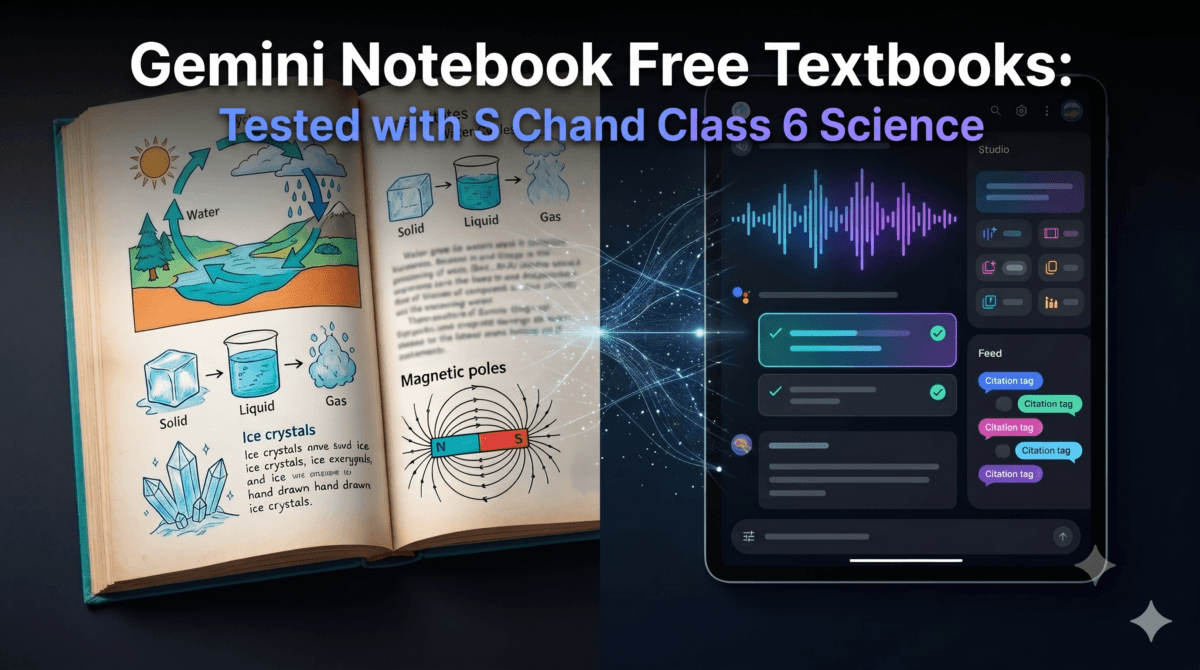
Google has added a library of free textbooks to Gemini Notebook, and for once the announcement is not only about American students. S Chand, one of India’s best-known school and college publishers, is part of the catalog.
I spent a day testing it in Chrome with a Class 6 science book, on both a Google AI Pro account and a free Google account. My son, who is in Class 6, also tried the quiz it generated.
This guide to Gemini Notebook textbooks in India covers what is in the catalog, what works, what does not work yet, and what parents and students should check before relying on it.
Table of Contents
Also Read : Free AI Quiz Generator Prompt Tool — No Login, No Signup
Key Takeaways
- Pre-Licensed Indian Curriculum: Around 180 titles appear when the catalog is filtered to India, mostly from S Chand and Vikas Publishing House. They include school books such as Lakhmir Singh’s Science and college-level engineering and commerce titles.
- Source-Grounded Studio Tools: Generates interactive flashcards, self-grading quizzes with answer explanations, and bilingual two-host podcast audio directly from textbook pages.
- Dual Quota System: Content generation runs against rolling short-term and weekly limits; running standard revision tasks barely dents an AI Pro plan quota (10% short-term, 0% weekly used in testing).
- Current Limitation: At the time of testing, adding catalog textbooks worked only in the web version in Chrome. The Windows Gemini app and the Android Notebook app did not show a Textbooks option, and school-level choices are few compared with college titles.
What Google Announced?
On October 29, 2026, Google announced that Gemini Notebook now offers hundreds of textbooks at no charge, drawn from educational providers in the United States and India, including OpenStax, Open Textbook Library, and S Chand Publishing. It represents a practical expansion of Expert Intelligence—an initiative Google introduced to help users ground AI outputs in authoritative, vetted reference material.
The core premise is straightforward: you add a textbook to a notebook, and Gemini Notebook answers your queries strictly from that book, complete with inline citations and interactive jumps back to the source text. In addition to answering questions, Notebook transforms chapters into structured study guides, practice quizzes, flashcards, and podcast-style audio discussions.
To access it, open any notebook on the web, click Add sources, and select Textbooks.
What Gemini Notebook Is, and Why It Isn’t Just Another Chatbot
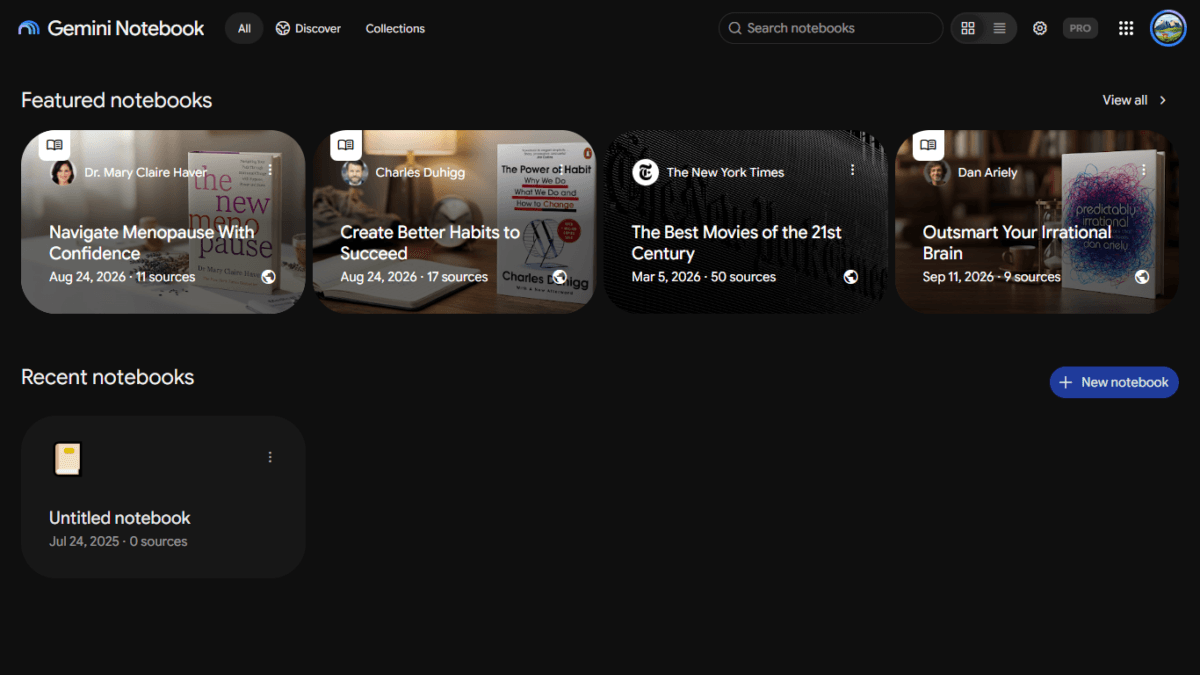
Gemini Notebook is the new name for NotebookLM. Google renamed it on July 16, 2026, and said it is the same standalone product. blog
If you have not used it, think of it as a study workspace built around the material you give it, not an open-ended chat window. You add sources, such as a PDF, a website or, now, a textbook from Google’s catalog, and the answers, quizzes and summaries are based on those sources.
Other AI assistants can also answer questions about files you upload, so that alone is not what sets it apart. In my testing, three things made it feel different from a general chatbot.
First, the book is part of the workspace. I picked a Class 6 science book from a catalog, and its pages opened in a reader on the left of the screen, with an automatic source guide above them. I never had to hunt for a PDF.
Second, the answers can be checked. Each statement in an answer carries a small numbered citation. When I clicked one, the reader jumped to the matching page and highlighted the passage, so it is easy to compare what the AI said with what the book says.
Third, the study tools are one-click buttons in a Studio panel on the right: Audio Overview, Video Overview, Slide Deck, Mind Map, Reports, Flashcards, Quiz, Infographic and Data Table. You do not need a long prompt to get a quiz with explanations. You choose the settings and, if you like, type the topic.
None of this makes it infallible. The screen carries a line saying that Gemini Notebook can make mistakes and that you should double-check, and the citations exist so that you can.
Where I Tested It, and Where It Falls Short Across Apps
I conducted testing across three environments: the web version in Chrome, the standalone Gemini desktop app on Windows, and the Notebook mobile application.
My primary account runs on Google AI Pro (activated via Jio’s 18-month promotional bundle). To verify access hurdles,I also tested the feature on a separate free Google account with the standard 15 GB of storage to check if free users could access the library. The books are indeed free, but I ran into a noticeable UI bug on free account: when I filtered specifically by Country → India, Gemini Notebook returned an empty state claiming no textbooks were found.
However, clearing the country filter and simply scrolling down or typing the title revealed the full Indian catalog—including Lakhmir Singh’s Science for Classes 6, 7, and 8—proving that the catalog is universally accessible, even if Google’s filter metadata is currently glitchy.
However, the experience across different Google app clients is starkly unequal:
- Web Browser (Chrome / Windows): The only complete experience. You get the 3-panel layout: the full embedded textbook reader on the left, the citation-backed chat in the center, and the rich Studio rail on the right (Audio Overviews, Quizzes, Flashcards, Mind Maps).
- Gemini Desktop App (Windows): The app does sync your notebooks under a dedicated “Notebooks” sidebar section. When you click Lakhmir Singh’s Science for Class 6, it recognizes the book, showing a neat blue book icon and a “1 Source” badge. But that is where the functionality stops. There is no textbook catalog picker to add new titles, no built-in PDF viewer to read the book, and none of the Studio generation buttons. It simply gives you a bare chat prompt with a model toggle (like Flash) and an external link in the top-right corner pointing you back out to “Gemini Notebook” in your browser.
- Notebook Mobile App (Android / iOS): On mobile, the Add source dialog offers standard inputs—PDF, audio, images, web links, YouTube, copied text, and Drive—completely omitting the curated Textbooks catalog tab.
In short: while the desktop Gemini app can act as a lightweight conversational conduit for an existing notebook, browsing textbooks and generating interactive study materials remains strictly confined to the desktop web browser.
What Is in the Gemini Notebook Textbooks India Catalog
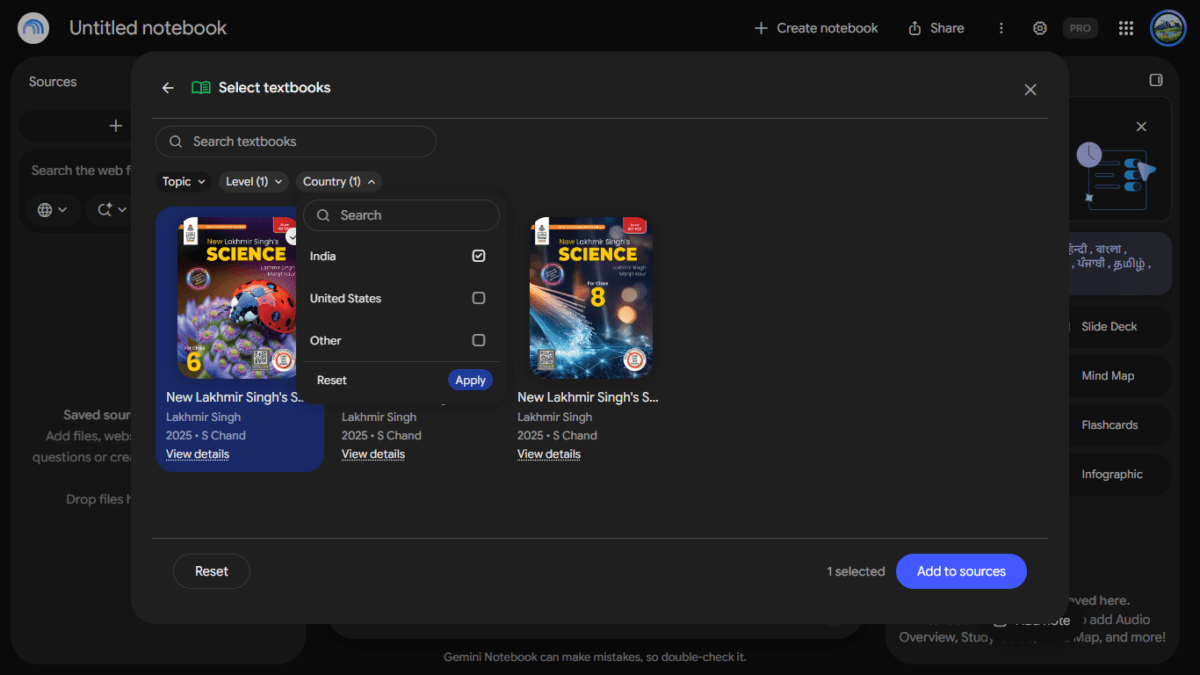
The Textbooks modal features a search bar alongside three primary filters: Topic, Level, and Country. The Level filter splits options into:
- Primary and Middle School
- Secondary and High School
- Higher Education
- Other
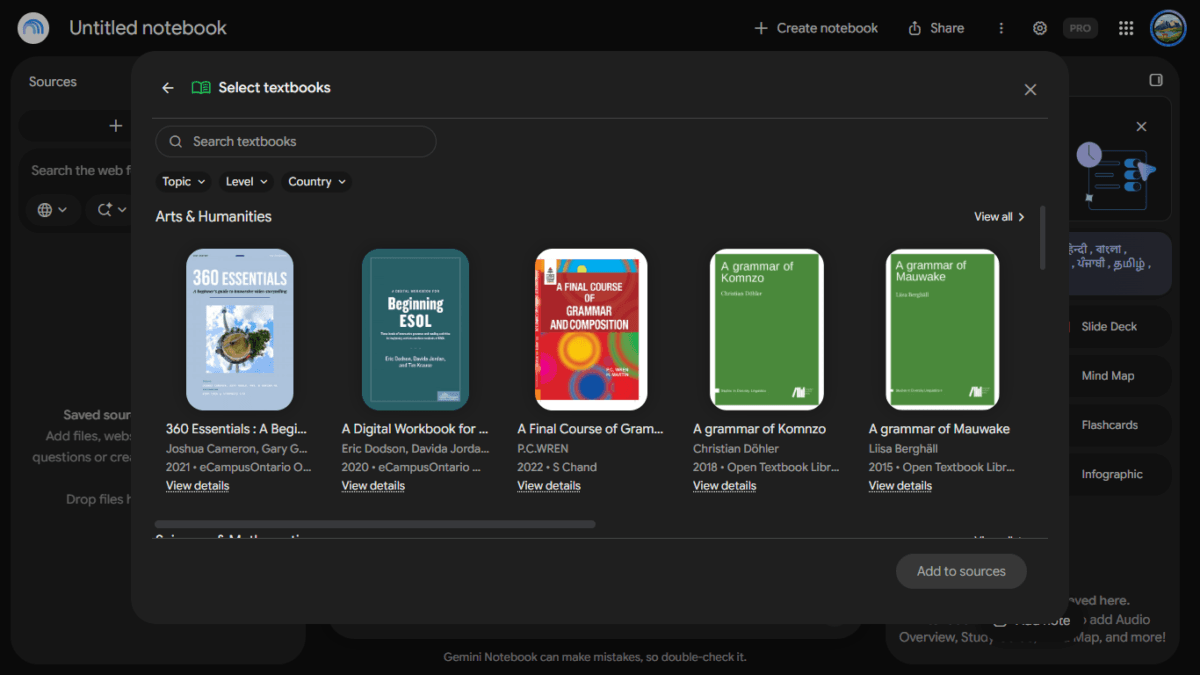
Leaving filters unselected displays global open-access collections, including the Open Textbook Library and eCampusOntario, listed alongside commercial Indian titles.
Catalog table
| Filter | What I found |
|---|---|
| Country: India | About 180 titles, mainly S Chand (about 140) and Vikas Publishing House (about 30). Approximate, counted from a screenshot |
| India + Primary and Middle School | 3 titles: New Lakhmir Singh’s Science for Classes 6, 7 and 8 |
| India + Secondary and High School | [count with the filter and list notable titles] |
| India + Higher Education | [count with the filter and list notable titles] |
Filtering Country specifically by India displays an alphabetical directory of roughly 180 titles, predominantly sourced from two major publishing houses: S Chand Publishing (~140 titles) and Vikas Publishing House (~30 titles).
The catalog is overwhelmingly weighted toward college and professional coursework:
- Engineering: Foundational texts like R.S. Khurmi’s Machine Design and Thermal Engineering, alongside R.K. Rajput’s Fluid Mechanics.
- Commerce & Professional: Extensive accountancy guides including P.C. Tulsian’s series and S.N. Maheshwari’s Advanced Accountancy.
- Undergraduate Sciences: Dedicated B.Sc. volumes across mathematics, organic and inorganic chemistry, botany, and zoology.
- General Interest: Select historical non-fiction, including Freedom at Midnight by Dominique Lapierre and Larry Collins.
School-level textbooks are currently limited. Setting the filters to Country: India and Level: Primary and Middle School returned exactly three books: S Chand’s New Lakhmir Singh’s Science for Classes 6, 7, and 8. Title text wraps tightly inside the catalog card layout; users should click View details on any title to inspect the specific edition and publication year before attaching it.
Adding the Book and Querying Sources
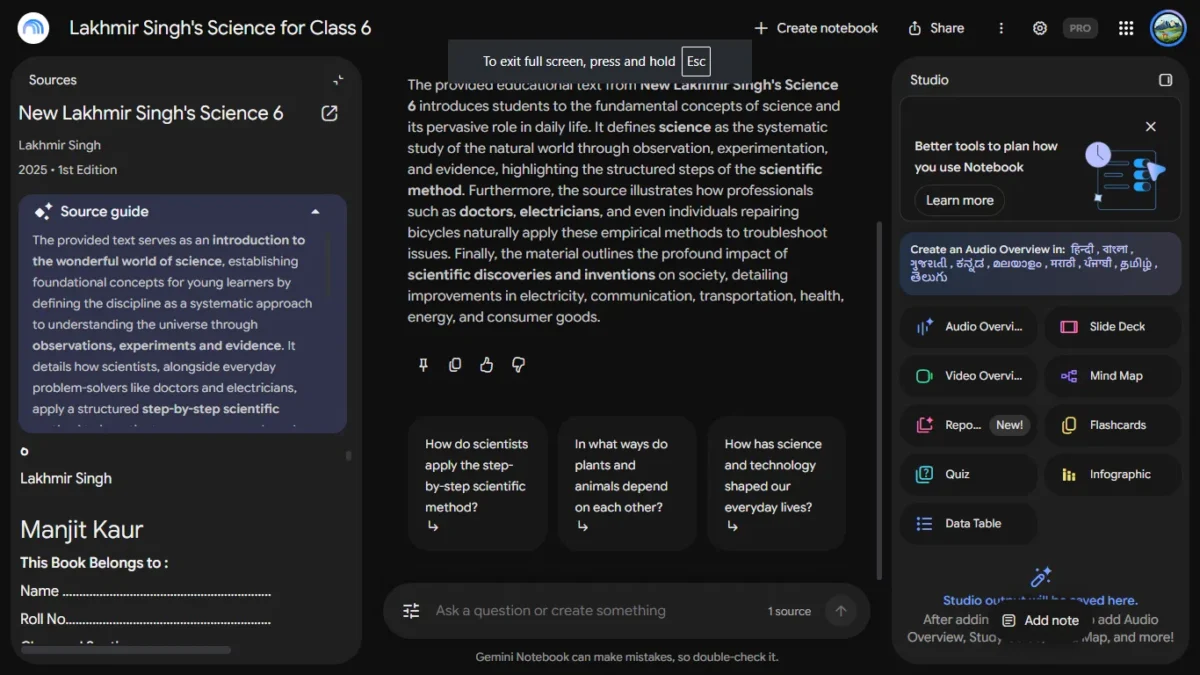
For hands-on testing, I selected New Lakhmir Singh’s Science for Class 6, authored by Lakhmir Singh and Manjit Kaur (S Chand, 2025 edition), and clicked Add to sources.
After a brief loading spinner, the workspace auto-titled itself to match the book. On the web, the interface displays its full three-pane layout:
- Left Rail: Source management, publication metadata, a generated source guide, and an embedded PDF reader containing the actual book pages.
- Center Panel: The citation-grounded conversational thread.
- Right Rail (Studio): Interactive artifact generators (Audio Overviews, Quizzes, Flashcards, Mind Maps, Reports).
Verification 1: Chapter Index Accuracy
I began with a baseline structural check, asking Gemini Notebook to list all chapters. It returned twelve discrete chapters—from The Wonderful World of Science to Beyond Earth—matching the physical book’s table of contents with exact numbered citations.
Verification 2: Explaining Scientific Concepts
Next, I prompted the system: “Explain the main concept of Chapter 4, Exploring Magnets, in simple words.”
The generated response methodically broke down what magnets are, magnetic versus non-magnetic materials, magnetic poles, the fundamental law of attraction and repulsion, handling guidelines, and real-world applications. The scientific details matched the text accurately, supported by over thirty distinct citation chips.
When clicking citation numbers (such as 22 and 23 alongside magnet demagnetization through heat and impact), the left panel shifted smoothly to the corresponding chapter page, highlighting the referenced paragraph in yellow.
The prose style was slightly more detailed than requested, introducing terms such as “magnetised” that may require adult clarification for an average Class 6 student.
Interactive Study Tools Tested: Flashcards and Quizzes
Both Flashcards and Quizzes share unified setup controls in the web Studio panel. Users can adjust question volume (Fewer, Standard, More), select difficulty (Easy, Medium, Hard), specify output language, and narrow topic scope via a free-form instruction field.
Flashcard Generation
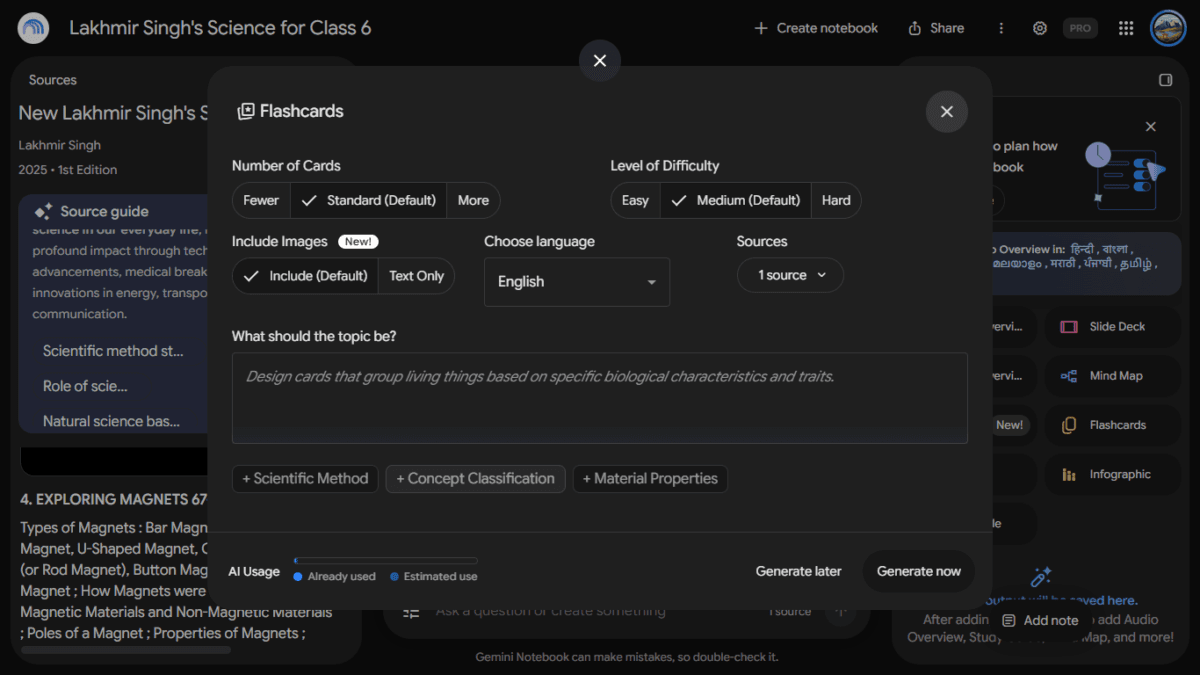
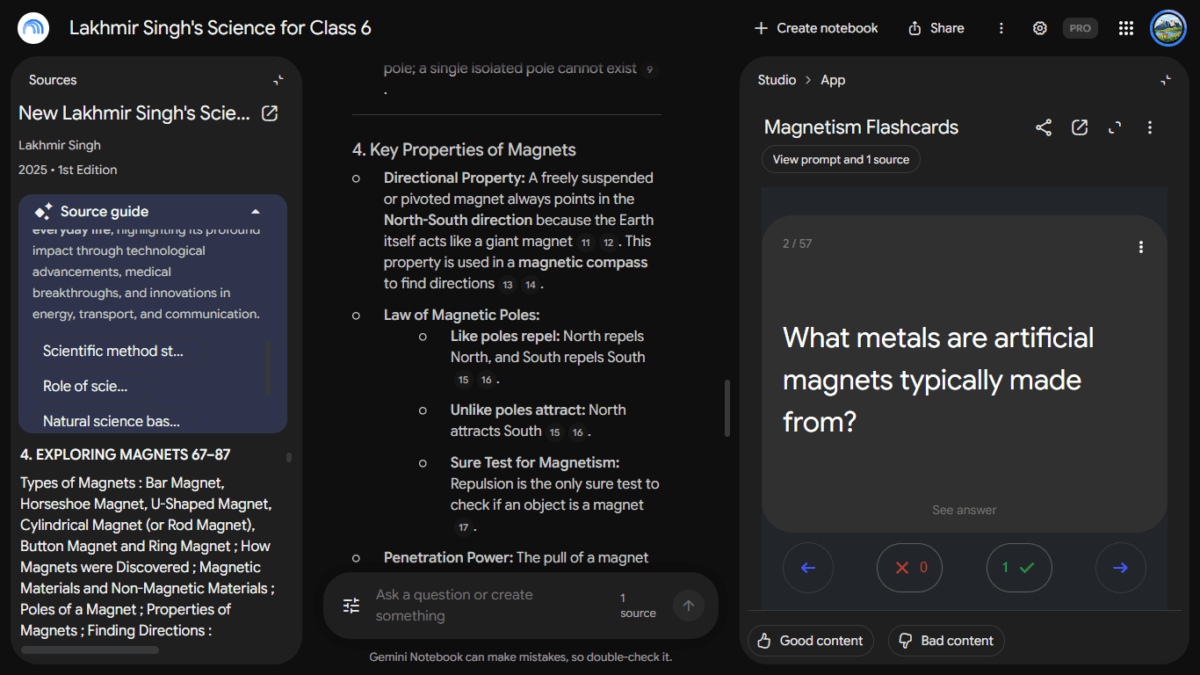
To test thematic scoping, I typed Chapter 4 only into the topic prompt, left settings on default, and generated a deck titled Magnetism Flashcards. The system produced 57 distinct cards.
Each digital card presents a question prompt, a click-to-reveal answer mechanic, and self-assessment buttons (thumbs up / checkmark and cross) to filter cards during study rounds. Sampling across 20 random cards showed zero hallucinations; every card pulled verifiable statements straight from Chapter 4’s magnetic theory sections.
Quiz Creation
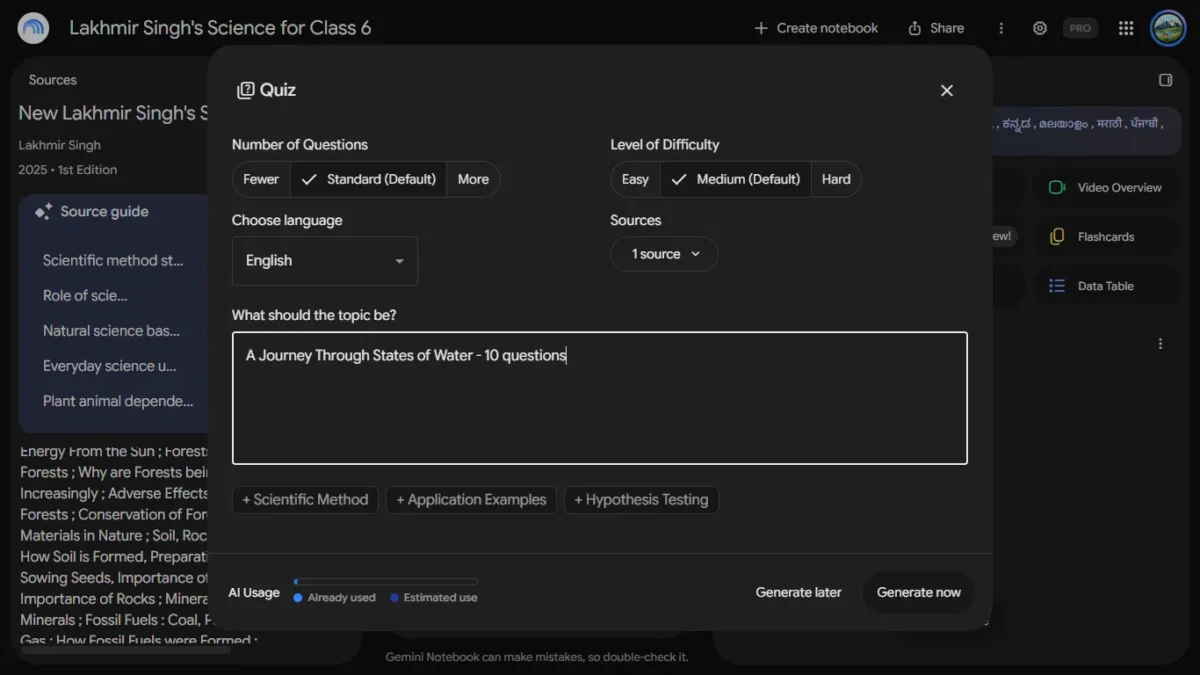
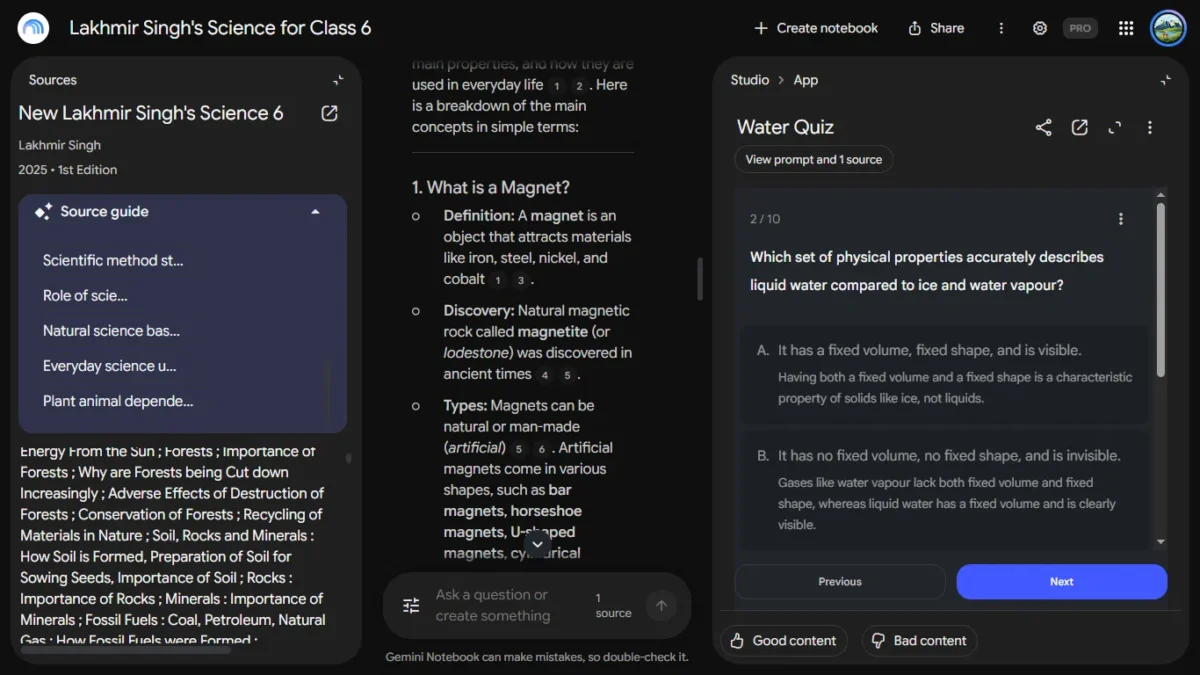
For quiz generation, entering A Journey Through States of Water, 10 questions in the topic field forced the generator to produce an exact 10-question evaluation. (Practical tip: entering the desired question number directly into the prompt box provides more reliable length control than relying solely on the Fewer/Standard/More interface buttons).
Every multiple-choice item includes pedagogical explanations detailing not only why the correct option is right, but why alternate distractors are scientifically invalid.
For example, when evaluating the physical properties of liquid water relative to ice and vapor, the quiz validated the correct option (“fixed volume, no fixed shape, visible”) while explaining that a fixed shape characterizes solid ice, not liquid water.
Quiz can also be shown in full screen in new tab
Real-World Classroom Test: A Class 6 Student Takes the Quiz
To see how the material works for a real student, I had my son, who is in Class 6, take the 10-question water quiz. He scored 7 out of 10.
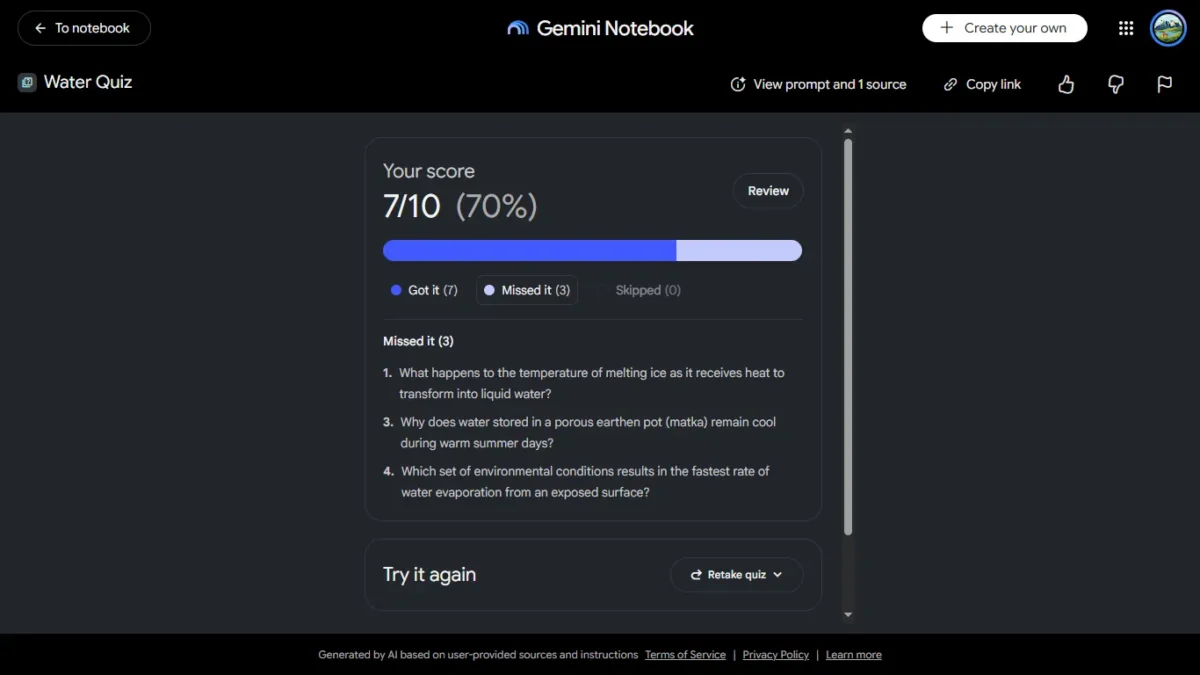
The results page is clear and simple. It shows the score as 7/10 (70%) with a progress bar, then splits the questions into Got it (7), Missed it (3) and Skipped (0).
Under that, it lists the three missed questions in full. In my son’s case they were about the temperature of melting ice, why water in a matka stays cool, and which conditions make water evaporate fastest. A Review button lets you go back over the questions, and a Retake quiz button at the bottom lets you try again.
This list of missed questions is useful for revision. A parent can see at a glance which topics to go over, without reading through all ten questions.
Two of the three questions my son missed were his own mistakes. The third was a topic that is in this book but was not in his school’s book.
The book’s opening pages say it is based on the latest NCERT syllabus and NCF 2023, but that is the book’s own claim. It did not match his school’s book on this topic.
This point matters for parents. Gemini Notebook follows the book you add, not your child’s syllabus. Syllabi differ across boards and schools, so a question can come straight from the textbook and still be unfamiliar to a student who studies from a different book.
Testing the Hindi Audio Overview: “पानी की अवस्थाएं और गुप्त ऊष्मा”
Gemini Notebook allows Studio Audio Overviews to be generated in nine regional Indian languages: Hindi, Bengali, Gujarati, Kannada, Malayalam, Marathi, Punjabi, Tamil, and Telugu.
To evaluate regional comprehension, I generated a Hindi “Deep Dive” Audio Overview from the water chapter. The generator queued the task in the background for roughly four minutes before delivering a 14-minute, 29-second audio episode titled “पानी की अवस्थाएं और गुप्त ऊष्मा” (States of Water and Latent Heat).
The quality of the generated audio revealed several notable traits:
- Conversational Banter: Rather than relying on monotone synthetic voice narration, two AI co-hosts (male and female voices) trade observations with natural conversational pacing and pauses. They open with an engaging hook: asking whether the water sitting in your kitchen glass could have once circulated through the body of a dinosaur millions of years ago.
- Bilingual Academic Balance: Regional educational content frequently fails when AI tools attempt literal translations of modern scientific nomenclature. Here, the audio maintained natural Indian classroom phrasing—using accurate Hindi concepts (ठोस, तरल, वाष्पीकरण, गुप्त ऊष्मा) alongside familiar English loan terms (molecules, closed system, latent heat) without phonetic distortion.
- Effective Pedagogical Analogies: The discussion translates molecular physics into accessible mental models. To explain why solids hold their shape, the hosts compare water molecules in ice to people crowded into a packed elevator, able only to vibrate in position. For liquids, they describe a bustling dance floor where individuals slide smoothly past one another while remaining within the room.
- Addressing Misconceptions: The co-hosts explicitly correct common student errors, noting that the white cloud emerging from a boiling kettle is not true gaseous water vapor (which is completely transparent and invisible), but rather microscopic liquid droplets condensing upon contacting cooler air.
Limits, Speed, and Quota Consumption
The textbooks themselves are free, but generating study aids draws against Google’s unified AI usage quotas.
To see how standard accounts compare to paid subscriptions, I tested the exact same Class 6 water chapter on both a standard free Google account (15 GB storage) and my Google AI Pro account. Both tiers display a “Gemini Notebook AI Usage & Limits” panel tracking consumption across two meters: a rolling 5-hour limit and a 7-day weekly ceiling.
Here is what the real consumption numbers showed:
- On the Free Account: one 10-question quiz used about 2% of the five-hour limit and none of the weekly limit, so occasional revision looks possible. I tested only one task, though, so heavier use may reach the limit sooner.
- On the AI Pro Account: After generating 57 magnetism flashcards, a 10-question water quiz, multiple cited chat queries, and a 14-minute Hindi Audio Overview, usage stood at 10% of the rolling limit and 0% weekly. Here, the modal suggested an upgrade to Google AI Ultra for “5X more usage.”
Speed remains consistent across both tiers for text tools: quizzes and flashcards generate almost instantly. The heavier compute load comes with Audio Overviews, which take 3 to 5 minutes to render in the background queue.
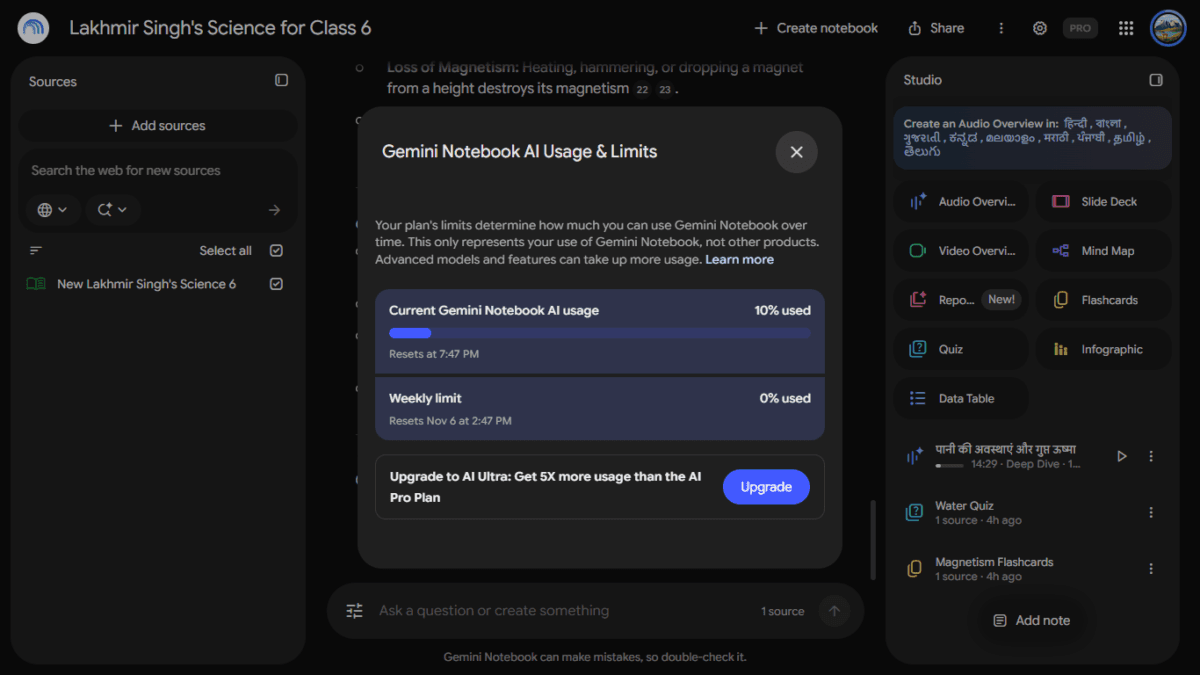
The Free vs. Pro Account Comparison
| Metric / Feature | Free Google Account (Standard Tier) | Google AI Pro Account |
| Current AI Usage | 2% used (after generating a 10-question Water Quiz) | 10% used (after generating 57 flashcards + 10-question quiz + 14:29 Hindi audio + deep chat queries) |
| Rolling Window Reset | Resets at 1:06 AM (5-hour window) | Resets at 7:47 PM (5-hour window) |
| Weekly Limit Ceiling | 0% used (Resets Nov 6 at 8:06 PM) | 0% used (Resets Nov 6 at 2:47 PM) |
| In-Modal Upsell Banner | “Upgrade to AI Plus: Get double the usage than your current plan” | “Upgrade to AI Ultra: Get 5X more usage than the AI Pro Plan” |
| Interactive Textbook Access | Free & unblocked (S Chand Lakhmir Singh 6 is fully functional) | Free & unblocked |
What to Check Before Relying on It
- Audit the Contents Page First: Never assume that a book matching your child’s grade level reflects their school’s syllabus. Open the source book’s table of contents inside Notebook and compare chapter headings against your school’s official syllabus tracker.
- Constrain Topics Explicitly: Avoid generating generic quizzes from an entire book. Always use the topic instruction box to restrict generation to specific chapters or units your child has already completed in school.
- Verify Inline Footnotes: While Notebook’s source-grounded model drastically curtails general internet hallucinations, errors in summarization can still occur. Teach students to click the numbered citation chips to inspect the raw passage directly in the left-hand PDF viewer.
- Account for Web Constraints: Keep in mind that adding catalog textbooks and using Studio tools remains restricted to desktop web browsers. The Gemini desktop app only offers a basic chat box for existing notebooks.
Who Should Use It Today
- Undergraduate & Professional Students: College learners enrolled in mechanical/civil engineering, B.Sc. physical sciences, CA foundation, and B.Com commerce tracks will find the deepest library of complete reference works (including Khurmi, Rajput, and Tulsian).
- ICSE and S Chand School Students: Secondary students in Classes 9 and 10 following ICSE syllabi, as well as middle-schoolers learning directly from S Chand’s Lakhmir Singh science series, can immediately integrate it for chapter revision.
- Parents Creating Practice Worksheets: Parents seeking structured, verifiable review questions can generate accurate revision material in seconds without manually drafting questions from physical books.
Frequently Asked Questions (FAQs)
Are Gemini Notebook textbooks India completely free to access?
Yes. Browsing, reading, and attaching textbooks from the catalog does not require a paid Google AI subscription. Both free Google accounts and Google AI Pro tiers can access the full catalog at no charge. However, generating large Studio artifacts (such as Audio Overviews or extensive quiz batches) draws from your account’s processing limits, which refresh more generously on paid plans.
Can I download the textbook PDFs for offline reading?
I did not find a way to download the textbook. The notebook’s three-dot menu offers Configure Chat, Customize notebook, Copy notebook, Analytics and Delete chat history, and none of them exports the book. The book is read inside Gemini Notebook’s own viewer, in the left panel of the web version.
You can share the notebook itself. The Share window lets you add people or groups by email, and the notebook’s access is set to Restricted by default, so only the people you add can open the link. The notebook menu also notes that your chat history is private to you. I did not test what a person you share with can see or do, so check that with a second account before relying on it.Does Gemini Notebook follow CBSE or ICSE school syllabi?
Gemini Notebook follows the specific textbook attached as a source, not an overarching board syllabus. While S Chand books are widely used in CBSE and ICSE schools, individual school curricula may skip chapters, reorder units, or introduce concepts not present in that edition. Parents should check chapter titles against the child’s school diary before testing.
Does Textbooks feature available on the mobile app?
When I tested on an Android phone on October 30, 2026, the add-source menu did not include Textbooks, and only the web version in Chrome did. I did not test iPhone, other browsers, or whether notebooks made on the web open in the app.
What Indian languages are supported for Audio Overviews?
Audio Overviews currently support nine Indian languages: Hindi, Bengali, Gujarati, Kannada, Malayalam, Marathi, Punjabi, Tamil, and Telugu. The AI co-hosts adopt conversational regional phrasing and handle scientific vocabulary bilingually without awkward phonetic translations.
What is the difference between Gemini Notebook Vs NotebookLM?
There is no difference as a product. Google renamed NotebookLM to Gemini Notebook on July 16, 2026, and said it remains the same standalone product. The rename came with closer ties to the Gemini ecosystem, and Google said notebooks would eventually be reachable through AI Mode in Search. The textbook catalog arrived later, on October 29.
The Verdict
Google’s integration of free, pre-licensed publisher textbooks into Gemini Notebook is a meaningful step forward for educational technology. By grounding AI synthesis in trusted Indian curricula like S Chand rather than the open internet, it solves the hallucination and verification issues that have made traditional chatbots risky for young learners.
The system’s core capabilities are impressive: chapter indexing is exact, quiz rationale explanations are genuinely educational, citations are interactively auditable, and regional Hindi audio synthesis sounds authentic rather than robotic.
The tool’s current limitations lie in distribution rather than comprehension: Indian school coverage remains thin in comparison to its extensive college catalog, and the standalone desktop app is largely an empty chat shell compared to the full-featured web app. As a focused study companion for supported subjects, Gemini Notebook delivers reliable, citation-backed revision—provided parents and students treat the textbook and classroom teacher as the ultimate authority.

Ayush Singhal is the founder and chief editor of TechMitra.in — a tech hub dedicated to simplifying gadgets, AI tools, and smart innovations for everyday users. With over 15 years of business experience, a Bachelor of Computer Applications (BCA) degree, and 5 years of hands-on experience running an electronics retail shop, Ayush brings real-world gadget knowledge and a genuine passion for emerging technology.
At TechMitra, he covers everything from AI breakthroughs and gadget reviews to app guides, mobile tips, and digital how-tos. His goal is simple — to make tech easy, useful, and enjoyable for everyone. When he’s not testing the latest devices or exploring AI trends, Ayush spends his time crafting tutorials that help readers make smarter digital choices.
📍 Based in Lucknow, India
💡 Focus Areas: Tech News • AI Tools • Gadgets • Digital How-Tos
📧 Contact: Get in touch →
🔗 Full Bio: https://techmitra.in/about-us/