

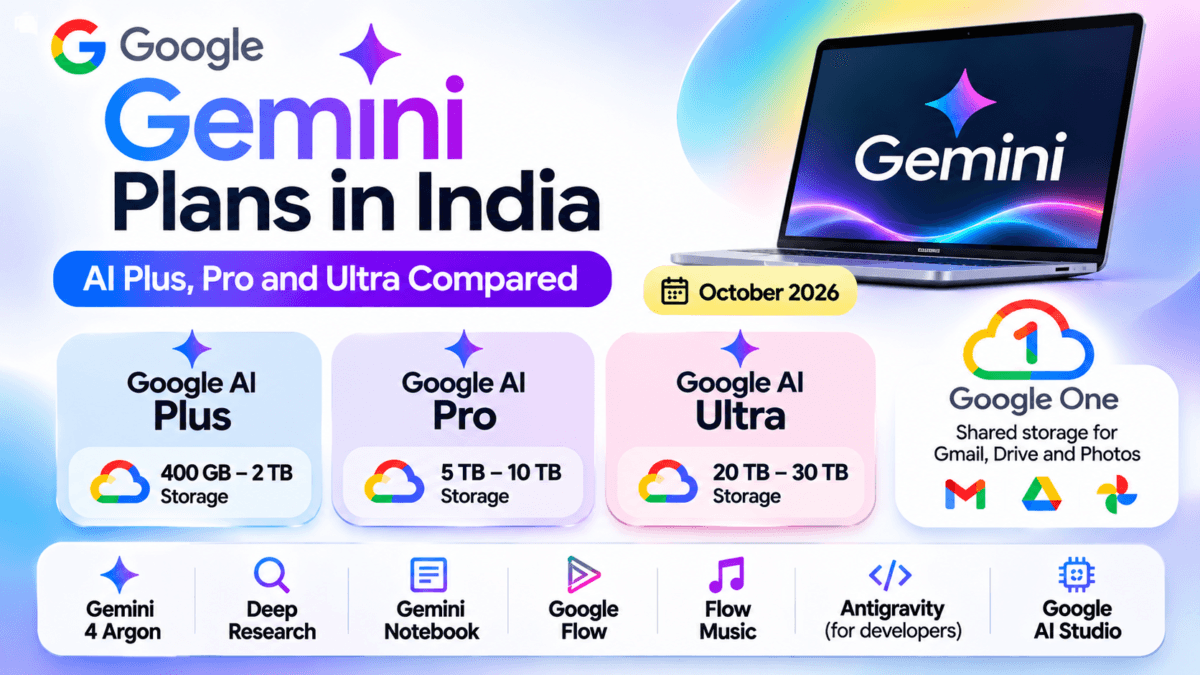
Google Gemini Price In India Last checked on 31 October 2026, on Google One India.
If you have been wondering what Gemini actually costs in India, the short answer is that there is no single “Gemini price”. Google sells Gemini through its Google AI plans, which are bundled with Google One storage, and the price you pay depends on the plan, the storage size and whether you pay monthly, quarterly or yearly. I went through every option on the Google One plans page and put the numbers in one place, so you do not have to click through each view yourself.
I took these screenshots from a free Google account, which is what a new subscriber sees. I also checked at checkout that the listed prices include all taxes, so there is no GST added on top of the figure shown. Everything below is the price shown to me on 31 October 2026, and Google changes offers often, so treat the introductory prices in particular as a snapshot.
If you are comparing the other big assistants as well, I have covered them separately: ChatGPT pricing in India and Claude pricing in India
Table of Contents
The quick answer
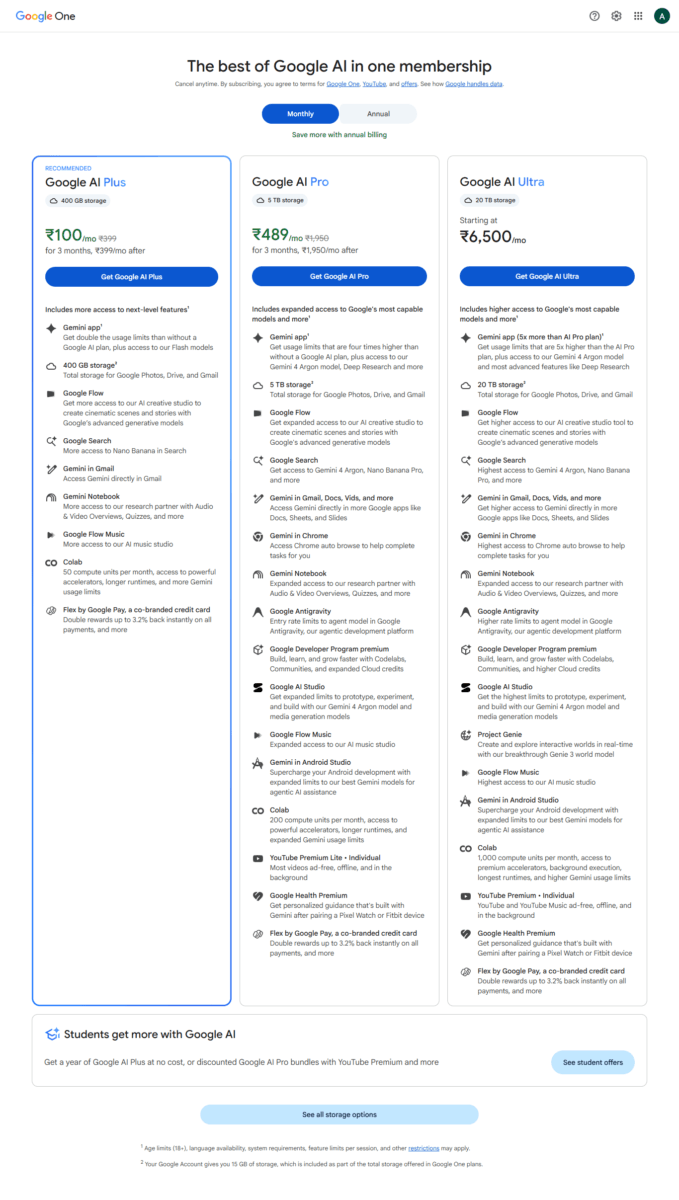
Google AI Plus costs ₹399 a month, Google AI Pro costs ₹1,950 a month, and Google AI Ultra costs ₹6,500 or ₹19,500 a month depending on the usage level you choose. New subscribers are shown discounted introductory prices on Plus and Pro, which I cover further down.
| Plan | Storage | Regular monthly price | Includes Gemini 4 Argon |
|---|---|---|---|
| Google AI Plus | 400 GB (or 2 TB at ₹650) | ₹399 | No |
| Google AI Pro | 5 TB (or 10 TB at ₹3,250) | ₹1,950 | Yes |
| Google AI Ultra (5x limits) | 20 TB | ₹6,500 | Yes |
| Google AI Ultra (20x limits) | 30 TB | ₹19,500 | Yes |
All Google one plans and pricing in one table
This table puts every plan, storage size and billing period side by side, with the regular price and the new-subscriber offer I was shown. On a phone, swipe sideways to see all the columns; the plan and storage columns stay in place as you scroll.
| Plan | Storage | Monthly | Monthly Promo | Every 3 Mos | 3-Mos Promo | Yearly | Yearly Promo | Gemini 4 Argon |
|---|---|---|---|---|---|---|---|---|
| Storage | 30 GB | ₹59 | ₹29 (6 mos) | ₹159 | ₹89 (6 mos) | ₹589 | ₹469 (1st yr) | — |
| Storage | 100 GB | ₹130 | ₹65 (6 mos) | ₹359 | ₹189 (6 mos) | ₹1,300 | ₹999 (1st yr) | — |
| Storage | 200 GB | ₹210 | ₹100 (6 mos) | ₹579 | ₹309 (6 mos) | ₹2,100 | ₹1,599 (1st yr) | — |
| Google AI Plus | 400 GB | ₹399 | ₹100 (3 mos) | ₹1,099 | — | ₹4,000 | ₹3,000 (1st yr) | Flash only |
| Google AI Plus | 2 TB | ₹650 | ₹320 (6 mos) | ₹1,789 | ₹979 (6 mos) | ₹6,500 | ₹5,199 (1st yr) | Flash only |
| Google AI Pro | 5 TB | ₹1,950 | ₹489 (3 mos) | ₹5,400 | — | ₹19,500 | — | ✓ Included |
| Google AI Pro | 10 TB | ₹3,250 | — | Not offered (Monthly billing only) | ✓ Included | |||
| Google AI Ultra 5x limits | 20 TB | ₹6,500 | — | Monthly billing only | ✓ Included | |||
| Google AI Ultra 20x limits | 30 TB | ₹19,500 | — | Monthly billing only | ✓ Included | |||
In the quarterly columns, the price is for each three-month billing period, and a “6 months” offer means the first two billings. The new-subscriber offers were shown on a free account and may differ on yours.
What each Google Gemini AI plan gives you ?
Google AI Plus is Google’s entry-level paid AI plan, offering twice the usage limits of a free Gemini account. It provides access to Gemini Flash models and Deep Research, allowing users to explore complex topics and generate detailed research reports using multiple sources. The plan also includes more access to image, music and video generation, 200 Google Flow credits per month, expanded features in Gemini Notebook, and Gemini integration in Gmail, Vids and other Google apps.
You also get 400 GB of shared cloud storage across Google Photos, Drive and Gmail, with the option to share the benefits with up to five family members. It is a good choice for users who want more AI features, research capabilities and storage without paying for the higher-priced Pro subscription.
Google AI Pro is the plan most people will mean when they say “Gemini paid”. It gives four times the usage limits of a free account, and it is the cheapest plan that includes Gemini 4 Argon and Deep Research. You also get 5 TB of storage, Gemini in Gmail, Docs and Vids, higher access to Gemini Notebook and Flow, YouTube Premium Lite and Google Health Premium. Like the other plans, it can be shared with up to five people.
Google AI Ultra is aimed at heavy users and professionals. It comes in two usage levels: 5x limits (compared with Pro) with 20 TB of storage at ₹6,500 a month, and 20x limits with 30 TB at ₹19,500 a month. Both include full YouTube Premium and the highest access to Gemini Notebook and Flow. One thing that surprised me is that both Ultra tiers show “Monthly billing only”, so you cannot pay for them quarterly or yearly.
Gemini 4 Argon is the real dividing line
Gemini 4 Argon is Google’s newest top model, and it opened to paying users on 13 October 2026. Google’s own plan page lists Argon access for Pro and Ultra, while the Plus plan lists only the Flash models. A free account does not get Argon either.
This matters because many people see the ₹399 price in headlines and assume it unlocks everything. It does not. If your reason for paying is to use Argon, Pro at ₹1,950 a month is the lowest plan that includes it.
Prices by billing period
Google gives you three ways to pay, and the cheapest depends on the plan. Here are the regular (non-introductory) prices from the three billing views.
| Plan and storage | Monthly | Every 3 months | Per year |
|---|---|---|---|
| Plus 400 GB | ₹399 | ₹1,099 | ₹4,000 |
| Plus 2 TB | ₹650 | ₹1,789 | ₹6,500 |
| Pro 5 TB | ₹1,950 | ₹5,400 | ₹19,500 |
| Pro 10 TB | ₹3,250 | Not offered | Not offered |
| Ultra (both tiers) | ₹6,500 or ₹19,500 | Not offered | Not offered |
Paying every three months saves only about 8 percent. On Pro, Google shows a saving of ₹450 per quarter, and on Plus 400 GB a saving of ₹98. Paying yearly is the real discount: Pro at ₹19,500 a year works out to ₹3,900 less than twelve monthly payments of ₹1,950. Google’s page says you save 16 percent by paying annually, and the numbers match that.
Introductory offers for new subscribers
This is where the prices get confusing, because the offer changes depending on the plan, the storage size and the billing period. These are the introductory prices my free account was shown.
| Plan and storage | Monthly | Every 3 months | Per year |
|---|---|---|---|
| Plus 400 GB | ₹100 for 3 months, then ₹399 | No offer | ₹3,000 for the first year, then ₹4,000 |
| Plus 2 TB | ₹320 for 6 months, then ₹650 | ₹979 for 6 months, then ₹1,789 | ₹5,199 for the first year, then ₹6,500 |
| Pro 5 TB | ₹489 for 3 months, then ₹1,950 | No offer | No offer |
Two things are worth knowing. First, these offers are for new subscribers. On my own Google account, which already has a subscription, the cheapest 30 GB monthly storage plan shows only the regular ₹59, while the free account showed ₹29 for the first six months. So if you already pay for Google One or a Google AI plan, do not expect to see the same introductory prices. Second, the offers move around. When Google launched AI Plus in India in December 2025, it advertised ₹199 a month for the first six months. Today the same 400 GB plan shows ₹100 for three months instead.
What you actually pay in the first year ?
Introductory prices make it hard to compare plans, so I worked out the first-year total for a new subscriber on each billing period. These are my own calculations from the prices above, and they assume the offers stay as shown.
| Plan and storage | Monthly | Every 3 months | Yearly |
|---|---|---|---|
| Plus 400 GB | ₹3,891 | ₹4,396 | ₹3,000 |
| Plus 2 TB | ₹5,820 | ₹5,536 | ₹5,199 |
| Pro 5 TB | ₹19,017 | ₹21,600 | ₹19,500 |
For Plus, paying yearly is clearly the cheapest in the first year. For Pro 5 TB, monthly with the three-month offer is actually about ₹480 cheaper than paying yearly in the first year, because of the ₹489 introductory price. The yearly plan wins from the second year onward, when twelve months at the regular price would cost ₹23,400 against ₹19,500. Quarterly is never the best choice in any of these cases.
Remember that Plus 400 GB yearly rises from ₹3,000 to ₹4,000 when the first year ends, so the introductory price is a one-time saving.
Google AI Plus vs Pro vs Ultra: AI Features Compared
The biggest difference between Google’s AI plans is not just storage space or subscription price. Each plan offers different AI models, usage limits and access to Google’s creative and research tools. Here’s how the three plans compare.
| AI feature | Google AI Plus | Google AI Pro | Google AI Ultra |
|---|---|---|---|
| Gemini usage limits | 2x free-plan limits | 4x free-plan limits | 5x or 20x Pro limits |
| Gemini 4 Argon | Not included | Included | Higher access |
| Gemini 3.1 Pro | More access than a free account | Expanded access | Higher access |
| Gemini Flash models | Yes | Yes | Yes |
| Deep Research | Standard access, where available | Expanded access | Higher access |
| Gemini Notebook | More access | Expanded access | Highest access |
| Google Flow | More access | Expanded access | Higher access |
| Google Flow Music credits | 3,000/month | 10,000/month | 30,000/month |
| Google Antigravity | Not included | Entry rate limits | Higher rate limits |
| Google AI Studio | Not listed as a Plus benefit | Expanded access | Higher access |
| Cloud storage | 400 GB or 2 TB | 5 TB or 10 TB | 20 TB or 30 TB |
| Family sharing | Up to 5 people | Up to 5 people | Up to 5 people |
Feature availability, usage limits and model access may vary by country and can change over time. Check Google’s India subscription page for the latest eligibility and limits. Access to Gemini 4 Argon inside Antigravity and AI Studio has been reported as limited to Ultra, so check Google’s plan page before relying on it.
Which plan offers the best AI capabilities?
Google AI Plus: This plan is suitable for everyday AI users who want higher Gemini usage limits, Flash models, more access to Gemini Notebook and Google Flow, and additional cloud storage. It is a reasonable starting point if you don’t regularly need Google’s most advanced models.
Google AI Pro: Pro is the step up for people who use AI more seriously. It includes Gemini 4 Argon, expanded access to Gemini 3.1 Pro and Deep Research, higher limits in Google Flow and additional capabilities across Google’s productivity tools. It is a better choice for research, content creation and more demanding AI tasks.
Google AI Ultra: Ultra is designed for professionals and heavy AI users who regularly hit Pro’s usage limits. It offers 5x or 20x higher Gemini usage limits compared with Pro, higher access to advanced models, more Flow Music credits and additional computing resources for development work. However, its high monthly price makes it difficult to justify for casual users.
The practical difference is simple: Plus is aimed at everyday AI usage, Pro is for people who need more advanced AI capabilities, and Ultra is for users who need the highest available limits.
What Do These Google AI Features Actually Do?
Google AI plans include several tools beyond the regular Gemini chatbot. Some help with research and writing, while others can generate videos, create music, analyse information or even assist with software development. Here’s what the main features do and how you can use them.
1. Gemini 4 Argon and Gemini Flash
Gemini 4 Argon is Google’s latest advanced AI model, designed to handle complex questions, reasoning and demanding workflows. It is particularly useful when you need detailed explanations, problem-solving or help with complicated tasks.
Gemini Flash models are designed for faster everyday tasks. You can use them for writing emails, summarising documents, answering questions, brainstorming ideas and general assistance.
In simple terms, Argon is intended for more demanding AI work, while Flash models focus on speed and everyday productivity.
2. Deep Research
Deep Research turns Gemini into an AI research assistant. Instead of giving you a quick answer, it can investigate a topic by searching and analysing information from multiple online sources and preparing a detailed report.
For example, you can ask it to research the best smartphones under ₹25,000 in India, compare their specifications, analyse competitors or prepare a report on the latest developments in artificial intelligence.
It is particularly useful for bloggers, students, researchers and professionals who regularly need to gather information from different sources.
3. Gemini Notebook
Previously known as NotebookLM, Gemini Notebook is Google’s research and learning assistant. You can upload documents, PDFs, notes and other reference materials and use AI to understand their contents.
It can summarise lengthy documents, answer questions based on your sources, organise information and generate Audio Overviews that make it easier to learn about a topic. You can also use Gemini Notebook to find and download textbooks and other study materials, making it useful for students who want to access learning resources.
For example, a student can upload study materials, download relevant textbooks and generate summaries, while a blogger can use it to organise research collected from multiple articles and documents. You can read our detailed guide on how to find and download textbooks using Gemini Notebook in India to learn more.
4. Google Flow
Google Flow is Google’s AI-powered creative studio for generating videos and cinematic scenes. You can describe a scene in text and use AI models to turn your ideas into visual content.
It is useful for creating short videos, storytelling, promotional clips and creative visual projects without requiring traditional video-editing skills.
Google AI subscriptions provide different levels of Flow credits, which determine how much content you can generate.
5. Google Flow Music
Google Flow Music helps users create original music using AI. Powered by Google’s music-generation technology, it can generate complete tracks based on descriptions of the desired genre, mood, instruments and style.
For example, you can describe a relaxing instrumental soundtrack, an upbeat background track or a particular musical mood and let AI generate a composition.
This can be useful for creators who need background music for videos and other creative projects. Check my guide on Google Music
6. Google Antigravity
Google Antigravity is Google’s agent-based development platform designed to help developers build software with AI assistance.
Instead of simply suggesting code, its AI agents can help plan development tasks, write code, review changes, test applications and work through more complex programming projects.
It is particularly useful for developers who want to automate parts of their coding workflow. Pro includes entry-level rate limits and Ultra offers higher ones, while Plus does not list Antigravity as a benefit. Access to Gemini 4 Argon inside Antigravity was reported as limited to Ultra at launch, so check Google’s current plan page before assuming your plan includes it.
7. Google AI Studio
Google AI Studio is a platform for experimenting with Google’s AI models and building AI-powered applications.
Developers can test different models, experiment with prompts, work with APIs and create prototypes before integrating AI into their own websites or applications.
For example, a developer can experiment with Gemini to build a chatbot, a document-analysis tool or an AI-powered application.
It is more suited to developers and technical users than people who simply want to chat with Gemini. Google’s plan page lists expanded AI Studio limits for Pro and higher limits for Ultra, but Argon access in AI Studio was reported as Ultra-only when the model launched, so confirm what your plan includes.
8. Google Colab
Google Colab is a cloud-based coding environment that allows users to write and execute Python code through a browser without installing a complete development environment on their computers.
It is widely used for data analysis, machine learning, AI experiments and educational projects.
Google AI subscriptions provide monthly compute units, which can be used to access computing resources such as GPUs and longer runtimes, depending on availability.
9. Jules
Jules is Google’s AI coding agent that helps developers work on software projects. It can connect to code repositories, understand existing code, investigate bugs and help implement requested changes.
For example, a developer can ask Jules to investigate a problem in a project, suggest a fix and prepare code changes for review.
It is particularly useful for developers who want to delegate repetitive coding tasks rather than write every line manually.
10. Gemini in Gmail, Docs and Other Google Apps
Paid Google AI plans also bring Gemini capabilities into Google’s productivity applications.
Depending on availability, you can use Gemini to:
- Draft and improve emails in Gmail.
- Summarise documents and assist with writing in Google Docs.
- Analyse information and work with data in Google Sheets.
- Create and edit content in Google Vids.
- Organise information and complete everyday productivity tasks.
These integrations are useful because you can access AI assistance directly inside the Google applications you already use instead of switching between different tools.
Which features are most useful?
For everyday users, Gemini, Deep Research and Gemini Notebook are among the most practical features. Content creators may find Google Flow and Flow Music useful, while developers can benefit from Antigravity, AI Studio, Colab and Jules.
Not every feature has the same availability or usage limits across all subscriptions and countries. Some advanced capabilities also require separate eligibility or access. Check Google’s India plan page before subscribing.
The Jio and student offers
Two offers can make the paid plans free or cheap for many Indian users.
Jio users. Google and Jio have partnered to give Google AI Pro free for 18 months with select Jio 5G plans, an offer worth ₹35,100 at the regular price (₹1,950 × 18). I use Google AI Pro through this offer on my own Jio connection. Eligibility depends on your Jio plan, so check the offer in the MyJio app before assuming you qualify.
Students. Google’s student page says eligible students can get a year of Google AI Plus at no cost, or Google AI Pro at a discounted price in bundles with YouTube Premium. Reports on the India offer put Pro for students at about ₹489 a month, and about ₹550 a month with YouTube. Check Google’s student page for the current eligibility and prices, because these terms change.
What Does Google One Storage Include? What Counts Towards Your Storage Limit?
One important benefit of Google’s AI plans is the cloud storage included with each subscription. However, this storage is not exclusively for Gemini or AI-generated content. Google One provides shared storage across three major Google services: Google Drive, Gmail and Google Photos.
For example, if you subscribe to Google AI Plus with 400 GB of storage, you can use that space for your email attachments, documents, photos, videos and other supported files across these services.
What uses your Google One storage?
Here is what counts towards your Google storage quota:
1. Google Drive
Files stored in your Google Drive consume storage space, including:
- PDFs, Word documents and spreadsheets.
- Photos and videos uploaded to Drive.
- ZIP files and other uploaded files.
- Google Meet recordings.
- Google Docs, Sheets and Slides files created or edited after June 1, 2021.
2. Gmail
Your Gmail storage includes:
- Emails and their attachments.
- Large files attached to incoming or outgoing emails.
- Messages in Spam and Trash folders.
Even emails you have not opened can consume storage if they contain large attachments.
3. Google Photos
Photos and videos backed up to Google Photos also use your shared storage.
This includes:
- Photos and videos backed up in Original quality.
- Photos and videos backed up in Storage saver quality after June 1, 2021.
- Videos backed up in Express quality after June 1, 2021.
Older photos backed up in Storage saver or Express quality before June 1, 2021 do not count towards your storage quota.
4. Android phone backups
Google One storage also covers data backed up from Android phones. Under Google’s updated backup policy, this includes:
- SMS and MMS messages.
- Call logs and call history.
- Device settings.
- Supported app data and settings.
These backups now count towards your Google Account storage limit. Google Contacts synced to your Google Account are managed separately and do not use your storage quota in the same way.
5. WhatsApp Chat Backups (on Android): WhatsApp backups on Android devices count directly against your Google cloud quota. For many active WhatsApp users in India, media-heavy chat backups are often the hidden reason their Google account runs out of space.
What does not count towards Google One storage?
Not everything stored in Google’s services consumes your storage allowance. Some important exceptions include:
- Files shared with you in Google Drive, as long as you haven’t made your own copy.
- Google Docs, Sheets, Slides, Drawings and Forms created before June 1, 2021, provided they haven’t been edited since that date.
- Photos and videos backed up in Storage saver or Express quality before June 1, 2021.
How much storage do Google’s AI plans provide?
| Google AI plan | Included storage |
|---|---|
| Google AI Plus | 400 GB or 2 TB |
| Google AI Pro | 5 TB or 10 TB |
| Google AI Ultra (5x) | 20 TB |
| Google AI Ultra (20x) | 30 TB |
This storage is shared across Gmail, Google Drive and Google Photos. You can also share your Google One storage with up to five additional family members, who use the shared storage allowance.
What happens when your Google One storage is full?
If you use all your available storage, Google restricts certain activities across its services:
- You cannot upload new files to Google Drive.
- Google Photos stops backing up new photos and videos.
- Gmail may stop sending and receiving emails.
- You cannot create new files in Google Docs, Sheets, Slides and other collaborative apps.
You will need to delete unnecessary files or upgrade your storage plan to restore normal functionality.
In short: Google AI subscriptions offer more than access to Gemini. They also provide substantial cloud storage for your everyday Google services. If you regularly store photos, videos, documents and email attachments, this storage can be an important part of the subscription’s overall value.
What about Google One Storage Only Plans?
Google One also sells plain storage plans with no Gemini features. These are separate from the AI plans, so do not confuse them with Gemini pricing. Here are the regular prices.
| Storage | Monthly | Every 3 months | Per year |
|---|---|---|---|
| 30 GB | ₹59 | ₹159 | ₹589 |
| 100 GB | ₹130 | ₹359 | ₹1,300 |
| 200 GB | ₹210 | ₹579 | ₹2,100 |
New subscribers are shown lower introductory prices on these as well, such as ₹29 a month for six months on 30 GB, ₹469 for the first year on 30 GB, ₹999 for the first year on 100 GB and ₹1,599 for the first year on 200 GB.
Which plan should you choose?
If you only need more storage and a few extra Gemini features, Google AI Plus at ₹399 a month is the sensible entry point, and the yearly option is the cheapest way to start. If you want Gemini 4 Argon, Deep Research and the stronger limits, Pro at ₹1,950 a month is the plan to look at, and it makes the most sense if you can get it free through Jio or at a discount as a student. Ultra only makes sense if you regularly hit Pro’s limits, since it starts at more than three times the price of Pro.
TechMitra Point
The price on the headline is not the price of the plan that gives you the best model. Plus costs ₹399, but Argon starts at Pro’s ₹1,950, so decide first which model you actually need. Then pick the billing period that suits you, because for Plus, the yearly option can save you close to ₹900 in the first year compared with paying monthly, while quarterly billing barely helps anywhere.
Frequently asked questions
Does the Gemini price in India include GST? The prices on the Google One India plans page include all taxes. I checked this at checkout, and no extra GST was added.
Is Gemini free in India? Yes, there is a free Gemini plan with a Google account, which includes 15 GB of shared storage. The paid plans add higher limits and more features, and the newest model, Gemini 4 Argon, needs Pro or Ultra.
What is the cheapest Gemini plan in India? The cheapest paid AI plan is Google AI Plus at ₹399 a month, with a new-subscriber offer of ₹100 a month for the first three months on the 400 GB option. The cheapest way to start overall is the yearly Plus plan at ₹3,000 for the first year.
Can I get Google AI Pro free? Possibly. Eligible Jio 5G users can get it free for 18 months, and eligible students can get Google AI Plus free for a year.
Can I pay for Google AI Ultra yearly? No. Both Ultra tiers show monthly billing only.
Prices and offers were checked on Google One India on 31 October 2026 using a free Google account. Google changes plans, storage sizes and introductory offers regularly, so confirm the final amount on the checkout screen before you pay. I will update this article when the prices change.

Ayush Singhal is the founder and chief editor of TechMitra.in — a tech hub dedicated to simplifying gadgets, AI tools, and smart innovations for everyday users. With over 15 years of business experience, a Bachelor of Computer Applications (BCA) degree, and 5 years of hands-on experience running an electronics retail shop, Ayush brings real-world gadget knowledge and a genuine passion for emerging technology.
At TechMitra, he covers everything from AI breakthroughs and gadget reviews to app guides, mobile tips, and digital how-tos. His goal is simple — to make tech easy, useful, and enjoyable for everyone. When he’s not testing the latest devices or exploring AI trends, Ayush spends his time crafting tutorials that help readers make smarter digital choices.
📍 Based in Lucknow, India
💡 Focus Areas: Tech News • AI Tools • Gadgets • Digital How-Tos
📧 Contact: Get in touch →
🔗 Full Bio: https://techmitra.in/about-us/