

🛠️ More Free Webmaster & SEO Tools on TechMitra
Building and optimizing your site? Check out our other privacy-friendly, browser-based tools:
I’ve spent enough hours hand-writing JSON-LD for TechMitra’s own articles—checking Google’s documentation, second-guessing whether a comma was in the right place, then re-checking the Rich Results Test—that I finally built a tool to do it properly instead of copy-pasting old schema blocks and editing them by hand.
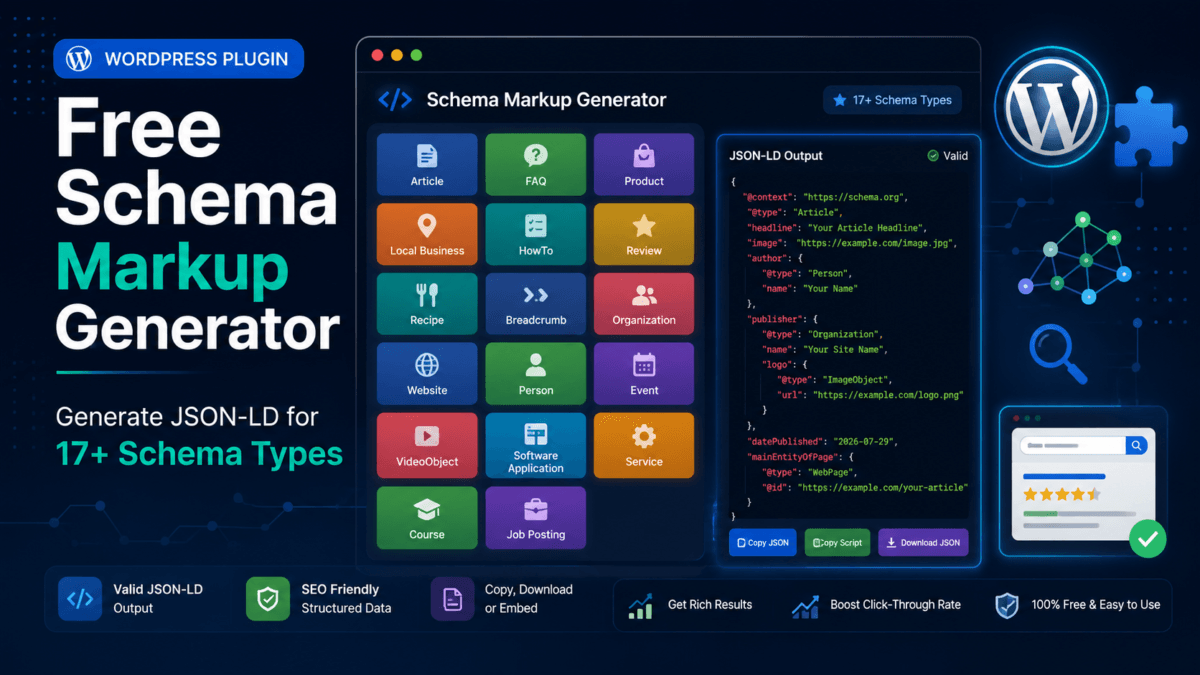
This is Schema Markup Generator free & privacy-first covering 17 common schema types: Article, FAQ, Product, LocalBusiness, HowTo, Review, Recipe, Breadcrumb, Organization, WebSite, Person, Event, VideoObject, Software Application, Service, Course, and Job Posting. Fill in a form, check real-time field validation, and copy valid JSON-LD straight into your page’s .
Schema Markup Generator Free
What is Schema Markup in SEO?
Schema markup (also known as structured data) is a standardized code format that you add to your website to help search engines like Google, Bing, and Yahoo better understand your content.
While regular HTML tells a browser how your content should look to human visitors, schema markup tells search engine crawlers what your content actually means. For example, without schema, a search engine might see “$29.99” as just a plain number; with Product schema, it recognizes it explicitly as the price of an item currently in stock.
By translating your content into a structured vocabulary (defined at Schema.org), you help search engines display enhanced search listings known as Rich Results or Rich Snippets—such as review star ratings, FAQ accordions, recipe cooking times, or event dates directly on the search engine results page.
Why I Built This Instead of Using an Existing Generator
Most schema generators online fall into two categories: bare-bones tools that only handle one schema type (usually FAQ), or bloated ones stuffed with ads that make you dig through popups just to find a copy button. Neither fit what I actually needed while managing my own sites—I wanted one clean tool that covered every schema type I regularly touch, with validation that tells me what’s actually missing instead of just spitting out code and hoping for the best.
A few design decisions worth highlighting:
- Checks field completeness, not live Google eligibility: I want to be upfront about this: no tool running in your browser can guarantee that Google will show a rich result for your page. Rich snippets depend on Google’s automated crawlers, site trust signals, and content policy compliance. What this tool does do is flag missing required or recommended properties for each schema type.
- Smart FAQ Quick-Importer: If you already have a list of Q&A pairs written out, you don’t have to manually fill individual fields one by one. Paste text formatted with
Q:andA:labels into the importer box, and the tool automatically parses and builds the schema array for you. - No fabricated data fields: The Product schema, for instance, only adds an
aggregateRatingblock if you fill in both an average rating and a review count—it won’t let you output one without the other. A schema with a fake or partial rating is worse than no rating schema at all. - 100% Browser-Based & Privacy-Friendly: Everything runs entirely in your browser using local JavaScript. No data is sent to an external server, nothing is logged, and no analytics track what you type. If you are cautious about pasting product prices or local business details into a third-party tool, rest assured: your data never leaves your device.
- Flexible Exporting & Dark Mode: You can copy raw JSON, grab the pre-wrapped
<script type="application/ld+json">block, or download a.jsonfile directly. Plus, there is a built-in dark mode toggle for comfortable late-night site optimization.
What Each Schema Type Is Actually For
- Article — Blog posts, news, and editorial guides. Adds author, publisher, and date metadata.
- FAQ — Question-and-answer blocks visible on the page.
- Product — E-commerce items with price, currency, availability, and optional rating data.
- LocalBusiness — Physical stores or local service businesses (address, phone, hours, and geo-coordinates).
- HowTo — Step-by-step instructional tutorials.
- Review — Standalone reviews for products, services, or organizations.
- Recipe — Ingredients, instructions, cooking times, and nutrition info.
- Breadcrumb — Navigation hierarchies that help search engines display breadcrumb paths in SERPs.
- Organization & WebSite — Core site identity markup, including publisher logos, social profile links (
sameAs), and internal site search actions. - Person — Author profiles, bio pages, and social links.
- Event — Time-bound events (in-person, online, or mixed) with ticket offer details.
- VideoObject — Embedded video content with thumbnails, durations, and upload dates.
- Software Application — Desktop software, mobile apps, or SaaS products.
- Service — Business or professional service offerings.
- Course — Educational courses and training programs.
- Job Posting — Open employment opportunities (includes job locations and annual salary ranges).
A Quick Note on FAQ and HowTo Rich Results
Google has tightened how often it displays FAQ and HowTo rich snippets in search results over the past couple of years—they have become more selective, and for many query types, these snippets show up far less frequently than they used to.
Adding structured markup is still well worth the effort: it gives search engines an accurate, structured representation of your content and costs you nothing. Just treat schema markup as good technical SEO hygiene rather than a guaranteed visual shortcut in search listings.
How to Use It on Your Site
- Use the search bar or tabs to pick the schema type matching your content.
- Fill in the fields (or use the FAQ Importer for rapid Q&A setup).
- Check the validation panel below the form—it will flag missing required fields and suggest recommended additions.
- Click Copy script tag (or Download JSON).
- Paste the snippet into your page’s
<head>section. - Test your live URL with Google’s Rich Results Test and the Schema Markup Validator before considering it done.
If you’re using WordPress, you can paste the script into your theme’s header settings, a custom code block, or a header/footer scripts plugin.
Have a schema type you’d like to see added, or found a field that needs tweaking? Let me know in the comments!

Ayush Singhal is the founder and chief editor of TechMitra.in — a tech hub dedicated to simplifying gadgets, AI tools, and smart innovations for everyday users. With over 15 years of business experience, a Bachelor of Computer Applications (BCA) degree, and 5 years of hands-on experience running an electronics retail shop, Ayush brings real-world gadget knowledge and a genuine passion for emerging technology.
At TechMitra, he covers everything from AI breakthroughs and gadget reviews to app guides, mobile tips, and digital how-tos. His goal is simple — to make tech easy, useful, and enjoyable for everyone. When he’s not testing the latest devices or exploring AI trends, Ayush spends his time crafting tutorials that help readers make smarter digital choices.
📍 Based in Lucknow, India
💡 Focus Areas: Tech News • AI Tools • Gadgets • Digital How-Tos
📧 Contact: Get in touch →
🔗 Full Bio: https://techmitra.in/about-us/