

Image Disclaimer: AI-generated graphic for educational/illustrative purposes. All product names, logos, and brands are property of their respective owners.
Table of Contents
Introduction
Search Engine Optimization (SEO) is no longer about keyword stuffing or backlink chasing — it’s about creating high-quality, structured, and understandable content that both Google and AI systems can interpret.
For me, on-page SEO has always been the most powerful and controllable part of digital visibility. With the help of the Rank Math SEO plugin — using only the free version — I’ve consistently achieved fast and stable rankings, often appearing on Google’s first page within hours of publishing.
But SEO is evolving. Today, your content doesn’t just need to rank on Google — it also needs to be optimized for AI tools and LLMs (Large Language Models) that power modern search assistants. And Rank Math is already equipped for this future, even in its free tier.
Also Read: On-Page SEO vs Off-Page SEO: What’s the Difference and Why Both Matter?
What Makes On Page SEO So Important
On-page SEO ensures your content is optimized for both search engines and readers. It helps Google understand your topic, structure, and purpose.
Key on-page elements include:
- Keyword placement in titles, headings, and paragraphs
- Meta tags and descriptions
- Internal links and structured schema
- Image optimization and alt text
- Readable content and mobile responsiveness
Without strong on-page SEO, even great content can remain invisible. That’s why Rank Math acts as your real-time SEO assistant — guiding you to optimize every detail that matters.
Why I Use Rank Math Plugin Over Other SEO Plugins
Before switching to Rank Math, I tried other tools like Yoast and AIOSEO — but Rank Math felt like the perfect balance of simplicity and depth.
| Feature | Why Rank Math Wins |
|---|---|
| Ease of Use | Clean, visual indicators (red → green) for instant feedback |
| Built-in Tools | Schema, redirections, analytics, and instant indexing — all in one plugin |
| Performance | Lightweight plugin that keeps your site fast and Core Web Vitals healthy |
It’s powerful yet beginner-friendly — which is why it’s trusted by professionals, bloggers, and agencies alike.
A Note on the Version I Use: 100% Free
I’ve achieved every result in this article using only the free version of Rank Math — no PRO upgrade. Here’s exactly what’s included free, so you know what to expect:
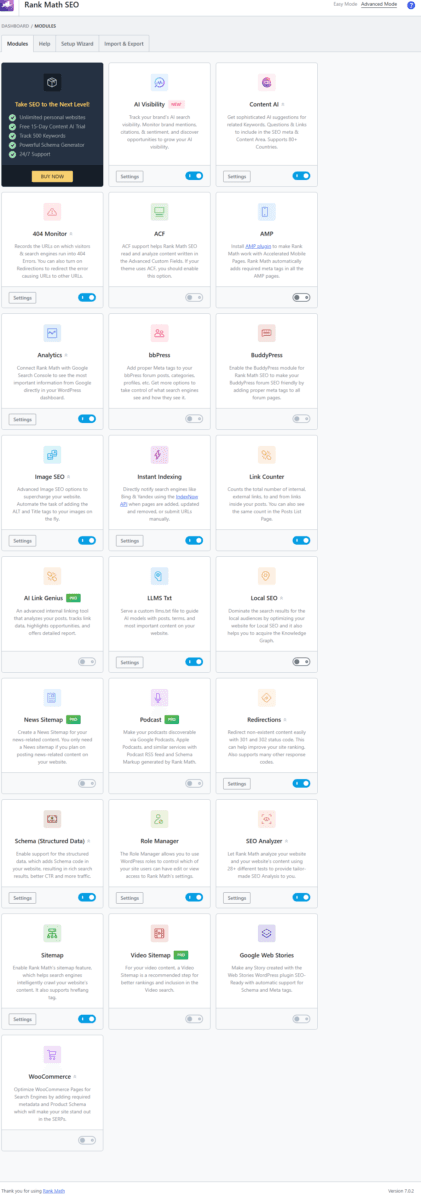
Free in Rank Math:
- SEO Analyzer (28+ tests, full site audit)
- Schema Generator (1 schema type per page)
- Up to 5 focus keywords per post
- Table of Contents block (native Gutenberg)
- FAQ block (native Gutenberg)
- Instant Indexing (Bing/IndexNow)
- 404 Monitor
- Redirections
- Google Web Stories support
- Sitemap
- Image SEO / ALT automation
- Link Counter
- Analytics (Search Console integration)
PRO-only (not used in this article):
- AI Link Genius
- News Sitemap
- Podcast Sitemap
- Video Sitemap
- Content AI (free version only offers a 15-day trial, not permanent free access)
For anyone starting out, the free version is more than enough to perform complete on-page SEO and even prepare your content for AI-driven visibility (LLMO).
Also Read: AI Performance Tab in Bing Webmaster Tools: What It Is & Why It Matters for SEO in 2026
Step-by-Step: How Rank Math Helps Optimize a Page
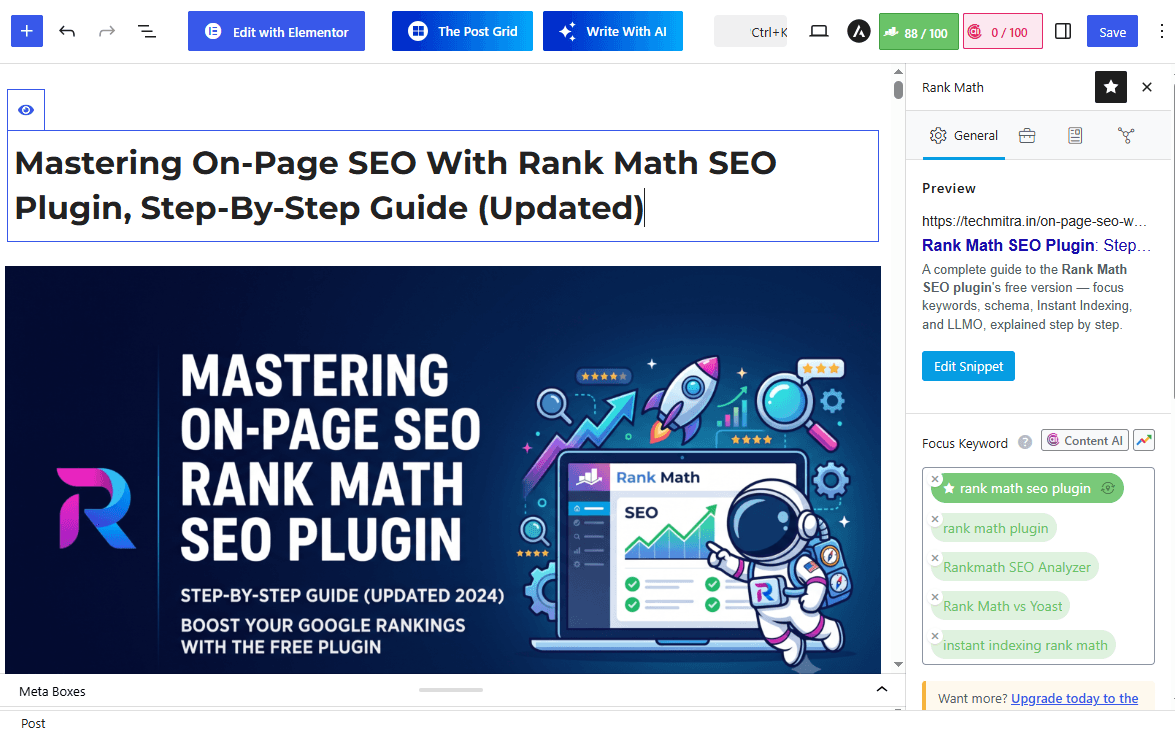
Step 1: Set the Focus Keyword
Rank Math’s free version lets you add up to 5 focus keywords per article. Once added, it automatically scans your content for:
- Keyword placement in title, URL, and meta description
- Keyword usage in headings and body text
- Keyword density and distribution
This keeps your content natural and keyword-rich without triggering over-optimization penalties.
Step 2: Optimize Title & Meta Description
Rank Math’s snippet editor shows how your content appears in Google results. You can adjust:
- SEO title and meta description
- Mobile vs desktop previews
- Character length and keyword inclusion
These small tweaks can significantly increase CTR (Click-Through Rate).
Step 3: On-Page SEO Checklist
Rank Math runs a real-time, color-coded analysis inside the editor, broken into four categories. Here’s what it actually checks in each:
Basic SEO
- Focus Keyword used in the SEO title, meta description, URL, and within the first 10% of the content
- Focus Keyword found in the body content and in subheadings
- Keyword density (Rank Math flags it if too low or too high)
- Content length — it explicitly praises longer, well-developed content (I’ve seen it call out “Content is 3000+ words long, good job!”)
- At least one image with the Focus Keyword as alt text
- Internal and external links present, including at least one DoFollow external link to a credible source
- Whether you’ve reused the same Focus Keyword in an earlier post (it flags duplicate keyword targeting)
Title Readability
- Focus Keyword at the beginning of the SEO title
- A positive or negative sentiment word in the title
- At least one “power word” in the title
- A number in the SEO title
Content Readability
- Use of a Table of Contents to break down long-form content
- Short paragraphs (easier to scan)
- Presence of images and/or video in the content
In practice, you won’t get a perfect score on every single check — for example, titles don’t always need both a sentiment word and a number to perform well. But the more green checks you clear, the more structured and complete your content becomes, both for readers and for search/AI crawlers.
Every green light means your content is one step closer to ranking better — and faster.
Step 4: Schema & Rich Results
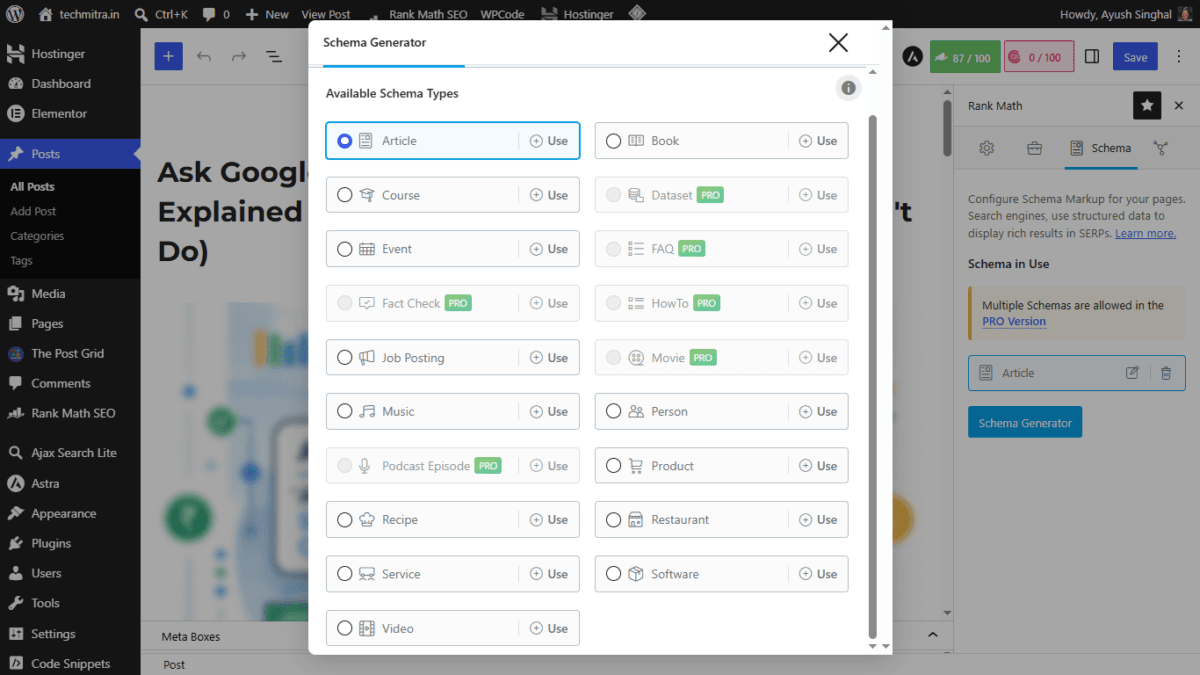
Structured data (schema) helps Google and AI understand your content contextually. Rank Math’s Schema Generator — free version — lets you apply one schema type per page, and the free tier gives you a real, usable set of types to choose from. (For a deeper walkthrough of setting this up, see my dedicated guide: Free Schema Markup Generator: How to Set It Up with Rank Math.)
Free schema types include: Article, Book, Course, Event, Job Posting, Music, Person, Product, Recipe, Restaurant, Service, Software, Video, and a few others.
PRO-only schema types: FAQ, HowTo, Dataset, Fact Check, Movie, and Podcast Episode are locked behind Rank Math PRO — you’ll see these greyed out with a “PRO” tag in the Schema Generator on the free version.
So while the article’s LLMO section talks about FAQ schema helping AI tools pick out direct answers, it’s worth being upfront: FAQ schema itself is a PRO feature. On free, you can still add an FAQ block visually in Gutenberg (which helps readability and structure), but it won’t carry the FAQPage schema markup unless you upgrade.
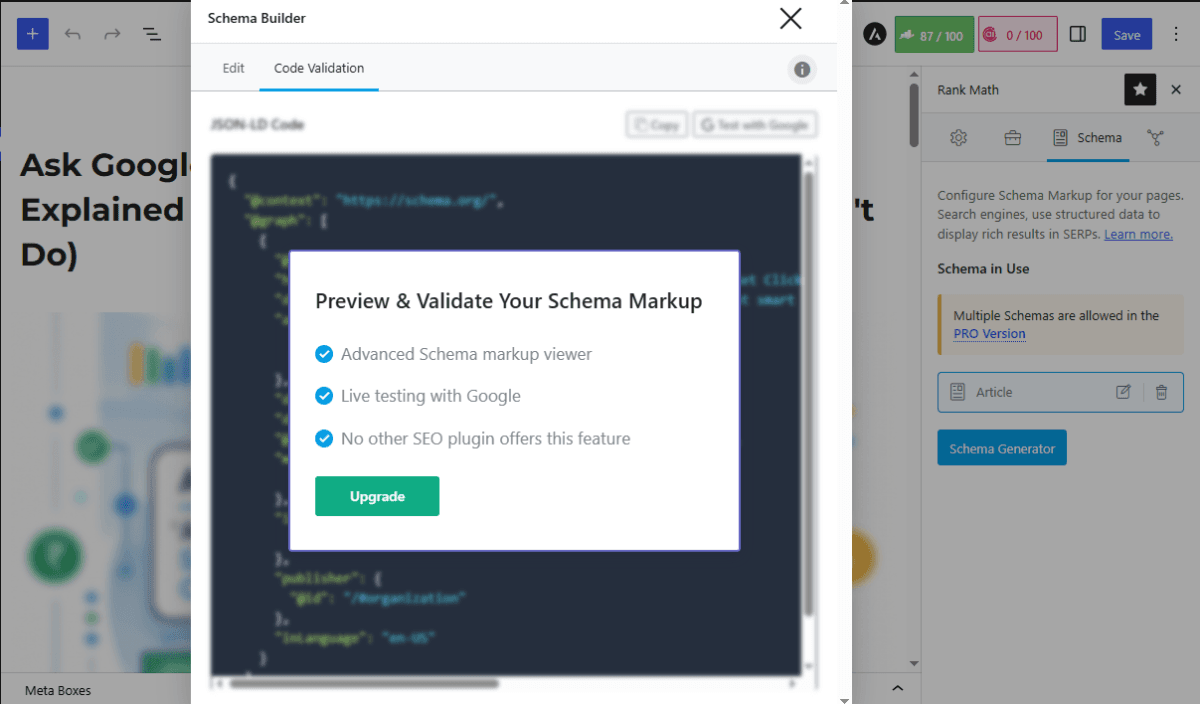
One more free-tier limit: the “Preview & Validate” live schema tester (which checks your JSON-LD code and tests it directly with Google) is also PRO-only. On free, you can still view and copy your raw JSON-LD code — you just won’t get the built-in live validation, so it’s worth testing your schema separately with Google’s Rich Results Test.
Even with these limits, one solid schema type per page — Article schema alone — is enough to establish the structured-data foundation Google and AI systems rely on for understanding your content.
Step 5: Advanced Robots Meta Controls (and More)
Tucked in the Advanced tab of Rank Math’s sidebar is a per-post Robots Meta panel. Most of these controls aren’t unique to Rank Math — Yoast’s free version offers similar basics — but it’s still an underused part of on-page SEO worth understanding properly:
- Index / No Index — decide whether a specific page or post should be indexed by search engines at all (useful for thank-you pages, internal drafts, or thin category pages you don’t want ranking) — also free in Yoast
- Follow / Nofollow — control whether search engines should follow the links on that page — also free in Yoast
- No Archive — prevent search engines from showing a cached copy of the page
- No Image Index — stop images on that page from being indexed separately
- No Snippet — block Google from showing a text snippet/preview for that page in search results
- Max Snippet / Max Video Preview / Max Image Preview — fine-tune how much text, video, or image preview Google is allowed to show in search results (defaults to unlimited, shown as
-1, with Max Image Preview offering a size option like “Large”)
Scroll a little further in the same Advanced tab and you’ll find a few more per-post controls:
- Canonical URL — manually set which URL is the “master” version of a page, which prevents duplicate-content issues if the same content is accessible from more than one URL — also free in Yoast
- Breadcrumb Title — override the title shown in your site’s breadcrumb navigation for that specific page, independent of the SEO title — also free in Yoast
- Redirect (per-post) — set up a redirect for that exact post or page right from the editor, without needing to go into the separate Redirections module. This one is a real Rank Math advantage — Yoast’s free version has no redirect functionality at all, per-post or otherwise; it’s a Premium-only feature there.
This matters more than it looks. Most publishers only think about getting pages indexed — but controlling what shouldn’t be indexed (duplicate content, low-value pages, internal utility pages), setting the correct canonical URL, and having a quick per-post redirect option are all things that keep your site’s overall SEO quality high. They also affect how much of your content shows up in AI-generated answers, since “No Snippet” and the “Max Preview” controls apply directly to how much text AI-powered search summaries can pull from your page.
Step 6: Technical Maintenance
Rank Math includes free tools that most competing plugins charge extra for:
- 404 Monitor — find broken links
- Redirection Manager — I’ve used this extensively and it works perfectly and instantly; redirects apply the moment you save them
- Analytics Dashboard — view keyword performance via Search Console
- Instant Indexing — works reliably with Bing/IndexNow in my experience, notifying search engines the moment a page is published or updated
Together, these keep your site technically healthy and optimized without needing a paid plan.
Instant Indexing Rank math: What It Is and How It Helps ?
What Is Instant Indexing?
Normally, when you publish or update a page, search engines don’t see it right away — they have to crawl your site on their own schedule, which can take anywhere from a few hours to several days. Instant Indexing removes that wait by actively pushing your URL to search engines the moment it changes, instead of passively waiting to be crawled.
This matters most for time-sensitive content — news, reviews, offers, trending topics — where being indexed first can be the difference between ranking #1 or getting buried under sites that covered the same story a day later.
How Rank Math Handles It
Rank Math’s free version includes an Instant Indexing module built on the IndexNow protocol — an open initiative backed by Microsoft (Bing) and Yandex that lets a site notify participating search engines the instant a URL is published, updated, or deleted.
Here’s what happens under the hood:
- Rank Math automatically generates and hosts a unique API key for your site — no manual setup, no Bing Webmaster Tools account needed
- When you publish or update a post, page, or media file (based on the post types you select), Rank Math instantly pings the IndexNow API in the background
- That single ping is shared across all IndexNow-participating search engines, so you don’t have to submit separately to each one
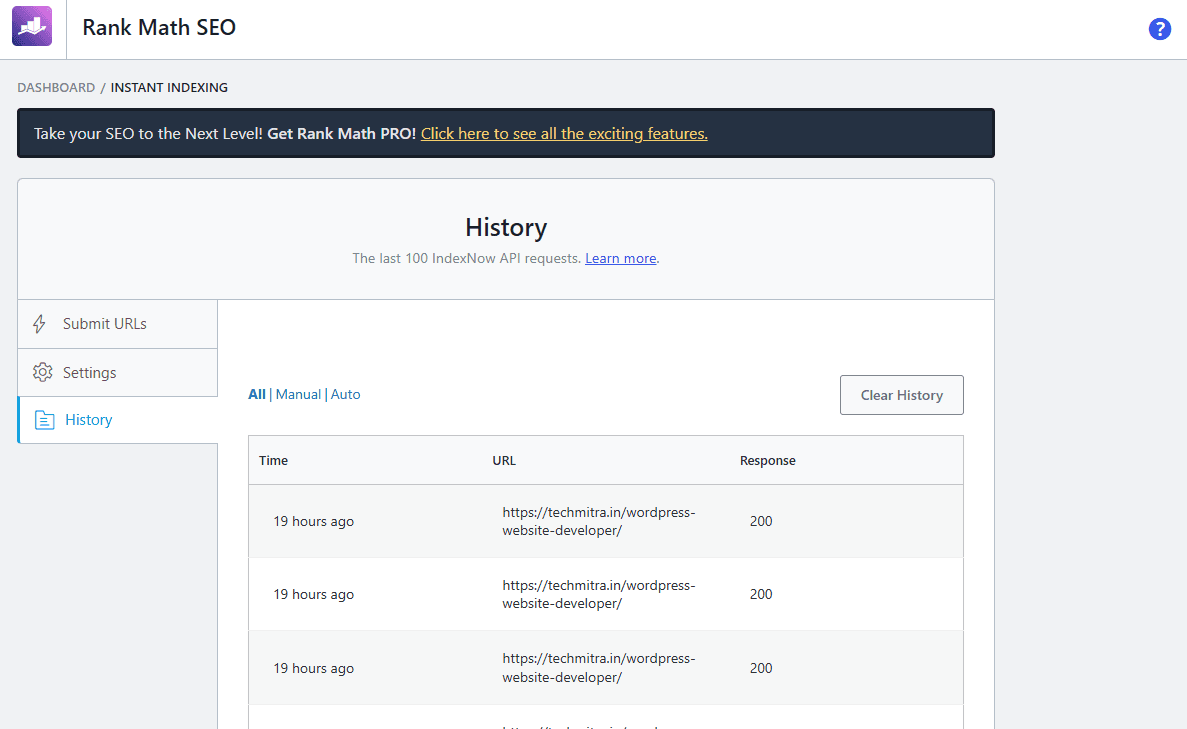
- You also get a Submit URLs option for manual/bulk submission, and a History log showing the response status (200 = successfully submitted, 202 = accepted and pending key verification) for every URL you’ve sent
In my own use, this has worked exactly as advertised — the moment I hit publish, I can see the submission go through in the History tab, and Bing reflects updated/new content noticeably faster than it did before I enabled it.
A Real Gotcha: Auto-Save Can Trigger Premature Submissions
Here’s something the documentation doesn’t make obvious enough: if you’re writing directly in the Gutenberg editor with a post already set to “Published,” every autosave or manual save while you’re still editing also pings IndexNow — not just your final publish. Since Gutenberg autosaves frequently, this means a half-finished article can get submitted to Bing multiple times before you’re actually done writing it.
To avoid this, I generally do one of two things:
- Keep the post in Draft status while writing, and only switch it to Published once the article is fully ready — Rank Math won’t submit draft posts to IndexNow, so you control exactly when the first (and real) submission happens
- Use the Schedule feature to set a future publish date/time instead of publishing immediately — this way I can keep refining the post right up until the scheduled time, and the IndexNow ping only fires when it actually goes live
Either approach keeps your Instant Indexing submissions clean and meaningful, instead of pinging search engines with an incomplete draft multiple times.
Why This Matters for On-Page SEO and LLMO
Instant Indexing isn’t just about Google-style rankings — it also feeds the same freshness signal that AI search tools rely on. Faster indexing means AI crawlers and search assistants that pull from Bing’s index (which several LLM-powered tools do) pick up your updated, structured content sooner, reinforcing the LLMO strategy covered later in this article.
It’s a completely free feature, requires no coding or technical setup, and is one of the more underrated tools in Rank Math’s free tier.
Check Rank Math’s own IndexNow/Instant Indexing documentation
How Rank Math’s SEO Score Improves Writing Quality
Rank Math doesn’t just measure optimization — it teaches good writing habits.
When your score rises from 70 to 90, it means your content:
- Became more structured
- Uses keywords naturally
- Flows better for readers and search engines
It’s like having an SEO mentor inside WordPress — one that pushes you to deliver quality and clarity.
Optimizing for AI and LLMs: The Future of SEO
What Is an LLM?
LLM stands for Large Language Model — the AI engines behind tools like ChatGPT, Claude, Gemini, and Perplexity. These models scan web pages to extract useful, trustworthy, and structured information to answer user queries.
But here’s the twist: AI tools don’t crawl like Google. They mainly read and reuse specific parts of your page — clear, structured content sections like FAQs, headings, and summaries.
That’s why the new era of SEO involves LLMO — Large Language Model Optimization.
What Is LLMO?
LLMO means making your content easy for AI models to read, understand, and reuse in answers. It’s like SEO — but instead of optimizing for Google bots, you’re optimizing for AI crawlers and semantic engines.
The goal is simple:
- Write in a clear, structured way
- Use schema and FAQs to guide AI
- Provide concise answers that AIs can quote or summarize
How Rank Math Helps in LLMO (Free Version Included)
| Feature | LLMO Benefit | Free? |
|---|---|---|
| FAQ & TOC Blocks (Gutenberg) | Help AI pick direct, structured answers easily | Yes (block only — FAQPage schema is PRO) |
| Schema Generator | Adds rich data (1 type per page) for AI parsing | Yes (Article, Product, Recipe, etc. — FAQ/HowTo schema are PRO) |
| LLMs.txt File Support | Guides AI crawlers on how to interpret your site content | Yes |
| Instant Indexing | Gets new/updated pages in front of Bing’s index (and AI systems that rely on it) fast | Yes |
| Canonical URLs | Ensures AI models and search engines avoid duplicate content | Yes |
Together, these features help AI tools trust and reference your content more often in their answers — even in zero-click search results — mostly without needing a paid upgrade. The one exception worth flagging: if you specifically want FAQPage schema markup (the rich-result FAQ dropdowns you see in Google search), that’s a PRO feature. The free FAQ block still displays nicely on the page and helps readability, it just won’t carry that structured markup on its own.
Why LLMO Matters for Your Business
When AI systems like ChatGPT or Perplexity mention your website, product, or blog in their answers, you gain:
- Brand visibility without needing backlinks
- Traffic from “AI citations”
- Reputation as an authority in your niche
LLMO is the next evolution of SEO — and Rank Math’s free tier already gives you the tools to compete in it.
Also read : What Is LLM SEO? How to Get Cited by ChatGPT, Google AI, Perplexity & Copilot
Rank Math vs Yoast vs AIOSEO: How the Free Versions Compare
I switched to Rank Math after using Yoast and AIOSEO, and the difference in the free tier is significant. Here’s how they stack up on the features that actually matter for on-page SEO:
| Feature | Yoast (Free) | AIOSEO (Free) | Rank Math (Free) |
|---|---|---|---|
| Focus keywords per post | 1 only | 1 only | Up to 5 |
| Schema / structured data | Basic defaults | Basic | 1 type per page, 20+ types to choose from |
| Redirect manager | Not included (paid) | Not included (paid) | Included, free |
| 404 monitoring | Not included (paid) | Basic (paid tiers) | Included, free |
| Instant Indexing (IndexNow) | Not included | Not included | Included, free |
| Google Search Console integration | Manual setup | Manual setup | Built-in, free |
| Google Analytics integration | Not included | Not included | Built-in, free |
| Internal linking suggestions | Not included (paid) | Not included (paid) | Included, free |
| WooCommerce SEO | Paid add-on | Paid tier | Included, free |
| llms.txt file support | Free (added 2025) | Free (added 2025) | Free |
| Setup wizard | Yes | Yes | Yes |
Where Yoast Still Wins
To be fair, Yoast isn’t behind everywhere. Its readability analysis is more detailed than Rank Math’s, and its traffic-light SEO workflow is arguably the simplest for a total beginner. If you want the absolute least amount of configuration and don’t need multi-keyword tracking or deeper schema flexibility, Yoast’s free version is a perfectly reasonable choice.
One thing that’s confirmed and worth calling out clearly: Yoast’s free version does not include a redirect manager or Instant Indexing (IndexNow) support — both are Rank Math free-tier features. If broken-link cleanup and faster indexing matter to you (and for any active publisher, they should), that alone is a meaningful gap in Yoast’s free plan.
Where AIOSEO Fits
AIOSEO sits in the middle — clean interface, stable performance, and solid for a straightforward business site. But almost every feature beyond the basics (redirects, 404 monitoring, deeper schema) sits behind a paid tier, which is exactly where Rank Math gives it to you for free.
Why I Stuck With Rank Math
The deciding factor for me wasn’t any single feature — it was that Rank Math’s free version doesn’t feel like a stripped-down trial. Redirects, 404 monitoring, Instant Indexing, WooCommerce SEO, Search Console and Analytics integration, and multi-keyword tracking are all things I’d normally expect to pay for, and they’re simply switched on. For a solo publisher or small team managing multiple sites without a large tooling budget, that free-tier depth is the real advantage over Yoast and AIOSEO.
What the Rankmath SEO Analyzer Actually Caught
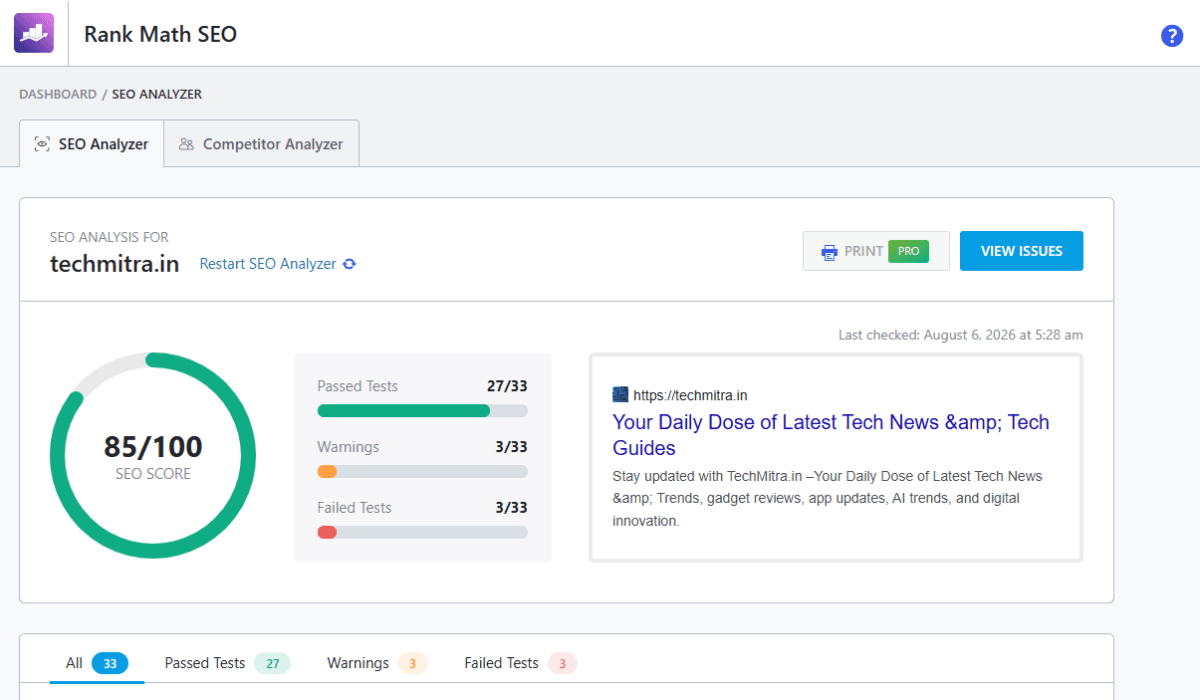
I ran Rank Math’s built-in SEO Analyzer (also free) on techmitra.in, and it’s genuinely one of the most useful features in the plugin — it doesn’t just give you a score, it tells you exactly what to fix:
- Flagged that 60 published posts don’t have the primary focus keyword in the post title
- Flagged 4 pages and 2 mail-poet pages with no focus keyword set at all
- Caught unminified JavaScript files slowing down page load
- Flagged response time at 1.11 seconds, above the recommended 0.8 seconds
- Confirmed strong marks on schema data, sitemaps, canonical tags, Search Console linkage, and OpenGraph meta
That level of specific, actionable feedback — for free — is hard to find in any other SEO plugin.
Common Rank Math Mistakes Beginners Make
Rank Math makes on-page SEO approachable, but that ease of use also causes some predictable mistakes. Here’s what to watch out for:
Chasing a 100/100 SEO score A perfect score looks satisfying, but it’s not the goal — it’s a checklist, not a ranking guarantee. Forcing every single check to turn green (adding a number to your title just because Rank Math asks for one, for example) can make content feel unnatural. Write for your reader first; let the score reflect good content, not the other way around.
Keyword stuffing Rank Math flags keyword density, but that doesn’t mean maximizing it is the goal. Repeating your focus keyword unnaturally to satisfy the “keyword found in content” checks reads poorly to actual readers and can hurt rather than help.
Choosing five unrelated focus keywords Just because the free version allows up to 5 focus keywords doesn’t mean you should use 5 unrelated ones. Pack too many disconnected topics into one post and Rank Math can’t meaningfully optimize for any of them — and neither can your content actually satisfy searches for all five. Keep your keywords tightly related to the same core topic.
Ignoring internal links It’s easy to focus on the on-page checklist and forget the bigger picture: internal linking is one of the simplest ways to help both search engines and AI crawlers understand how your content connects. A green checkmark for “internal links present” isn’t the same as actually linking to your most relevant, useful related articles.
Skipping image ALT text Rank Math can auto-generate ALT text, but it’s worth writing it yourself when the image is meaningful — a lazy or generic ALT tag (like the filename) wastes an easy, free opportunity to reinforce your focus keyword and improve accessibility at the same time.
Using multiple plugins for the same SEO task Since Rank Math already includes redirects, 404 monitoring, sitemaps, schema, and Instant Indexing for free, installing a separate redirect plugin or a separate XML sitemap plugin alongside it usually just creates conflicts (duplicate sitemaps, competing meta tags) and unnecessary bloat. Check what Rank Math already covers before adding another plugin for the same job.
Who Should Use Rank Math?
Rank Math’s free version is generous enough to suit most WordPress users, but how well it fits depends on what kind of site you’re running:
| User Type | Recommendation | Why |
|---|---|---|
| Blogger | Excellent | Multi-keyword tracking, schema, and Instant Indexing cover everything a content-focused blog needs, all for free |
| Small Business | Excellent | Local visibility, schema markup, and technical SEO tools (redirects, 404 monitoring) come built-in without hiring an SEO specialist |
| WooCommerce Store | Excellent | Free WooCommerce SEO support (product schema, breadcrumbs) is a real advantage — most competitors charge extra for this |
| News Website | Good | Solid for day-to-day publishing and Instant Indexing speed, but News Sitemap is a PRO-only feature, which serious news publishers will likely want |
| Agency | Excellent | Free version already covers most client needs, and Rank Math’s per-site pricing scales well for managing multiple sites |
| Beginner | Very Good | The setup wizard and color-coded checklist make it approachable, though the sheer number of modules can feel like a lot at first |
If your site fits comfortably into one of the “Excellent” categories, the free version alone — used the way this article describes — should be more than enough to build a strong on-page SEO foundation.
Key Takeaways
| Aspect | Rank Math Advantage (Free Version) |
|---|---|
| Keyword Optimization | Real-time tracking for up to 5 focus keywords |
| Meta & Snippets | Mobile-friendly live preview for perfect CTR |
| Schema | 1 structured data type per page, for AI + Google |
| Internal Linking | Improves crawl depth via Link Counter |
| Technical SEO | 404 Monitor, instant Redirections, Instant Indexing (Bing) |
| Site Health | Full SEO Analyzer audit with 28+ tests |
| LLMO Readiness | FAQ/TOC blocks, LLMs.txt, canonical URLs — all free |
| Google Web Stories | Fully supported in the free version |
Rank Math proves that you don’t need a PRO subscription to build a technically sound, AI-ready, high-ranking WordPress site. The free version alone — used consistently and correctly — is what’s behind every result in this article.
Frequently Asked Questions
Is Rank Math’s free version enough for good on-page SEO?
Yes. Every result in this article — including an 85/100 site-wide SEO score and multiple first-page Google rankings — was achieved using only Rank Math’s free version. It includes focus keyword tracking (up to 5), 1 schema type per page, a redirect manager, 404 monitoring, Instant Indexing, and a full SEO Analyzer audit, all at no cost.
How many focus keywords can I add in Rank Math free?
Up to 5 focus keywords per post or page in the free version. Rank Math PRO removes this cap.
Does Rank Math’s free version support schema markup?
Yes, but limited to 1 schema type per page, chosen from a set that includes Article, Product, Recipe, Event, Job Posting, Software, and several others. FAQ, HowTo, Dataset, Fact Check, Movie, and Podcast Episode schema types are PRO-only. PRO also unlocks using multiple schema types on the same page and a live schema validator that tests your markup directly with Google.
What is Instant Indexing in Rank Math, and is it free?
Instant Indexing uses the IndexNow protocol to notify Bing and Yandex the moment a page is published, updated, or deleted, instead of waiting for those search engines to crawl your site on their own schedule. It’s completely free in Rank Math, generates its own API key automatically, and requires no coding.
Does Yoast SEO offer a redirect manager or Instant Indexing in its free version?
No. Yoast’s free version does not include a redirect manager or IndexNow/Instant Indexing support — both require Yoast Premium. Rank Math includes both for free.
What is LLMO and why does it matter for a WordPress blog?
LLMO (Large Language Model Optimization) means structuring your content so AI tools like ChatGPT, Claude, Gemini, and Perplexity can easily read, understand, and cite it in their answers. Rank Math supports this with free FAQ/TOC Gutenberg blocks, schema markup, llms.txt file support, and canonical URLs.
Do I need Rank Math PRO to rank on Google’s first page?
Not necessarily. This article and the results referenced in it — including top-5 rankings without backlinks — were achieved entirely with Rank Math’s free version. PRO adds convenience features (unlimited keywords, more schema types, AI Link Genius, advanced sitemaps) but isn’t required for solid on-page SEO fundamentals.
Is Google Web Stories support free in Rank Math?
Yes, Google Web Stories support is included in Rank Math’s free version, along with the standard Sitemap module.

Ayush Singhal is the founder and chief editor of TechMitra.in — a tech hub dedicated to simplifying gadgets, AI tools, and smart innovations for everyday users. With over 15 years of business experience, a Bachelor of Computer Applications (BCA) degree, and 5 years of hands-on experience running an electronics retail shop, Ayush brings real-world gadget knowledge and a genuine passion for emerging technology.
At TechMitra, he covers everything from AI breakthroughs and gadget reviews to app guides, mobile tips, and digital how-tos. His goal is simple — to make tech easy, useful, and enjoyable for everyone. When he’s not testing the latest devices or exploring AI trends, Ayush spends his time crafting tutorials that help readers make smarter digital choices.
📍 Based in Lucknow, India
💡 Focus Areas: Tech News • AI Tools • Gadgets • Digital How-Tos
📧 Contact: Get in touch →
🔗 Full Bio: https://techmitra.in/about-us/