

Google Photos AI Remix Tool Explained: 13+ Templates, How to Use & Supported Devices
Google is quietly turning your regular photos into creative masterpieces—and the new Remix feature in Google Photos is proof of that.
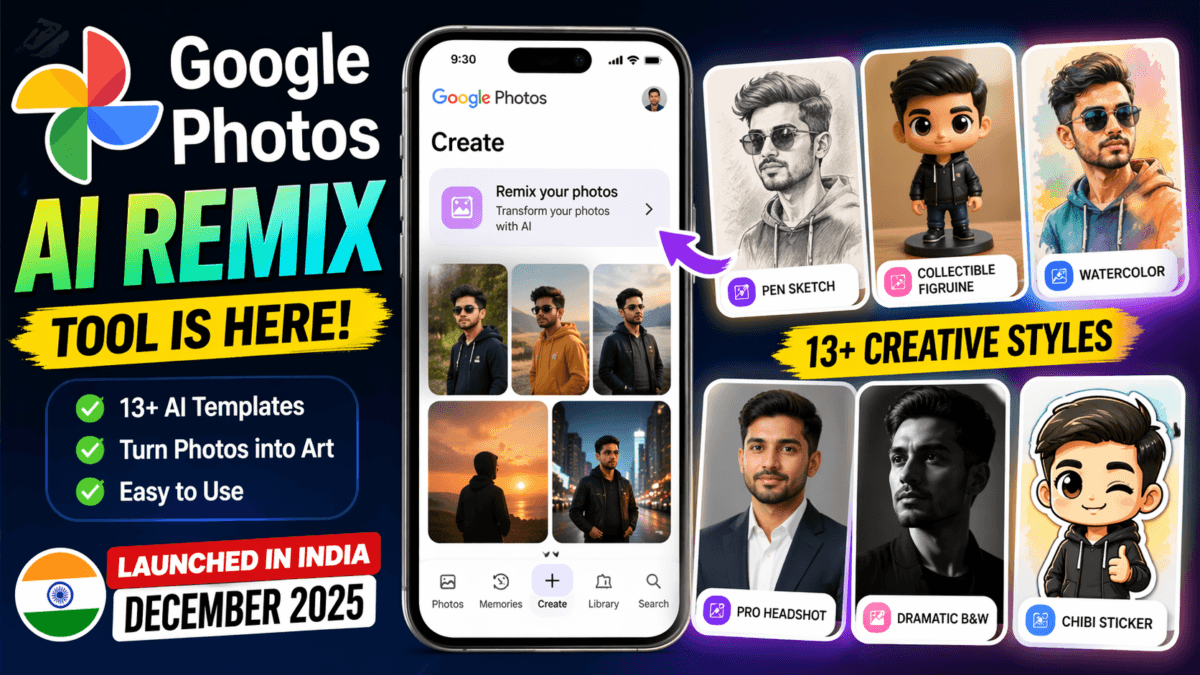
Launched in India in December 2025, this AI-powered tool lets you transform your images into sketches, collectibles, headshots, and more—within seconds.
But here’s the catch:
👉 Many users still don’t know how to use Remix properly or where to find it.
In this guide, I’ll walk you through everything—from features to templates and step-by-step usage of Google photos AI Remix tool.
Also Check : 30 Best Prompts for Gemini AI Saree Look: The Ultimate 2026 Guide
Table of Contents
What is Google Photos AI Remix Tool?
Google Photos Remix is an AI image transformation tool that converts your photos into different artistic styles using generative AI.
Instead of manually editing images, you simply:
- Select a photo
- Choose a style
- Let AI generate the result
It’s similar to AI tools like Midjourney or DALL·E, but built directly into your gallery app.
Google Photos Remix Tool Templates (All Available Styles)
Google has added ready-made AI templates, making it super easy for beginners.
Here are all the current Remix styles:
- Transform your photo into a pen sketch
- Turn into a collectible figurine
- Recreate your photo in soft watercolor paints
- Create a professional headshot
- Put me in a dramatic black & white photo
- Turn your photo into a cute chibi art style sticker
- Transform your image into a rich oil painting masterpiece
- Put me in a fashion photoshoot
- Add iconic art deco patterns
- Create a custom enamel pin
- Give my photo a sun-worn vintage look
- Add a film grain effect
- Make it look like instant film with flash
👉 These templates are what make Remix powerful—it’s not just filters, it’s AI-generated transformations.
How to Use Google Photos Remix (Step-by-Step Guide)
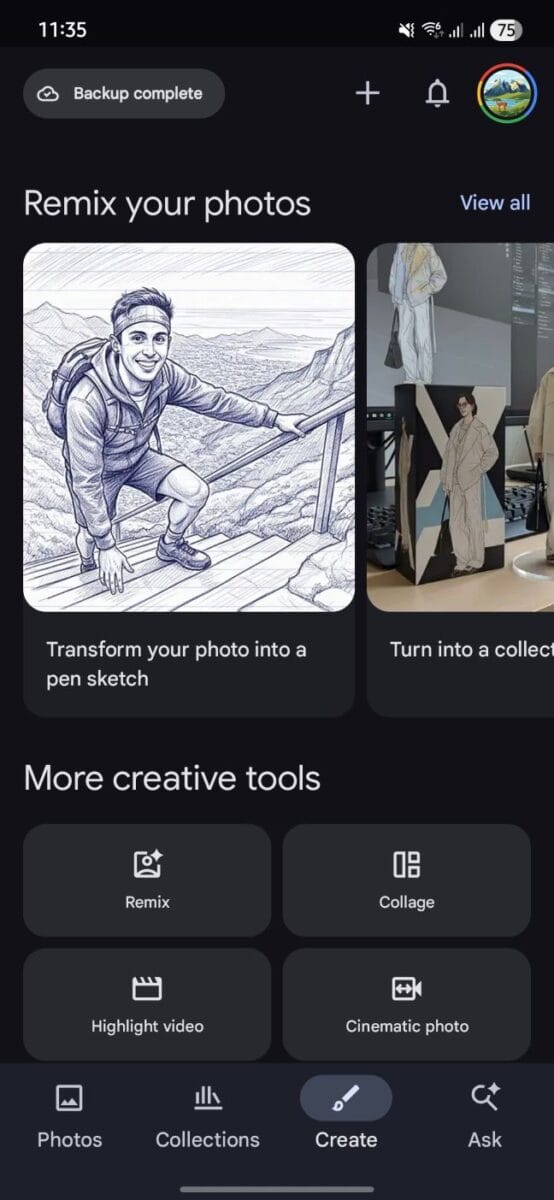
This is the most important part—and where most users get confused.
Follow these steps:
Step 1: Open Google Photos
Launch the Google Photos app on your Android phone.
Step 2: Tap on “Create”
At the bottom or top menu, tap the Create button.
Step 3: Select “Remix your photos”
👉 The first tab you’ll see is “Remix your photos”
Step 4: Choose a Template
Pick any style (like sketch, headshot, chibi, etc.)
Step 5: Select Your Photo
Choose an image from your gallery.
Step 6: Generate AI Image
Tap Generate and wait a few seconds.
Step 7: Save or Share
Download the image or share directly on social media.
Also You can check Google Photos Help for moe information
Availability of Google Photos Remix
- ✅ Available on Android smartphones
- ✅ Available on iPhone (iOS devices)
- ❌ Not available on PC / Web version of Google Photos
👉 Currently, Remix works only inside the mobile app and is not supported on desktop browsers.
👉 If you don’t see Remix:
- Update your Google Photos app
- Wait for server-side rollout
Also Check : Nano Banana AI 3D Figurines Trend: 50+ Best Prompts for Figurines, Collectibles & 3D Sculptures
Best Use Cases of Remix
Here’s where Remix really shines:
- 📸 Social media profile pictures
- 💼 LinkedIn-style professional headshots
- 🎨 Creative Instagram posts
- 🧑🎤 Fun avatars and stickers
- 🖼️ Artistic photo transformations
Pro Tips for Better Results
- Use clear, high-resolution photos
- Faces give better AI output
- Try multiple templates for best results
- Avoid blurry or dark images
- Regenerate if result is not perfect
Also Read : WhatsApp Launches Mobile Recharge Feature in India: Everything You Need to Know
FAQs
Is Google Photos Remix free?
Yes, currently it is free to use.
Is Remix available in India?
Yes, it launched in India in December 2025.
Why is Remix not showing on my phone?
It’s still rolling out. Try updating the app or wait.
Can I use Remix on iPhone?
No, currently it is only available on Android.
Does Remix need internet?
Yes, since it uses AI processing.
Also Read : Google Photos prompt-based editing Introduced in India, edit photos with text or voice using AI
Final Verdict
Google Photos Remix is one of the most exciting AI features added recently.
It turns your everyday photos into:
- Art
- Avatars
- Professional images
👉 And the best part? It’s built right into your gallery.
If you haven’t tried it yet, now is the perfect time.
TechMitra Take
This is Google’s smart move to bring AI creativity to everyday users—without needing complex tools.
If Google expands this to iOS and adds more templates, Remix could become:
👉 A serious competitor to standalone AI image apps.

Ayush Singhal is the founder and chief editor of TechMitra.in — a tech hub dedicated to simplifying gadgets, AI tools, and smart innovations for everyday users. With over 15 years of business experience, a Bachelor of Computer Applications (BCA) degree, and 5 years of hands-on experience running an electronics retail shop, Ayush brings real-world gadget knowledge and a genuine passion for emerging technology.
At TechMitra, he covers everything from AI breakthroughs and gadget reviews to app guides, mobile tips, and digital how-tos. His goal is simple — to make tech easy, useful, and enjoyable for everyone. When he’s not testing the latest devices or exploring AI trends, Ayush spends his time crafting tutorials that help readers make smarter digital choices.
📍 Based in Lucknow, India
💡 Focus Areas: Tech News • AI Tools • Gadgets • Digital How-Tos
📧 Contact: Get in touch →
🔗 Full Bio: https://techmitra.in/about-us/