
Free llms txt Generator: Build a Curated File for AI Search (2026)
🛠️ More Free Webmaster & SEO Tools on TechMitra
Building and optimizing your site? Check out our other privacy-friendly, browser-based tools:
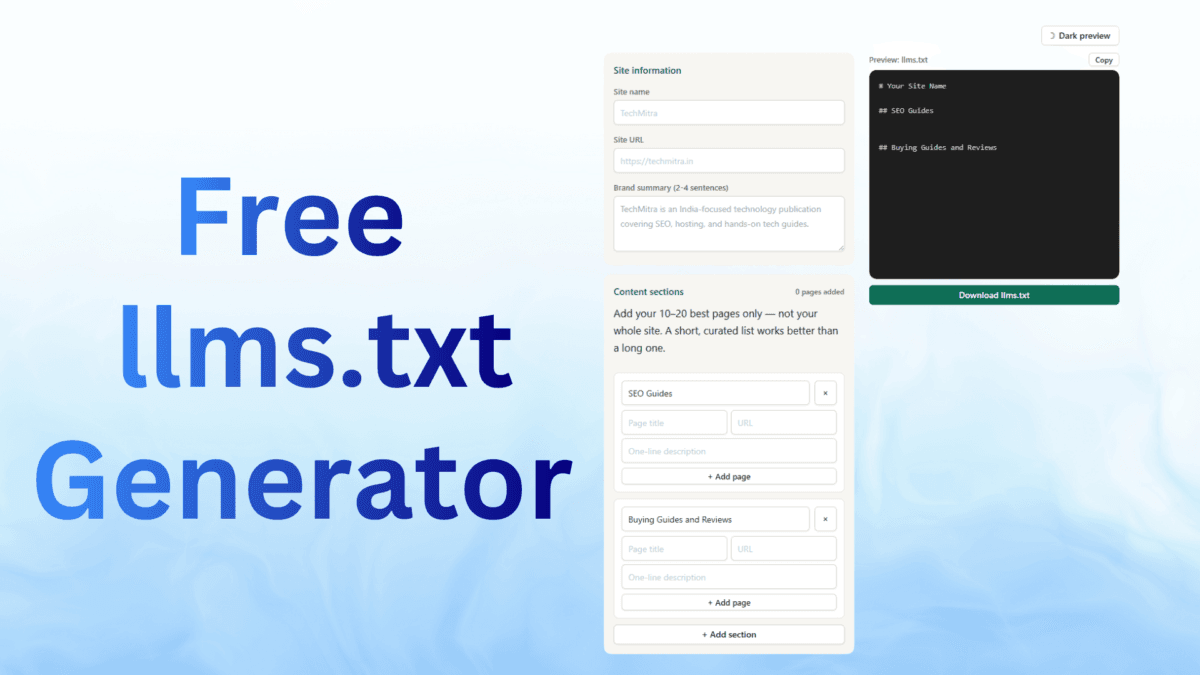
Use the tool below to build a properly curated llms.txt file for your website — a short, structured Markdown file that helps AI tools like ChatGPT, Perplexity, and Claude quickly understand what your site is and which pages matter most.
Add your 10–20 best pages only — not your whole site. A short, curated list works better than a long one.
Generated in your browser. Nothing is saved or sent anywhere.
What is an llms.txt File?
llms.txt is a plain Markdown file placed at your website’s root (yoursite.com/llms.txt) that gives AI systems a short, curated summary of what your site is and which pages matter most — cutting through the noise of navigation menus, ads, and cookie banners that dominate a normal webpage.
Proposed by Jeremy Howard of Answer.AI in 2024, it’s a voluntary community convention, not an official W3C or IETF standard. Adoption has grown quickly through 2026, with companies like Anthropic, Stripe, and Cloudflare publishing one.
For the full explanation — including how AI tools actually use this file, and what schema markup does and doesn’t do for AI citations — see our complete LLM SEO guide.
Why Not Just Use an Auto-Generated Version?
Many WordPress SEO and hosting plugins (Rank Math, Yoast, and various hosting toolkits) now auto-generate an llms.txt file for you. In practice, most of these versions miss the point of the format entirely — they dump a near-complete list of every post on your site, with no brand summary, no curation, and no topical grouping. That’s effectively a sitemap wearing a Markdown costume, and it defeats the purpose of a file meant to be a short, skimmable briefing.
This tool does the opposite: it only includes what you deliberately add. This isn’t just a plugin problem, either — several dedicated “llms.txt generator” websites exist too, and most of them work exactly like Rank Math or Hostinger’s built-in version: point them at your site, they crawl every page, and hand back a large, auto-summarized list. It’s the same crawl-and-dump approach wearing a nicer interface, not a different solution. A good llms.txt file doesn’t just list your pages — it signals what you’re actually credible on. That’s a judgment call only you can make about your own content, not something a crawler can infer. This tool is also free with no signup, no account, and no upsell — what you enter stays in your browser.
Also Read : What is SEO, What Are Its Different Types And Its Benefits? (2026 Guide)
How to Use This Tool
- Enter your site name and URL.
- Write a short brand summary — two to four sentences on what your site does and who it’s for. This is the single most important part of the file, and the part every auto-generated version skips.
- Add sections for each topic area of your site (for example, “SEO Guides,” “Buying Guides,” “AI Tutorials”) and list your 10–20 best pages underneath — not everything you’ve ever published, just your strongest, most representative content.
Why 10–20 pages, not everything?
An AI model reading your llms.txt file is trying to answer one question fast: what is this site actually good at, and where should I look? A file with 500 links doesn’t answer that any better than the model just crawling your site directly — it’s the same amount of noise, just in Markdown instead of HTML. A file with 10–20 links, grouped by topic, answers it immediately.
There’s also a practical limit behind this: AI models process a limited amount of text at once, and a huge llms.txt file competes for that same limited space as everything else the model is trying to read. Every additional weak or repetitive link pushes out room that could go toward better context for your best content. Ten to twenty genuinely strong pages, chosen deliberately, do more work than a hundred pages chosen by default.
If you’re worried about leaving content out, that’s what a separate llms-full.txt file is for — it can hold the complete text of your most critical articles, useful for documentation or text-heavy sites, while llms.txt stays the short, curated “start here” version.
One honest caveat worth keeping in mind: llms.txt is a shortcut for AI crawlers to understand your site faster, not a ranking hack. It doesn’t guarantee your content gets cited or included in AI-generated answers — that still depends on the quality and authority of the content itself. 4. Copy or download the generated file. 5. Upload it to your website’s root directory so it’s reachable at yoursite.com/llms.txt. 6. Disable any auto-generated llms.txt from your SEO or hosting plugin, so it doesn’t silently overwrite the file you just uploaded.
A Good llms.txt File Structure
# Your Site or Brand Name

> A two-to-four sentence summary of what your site does and who it's for.

## Key Pages

- [Page Title](https://yoursite.com/page-url/): One-line description
- [Page Title](https://yoursite.com/page-url/): One-line description

## Guides

- [Guide Title](https://yoursite.com/guide-url/): One-line description
For larger sites, a companion llms-full.txt can list every page in more depth — this tool focuses on the curated “start here” version, which matters more for how AI tools actually use the file.
FAQs
Q1: Is llms.txt required for SEO?
No — it’s a voluntary convention, not an enforced standard. It won’t fix weak or thin content, but it costs nothing to add and may help AI tools understand your site faster.
Q2: How many pages should I include?
10–20 is the general guidance — a curated shortlist of your strongest content, not a full site listing.
Q3: Where do I upload the file?
To your website’s root directory, so it’s reachable directly at yoursite.com/llms.txt.
Q4: Does this tool store my data?
No — everything is generated directly in your browser. Nothing you enter is saved or sent anywhere; only you can copy or download the result.
Q5: Should my llms.txt file be indexed by Google?
No — it’s meant for AI models, not traditional search engines, so it’s generally set to noindex. Just make sure AI crawlers like GPTBot and ClaudeBot can still access it; noindex only affects search engine indexing, not crawler access.

Ayush Singhal is the founder and chief editor of TechMitra.in — a tech hub dedicated to simplifying gadgets, AI tools, and smart innovations for everyday users. With over 15 years of business experience, a Bachelor of Computer Applications (BCA) degree, and 5 years of hands-on experience running an electronics retail shop, Ayush brings real-world gadget knowledge and a genuine passion for emerging technology.
At TechMitra, he covers everything from AI breakthroughs and gadget reviews to app guides, mobile tips, and digital how-tos. His goal is simple — to make tech easy, useful, and enjoyable for everyone. When he’s not testing the latest devices or exploring AI trends, Ayush spends his time crafting tutorials that help readers make smarter digital choices.
📍 Based in Lucknow, India
💡 Focus Areas: Tech News • AI Tools • Gadgets • Digital How-Tos
📧 Contact: Get in touch →
🔗 Full Bio: https://techmitra.in/about-us/