

After spending 1.5 years actually using AI tools day to day, I’ve learned what separates a mediocre AI response from a genuinely useful one — and for quizzes, it almost always comes down to the prompt. A vague request like “make a quiz on the Vedic age” gets you a vague, generic quiz. A specific one — board, class, chapter, format, difficulty — gets you something a child could genuinely study from.
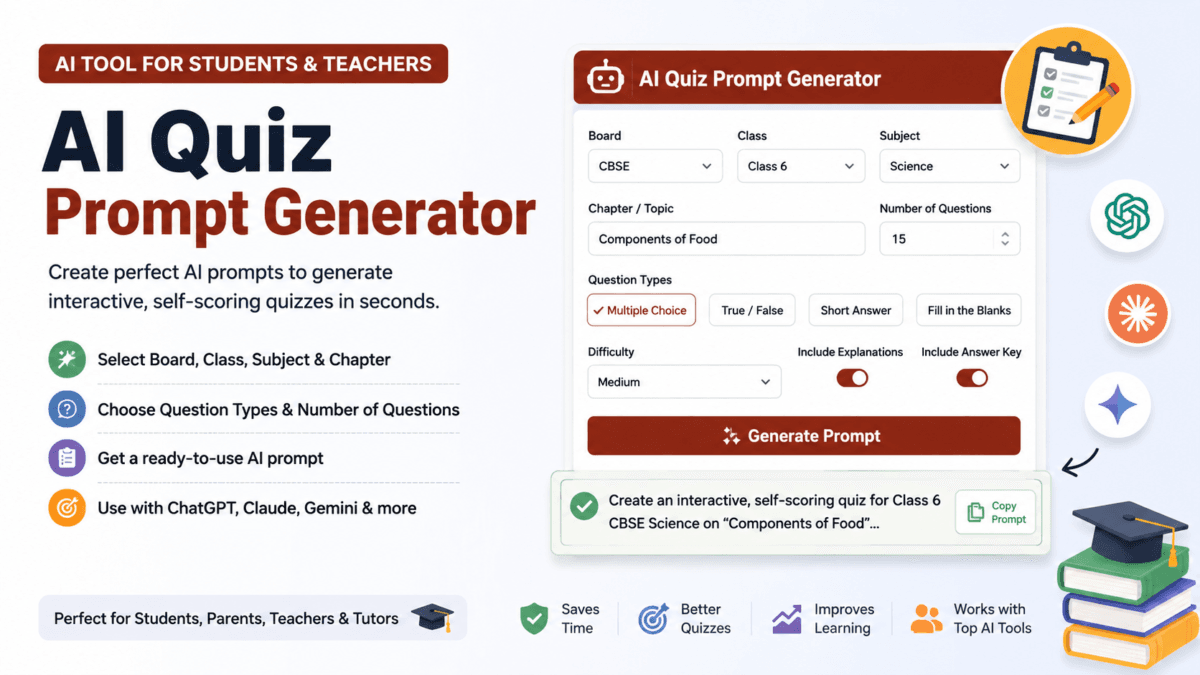
Most parents and teachers haven’t spent 1.5 years learning that. They shouldn’t have to. So I built a free tool that does the prompt-writing for you: pick your details from a form, and it generates a ready-to-paste AI prompt, formatted the way I’ve learned actually works.
I looked around before building this, and there’s no shortage of “AI quiz generator” apps for Indian boards already — several of them are genuinely more powerful than what I’ve built here, generating a complete quiz or paper directly with answer keys and PDF export. But nearly all of them ask you to sign up first, and most meter usage behind credits or a subscription once you go past a handful of free papers. If you already have Claude, Gemini, or ChatGPT open in another tab, creating a whole new account just to get a quiz prompt is a step you shouldn’t need. That’s the specific gap this tool fills — no account, no credits, no cost, nothing saved anywhere. You fill a form, you get a prompt, you paste it into the AI you already use.
Try the AI Quiz Generator Prompt Tool
AI quiz generator
Create a ready-to-use AI prompt for generating interactive quizzes for CBSE, ICSE, ISC, IB, IGCSE and State Board students. Pick your details below — get a prompt to paste into Claude, Gemini, or ChatGPT.
Paste this into Claude, Gemini, or ChatGPT. Always cross-check facts against your textbook before using for exam prep.
Create a ready-to-use AI prompt for generating interactive quizzes for CBSE, ICSE, ISC, IB, IGCSE and State Board students — just fill in the fields below and copy the result into Claude, Gemini, or ChatGPT.
Why I built this
I wrote about this exact idea a few weeks ago, after testing Claude AI to build an interactive, self-scoring quiz for my daughter’s ICSE Class 6 History chapter. That article’s core tip was simple: be specific in your prompt. Name the board, the class, the chapter, the format you want.
That advice is easy to write and hard to actually apply if you don’t already know what a good prompt looks like. So instead of just telling readers to “be specific,” I built a form that forces specificity for them — the tool asks the questions I’d normally ask myself before prompting an AI, then assembles the answer into a proper prompt automatically.
What the tool actually does
You fill in six things:
- Board — CBSE, ICSE, ISC, State Board, IB, IGCSE, or type your own
- Class — 1 through 12
- Subject — the common ones are listed, or type a custom subject
- Chapter or topic name — exactly as it appears in the textbook
- Difficulty — Easy, Medium, Hard, or Mixed
- Question formats — Multiple choice, True/False, Fill in the blanks, Matching, Short answer (pick as many as you want)
There are also two extra controls worth knowing about:
Question source. By default, the tool tells the AI to draw on general syllabus knowledge. But if you select “My textbook / chapter content,” a text box appears where you can paste the actual chapter text — a paragraph, a full page, whatever you have. The generated prompt then instructs the AI to build questions strictly from that pasted text, not from its own general knowledge. This matters because it keeps the quiz tightly matched to your child’s specific textbook edition, rather than a generic version of the topic that might use different terms or leave out details your child’s book covers.
Interactive vs. worksheet toggle. Check the box and the prompt asks for a self-scoring, interactive quiz — the kind I covered in my Claude AI test. Uncheck it, and the prompt instead asks for a clean, printable worksheet with an answer key, which is more useful if you want something to hand out on paper.
Once you hit Generate prompt, everything above gets assembled into a structured prompt, and a Copy button lets you grab it in one click — ready to paste directly into Claude, Gemini, or ChatGPT.
An example
Say you fill in: CBSE, Class 6, Science, chapter “Components of Food,” Medium difficulty, Multiple Choice + True/False, interactive quiz on, explanations on. The tool produces a prompt roughly like this:
Generate an interactive, self-scoring quiz for Class 6 CBSE board, Subject – Science, Chapter – “Components of Food”.
Requirements:
- Include 15 questions total
- Use these question formats: Multiple Choice, True or False
- Difficulty level: Medium
- Vary the phrasing of questions instead of copying textbook sentences verbatim
- Clearly mark or label the correct answer for each question
- Build it as a self-contained interactive quiz with instant scoring on submit, not just a printable worksheet
- Add a short explanation for each correct answer, written in simple language a Class 6 student can understand
- Keep the language and complexity appropriate for a Class 6 student
- Use terminology, dates and facts consistent with the CBSE board syllabus
Paste that into Claude and you’ll get a properly structured, appropriately difficult quiz on the first try — no back-and-forth needed to fix a vague first attempt.
Who this is actually for
If you’re already comfortable writing detailed AI prompts, this tool will feel unnecessary — you’re probably already typing something close to this. It’s built for the much larger group of parents, students, and teachers who aren’t AI-fluent yet and don’t want to become prompt engineers just to get their child a decent revision quiz. It packages the specificity that takes practice to learn into a simple form.
Why no login matters here
This tool is built to be used the moment you land on the page — no account, no signup form, no email required. Fill in your details, get your prompt, done. Come back tomorrow, or ten times today, and it works exactly the same way, with no usage limit and no cost.
That was a deliberate choice. If you already have Claude, Gemini, or ChatGPT open in another tab, the most useful thing this tool can do is stay out of your way — hand you a well-structured prompt in seconds and let you get back to the AI chat you’re already using. Everything runs locally in your browser, so nothing you type is sent to a server or stored anywhere — including anything you paste into the textbook-content box. Close the tab, and it’s gone, ready for a fresh, private use next time.
A few honest notes
- The tool only generates the prompt — it doesn’t call any AI itself. You still need to paste the result into Claude, Gemini, or ChatGPT (or whichever AI tool you use) to actually get your quiz. If you want a tool that generates the finished paper directly with PDF export and marking schemes, that’s a different category of product, and several such tools already exist for Indian boards.
- Like any AI-generated content, always cross-check the resulting quiz’s facts, dates, and terminology against the actual textbook before using it for serious exam prep, especially for board-specific details that can vary between publishers.
FAQs
Do I need to create an account to use this?
No. There’s no login, no signup, and no email required — the form is usable immediately, every time.
Is this tool free to use?
Yes, completely free, with no credits, limits, or hidden paid tier.
Does this tool generate the quiz itself?
No. It generates the prompt you paste into an AI chat tool like Claude, Gemini, or ChatGPT, which then creates the actual quiz.
Which AI tools does the generated prompt work with?
Any general-purpose AI chat assistant — Claude, Gemini, and ChatGPT all work well with it, since the prompt is written in plain instructions rather than tool-specific syntax.
Can I use my own textbook content instead of general AI knowledge?
Yes. Select “My textbook / chapter content” under Question source, paste your chapter text into the box that appears, and the prompt will instruct the AI to generate questions strictly from that text.
Does this work for boards other than CBSE and ICSE?
Yes. ISC, IB, IGCSE, and State Board are built in, and you can type in any other board name using the “Other” option.
Can I choose how hard the questions are?
Yes, there’s a Difficulty setting with Easy, Medium, Hard, and Mixed options.
Is my pasted textbook content stored anywhere?
No. Everything runs locally in your browser — nothing is uploaded, saved, or sent to any server.
Related reading: How I Used Claude AI to Build an Interactive Practice Quiz for My Child’s ICSE History Chapter and How to Use Gemini AI for Students: The Interactive Quiz Secret

Ayush Singhal is the founder and chief editor of TechMitra.in — a tech hub dedicated to simplifying gadgets, AI tools, and smart innovations for everyday users. With over 15 years of business experience, a Bachelor of Computer Applications (BCA) degree, and 5 years of hands-on experience running an electronics retail shop, Ayush brings real-world gadget knowledge and a genuine passion for emerging technology.
At TechMitra, he covers everything from AI breakthroughs and gadget reviews to app guides, mobile tips, and digital how-tos. His goal is simple — to make tech easy, useful, and enjoyable for everyone. When he’s not testing the latest devices or exploring AI trends, Ayush spends his time crafting tutorials that help readers make smarter digital choices.
📍 Based in Lucknow, India
💡 Focus Areas: Tech News • AI Tools • Gadgets • Digital How-Tos
📧 Contact: Get in touch →
🔗 Full Bio: https://techmitra.in/about-us/