

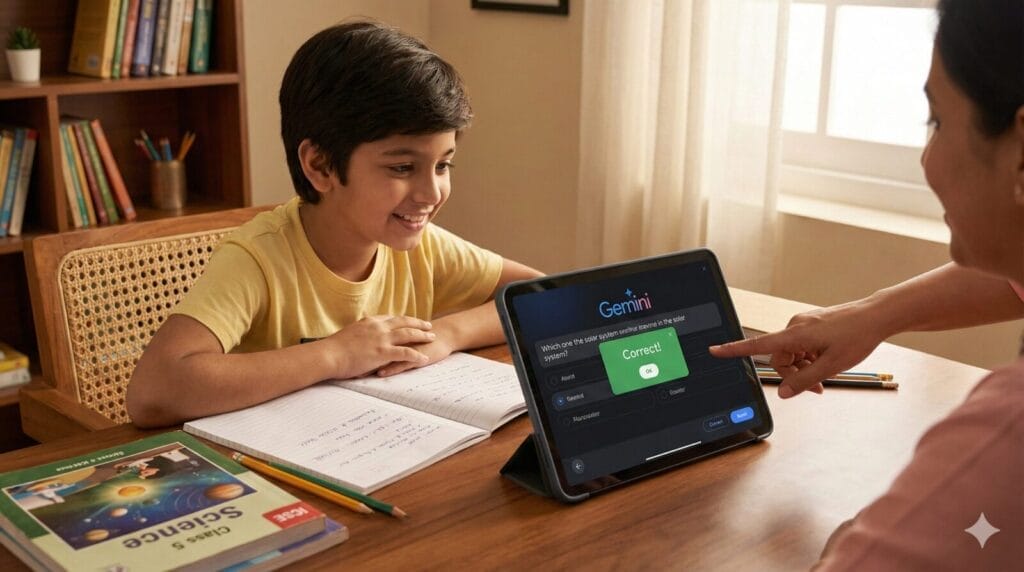
Gemini AI for Students: Bridging the gap between school textbooks and interactive learning.
Last Updated: April 28, 2026
As a parent navigating the 2026 school year here in Lucknow, I’ve seen firsthand how the conversation around AI in education has shifted. We are no longer asking if students should use AI, but how they can use it to actually become smarter rather than just lazier.
When I first started looking for ways to support my son with his Class 6 ICSE syllabus, I was worried that tools like Google Gemini would just provide “easy outs” for homework. However, after months of testing, I discovered a “Secret” workflow. Gemini isn’t just a chatbot; it can be transformed into a 24/7 personal tutor that builds critical thinking through interactive quizzes.
In this deep-dive guide, I’ll show you exactly how to turn “boring” study sessions into engaging, high-retention learning experiences.
Table of Contents
Also Read : Top 25 ChatGPT Prompts for Students (Homework Help, Study Notes, Essay Writing, Quiz Practice)
The Paradox of AI in Education: Shortcut vs. Superpower
In 2026, the National Education Policy (NEP) has placed a massive emphasis on “Competency-Based Learning.” This means exams are moving away from rote memorization and toward understanding.
Most students use AI as a Shortcut (e.g., “Write an essay on photosynthesis”). This leads to zero learning.
The Superpower method involves using AI as a Feedback Loop. Instead of giving the answer, the AI tests the student’s knowledge. This is where the “Interactive Quiz Secret” comes in.
Setting Up Gemini AI for Your Child
Before we jump into the prompts, ensure you are using the 2026 Gemini app interface.
- For Android Users: Gemini is now integrated into the core OS. You can trigger it by swiping from the corner or using the power button.
- For iPhone Users: Ensure you have the latest Google App with the Gemini toggle enabled.
- Gemini Live: For 2026, I highly recommend using the “Live” mode (the waveform icon) if your child prefers verbal learning.
How to Use AI for Quiz Creation for Students: If I Am Not Tech Savvy
This is a common concern for many parents and teachers, but the answer is a resounding yes. In 2026, AI tools have evolved to be “human-first.” You no longer need to know how to code or understand complex settings to be successful.
Here is why learning how to use AI for quiz creation is actually easier than most traditional computer tasks:
Also I have tested Claude AI for Quiz for students check here its results
It’s Like Sending a WhatsApp Message
In 2026, interacting with AI like Gemini is just like chatting with a friend. You don’t need to learn “computer language.” If you can type a message or speak into your phone in Hindi, Tamil, or English, you already have the skills needed to create a world-class quiz.
Why You Don’t Need to be “Tech-Savvy”
- Natural Voice Conversations: You can simply tap the microphone icon and say, “Gemini, please help me make a 5-question test for my daughter on today’s History lesson.” The AI does the heavy lifting of formatting and research.
- The “Photo-to-Quiz” Feature: You don’t even have to type out the questions. Just take a clear photo of a textbook page. The AI “reads” the page and automatically suggests relevant questions.
- Instant Guidance: If you get stuck, you can literally ask the AI, “How do I make this quiz harder?” or “Can you show these as multiple-choice questions?” It adjusts in real-time based on your feedback.
A Note for Parents: “If you can use a smartphone to book a cab or send a voice note, you are tech-savvy enough to use AI for your child’s education. The technology is designed to understand you, rather than forcing you to understand it.”
Also Read : The Ultimate AI Showdown: ChatGPT 5.5 (Go) vs. Gemini 3.5 Flash (Pro) vs. Claude Sonnet 4.6 (Free)
3 Tips for Beginners to Start Today
Talk to it Like a Person: Don’t worry about “perfect” prompts. The more naturally you speak, the better the AI understands your intent.
Start Small: Don’t try to build a 50-question exam. Start with a simple 3-question “Check for Understanding” after a school day.
Use the “Double-Check” Feature: If you’re worried about accuracy, always hit the “G” icon at the bottom of the response to verify the AI’s facts against Google Search.
The “Interactive Quiz Secret”: A Step-by-Step Guide
Most parents and students treat AI like a search engine—they ask a question, get an answer, and the learning stops there. That is a static experience. To turn Gemini into a high-performance tutor, you need to use the Interactive Quiz Secret. This method forces the student to engage in “Active Recall,” which is scientifically proven to improve memory retention.
1. The “Persona” Prompt
The secret begins with setting the right “Persona.” If you don’t define the role, Gemini might give answers that are too simple or too complex. You need to tell it exactly which board and class it is teaching.
Copy/Paste this Prompt (Optimized for 2026):
“You are an expert ICSE Board Science teacher. I want to test my child on the Class 6 Biology chapter ‘Plants Life: The Leaf.’ Do not give me a list of questions all at once. Instead, ask one multiple-choice question at a time. Wait for the answer before moving to the next. If the answer is right, briefly explain why. If the answer is wrong, provide a hint and explain the correct concept. Are you ready?”
Visualizing the “Secret”: A Step-by-Step Walkthrough
To show you exactly how this looks in practice, I ran a live session on TechMitra using a Class 6 Biology topic: “Plants Life: The Leaf.” Here is the flow of a high-engagement AI tutoring session.
Step 1: Initiating the Session
Everything starts with a clear, concise prompt. As you can see in the first image, I didn’t just ask for information; I commanded a specific quiz for the ICSE board.
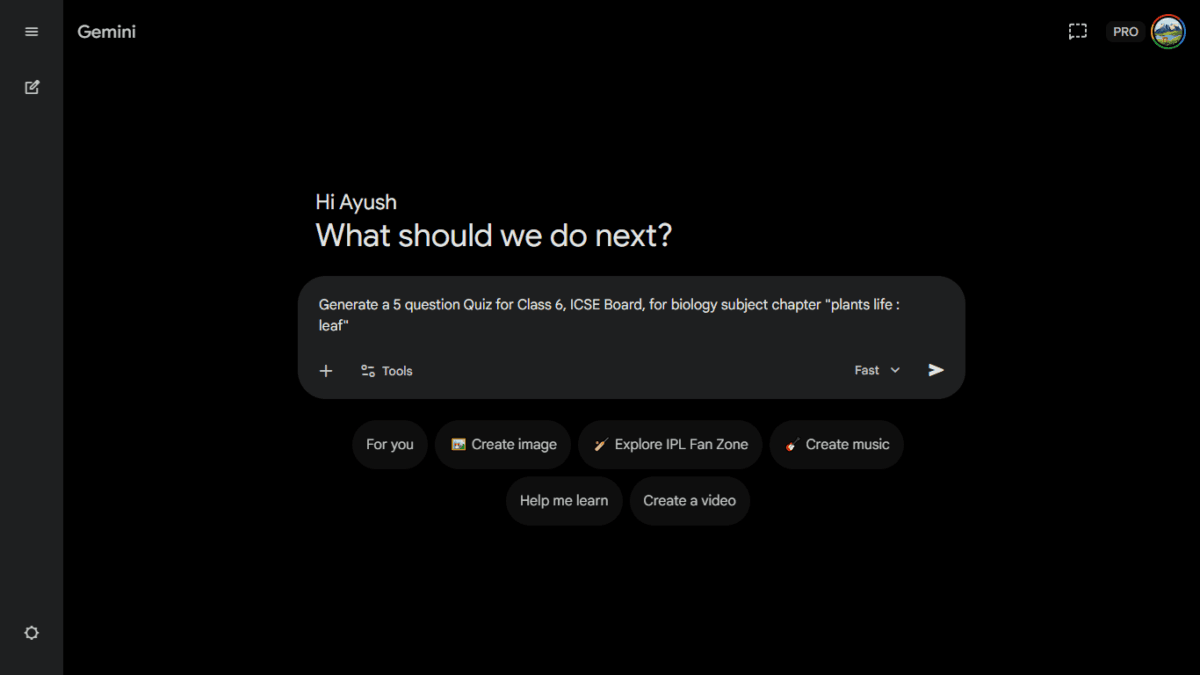
Pro-Tip: Notice the “Fast” toggle in the screenshot. For quick-fire quizzes, this setting ensures the AI responds instantly without lag.
Step 2: Interactive Engagement
Once the quiz starts, the interface transforms. It’s no longer a wall of text; it’s a clickable, immersive experience. The AI asks one question at a time to keep the student focused.
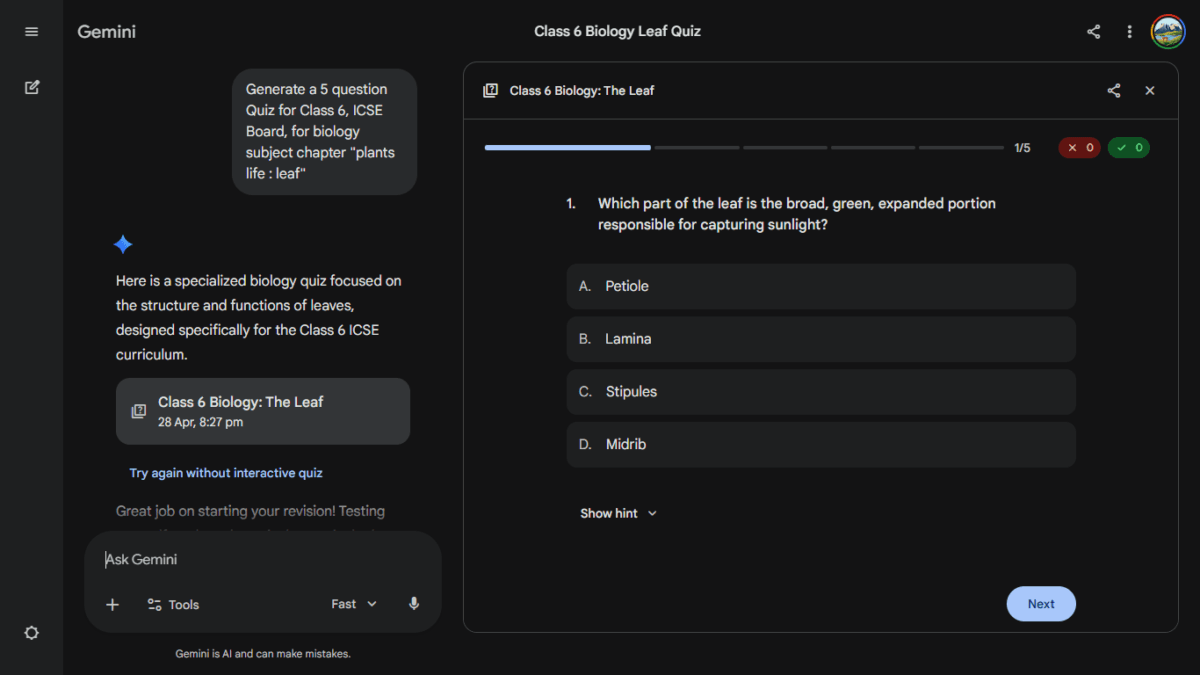
When the student gets an answer right, Gemini provides immediate positive reinforcement and a brief rationale to lock in the concept.
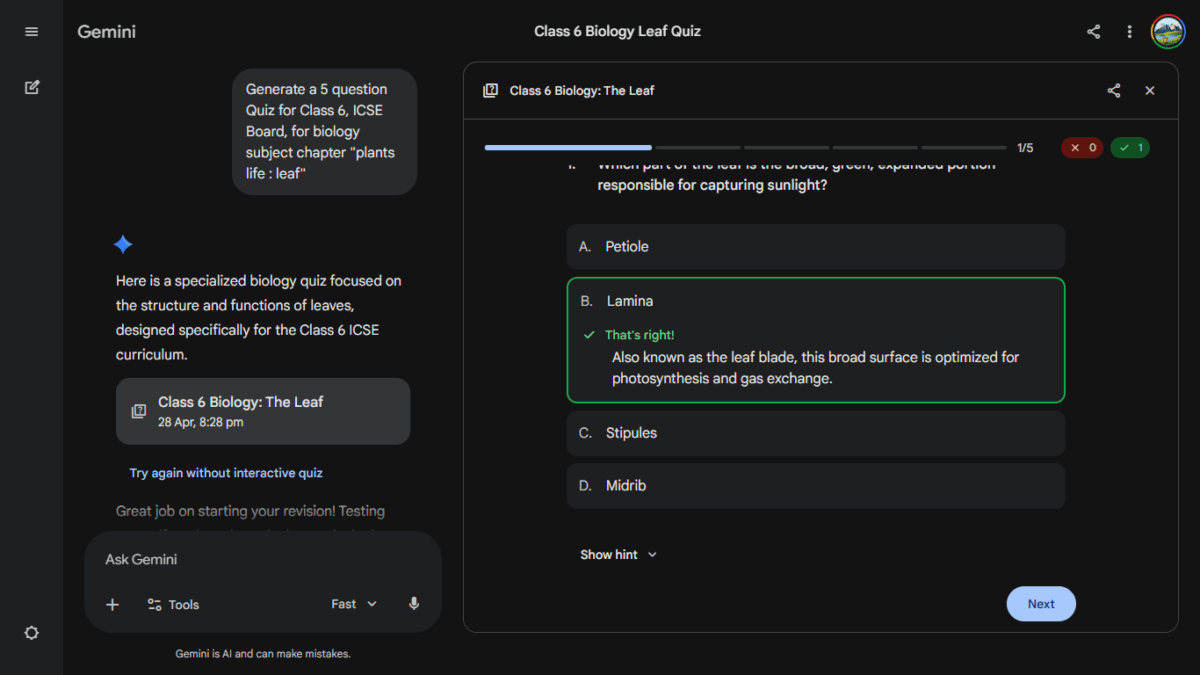
Step 3: Turning Mistakes into Lessons
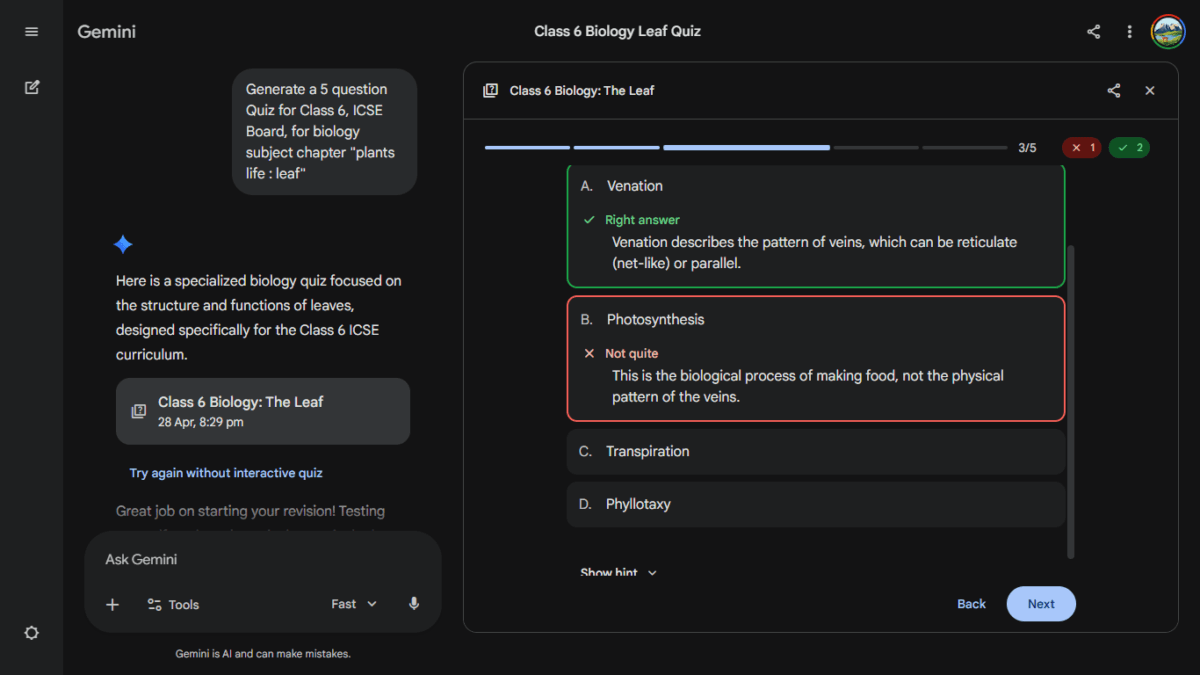
This is the most important part of the “Secret.” When a student makes a mistake, the AI doesn’t just mark it “X.” It explains the distinction between similar concepts—like the difference between Venation and Photosynthesis. This prevents “rote learning” and ensures the student actually understands the why.
Step 4: The Performance Dashboard
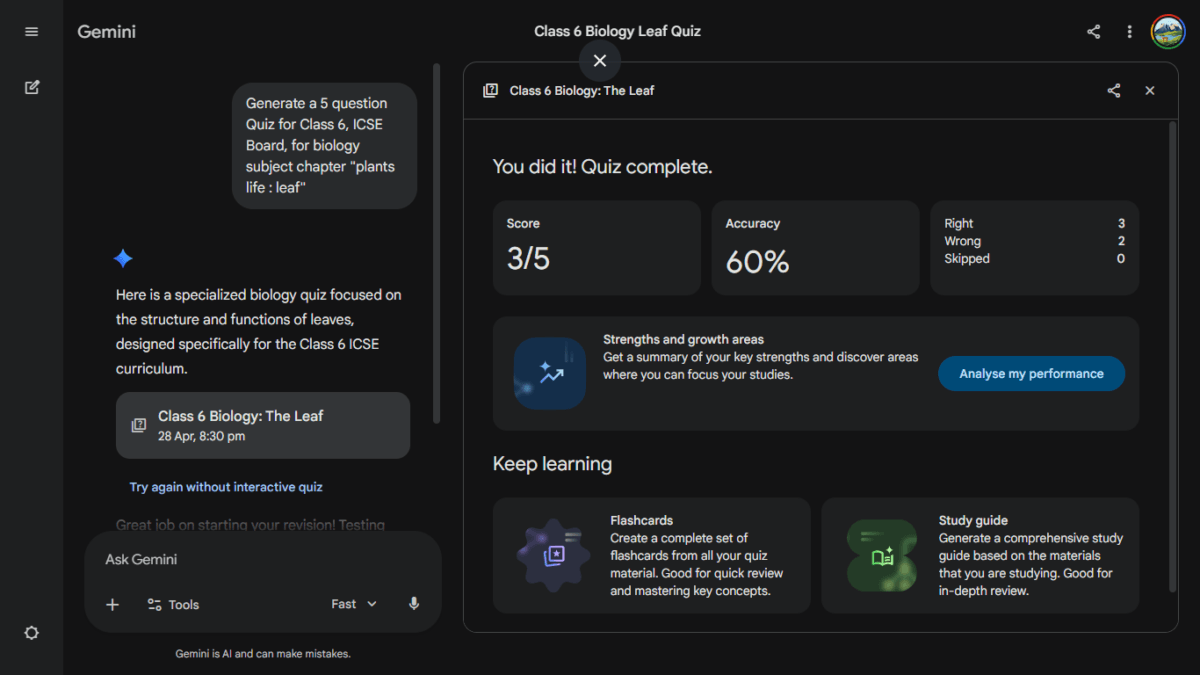
At the end of the session, you get a full breakdown. In 2026, Gemini goes a step further by offering to create Flashcards or a Study Guide based specifically on the questions the student missed.
2. Utilizing Multimodal Features
In 2026, the most effective way to use Gemini is through its “eyes.” Instead of typing out long chapters, use the Visual Workflow:
- Snap a Photo: Take a clear picture of a diagram (like the structure of a leaf or the parts of a flower) from the actual school textbook.
- The Prompt: “Look at this image from the Class 6 Science book. Create an interactive 5-question quiz based specifically on the labels and definitions shown here.”
This ensures the quiz is 100% aligned with the exact material the teacher will test in school.
3. Real-Time Feedback & Detailed Analysis
Unlike a traditional worksheet where you check the answers at the very end, this interactive method provides instant correction.
- Conceptual Reinforcement: If your child picks “Petiole” instead of “Lamina,” Gemini doesn’t just say “Wrong.” It explains that the Lamina is the broad green part for photosynthesis, while the Petiole is the stalk.
- The Performance Summary: Once the quiz is complete, use this follow-up prompt: “Analyze my performance. Which specific topics in this chapter do I need to study more, and can you generate 3 flashcards for those topics?”
4. The Bilingual Advantage
Don’t forget that you can bridge the language gap here. You can give your instructions in Hindi or Tamil to ensure the AI understands your specific requirements, then instruct it to conduct the quiz in English. This ensures the student is prepared for their English-medium exams while the parent remains fully in control of the tutoring session.
Prefer not to write the prompt yourself? Try the free AI Quiz Generator Prompt Tool — pick your board, class, and chapter, and get a ready-to-paste prompt in seconds.
Real-World Case Study: From Hindi Voice to English Quiz
Understanding the theory is one thing, but seeing it in action is another. Here is a 3-step walkthrough of a session I recently conducted using the mobile app.
Step 1: The Bilingual Command
The power of Gemini in 2026 is its “Natural Language Understanding.” You don’t need to speak perfect English to set up a high-quality quiz. In this example, I used a Hindi voice prompt to request a specific Biology quiz for Class 6.
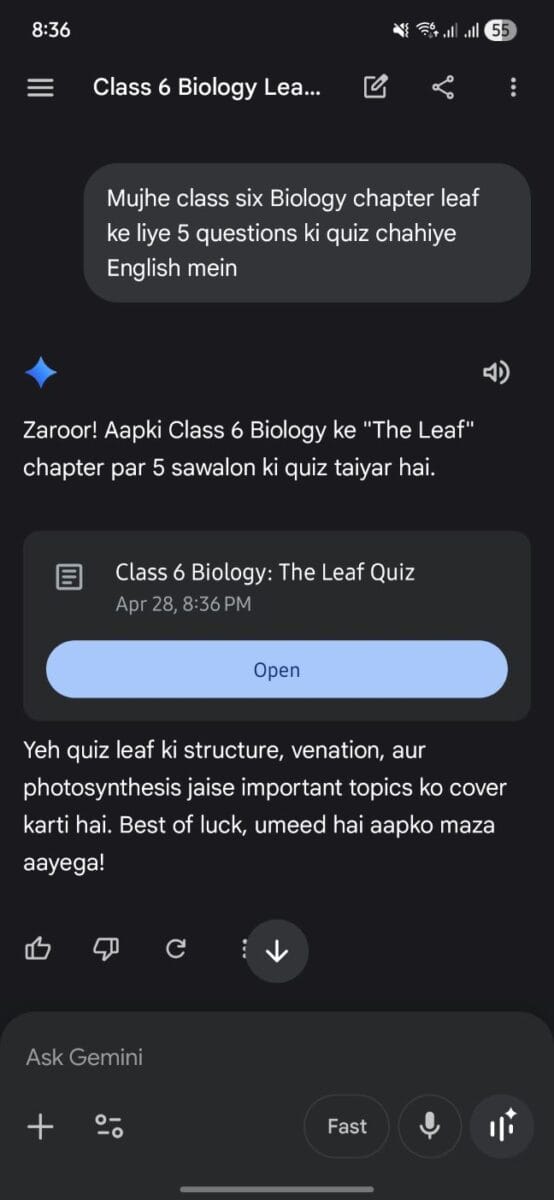
The Prompt used: “Mujhe class six Biology chapter leaf ke liye 5 questions ki quiz chahiye English mein.”
Notice how Gemini responds warmly in Hindi/Hinglish, confirming that it understands the request and is ready to switch languages for the actual test.
Step 2: The English-Medium Interface
Even though the instructions were given in Hindi, the AI immediately generates the quiz in professional, academic English. This is perfect for preparing for ICSE or CBSE board exams.
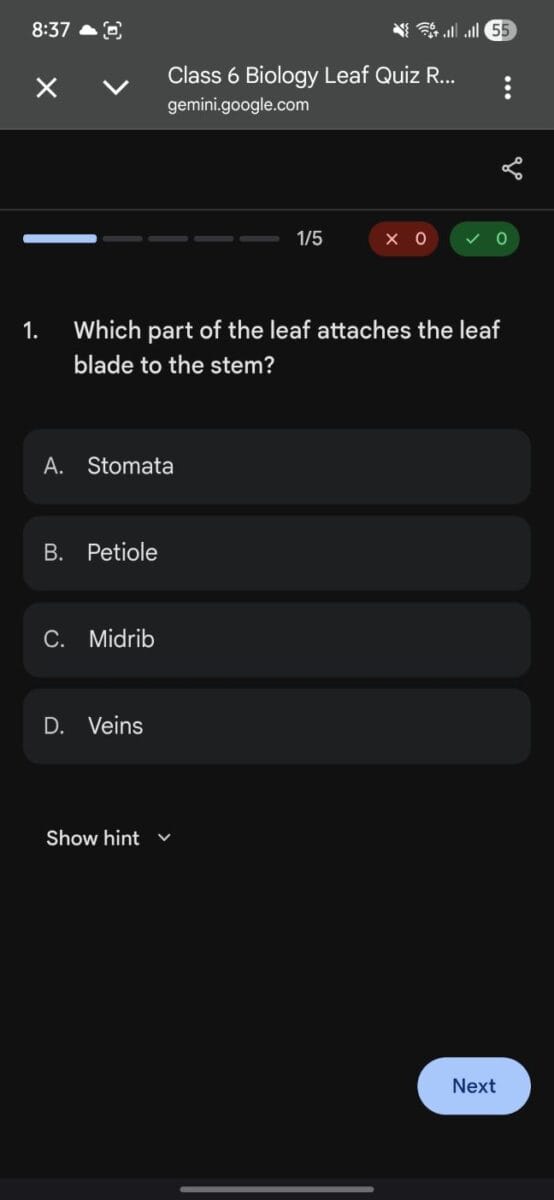
The question—“Which part of the leaf attaches the leaf blade to the stem?”—is exactly what a student would face in a classroom environment. This allows the child to practice their English terminology while the parent manages the session in the language they are most comfortable with.
Step 3: Data-Driven Performance Analysis
The learning doesn’t stop when the quiz ends. Once the 5 questions are completed, Gemini provides a full “Scorecard.”
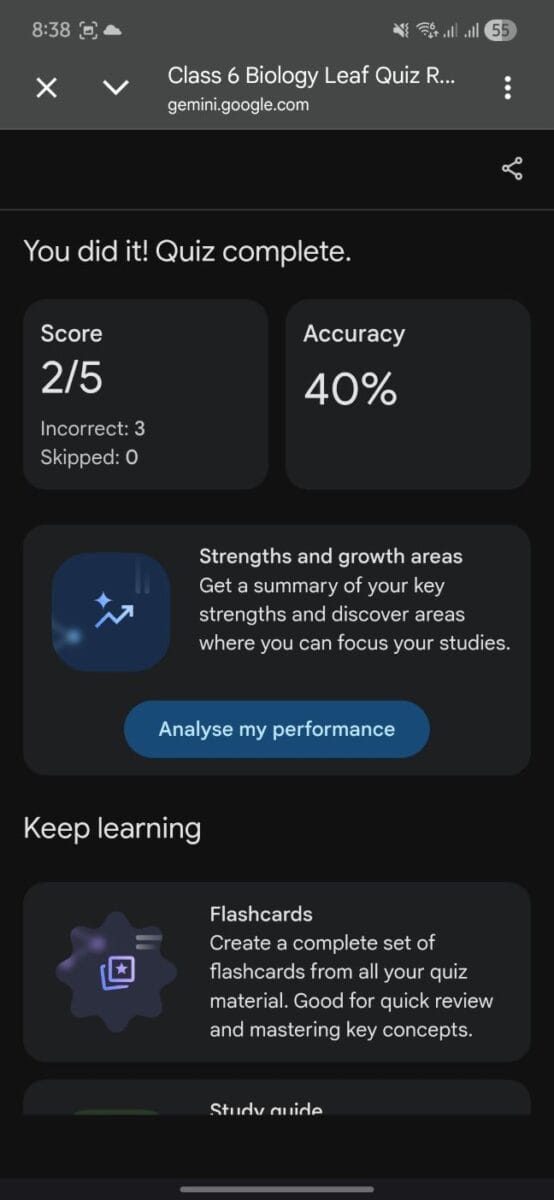
As you can see, the dashboard provides:
- Accuracy Metrics: A clear 40% or 60% breakdown to show where the student stands.
- Analysis: A button to “Analyse my performance” which breaks down exactly which parts of the leaf anatomy the student needs to revisit.
- Keep Learning Tools: In 2026, the AI automatically suggests Flashcards or a Study Guide based specifically on the questions the student got wrong.
Also read : Google Translate Turns 20: AI-Powered Pronunciation Practice Marks a New Era
TechMitra Quick Tip: The “Fast” Toggle
If you look closely at the first screenshot, you’ll see a toggle for “Fast” near the prompt bar. For daily quizzes like this, I recommend keeping it on “Fast.” It uses a lighter model (like Gemini 3 Flash) that gives instant responses, making the study session feel more like a quick game rather than a slow computer task.
Also Read : How AI Can Help Students Prepare for Final Exams (With Detailed, Customizable Prompts)
Why This Method Beats Traditional Tuition (Benefits Of AI For Students)
As someone with a background in Computer Applications (BCA) and years in the retail tech sector, I look at efficiency. Traditional tuition often involves a one-size-fits-all approach. Gemini provides:
- Immediate Feedback: In a classroom of 40, a child might wait 20 minutes for a teacher to check their work. Gemini does it in 0.2 seconds.
- Safe Environment to Fail: Children often feel shy about getting answers wrong in front of peers. AI removes that “judgment” factor.
- HOTS Question Generation: You can ask Gemini to generate “Higher Order Thinking Skills” questions, which are now mandatory under the new education guidelines.
Subject-Specific Use Cases for Class 5–10
Mathematics: The Step-by-Step Coach
Don’t ask for the answer to a fraction problem. Ask:
“Help me solve this fraction problem step-by-step. Give me the first step and let me try to do it before you move to the second step.”
Languages: Contextual Grammar
Instead of memorizing definitions, use:
“Let’s play a game. You write a short story about a space adventure, but leave blanks for the Adjectives. I will fill them in, and you tell me if my choices make sense grammatically.”
Environmental Science (EVS) & Green Tech
Given my personal interest in Solar Energy and Green Tech, I often use Gemini to explain these concepts to my son.
“Explain how a solar panel works using a LEGO analogy that a 10-year-old can understand.”
Important Safeguards: The “Parental Filter”
AI is a tool, not a babysitter. In 2026, we have to be mindful of two things:
The Hallucination Check
Even in 2026, AI can occasionally “hallucinate” (make up facts). Teach your child to use the “Double Check” button (the ‘G’ icon) at the bottom of the Gemini response. It will highlight in green what is verified by Google Search and in red what might be inaccurate.
Privacy & Data
Ensure you are using a supervised account if your child is under 13. While Gemini is safe, it’s a good habit to review the “Activity” log once a week to see what your child is curious about.
The TechMitra Edge: Why This Works (Technical Deep-Dive)
For those of you who, like me, enjoy digging into the “how” and “why” of technology, there is a technical reason this interactive method works so well. It’s all about Prompt Engineering.
- Zero-Shot vs. Few-Shot: If you just ask for a quiz, that’s “Zero-Shot.” But if you provide 1–2 examples of the exact style of question you want, that’s “Few-Shot” prompting. This small change drastically improves the AI’s accuracy for school boards like ICSE.
- Performance Matters: If you’re sharing these quizzes on your own site, remember that high-quality screenshots can be heavy. On TechMitra, I use LiteSpeed Cache and WebP conversion to ensure these images don’t hurt our Core Web Vitals. Fast-loading pages aren’t just better for SEO; they are better for students who might be on slower mobile networks.
8. Summary: The 2026 Student’s Toolkit
| Feature | Best Use Case |
| Gemini Live | Auditory learners & Language practice |
| Image Input | Solving diagrams & handwritten math |
| Google Drive Integration | Summarizing long school PDFs/Notes |
| Interactive Quizzing | Active recall & Exam preparation |
Also read : 50 Best ChatGPT Prompts for Editing Uploaded Photos (2026 Guide)
Final Thoughts: Preparing for a Hybrid Future
The goal of TechMitra has always been to simplify technology. In the context of education, “simplifying” doesn’t mean making the work easier—it means making the understanding clearer.
By using the “Interactive Quiz Secret,” we move our children away from being passive consumers of technology and turn them into active, curious learners. My son’s engagement with his ICSE subjects has transformed since we started using Gemini as a tutor rather than an answer key.
Are you using AI for your child’s studies? Join the conversation in the comments below or reach out to me via the TechMitra contact page. Let’s build a smarter future together!
Frequently Asked Questions (FAQ)
Q1: Can Gemini generate quizzes for State Boards like UP Board?
Yes! Simply specify the board and the language (e.g., “UP Board Class 10 Physics in Hindi”) and Gemini will adapt.
Q2: Is the free version of Gemini enough for students?
For 90% of school-level tasks, the free version is excellent. The “Ultra/Pro” versions are only necessary if the student is doing advanced coding or large-scale data analysis.
Q3: How do I prevent my child from cheating?
The best way is to sit with them for the first few sessions. Use the “Interactive Tutor” prompt provided in Section 3—it’s designed to test them, not give them answers.

Ayush Singhal is the founder and chief editor of TechMitra.in — a tech hub dedicated to simplifying gadgets, AI tools, and smart innovations for everyday users. With over 15 years of business experience, a Bachelor of Computer Applications (BCA) degree, and 5 years of hands-on experience running an electronics retail shop, Ayush brings real-world gadget knowledge and a genuine passion for emerging technology.
At TechMitra, he covers everything from AI breakthroughs and gadget reviews to app guides, mobile tips, and digital how-tos. His goal is simple — to make tech easy, useful, and enjoyable for everyone. When he’s not testing the latest devices or exploring AI trends, Ayush spends his time crafting tutorials that help readers make smarter digital choices.
📍 Based in Lucknow, India
💡 Focus Areas: Tech News • AI Tools • Gadgets • Digital How-Tos
📧 Contact: Get in touch →
🔗 Full Bio: https://techmitra.in/about-us/