
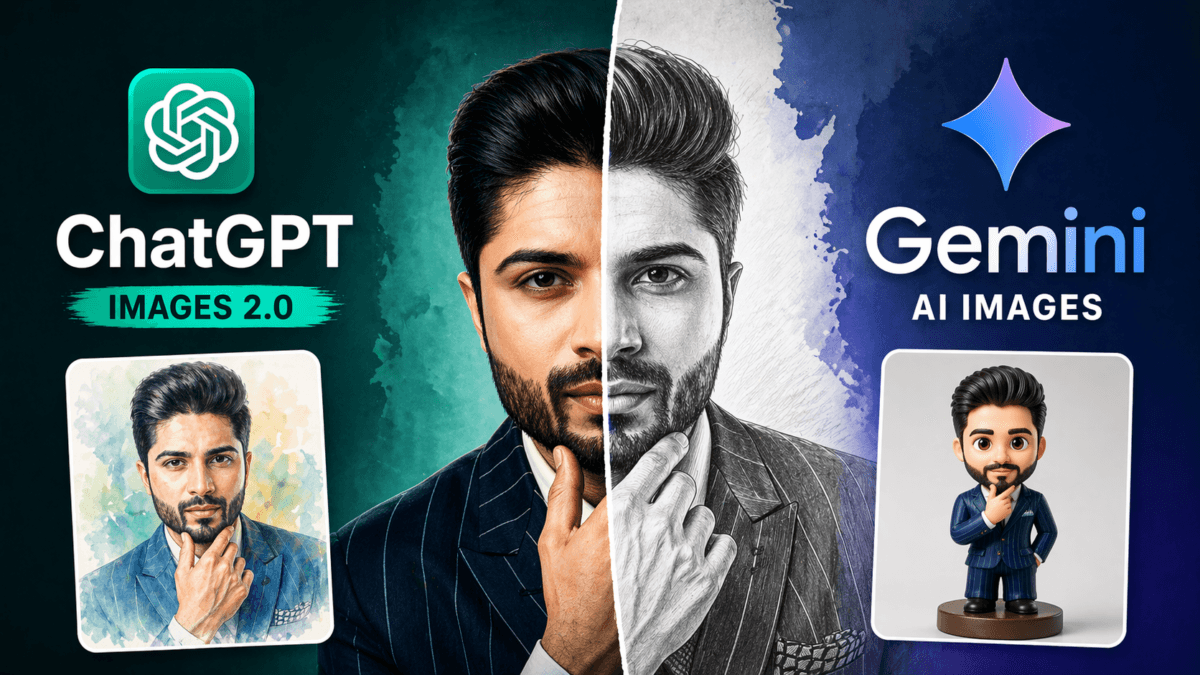
AI image generation just took a major step forward with the launch of ChatGPT Images 2.0 by OpenAI.
While tools like Google Gemini were already offering image generation, this new update from ChatGPT focuses heavily on precision, control, and real-world usability.
But here’s the real question:
👉 Is it actually better than Gemini in real usage?
I tested both tools using the same prompts and image—and the results were quite interesting.
Also Read : AI Creativity Vs Human Creativity: A New Maker or a New Challenge?
Table of Contents
ChatGPT Images 2.0 Features & Capabilities
According to OpenAI, ChatGPT Images 2.0 brings significant improvements over previous models, especially in terms of control and accuracy.
Here’s what stands out 👇
1. Better Prompt Precision & Complex Composition
One of the biggest upgrades is how accurately it follows prompts.
- Handles complex layouts
- Supports UI designs, structured visuals, and text-heavy images
- Better alignment with user intent
👉 Earlier AI tools struggled with:
- Text placement
- Layout structure
- Multiple elements
Now, this is significantly improved.
2. Strong Multilingual Support
This is a huge upgrade, especially for Indian creators.
ChatGPT Images 2.0 can now generate text accurately in:
- Hindi
- Bengali
- Chinese
- Japanese
- Korean
👉 This means you can create:
- Posters
- Infographics
- Social media creatives
in your local language
3. Improved Style Consistency
The new model performs better across different styles like:
- Photorealistic
- Cinematic
- Pixel art
- Manga
👉 More importantly:
- Lighting is improved
- Textures feel natural
- Composition looks balanced
4. Flexible Aspect Ratios
You’re no longer limited to square images.
Now supports:
- Ultra-wide (3:1)
- Vertical (1:3)
👉 Perfect for:
- YouTube thumbnails
- Blog banners
- Instagram posts
5. “Thinking” Capabilities (Big Upgrade)
This is where it gets interesting.
ChatGPT Images 2.0 can:
- Combine reasoning + image generation
- Search web (when enabled)
- Verify outputs
- Generate images in context
👉 Basically:
Text + Thinking + Image = All-in-one workflow
6. Multiple Outputs with Consistency
- Can generate up to 8 images at once
- Maintains character & object consistency
👉 Very useful for:
- Branding
- Storytelling
- Product visuals
7. Real Use Cases
OpenAI positions it for:
- Design prototyping
- Marketing creatives
- Educational diagrams
- Product development
👉 It’s not just “fun AI”—it’s becoming a practical tool
Limitations (Important for Trust)
It’s not perfect yet:
- Struggles with complex physics-based visuals
- Issues with:
- Dense diagrams
- Repetitive patterns
- High-res (2K+) still in beta
- Some outputs need manual verification
👉 Good to mention—builds credibility in your article
Also read : 50 Best ChatGPT Prompts for Editing Uploaded Photos (2026 Guide)
Now Let’s Get Real: ChatGPT vs Gemini Image Test

Instead of relying on features, I tested both tools using:
- Same image
- Same prompts
- 5 different styles
👉 This gives a real-world comparison
How I Tested
To keep things fair:
- I used the same portrait image
- Applied identical prompts
- Tested across 5 styles:
- Watercolor
- Pencil Sketch
- Collectible Figurine
- Cinematic Portrait
- Oil Painting
This ensures a real comparison—not theory
1. Watercolor Style Test
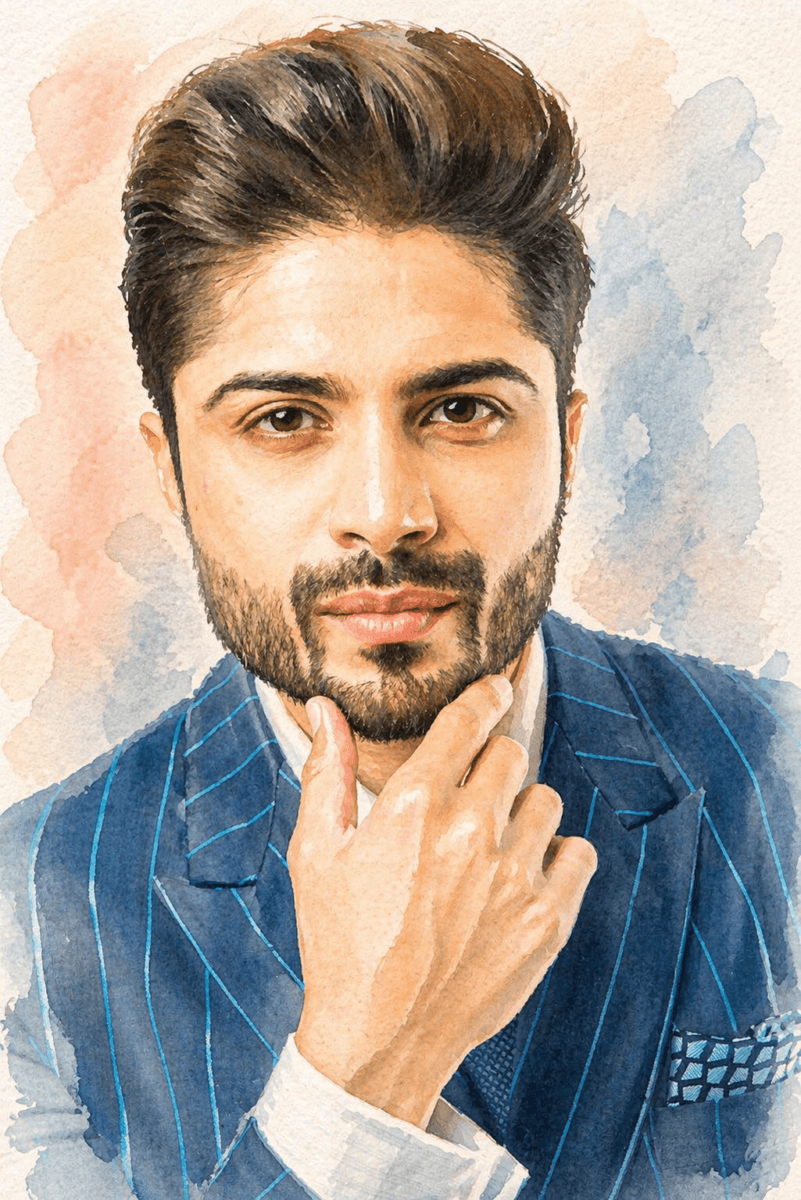
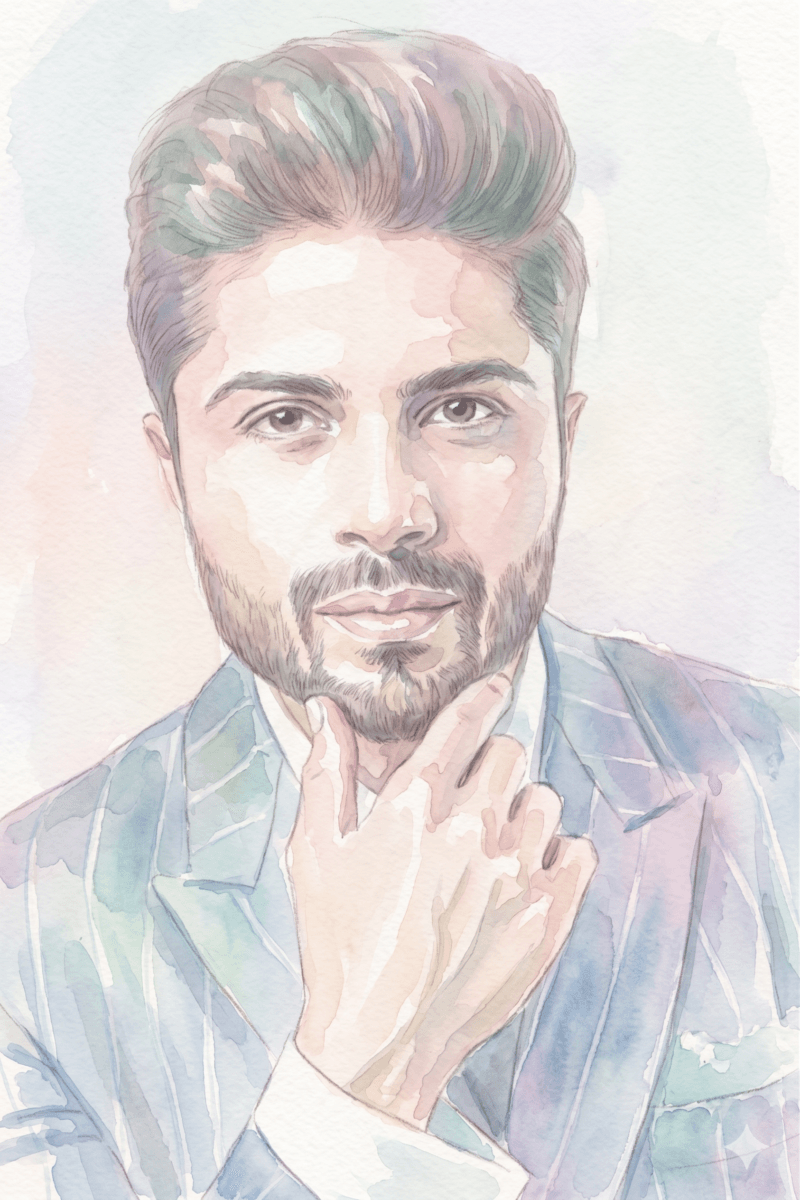
Prompt – Transform this image into a soft watercolor painting with natural brush strokes, pastel colors, and artistic texture
My Observation
- ChatGPT
- More realistic face
- Better brush control
- Strong depth and contrast
- Gemini
- Very soft tones
- Lost facial sharpness
- Slightly faded look
👉 Verdict: ChatGPT delivers more usable, polished output
2. Pencil Sketch Test
Prompt- Convert this portrait into a highly detailed pencil sketch with realistic shading and fine linework
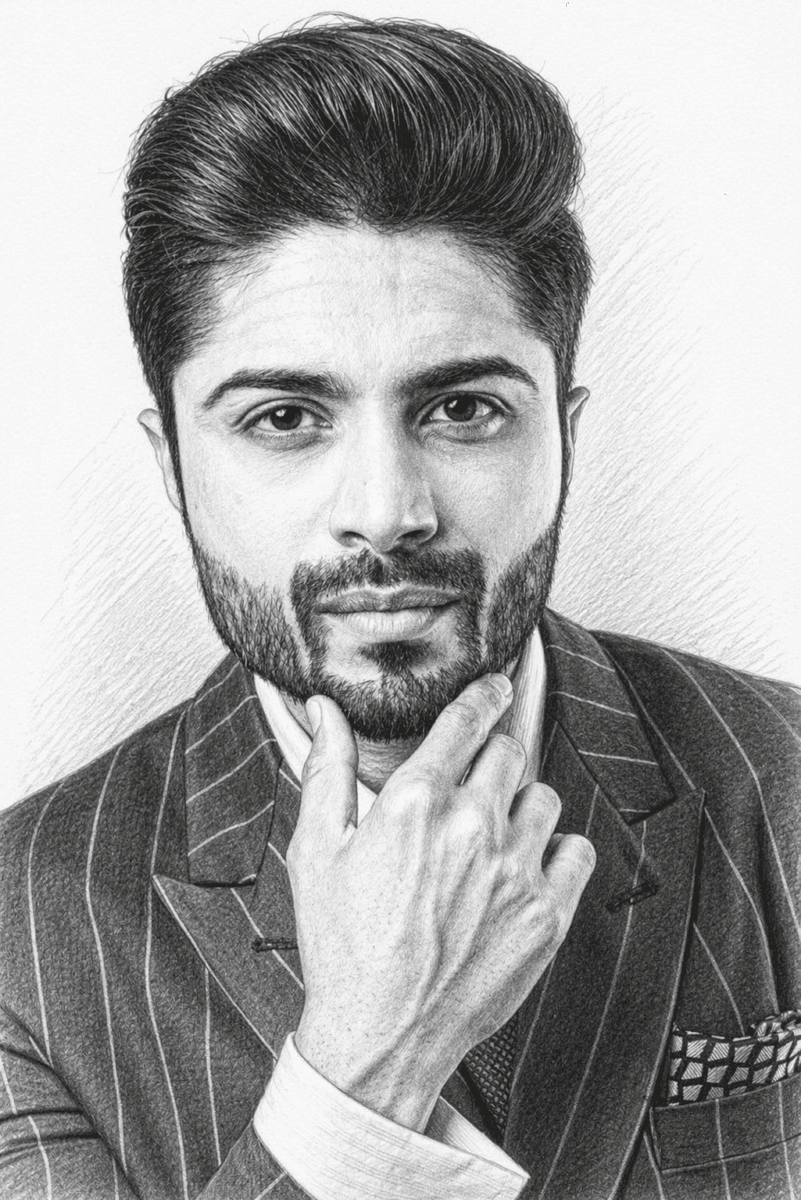
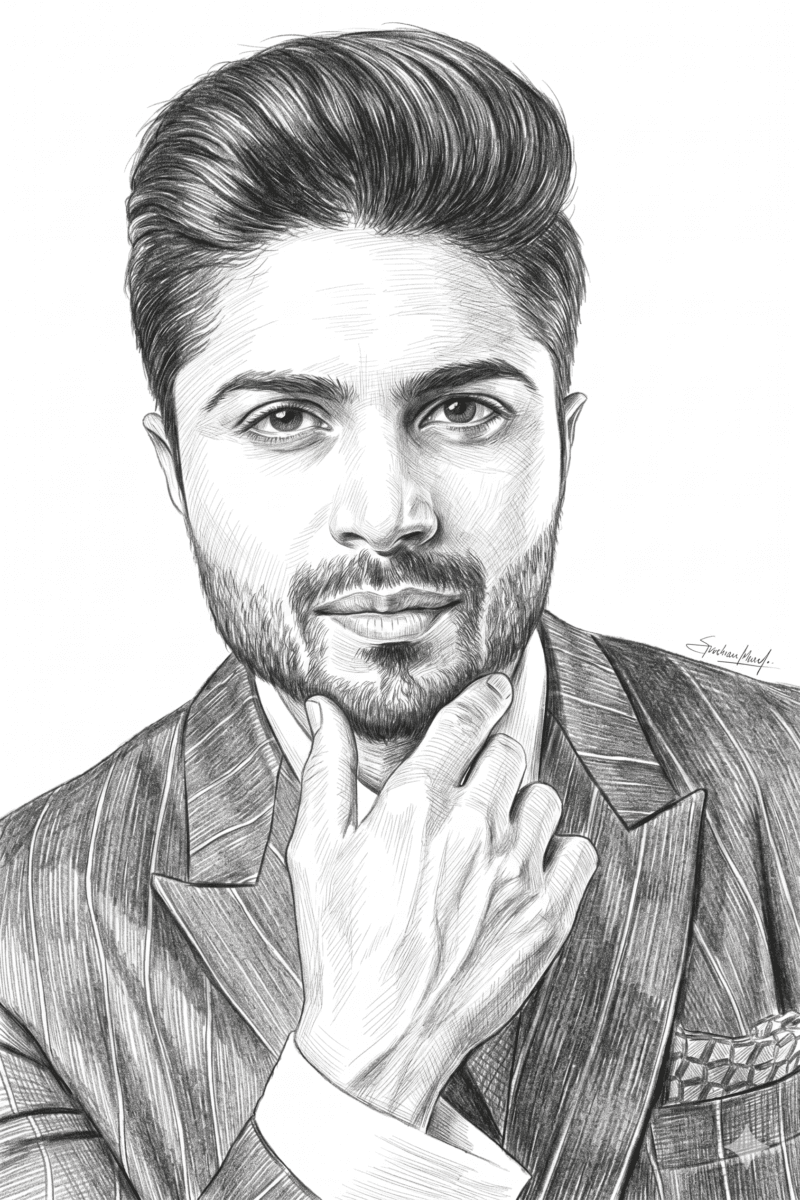
My Observation
- ChatGPT
- Realistic shading
- Natural pencil texture
- Strong depth
- Gemini
- More like line drawing
- Less depth
- Feels digital
👉 Verdict: ChatGPT = real sketch, Gemini = More Clearity
3. Collectible Figurine Test
Prompt- Turn this person into a collectible 3D figurine, toy-like, with smooth plastic texture and soft studio lighting
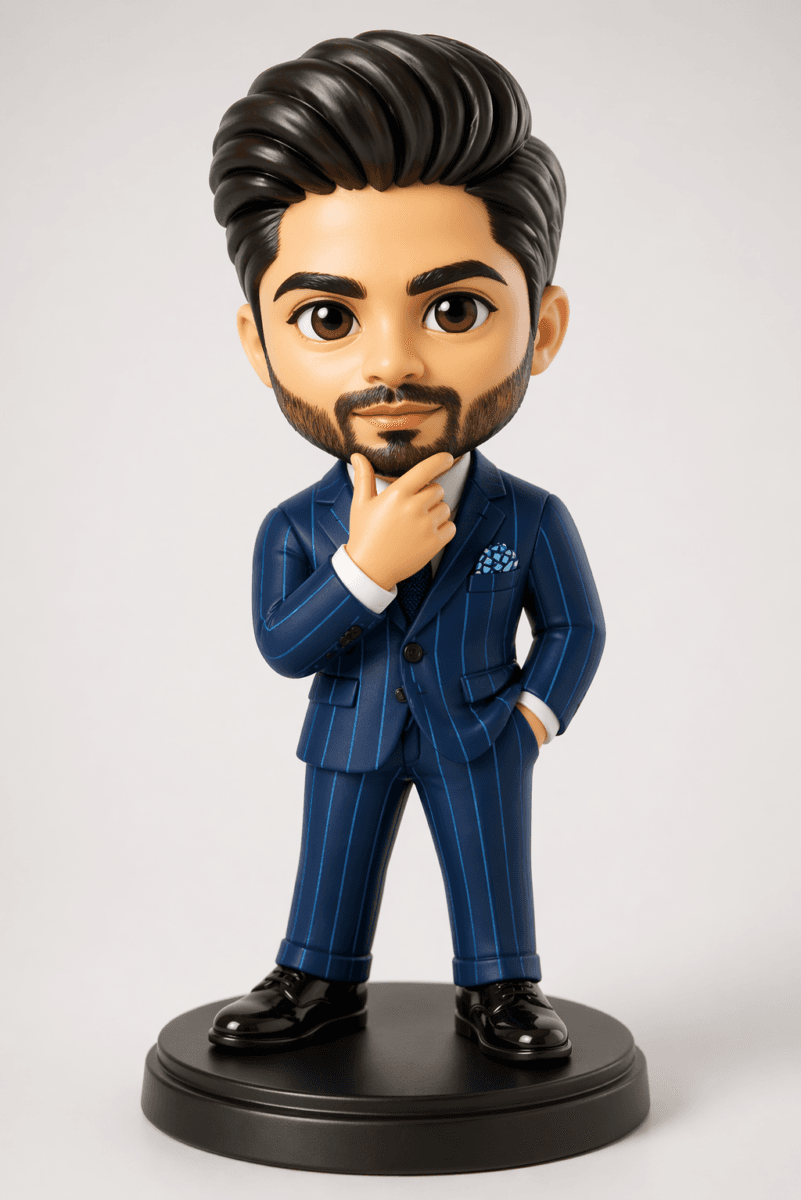

My Observation
- ChatGPT
- Premium 3D look
- Better lighting & reflections
- Product-like quality
- Gemini
- More cartoon-like
- Flat lighting
- Less detailed
👉 Verdict: ChatGPT feels like a real product render, Gemini is Very Cartoonish
4. Cinematic Portrait Test
Prompt- Create a cinematic version of this portrait with dramatic lighting, shallow depth of field, and movie-style color grading

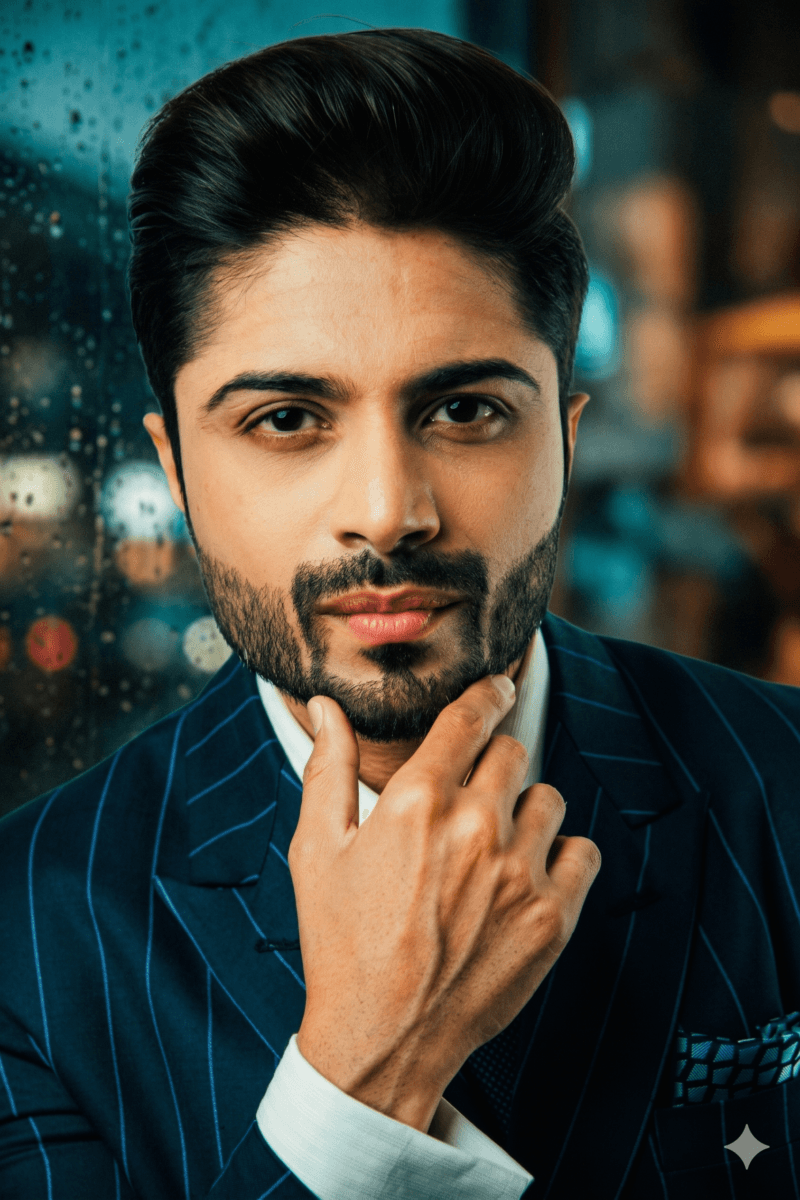
My Observation
- ChatGPT
- Better lighting contrast
- Natural skin texture
- Real cinematic feel
- Gemini
- Also good
- Slightly over-smooth skin
- Less dramatic
👉 Verdict: Close—but ChatGPT still wins
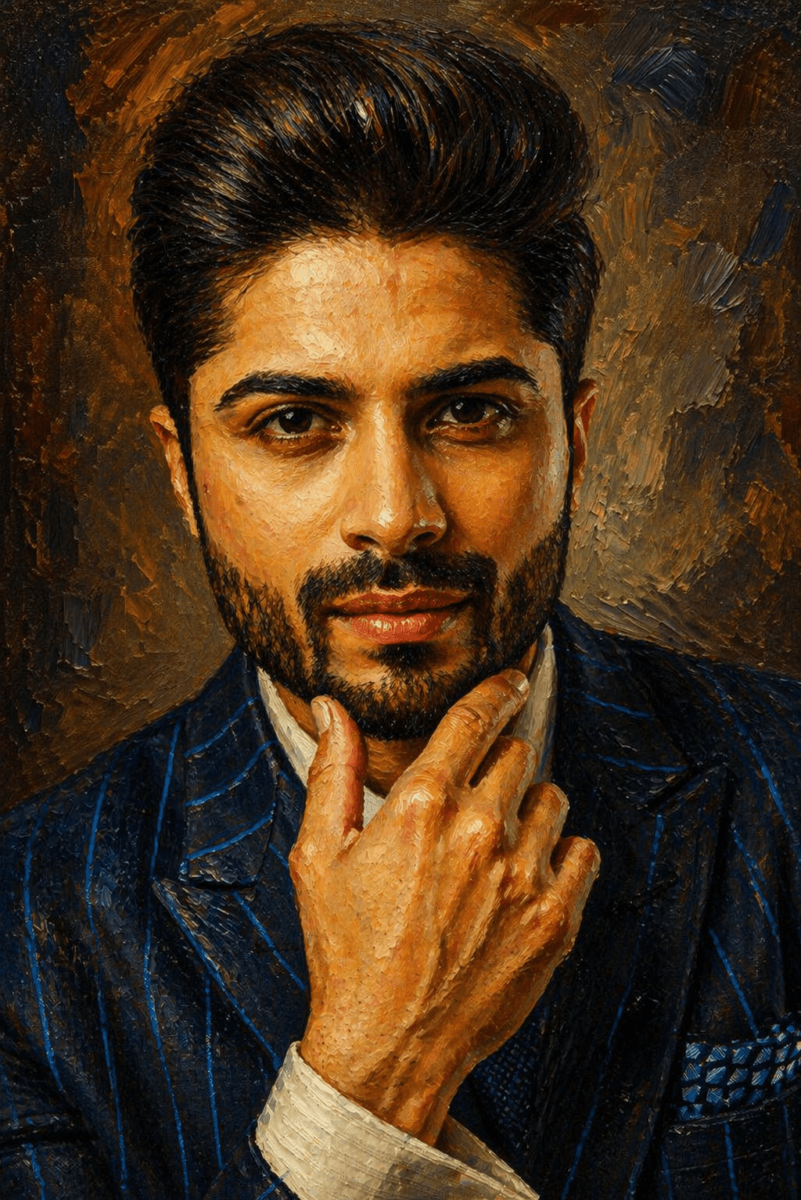
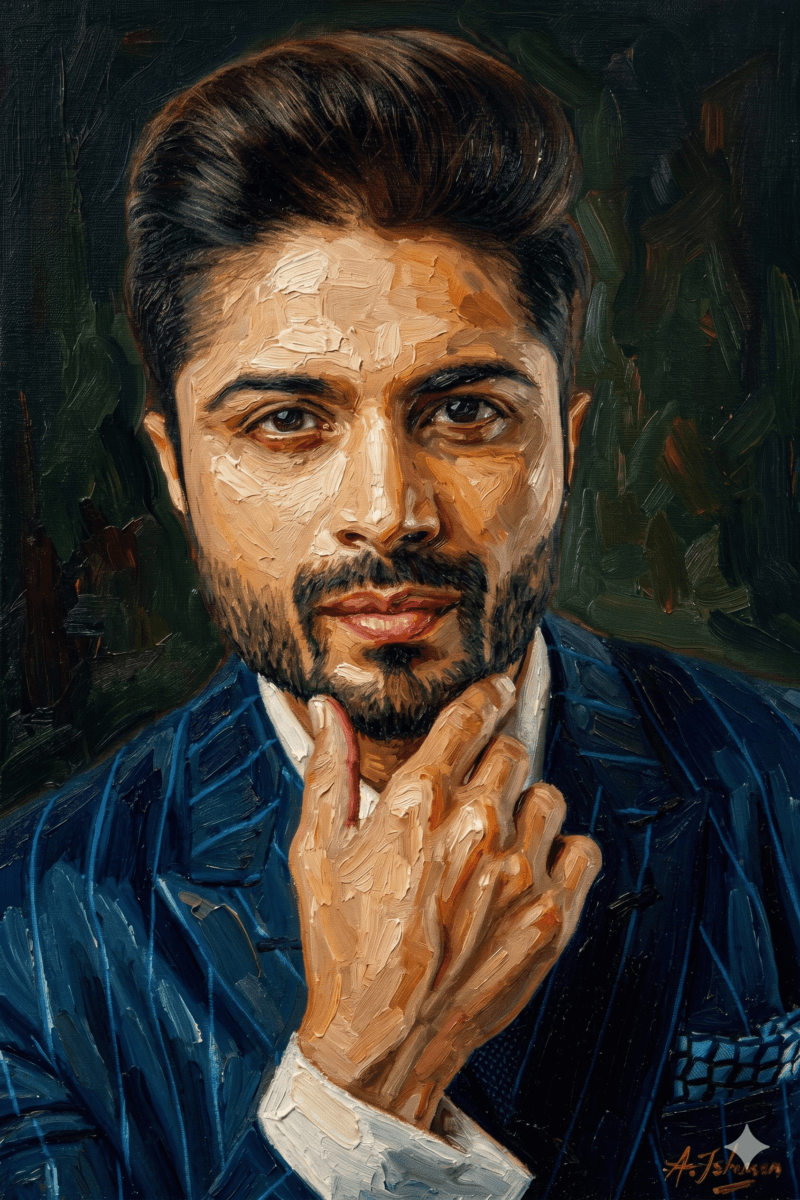
5. Oil Painting Test
Prompt- Transform this image into a classical oil painting with rich textures, deep colors, and visible brush strokes
My Observation
- ChatGPT
- Balanced texture
- Maintains facial accuracy
- Looks like gallery art
- Gemini
- Heavy brush strokes
- Slight distortion
- More stylized than realistic
👉 Verdict: ChatGPT gives better balance
Click Here to : Know more about chatGPT images 2.0
Also Read : ChatGPT “Meet Your Younger Self” Trend: How to Create Viral AI Childhood Photos (25 Detailed Prompts)
Style Control & User Experience
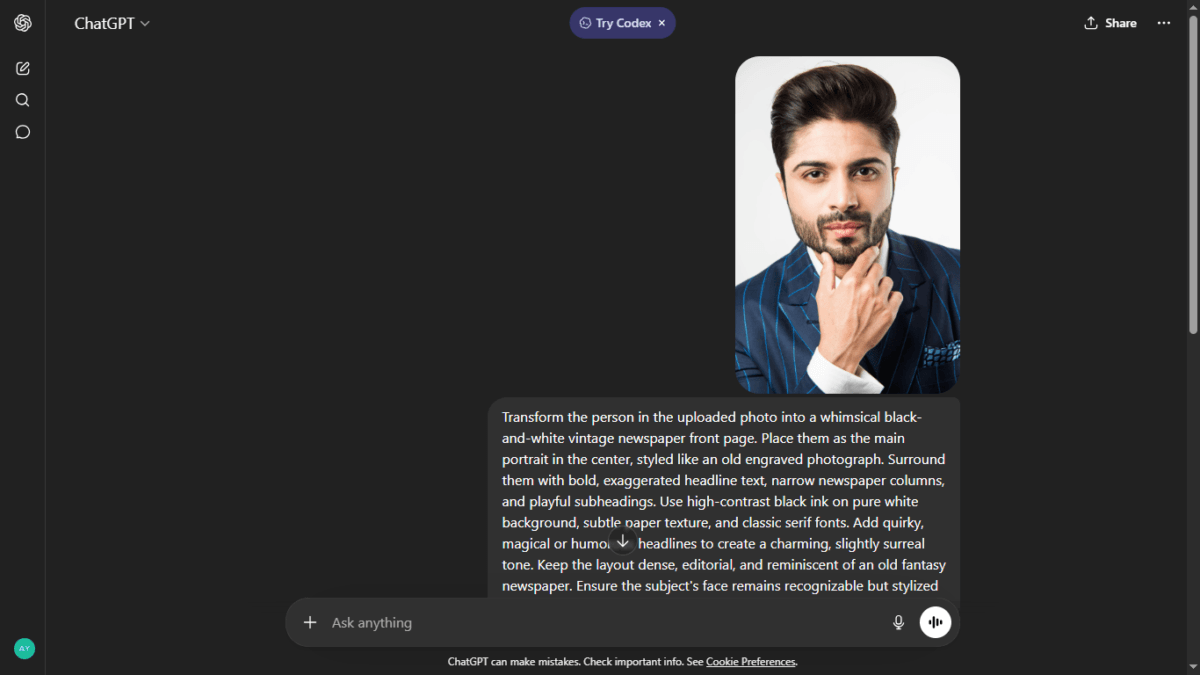
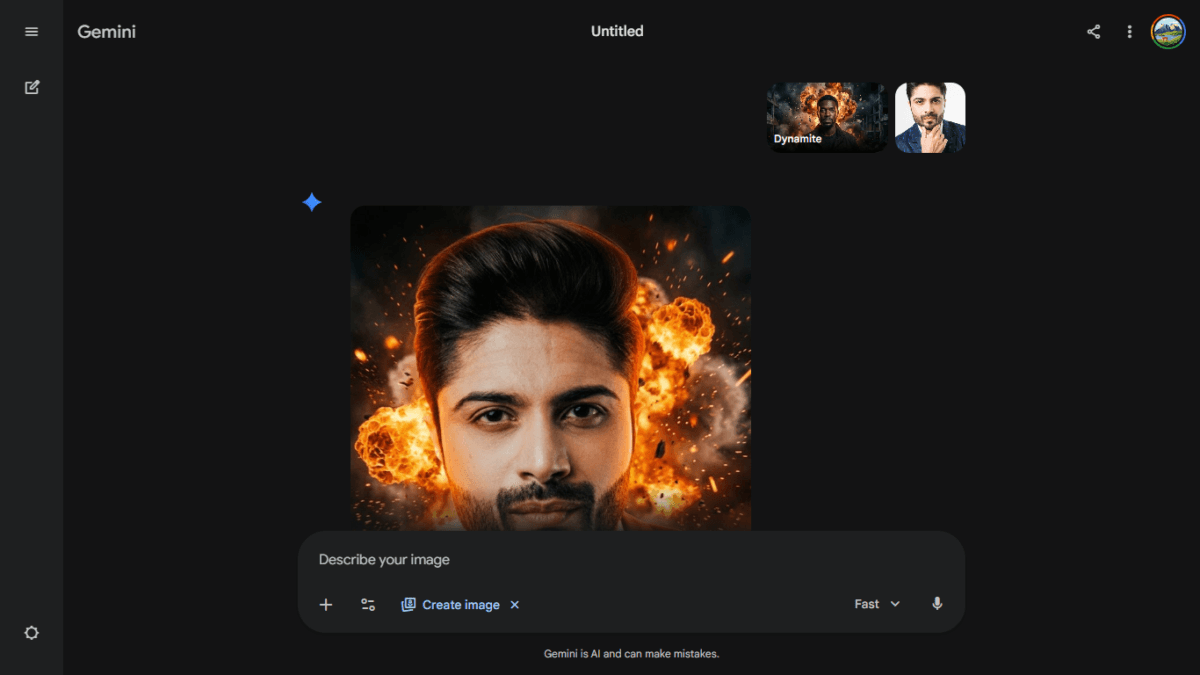
Key Difference
- ChatGPT
- Shows full detailed prompt
- Gives complete control
- Transparent process
- Gemini
- Shows style previews (images)
- Simple to use
- Less control
👉 Insight:
- ChatGPT = Power + control
- Gemini = Simplicity + ease
Final Comparison Table
| Feature | ChatGPT | Gemini |
|---|---|---|
| Realism | ⭐⭐⭐⭐⭐ | ⭐⭐⭐☆☆ |
| Detail | High | Medium |
| Consistency | Strong | Moderate |
| Style Accuracy | Excellent | Good |
| Ease of Use | Medium | High |
Also Read : The Ultimate AI Showdown: ChatGPT 5.5 (Go) vs. Gemini 3.5 Flash (Pro) vs. Claude Sonnet 4.6 (Free)
Final Verdict: Which One Is Better?
After testing all 5 styles:
👉 ChatGPT clearly performs better overall
Why ChatGPT Wins:
- More realistic outputs
- Better detailing
- Strong consistency
- Professional-quality images
Where Gemini Stands:
- Easier to use
- Good for beginners
- Decent results (but inconsistent)
When AI Judges Itself: Gemini’s Verdict vs Reality
Gemini’s Own Verdict
According to Google Gemini:
Gemini chose its own image (Image 2) as the winner,
because it had more visible fine linework.
My Analysis
This is where things get interesting 👇
ChatGPT Image (Image 1)
- More realistic shading transitions
- Better depth and dimension
- Looks closer to a real pencil artwork
- Blended strokes = professional finish
Gemini Image (Image 2)
- Strong visible lines
- Clear sketch-style strokes
- But:
- Less depth
- Slightly flat areas
- More like illustration than realism
Where Gemini’s Judgment Goes Wrong
Gemini focused heavily on:
👉 “fine linework”
But ignored:
- Depth
- Realism
- Natural shading
👉 In real-world art:
Good sketch ≠ just lines
It’s about shading + depth + realism
Correct Interpretation of the Prompt
prompt was:
“Highly detailed pencil sketch with realistic shading and fine linework”
👉 This has two key requirements:
- Realistic shading
- Fine linework
Reality Check
| Factor | ChatGPT | Gemini |
|---|---|---|
| Shading Realism | ⭐⭐⭐⭐⭐ | ⭐⭐⭐☆☆ |
| Linework | ⭐⭐⭐⭐☆ | ⭐⭐⭐⭐⭐ |
| Overall Balance | ⭐⭐⭐⭐⭐ | ⭐⭐⭐⭐☆ |
Final Insight
“Interestingly, Gemini selected its own output as the winner, prioritizing visible linework. However, from a practical and artistic perspective, ChatGPT’s result offers better shading, depth, and realism—making it a more accurate representation of a high-quality pencil sketch.”
Final Conclusion
From my testing, ChatGPT consistently produced images that felt more “finished” and usable—especially for blog thumbnails, social media, or content creation.
Gemini isn’t bad at all—but right now, it feels more like a beginner-friendly tool, while ChatGPT 2.0 is clearly ahead in quality and control.
FAQs
Is ChatGPT image generator better than Gemini?
Yes, in terms of realism, detail, and consistency, ChatGPT performs better based on testing.
Is Gemini easier to use?
Yes, Gemini is simpler and more beginner-friendly due to visual style presets.
Which is better for bloggers?
ChatGPT—because it produces more usable, high-quality images.
Can I use these images commercially?
Always check platform policies, but most AI tools allow commercial use with conditions.
Is ChatGPT Images 2.0 free?
Depends on plan, but some features may require paid access.

Ayush Singhal is the founder and chief editor of TechMitra.in — a tech hub dedicated to simplifying gadgets, AI tools, and smart innovations for everyday users. With over 15 years of business experience, a Bachelor of Computer Applications (BCA) degree, and 5 years of hands-on experience running an electronics retail shop, Ayush brings real-world gadget knowledge and a genuine passion for emerging technology.
At TechMitra, he covers everything from AI breakthroughs and gadget reviews to app guides, mobile tips, and digital how-tos. His goal is simple — to make tech easy, useful, and enjoyable for everyone. When he’s not testing the latest devices or exploring AI trends, Ayush spends his time crafting tutorials that help readers make smarter digital choices.
📍 Based in Lucknow, India
💡 Focus Areas: Tech News • AI Tools • Gadgets • Digital How-Tos
📧 Contact: Get in touch →
🔗 Full Bio: https://techmitra.in/about-us/