

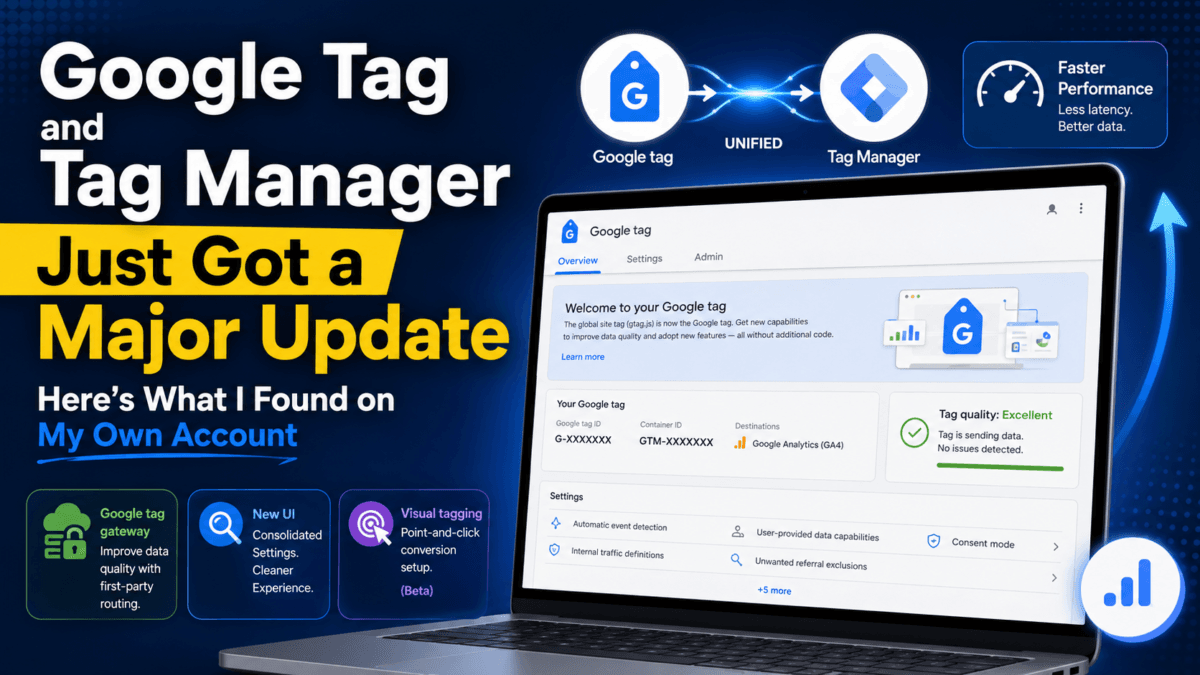
Google announced a significant overhaul to Google Tag and Google Tag Manager on May 20, 2026, and officially began the update rollout on August 20, 2026. The pitch: unify the Google tag and Google Tag Manager into one system, cut page-load latency by removing an extra JavaScript hop, and let you set up conversion tracking by clicking on your website instead of writing code.
That’s the announcement. But announcements and what actually shows up in your account are two different things — so instead of just summarizing Google’s blog post, I logged into my own Google Tag Manager account across a few of my sites (TechMitra, AdaptiveLifeGuide, and a couple of others) to see what’s actually live right now, and what’s still pending.
Here’s what’s real, what’s not yet rolled out, and what you should actually check on your own account.
At a glance — what I found on my account:
- Live now: Consolidated settings panel, Tag quality health status, rebrand messaging
- Partially live / actionable: Google tag gateway for advertisers (first-party CDN routing) — flagged as Incomplete, waiting on setup
- Not yet rolled out (for me): The optimization banner, the redesigned Overview UI with the collapsible Advanced tab, and visual event tagging (still Ads-only beta)
Table of Contents
Also Read : What is SEO, What Are Its Different Types And Its Benefits? (2026 Guide)
What is a “Google tag” exactly?
Before getting into the update, it’s worth clarifying what a Google tag actually is — the terminology has shifted a few times and it trips people up.
A Google tag is the single snippet of JavaScript (gtag.js) you place on your website to send data to Google products — Google Analytics (GA4), Google Ads, and Floodlight. Instead of installing a separate tracking snippet for each product, one Google tag can feed data to multiple destinations at once.
It’s different from Google Tag Manager (GTM), though the two are closely related and, per this update, converging:
- Google tag = the lightweight snippet that just sends data to Google destinations. IDs typically start with
G-(GA4) orAW-(Google Ads). - Google Tag Manager = a full container system for managing that snippet — plus any other tags, triggers, and variables — through a visual interface, without editing your site’s code for every change. Container IDs start with
GTM-.
If you’ve ever connected GA4 or Google Ads to your site, you already have a Google tag running, whether or not you’ve ever opened Tag Manager. That’s exactly what I found on my own account below.
What Google announced
Five changes, in short:
- Google is unifying the Google tag and Google Tag Manager. Sites that only use a Google tag (a
G-orAW-prefixed ID) will get access to full Tag Manager features — debugging, version control, an interface-driven setup — without needing to build a separate container from scratch. - A redesigned Overview page, with a new Settings tab for container-wide configuration and a collapsible Advanced tab (Triggers, Variables, Templates, Folders) to cut down visual clutter.
- Faster tag performance. Optimized containers send data straight to Google destinations instead of loading
gtag.jsas a middle step — less JavaScript, less latency. - Visual tagging. Point-and-click event setup: walk through a test purchase on your site, tag the transaction fields, and Google handles the triggers and variables in the background. Currently in beta, limited to purchase conversions in Google Ads.
- It’s opt-in. Google says explicitly that nothing changes automatically — you’ll see an “optimization banner” on your container when it’s your turn, and you can preview every change before publishing.
There’s also a developer-facing change worth flagging: per Google’s own release documentation, new deployment snippets are dropping the inline gtag('config', ...) command. Initialization is instead expected to run through a gtm init trigger inside the container. This is a structural shift for anyone who manages tag deployment by hand rather than through the interface — I haven’t seen this on my own account yet, so I’m citing it from Google’s documentation rather than reporting it as something I’ve tested.
That’s the official version. Here’s what I actually found.
What’s live on my account right now
My existing Google tags — untouched, but already there
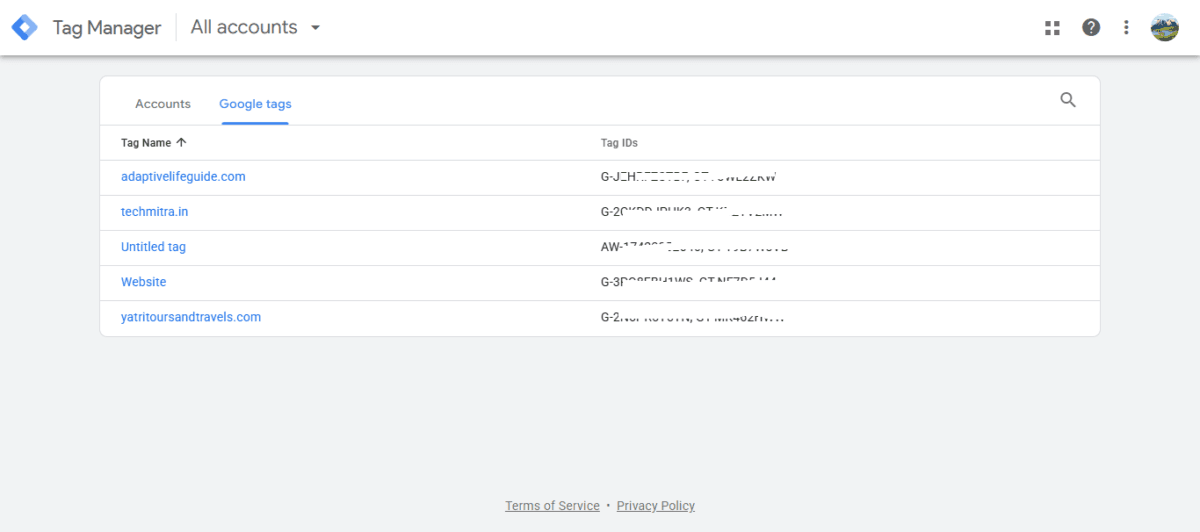
First surprise: I opened Tag Manager expecting an empty account, and instead found a “Google tags” list with tags already created for several of my sites — techmitra.in, adaptivelifeguide.com, and others — each with its own G- and GT- prefixed IDs. I never manually built these in Tag Manager. My best guess is they were generated automatically through GA4 and Ads account linking, though Google’s interface doesn’t explicitly confirm that origin — it’s worth flagging as inference on my part, not a confirmed fact.
If you’ve connected Google Analytics or Google Ads to your site at any point, there’s a decent chance you have tags sitting in Tag Manager that you’ve never actually opened.
The “Welcome to your Google tag” banner
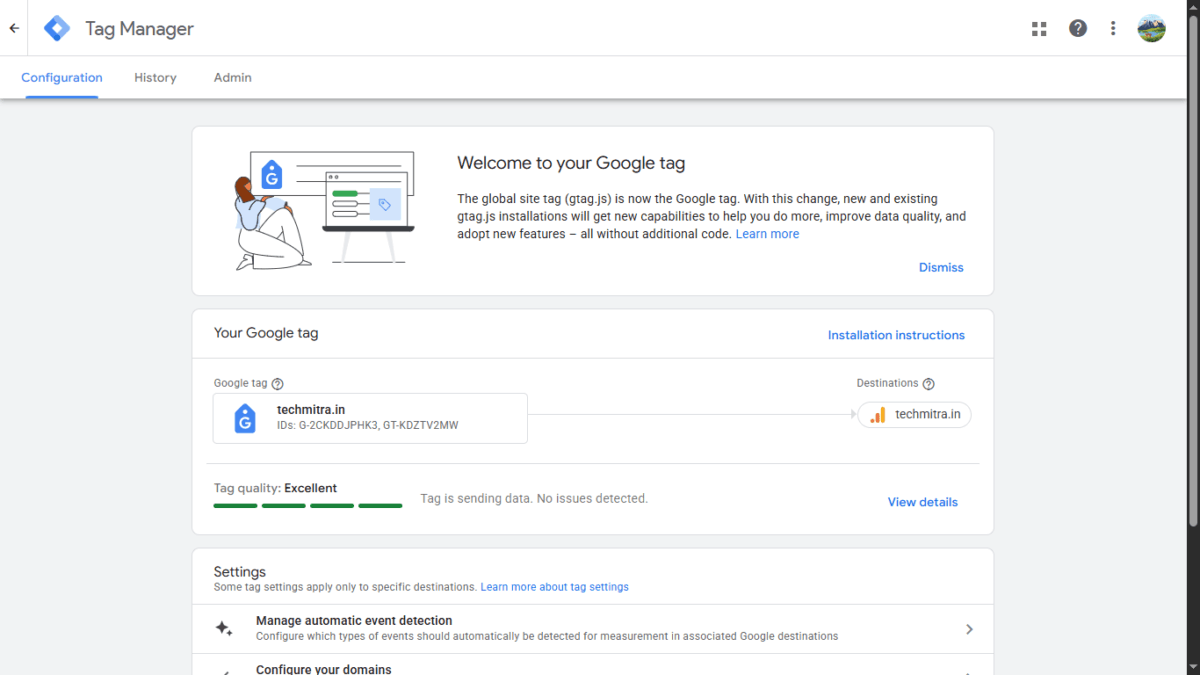
Clicking into the techmitra.in tag showed a banner: “The global site tag (gtag.js) is now the Google tag. With this change, new and existing gtag.js installations will get new capabilities to help you do more, improve data quality, and adopt new features — all without additional code.”
Below it: the tag’s IDs, its destination (my GA4 property), and a Tag quality: Excellent indicator with “Tag is sending data. No issues detected.” That’s a genuinely useful health check, and it’s live now — not a beta feature.
Settings really are consolidated
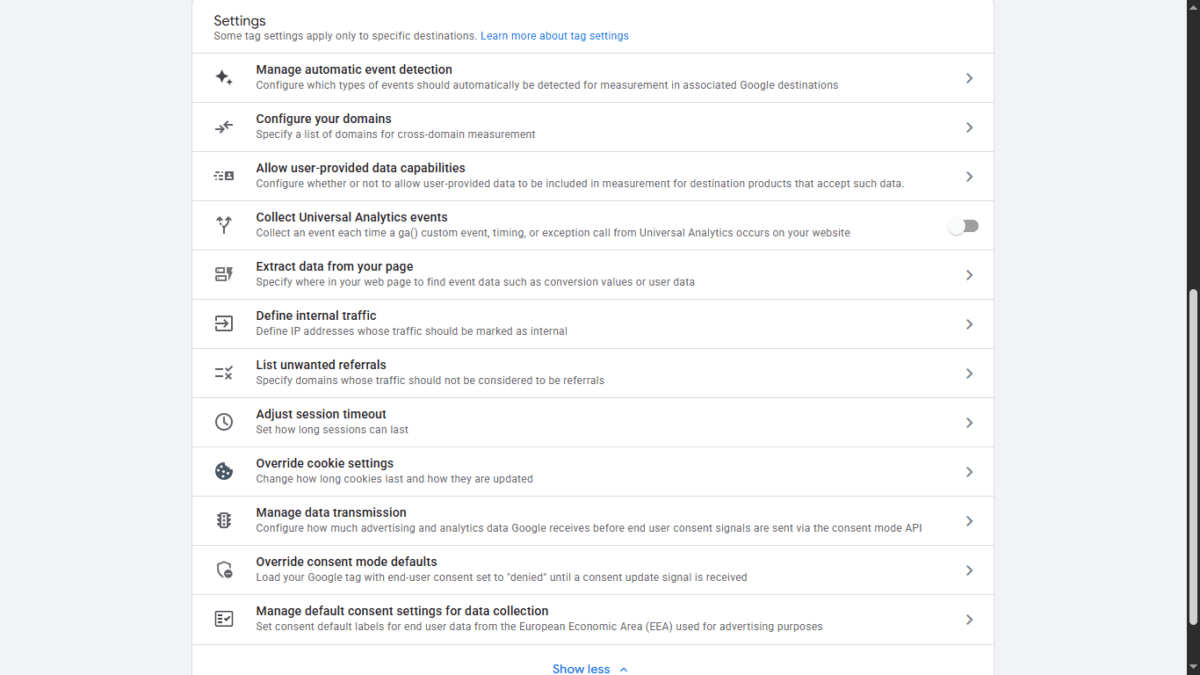
Scrolling down, the Settings section had every control I’d expect to be scattered across GA4’s admin panel instead sitting in one place: automatic event detection, cross-domain configuration, user-provided data capabilities, Universal Analytics event collection (a toggle, off by default for me), page-level data extraction, internal traffic definitions, unwanted referral exclusions, session timeout, cookie override settings, consent mode data transmission, consent mode defaults, and default consent settings for the EEA. Eleven settings, one screen, no jumping between GA4 and Ads to configure them separately.
The Admin tab has a pending action item
This is the most concrete finding. Under Admin → Google tag management, there’s an entry called Google tag gateway for advertisers — Google’s full name for the feature, though the in-product label just reads “Google tag gateway” — marked Incomplete, described as: “Improve data quality by updating your tag to operate in your first-party context.”
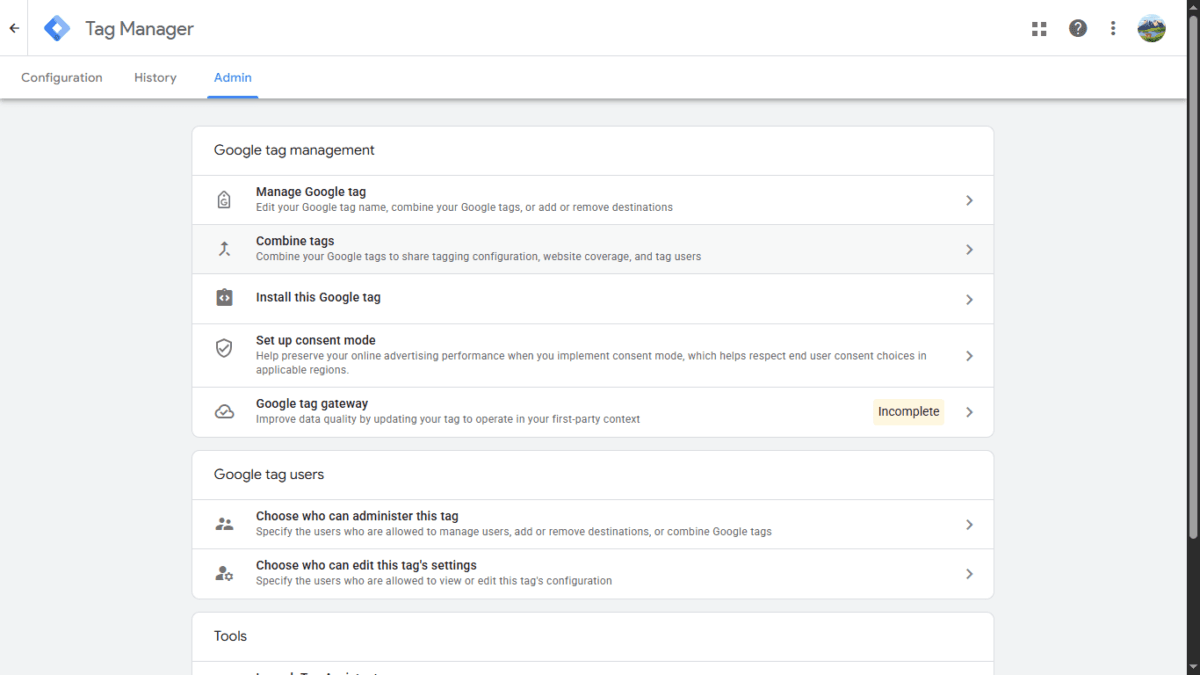
In plain terms, this routes tag data through a first-party CDN or edge endpoint on your own domain before it reaches Google, instead of going straight from the browser to Google’s servers. Google’s release notes show this rolling out gradually since January across Cloudflare, Google Cloud Platform, Akamai, Fastly, and Amazon CloudFront. On my account, Google flagged this specific item as Incomplete under the techmitra.in tag. I’m reporting what showed up for me, not claiming every account will see the same prompt. It’s a real, sitting-in-your-account item worth checking, not marketing copy — I’ll cover the actual setup process in a dedicated follow-up article, since it deserves its own walkthrough.
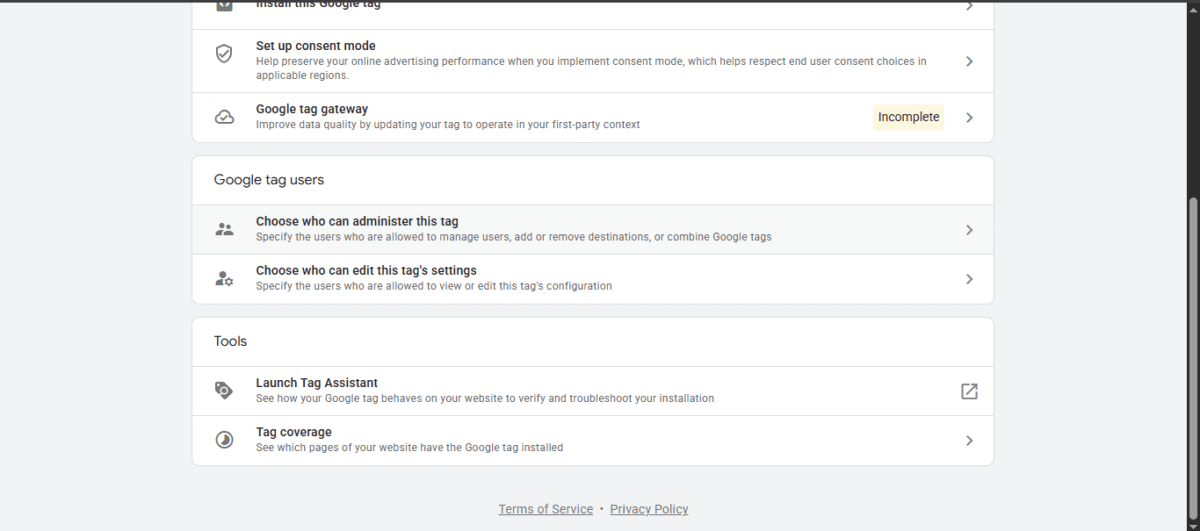
The Admin tab also has straightforward tools worth knowing about regardless of any of this update: Launch Tag Assistant (verify your tag is actually firing correctly on live pages) and Tag coverage (see which pages on your site do and don’t have the Google tag installed).
What’s NOT live on my account yet
This matters as much as what is. I did not see:
- The optimization banner — the specific prompt to upgrade this Google tag into a full GTM container with debugging and version control
- The redesigned Overview page — I’m still on the older Configuration / History / Admin tab layout, not the new Settings-tab-plus-collapsible-Advanced-tab interface Google described
- Visual tagging — no point-and-click conversion setup entry point anywhere in my account
Google’s own announcement says there’s “no fixed rollout date” for the full upgrade, and my account is proof of that. The rebrand and settings consolidation have clearly reached me. The container-level optimization and new UI haven’t — at least not yet, as of August 23, 2026.
What you should actually do
- Check your own Tag Manager account, even if you think you’ve never set one up. Go to tagmanager.google.com and click the “Google tags” tab (not just “Accounts”) — you may have tags already there from GA4 or Ads linking.
- Check the Admin tab for pending items on your own account. If you see “Google tag gateway for advertisers” marked Incomplete — as I did — that’s worth a look. I’ll walk through the actual setup process — including which CDNs are supported and what to expect — in a separate article.
- Don’t wait for the optimization banner to appear before checking Tag Assistant and Tag coverage. Both are available now and tell you whether your tag is actually working correctly.
- When the optimization banner does show up, it’s safe to explore. Google previews every change before you publish it, and nothing happens automatically. There’s no forced migration here.
- If you’re still only using plain gtag.js with no Tag Manager container at all, this update is aimed squarely at you — it’s designed to hand you Tag Manager’s tools without requiring a rebuild.
Bottom line
The Google tag and Tag Manager unification is real and it is rolling out — but unevenly. My own account shows the early stage of it (rebrand, consolidated settings, a pending first-party routing task) without the headline features (new UI, visual tagging, the optimization flow) yet in view. If your account looks like mine, you’re not behind — you’re just not first in line. Check your own account using the steps above; it takes two minutes and might surface a pending action item you didn’t know was waiting.

Ayush Singhal is the founder and chief editor of TechMitra.in — a tech hub dedicated to simplifying gadgets, AI tools, and smart innovations for everyday users. With over 15 years of business experience, a Bachelor of Computer Applications (BCA) degree, and 5 years of hands-on experience running an electronics retail shop, Ayush brings real-world gadget knowledge and a genuine passion for emerging technology.
At TechMitra, he covers everything from AI breakthroughs and gadget reviews to app guides, mobile tips, and digital how-tos. His goal is simple — to make tech easy, useful, and enjoyable for everyone. When he’s not testing the latest devices or exploring AI trends, Ayush spends his time crafting tutorials that help readers make smarter digital choices.
📍 Based in Lucknow, India
💡 Focus Areas: Tech News • AI Tools • Gadgets • Digital How-Tos
📧 Contact: Get in touch →
🔗 Full Bio: https://techmitra.in/about-us/