
Image disclaimer: This image is for illustrative purposes only and is not an official Canva graphic. Canva plan names, pricing, features, and availability may change by country and over time. Please check Canva’s official website for the latest information.
If you’ve logged into Canva recently on a Free account in India, you might have noticed something new. The upgrade prompt doesn’t just say “Try Canva Pro” anymore — it now offers Canva Pro Lite first. Most Canva coverage online hasn’t caught up to this yet, mostly because it’s genuinely new and, for now, only rolled out in a couple of countries.
(Quick note before we get into it: Canva also sells Canva Business, aimed at individuals and small teams who want everything in Pro plus deeper collaboration, brand approvals, and marketing tools — covered in more detail in our complete Canva features and pricing guide. This article isn’t covering Business — it’s specifically about the plan most people upgrading from Free will actually see: Pro Lite vs. full Pro.)
Here’s a small thing that tells you a lot about how Canva actually splits free from paid: browse the Photos or Templates library on any account, and you’ll spot a tiny crown icon on certain thumbnails. That crown means “premium” — everything without it is fair game on Free, sitting in the same search results as the paid stuff. It’s a small detail, but it’s honestly the clearest way to see where the line actually sits, rather than trying to piece it together from a pricing page. That same idea — more is free than you’d expect, but the gap is specific — comes up again and again in this comparison.
This is a hands-on look at all three tiers, based on what actually shows up inside a live Canva account, not just a rewrite of the pricing page.
Table of Contents
Also Read : ChatGPT’s Canva Plugin: What Works, What Doesn’t (Real Test)
Templates and Photos: The Two Features That Are Genuinely Good on Free
Before getting into plan-by-plan specifics, it’s worth stopping on the two features that define using Canva more than any AI tool does — and where Free is more generous than people usually give it credit for: templates and photos.
Templates
This is really the thing that made Canva what it is. You’re not starting from a blank canvas the way you would in Photoshop — you pick a template that’s already designed, for more or less anything: Instagram posts, YouTube thumbnails, resumes, wedding invitations, business cards, presentations, posters, festival greetings, product mockups, menus, certificates.
That’s why it caught on with people who have zero design background. You don’t need to know anything about layout or colour theory to end up with something that looks decent — pick a template close to what you want, swap in your own text and photos, and you’re done in minutes instead of hours.
The template count changes by plan, and it’s one of the bigger practical differences between tiers:
- Free — 1.6M+ templates, though a good chunk of Canva’s better, more polished designs are marked Pro-only (you’ll see that small crown icon on them)
- Pro Lite — 2M+ templates, and importantly, unlimited use of premium templates — so even though the raw number is smaller than full Pro’s, you’re not blocked from actually using the better ones the way you are on Free
- Pro / Business — 3.6M+ templates, the full library, including whatever’s newest
What’s easy to miss is that the count matters less than the access. On Free, premium templates still show up in your search results — you just get an upgrade prompt the moment you tap one. Pro Lite removes that block entirely, even with a smaller total library than Pro. That alone is arguably the best reason to go from Free to Pro Lite, before you even touch an AI tool.
For India specifically, this matters more than it might elsewhere — the template library has decent coverage for things like festival posts (Diwali, Holi, Eid, Janamashtami) and Indian wedding invitations, which is often a real gap in more generic, Western-first design tools.
Photos
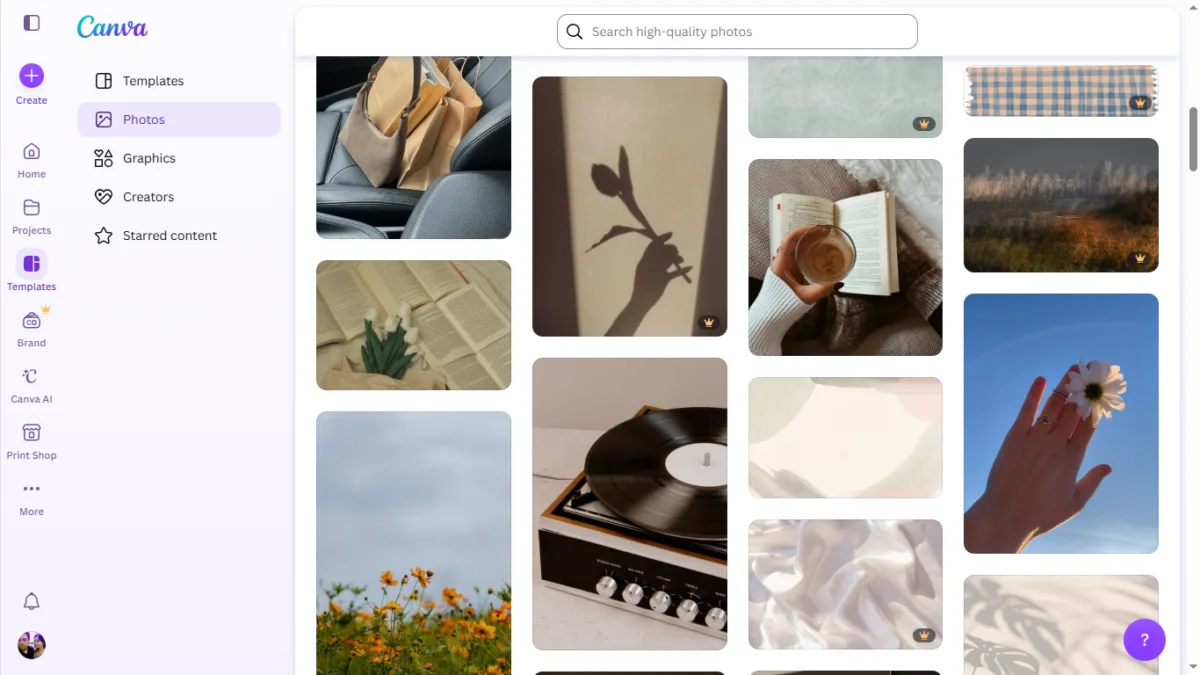
Templates aren’t the only place Free is more generous than people assume — Photos works the same way.
Free accounts get 4.7M+ photos (along with video, graphics, and audio in the same library), while paid plans unlock the full 141M+ collection. That gap looks huge on paper, but in practice, free and premium photos sit side by side in the same search results — that same crown icon is how you tell them apart. Search for something, and you’ll get a real mix of usable, decent photography — not an obviously worse set of images pushed to free accounts.
Browsing is also better than a plain search box suggests. Canva groups photos into Collections — curated sets built around a theme rather than a keyword, things like “Entrepreneur Year in Review Moments” or “Day in the Life” style sets, each with dozens of photos that actually look like they belong together. That’s genuinely useful if you’re putting together something that needs a consistent look across several images — a slide deck, a run of social posts.
On licensing: Canva allows a lot of Free and Pro content to be used for personal and commercial projects, but its content licence has specific restrictions depending on how you’re using it — for example, selling templates or products that include Pro content comes with its own rules. If you’re publishing something for sale, it’s worth checking Canva’s current licence terms directly rather than assuming everything’s fair game.
If you’re trying to decide whether Free is “enough” before paying for anything, Photos is one of the clearer signs that it often is.
What Is Canva Pro Lite?
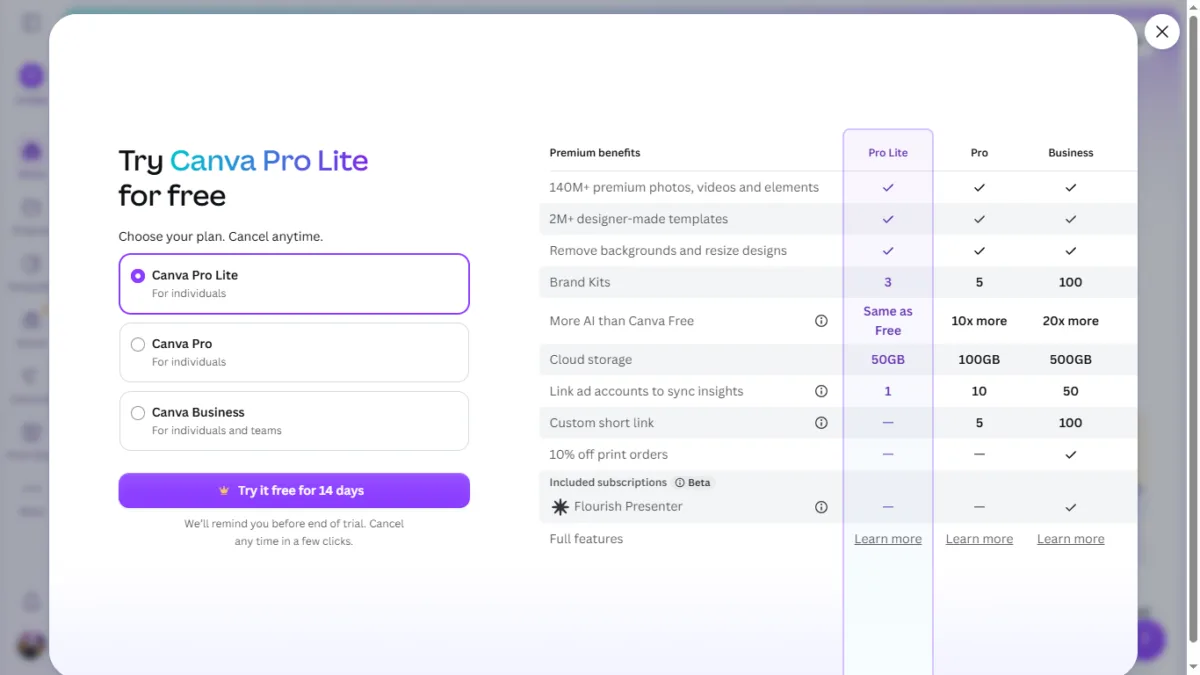
Canva Pro Lite is a newer plan sitting between Free and Pro, confirmed directly by Canva’s own help documentation. It’s aimed at people who want premium templates, photos, and the core one-click design tools, without paying for Canva’s full AI feature set.
Two things set it apart from every other Canva plan:
- It’s currently available in India and Indonesia. Canva says it’s rolling this out gradually, so it may not show up on every account yet even within those two countries.
- It’s only available on the web and Android app — not on iOS.
If you’re on a Free account in India right now, this is probably the plan Canva shows you first when you tap “Upgrade,” ahead of full Pro.
If you’re on a Free account in India right now, this is probably the plan Canva shows you first when you tap “Upgrade,” ahead of full Pro.
If you’re already on Canva Pro, you won’t see Pro Lite offered to you the same way — it doesn’t show up as a prompt or an obvious option on your account. That’s not because Pro users can’t get it; you actually can switch, but it’s a manual downgrade you have to go looking for, not something Canva pushes to you.
Per Canva’s own help documentation, the path is Settings → Billing → Plan section → “More” → Switch to Canva Pro Lite. If you’re on Canva Business with team members, you’ll need to remove them first; if you have an AI Pass add-on, you’ll need to remove that and let it run out first too. It’s a deliberate, few-step process rather than a one-tap switch — which probably explains why most existing Pro subscribers don’t even know Pro Lite is an option for them.
Canva Pro Lite Pricing (Verified)

Checked directly from a live Canva account’s upgrade screen:
- Monthly: ₹199/month
- Yearly: ₹1,590/year (works out to ₹132.50/month) — Canva lists this as a saving of ₹798 over paying monthly
That puts Pro Lite at roughly 40% cheaper than full Pro (₹500/month), which starts to make sense once you see what’s missing.
What’s Included in Canva Pro Lite
Straight from Canva’s help centre:
Design and publishing
- Unlimited access to premium templates, elements, photos, videos, fonts, and audio
- Print-ready CMYK exports
- Social Content Planner (scheduling)
AI design tools
- Background Remover (photo and video)
- Magic Resize
- Magic Eraser
- Magic Grab
Brand tools
- 3 Brand Kits (Free gets 1, Pro gets 5)
- Brand Templates
- Components (turning static assets into reusable elements)
Storage
- 50GB cloud storage (Free is 5GB, Pro is 100GB — Pro Lite sits right in between)
The One Thing Pro Lite Doesn’t Give You
This is the limitation that actually matters, and Canva is upfront about it rather than burying it: conversational design in Canva AI isn’t included with Pro Lite at all. That means the Canva AI chat assistant — the one I tested in a separate piece, where it generated a full festival social post from a single prompt and pulled captions straight from a live article URL — is Pro and Business only.
Pro Lite’s AI allowance is also explicitly the same as a Free account. Upgrading gets you the design tools and unlimited premium content, but it doesn’t give you more AI generation to work with.
So it’s probably most accurate to think of Pro Lite as: Free, but with unlimited premium templates and stock content, plus the core one-click editing tools switched on — not a lighter version of Canva’s full AI experience.
Canva Free vs Pro Lite vs Pro: Core Differences
| Feature | Free | Pro Lite | Pro |
|---|---|---|---|
| Price | ₹0 | ₹199/mo | ₹500/mo |
| Premium content | Limited | Unlimited | Unlimited |
| Background Remover | ✗ | ✓ | ✓ |
| Magic Resize | ✗ | ✓ | ✓ |
| Magic Eraser / Magic Grab | ✗ | ✓ | ✓ |
| Magic Edit / BG Generator / Magic Expand | ✗ | ✗ | ✓ |
| Canva AI (conversational design) | Limited | Free-level only | Full access |
| Brand Kits | 1 | 3 | 5 |
| Storage | 5GB | 50GB | 100GB |
| Social scheduling | ✗ | ✓ | ✓ |
Swipe left/right to see all plans on mobile.
AI Allowance, Compared Separately
The AI side deserves its own table, mostly because it’s easy to misread. Canva’s allowance is a shared monthly pool, not separate add-up-able buckets — think of it as “pick one path,” not “add these numbers together.” Actual usage also varies depending on which specific tool you’re using and how demanding the task is, so treat these as Canva’s own stated ranges, not a hard guarantee.
| Plan | Monthly AI allowance |
|---|---|
| Free | Up to 200 Standard AI uses, or 20 Premium AI uses |
| Pro Lite | Same as Free* |
| Pro | 10x Standard/Premium AI vs. Free, or up to 20 Ultra AI uses |
*Per Canva’s Pro Lite help documentation. Standard AI tools (Magic Write, Translate) are unlimited on paid plans; the allowance above governs Premium and Ultra AI tools specifically. Actual usage varies by tool and task complexity — see Canva’s help centre for details.
What I Found Testing This on My Own Free Account
A few things worth mentioning that only really show up once you’re inside a Free account, not just reading the pricing page. Worth being clear these are from my own testing, not something Canva documents outright:
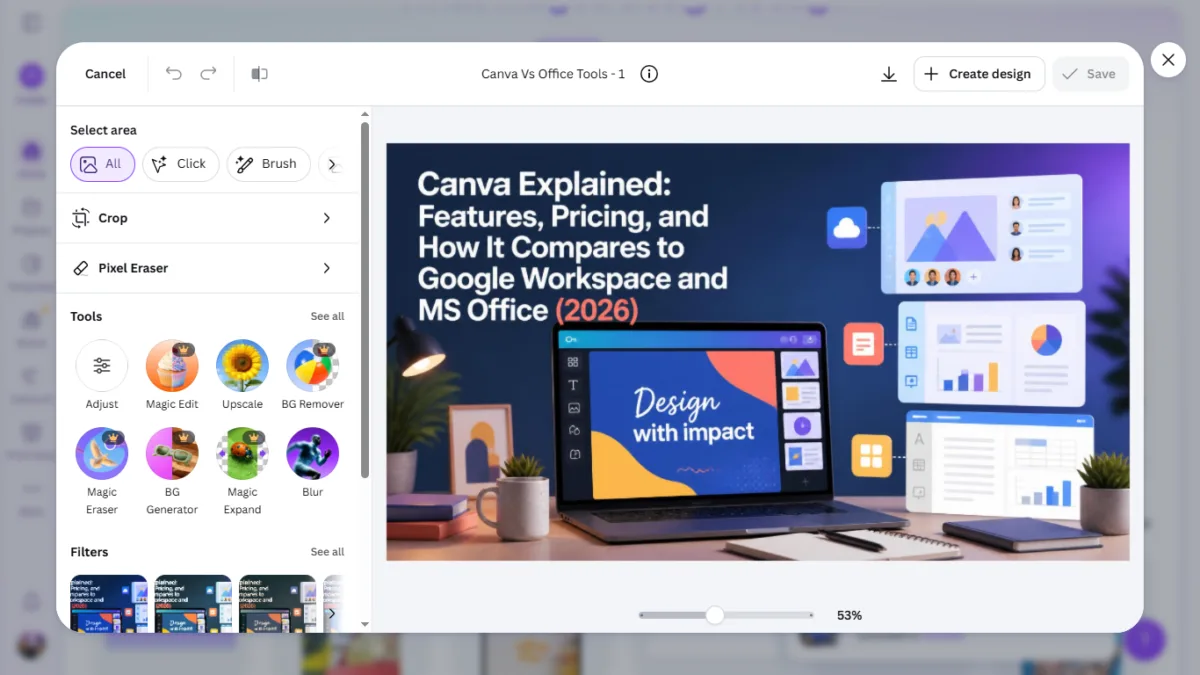
The AI toolset is visible, just locked. Open the photo editor on a Free account and the full toolbar is right there — Magic Edit, Upscale, BG Remover, Magic Eraser, BG Generator, Magic Expand, Blur. Nothing’s hidden. You just get an upgrade prompt the moment you try to use most of them.
In my testing, Magic Layers was the one exception — it worked on my Free account, even though Canva’s own pricing documentation lists Magic Layers as a Premium AI tool. That might just be how the rollout was going on my account at the time, so I wouldn’t treat it as a permanent rule — worth checking your own account rather than assuming either way.
Export controls are more restrictive than the comparison pages suggest. On Free, when you download a design, both the file size and export quality are fixed — you can’t adjust them the way you can on a paid plan. This isn’t something Canva’s main comparison table calls out clearly, but it’s a real limitation if you need a specific file size for a printer or an ad platform.
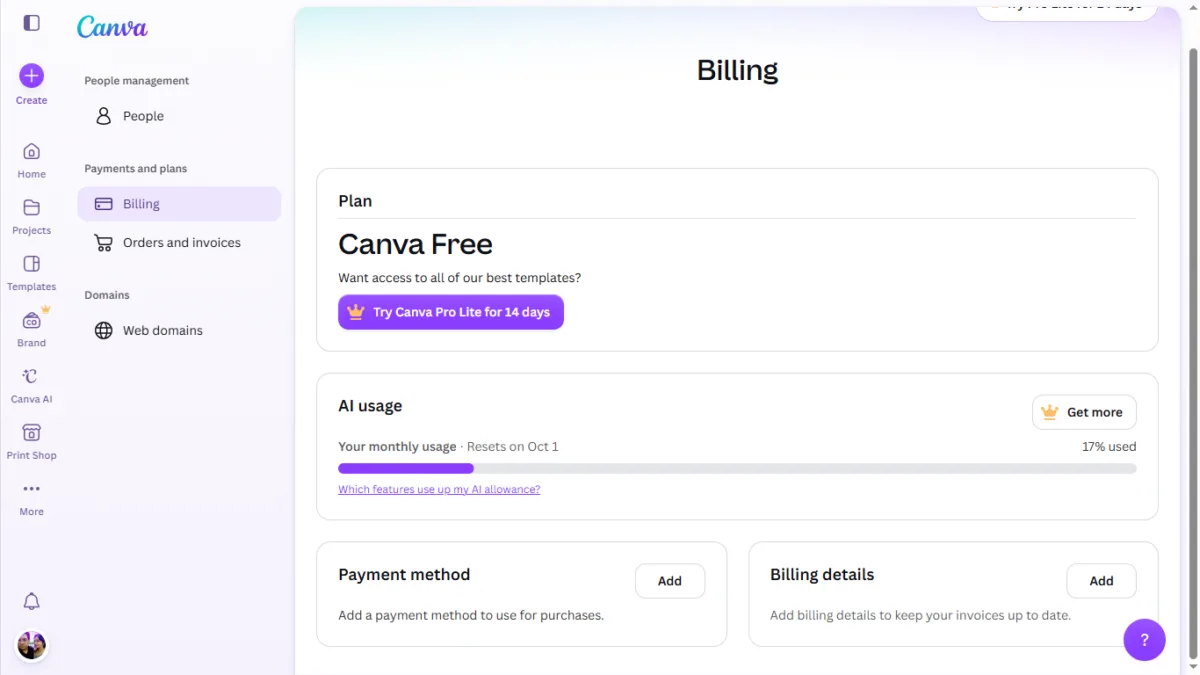
Your AI allowance is tracked and visible in real time. The Billing page shows a live usage bar for your monthly AI allowance — mine was sitting at 17% used, resetting at the start of the next month — along with a link explaining which features actually draw from it. If an AI tool suddenly stops responding, that’s the first place worth checking.
Who Should Actually Buy Which Plan
Stay on Free if:
- You design occasionally — a few posts a month, a resume, a one-off flyer
- You don’t specifically need Background Remover, Magic Resize, or unlimited premium content
- A smaller asset library and fixed export settings genuinely don’t bother you
Pro Lite is a good fit if:
- You’re in India (or Indonesia) and design semi-regularly
- You mainly want unlimited premium templates and stock content
- You use Background Remover, Magic Resize, Magic Eraser, or Magic Grab often enough that Free’s restrictions are annoying
- You don’t need the Canva AI chat assistant or a bigger AI allowance
- You’re a blogger, social media creator, student, or small business owner who wants a step up from Free without paying full Pro price
Pro is worth the extra money if:
- Canva AI (the conversational assistant) is part of how you actually want to work
- You need Magic Edit, Background Generator, or Magic Expand specifically
- You’ll genuinely use the larger AI allowance, not just have access to it
- You want deeper brand tools (more Brand Kits, custom short links)
If you’re on the fence, check your own account’s upgrade screen for whatever trial or billing terms Canva is currently showing you — those details can shift, so it’s worth confirming directly rather than assuming they match what worked for someone else.

Ayush Singhal is the founder and chief editor of TechMitra.in — a tech hub dedicated to simplifying gadgets, AI tools, and smart innovations for everyday users. With over 15 years of business experience, a Bachelor of Computer Applications (BCA) degree, and 5 years of hands-on experience running an electronics retail shop, Ayush brings real-world gadget knowledge and a genuine passion for emerging technology.
At TechMitra, he covers everything from AI breakthroughs and gadget reviews to app guides, mobile tips, and digital how-tos. His goal is simple — to make tech easy, useful, and enjoyable for everyone. When he’s not testing the latest devices or exploring AI trends, Ayush spends his time crafting tutorials that help readers make smarter digital choices.
📍 Based in Lucknow, India
💡 Focus Areas: Tech News • AI Tools • Gadgets • Digital How-Tos
📧 Contact: Get in touch →
🔗 Full Bio: https://techmitra.in/about-us/