
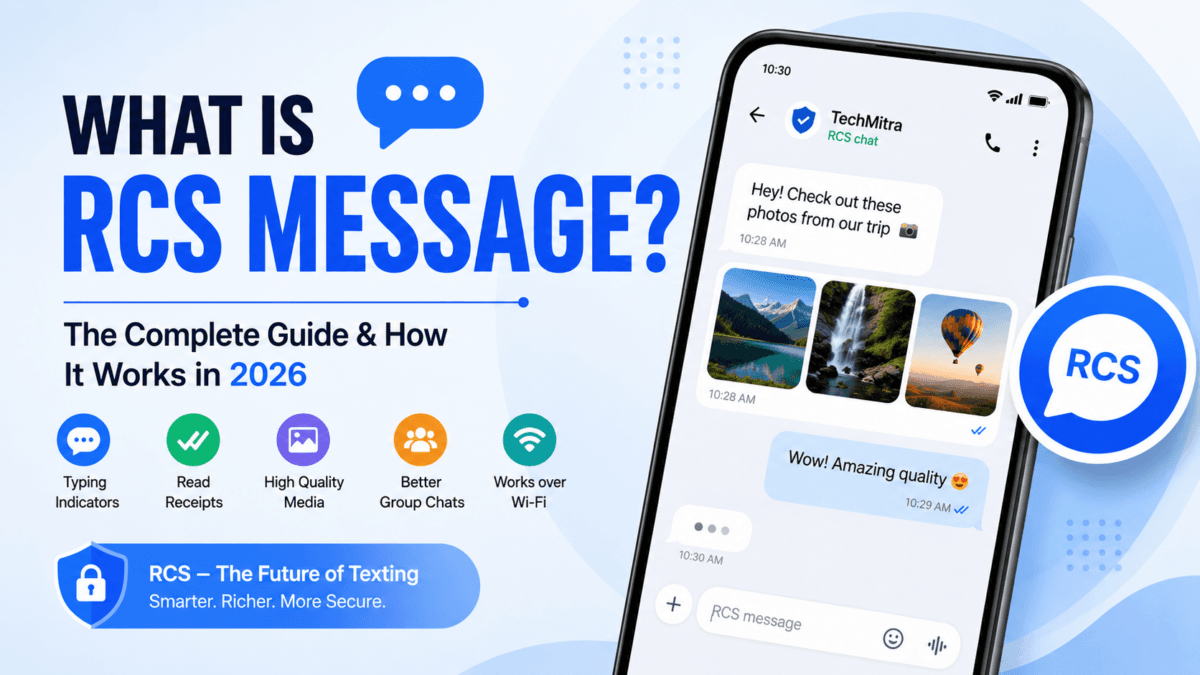
If you’ve noticed “RCS Chat” showing up in your Google Messages app and wondered what it actually is, you’re not the only one — this shows up in our search data constantly. So I tested it myself on two different SIMs (BSNL and Jio) on the same phone to see exactly how it behaves in India, and this guide covers everything I found.
For years, SMS was just… how you texted. But once WhatsApp and iMessage normalized read receipts, typing indicators, and actually-viewable photos, plain SMS started feeling stuck in 2010. RCS — Rich Communication Services — is Google and the telecom industry’s answer to that: bringing those modern features into your phone’s default messaging app, with no separate app to install.
In this guide:
- What is RCS message
- How it works, in plain terms
- RCS vs SMS vs WhatsApp
- Whether it’s actually safe
- How to turn it on or off (with real screenshots)
- What an RCS message looks like once it’s active
- Common problems and fixes
Table of Contents
Also Read : What is Brevo, Its Pricing, and How to Authenticate Your Website (Connecting DNS)
What Is RCS Message, Simply?
RCS (Rich Communication Services) is a messaging standard — not an app — built by the telecom industry group GSMA to replace old-school SMS and MMS.
The core difference: SMS travels over your carrier’s basic signaling network. RCS travels over the internet — Wi-Fi or mobile data — the same way WhatsApp or Telegram messages do. That’s what unlocks everything else: typing indicators, read receipts, real photo quality, and group chats that don’t fall apart after five people join.
You don’t install anything new for this. On Android, it’s built into Google Messages. On iPhone, Apple added RCS support starting with iOS 18.
How RCS Chats Actually Works
Once RCS is active for both people in a conversation, here’s what changes:
- Messages go over Wi-Fi or mobile data instead of the SMS network
- Photos and videos arrive at close to their original quality
- You can see when the other person is typing
- Read receipts show whether your message was actually opened
- Group chats sync better and don’t lose messages
If the other person’s phone doesn’t support RCS — or their connection drops — your phone quietly falls back to regular SMS/MMS. You don’t have to do anything for that fallback; it happens automatically.
What This Actually Looks Like
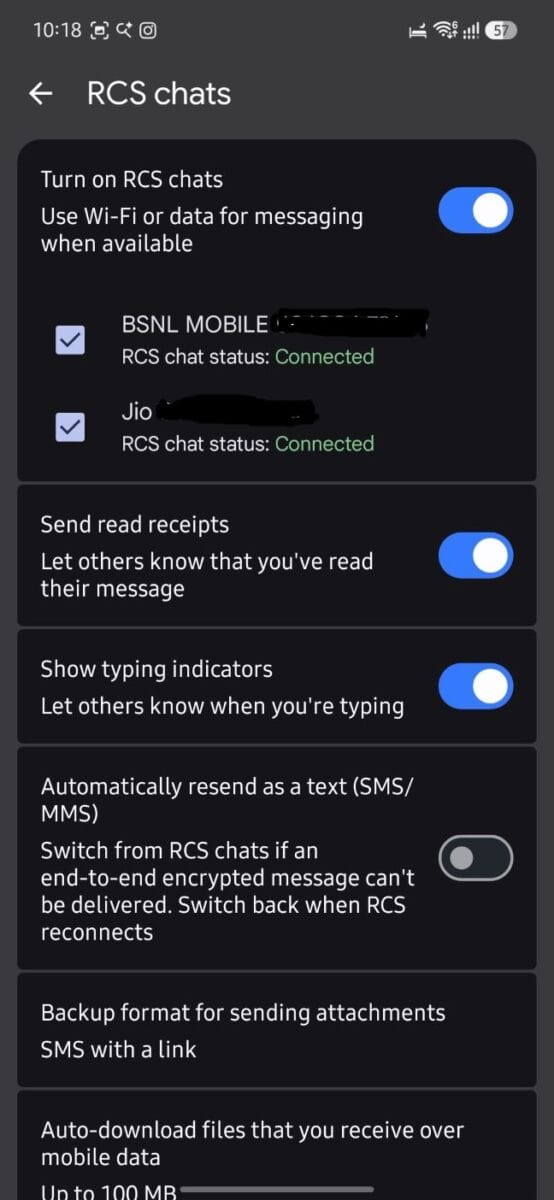
Here’s the real settings screen from a Google Pixel-style Messages app, showing RCS active on two separate SIMs at once:
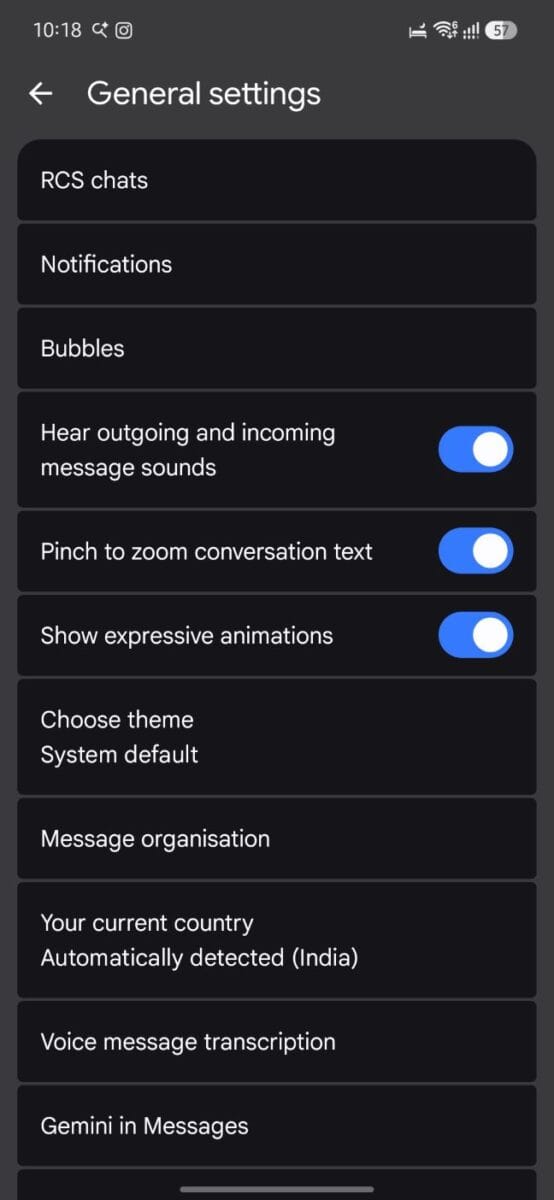
And this is where that setting lives inside the app — General settings → RCS chats:
One thing worth knowing if you’re on a dual-SIM phone like most people in India: RCS status is tracked separately per SIM. You can have it connected on Jio and not on your second number, and that’s completely normal — it’s not a bug.
Official RCS Settings by Google – Click Here
What an Actual RCS Conversation Looks Like
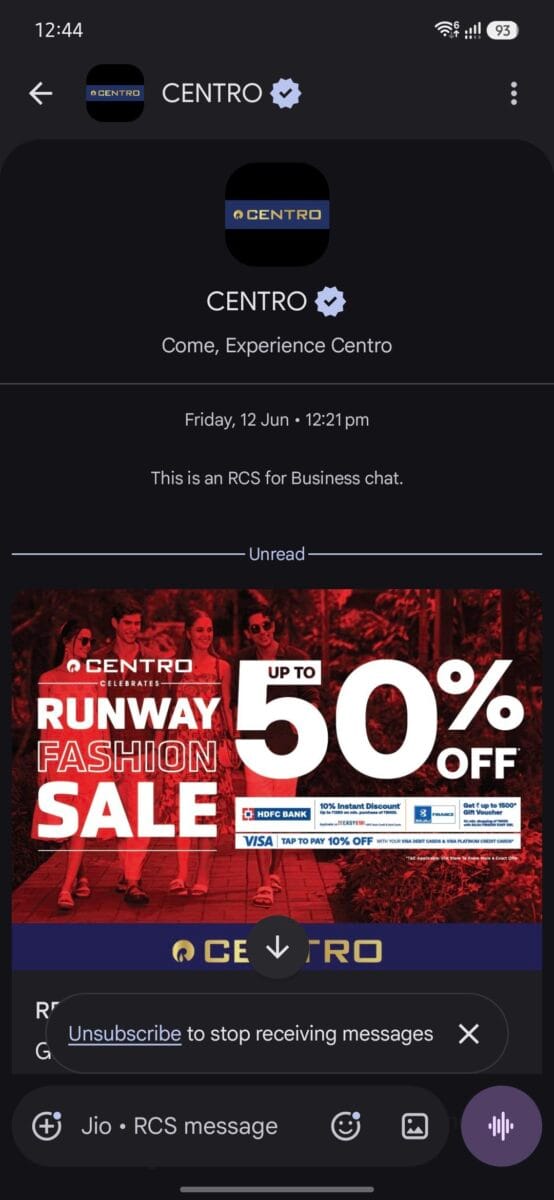
Here’s a real example — a message from a verified business (in this case, a retail brand) received over RCS on a Jio SIM. A few things to notice:
- Right at the top, Google Messages labels it: “This is an RCS for Business chat” — a clear signal you’re not looking at plain SMS
- The brand shows up with a verified checkmark, name, and logo — something SMS senders (just a phone number) can never do
- The promotional image renders at full size and quality, not the tiny, compressed thumbnail you’d get over MMS
- The compose bar at the bottom confirms it too: “Jio · RCS message”
For one-on-one chats (not business messages), the read receipt behavior is slightly different from what people expect coming from WhatsApp:
- One blue bubble/checkmark appears once your message is delivered
- Two blue bubbles/checkmarks appear once the other person has actually read it
If a conversation shows up as a plain bubble with no delivery status, verified badge, or rich media, it’s fallen back to SMS — usually because the other person doesn’t have RCS on, or the connection briefly dropped.riefly dropped.
SMS vs RCS Messaging : What’s Actually Different
| Feature | SMS | RCS |
|---|---|---|
| Needs internet | No | Yes |
| Character limit | 160 characters | Much higher |
| Photo/video quality | Compressed, often blurry | High quality |
| Read receipts | No | Yes |
| Typing indicators | No | Yes |
| Group chats | Basic, often breaks | Works properly |
| Works over Wi-Fi | No | Yes |
| Large file sharing | Very limited | Supported |
The short version: RCS makes your default texting app behave like WhatsApp, without asking you to open a different app.
RCS vs WhatsApp: Can It Actually Replace WhatsApp?
Short answer: not yet, not fully — at least not in India.
| Feature | RCS | |
|---|---|---|
| Works with just a phone number | Yes | Yes |
| Needs a separate app | No | Yes |
| High-quality media | Yes | Yes |
| End-to-end encryption | Supported in most chats now | Yes |
| Cross-platform | Yes | Yes |
| Backup options | Limited | Strong (Google Drive/iCloud) |
| User base in India | Growing | Massive, everyone already has it |
WhatsApp’s advantage in India isn’t really features anymore — it’s that everyone’s already on it, for personal chats and business both. RCS is a genuinely solid upgrade to default texting, but it’s competing with a habit, not just a feature set.
RCS vs iMessage
iMessage is Apple’s own system, locked to Apple devices talking to other Apple devices. RCS is different by design — it’s an open, cross-platform standard meant to work regardless of what phone the other person has.
Since Apple added RCS support (iOS 18 and later), texting between iPhone and Android has genuinely improved: better photo/video quality, typing indicators, and read receipts now work both ways. The bubble on an iPhone screen still shows green for an Android contact — that hasn’t changed, and Apple has given no indication it plans to. But the experience behind that green bubble is much closer to what blue-bubble iMessage users get than it used to be.
Some iMessage-exclusive features (like certain sticker effects) are still Apple-only. But the basics — read receipts, decent photos, typing indicators — now work across the green/blue divide.
Is RCS Messaging Safe?
Yes, meaningfully safer than plain SMS — and this got a real upgrade recently. As of May 2026, Apple and Google began rolling out end-to-end encryption for RCS chats between iPhone and Android, not just within each platform. This shipped in beta with iOS 26.5, built on the GSMA’s Universal Profile 3.0 standard using the Messaging Layer Security (MLS) protocol.
Android-to-Android RCS in Google Messages has actually had end-to-end encryption since 2020. The new part is the iPhone-to-Android link — for the first time, a message crossing between the two platforms can be encrypted the whole way, with no one in between (not Apple, Google, or your carrier) able to read it.
That encryption isn’t automatic just because both people have modern phones — three things need to line up at once:
- iOS 26.5 or later on the iPhone side
- The latest Google Messages build on the Android side
- Both carriers supporting the current RCS Universal Profile standard
When it’s active, you’ll see a small lock icon next to the chat. On iPhone, the compose field shows “Text Message · RCS · Encrypted.” No lock means one side — device, app version, or carrier — hasn’t caught up yet, and the conversation is running unencrypted (or has quietly fallen back to plain SMS, which has never been encrypted at all).
RCS Business Messaging in India
You’ve probably already received one of these without realizing it — a delivery update from a food app, an OTP that comes with a verified badge, a bank alert with a “View Details” button built into the message itself. That’s RCS Business Messaging (RBM).
Common uses:
- Order and delivery tracking
- OTP and account verification
- Flight and travel updates
- Bank notifications
- Customer support with action buttons
The point of RBM is that businesses can show a verified profile and logo, and add clickable buttons directly inside the message — something plain SMS was never built to do.
Does RCS Work in India?
Yes. Jio, Airtel, and Vi (Vodafone Idea) all support RCS on compatible Android and iPhone devices as of 2026. Most Android phones running Google Messages get it working with no extra setup — you’ll just see the status change to “Connected” once it activates, which in our testing took under a minute on both a BSNL and a Jio SIM.
How to Enable RCS Chats on Android
- Open the Google Messages app.
- Tap your profile icon in the top corner.
- Tap Messages settings.
- Tap General.
- Tap RCS chats.
- Toggle on Turn on RCS chats.
- If you’re on dual-SIM, select which SIM(s) you want it active on.
- Wait a few seconds — the status should switch to Connected.
While you’re in this menu, it’s worth also turning on Send read receipts and Show typing indicators if you want the full experience.
How to Enable RCS on iPhone (iOS 18+)
- Open Settings.
- Scroll to Apps, then tap Messages.
- Under Text Messaging, find RCS Messaging.
- Toggle it on.
Note: this option only appears if your carrier supports RCS on iPhone — it isn’t available everywhere yet.
How to Disable RCS Chats
If you’d rather go back to plain SMS — for one SIM or entirely:
- Open Google Messages.
- Tap your profile icon.
- Tap Messages settings.
- Tap General.
- Tap RCS chats.
- Uncheck the SIM(s) you want to disable — you can turn it off for just one SIM and leave the other active.
- Confirm when prompted.
Once confirmed, that SIM falls back to regular SMS/MMS, and the “Connected” status disappears for it.
Why Is RCS Not Working?
The usual culprits, in order of how often they actually turn out to be the problem:
- Weak or no internet connection
- Your carrier doesn’t support RCS yet on that SIM
- RCS toggled off in settings (check the steps above)
- Outdated Google Messages app
- Phone number verification stuck or incomplete
Restarting the Messages app or updating it from the Play Store fixes this more often than you’d expect.
RCS: Pros and Cons
Pros
- Real upgrade over SMS with no new app needed
- High-quality photo and video sharing
- Typing indicators and read receipts
- Group chats that actually hold together
- Works over Wi-Fi, not just mobile signal
Cons
- Needs an internet connection to work at all
- Not every carrier supports every feature yet
- Some inconsistency between devices and OS versions
Frequently Asked Questions
What does RCS chat mean?
RCS chat refers to a modern messaging system that upgrades your phone’s default SMS app — adding typing indicators, read receipts, and HD photo sharing, similar to WhatsApp, but without installing any extra app.
What is the full form of RCS?
RCS stands for Rich Communication Services.
Is RCS messaging free in India?
Yes — over Wi-Fi it’s completely free. Over mobile data it uses a small amount of your data plan, similar to WhatsApp. It only switches to paid SMS rates if it falls back because there’s no internet available.
How do I know if I’m sending RCS or SMS?
In Google Messages, the compose box will say “RCS chat” instead of “Text message.” On iPhone, the bubble color doesn’t change, but you’ll see RCS features like typing indicators and better-quality media working with Android contacts.
Why is the bubble still green on iPhone when I text an Android user?
Apple reserves blue bubbles for iMessage-to-iMessage chats only. RCS conversations with Android users stay green — that hasn’t changed even with RCS support added. What has changed is that the green-bubble experience now includes better photos, typing indicators, and read receipts, instead of the old degraded MMS fallback.
Can I use RCS without internet?
No. RCS needs an active data or Wi-Fi connection. If you’re offline, your phone will typically offer to resend the message as SMS instead.
Does RCS work on all Indian carriers?
Jio, Airtel, and Vi all support RCS on compatible devices. If it’s not connecting, check that RCS chats are enabled in settings and that you have a stable data or Wi-Fi connection.
How do I stop spam on RCS?
Verified businesses on RCS carry a badge, so you can tap the business profile and select “Block & Report Spam” — this tends to be more effective than blocking a regular SMS number since the sender is carrier-verified.
Also Read : Facebook Verified: Meta Launches Free Selfie-Based Badge to Prove You’re a Real Person
What’s New in RCS (2026 Updates)
RCS has moved fast this year. Here’s what’s actually changed, confirmed as of July 2026:
- Cross-platform encryption (May 2026): iPhone-to-Android RCS chats can now be end-to-end encrypted, covered above. Rolling out gradually by carrier.
- Universal Profile 4.1 (July 2026): The GSMA published the latest RCS specification this month. It focuses on more stable, efficient message transport, the ability to share profile names and pictures in chats instead of just phone numbers, and refinements to encryption based on lessons from the cross-platform E2EE rollout.
- iOS 27 (public release expected September 2026): Currently in beta, this adds inline threaded replies and proper emoji photo reactions to cross-platform RCS chats — features Android users already had, and that iPhone users are only now getting for chats with Android contacts. Reactions used to show up as clunky text (“Ryan loved an image”); now they display as the actual emoji on both sides.
- Edit and unsend: Both platforms now support editing a sent RCS message or deleting it for both people — but only within a 15-minute window after sending. After that, it’s permanent.
Worth noting: these features depend on the RCS Universal Profile the industry standardized back in 2024 (version 2.7) and has continued refining since. Apple’s iPhone implementation has generally lagged a version or two behind — the standard is already at 4.1, and iOS is still catching up on features that shipped in the spec roughly two years ago.
Is RCS the Future of Texting?
RCS is spreading because it upgrades the one messaging app that’s already on every phone, without asking anyone to download something new. As support improves across more carriers and both Android and iPhone, it’s reasonable to expect RCS becomes the default texting experience rather than something you have to think about turning on.
For now, if you’re on Jio, Airtel, or Vi with a reasonably modern phone, there’s a good chance it’s already running — worth checking your settings using the steps above.

Ayush Singhal is the founder and chief editor of TechMitra.in — a tech hub dedicated to simplifying gadgets, AI tools, and smart innovations for everyday users. With over 15 years of business experience, a Bachelor of Computer Applications (BCA) degree, and 5 years of hands-on experience running an electronics retail shop, Ayush brings real-world gadget knowledge and a genuine passion for emerging technology.
At TechMitra, he covers everything from AI breakthroughs and gadget reviews to app guides, mobile tips, and digital how-tos. His goal is simple — to make tech easy, useful, and enjoyable for everyone. When he’s not testing the latest devices or exploring AI trends, Ayush spends his time crafting tutorials that help readers make smarter digital choices.
📍 Based in Lucknow, India
💡 Focus Areas: Tech News • AI Tools • Gadgets • Digital How-Tos
📧 Contact: Get in touch →
🔗 Full Bio: https://techmitra.in/about-us/