

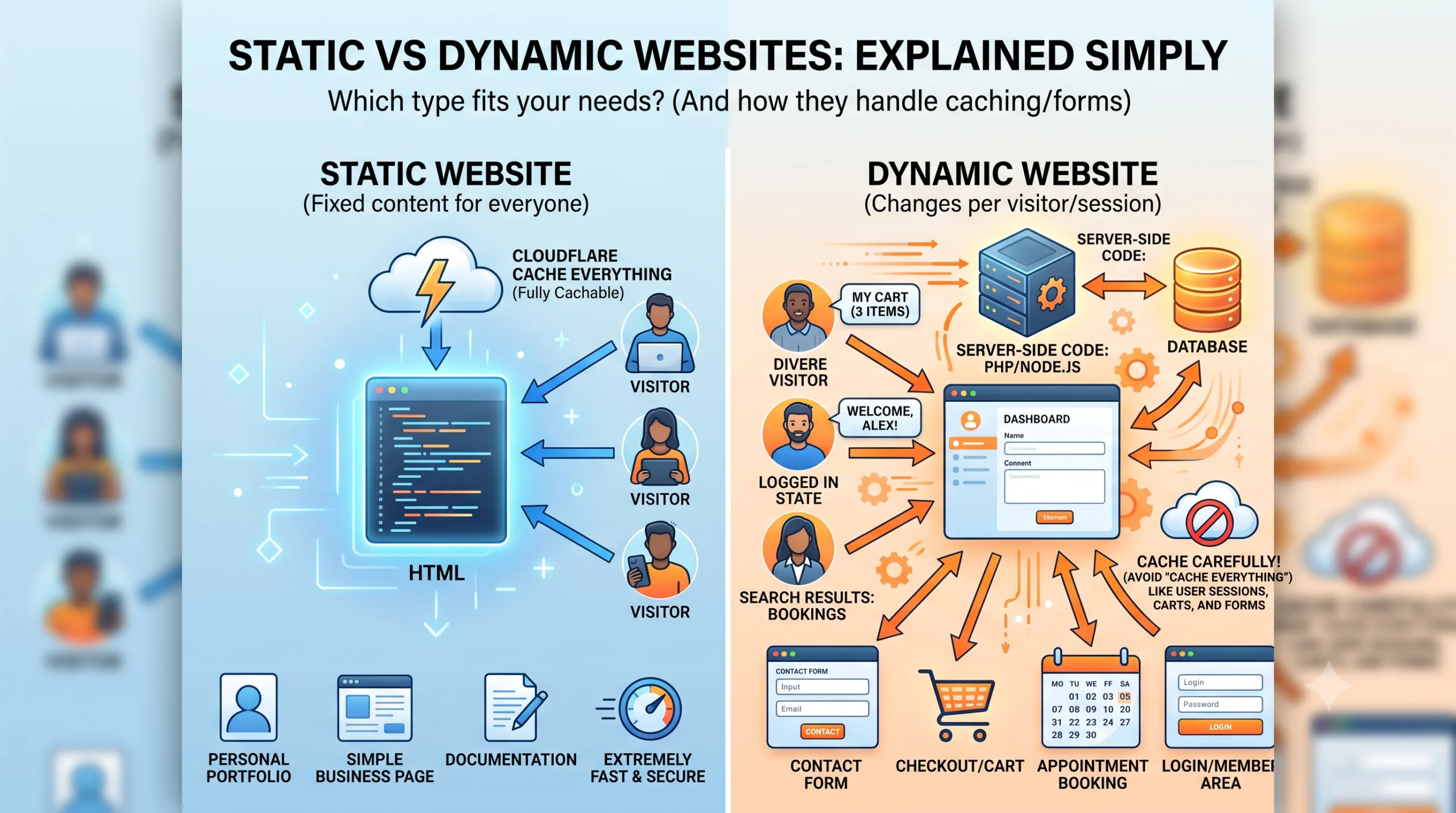
Image : Static Vs Dynamic Websites Shown Side By Side
If you’ve ever tried to decide what kind of website to build — a portfolio, a business page, an online store, or a site with a booking form — you’ve probably run into the terms “static” and “dynamic” website. They sound technical, but the difference actually comes down to one simple question: does the page stay the same for every visitor, or does it change depending on who’s looking at it?
In this guide, we’ll break down what static and dynamic websites actually mean, why forms are the easiest way to spot the difference, how each type affects performance and SEO, and — because this trips up a lot of site owners — why caching tools like Cloudflare’s “Cache Everything” rule behave very differently depending on which type of site you’re running.
Table of Contents
Also Read : On Page SEO and Off Page SEO: What’s the Difference and Why Both Matter?
What Is a Static Website?
A static website is made up of fixed HTML files. When someone visits the page, the server sends the exact same file to every single visitor — no matter who they are, when they visit, or what device they’re using. Nothing changes unless you, the site owner, manually edit the file and re-upload it.
Think of a static site like a printed brochure. Everyone who picks it up sees the same words, same images, same layout. The website doesn’t “think” or respond to the visitor at all — it just displays what’s already there.
Common examples of static websites:
- Personal portfolios
- Simple business landing pages
- Digital resumes
- One-page event or product announcement pages
- Documentation pages that rarely change
Why people choose static sites:
- They load extremely fast, since there’s no server-side processing involved
- They’re cheap to host — many static sites can run on free or very low-cost hosting
- They’re harder to hack, since there’s no database or backend logic to exploit
- They’re simple to maintain if the content genuinely doesn’t need to change often
The tradeoff is flexibility. A static site can’t remember who you are, can’t show you personalized content, and can’t process anything you type into it — which brings us to dynamic websites.
What Is a Dynamic Website?
A dynamic website generates its content on the fly, often differently for each visitor, each session, or each request. Instead of serving a fixed file, the server runs code, pulls information from a database, and builds the page in real time before sending it to your browser.
The simplest, most universal sign that you’re dealing with a dynamic website is this: does the site have a form that does something?
Any of the following make a website dynamic, not static:
- Contact forms that email you when someone submits them
- Appointment or booking forms that check availability and store a reservation
- Login and membership areas that show different content depending on who’s signed in
- E-commerce carts and checkouts that track what you’ve added and calculate totals
- Comment sections that display new comments without you editing the page yourself
- Search and filter tools that pull matching results from a database
- Personalized dashboards, quizzes, surveys, or any tool that reacts to your input
If a visitor can type something into a box, click submit, and get a response that’s specific to them — booking confirmed, form received, item added to cart — there’s a server and a database working behind the scenes. That’s what makes it dynamic.
Also Read : Xbox Cloud Gaming in India (2026): Pricing, Setup & Is It Worth It ?
Why Forms Are the Real Giveaway
It’s worth slowing down on this, because it’s the part most explanations skip.
When you submit a form on a dynamic website, several things typically happen in sequence:
- Your browser sends the form data to the server
- Server-side code (PHP, Node.js, Python, etc.) processes that data
- The server may write to a database (saving your appointment, your comment, your order)
- The server may read from a database (checking if a time slot is free, checking your login credentials)
- A session or cookie is often created to remember who you are as you continue browsing
- The server sends back a response built specifically for you — a confirmation message, an error, or updated content
None of that is possible on a purely static site, because static sites have no server-side logic and nothing to write to. A static HTML file can display a form visually, but it can’t process what you type into it without connecting to something dynamic behind the scenes — which is exactly why services like Google Forms, Typeform, or Fluent Forms (loaded via JavaScript/AJAX) exist. They let a static site borrow dynamic functionality without the whole site needing a database of its own. We’ll come back to this hybrid approach shortly.
The Common Misconception: “No Forms or Login = It Must Be Static”
This is one of the most common mix-ups, and it’s an easy one to fall into: assuming that if a website doesn’t have a login system or doesn’t collect data from visitors through a form, it must be static.
That’s not accurate. Forms and logins are the easiest way to spot a dynamic site, but they’re not what makes a site dynamic. What actually determines whether a site is static or dynamic is what happens on the server, not what the visitor sees or interacts with.
A website is dynamic if it meets either of these conditions, regardless of whether it has forms:
- It runs server-side code (like PHP) to build the page when it’s requested
- It pulls its content from a database instead of from a fixed file
This is exactly why every WordPress website is dynamic by default — even a simple blog with no comments, no login area, and no contact form. When someone visits a WordPress post, the server is still running PHP behind the scenes, querying the MySQL database for that post’s title, content, category, and metadata, and assembling the final HTML on the spot. The visitor never fills out a form or logs in, but the underlying mechanism is fully dynamic. The same is true for business sites, portfolios, or news sites built on WordPress, Joomla, or Drupal — the CMS itself is what makes them dynamic, not whether visitors can submit anything.
The one genuine exception: a WordPress site can be converted into a truly static site using plugins like Simply Static or WP2Static, which crawl the entire site and export it as plain HTML/CSS files. Those exported files can then be hosted separately — on platforms like Netlify, GitHub Pages, or Cloudflare Pages — completely disconnected from the live PHP/database backend. At that point, it genuinely is static, since there’s no server-side processing happening anymore. But this is a deliberate, uncommon export step — not how WordPress runs by default — and it usually means giving up native comments, live search, and forms unless those are replaced with external embedded tools.
Caching adds another layer of confusion here. Tools like LiteSpeed Cache or WP Rocket generate static HTML snapshots of dynamic WordPress pages so visitors get served a fast, pre-built file instead of triggering PHP and a database query on every visit. This makes a WordPress site feel and perform like a static site — but it doesn’t change what the platform is underneath. The moment content is updated, a comment is posted, or the cache expires, the dynamic engine kicks back in to rebuild the page. So a cached WordPress site is best described as a dynamic website delivered through a static caching layer, not a static website.
In short: don’t judge static vs dynamic by whether a site asks you for input. Judge it by whether the page is a fixed file or something assembled by server-side code and a database at request time. By that measure, nearly every WordPress site you’ve ever visited — including ones with no forms at all — is dynamic.
Performance and SEO Differences
Speed: Static sites are almost always faster, since there’s no database query or server-side processing delay — the file is just handed over as-is. Dynamic sites can be optimized to load quickly too, but they’re doing more work behind the scenes, so speed depends heavily on hosting quality, caching setup, and how efficiently the code is written.
Hosting requirements: Static sites can run on very lightweight, inexpensive hosting or even free platforms, since there’s no server-side processing needed. Dynamic sites need a hosting plan that supports a database and a server-side language (PHP for WordPress, for example), which generally costs more and requires more configuration.
SEO: Both types can rank well in search engines — SEO depends far more on content quality, site structure, and backlinks than on whether a site is static or dynamic. That said, dynamic sites (especially WordPress-based ones) tend to have an advantage for content-heavy sites because of easier content management, plugin ecosystems for SEO (like RankMath or Yoast), and the ability to scale to hundreds of pages without manually creating each file. Static sites can be excellent for SEO too, particularly for small, focused sites, since their speed advantage is itself a ranking factor.
Security: Static sites have a smaller attack surface — there’s no database to inject malicious code into and no login system to brute-force. Dynamic sites need active security management: keeping the CMS and plugins updated, protecting login pages, and often sitting behind a firewall like Cloudflare, precisely because forms, logins, and databases are common attack targets.
The Caching Trap: Why “Cache Everything” Isn’t Safe for Dynamic Sites
This is one of the most practical differences between static and dynamic websites, and it’s something a lot of site owners get wrong when they set up Cloudflare.
Cloudflare offers a page rule called Cache Everything, which does exactly what it sounds like — it caches the entire HTML response at Cloudflare’s edge servers, not just static assets like images, CSS, and JavaScript (which Cloudflare caches by default regardless of this rule).
For a static website, this is completely safe. Since every visitor is supposed to see the exact same page, caching the full HTML and serving it instantly from Cloudflare’s edge network only makes the site faster with no downside.
For a dynamic website, this can break things badly if applied carelessly. Because dynamic pages often generate different content per visitor — logged-in dashboards, shopping cart contents, form submission responses, session-specific data — caching the full HTML means one visitor’s version of the page can get served to someone else entirely. In real-world terms, this can cause:
- One user’s logged-in account view being shown to another visitor
- Broken or stuck shopping carts and checkout pages
- Contact or booking forms failing silently because session tokens (nonces) get cached and mismatch on submission
- Stale content being served to everyone even after it’s updated
If you’re running a dynamic site — WordPress, WooCommerce, a membership site, anything with forms or logins — “Cache Everything” needs to be applied carefully, not turned on blindly. The safer approach is to:
- Exclude sensitive paths like
/wp-admin/,/cart/,/checkout/,/my-account/, and any form-processing URLs from the cache rule - Bypass caching for visitors carrying login or cart cookies (such as
wordpress_logged_in_*or WooCommerce session cookies) - Use Cloudflare APO (Automatic Platform Optimization) if you’re on WordPress specifically — it’s designed to intelligently cache dynamic WordPress sites while still respecting logged-in states and dynamic content, which is a much safer middle ground than a blanket Cache Everything rule
This is exactly the kind of caching decision that comes up when running a real WordPress site behind Cloudflare — getting it wrong doesn’t just slow things down, it can quietly break forms and checkouts without an obvious error message pointing to the cause.
Read Cloudflare Cache Everything Case Study: How I Reduced Server Response Time by 60% (Real GSC Data)
Static vs Dynamic Website Examples
Categories are easier to understand with real examples attached to them. Here’s what static and dynamic actually look like in practice:
Static website examples:
- A personal portfolio or resume site built with plain HTML/CSS, or tools like GitHub Pages
- Documentation sites built with static site generators (Hugo, Jekyll, Docusaurus)
- A simple one-page business site — a local shop’s “hours and contact” page with no booking system
- Landing pages for a single product launch or event that don’t need to change after publishing
- Archived or “frozen” versions of older websites, since no new data is being written
Dynamic website examples:
- Wikipedia — content is pulled from a database and can be edited and updated by users in real time
- Amazon or Flipkart — product listings, prices, cart contents, and recommendations all change per visitor and per session
- Zomato or IRCTC — availability, bookings, and search results are generated on the fly based on your input
- Any WordPress blog with comments enabled — new comments appear without the page being manually re-published
- Gmail, Facebook, or any login-based platform — the entire page is built specifically for the logged-in user
- A clinic, salon, or service website with an appointment/booking form — the site checks availability and stores your booking in a database
A useful way to tell them apart quickly: if you can view-source a page and see the exact same HTML no matter who’s logged in or what you’ve searched for, it’s static. If the content shifts based on who you are, what you’ve typed, or what you’ve clicked, it’s dynamic.
Static and Dynamic Aren’t Always an Either/Or
Modern web development has blurred this line quite a bit. It’s increasingly common to build a static site with dynamic elements bolted on — sometimes called the JAMstack approach. A site can be built entirely from static HTML for speed and simplicity, then use an embedded form service (Google Forms, Typeform, Fluent Forms via AJAX, Formspree, etc.) to handle the one dynamic task — like collecting a contact request or booking — without needing a full database-driven backend for the entire site.
This hybrid approach gives you most of the speed and security benefits of a static site while still allowing a form to actually do something useful. It’s a good option for smaller sites that only need one or two interactive features rather than a fully dynamic backend.
Also Read : Shopify vs WooCommerce India (2026): Real Cost & Which is Better for Small Business
Static or Dynamic — Which Should You Choose?
A quick way to decide:
Choose static if:
- Your content rarely changes
- You don’t need logins, carts, or personalized content
- Speed and low hosting cost are top priorities
- Any forms you need can be handled by an embedded third-party tool
Choose dynamic if:
- Your site needs logins, memberships, or personalized dashboards
- You’re running e-commerce with carts and checkouts
- You need built-in appointment/booking systems, comment sections, or search/filter tools
- You expect to publish a large volume of content and need a content management system to handle it at scale
Consider a hybrid (static + embedded dynamic tools) if:
- You want a fast, simple site but still need one or two interactive features like a contact or booking form
Conclusion
The static vs dynamic distinction isn’t really about which technology sounds more advanced — it’s about whether your site needs to respond to visitors individually or simply display the same information to everyone. The presence of a working form — contact, booking, login, cart, or otherwise — is usually the clearest sign you’re dealing with a dynamic site, since that’s the point where a server and database step in to process what the visitor submits.
Understanding this distinction matters beyond just planning a new website. It affects your hosting choice, your security setup, and — as the Cloudflare caching example shows — even routine performance decisions can go wrong if you don’t know which type of site you’re actually running.
Frequently Asked Questions
1. Is WordPress a static or dynamic website?
WordPress is dynamic by default. It generates pages using PHP and a MySQL database, which is what allows features like comments, logins, search, and plugins such as booking or contact forms to work. WordPress can be made to output static-like pages using caching plugins, but the underlying platform is dynamic.
2. Can a static website have a contact form?
Yes, but it needs help from an external service, since static HTML alone can’t process form submissions. Tools like Google Forms, Typeform, Formspree, or an embedded AJAX-based form service let a static site collect and process form data without needing its own database or backend.
3. Which is better for SEO — static or dynamic?
Neither type has an inherent SEO advantage. Rankings depend far more on content quality, site structure, and backlinks. Static sites benefit from faster load times, which is a ranking factor, while dynamic sites benefit from easier large-scale content management and SEO plugins, which helps sites that publish frequently.
4. Is a dynamic website more expensive to host than a static one?
Usually, yes. Dynamic sites need hosting that supports server-side processing and a database, which typically costs more than hosting a static site, since static files can often run on minimal or even free hosting infrastructure.
5. Why did my WordPress forms break after enabling Cloudflare’s Cache Everything rule?
This happens because Cache Everything caches the full HTML response, including session-specific data like form security tokens (nonces). When Cloudflare serves a cached version of the page to a new visitor, the token doesn’t match what the server expects, causing form submissions to fail. Excluding form and checkout pages from the cache rule, or using Cloudflare APO for WordPress, fixes this.
6. Is an online store (e-commerce site) static or dynamic?
Dynamic. E-commerce sites need to track cart contents, process checkouts, manage inventory, and often show personalized pricing or recommendations — all of which require server-side logic and a database, which static sites don’t have.
7. Can a website be part static and part dynamic?
Yes. This hybrid approach, often associated with the JAMstack model, uses static HTML for most of the site for speed and simplicity, while handling any interactive features — like a booking or contact form — through an embedded third-party dynamic tool.
8. If my website doesn’t have a login or contact form, is it static?
Not necessarily. A website is dynamic based on how it generates pages — whether it runs server-side code and pulls content from a database — not based on whether visitors can submit anything. A WordPress blog with no forms and no login area is still dynamic, because the server is still querying a database and assembling each page with PHP every time it’s requested.

Ayush Singhal is the founder and chief editor of TechMitra.in — a tech hub dedicated to simplifying gadgets, AI tools, and smart innovations for everyday users. With over 15 years of business experience, a Bachelor of Computer Applications (BCA) degree, and 5 years of hands-on experience running an electronics retail shop, Ayush brings real-world gadget knowledge and a genuine passion for emerging technology.
At TechMitra, he covers everything from AI breakthroughs and gadget reviews to app guides, mobile tips, and digital how-tos. His goal is simple — to make tech easy, useful, and enjoyable for everyone. When he’s not testing the latest devices or exploring AI trends, Ayush spends his time crafting tutorials that help readers make smarter digital choices.
📍 Based in Lucknow, India
💡 Focus Areas: Tech News • AI Tools • Gadgets • Digital How-Tos
📧 Contact: Get in touch →
🔗 Full Bio: https://techmitra.in/about-us/