

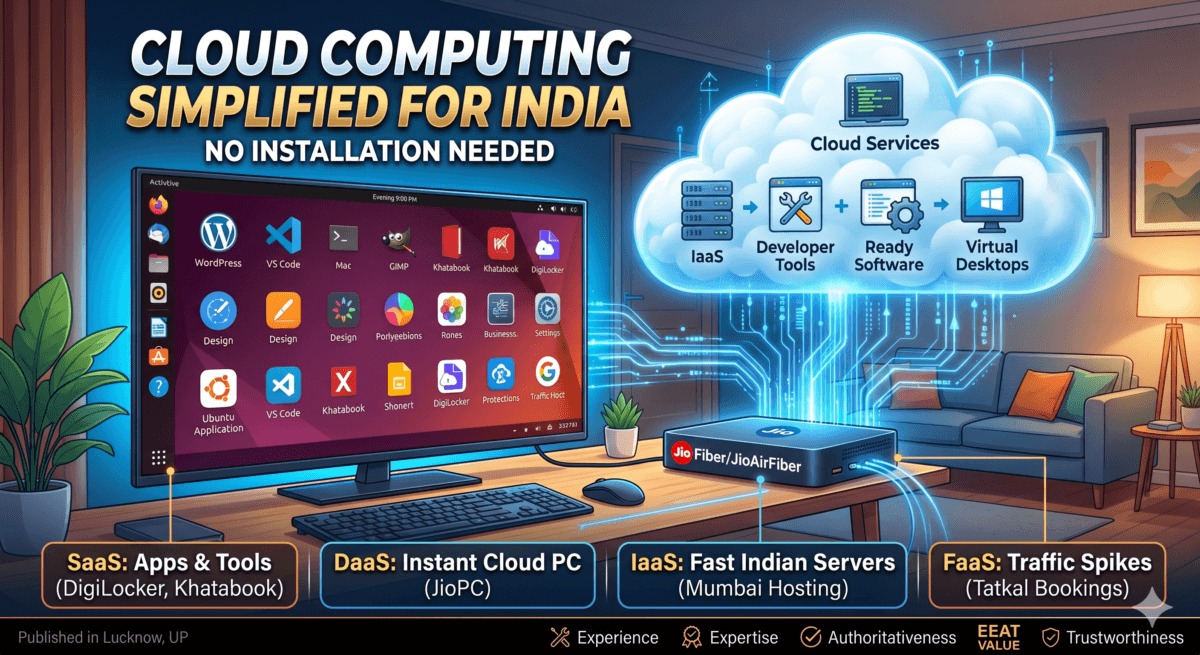
For decades, the standard definition of a personal computer was concrete. It was a physical object: a bulky CPU tower humming under a desk, a metallic laptop resting in a backpack, or a server rack spinning under heavy air conditioning in an office. Owning a computer meant bearing the burden of physical hardware depreciation, dealing with sudden hard drive crashes, paying thousands for local software licenses, and facing structural financial barriers. If a student in India wanted to learn coding, or a local business owner wanted to digitize their accounting ledger, the entry fee was often an upfront investment of ₹40,000 to ₹50,000 for a capable physical machine.
But a quiet infrastructure shift has fundamentally re-engineered this paradigm. Today, high-speed fiber broadband and widespread 5G data rollouts across India have transformed how compute power is accessed. The physical machine sitting on your desk is no longer the bottleneck. The actual processing, memory, and storage can seamlessly live miles away in highly secure, hyper-scale data centers, streamed in real-time straight to basic, affordable screens.
This is the reality of Cloud Computing.
While global textbooks describe this shift using Western corporate examples like Salesforce, Amazon AWS in Virginia, or Netflix, those references feel abstract to the everyday Indian digital ecosystem. To truly understand how cloud computing functions, we must look at how it operates within the context of our own daily lives—from checking a verified license on DigiLocker and booking a Tatkal train ticket on IRCTC, to scaling a regional blog on Hostinger’s Mumbai servers or booting up an Ubuntu desktop on a living room TV via JioPC.
Table of Contents
Also read : Windows 10 End of Life Has Passed: Install Chrome OS Flex and Revive Your Old Laptop for Free
What is Cloud Computing?
At its architectural core, cloud computing is the on-demand delivery of computing resources over the internet on a pay-as-you-go basis. Instead of buying, maintaining, and housing physical data centers, hard disks, or heavy processors, users and enterprises rent access to these services from cloud service providers like Google Cloud, Microsoft Azure, Amazon Web Services (AWS), or homegrown Indian infrastructure firms like Jio Cloud Services.
The term “the cloud” is simply a metaphor for the internet. It represents an interconnected global network of massive physical data warehouses filled with millions of interconnected server blades. When you use the cloud, you are shifting the burden of local storage, processing power, and software execution from your local, limited hardware to these optimized remote servers.
The Foundational Attributes of the Cloud
To be classified as true cloud computing, a digital service must possess five defining technical characteristics:
- On-Demand Self-Service: A user can provision computing capabilities—such as server time, processing power, or storage expansion—automatically, on their own, without requiring any manual human intervention from the service provider.
- Broad Network Access: The service is universally available over the network and can be seamlessly accessed via standard mechanisms by heterogeneous thin or thick client platforms (such as smartphones, tablets, laptops, or television set-top boxes).
- Resource Pooling: The provider’s computing resources are pooled together in a multi-tenant model to serve multiple consumers simultaneously. Physical and virtual resources are dynamically assigned and reassigned according to consumer demand, meaning you share the underlying physical hardware infrastructure safely while remaining digitally isolated.
- Rapid Elasticity: Capabilities can be elastically provisioned and released, in some cases automatically, to scale rapidly outward or inward commensurate with demand. To the consumer, the capabilities available for provisioning often appear to be unlimited.
- Measured Service: Cloud systems automatically control and optimize resource use by leveraging a metering capability at some level of abstraction appropriate to the type of service (e.g., storage, processing, bandwidth, or active user accounts). Resource usage can be monitored, controlled, and reported transparently, adhering to a strict pay-as-you-go financial structure.
What Is Cloud Computing In Simple Words : No Installation Needed! (Summary)
If you want to understand cloud computing without getting lost in complicated technical definitions, just remember this one simple rule:
“If you are using a software application or a hardware feature on your mobile phone, laptop, or TV, but you never had to download, install, or physically plug it into your device—you are actively using Cloud Computing.”
In the traditional tech world, everything required physical setup and installation. The cloud completely flips this script. Let’s look at how this works for both software and hardware in our daily lives:
1. Software Without Installation
- The Old Way: To type a document, edit a photo, or manage your business accounts, you had to buy a CD or download a massive setup file (
.exefor computers or.apkfor phones). You had to install it, which used up your device’s internal storage and slowed it down. - The Cloud Way: You don’t download a thing. You just open your web browser, type a URL, and start working instantly.
- Everyday Examples: When you type a prompt into ChatGPT or Gemini, look up your driving license on DigiLocker, update your shop’s ledger on Khatabook, or draft a new post on WordPress.com, you haven’t installed an AI brain or a massive database onto your phone. The actual software lives and breathes on remote computers miles away. Your screen is just a smart mirror showing you the results.
2. Hardware Without Installation
- The Old Way: If your mobile phone ran out of space to save photos, you had to go to a market, buy a physical MicroSD card, and slide it into your phone. If your computer became too slow to run heavy tasks, you had to open up the CPU cabinet and manually install more RAM or a faster processor.
- The Cloud Way: You upgrade your hardware capabilities instantly over the internet with the click of a button.
- Everyday Examples:
- Storage: When your phone memory gets full, you don’t install a new physical hard drive. You subscribe to Google Drive or Google One. Instantly, 100GB of extra storage is attached to your account—zero tools or installation required.
- Processing Power: If you don’t own an expensive computer, you launch JioPC on your JioFiber or JioAirFiber connection. The moment you log in, Jio instantly attaches a high-performance 4-Core CPU and 8GB of RAM to your basic TV screen directly from their remote data center.
Also Read : Shopify vs WooCommerce India (2026): Real Cost, Hidden Charges & Which is Better
The 4 Layers of the Cloud Service Stack: Types Of Cloud Computing
To understand the architecture of cloud computing, it is best to view it as a multi-layered stack where each layer offers a different level of control and user responsibility. While standard definitions historical focus on three primary layers, the modern tech landscape highlights four core service models.
Let us break these down step-by-step, contrasting standard textbook definitions with direct, real-world Indian applications.
+------------------------------------------------------------+
|             SaaS (Software as a Service)                   |
|       Ready-to-use apps (DigiLocker, Khatabook)            |
+------------------------------------------------------------+
|             DaaS (Desktop as a Service)                   |
|         Virtual computers in the cloud (JioPC)             |
+------------------------------------------------------------+
|             PaaS (Platform as a Service)                   |
|     Developer environments & tools (Razorpay APIs)         |
+------------------------------------------------------------+
|           IaaS (Infrastructure as a Service)               |
|   Raw virtual servers & storage (Hostinger Mumbai Cloud)   |
+------------------------------------------------------------+
A. Infrastructure as a Service (IaaS)
The Technical Definition: IaaS represents the most flexible foundational layer of the cloud computing stack. It provides raw, unconfigured computing infrastructure over the internet. When an enterprise utilizes IaaS, they are renting blank virtual machines, raw storage space, block storage, and complex networking components (like firewalls, load balancers, and IP addresses). The cloud provider manages the physical data center hardware, power, cooling, and virtualization layers. The user remains completely responsible for installing, configuring, and updating the operating system (such as Linux or Windows), managing databases, setting up security configurations, and uploading software application code.
The Localized Indian Perspective (Web Creators & Bloggers):
Consider the workflow of an independent Indian website creator, blogger, or small e-commerce entrepreneur building a self-hosted platform using the open-source software WordPress.org. Decades ago, running a high-performance website meant purchasing a dedicated physical server computer, setting it up in an office, and maintaining a non-stop power backup generator to ensure the site never went offline due to local load-shedding.
Today, that entire headache is offloaded via IaaS. Website creators buy a Cloud Web Hosting plan from service providers like Hostinger India, Cloudways, or Bluehost India. During the setup process, the creator specifically selects a physical data center location inside India—such as Mumbai or Bengaluru.
By doing this, the creator is renting a virtualized slice of a powerful, industrial-grade server rack located securely in an Indian data warehouse. The physical hardware is maintained by the provider, but the website creator has full access to configure the underlying server environment, allocate disk space, and manage their databases. Furthermore, thanks to the inherent elasticity of IaaS, if an article or product suddenly goes viral on Indian social media, generating hundreds of thousands of concurrent visitors, the creator does not have to worry about a hardware crash. With a single click inside their dashboard, they can instantly upgrade their virtual CPU cores and RAM to handle the massive traffic spike, and downscale them later when traffic normalizes.
B. Platform as a Service (PaaS)
The Technical Definition: PaaS steps up one level of abstraction by completely eliminating the need for users to manage the underlying infrastructure layers (hardware, operating systems, runtime environments, and storage systems). The PaaS provider delivers a fully managed, ready-to-code digital workbench. Developers are provided with a complete suite of hardware tools, software development frameworks, pre-configured database systems, and application deployment pipelines. The developer does not care about command-line server security patches or operating system updates; they can focus 100% of their energy on writing clean application code and deploying it smoothly.
The Localized Indian Perspective (FinTech Developers):
Think about how digital payment infrastructure operates across India. When a local software engineer is tasked with building a custom mobile app or an online billing portal for a startup, they do not spend months writing complex banking network scripts, setting up cryptographic security firewalls, or building raw transaction processing engines from scratch.
Instead, they turn to specialized platforms like Razorpay or PayU. These platforms operate effectively as a service layer for transaction systems, providing pre-built APIs, software development kits (SDKs), secure sandbox testing environments, and automated settlement systems. The developer simply drops the integration code into their app. The complex technical platform that handles millions of UPI processing loops simultaneously runs seamlessly on fully managed cloud infrastructure behind the scenes, allowing the developer to build functional tools in days rather than years.
Also Read : How AI CRM Helps Retailers Grow Sales, Retain Customers, and Compete Smarter in 2026
C. Desktop as a Service (DaaS) / Cloud PC
The Technical Definition: DaaS is a specialized implementation model where an entire desktop operating system environment is virtualized, processed, and managed inside cloud data centers, then streamed directly to a client endpoint device over the internet. In a traditional hardware paradigm, your operating system (like Windows or Linux) relies directly on the local physical RAM and CPU chips inside your device casing. In a DaaS setup, your physical device acts merely as a “thin client”—essentially an interactive viewing screen. Every mouse click, keyboard stroke, or application instruction is transmitted over the network to a virtual machine in a remote data center, which executes the task instantly and streams the updated video frame back to your display.
The Localized Indian Perspective (The JioPC Revolution):
Perhaps the most ground-breaking consumer application of cloud computing in contemporary India is the JioPC app, deployed across JioFiber and JioAirFiber high-speed networks.
+------------------+     Internet Streams     +-----------------------+
|  Your Living Room|    Input & Video Frame   | Jio Cloud Data Center |
|  [Basic TV Screen] <======================> | [Virtual Machine]     |
|         +        |     (Low Latency)        | - 4 vCPU Cores        |
|  [Jio Set-Top Box]                       | - 8 GB System RAM     |
|         +        |                          | - 500 GB Cloud Storage|
| [Keyboard/Mouse] |                          | - Ubuntu Linux OS     |
+------------------+                          +-----------------------+
For generations, the high upfront cost of physical computer hardware has maintained a stark digital divide across rural and semi-urban Indian households. JioPC aims to completely bypass this hurdle by utilizing the cloud. Under this architecture, an ordinary family does not need to invest ₹40,000 in a physical laptop or desktop CPU. Instead, they simply plug a standard USB keyboard and mouse directly into their existing Jio Set-Top Box (STB) connected to their home television screen.
When the user launches the JioPC app on their TV, they are not booting up a local computer chip. They are instantly opening an interactive portal to a dedicated virtual machine running in Jio’s data centers. The cloud allocation instantly provisions a robust technical environment: 4 vCPU cores, 8 GB of system RAM, 500 GB of secure cloud storage, and an optimized Ubuntu Linux operating system.
When a student uses this setup to learn Python programming, write school assignments via browser-based productivity suites, or design graphics on cloud tools, the heavy computational processing is occurring miles away on remote servers. If the internet drops or the electricity cuts out locally, the virtual desktop doesn’t crash; it safely pauses in the cloud for an idle period, preserving every file securely until connectivity resumes. For a subscription plan starting as low as ₹599 per month, the cloud effectively transforms an ordinary television into a next-generation computer, democratization access to education and digital literacy across India.
Also Read : How to Speed Up a Slow Windows 11 PC (Also Works on Windows 10): The Ultimate Guide
D. Software as a Service (SaaS)
The Technical Definition: SaaS resides at the absolute peak of the cloud computing stack and represents the most widely utilized model globally. In this model, the end-user has zero involvement with infrastructure, code, deployment runtimes, or storage arrays. The service provider develops, hosts, patches, secures, and maintains a fully complete, consumer-ready software application in the cloud. Users access the application instantly via a web browser or standard mobile app interface.
The Localized Indian Perspective (Everyday Digital Life):
SaaS tools are woven tightly into the fabric of daily life in modern India. Let us look at three classic examples that demonstrate how SaaS works across different sectors:
- DigiLocker (The Citizen SaaS): Under the Digital India initiative, DigiLocker stands out as a prime national SaaS model. Millions of citizens log into DigiLocker via their phones to fetch and store legally valid copies of their Aadhaar cards, driving licenses, or academic certificates. As an individual, you did not have to purchase hard disk storage or install complex document-viewing systems. The National Informatics Centre (NIC) hosts the entire application architecture on secure government cloud systems. You simply use the software via the internet to access your data instantly.
- Khatabook / Vyapar (The MSME SaaS): Step inside almost any local kirana store or micro-business across India today, and you will find shopkeepers moving away from traditional physical paper ledgers (bahi-khata). Instead, they track credits, debits, and inventory on applications like Khatabook or Vyapar. The critical financial ledger data is not saved locally on their mobile phone storage—which could easily be lost, broken, or stolen. Every entry is instantly uploaded, calculated, and securely backed up to remote cloud servers, allowing business owners to access their financial status from any device, anywhere.
- WordPress.com (The Creative SaaS): For a beginner content creator or a small local business looking to establish an immediate digital footprint, WordPress.com functions as a highly optimized SaaS tool. Unlike the self-hosted WordPress.org method which requires managing independent hosting accounts, a user on WordPress.com simply creates an account, picks a ready-made layout template, and starts publishing immediately. The entire system—themes, layout engines, image optimization, and page speed delivery—is handled entirely by the provider’s cloud ecosystem.
“Take this website as an example. To build this blog, I didn’t buy a physical server machine to keep running in my room 24/7. Instead, I purchased a domain and a cloud hosting plan from a provider like Hostinger. The server infrastructure, the database, and the WordPress platform itself all live and run in a secure, remote data center. Because it’s powered entirely by cloud computing, I can manage, update, and publish articles on this site from any device with an internet connection, without installing a single file on my local computer.”
Check Hostinger India hosting services
Also Read : The Ultimate Guide to DigiLocker: Setup, Fetching Exam Results, CKYC, and Digital IDs (2026 Edition)
Deployment Models: Where Does the Cloud Live?
Cloud computing is further classified by its deployment models, which define who owns, manages, and has access to the physical and virtual infrastructure.
Public Cloud
In a public cloud model, the entire infrastructure (servers, network channels, and storage vaults) is owned and operated by a third-party cloud provider. These resources are delivered over the public internet to multiple organizations and individual consumers (often referred to as “tenants”).
- Indian Context: When a freelancer uses Google Drive or Google Photos to back up files, or when a home user subscribes to JioPC, they are operating in a public cloud model. The underlying hardware is shared across thousands of users simultaneously, though each individual’s data remains virtually partitioned and completely private.
💡 Related Read: While cloud computing handles the processing and running of your apps, you can learn how the cloud protects your personal files and phone backups from sudden hardware failure in our dedicated guide: What is Cloud Storage: Savior from Data Loss.
Private Cloud
A private cloud consists of computing resources used exclusively by one single business, enterprise, or government organization. The physical infrastructure can either be located on-site within the organization’s own physical data center or hosted securely by a third-party service provider specializing in dedicated environments.
- Indian Context: Major financial institutions like the State Bank of India (SBI) or HDFC Bank, along with defense sectors, rely heavily on private cloud models. Because they handle highly sensitive financial data, national identity records, and confidential user history, they require total physical control over their infrastructure to minimize exposure to the public internet and comply with stringent regulatory mandates.
Hybrid Cloud
As the name implies, a hybrid cloud combines components of both public and private clouds, bound together by standardized technology that allows data and applications to be shared dynamically between them. This model gives organizations greater flexibility, more deployment options, and better optimization of their existing security posture.
- Indian Context: Consider a major Indian e-commerce platform like Flipkart or Myntra. During normal months, their core customer billing data, sensitive employee details, and financial logs are securely housed in a private cloud setup. However, during major national shopping festivals like a Diwali Festive Sale, traffic orders suddenly skyrocket by 10x to 20x. Rather than spending crores of rupees to purchase physical servers that will sit idle for the rest of the year, the platform uses a hybrid model. It dynamically “bursts” its public-facing catalog browsing and order processing workloads into the public cloud to handle the massive, temporary consumer surge, while keeping its core data safe inside the private cloud.
Summary Matrix: The Indian Cloud Ecosystem at a Glance
To visualize how these concepts intersect, we can replace generic global textbook references with clear, direct examples from the Indian technological landscape:
| Cloud Concept | Primary Service Model | Traditional Global Example | Localized Indian Case Study | Why It Matters to Local Users |
| SaaS | Software as a Service | Salesforce / Microsoft 365 | DigiLocker / Khatabook / WordPress.com | Eliminates local software installs; provides instant utility for citizens and shopkeepers. |
| DaaS | Desktop as a Service | Windows 365 Cloud PC | JioPC via JioFiber & JioAirFiber | Turns any basic television screen into a fully powered Ubuntu PC for ₹599/month. |
| IaaS | Infrastructure as a Service | AWS Virginia / Azure VMs | Hostinger / Cloudways (Mumbai Cloud Nodes) | Gives website creators scalable, local server space to ensure rapid site loading speeds. |
| FaaS | Function as a Service | AWS Lambda / Netflix backend | IRCTC Tatkal Bookings / Hotstar IPL Alerts | Dynamically wakes up micro-code to handle millions of simultaneous clicks during high-traffic moments. |
Strategic Advantages of Cloud Adoption in India
The explosive growth of cloud computing is not just a passing corporate trend; it is a fundamental catalyst for digital inclusion and economic growth across India. The model offers several profound advantages:
A. Total Eradication of Upfront Capital Expenditures (CapEx)
For a small startup in Bengaluru, a content creator in Lucknow, or an educational institute in a tier-2 city, purchasing physical server hardware or high-end laptops requires significant capital investment. Cloud computing turns these heavy capital expenditures (CapEx) into predictable, operational expenditures (OpEx). You don’t buy the machine; you rent a slice of it only for the exact hours or months you use it, leveling the playing field for independent creators and bootstrapped small businesses.
B. Hyper-Scalability and Resiliency
Traditional computing infrastructures required meticulous capacity planning. If you undersized your server capacity, your website crashed during traffic spikes. If you oversized it, you wasted valuable financial resources on idle silicon. Cloud computing provides rapid elasticity. Whether a website goes from 10 visitors to 10 million overnight, the cloud scales up automatically to meet the demand, ensuring high availability and zero downtime.
C. Data Sovereignty and Compliance
With the implementation of strict national data protection laws, keeping citizen data secure within geographical boundaries is incredibly important. Global cloud providers along with local infrastructure leaders have invested heavily in establishing massive, localized data footprints in cities like Mumbai, Chennai, Hyderabad, and Delhi-NCR. This ensures that data generated by Indian users stays safely within the country, complying fully with local regulations while drastically reducing data latency for regional users.
The Scales of Cloud Computing: Pros and Cons
Like any powerful technology, cloud computing comes with a set of distinct advantages and critical challenges. For an Indian creator, business owner, or student, understanding both sides of the coin is essential before shifting completely to a cloud-first workflow.
The Pros (Advantages Of Cloud Computing)
- Drastic Cost Reductions: The absolute biggest win for the Indian market is the elimination of heavy upfront costs. Instead of saving up ₹40,000 to ₹50,000 to buy a physical computer with decent specs or a local office server, you can rent a cloud-based equivalent for a fraction of the cost. You pay a small monthly or pay-as-you-go fee, shifting from a large capital expense (CapEx) to a manageable monthly operational expense (OpEx).
- Infinite, On-Demand Scalability: If you run a local e-commerce store or a WordPress blog, your website lives on virtual space. If your business suddenly gets featured by a popular content creator or a major national news channel, you don’t have to worry about a hardware crash. With a single click inside your hosting dashboard, you can instantly upgrade your virtual CPU cores and RAM to handle millions of visitors, and downscale them later when things quiet down.
- Universal Access and Disaster Recovery: Because your data is not trapped inside a single physical hard drive on your desk, you can access your digital workspace from anywhere. If you are a student using a virtual desktop like JioPC, or a shopkeeper recording sales on Khatabook, your data is continuously synced. Even if your physical device gets broken, stolen, or ruined by a sudden monsoon power surge, your files remain completely intact and safe inside highly secure remote data centers.
- Zero Maintenance Hassles: When you rely on the cloud, you completely offload the headache of hardware maintenance. You don’t have to clean out physical cooling fans, replace aging solid-state drives (SSDs), or manually install tedious system patches. The provider takes care of security, cooling, and hardware optimization entirely behind the scenes, allowing you to focus 100% on your actual work.
The Cons (Disadvantages Of Cloud Computing)
- Strict Dependency on High-Speed Internet: This is the most significant bottleneck in the Indian context. True cloud computing requires a stable, relatively fast internet connection to work seamlessly. If you are using a Cloud PC like JioPC to code or edit files, or interacting with heavy cloud applications like WordPress and ChatGPT, a sudden drop in network connectivity or an unstable mobile data signal will instantly freeze or interrupt your virtual workflow.
- The “Subscription Trap” Over Time: While the lack of an upfront hardware cost is incredibly attractive, recurring subscriptions can quietly add up over the long term. If you are paying monthly fees for cloud storage (like Google One), virtual desktops (like JioPC), and premium cloud software over several years, the cumulative cost might eventually equal or surpass what you would have spent buying a physical, mid-range machine upfront.
- Loss of Ultimate Control and Vendor Lock-in: When your data and applications live entirely on someone else’s infrastructure, you are bound by their terms, updates, and pricing models. If a major provider suddenly raises their subscription prices, changes their interface, or experiences a rare global server outage, your digital business or daily workflow is temporarily at their mercy. Migrating all your data from one cloud platform to another can also be a highly complex technical challenge.
- Data Privacy and Latency Concerns: Even though major cloud platforms have established massive data centers locally in cities like Mumbai, Chennai, and Bengaluru to comply with national data sovereignty laws, some users remain hesitant about privacy. Storing highly confidential business accounting details or personal documents on a third-party shared public server always requires a high degree of trust in the provider’s cybersecurity protocols.
Also Read : Understanding the Storage and the Different Types of Storage: SSD vs. HDD vs. NVMe
Conclusion: The Horizon is Cloud-Powered
The future of technology is rapidly shifting away from the physical components inside our immediate devices and moving squarely into the cloud. As high-speed connectivity via fiber networks and 5G reaches every corner of the country, the necessity of owning expensive, localized physical hardware will continue to decline.
Whether you are an independent website creator spinning up a fast blog on a Mumbai cloud server, a small business owner securing daily transactions on a digital ledger app, or a student utilizing a Jio Set-Top Box to access an advanced virtual computer on your living room television—you are actively participating in the cloud computing revolution. By moving processing power to remote servers, the cloud has successfully democratized technology, ensuring that a steady internet connection is now the only real tool you need to build, create, and innovate for the global digital economy.
You can read this JioPC App Overview and review to get a visual demonstration of how the JioPC interface looks on a TV screen and how it functions as a cloud desktop.
“In fact, you don’t have to look far to see cloud computing in action. The very AI assistant you are using to read or write about this technology is a cloud computing service. When you chat with an AI like Gemini or ChatGPT, your device isn’t processing the answer. Your question travels at the speed of light to massive cloud data centers, processes billions of parameters on high-end remote server clusters, and streams the answer back to your screen in seconds. The cloud isn’t just the future—it is actively driving the conversations we are having today.”

Ayush Singhal is the founder and chief editor of TechMitra.in — a tech hub dedicated to simplifying gadgets, AI tools, and smart innovations for everyday users. With over 15 years of business experience, a Bachelor of Computer Applications (BCA) degree, and 5 years of hands-on experience running an electronics retail shop, Ayush brings real-world gadget knowledge and a genuine passion for emerging technology.
At TechMitra, he covers everything from AI breakthroughs and gadget reviews to app guides, mobile tips, and digital how-tos. His goal is simple — to make tech easy, useful, and enjoyable for everyone. When he’s not testing the latest devices or exploring AI trends, Ayush spends his time crafting tutorials that help readers make smarter digital choices.
📍 Based in Lucknow, India
💡 Focus Areas: Tech News • AI Tools • Gadgets • Digital How-Tos
📧 Contact: Get in touch →
🔗 Full Bio: https://techmitra.in/about-us/