

Introduction
In today’s world, where everything has shifted online, fraud has also evolved. Now, no work is untouched by fraud. Whether you are running a business, making websites, selling products, or even studying online, fraudsters are always ready to trap innocent people. I am sharing my own recent experience so that you stay alert and do not fall prey to such email fraud threat.
I am a website creator. I created my website adaptivelifeguide.com to help people with mobility challenges and disabilities. Until April 30, 2025, I ran Facebook ads to promote it. After that, I stopped running ads completely as I was focusing on writing good articles instead of paid promotion.
However, something strange happened on 1st July 2025.
Also Read: Why Security Updates Are Critical for Your Smartphone in 2026 ?
The fraud phishing email I received
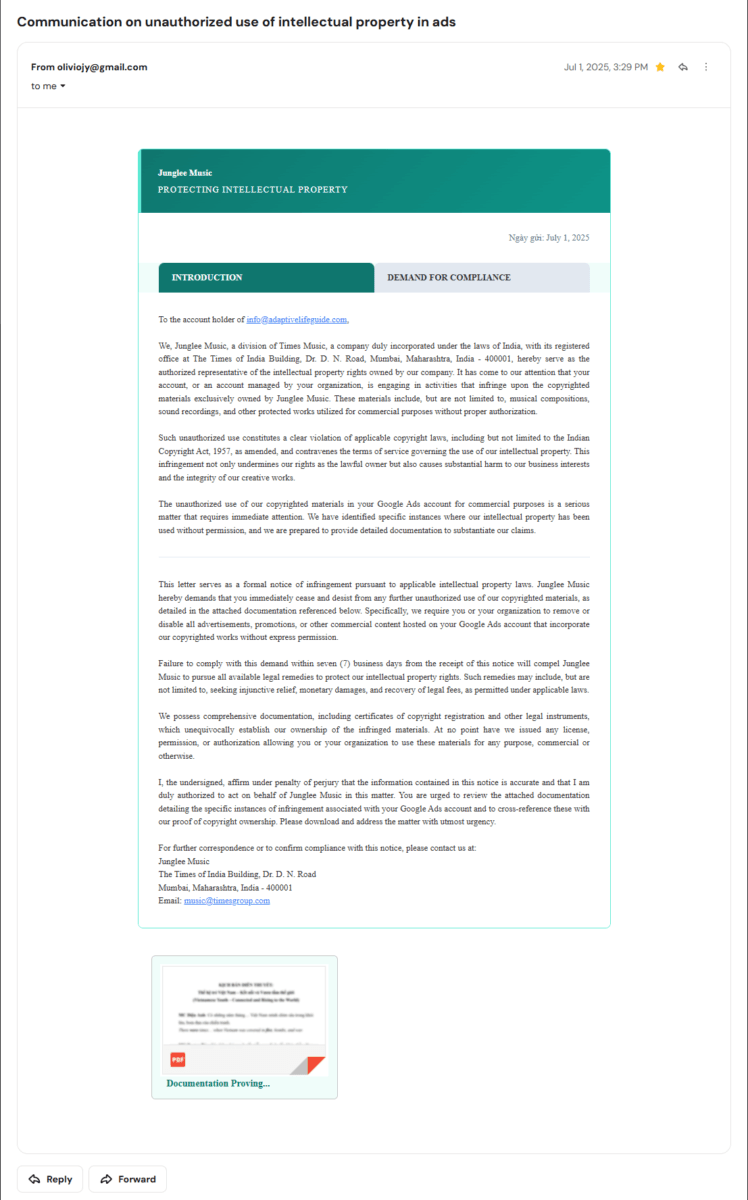
On that day, I got an email from [email protected] to my email id [email protected]. The subject line said — “Unauthorized Use of Intellectual Property in Ads.” The email claimed to be from Junglee Music Company and mentioned that I had used their copyrighted music in my ads without permission. They asked me to download a file to check the notice and warned that I had to reply within a week or legal action would be taken.
At first glance, it looked genuine. The office address was correct, and the language was formal. But as an aware internet user, I checked a few things:
- The email was sent from Gmail, not from an official domain like @junglee.com. Big companies never use free email services to send legal notices.
- The email mentioned I had run ads on Google Ads, but I do not have any Google Ads account.
- The attachment was not a PDF, even though the file name showed it as a PDF notice.
This raised my suspicion, but I wanted to see what exactly it was. I downloaded the file. To my surprise, instead of a .pdf file, it was a .exe setup file. This clearly indicated that it was not a notice but a software program.
One more red flag I noticed later
After looking more carefully at the Junglee Music email, I spotted something unusual in the header. It contained the phrase “Ngày gửi: July 1, 2025” — which is not English or Hindi. “Ngày gửi” is Vietnamese, and it directly translates to “Date sent.”
Why would a legal notice from an Indian music company based in Mumbai contain Vietnamese system text? This strongly suggests that the phishing tool — or the person operating it — is based out of Vietnam, not India. The scammer simply used a Vietnamese bulk-mailing tool and forgot to change the template language before blasting it to thousands of websites.
I ran the file to check
Out of curiosity and to test how it works, I ran the file. It installed immediately, but nothing visible happened. There was no window, no interface, no installation success message.
I knew something was wrong. I opened Task Manager to check the running processes. There I saw a process running with the same icon as the downloaded file, and its name was “pdfreader.”
This name sounds safe — like a normal PDF reader program. But think carefully — why would an official notice come as a setup file disguised as a PDF reader?
What was its intention?
Most likely, this program was designed to:
- Scan all PDF files on my computer — such as bank statements, credit card bills, insurance documents, ID proofs, and property papers.
- Steal sensitive data silently without the user knowing anything.
- Send stolen data to the fraudster, who can misuse it for identity theft, financial fraud, or blackmail.
Since I do have antivirus installed, it could not scan the file immediately. However, as a precaution, I uninstalled the program quickly. I also deleted the downloaded file and emptied the Recycle Bin.
Also Read : I Got a Phishing Email Pretending to Be My Hosting Provider — Here’s How I Spotted It (And How You Can Too)
Another similar fraud email
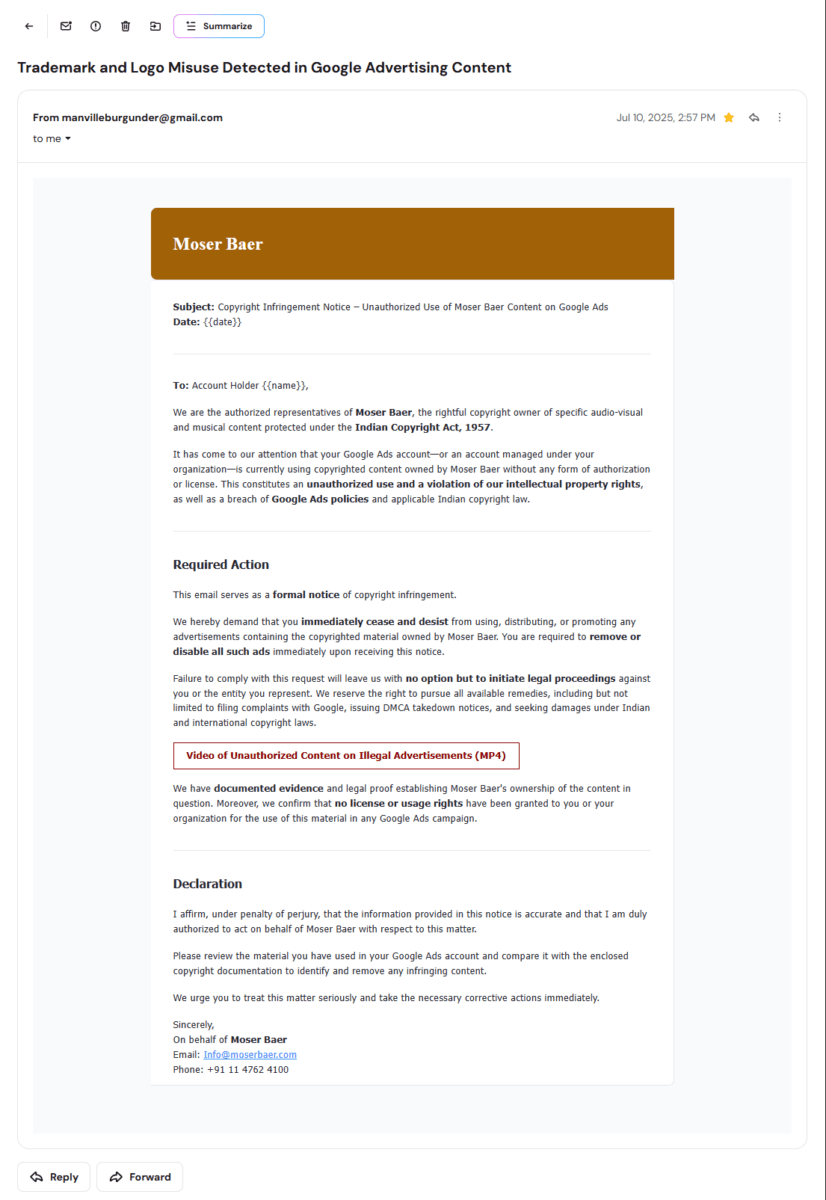
Just a few days later, on 10th July 2025, I received a similar email claiming to be from Moser Baer company stating copyright violation in ads. But I knew that Moser Baer closed down in 2018. A company that shut down seven years ago cannot possibly be monitoring modern Google Ads accounts in 2025. Also, this email was sent from a Gmail address ([email protected]) — and to make it worse, the email body still had unfilled template placeholders: {{date}} and {{name}} were literally visible in the text. The scammers had forgotten to fill in their own mass-mailing script before sending it.
These repeated attempts showed that fraudsters are targeting website owners, businesses, and digital creators with fake legal threats to scare them into installing their malware.
Are these email phishing scams still active in 2026?
Yes — and they have gotten more convincing.
The same pattern used in the Junglee Music email (July 1, 2025) and the Moser Baer email (July 10, 2025) is still actively circulating in 2026. In fact, these scams have evolved in three clear ways:
1. More polished legal language. The Junglee Music email included a real, verifiable address — The Times of India Building, Dr. D.N. Road, Mumbai — to appear legitimate. Fraudsters now research actual company addresses and copy legal phrasing to make the threat feel credible.
2. They specifically target active advertisers. If you are running or have recently run Facebook Ads or Google Ads, you are a high-value target. Scammers use automated bots to scrape Meta’s public Ad Library, find active advertisers, then harvest the contact email from the business website. Because you care about your ad account health, you are more likely to panic at a copyright threat.
3. They use defunct company names on purpose. Moser Baer shut down in 2018 — yet scammers used their name in 2025. They deliberately choose dissolved companies because victims may still recognise the brand, but there is no active corporate team to expose the fraud publicly.
If anything, the threat is growing. Cybercrime targeting small website owners and digital creators in India increased significantly through 2024 and 2025. These IP-threat email scams are part of a wider, coordinated international operation — not isolated random attempts.
Scammers don’t just target professional webmasters through email. If you use mobile apps on your phone, see our alert on the new Food Delivery App OTP Takeover Scam affecting daily buyers.
7 signs that copyright email is a phishing scam
The next time you receive a frightening legal threat over email, check these seven signs before doing anything else:
| # | Red flag | Real example from my emails |
|---|---|---|
| 1 | Sent from Gmail or free email | [email protected] claiming to be Junglee Music |
| 2 | Attachment is .exe, not .pdf | File installed silently as “pdfreader” malware |
| 3 | Claims you used a platform you never used | Both emails accused me of “Google Ads” — I had none |
| 4 | Company is closed or doesn’t exist | Moser Baer shut down in 2018 |
| 5 | Template placeholders left unfilled | {{date}} and {{name}} literally visible in the Moser Baer email |
| 6 | Extreme urgency with legal threats | “Seven (7) business days or we pursue legal remedies” |
| 7 | No specific content identified | Neither email named a single song, video, or ad |
If even one of these signs is present — do not download anything. Close the email and verify directly using contact details from the company’s official website, not from the email itself.
Lessons learned: how to stay safe from email fraud threat
This incident has taught me some important lessons about online safety, which I want to share with you.
1. Check email sender address carefully
Official notices from companies will never come from Gmail, Yahoo, or other free email services. They always come from their own domains like @companyname.com.
2. Never download suspicious files
Legal notices are sent as PDFs or direct emails, not as .exe setup files. If any attachment asks you to install something, it is definitely a fraud.
3. Verify the company
If you receive any legal threat email — search the company’s official contact details from Google, not from the email. Call their legal or corporate communication team to confirm. If it is real, they will guide you officially.
4. Use antivirus
A good antivirus would detect such malicious setup files immediately. Keep your system protected at all times. But highly active phishing networks continuously obfuscate their file layouts to bypass signature-based antivirus scanners[cite: 3]. This is why enterprise-grade hardware armor like Samsung Knox or Apple’s Secure Enclave is essential to block unauthorized background executions. Learn more in our deep-dive on why smartphone hardware security matters more than specs.
5. Understand their psychology
Fraudsters use fear tactics. Words like legal action, unauthorized use, copyright violation, and account suspension are used to scare users into quick action without thinking. Always calm down and analyze logically.
6. Check the file extension
If an email claims to send a PDF but the download is a .exe file, it is a clear sign of malware.
7. Uninstall unknown programs immediately
If you accidentally install such files, immediately uninstall them and delete all related files from Downloads, Program Files, and Temp folders. Empty the Recycle Bin.
8. Monitor your bank accounts
After any malware incident, keep a close eye on your bank accounts for unauthorized transactions and change your passwords as a precaution.
9. Stop publishing your email as plain text
Automated bots scrape plain text emails like [email protected] from contact pages effortlessly. Replace your public email with a contact form protected by a verification gateway like Cloudflare Turnstile to reduce how easily scammers can harvest your address.
Why are such frauds increasing?
In today’s digital world, where payments, business operations, and communications have moved online, cybercriminals are targeting everyone — website owners, freelancers, students, small business owners, and digital marketers.
Fraud is no longer limited to OTP scams or fake phone calls. It has entered professional spaces, making it hard to differentiate between genuine communication and fraud.
Final words
This is my personal experience, and I am sharing it so that you do not become a victim of such fraud. If I had blindly trusted the email and entered my passwords or kept that malware installed for long, it could have scanned my entire data and caused huge financial or personal loss.
In the end, remember —
In the digital world, trust only what you can verify.
Stay alert. Never act in haste when any email threatens you with legal action or account suspension. Analyze the details, consult experts, and keep your devices protected with strong antivirus and awareness.
If you found this article useful, share it with your friends and family. Let’s create a safer digital world together by spreading awareness against fraud.
Frequently asked questions
Is a copyright infringement email from Gmail real?
No. Legitimate legal notices from companies always come from official corporate email domains — never from free services like Gmail or Yahoo. If you receive a copyright claim from a Gmail address, it is almost certainly a scam.
What should I do if I accidentally downloaded a suspicious .exe file?
Open Task Manager immediately and end any unfamiliar processes. Uninstall the program from Control Panel, delete the downloaded file, empty the Recycle Bin, and run a full antivirus scan. Change your important passwords as a precaution.
Why does the fake email use real company names like Junglee Music?
Scammers use recognisable brand names to add false credibility and trigger panic. Junglee Music is a real division of Times Group — but the email came from a random Gmail account, not from @timesgroup.com.
Can antivirus software catch this type of malware?
Not always immediately. Scammers continuously modify their files to achieve what is called “Zero-Day” status — meaning the file slips past signature-based antivirus scanners for the first few days of a campaign. Always be cautious regardless of whether your antivirus flags a file.
How did scammers get my email address?
If you ran Facebook or Google Ads, your business is visible in public ad libraries. Automated bots scrape these libraries for active advertisers, then crawl the advertiser’s website to harvest public contact emails like [email protected].

Ayush Singhal is the founder and chief editor of TechMitra.in — a tech hub dedicated to simplifying gadgets, AI tools, and smart innovations for everyday users. With over 15 years of business experience, a Bachelor of Computer Applications (BCA) degree, and 5 years of hands-on experience running an electronics retail shop, Ayush brings real-world gadget knowledge and a genuine passion for emerging technology.
At TechMitra, he covers everything from AI breakthroughs and gadget reviews to app guides, mobile tips, and digital how-tos. His goal is simple — to make tech easy, useful, and enjoyable for everyone. When he’s not testing the latest devices or exploring AI trends, Ayush spends his time crafting tutorials that help readers make smarter digital choices.
📍 Based in Lucknow, India
💡 Focus Areas: Tech News • AI Tools • Gadgets • Digital How-Tos
📧 Contact: Get in touch →
🔗 Full Bio: https://techmitra.in/about-us/