

The Chrome 156 update is now rolling out to the Stable channel for Windows, Mac, Linux, Android and iPhone. The desktop release carries 353 security fixes, six of them rated Critical. Google released it on 20 October 2026, and Indian news sites picked it up on 22 October.
If you use Chrome on a laptop, a desktop or a phone, the practical answer is simple: open About Chrome, let it update, and relaunch the browser.
The rest of this article explains what was fixed, how big this update really is compared with earlier ones this year, how to check your version, and what else changed in Chrome 156.
Table of Contents
Also Read : 25 Best Free Chrome Extensions for Productivity in 2026
What Google released and which version you should see
The update is rolling out gradually over the coming days and weeks, so some people will see it immediately and others will have to wait. These are the builds Google has listed for each platform.
| Platform | Chrome 156 build |
|---|---|
| Windows and Mac | 156.0.8078.47 / 156.0.8078.48 |
| Linux | 156.0.8078.47 |
| Android | 156.0.8078.47 (Google Play, over the next few days) |
| iPhone and iPad | 156.0.8078.46 (App Store) |
| ChromeOS | 16836.19.0, browser version 156.0.8078.42 |
If your Chrome shows a version number lower than these, you are still on the old build and the fixes have not reached you yet.
What the 353 security fixes mean
Google’s release note for the desktop update says it includes 353 security fixes. One outlet that counted the individual entries in Google’s list (Chrome Geek) puts the split at 6 Critical, 61 High, 197 Medium and 89 Low. That breakdown is a third-party count, not a figure Google states in a headline, so treat it as an estimate.
The important point for ordinary users is the kind of bugs involved. Most of this batch is memory-safety problems, such as memory corruption and use-after-free errors.
In a use-after-free bug, the browser keeps using a piece of memory after it has already been released. An attacker who can control what ends up in that memory may be able to make the browser run code it should not.
Chrome runs inside a sandbox, so a single bug of this kind usually is not enough on its own to take over a computer. But attackers chain bugs together, and that is why Google rates the worst ones Critical.
The six Critical bugs
The Critical fixes are in Skia (Chrome’s graphics library), Accessibility, CSS, Paint and WebRTC. The CVE numbers for all six are listed below.
CVE-2026-113341 is memory corruption in Skia and was reported by Google’s own team on 3 October. CVE-2026-113279 is memory corruption in Accessibility, reported by researcher Xinyang Ge on 5 October. CVE-2026-113271 is a use-after-free in Accessibility, also credited to Xinyang Ge.
CVE-2026-113303 is memory corruption in WebRTC, the technology behind browser-based video calls. It was reported by OpenAI Codex Security (researcher handle kylebot) on 15 October.
The remaining two Critical bugs are memory corruption in CSS (CVE-2026-113072) and in Paint (CVE-2026-113280), both reported on 6 October. Reports say they were also found by Xinyang Ge.
The WebRTC timeline is worth noticing. According to Google’s listing, that bug was reported on 15 October and was fixed in a stable release five days later.
The AI angle: bugs found with Claude and Codex Security
A noticeable part of this release is who found the bugs. Google’s listing credits the Accessibility use-after-free to “Xinyang Ge (Anthropic), assisted by Claude”, and the Critical WebRTC bug to OpenAI Codex Security.
So two of the six Critical bugs were found with the help of AI-based security tools, and Google’s own team found the Skia one. This is a trend that has run through 2026: earlier Chrome releases this year also credited AI-assisted researchers, and the number of fixes per release has climbed sharply since spring.
For readers, the takeaway is that AI tools are now finding serious browser bugs faster than before, which is good news for fixes but also a reason updates are getting bigger and more frequent. Full disclosure for anyone reading: Claude is the AI model made by Anthropic, one of the companies named in Google’s credit line.
Is anyone attacking users with these bugs?
Google’s release note does not say that any of these 353 bugs is being exploited in the wild. That is the main difference between this update and an emergency zero-day patch.
That is reassuring, but it is not a reason to delay. Google normally keeps bug details restricted until most users have updated, and once a fix is public, attackers can compare the old and new code to work out what was patched. The sooner you are on the new build, the smaller that window is.
How big is 353, really?
The number looks scary, but it is not a record. Chrome 150, released at the end of June, had 382 security fixes. Chrome 151 followed in late July with 370, Chrome 152 in August had 327, and Chrome 155 earlier this month had 247.
So 353 is in line with a pattern of very large releases this year, not a one-off. A higher count does not automatically mean a more dangerous release, because many entries are Medium or Low severity. What matters for you is that Critical and High bugs are patched, and that you actually receive the update.
How to install the Chrome 156 update
On Windows, Mac or Linux, open Chrome, click the three-dot menu, go to Help and then About Google Chrome (or Settings and then About Chrome). Chrome checks for the update by itself, downloads it, and shows a Relaunch button.
The update only takes effect after you relaunch, and many people forget this because Chrome stays open for days with tabs saved.
If the About page still says you are up to date but shows an older version, the staged rollout has not reached your device yet, so check again in a day or two. If you prefer not to wait, you can install the latest version from google.com/chrome, and you should avoid any other download site.
On Android, open the Google Play Store, search for Chrome and tap Update. On an iPhone, do the same from the App Store. On a Chromebook, go to Settings, About ChromeOS, and check for updates.
One caution for people who do not use Chrome itself: browsers built on the same Chromium engine, such as Microsoft Edge, Brave and Opera, do not get Google’s update automatically. Their makers have to ship their own updates, so watch for the next update in those browsers as well.
What else is new in Chrome 156
The update is mostly about security, but there are a few user-facing changes. The main one is Talk to Type, a Gemini-powered voice typing feature for any text box on the web. You right-click in a text box, choose Talk to Type, and speak, and Chrome turns the speech into punctuated text. You can also select text and give an instruction such as making it more formal.
It needs a signed-in Chrome profile, microphone access and a normal, non-Incognito window. You have to opt in the first time because Chrome then processes your voice and the text on the page.
Google says it has been rolling out gradually since Chrome 153, starting in the US, so having Chrome 156 does not guarantee that you will see it. It did not show up on my own Chrome 156 in India on 22 October (see the TechMitra Point below).
According to Google’s enterprise release notes, Gemini Spark can now use logins saved in Google Password Manager to finish tasks on third-party sites. This needs your explicit consent for each task plus a fingerprint, face or device unlock.
Gemini in Chrome on desktop can also turn a web page, PDF, slide deck or YouTube video into an interactive quiz in some countries and languages.
Finally, Chrome on Windows will start automatically when you sign in to Windows, again as a gradual rollout, with a policy for administrators to control it. If you do not want Chrome starting with your PC, check the startup setting after the update.
For developers, the release adds a CSS random() function, a new scroll-snap option, and a WebRTC diagnostic logging API, among other items listed in Chrome’s release notes.
If you manage computers for a shop or office
If you look after several PCs, do not assume the update has reached them all. Laptops that stay switched off or offline for long periods, and machines where the browser is never closed, are the usual ones that fall behind.
Check the version on each machine and make sure staff relaunch Chrome. Admins using Chrome Enterprise policies should also review the new policies for voice typing, Gemini Spark and launch on startup. The old Autofill address and credit card policies are deprecated in favour of a single AutofillSettings policy.
TechMitra Point
I checked my own Windows PC on 22 October 2026 at 12:44. Chrome’s About page (chrome://settings/help) showed “Chrome is up to date” with Version 156.0.8078.48 (Official Build) (64-bit). That matches the Windows and Mac build Google listed for Chrome 156.
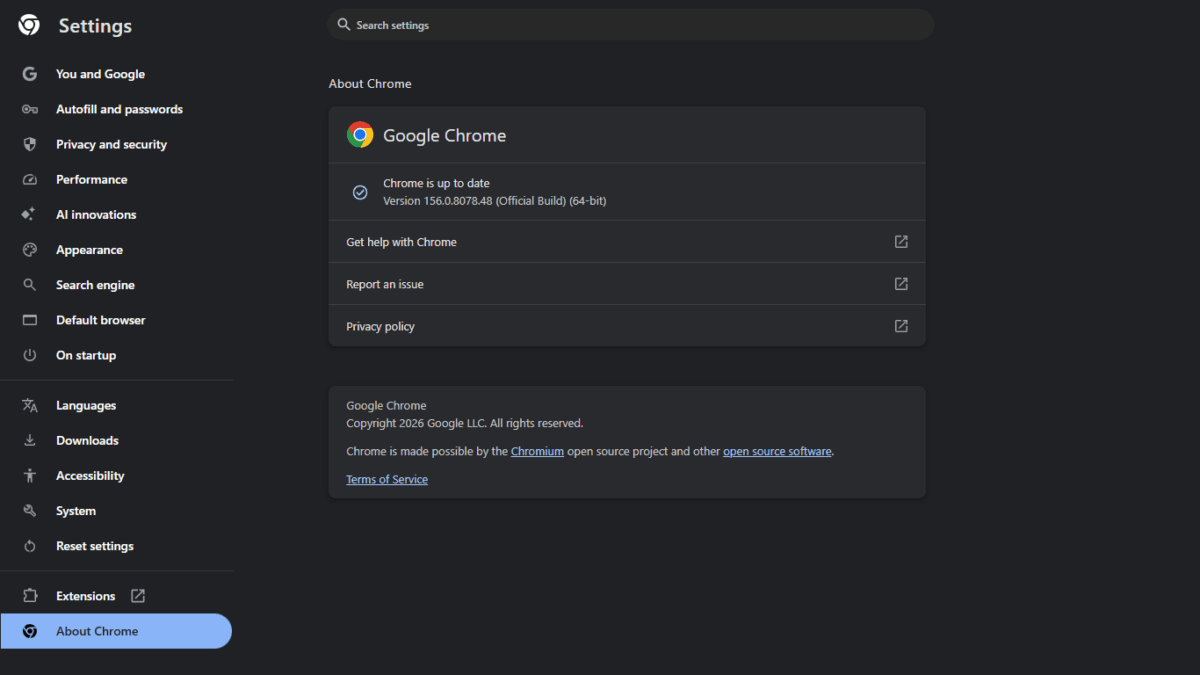
The update appeared for me only when I opened About Chrome, so if you are waiting for it, checking that page yourself is the quickest way to get it.
Talk to Type did not appear for me. I right-clicked inside text boxes on my Chrome 156, both the search box on the TechMitra website and the search box on the New Tab page. The menu showed only the usual options such as Cut, Copy, Paste, Spell check and Inspect.
Google says the feature is rolling out gradually, so it may not have reached every account yet.
Also Read : GoFullScreenshot Review: Full Webpage Screenshot Extension Tested & How It is ?
Frequently asked questions
Is Chrome 156 safe to install? Yes. It is the official stable release from Google, and the point of the update is to close security holes. Install it only from Chrome’s own update mechanism or google.com/chrome.
Do I need to restart Chrome? Yes. The fixes are not active until you click Relaunch, so finish the update by restarting the browser.
Is this a zero-day emergency update? No. Google’s note does not flag any of the 353 bugs as being exploited in the wild, but the six Critical bugs are serious enough that you should not put the update off.
Why can’t I see Chrome 156 yet? Google releases Chrome in stages over days and weeks, so your device may simply not have been offered it yet. Check About Chrome again later.
Sources
- Google Chrome Releases: Stable Channel Update for Desktop (Chrome 156)
- Google Chrome Releases: Stable Channel Update for ChromeOS
- Chrome Enterprise release notes for Chrome 156
- Chrome Geek: Chrome 156 stable overview
- GBHackers: Chrome 156 fixes 353 security vulnerabilities
- India TV News: Google Chrome gets major security update with 6 critical bug fixes

Ayush Singhal is the founder and chief editor of TechMitra.in — a tech hub dedicated to simplifying gadgets, AI tools, and smart innovations for everyday users. With over 15 years of business experience, a Bachelor of Computer Applications (BCA) degree, and 5 years of hands-on experience running an electronics retail shop, Ayush brings real-world gadget knowledge and a genuine passion for emerging technology.
At TechMitra, he covers everything from AI breakthroughs and gadget reviews to app guides, mobile tips, and digital how-tos. His goal is simple — to make tech easy, useful, and enjoyable for everyone. When he’s not testing the latest devices or exploring AI trends, Ayush spends his time crafting tutorials that help readers make smarter digital choices.
📍 Based in Lucknow, India
💡 Focus Areas: Tech News • AI Tools • Gadgets • Digital How-Tos
📧 Contact: Get in touch →
🔗 Full Bio: https://techmitra.in/about-us/