
Jio Amazon Prime Lite free is now live for JioHome customers: a year of Prime Lite at no extra cost. I received the offer on my own ₹899 JioAirFiber (100 Mbps) connection today, activated it, and got it running on my TV. This guide covers who qualifies, exactly how I did it, and the fine print that could cost you money later.
The short version
- What you get: 12 months of Amazon Prime Lite at no extra cost
- Who gets it: New and existing JioHome customers on eligible 30 Mbps and 100 Mbps 3-in-1 plans (TV + OTT + Wi-Fi)
- Where to claim: A banner inside the MyJio app, under your JioHome account
- Rollout: Started 19 September 2026, in phases over about two weeks, so you may not see the banner yet
- Conditions: MyJio says the benefit continues while you keep recharging with an eligible plan without a break
- Catch: MyJio’s notes say postpaid users are auto-renewed at the market price after the term, while prepaid users must pay to continue. Check which one you are
Table of Contents
Also Read : Jio Cloud Gaming Review: I Tested It on Mobile, TV and a 4GB RAM PC — Here’s the Honest Truth
Why is Jio doing this?
The offer is part of Jio’s 10th anniversary celebrations. Amazon Prime Lite normally costs ₹799 per year, so that is the value of the benefit.
Which JioHome plans are eligible?
The one-year offer covers eligible 30 Mbps and 100 Mbps 3-in-1 plans. That includes the ₹599 and ₹899 tiers, which is confirmed by the terms shown inside the MyJio claim screen.
Customers on the ₹888 and ₹1,199 plans, or on plans of 150 Mbps and above, are not moved to this new offer. They continue with the existing 24-month Prime Lite benefit, which the terms describe as available on 2 devices rather than 1.
| Your plan | Prime Lite duration | Devices |
|---|---|---|
| ₹599 / ₹899 and equivalent (30 and 100 Mbps) | 12 months | 1 (TV or mobile) |
| ₹888 / ₹999 and above, 150 Mbps+ | 24 months | 2 (TV or mobile) |
Note: the ₹899 plan I tested on falls in the 12-month tier. The ₹999 figure comes from the terms shown on the claim screen; check yours in the app.
What Prime Lite actually includes
Prime Lite is the cut-down version of Prime, and it is worth knowing the limits before you cancel your other subscriptions.
You get:
- Prime Video with movies and shows
- Free and fast delivery on eligible Amazon purchases, as described in Jio’s offer
You do not get:
- Ad-free viewing: Prime Lite streams with ads
- 4K: video is limited to HD
- More than one device playing at a time on the 12-month tier (see the test below)
- Some full-Prime extras: Amazon’s own page lists Prime Gaming as not included, and older reports also say Prime Music and Prime Reading are not. Check Amazon’s current Prime Lite page for the latest list
Delivery is also a place where Lite may differ from full Prime. Amazon’s pages and older reports describe the delivery speeds differently, so check your own Amazon account to see what applies to your eligible orders instead of assuming full Prime speed.d.
Amazon Prime Lite device limit on Jio: what I actually found
Jio’s terms say the 12-month tier is “available on one device (TV/Mobile)”. Amazon India’s help page says something similar: Prime Lite members can watch on one device only, and the first device you watch on becomes the only device. It adds that Prime Lite sold through providers like Jio can allow one or two devices, and that the number is shown at sign-up. I tested how this works in practice.
Result: I played a video on my phone, then tried to play one on my TV, which was running the Jio AirFiber app. The TV showed this error:
Unable to play video. This video can’t start because your account is already playing the maximum number of videos. To watch this video here, please reduce the videos playing on your account’s other registered devices.
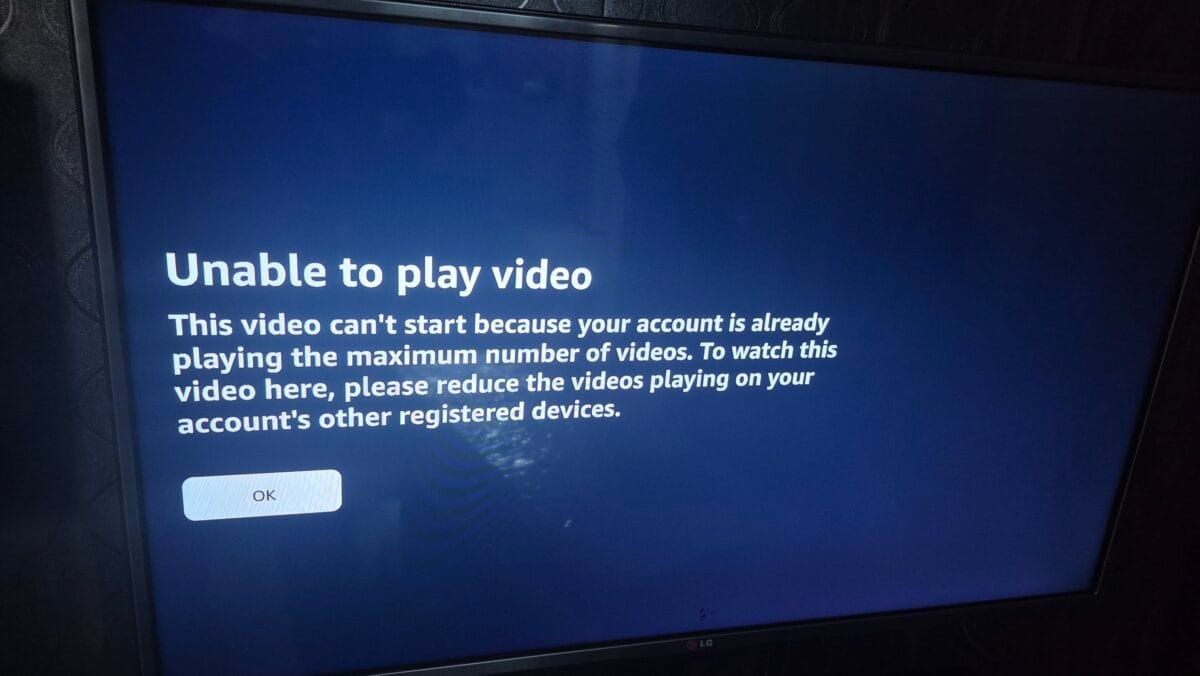
In my earlier test, with the TV playing first, the phone was blocked instead. So the limit works in both directions: one active stream at a time on the 12-month tier. If someone at home is watching on one device, nobody else can start a video on another device using the same account. This is a real limit for families, so factor it in before you rely on Prime Lite as your main OTT.
What Amazon’s Devices page shows
On Prime Video’s Devices page, Amazon states: “Your Prime Lite membership lets you stream on 1 mobile or TV devices.” That is the same one-device limit Jio’s terms describe. The page lists every registered device, with a Remove or Sign out link next to it, plus a Register new device button and an upgrade to Prime link. <!– HAVE: Screenshot_20260924_143020_Chrome.jpg. Blur the personal name in the set-top box label. Crop the status bar. –>
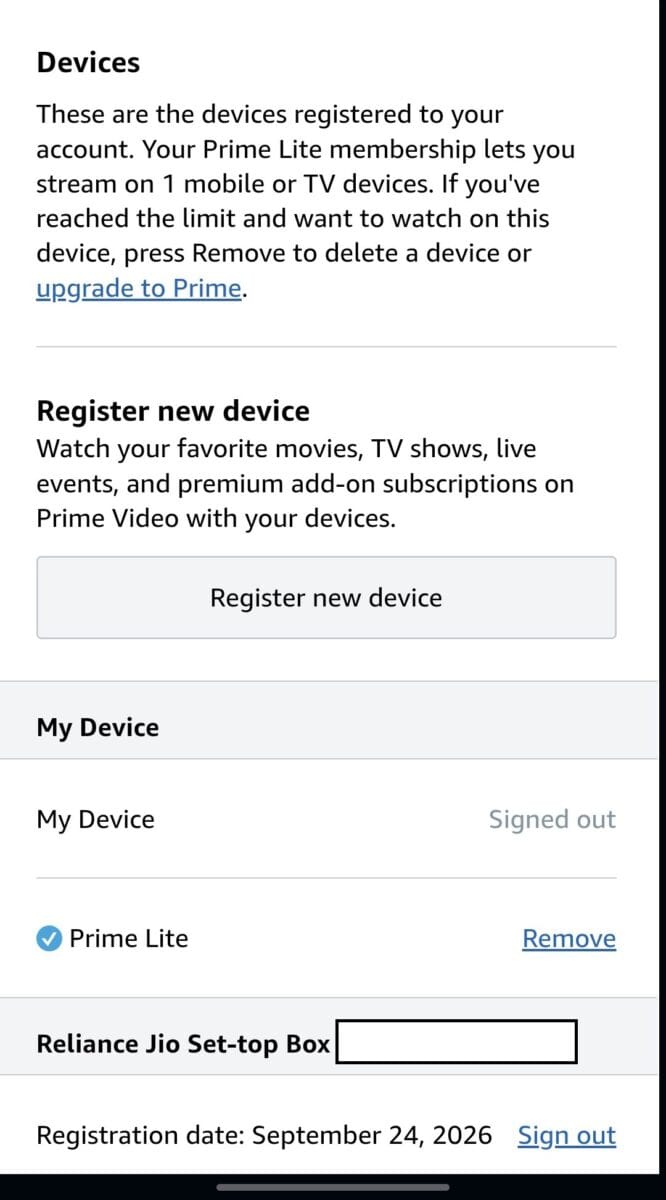
On my account, the phone browser was listed as Signed out, and the Reliance Jio Set-top Box (my AirFiber box) was registered today with a Sign out link next to it. That fits what I saw: once the phone was signed out, the TV could play.
It is not locked to the first device forever
Even though Amazon says the first device becomes the only one, that was not permanent in my test. Once I fully signed out of Prime on the first device, the second device played normally.
How to free up the slot
- Closing the Prime Video app is not enough. I closed it on my phone and the TV stayed blocked.
- Sign out of the Prime account on the other device. This is what worked for me. After that, the TV played normally.
- Use Amazon’s Devices page. It has a Remove link next to a registered device, and a Sign out link next to a signed-in one. Amazon’s help page says you can remove up to 2 devices in a 30-day period. I only tried signing out, not Remove.
- I have not tested It could be required to remove device also
How to activate Jio Amazon Prime Lite Free Subscription (step by step)
This is the exact flow I followed on my ₹899 AirFiber plan.
- Open the MyJio app and select your JioHome connection.
- Tap the “Claim Amazon Prime Lite!” banner. If you can’t see it, the rollout may not have reached your account yet.
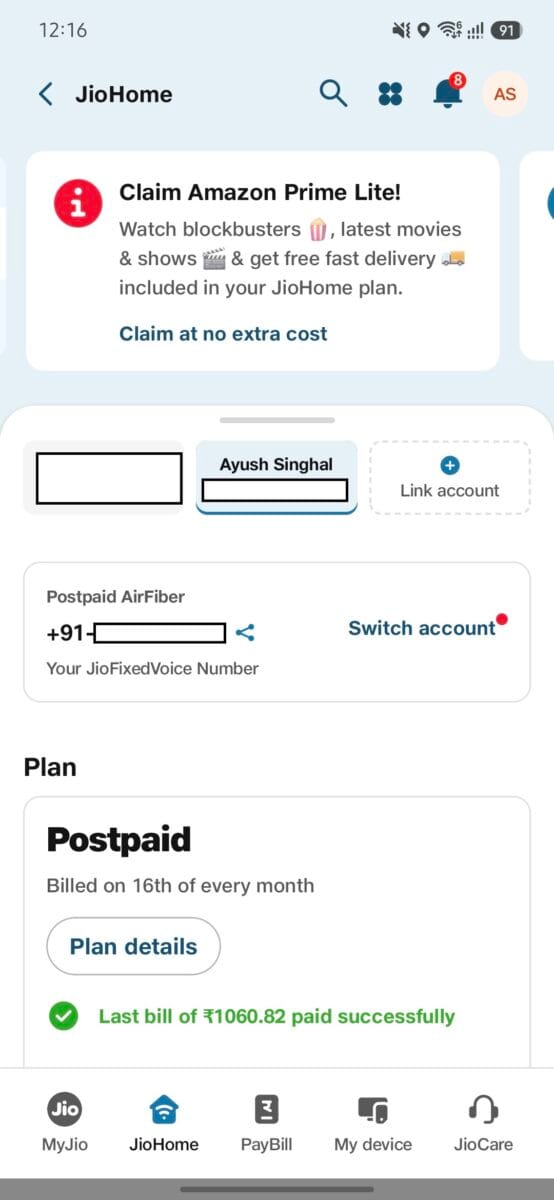
3. Read the offer page and tap Activate now.
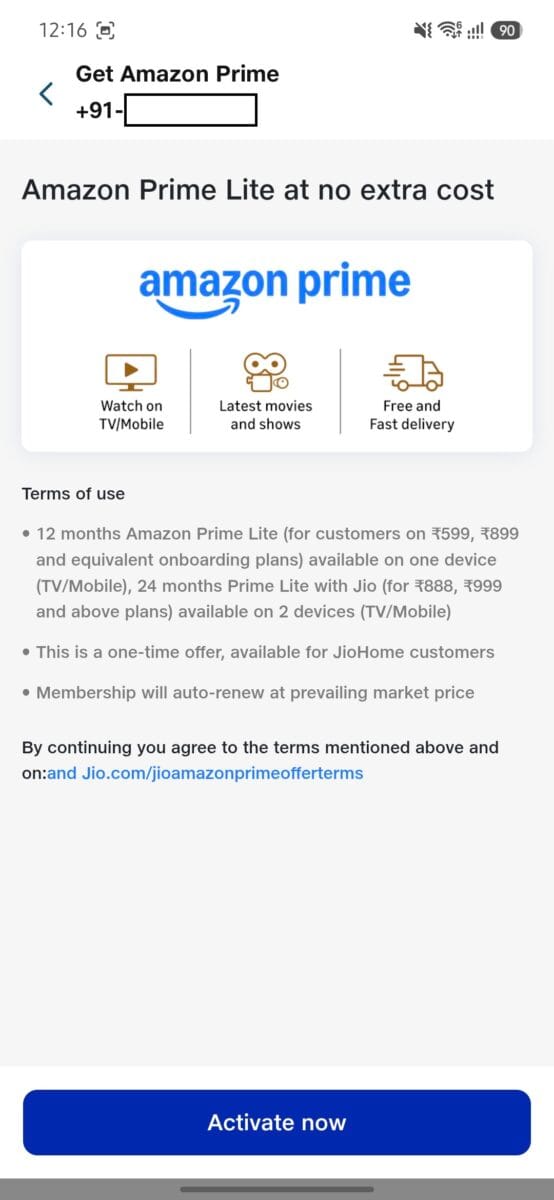
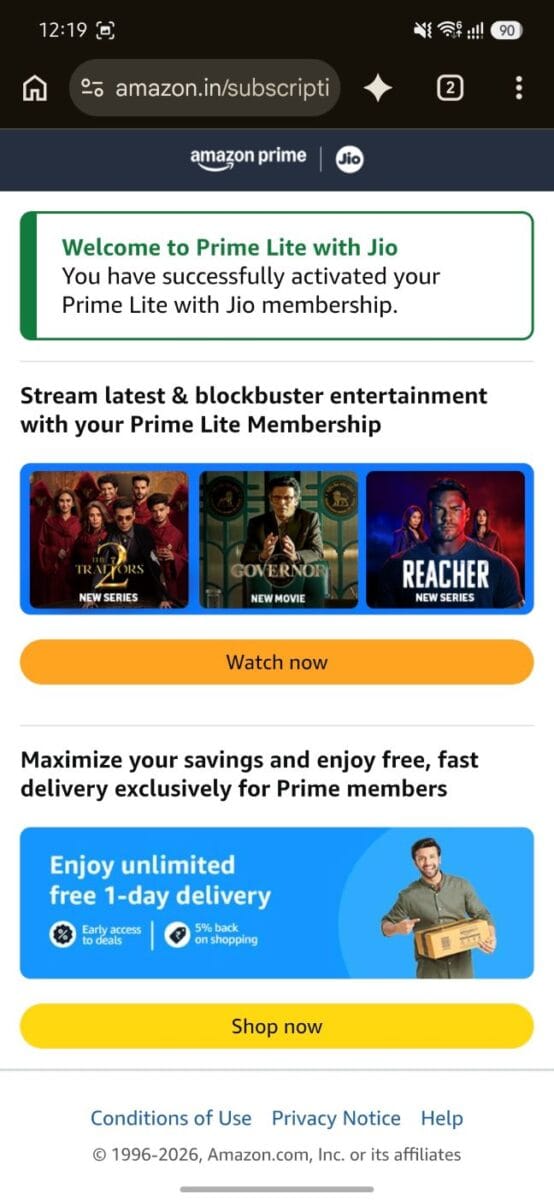
4. You are sent to Amazon. Sign in or create an account using a mobile number.
5. You will see “Welcome to Prime Lite with Jio”. That confirms the membership is active.
You do not need to use your AirFiber number
This is the tip most people will miss. The mobile number you register on Amazon does not have to be the same number linked to your JioAirFiber connection.
I activated it with a different number because my AirFiber-registered number was already used on JioPrime. It worked without any problem. This is handy if:
- your AirFiber number is already tied to another Amazon or Jio benefit
- you want the membership on a family member’s Amazon account
Remember that the terms call this a one-time offer for JioHome customers, so choose the account carefully before you tap Activate.
Keep a note of which number or email you used. MyJio’s notes say to log in with the same Amazon ID (email or mobile) you used during activation. If you forget it, the My subscriptions page has a Recover username button.
How to watch on your TV
Once the membership is active, connect your TV:
1.On the Jio AirFiber dashboard (the pre-installed home screen), open the Amazon Prime Video app
2. The TV shows a 5-6 character code and a QR code. You can use either one.
- On your phone or laptop, open primevideo.com.
- Tap your profile icon and choose Watch Anywhere.
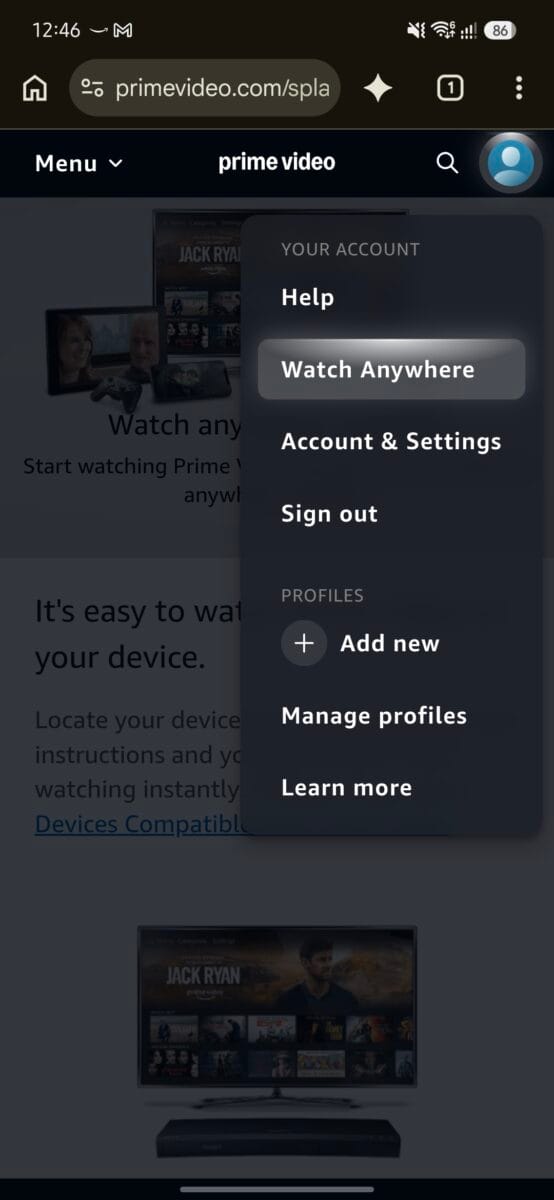
3. Select “Sign in to your Amazon account and enter your code” and sign in with the same Amazon account you used to activate Prime Lite.
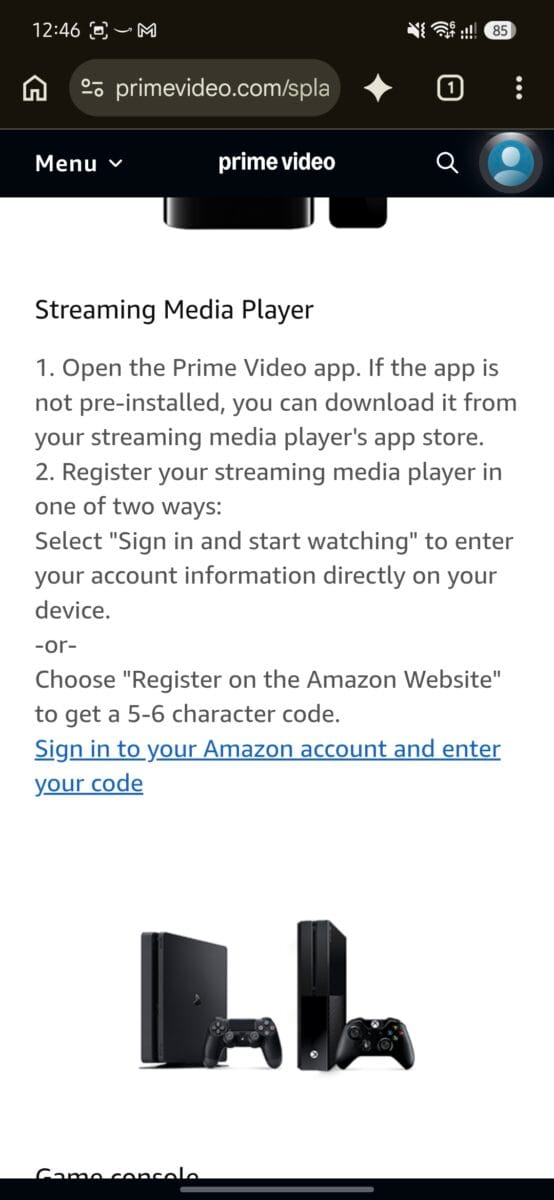
4. You land on a “Register a device” page
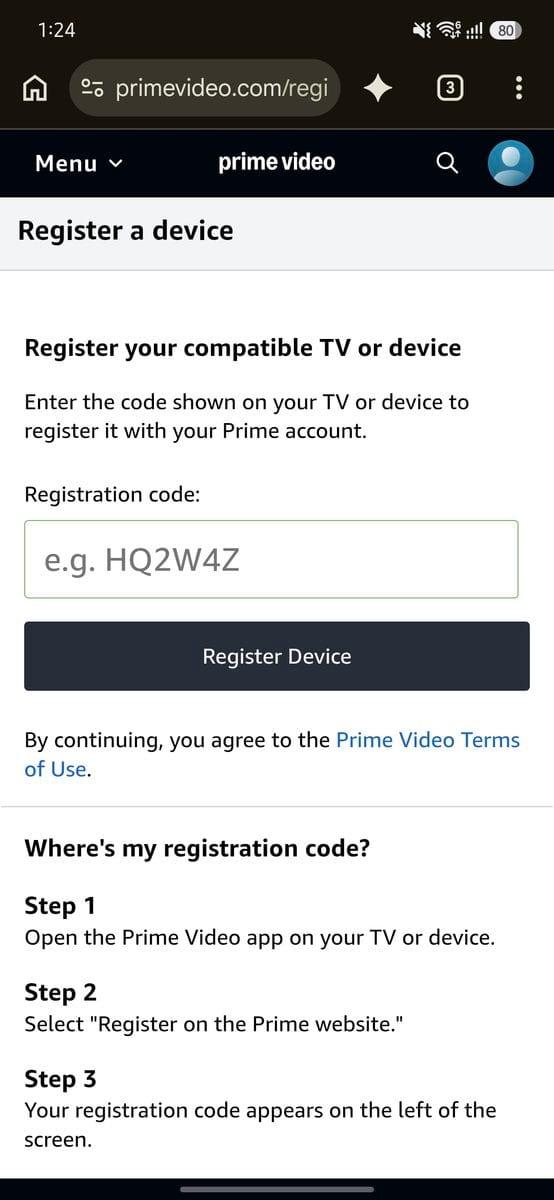
5. Type the code shown on your TV into the Registration code box. It looks like a short mix of letters and numbers, for example HQ2W4Z.
6. Tap Register Device.
Amazon’s own page says the code appears on the left side of the TV screen.
Option 2: Scan the QR code
- Open the Jio Prime app on your phone and use its QR scanner.
2. Scan the QR code shown on the TV.
3. Confirm with the same Amazon account you used to activate Prime Lite.
Either way, your TV signs in within a few seconds.
What happens after 12 months
What MyJio shows. Open MyJio → More → My subscriptions → Amazon Prime. On my account it shows the status Active and an expiry date exactly one year after I activated it (24 September 2027).
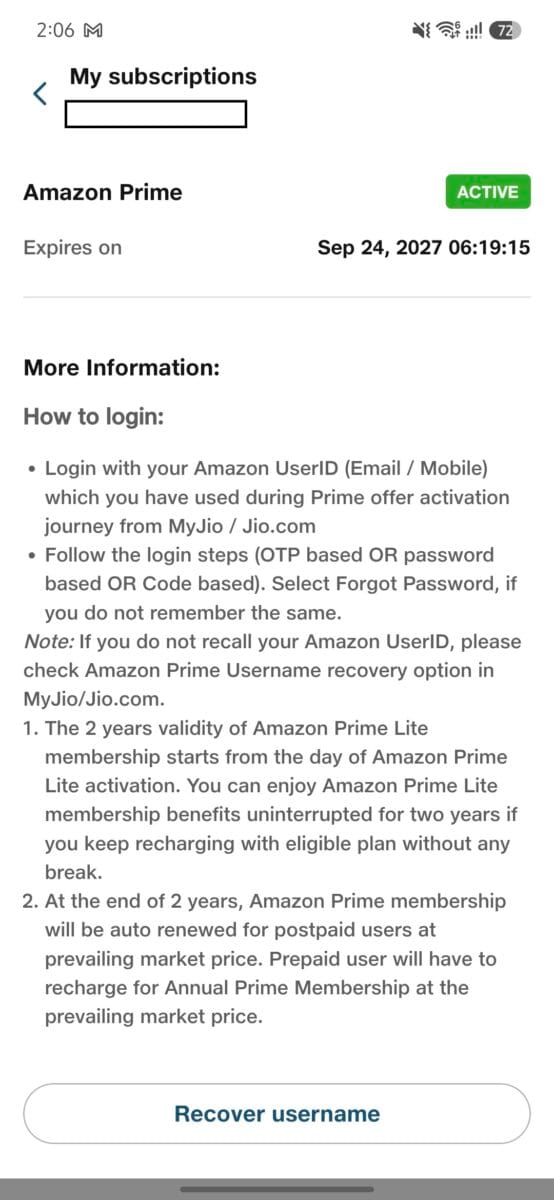
The notes on that page say two things that matter:
- The membership continues uninterrupted if you keep recharging with an eligible plan without any break.
- At the end of the term, Amazon Prime will be auto-renewed for postpaid users at the prevailing market price. Prepaid users have to recharge for the annual membership themselves.
My JioAirFiber is a postpaid connection, so the auto-renewal note applies to me.
A wording oddity: the same notes talk about “2 years” of validity, but the expiry date on my account is 12 months away. That text seems to be shared with the 24-month offer. Go by the expiry date and the 12-month terms on the claim screen.
Why postpaid and prepaid differ. I also have a JioFiber line that came with a year of Amazon Prime, and that one was prepaid. When its year ended, the membership deactivated automatically. Jio then showed a banner saying I would have to pay ₹1,499 to keep using Amazon Prime. I did not pay, and nothing was charged without my action.
That matches the MyJio note above: prepaid users have to recharge for the annual membership themselves, while postpaid users are auto-renewed. My AirFiber is postpaid, so I expect the auto-renewal to apply to me, but I have not seen that happen yet because I only activated it today.
Other evidence points the same way. One Jio customer posted a renewal notice for Prime Lite on a JioHome connection saying “Rs. 1499 (Will be added in your next bill)”. That is what postpaid auto-renewal would look like, though it was an older offer.
If you are on a prepaid connection, expect the membership to end and a paid renewal to be offered. If you are on a postpaid connection, expect the charge to be added to your bill unless you opt out first.
What to do:
- Set a phone reminder for around 11 months from your activation date.
- Around then, open My subscriptions and check the end date and any renewal notice or banner.
- If you don’t want to keep it, get it switched off through Jio before the end date. Don’t assume it will lapse by itself.
Where to cancel: I did not see a cancel button on the My subscriptions page, only the login help and a Recover username button. Amazon’s support staff have said that a subscription activated through a third-party provider can only be cancelled by that provider, and some users report that “End membership” is greyed out on Amazon for Prime Lite with Jio. If you can’t find an opt-out in MyJio, contact Jio Care well before the end date.
Should you claim it?
For most JioHome users on eligible plans, yes. It costs nothing, and ₹799 of value is real money. Just go in knowing the limits:
- Expect ads and HD quality, not the full Prime experience.
- You get one active stream at a time on the 12-month tier. I tested it in both directions, and closing the app does not free the slot. Signing out does.
- Diarise the end date and check MyJio. In my experience an earlier Jio Prime offer just switched off and asked me to pay to continue, but this offer’s terms mention auto-renewal, so confirm before the year ends.
FAQ
Can two family members watch at the same time?
Not on the 12-month tier. In my test, the second device was blocked with a “maximum number of videos” error. Closing the app on the first device did not clear it. Signing out of Prime on that device did.
Is the offer available to existing customers?
Yes. Both new and existing customers on eligible plans can claim it.
I can’t see the banner in MyJio. What should I do?
Jio said the rollout is phased over roughly two weeks from 19 September 2026. Update the app and check again in a few days.
Does the 12 months start when I activate?
Yes. The free period starts on the day you activate, not the day the offer launched.
Can I use a different mobile number on Amazon?
Yes. In my case it worked with a number other than my AirFiber-registered one.
What happens if I upgrade to full Amazon Prime?
An Amazon support reply from 2025 says Prime Lite with Jio is cancelled without refund once you upgrade to full Prime. Terms can change, so check the current terms before upgrading.
Tested on a ₹899 JioAirFiber (100 Mbps) connection on 24 September 2026, including the single-stream limit in both directions. Offer terms can change, so confirm eligibility and the auto-renewal terms inside your own MyJio app before activating.

Ayush Singhal is the founder and chief editor of TechMitra.in — a tech hub dedicated to simplifying gadgets, AI tools, and smart innovations for everyday users. With over 15 years of business experience, a Bachelor of Computer Applications (BCA) degree, and 5 years of hands-on experience running an electronics retail shop, Ayush brings real-world gadget knowledge and a genuine passion for emerging technology.
At TechMitra, he covers everything from AI breakthroughs and gadget reviews to app guides, mobile tips, and digital how-tos. His goal is simple — to make tech easy, useful, and enjoyable for everyone. When he’s not testing the latest devices or exploring AI trends, Ayush spends his time crafting tutorials that help readers make smarter digital choices.
📍 Based in Lucknow, India
💡 Focus Areas: Tech News • AI Tools • Gadgets • Digital How-Tos
📧 Contact: Get in touch →
🔗 Full Bio: https://techmitra.in/about-us/