

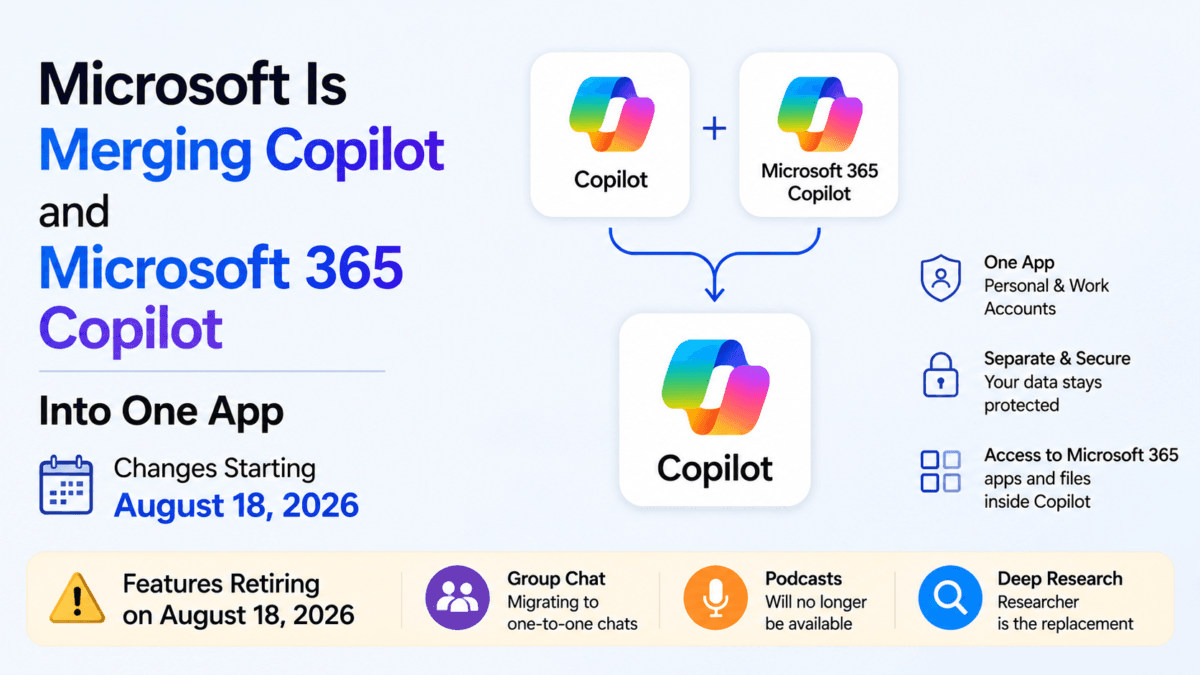
If you’ve ever paused for a second wondering “wait, do I open Copilot or Microsoft 365 Copilot for this?” — Microsoft has finally noticed the confusion too. The company is merging its two separate Copilot apps into a single unified experience, and in the process, retiring five features some users have come to rely on.
This isn’t a minor visual refresh, and it isn’t a single overnight switch either. It’s a staggered rollout that touches how you sign in, which apps you can reach from inside Copilot, and — for a meaningful chunk of users — which features simply won’t exist anymore once your account updates. Here’s a complete breakdown of what’s changing from Microsoft Copilot app merger, when it actually reaches you, and exactly what to do before you lose access to anything.
Table of Contents
Also Read : Microsoft Quietly Extends Windows 10 ESU Support to October 2027
Two Apps, One Confusing Setup — Until Now
Since Copilot’s 2023 launch, Microsoft has run two parallel products:
- Copilot — the free-to-use, consumer-facing AI chatbot, tied to a personal Microsoft account (or Google/Apple sign-in).
- Microsoft 365 Copilot — the enterprise version, built around work/school accounts, deeply wired into Word, Excel, Outlook, and the rest of the Microsoft 365 suite.
If you used both — say, Copilot for personal questions and M365 Copilot for office work — you were juggling two separate apps, two separate logins, and two icons cluttering your taskbar or system tray, even though under the hood they were built on largely the same AI foundation. Microsoft’s own framing for this update is that it wants a “simpler, more cohesive experience”: one Copilot app, with personal and work accounts still kept separate underneath.
When Does This Actually Reach You? (Important — It’s Not All at Once)
This is the detail that’s easy to get wrong, so it’s worth being precise about it: the rollout is staggered by platform, not a single flip-of-a-switch date.
- Mobile and web: Worldwide rollout begins in mid-August 2026.
- Windows and Mac apps: Rollout follows in mid-September 2026.
- Feature retirements (Group Chat, Podcasts, Deep Research, Mico, Copilot Labs): Account updates begin on August 18, 2026, and roll out gradually — Microsoft is explicit that timing “may vary by account.”
- A small group of Windows Insiders started receiving early updates the week of August 10, 2026.
In practice, this means two people could see completely different things on the same day depending on their platform and account. Don’t be alarmed if a colleague on mobile already has the unified app while you’re still on Windows waiting for your update — that’s expected, not a bug.
This Is Step One Toward a Bigger “Super App”
There’s important context here that’s easy to miss if you only look at the app merger in isolation: this update is explicitly a technical foundation for something larger. Microsoft CEO Satya Nadella confirmed on the company’s July 29, 2026 earnings call that a unified Copilot “Super App” — bringing together chat, AI coding, Cowork, and new autonomous “Autopilot” agents into one single app — is planned to launch by the end of September 2026.
The Copilot/Microsoft 365 Copilot merger covered in this article is the first visible piece of that plan: getting personal and work accounts into one shell, with one icon, on every platform, before the bigger Super App layer arrives on top. Microsoft hasn’t detailed pricing or exact feature scope for the Super App yet — that’s a separate story worth watching as September approaches.
What’s Actually Changing After Microsoft Copilot Merger
According to Microsoft’s own support documentation, here’s what the unified Copilot app brings:
One login, multiple accounts — but kept separate. You’ll be able to sign in with your personal account, your work/school account, or both — and switch between them inside the same app. Importantly, Microsoft is clear that work and personal accounts remain separate even when both are signed in: your organization’s security, privacy, compliance, and admin controls continue to apply fully to your work account, and that data doesn’t mix with your personal chats.
Microsoft 365 apps built right in. Word, Excel, Outlook, and other M365 apps become accessible directly from within Copilot, along with your files and documents for contextual queries. You won’t have to leave the chat window to reference a spreadsheet or pull up a document.
A single icon, finally. For Windows users specifically, this solves a small but persistent annoyance: no more two separate Copilot icons sitting in the taskbar and system tray.
Free tier stays free. You can continue to chat with Copilot, generate images, and upload files for context at no cost — subject to Microsoft’s usage limits. When you hit a limit, Microsoft’s own wording is refreshingly blunt: upgrade to a paid plan, or “come back later” once your limit resets.
Microsoft 365 subscribers keep their edge. Paid subscribers continue to get advanced AI models, higher usage limits, and access to agent-based features not available on the free tier — this part of the value proposition isn’t changing, just the app it lives inside.
How This Plays Out Depending on Which App You Currently Use
Microsoft has published an account-type breakdown (via its official support documentation) of exactly what happens to different user groups. It’s worth checking which row applies to you:
| If you currently use… | Here’s what happens |
|---|---|
| Copilot with a personal Microsoft, Google, or Apple account | You’re moved to the updated Copilot app; your chat history and most content move with you automatically. Mobile users will need to download the updated app version. Files you’ve shared or generated move to OneDrive. |
| Microsoft 365 Copilot app with a personal Microsoft account | Minor navigation and icon changes only. Copilot chat becomes available to you at no extra cost if you didn’t already have an M365 subscription. |
| Both Copilot and Microsoft 365 Copilot with a personal account | Your chats and content from both apps are merged into a single updated app — but data stays segregated by account type (personal data doesn’t merge with work data). |
| Microsoft 365 Copilot with a work or school account | Minor UX and icon changes; your organization’s existing controls remain fully intact. |
Also Read :What Is Copilot+ PC in Windows? Features, Benefits & Top Picks
The Features Being Retired — All Five of Them
This is the part that’ll actually affect your day-to-day use, and it’s worth being thorough here: Microsoft is retiring five named features as part of this transition, not three. Three of them (Group Chat, Podcasts, Deep Research) get detailed treatment on Microsoft’s support pages; two others (Mico and Copilot Labs) are confirmed but with less public detail.
1. Group Chat
Group Chat let multiple people participate in a shared Copilot conversation together — brainstorming, planning, or generating content as a group. It’s being retired entirely, confirmed on Microsoft’s own dedicated FAQ page for retired features.
- Your own message history, prompts, and artifacts remain accessible after the switch — no action needed for your own content.
- Each former Group Chat becomes a one-to-one conversation — you can no longer continue it as a group.
- Prompts, images, and artifacts created or shared by other participants in that chat will not be accessible once your account updates.
- Guests who joined via an invite link lose access entirely once their account updates; their own messages may carry over into an individual chat, but content from others won’t.
- Microsoft’s stated reason: it’s “evolving the Copilot experience to focus on streamlined, high-quality interactions,” and says learnings from Group Chat are being folded into broader Copilot improvements — in other words, no direct replacement is planned.
Action needed: If you’re in an active Group Chat with content from other people that you want to keep, download it before your account updates. Microsoft is explicit that this content is not preserved automatically.
2. Podcasts
Copilot’s AI-generated podcast feature — which let users generate and listen to audio-format content — is being shut down entirely, for both free and paid users.
- After the cutoff, you can no longer create new podcasts.
- Previously created podcasts also become inaccessible — this isn’t just a “no new creation” retirement, existing content goes away too, and shared links stop working.
- Action needed: On Copilot for web, go to your podcast library and use the download option in the podcast menu to save anything you want to keep, before the cutoff.
3. Deep Research
Deep Research — the feature that let Copilot browse the web and compile detailed, multi-source research reports — is being retired for consumer accounts. This is the most nuanced of the five retirements, because Microsoft is positioning a partial replacement rather than just cutting the feature outright:
- If you’re a Microsoft 365 Premium subscriber: You get a direct replacement. A similar feature called Researcher continues to be available for in-depth research tasks, and your existing Deep Research reports carry over — accessible through Researcher going forward.
- If you’re on Personal or Family (or free): You don’t get access to Researcher, but your existing Deep Research reports are not deleted. You can still find and open your previous reports through your Copilot chat history — you just lose the ability to generate new ones.
- Either way: Microsoft explicitly notes you can open old Deep Research reports in Microsoft Word and save them permanently, if you want a copy independent of Copilot entirely.
So unlike Group Chat and Podcasts — where content genuinely disappears — Deep Research’s retirement is really a feature retirement rather than a content retirement. Your past work stays retrievable; you just lose the ability to generate new Deep Research-style reports unless you’re paying for Premium and using Researcher instead.
4. Mico
Mico was Copilot’s animated, floating character — an expressive visual presence that appeared during voice conversations, often compared to an AI-era version of Microsoft’s old Clippy assistant. It’s being quietly discontinued as part of this transition.
5. Copilot Labs
Copilot Labs was Microsoft’s space for experimental, early-access Copilot features — a testing ground for capabilities that hadn’t graduated to the main app yet. It’s being discontinued alongside the other four.
The Bigger Picture Behind These Cuts
There’s a useful piece of internal context here: reporting citing an internal memo from Jacob Andreou, the Microsoft EVP overseeing Copilot, indicates the company told staff the app needs to earn “the right to exist” in customers’ daily lives — meaning Microsoft is deliberately moving on from features that experimented but didn’t deliver enough measurable value. Group Chat, Podcasts, Mico, and Copilot Labs all fall into that bucket; Deep Research is the partial exception, since its core capability survives (for paying users) under the Researcher name.
Also read : Microsoft Rewards Points Value in India: How to Earn & Redeem
Why This Matters
For most casual users, this is a net positive —A one app instead of two, less confusion about where to go for what, one fewer icon cluttering the taskbar, and free users even pick up Copilot chat access if they were previously using a bare M365 Copilot app without a subscription. Microsoft’s account-type table makes clear that for a large share of users, this update is genuinely low-friction: icon and navigation tweaks, nothing more.
But if you were an active user of Group Chat, Podcasts, Deep Research, Mico, or Copilot Labs, this is a real feature loss, not just a UI reshuffle:
- Group Chat disappears as a concept entirely — there’s no stated replacement.
- Podcasts disappears with no replacement and no grace period for accessing old content.
- Deep Research has a replacement path, but it’s gated behind a Microsoft 365 Premium subscription — free and Personal/Family users lose the ability to generate this kind of report altogether, even though their old reports remain readable.
- Mico and Copilot Labs simply go away, with Microsoft offering little public detail beyond the fact of their retirement.
This also fits a broader pattern of Microsoft actively reshaping its Copilot lineup through 2026: it recently paused the automatic rollout of the M365 Copilot app on Windows, retired the standalone Microsoft Lens app in favor of Copilot’s document-scanning features, and pulled Copilot off Xbox and mobile consoles under Xbox chief Asha Sharma. Copilot’s product shape has clearly been in flux for a while — this merger, and the Super App it’s building toward, reads like Microsoft finally trying to settle on a coherent, permanent structure rather than another incremental tweak.
Which Copilot Users Need to Take Action?
| User Type | Action Needed |
|---|---|
| Regular Copilot user (just chat, images, files) | No action required — transition is automatic |
| Group Chat user | Download content shared by other participants before your account updates; your own messages carry over automatically |
| Podcast user | Download anything you want to keep from your podcast library before the cutoff — all access is lost after |
| Deep Research user (free / Personal / Family) | No content is deleted, but save anything important as a Word doc if you want a Copilot-independent copy |
| Deep Research user (Microsoft 365 Premium) | No action needed — Researcher becomes your ongoing replacement, with reports carried over |
| Mico / Copilot Labs user | No stated migration path — these features simply stop being available |
Conclusion
Microsoft’s decision to merge Copilot and Microsoft 365 Copilot into a single app is, at its core, an admission that running two separate products for personal and professional AI use was creating more friction than it was worth — and it’s only the first visible step toward a much bigger “Super App” Microsoft plans to ship by the end of September. For the average user — someone who just wants to chat, generate an image, or get help with a Word document — the unified app should feel like a straightforward improvement: fewer apps to manage, one identity to sign in with, and Microsoft 365 tools within easier reach.
The real story, though, is in the fine print. Cutting Group Chat, Podcasts, Mico, and Copilot Labs outright, and gating Deep Research’s replacement behind a Premium subscription, shows Microsoft is willing to sunset features that didn’t earn their keep — even if some users genuinely relied on them. And because the rollout is staggered by platform rather than happening everywhere at once, it’s worth checking your own app rather than assuming a one-size-fits-all date. If any of these five features affects you, the window to act is real but not infinite: back up what you need before your account updates, not after.
Frequently Asked Questions
Q1. When exactly does the Copilot merger happen?
It’s staggered, not a single date. Mobile and web apps begin their worldwide rollout in mid-August 2026; Windows and Mac apps follow in mid-September 2026. Feature retirements (Group Chat, Podcasts, Deep Research, Mico, Copilot Labs) begin with account updates on August 18, 2026, and roll out gradually — timing varies by account.
Q2. Do I need to do anything to get the new unified Copilot app?
No — for most users, the transition is automatic. Mobile users will need to download an updated version of the app to continue using it; web users are redirected automatically.
Q3. Will I lose my chat history?
No, for the vast majority of users your chat history moves with you. The one exception is Group Chats, where your own messages remain accessible but prompts and artifacts created by other participants do not.
Q4. I use Microsoft 365 Copilot for work — will my company’s data or admin controls be affected?
No. Microsoft states explicitly that work and personal accounts remain separate within the unified app, and your organization’s existing security, privacy, compliance, and administrative controls continue to apply fully.
Q5. Is Copilot still free after this update?
Yes. Free users can continue to chat, generate images, and upload files for context, subject to Microsoft’s usage limits. Microsoft 365 subscribers continue to get higher limits and access to more advanced models and agent features.
Q6. What happens to my old Deep Research reports?
They aren’t deleted. Microsoft 365 Premium subscribers can access them through the new Researcher feature. Personal, Family, and free users can find their previous reports in their Copilot chat history, and everyone has the option to open old reports in Microsoft Word to save a permanent copy.
Q7. Is there a replacement for Deep Research?
Yes, but only for Microsoft 365 Premium subscribers — a similar feature called Researcher continues to offer in-depth, multi-source research report generation after Deep Research is retired.
Q8. Can I still access old podcasts I created in Copilot after the cutoff?
No. Once Podcasts is retired, previously created podcasts are no longer accessible, for both free and paid users, and shared podcast links stop working. Download anything you want to keep from your podcast library before then.
Q9. What are Mico and Copilot Labs, and why are they being removed?
Mico was Copilot’s animated character that appeared during voice conversations; Copilot Labs was a space for experimental, early-access features. Both are being discontinued as Microsoft narrows Copilot’s focus — reporting suggests this reflects an internal push to keep only features that demonstrably earn their place in the app.
Q10. Will Group Chat come back in any form later?
Microsoft hasn’t announced a replacement or a return date for Group Chat as a concept. The company says learnings from it are being incorporated into broader Copilot improvements, but nothing specific has been promised.
Q11. Is this the “Super App” I’ve been hearing about?
Not exactly — this app merger is a technical foundation for the Super App, not the Super App itself. Microsoft CEO Satya Nadella confirmed on the July 29, 2026 earnings call that the actual Super App — combining chat, coding, Cowork, and autonomous agents — is planned to launch separately, by the end of September 2026.
Q12. Is this the same as Microsoft’s earlier January 2025 rebrand of the Office app to “Microsoft 365 Copilot app”?
No — that was a naming and icon change to the Office app. This is a deeper structural merger that combines two entirely separate apps (consumer Copilot and Microsoft 365 Copilot) into one, along with several feature retirements. The two updates are related in spirit but are separate changes rolled out about 18 months apart.
Sources: Microsoft Support documentation, Windows Central

Ayush Singhal is the founder and chief editor of TechMitra.in — a tech hub dedicated to simplifying gadgets, AI tools, and smart innovations for everyday users. With over 15 years of business experience, a Bachelor of Computer Applications (BCA) degree, and 5 years of hands-on experience running an electronics retail shop, Ayush brings real-world gadget knowledge and a genuine passion for emerging technology.
At TechMitra, he covers everything from AI breakthroughs and gadget reviews to app guides, mobile tips, and digital how-tos. His goal is simple — to make tech easy, useful, and enjoyable for everyone. When he’s not testing the latest devices or exploring AI trends, Ayush spends his time crafting tutorials that help readers make smarter digital choices.
📍 Based in Lucknow, India
💡 Focus Areas: Tech News • AI Tools • Gadgets • Digital How-Tos
📧 Contact: Get in touch →
🔗 Full Bio: https://techmitra.in/about-us/