

Last tested 13 and 14 November 2026
Disclosure: Hostinger invited me to test its AI tools and provided 1,000 testing credits. I tested the tools myself using my own prompts and have documented both what worked and what didn’t. Hostinger did not control the results or conclusions in this article.
Every parent and teacher I know has the same problem: a chapter to revise, a child who finds revision boring, and no time to build a quiz. Hostinger says its AI game maker can solve that. You upload a PDF or a photo of the chapter, or describe a game in plain words, and it builds a playable game with nothing to install.
I wanted to know how true that is for Indian school content, so I spent two days building six games: a plain arcade game, a Class 6 robotics quiz, a robot mission game, a balloon game for toddlers, a Class 6 ICSE history game, and a history jigsaw made from textbook photos. For every game I wrote the prompt myself, played the result and checked what it cost. You can find the main prompts at the end of this article.
I wanted to know how true that is for Indian school content, so I spent two days building six games: a plain arcade game, a Class 6 robotics quiz, a robot mission game, a balloon game for toddlers, a Class 6 ICSE history game, and a history jigsaw made from textbook photos. For every game I wrote the prompt myself, played the result and checked what it cost. You can find the main prompts at the end of this article.
I tested both of Hostinger’s AI game-building workflows during this experiment: the game maker inside AI Builder and Hostinger Agent/Agent Plus. The workflows are similar in purpose but different in how you interact with them, so I have described both below.
Table of Contents
What Is Hostinger AI Game Maker?
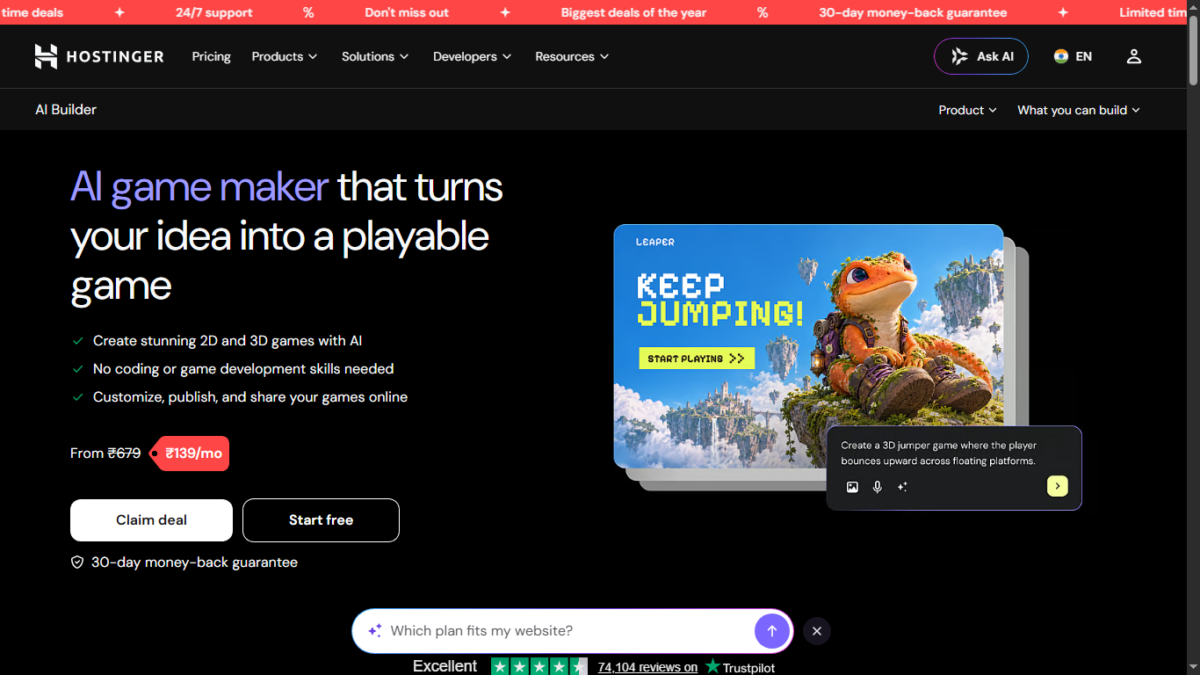
Hostinger’s AI Builder uses an Agentic/conversational workflow to create and modify web projects, including games.
Instead of starting with an empty code editor, you describe the game you want and the AI Agent generates the project. You can then give it additional instructions to change the design, gameplay, questions, animations or other parts of the project.
One of the main things I wanted to test was Hostinger’s claim that users can upload a PDF or photo of a chapter, or simply describe a game in plain language, and get a playable game.
The short version
I built six browser games with Hostinger’s AI tools. Catch the Stars was the only game that worked as expected without a significant problem. The other five had issues ranging from gameplay and animation bugs to failure to follow important parts of my prompt. One game—the History Picture Puzzle—never became reliably playable at all.
That was the biggest lesson from the test: Hostinger’s AI can produce a surprisingly complete-looking game very quickly, but the first version is not necessarily a finished game. Every game needs to be played and tested carefully before you can consider it ready for children or other users.
| Game | What I gave it | Result | Credits used |
|---|---|---|---|
| Catch the Stars | Text prompt only | Works | 0 for the one edit I priced |
| Robotics Challenge, Class 6 | Photos of CBSE chapter pages | ⚠️ Playable, but major prompt-following/gameplay issues | Not tracked ( Step 1) |
| Robot Rescue Mission | Six photos of the same chapter | ⚠️ Playable, but had errors | Not tracked (2 Steps) |
| Pop the Alphabet Balloons | Text prompt only | ⚠️ Playable, but had gameplay/animation bugs | About 41 (four steps) |
| Rise of Magadh, ICSE Class 6 | Text prompt only | ⚠️ Playable, but had errors | About 9 |
| History Picture Puzzle | Three textbook photos | ❌ Did not work reliably | About 62 (four steps) |
Credits are matched to my chats by time, because Hostinger’s usage page shows the time of each charge but not which project it belongs to.
Hostinger AI Game Maker pricing
If you want to build and publish games through Hostinger’s AI Game Maker, you need an eligible Hostinger plan. I checked the India pricing on November 15, 2026, during Hostinger’s Black Friday sale.
| Plan | Sale price | Upfront price for 48 months | Games |
|---|---|---|---|
| Premium | ₹139/month | ₹6,672 | Up to 3 |
| Unlimited | ₹199/month | ₹9,552 | Unlimited |
| Cloud Startup | ₹599/month | ₹28,752 | Unlimited |
The monthly figure is calculated from the total amount paid upfront for 48 months. Current renewal prices are ₹449/month for Premium, ₹649/month for Unlimited and ₹1,599/month for Cloud Startup.
The current sale also doubles the included AI credits: Premium lists 500 instead of 250, Unlimited lists 1,000 instead of 500, and Cloud Startup lists 2,000 instead of 1,000. These are promotional figures, so they can change after the sale.
There is an important distinction between testing a game and publishing one. During my testing, I was able to download the HTML files generated by Hostinger Agent and open them locally in a browser without hosting. If you want to publish the game online through Hostinger and give people a shareable URL, you need an eligible hosting plan.
Also, the 1,000 testing credits Hostinger gave me for this experiment should not be confused with the normal plan allowance. Those credits were provided specifically for my testing.
Two ways to build a game on Hostinger, and how I tested both
Hostinger currently gives you two related ways to build games with AI, but the workflow is different depending on where you start.
The first is the game maker inside AI Builder. According to Hostinger’s help page, you can open the Websites section of the dashboard, create a website in a hosting plan, choose AI Builder, select Agentic mode and describe the game you want to create. You can then continue working on the project through the AI chat.
I tested this route and successfully created a game with AI Builder. When I started from the AI Builder screen, however, I did not see an option to attach files on that initial screen. I could describe the game and start the building process, but I could not attach my textbook images or other reference files at that point.
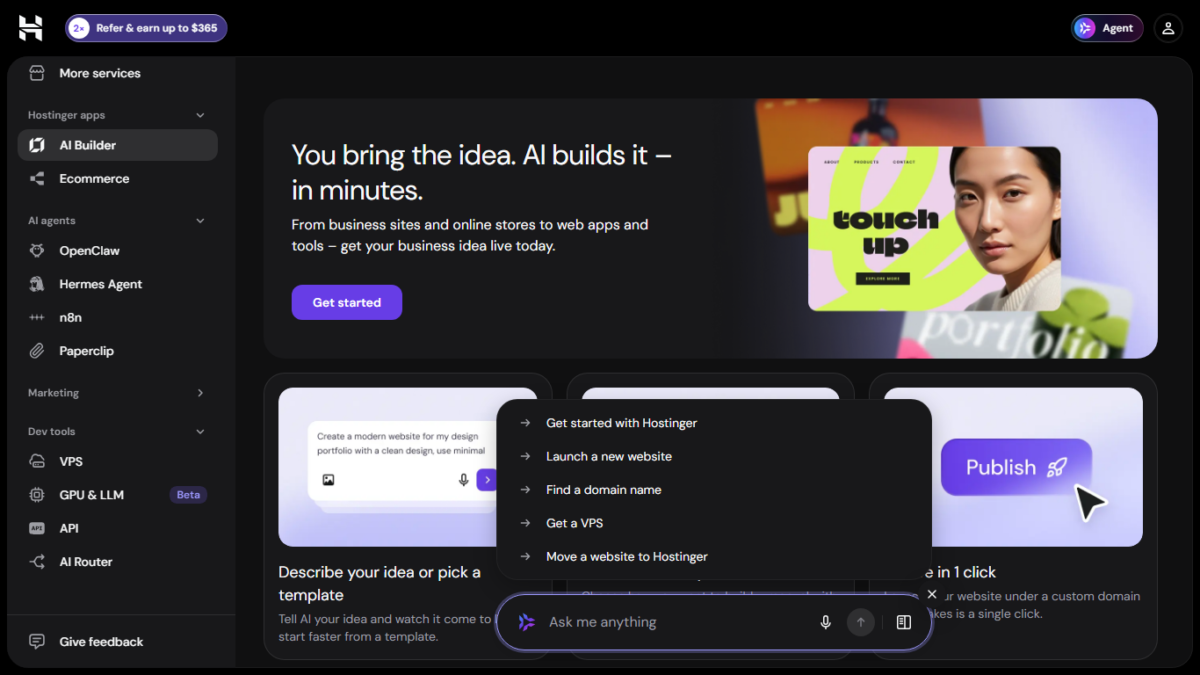
The second route is Hostinger Agent, which I accessed through Agent Plus in the Hostinger dashboard. This is the workflow I used for the other games in this article.
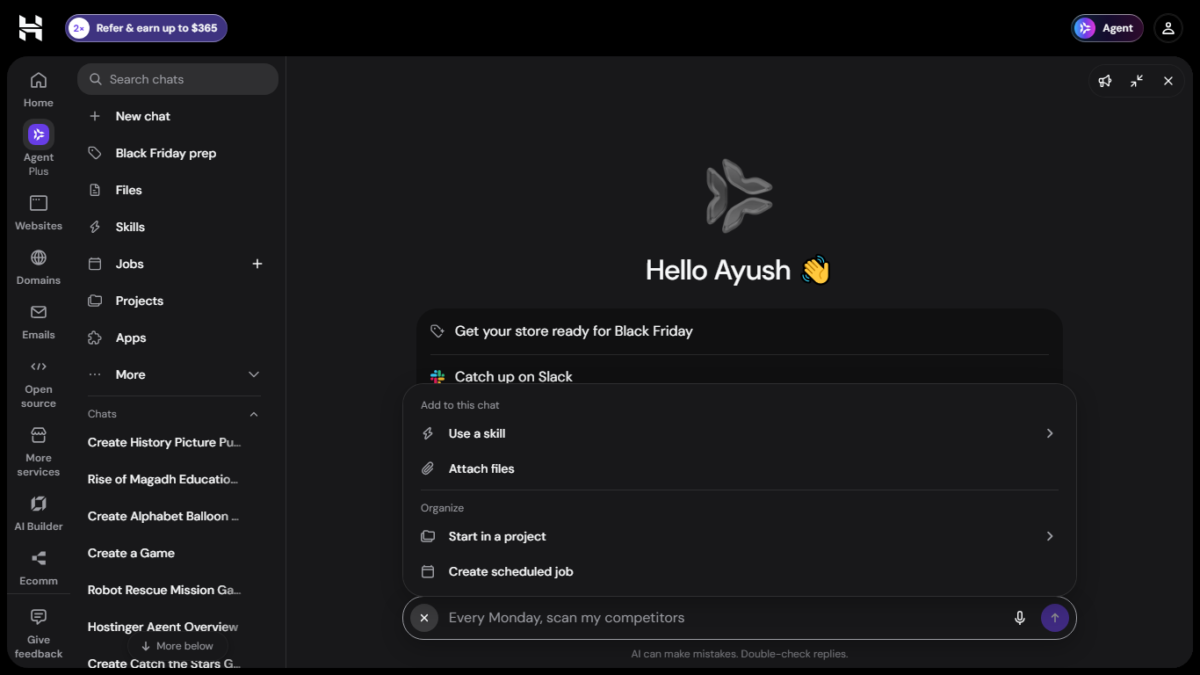
This workflow gave me a different experience. Once I was inside Agent Plus, the chat included an Attach files option. I could therefore provide reference material to the Agent while working on a game. This became particularly useful when I wanted to use textbook pages, images or other source material as part of the game-building process.
So, although AI Builder and Hostinger Agent are part of the same broader AI ecosystem, I found a practical difference between the two workflows: AI Builder let me start building a game directly from the website-building interface, while Agent Plus gave me a chat-based workflow with file attachments.
AI Builder and Agentic mode
AI Builder also has different modes. In Manual mode, you can work with the visual editor without using AI credits. In Agentic mode, you describe what you want through chat and AI handles the building process.
My testing included the AI-driven workflow. I created a game through AI Builder and also created several games through Agent Plus, which allowed me to compare the two experiences rather than relying on Hostinger’s descriptions alone.
Testing and hosting
The hosting question also became important during my testing. When I asked the Agent to build and publish my first game, it told me that I did not have a hosting plan that could take a new website and asked me to choose one.
When I asked whether hosting was necessary if I only wanted to test the game myself, it explained that hosting is needed for a shareable online link, while a locally generated HTML game can be opened directly in a browser.
I therefore tested the generated games locally as well. The Agent gave me HTML files that I could open in my browser without first publishing them on Hostinger.
That distinction matters if you simply want to experiment with game creation. You can test a generated HTML game locally without first putting it online. Publishing becomes relevant when you want a public, shareable URL.
For my testing, I used textbook material and images as references. The important difference I found was that I could attach those files through the Hostinger Agent workflow, whereas I did not see an attachment option on the initial AI Builder screen where I started creating the game.
Where to run the prompts, step by step
This is the route I followed for the games I built with Hostinger Agent.
- Log in to your Hostinger dashboard (hPanel) or by opening Game Maker page and then click register or login
- Open Hostinger Agent. In my dashboard it appears as an Agent button at the top right and as Agent Plus in the left menu. Hostinger says you can open it as a full-page workspace or as a sidebar docked beside the dashboard.
- Check that it is in Agent mode. Hostinger’s changelog describes a Chat mode for support questions and an Agent mode for features such as creating files, with Agent mode as the default.
- Click New chat. I started a separate chat for every game, which kept each game’s prompts and files together and made it easier to match credit charges to games later.
- If you are building from a chapter, attach the pages first, using the attachment icon in the chat box. I attached up to six photos of textbook pages, and that was the limit I ran into.
- Paste your prompt and send it. Say that you want a self-contained HTML file you can test in your browser, not a published website. My Magadh prompt ended with the line “create the game itself as a self-contained HTML project that can be tested locally in a browser.”
- When the reply arrives, download the file from the file card in the chat. If it is a ZIP, extract it and keep the images in the same folder as the HTML file. Then double-click the HTML file to open it in your browser.
- Play it, ideally on your phone as well. Then ask for changes in the same chat, naming the exact problem, which worked much better than vague requests.
- Keep an eye on your credits. Hostinger says your balance shows at the bottom of the navigation panel, or at the top right in full-page layout. On the Hostinger Credits page, the View link next to “Spent this month” opens a list of every charge with its time.
If you want to try AI Builder’s own game maker instead, Hostinger’s game maker page offers a free trial with no credit card, and the help page above gives the route: Websites, create a website, choose AI Builder, select Agentic, then describe your game and refine it in the chat. I also tested AI Builder’s own game-making workflow separately, as described above, so the results in this article include both workflows.
What it cost me
Hostinger gave me 1,000 testing credits. By the end of the two days I had spent about 113 of them, roughly 11 percent. Individual charges ran from 6.5 to 25.7 credits. A fresh game cost around 9 to 11 credits, and small balloon tweaks cost between 6.5 and 13.8 each.
The expensive part was repair. The jigsaw’s first build cost about 11 credits. Three attempts to fix its dragging cost around 52 more, and I never got a working puzzle out of it. That one game used more than half of everything I spent, and the last charge, 10 credits, matches the reply in which the Agent said it could not attach a new file.
Small edits are not always charged. Before I changed the arcade game’s timer from 60 to 90 seconds, I asked the Agent whether the change would use credits. It said yes. After the edit it reported zero credits and corrected itself, and the usage page shows no charge at that time. So the Agent’s own estimates are not reliable. If cost matters to you, check your balance before and after every prompt.
I did not do that for my first tests, so I cannot give you reliable costs for the robotics quiz, the robot mission game or the first version of the arcade game. Hostinger’s usage page shows no charges at all before 13:56 on 14 November, so my earliest builds appear to have cost nothing.
The six games
1. Catch the Stars
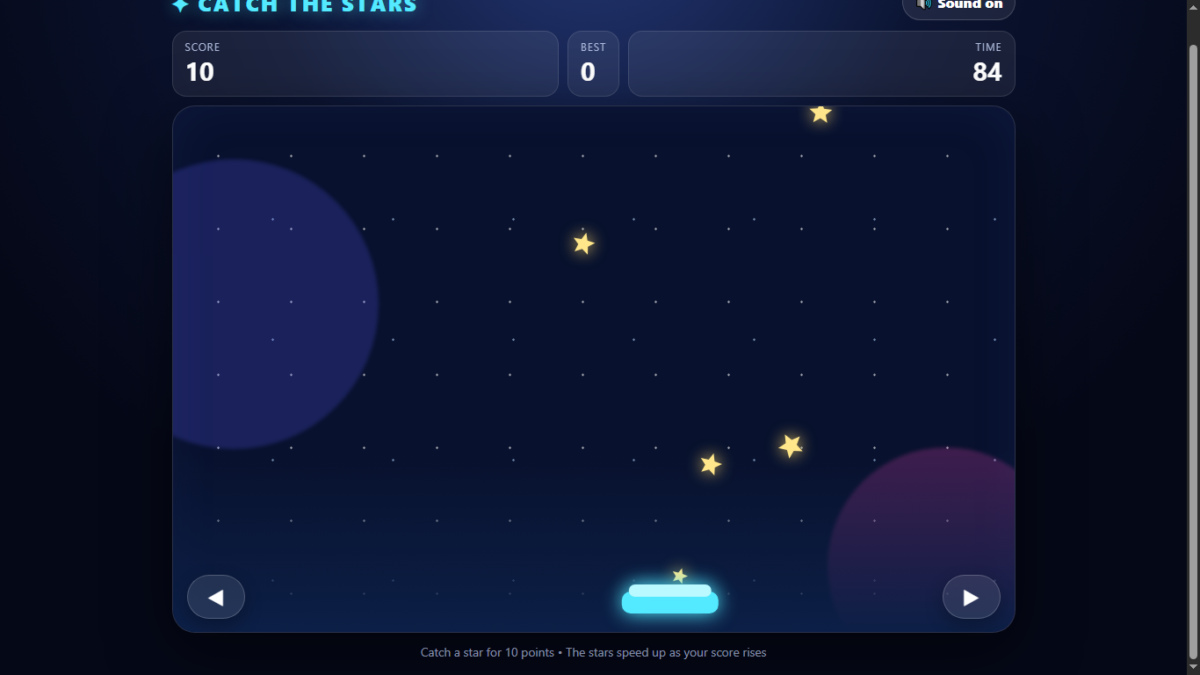
My first game was a plain arcade game, with no textbook involved: a basket at the bottom of the screen, stars falling at different speeds, arrow keys or A and D to move, touch buttons on mobile, 10 points per star, increasing speed, a 60-second timer, a saved high score, a night-sky look and sound effects with a mute button.
This is also where I first ran into the hosting wall. The Agent asked me to choose a hosting plan to continue. I asked whether I needed one if I only wanted a local game, it said no, and it made a single HTML file of about 10 KB with a short readme. Later I asked it to change the timer to 90 seconds, and the timer works. The 60 to 90 second edit is also the one I used to check its credit estimate, described above.
It was the most complete of the six, and it matches most of my brief. Two things are worth testing on your own phone before you share it: the saved high score, which uses the browser’s storage and can fail on some embedded pages, and the sound.
🎮 Play the game: Play Catch the Stars
2. Robotics Challenge, Class 6
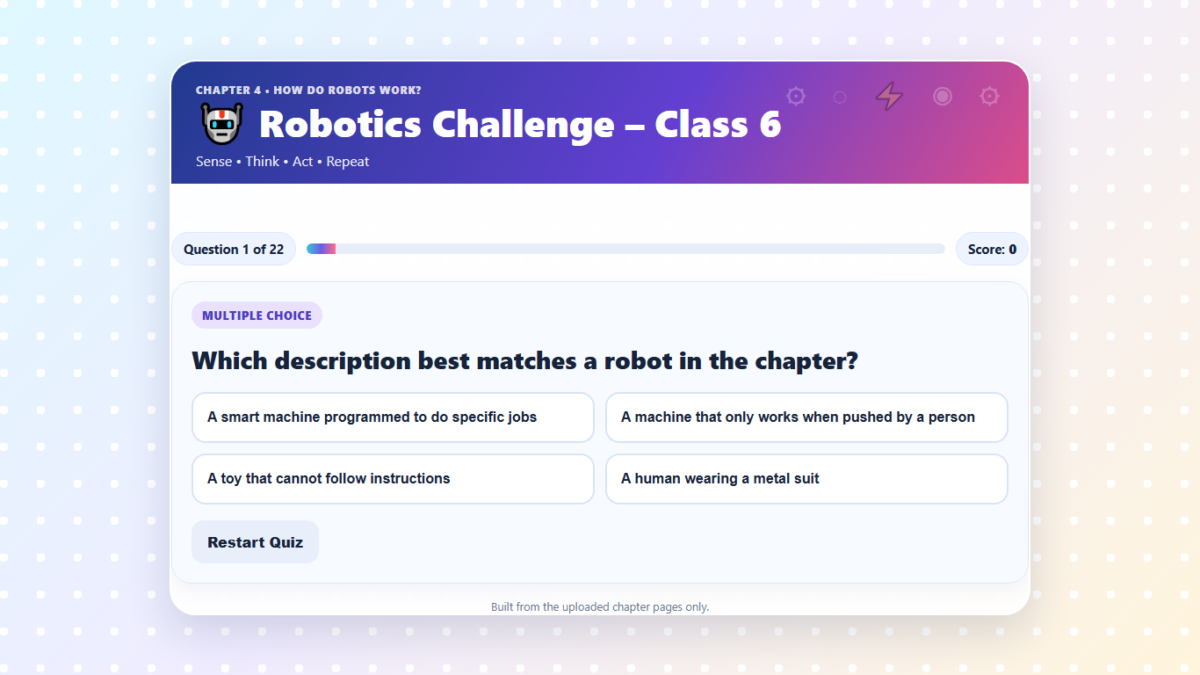
I uploaded photos of the Class 6 CBSE chapter “How Do Robots Work?” and asked for a game of 20 to 25 questions built only from those pages, mixing multiple choice, true or false, fill in the blanks, matching and “Who am I?” questions. I told it not to add any facts from outside the chapter.
The Agent said there was no Hostinger website on my account to publish into, so it made a self-contained HTML file. The result has 22 questions, instant feedback with a short explanation, a progress bar, a score and a final message, all in a colourful robot theme. It works, and it looks good on a phone.
It also has three problems. The question types are mostly labels: the cards say “True or false” or “Matching style”, but every question is a four-button multiple choice, and the true or false question even offers “Only in movies” and “The chapter does not say” as extra answers. I rechecked all 22 questions, and the correct answer is always the first option. A child who taps the first button every time scores 22 out of 22 and is told “Outstanding! You are a robotics expert in training.” And two topics I had listed, the science behind robotics and the future of robotics, have no real question of their own. The design is also lighter than I asked for: emoji robots instead of circuits and gears.
Because it was told to use only my uploaded pages, the questions follow the chapter’s wording. I would still check each one against your own book.
3. Robot Rescue Mission
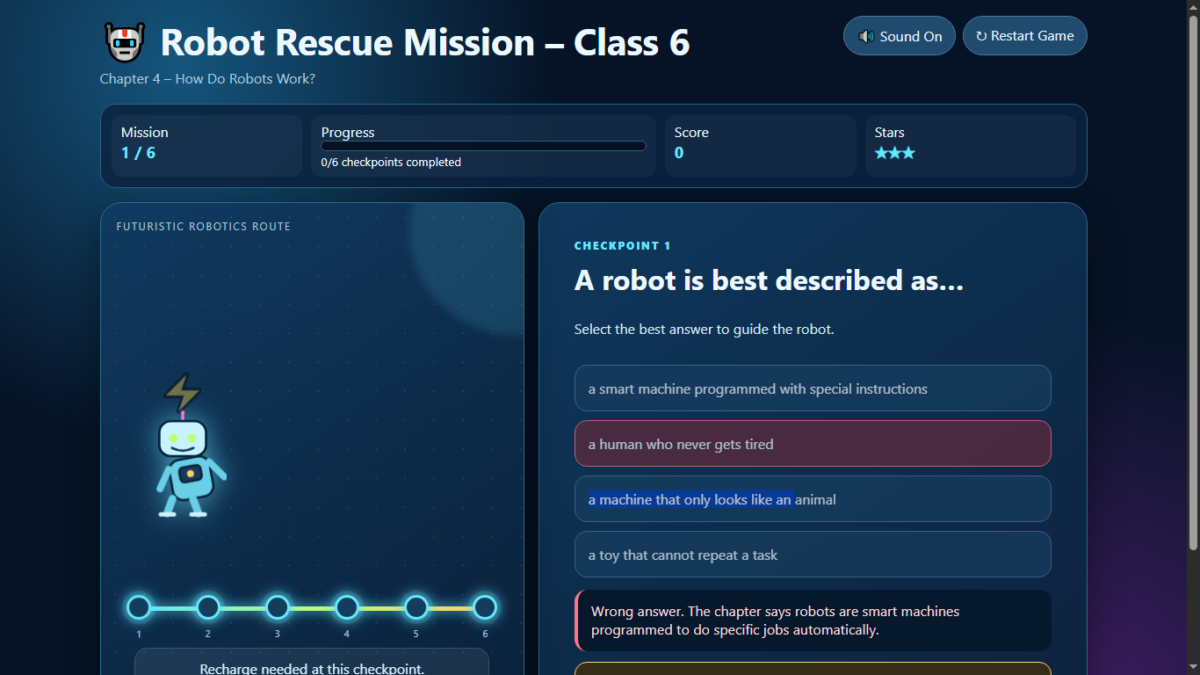
For the same chapter I asked for a mission game instead of a quiz, where a robot moves forward after each correct answer, a wrong answer gives a hint from the chapter and a second try, and the child earns one to three stars based on performance. I uploaded six photos of the pages this time.
The first version had six missions, and the Agent’s summary listed robot movement, shaking and celebration effects. In the game, though, the robot never travelled anywhere. It floated in one spot while small dots along the bottom lit up, so the central idea of my prompt, a robot that moves forward after each correct answer, was missing. A wrong answer shook the answer button, not the robot, and a right answer brought confetti but no robot celebration.
The stars were also meaningless: the game awards them for progress, not performance, so a child who makes several mistakes still finishes with three stars. The questions are all simple recall, so the difficulty does not rise as I asked. And as in the robotics quiz, the correct answer is the first option in all six questions.
My follow-up prompt was long, about 740 words, so the chat turned it into a text attachment, which I come back to below. It spelled out the gameplay loop. After a correct answer the robot travels to the next checkpoint, and the next question appears only when it arrives. After a wrong answer the robot stays where it is, a 10-second recharge countdown starts with the answer buttons disabled, and then the child can try again.
The upgraded version fixed most of this. The robot now travels between six visible checkpoints, the recharge countdown, the disabled buttons and the charging effect all work, and the stars depend on mistakes. But it still missed some of what I asked. The next question appears at the moment the robot starts moving, not when it arrives, so the answers can be tapped while it is still travelling. The walking animation plays in place for about a second before the robot moves, not during the trip. I also asked for a robot movement sound, and the game has no separate one.
There is also a bug a child could trigger. If two wrong answers are tapped within half a second, the recharge lock stops working for the rest of the game, and later wrong answers no longer lock the buttons. The game still has the first version’s habit of putting the correct answer first in every question, and the hint after a wrong guess spells out the right answer, so the ten-second wait does little to stop guessing.
4. Pop the Alphabet Balloons
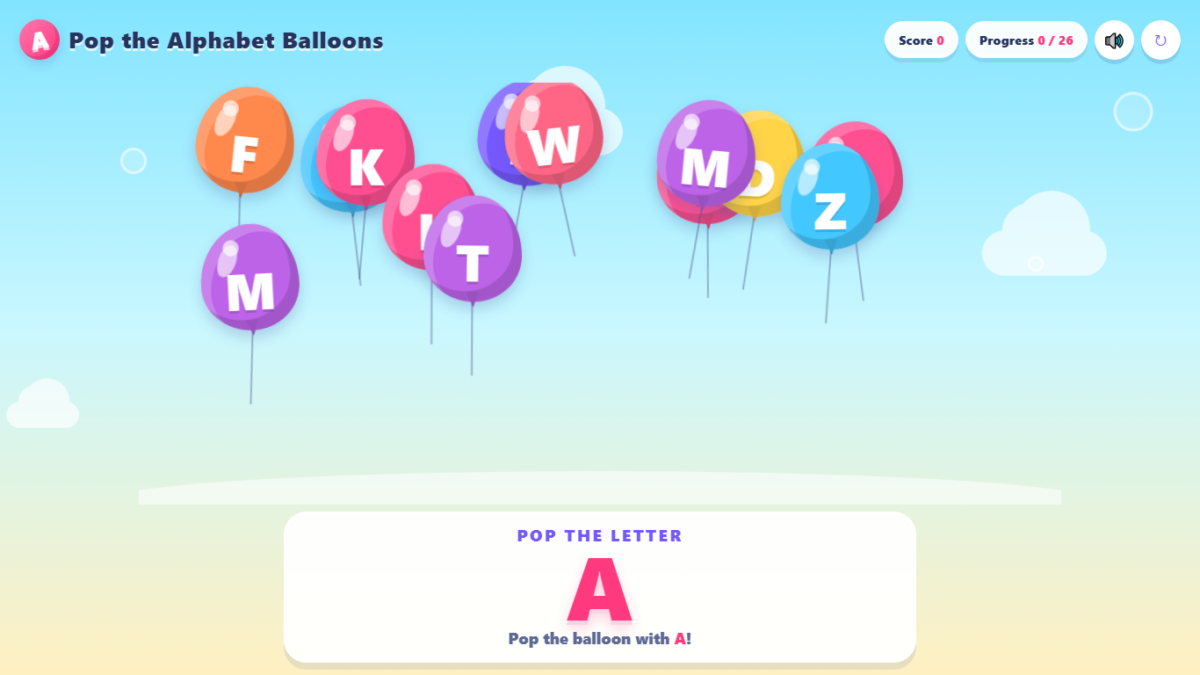
This is a game for toddlers. A large target letter appears at the top, colourful balloons float up the screen, tapping the matching balloon pops it with a sound and sparkles, and tapping a wrong one makes it shake gently without losing points. The child works through A to Z.
It took four rounds: the first build, an upgrade, a request to move the letter box below the balloons and remove the square box around them, and a final fix. That third request is the instructive one. The Agent replied that the balloon area had no square border or background panel, but the white boxes were still there. I had to write a second, much more specific prompt describing the white rectangles behind each balloon. Only then did it find the real cause, the browser’s default white background on the balloon buttons, and fix it. Its first “done” was not true, and it only worked once I named the exact problem. These four steps cost about 41 credits.
The game has one flaw that matters for a toddler. When I played it, the balloon with the target letter often took 10 to 15 seconds to appear. Each new balloon gets a random letter, and nothing makes sure the target letter is on screen, so a small child can be left staring at the wrong letters and think the game is broken. That is partly my prompt’s fault: I asked for balloons with letters and a target to find, but I never said the target letter must always be on screen, and the Agent did not assume it. Nothing speaks the letter aloud either, so a child who cannot read yet has only the big letter to match.
I then tried one more fix prompt, aimed only at this problem: the target letter must always be on screen, and the Agent must change nothing else and test it for every letter from A to Z. The Agent replied that it had fixed only the target-visibility issue, and that its test passed for all 26 letters. When I played the new version, the balloon for the target letter was there straight away.
So the problem was fixable with one specific prompt, which is the practical lesson: the Agent did not assume the target letter must always be visible, but it did the job once I said so. The fix had a side effect, though. After most pops, the balloon for the next letter now appears out of nowhere about half a second later, so the game feels like it hands the child the next answer instead of letting it float into view.
🎮 Play the game: Play pop the alphabet balloons
5. Rise of Magadh, ICSE Class 6
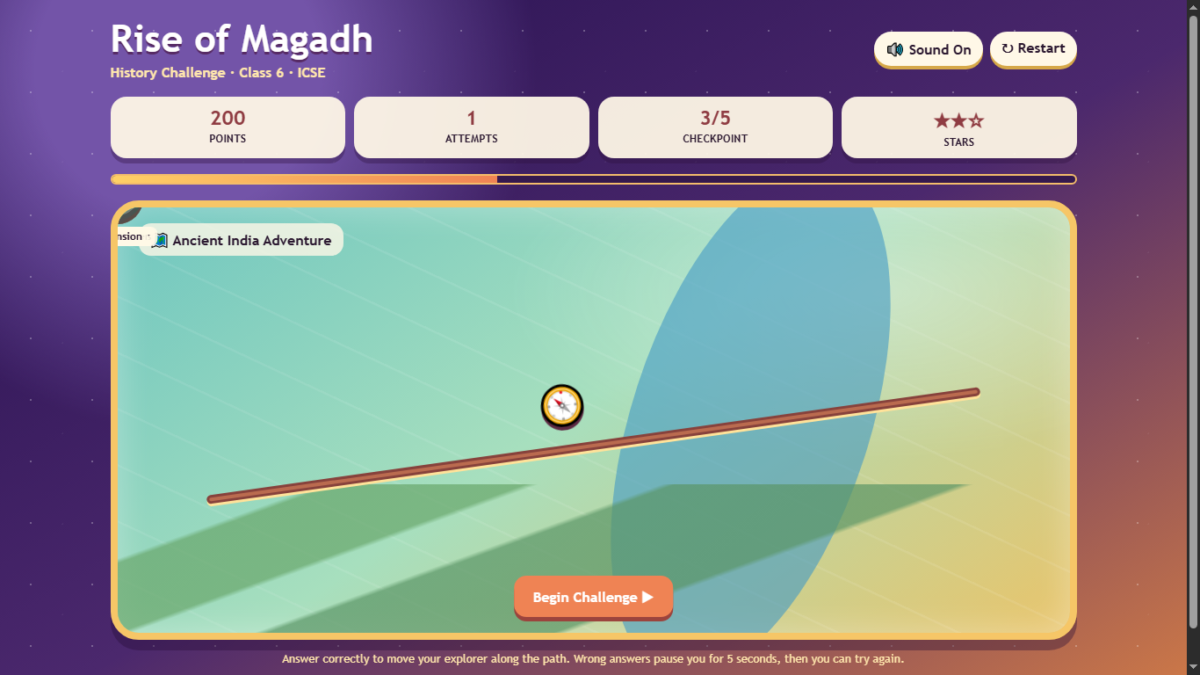
For this one I did something different. I told the Agent not to ask me for a textbook and to use its general knowledge of the chapter. I asked for a map-style adventure with checkpoints, an explorer who moves along the path only after a correct answer, a five-second lock after a wrong answer, a mix of question types, a star rating and background music. It gave me a single file of about 14 KB for about 9 credits.
It follows the design closely on paper: five checkpoints, three attempts, multiple choice, true or false, matching and sequencing questions, a retry countdown and a Mission Complete screen. When I opened it, though, I found problems.
The five checkpoint circles do not appear on the map. I saw a compass and a brown line, with the circles stuck in the top-left corner behind the map’s edge, a layout bug. The explorer does still move after correct answers. The score and stars also tell you nothing. I played through with two wrong answers and finished with 650 points and three stars, exactly what a perfect run gives.
There is no background music, although I asked for it, only short beeps. And with five questions the game cannot cover the eleven topics I listed. No question names a ruler, and the checkpoint labelled “Expansion” actually asks about capitals. The matching question lists its answers in the same order as the rows, so a child can just pick them in order.
The facts it uses agree with what I know: Magadh in present-day Bihar, the Ganga and Son rivers, iron and elephants, Rajagriha and Pataliputra, and the order Haryanka, Nanda, Maurya, although it leaves out the Shishunaga dynasty. But this game was built from the AI’s general knowledge, not from a textbook, so I would check every fact against the ICSE book. That is a real difference from the robotics games, which were tied to the pages I uploaded.
6. History Picture Puzzle Challenge
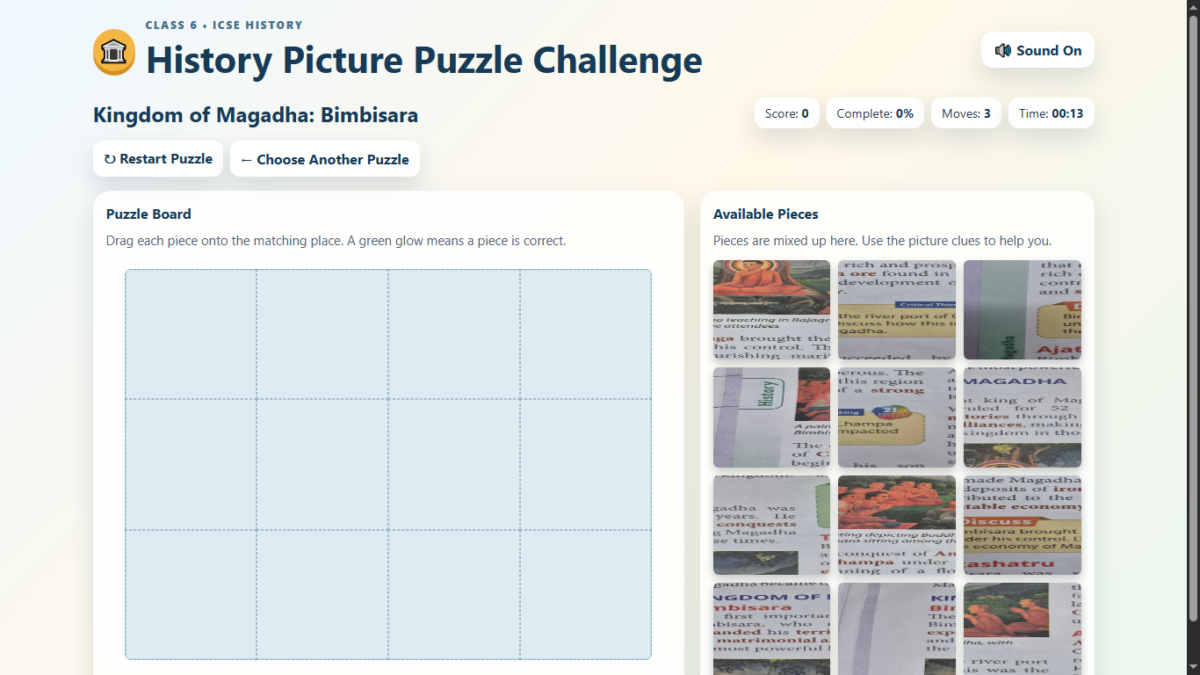
This was the test I was most looking forward to, and it failed. I uploaded three photos of ICSE history textbook pages and asked for a jigsaw game with three puzzle choices, 12 pieces each, draggable with a mouse or finger, followed by a “Puzzle Complete” screen with an explanation, important facts and a Listen button, using only what the images and captions showed.
The Agent delivered a ZIP file containing a page and the three images, and said it had 12-piece draggable puzzles with mouse and touch support. The pieces would not move.
I asked it to fix only the dragging, and to test the drag and drop before returning the file. Its first reply failed to complete. Its next one blamed mixed positioning, and it said its own browser test could not start because a graphics library was missing in its sandbox, so it ran a simulated test instead and reported that mouse and touch dragging passed. I tried the new file: clicking replaced the image, but nothing dragged.
The second fix blamed a CSS rule overriding the piece’s position and again listed “verified behavior”. Still no dragging, and now the piece zoomed when I clicked it. At that point the Agent said the previous package “was not actually corrected” and that it could not attach a new one because its workspace was temporarily unavailable.
I stopped there. In three rounds the diagnosis changed every time, “verified” meant tested against a simulation and not in a real browser, and I never got a working puzzle. To its credit, the Agent did admit at the end that the fix had not worked. This game cost about 62 credits across four charges.
How the robotics quiz compares with quizzes from other AI tools
I have generated many quizzes like the Robotics Challenge with Gemini and Claude. I did not keep count, but in my experience the answers are always jumbled, and the correct answer is never fixed to one position, so there is no pattern a child can spot. In the Robotics Challenge the correct answer was the first option in all 22 questions. In fairness, Hostinger Agent did give me the 22 questions I asked for.
The comparison is not entirely fair. Gemini and Claude gave me quizzes, while Hostinger Agent built a complete game with a score, sounds, a progress bar and a file I can put on any website. That is a bigger job. But a quiz is only as good as its questions, and on this point the chat tools did better for me. Their quizzes still need the same fact-checking against the textbook.
If you want to try the chat-tool route yourself, I built a free AI Quiz Generator Prompt Tool that writes the prompt for you. You choose the board, class, chapter, difficulty and question types, and it gives you a ready prompt to paste into Claude, Gemini or ChatGPT, with no login or signup.
Limits I ran into
The input limit. In my test, with six page photos uploaded, a long pasted prompt was turned into a text file attachment, and the interface told me the limit was six. The Agent still read the text file and acted on it, so the instructions were not lost, but the file used up one of the six slots. If you are working from a chapter with many pages, a single PDF may be an easier route. I did not test that.
The “verified” claims. Three times, the Agent said something was fixed or checked when it was not: the white boxes on the balloons, the jigsaw dragging, and the Magadh gameplay check that missed the hidden checkpoints. Its checks seem to look at the code, not at what a child would see on the screen.
The files. Most games come as a single HTML file that runs anywhere. The jigsaw came as a ZIP with image files, which you would have to upload as a folder.
The credit record. The usage page shows charges by time and has no breakdown by project, so keep your own notes if you want to know what each game cost.
Tips if you try it
Be specific. The white-box fix worked only after I described the exact problem, and the vague request did not. Ask for things you would otherwise assume: that the answer options are shuffled, that the target letter is always on screen, that the letter is spoken aloud. Ask the Agent what a prompt will cost, then check your balance yourself. Play every game on a phone before giving it to a child, and check every fact against your own textbook, especially for the games built from general knowledge.
My verdict
My conclusion is that Hostinger Agent is useful for creating a first draft of a game, but it is not yet reliable enough to treat the generated game as finished. It can turn a detailed prompt into a working-looking classroom game very quickly, the credit usage was relatively low for most of my tests, and the self-contained HTML files made it easy to test the games locally without hosting.
But the biggest issue is the amount of testing and fixing required afterward. Five of my six games had problems that I found during testing, and one never became reliably playable. In several cases, the Agent’s own claims that it had tested or fixed an issue did not match what I found when I played the game myself. Even one fix that did work in the balloon game introduced a new side effect.
So I would not recommend giving a game generated by Hostinger Agent directly to children without testing it yourself first. The workflow that worked best for me was: ask the Agent to build the game, play it yourself, identify the problems precisely, ask for fixes, test the fixes again, and keep an eye on your credit usage.
For parents, teachers, and creators, that still makes Hostinger Agent useful as a rapid prototyping tool. It can save considerable time compared with building a game from scratch. But based on my six-game test, I would currently treat the output as a starting point rather than a finished product.
I have also tested the game-making workflow inside AI Builder separately, so I have not treated the two workflows as identical. If Hostinger improves the issues documented in this article, I will update the article.
Appendix: the prompts I used
Catch the Stars (my first game)
Create a complete, playable browser game called “Catch the Stars”.
Game concept:
The player controls a small basket at the bottom of the screen and moves it left and right to catch falling stars. Stars fall from the top at different positions and speeds.
Core gameplay:

* Use the keyboard arrow keys or A/D keys to move the basket.
* On mobile, provide simple left and right touch controls.
* Catching a star gives 10 points.
* Missing a star does not immediately end the game.
* The game should become progressively faster as the score increases.
* Include a 60-second game timer.
* When the timer reaches zero, show a Game Over screen.
* Display the current score and remaining time clearly.
* Include a Start Game button and a Play Again button.
* Save the player's highest score locally so it remains after refreshing the page.

Visual design:

* Create a polished, colorful arcade-style design.
* Use a night-sky background with stars.
* Make the basket and falling stars visually distinct.
* Add smooth animations.
* Add simple sound effects for catching a star and finishing the game, with a mute/unmute button.
* Make the game responsive and playable on both desktop and mobile.

User experience:

* Show a short instruction before the game starts.
* Make the controls obvious.
* Make the game screen fit properly on mobile without horizontal scrolling.
* Keep the interface clean and easy to understand.

Technical requirements:

* Make the game fully playable in the browser.
* Do not require the player to install anything.
* Make sure the game works without external paid services.
* Build the complete first playable version now.

After creating it, show me the playable game so I can test it.
Robotics Challenge, Class 6 (first prompt, with photos of the chapter pages)
Create a complete, playable educational browser game called **“Robotics Challenge – Class 6”** based ONLY on the uploaded textbook chapter images I provided.

The chapter is **“How Do Robots Work?”** from a Class 6 CBSE computer book.

Use the uploaded pages as the sole source of information. Do not add facts, names, dates, examples, or explanations from outside the chapter.

Create an interactive quiz/game for Class 6 students.

### Game structure

Create approximately 20–25 questions covering different parts of the chapter.

Use a mixture of:
- Multiple-choice questions
- True/False questions
- Fill-in-the-blank style questions
- Matching-style questions
- “Who am I?” questions
- Identify the correct robot/component/type questions

Cover the chapter fairly across these topics:

1. What are robots?
2. Timeline of robotics
3. Components of robots
4. Sensors and types of sensors
5. Actuators and types of actuators
6. Controller
7. Power supply
8. Frame or structure
9. Software
10. Sense–Think–Act–Repeat cycle
11. Types of robots
12. Industrial robots
13. Service robots
14. Medical robots
15. Exploration robots
16. Famous Indian robots: MITRA, RASHMI, MANAV and VYOMMITRA
17. The science behind robotics
18. AI and robotics
19. Programming languages used in robotics
20. Future of robotics

### Gameplay

- Show one question at a time.
- Provide 4 answer choices for multiple-choice questions.
- Immediately show whether the answer is correct or incorrect.
- Give a short explanation based on the chapter.
- Keep track of the student's score.
- Show progress such as “Question 5 of 20”.
- Add a final score screen.
- Give the student a performance message based on the score.
- Include a **Play Again** button.
- Include a **Restart Quiz** option.
- Make the game suitable for children around Class 6 level.

### Design

Create a polished, colorful educational robotics theme.

Use:
- Robots
- Circuits
- Sensors
- Gears
- Futuristic but child-friendly visuals
- Clear large buttons
- Easy-to-read typography
- Attractive animations

Make it responsive so it works on both desktop and mobile.

### Important accuracy requirement

The uploaded textbook chapter must be treated as the source of truth.

Do NOT invent information or use external knowledge to create questions.

If a fact is not present or clearly supported by the uploaded pages, do not use it.

Use the terminology used in the chapter wherever possible.

Create the complete first playable version now.
Robot Rescue Mission (first prompt, with six photos of the chapter pages)
Create a complete, playable educational browser game called **“Robot Rescue Mission – Class 6”** based ONLY on the uploaded pages of **Chapter 4: How Do Robots Work?**

Do not introduce facts, terminology, questions, or explanations that are not supported by the uploaded chapter.

Turn the chapter content into an interactive mission-based game rather than a standard quiz.

GAMEPLAY:
- The student is the controller of a robot.
- Create 5–7 missions based on important concepts from the chapter.
- Each mission should present a question, challenge, or scenario derived from the chapter.
- Use multiple-choice interactions where appropriate.
- After selecting an answer, immediately show whether it is correct.
- For a correct answer, the robot should move forward to the next mission.
- For an incorrect answer, show a short helpful hint/explanation based only on the chapter and allow the student to try again.
- Gradually increase the difficulty.

ANIMATIONS:
- Animated robot character that moves between missions.
- Robot eyes/lights should animate during interaction.
- Smooth transition between missions.
- Correct answer: robot celebrates with a success animation, particles/confetti, and a positive sound effect.
- Incorrect answer: robot performs a small shake/error animation.
- Show an animated progress path so students can see the robot getting closer to the final destination.
- Add a final “MISSION COMPLETE” animation when all missions are completed.
- Award 1–3 stars based on performance.

GAME UI:
- Title: Robot Rescue Mission – Class 6
- Subtitle: Chapter 4 – How Do Robots Work?
- Score display
- Progress indicator
- Mission number
- Stars earned
- Restart Game button
- Sound On/Off button
- Clear instructions
- Responsive design for desktop, tablet and mobile.

IMPORTANT:
Use the uploaded chapter pages as the sole content source. Do not make up information outside the chapter.

Make the game visually engaging for Class 6 students, with a colorful robotics/futuristic theme, but keep the interface clean and easy to understand.

Create the complete first playable version now.
Robot Rescue Mission (my follow-up prompt, which the chat turned into a text file)
Modify the existing "Robot Rescue Mission – Class 6" game into a much more interactive, animated educational game.

IMPORTANT:
- Continue using ONLY the uploaded Chapter 4 pages as the content source.
- Do not invent facts or questions outside the uploaded chapter.
- Keep the existing questions/content, but completely improve the gameplay mechanics.
- Do not make it just a normal multiple-choice quiz.

GAME CONCEPT:

The player controls a small animated robot moving through a futuristic path/mission.

1. ROBOT MOVEMENT
- Show the robot clearly on the game screen.
- Create a visible mission path with multiple checkpoints/stations.
- The robot should start at the first checkpoint.
- After the player answers a question correctly, the robot should animate and physically move forward along the path to the next checkpoint.
- Add smooth walking/rolling movement, glowing effects or small animation while the robot travels.
- The next question should appear only after the robot reaches the next checkpoint.
- Show the robot's current position and mission progress.

2. QUESTION AT EACH CHECKPOINT
- Each checkpoint represents one question from the uploaded chapter.
- When the robot reaches a checkpoint, display the question.
- Use multiple-choice answers.
- Make the question area visually integrated into the game rather than looking like a standard quiz page.
- Clearly indicate when the player selects an answer.

3. CORRECT ANSWER
When the answer is correct:
- Show a positive animation such as "Correct!" or "Mission Successful!"
- Add a small celebration effect.
- Increase the score.
- Award 1 star or another suitable reward.
- Play a short success sound if sound is enabled.
- Animate the robot moving toward the next checkpoint.
- Unlock the next question only after the robot reaches the next checkpoint.

4. WRONG ANSWER — IMPORTANT
When the player selects a wrong answer:
- Do NOT immediately allow the robot to move forward.
- Show a clear "Wrong Answer" state.
- The robot should remain at the current checkpoint.
- Start a visible 10-second countdown timer.
- Display something like:
  "Robot needs to recharge. Wait 10 seconds before trying again."
- Show the countdown prominently: 10, 9, 8, 7... 1.
- During the countdown, disable the answer buttons.
- Add a visual charging/recharging animation around the robot.
- After the countdown reaches zero, enable the answers again.
- The player can then try the same question again.
- Do not move the robot until the player gives the correct answer.

5. ROBOT ANIMATION
Make the robot feel alive throughout the game:
- Idle animation while waiting.
- Walking/rolling animation when moving.
- Small reaction animation for a wrong answer.
- Happy/celebration animation for a correct answer.
- Charging/recharging animation during the 10-second penalty.
- Add small futuristic effects around checkpoints.
- Use smooth CSS/JavaScript animations rather than static images wherever possible.

6. GAME PROGRESS
Show:
- Current mission/question number.
- Score.
- Stars earned.
- Progress along the robot path.
- Current checkpoint.
- Remaining questions.
- Optional mission status such as "3/10 checkpoints completed".

7. GAME COMPLETION
After the final question:
- Animate the robot reaching the final destination.
- Show a large "MISSION COMPLETE!" screen.
- Add a celebration/confetti animation.
- Display final score and stars.
- Show how many questions were completed.
- Provide a "Play Again" button.
- Allow the player to restart the complete mission.

8. VISUAL DESIGN
Use a colorful futuristic robotics theme suitable for Class 6 students:
- Animated robot
- Futuristic laboratory/space/robotics environment
- Glowing checkpoints
- Animated path
- Moving background elements
- Clear large buttons
- Friendly visual feedback
- Responsive on desktop, tablet and mobile

9. SOUND
Include:
- Sound On/Off button.
- Correct-answer sound.
- Wrong-answer sound.
- Robot movement sound.
- Countdown/recharge sound.
- Mission-complete sound.
Do not require any paid external audio service.

10. MOBILE
The game must work properly on mobile phones.
Use touch-friendly answer buttons and controls.
The robot movement and animations must remain smooth on smaller screens.

MOST IMPORTANT GAMEPLAY LOOP:

Question appears → player chooses answer →

CORRECT:
Correct animation → score increases → robot moves to next checkpoint → next question appears.

WRONG:
Wrong animation → robot stays at checkpoint → 10-second countdown/recharge → answers become available again → player retries → robot moves only after correct answer.

Make this feel like an actual playable robot adventure game with educational questions, NOT a normal quiz with a robot image added to it.

Create the complete playable version now.
Pop the Alphabet Balloons (opening line, plus the two fix prompts)
Create a complete, playable browser game for toddlers called **"Pop the Alphabet Balloons"**. This is a completely separate game from the Robot Rescue Mission game.

Create a complete, playable browser game for toddlers called **"Pop the Alphabet Balloons"**. This is a completely separate game from the Robot Rescue Mission game. GAME CONCEPT: Colorful balloons containing alphabet letters A, B, C, D and so on should continuously float upward from the bottom of the screen. At the top of the screen, display a large target instruction such as: "POP THE LETTER" "A" The child must find and burst the balloon containing the matching letter. CORE GAMEPLAY: 1. Start with the target letter A. 2. Multiple colorful balloons float upward on the screen. 3. Each balloon contains one large, clearly readable letter. 4. The child taps/clicks the balloon matching the target letter. 5. When the correct balloon is tapped: - The balloon should visibly burst. - Play a realistic but child-friendly balloon POP sound. - Show colorful particles/confetti. - Play a short cheerful success tune. - Add a positive visual effect such as stars/sparkles. - Increase the score. - Immediately move to the next target letter. 6. Wrong balloons should NOT burst. 7. If the child taps a wrong balloon: - Make that balloon shake gently. - Play a soft incorrect sound. - Do not reduce the child's score. - Keep the game encouraging and suitable for toddlers. 8. Continue through the alphabet. ALPHABET: Use uppercase English letters: A → B → C → D → E → F → G → H → I → J → K → L → M → N → O → P → Q → R → S → T → U → V → W → X → Y → Z GAME END: After the child correctly pops Z: - Stop the balloons. - Show a large animated celebration: "🎉 GREAT JOB! 🎉" - Show the child's final score. - Release colorful confetti. - Play a cheerful victory tune. - Show a "Play Again" button. BALLOON ANIMATION: Make the balloons actually move continuously upward.
Use different: - colors - sizes - horizontal starting positions - floating speeds - gentle side-to-side movement The balloons should feel alive and playful. When a balloon is popped, create a convincing burst animation: - balloon expands slightly - balloon disappears/bursts - small particles appear - strings disappear - pop sound plays at the same moment VISUAL DESIGN: Create a very colorful, attractive toddler-friendly design. Use: - bright cheerful colors - large rounded buttons - large easy-to-read letters - playful background - clouds, stars, bubbles or other subtle decorative elements - smooth animations - friendly typography - lots of visual feedback Do NOT make the interface complicated. The target letter must always be extremely clear and large. AUDIO: Include: - realistic balloon POP sound for correct answers - gentle incorrect sound for wrong answers - cheerful short success melody - cheerful final victory tune - Sound On/Off button Use audio that can work directly inside the self-contained HTML game without requiring paid external services. MOBILE: The game must work especially well on: - smartphones - tablets - desktop computers Make balloons large enough for a toddler to tap easily. Do not require keyboard controls. Add touch/click interaction. GAME HUD: Display: - Target Letter - Score - Progress, e.g. "3 / 26" - Sound On/Off - Restart Game IMPORTANT: This must be a REAL interactive game, not a static quiz. The child should physically interact with moving balloons and see the balloon burst when the correct letter is selected. Make the balloon movement and burst animation visually obvious. Create the complete playable first version now and show it in the preview.
Put letterbox below the flying balloons and also remove square box around balloonsFix the balloon graphics in the existing game.
IMPORTANT: Do not redesign the game and do not change the gameplay.
The current balloons have visible WHITE RECTANGULAR BOXES behind them. Remove those rectangles completely.
After making the change, show me the updated playable preview.My last fix prompt for the balloon game:
Fix only this problem: the target letter must always be on screen. Whenever the current target letter is not among the visible balloons, spawn a balloon with that letter immediately, so the child never waits. Do not change the design, sounds, scoring or any other behavior. Before returning the file, test that this works for every letter from A to Z.Rise of Magadh (ICSE Class 6, no textbook uploaded)
Create a complete, playable educational browser game for:
Subject: History
Chapter: Rise of Magadh
Class: 6
Board: ICSE
IMPORTANT:
Do not ask me to upload a textbook, PDF, image, or chapter pages. Create the game using your general knowledge of the topic and the information provided above.
GAME CONCEPT:
Create an interactive "Rise of Magadh – History Challenge" for Class 6 students.
Instead of making it only a normal multiple-choice quiz, make it feel like a small educational game.
GAMEPLAY:

* Start with a colorful animated map-style screen representing ancient India.
* The player controls a small character/army marker travelling through different checkpoints.
* Each checkpoint represents a challenge related to the Rise of Magadh.
* When the player reaches a checkpoint, a question or puzzle appears.
* The player must answer correctly to unlock the next checkpoint.
* Correct answer: show a positive animation, sound effect, points and allow the player to continue.
* Wrong answer: show a gentle "Try Again" animation and temporarily lock the player for 5 seconds before another attempt.
* Add a visible progress path showing how far the player has travelled.
* Include a score, lives/attempts, progress and star rating.
* At the end, show a "Mission Complete" screen with the final score and stars.

QUESTION TYPES:
Use a mixture of:

* Multiple choice
* True/False
* Match the pair
* Identify the correct option
* Simple ordering/sequencing
* Short puzzle-style questions

Keep the questions appropriate for Class 6 students.
CONTENT:
Focus the game on important concepts related to the Rise of Magadh, such as:

* Location of Magadh
* Important rulers
* Why Magadh became powerful
* Natural advantages
* Rivers and fertile land
* Iron resources
* Elephants
* Strategic location
* Important capitals
* Expansion of Magadh
* Major dynasties connected with Magadh

Do not make the questions unnecessarily difficult.
VISUAL DESIGN:

* Colorful ancient-India adventure theme
* Attractive animated background
* Animated player/character
* Animated movement between checkpoints
* Small celebrations for correct answers
* Smooth transitions between questions
* Clearly visible buttons
* Large readable text suitable for Class 6 students
* Responsive on desktop, tablet and mobile
* Avoid cluttered layouts

AUDIO:

* Pleasant background music
* Correct-answer sound
* Wrong-answer sound
* Completion/celebration sound
* Sound On/Off button

IMPORTANT:
The game must be genuinely playable, not just a static quiz page.
The player should physically progress through the map/checkpoints after answering questions.
Create the complete first playable version now.
Do not create a website around the game; create the game itself as a self-contained HTML project that can be tested locally in a browser.
History Picture Puzzle Challenge (opening lines, with three photos, plus the fix requests)
Create a playable educational browser game called **"History Picture Puzzle Challenge"** for Class 6 ICSE students.

The game should use the 3 uploaded History textbook images as three separate puzzle choices.

### Main screen
Title: **History Picture Puzzle Challenge**
Subtitle: **Class 6 • ICSE History**

Show 3 large cards, one for each uploaded image. Each card should have:
- The image thumbnail
- A short chapter/topic label based on the uploaded image
- A **Play Puzzle** button

The child chooses any one image to play.

### Jigsaw puzzle
After selecting an image:
- Turn the selected image into a jigsaw puzzle.
- Start with approximately **12 pieces** so it is suitable for a Class 6 child.
- Pieces should be draggable with the mouse.
- Make the puzzle work on desktop and mobile/touch screens.
- Show a clear puzzle board and the available pieces.
- When pieces are correctly placed, give positive visual feedback.
- When the puzzle is completely assembled, show a success animation and score.

### After completing the puzzle
Display:
**Puzzle Complete!**

Then show:
1. The completed image.
2. A short educational explanation about what the image shows.
3. Important facts related to the image/chapter.
4. A **Listen** button that reads the explanation aloud using browser text-to-speech.
5. A **Play Again** button.
6. A **Choose Another Puzzle** button.

Use only information that can reasonably be derived from the uploaded image, its visible caption/text, and the chapter/topic information provided with the image. Do not invent textbook-specific facts.

### Game features
Include:
- Score
- Completion percentage
- Number of moves
- Optional timer
- Sound On/Off
- Restart Puzzle
- Choose Another Puzzle
- Responsive mobile design
- Attractive educational/history theme
- Smooth puzzle-piece movement
- Clear instructions for children

Keep the interface simple enough for a Class 6 student to understand without adult assistance.

This must be a **complete playable local browser game**. Do not require a paid API, external game service, or installation.

First create the complete playable version using the uploaded images.
Fix the jigsaw puzzle interaction only.
The puzzle pieces are visible, but they cannot currently be dragged with the mouse or finger.
Most importantly, test the actual drag-and-drop interaction before returning the updated playable HTML file.My two later messages were short: that the problem was not solved and the image only replaced itself when clicked, and then that there was still no dragging and the image started zooming after a click.
Prompt - 2
Fix the jigsaw puzzle interaction only.

The puzzle pieces are visible, but they cannot currently be dragged with the mouse or finger.

Please make the 12 puzzle pieces fully draggable:
- Desktop: click and hold a piece, drag it, and release it.
- Mobile/tablet: touch and drag a piece with a finger.
- Pieces must remain under the user's pointer/finger while dragging.
- Allow pieces to be moved freely around the puzzle area.
- When a piece is dropped near its correct position, snap it into place.
- Correctly placed pieces should stay locked.
- Incorrectly placed pieces should remain movable.
- Keep the existing 12-piece puzzle, images, design, scoring, sound and completion information unchanged.
- Do not redesign the interface.
- Do not replace the puzzle with a different game.
- Do not change the educational content.

Most importantly, test the actual drag-and-drop interaction before returning the updated playable HTML file.
Prompt - 3
problem not solved now image replaces when clicked but no dragging
Prompt - 4
no dragging Image starts zooming after clicked

Ayush Singhal is the founder and chief editor of TechMitra.in — a tech hub dedicated to simplifying gadgets, AI tools, and smart innovations for everyday users. With over 15 years of business experience, a Bachelor of Computer Applications (BCA) degree, and 5 years of hands-on experience running an electronics retail shop, Ayush brings real-world gadget knowledge and a genuine passion for emerging technology.
At TechMitra, he covers everything from AI breakthroughs and gadget reviews to app guides, mobile tips, and digital how-tos. His goal is simple — to make tech easy, useful, and enjoyable for everyone. When he’s not testing the latest devices or exploring AI trends, Ayush spends his time crafting tutorials that help readers make smarter digital choices.
📍 Based in Lucknow, India
💡 Focus Areas: Tech News • AI Tools • Gadgets • Digital How-Tos
📧 Contact: Get in touch →
🔗 Full Bio: https://techmitra.in/about-us/