


Tested on 15 October 2026 (app version 10.2)
Disclosure: The developer of this app is my brother-in-law. I was not paid for this review, and I have tried to test it as I would test any other app. The good points and the problems below are what I actually found. I also left a 5-star review on the app on Google Play in 2015, long before this article.
If you invest through SIPs or are planning a loan, you have probably used an online calculator and wondered whether you can trust the number it shows. I tested SIP Planner & SIP Calculator, a free Android app from the Google Play Store, by checking its results against the SEBI Investor calculator and against spreadsheet formulas. This SIP calculator app review covers what it does, how accurate it is, and where it irritates.
Table of Contents
Also Read : 40 Pro AI Prompts for Stock Trading: Excel, PDF Analysis & Live Market Data (2026 Guide)
At a glance
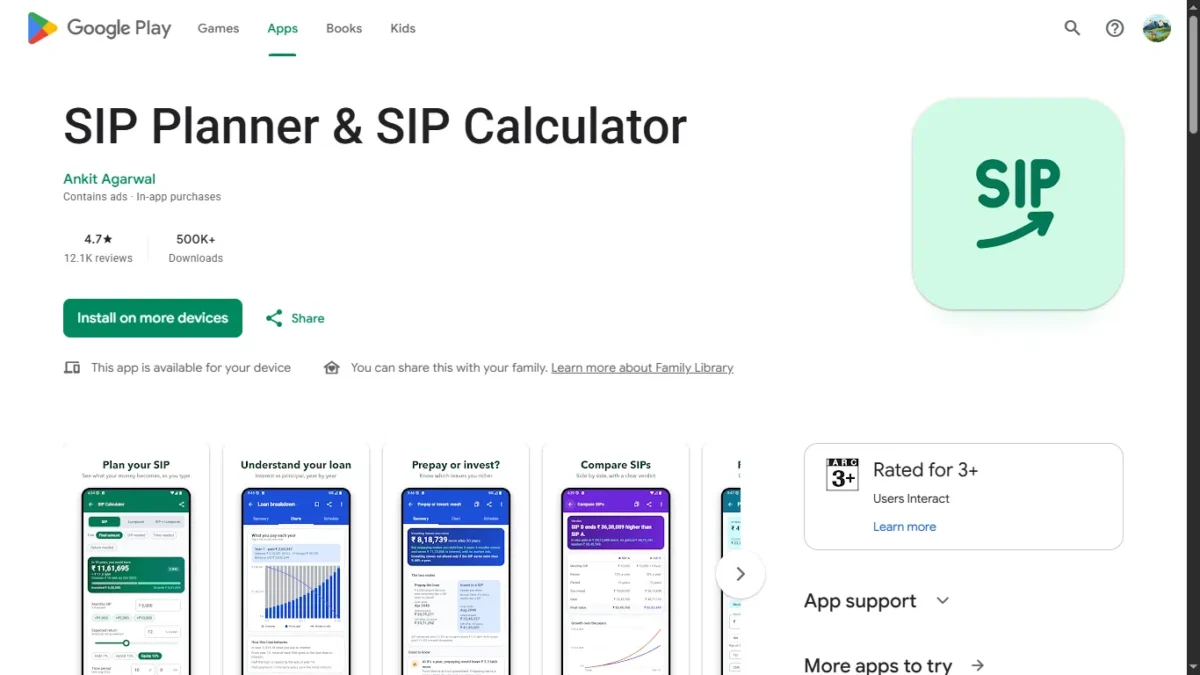
| Item | Detail |
|---|---|
| App | SIP Planner & SIP Calculator (Android) |
| Developer | Ankit Agarwal (my brother-in-law) |
| On Google Play since | At least 2015 (I left a review in February 2015) |
| Rating | 4.7★ from 12.1K reviews |
| Downloads | 500K+ |
| Price | Free with ads; ₹299 one-time purchase removes ads |
| Content rating | Rated 3+ |
| Languages | English and Hindi |
| Version tested | 10.2, on 15 October 2026 |
What is SIP Planner?
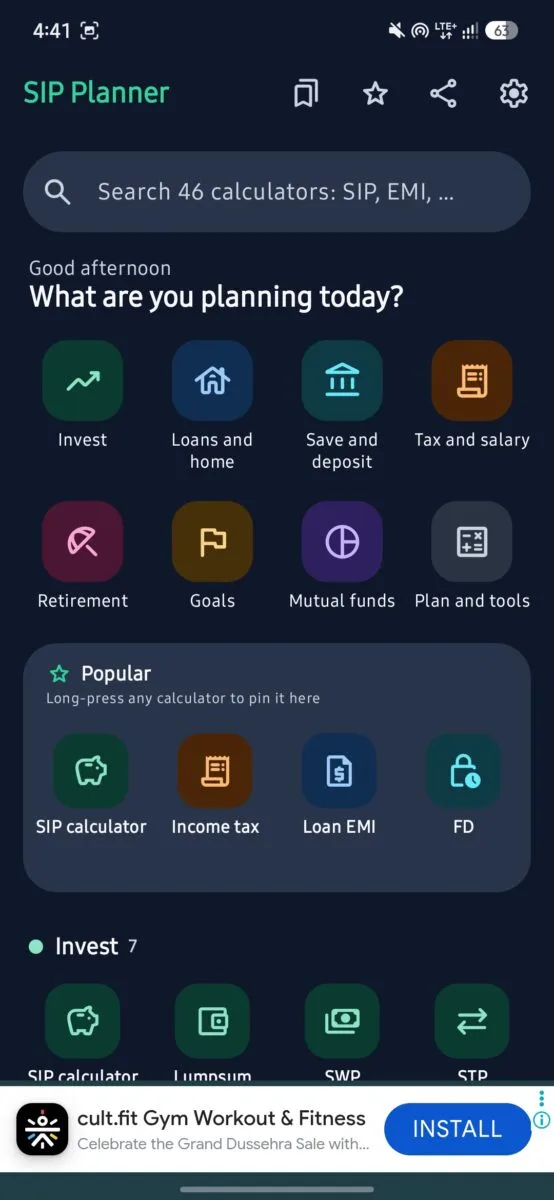
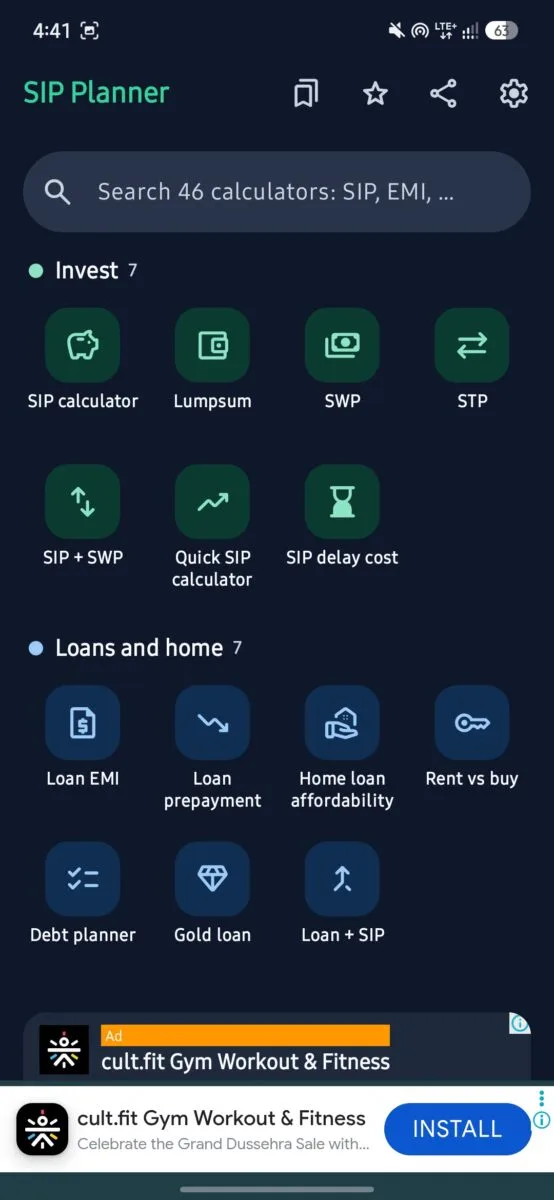
Screenshot – Home screen of APP
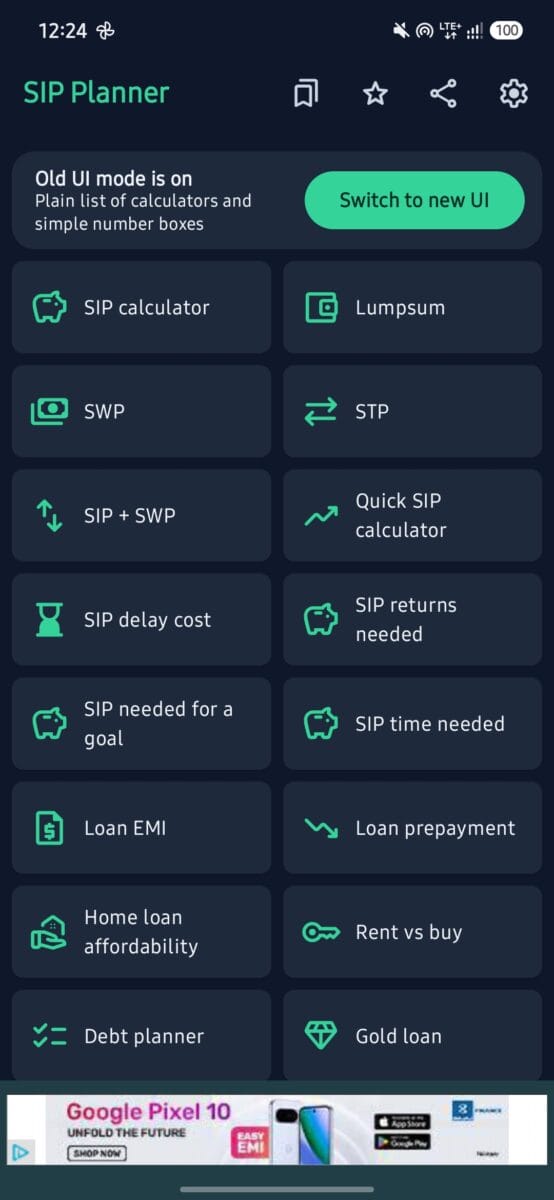
SIP Planner is an Android app with more than 40 financial calculators and tools in one place. They are grouped into Invest, Loans and home, Save and deposit, Tax and salary, Retirement, Goals, Mutual funds and Plan and tools. A search bar at the top says it covers 46 calculators; the tiles on the home screen add up to 44, so I describe it as 40+.
Here is what each section contains, based on the app’s home screen:
| Section | Calculators and tools |
|---|---|
| Invest (7) | SIP calculator, Lumpsum, SWP, STP, SIP + SWP, Quick SIP calculator, SIP delay cost |
| Loans and home (7) | Loan EMI, Loan prepayment, Home loan affordability, Rent vs buy, Debt planner, Gold loan, Loan + SIP |
| Save and deposit (6) | FD, RD, PPF, Sukanya Samriddhi, Post office schemes, FD rates finder |
| Tax and salary (3) | Income tax, EPF, Gratuity |
| Retirement (3) | Retirement planner, NPS, FIRE |
| Goals (6) | Child education, Dream home, Marriage, Dream car, Vacation, Any goal |
| Mutual funds (5) | My returns (XIRR), Direct vs regular, Fund explorer, Compare SIPs, SIP FAQ |
| Plan and tools (7) | Compound interest, Emergency fund, Inflation, CAGR, Term insurance cover, Stock average, Smoking cost |
The app is free, supports English and Hindi, and offers 12 currencies (INR, USD, EUR, GBP, JPY, AED, BDT, THB, CAD, AUD, CHF and SGD). Light, dark and follow-system themes are available.
The home screen also has a “Popular” row where you can pin your most used calculators by long-pressing them, plus bookmark, favorite and share buttons. At the bottom, “Useful links” give shortcuts to mutual fund portals and bank login pages. These open external sites, so check the address before you log in to anything.
Is it accurate? My tests
A calculator is only useful if the numbers are right. I tested three calculators.
Test 1: SIP calculator
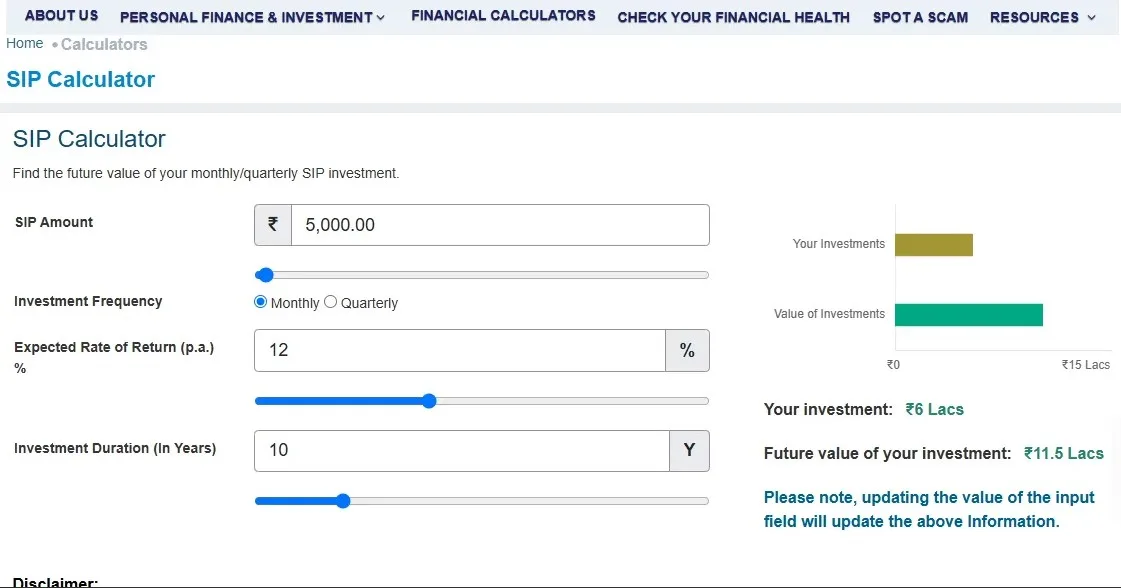
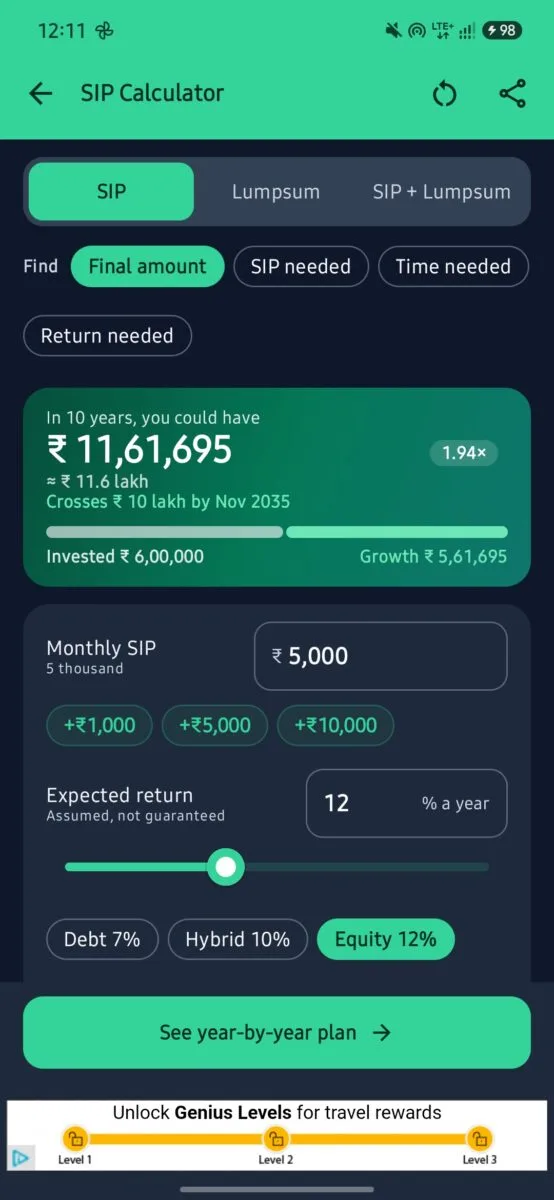
Inputs: ₹5,000 per month, 12% expected return, 10 years.
| Source | Result | Timing assumption |
|---|---|---|
| SEBI Investor calculator | about ₹11.5 lakh | Invested at end of month |
Spreadsheet =FV(12%/12,120,-5000,0,0) | ₹11,50,194 | End of month |
Spreadsheet =FV(12%/12,120,-5000,0,1) | ₹11,61,696 | Start of month |
| SIP Planner app | ₹11,61,695 | Start of month |
The app matches the start-of-month spreadsheet result to within ₹1, which is just rounding. It is about ₹11,500 higher than SEBI’s figure over 10 years for one reason: the app assumes each installment is invested at the start of the month, so every installment earns one extra month of growth, while SEBI assumes the end of the month. The monthly schedule in the app’s PDF confirms this. Its first row shows ₹5,000 invested in October 2026 and already earning ₹50 of interest that same month.
Neither method is wrong, but the app does not say which one it uses on the result screen. A short note would help readers who compare it with other calculators.
I checked the extra numbers as well. The invested amount (₹6,00,000), the gain (₹5,61,695), the 1.94× multiple and the 93.6% absolute return are all consistent. The statement that 48% of the final amount comes from returns is also correct. The year-by-year schedule in the exported report reconciles with the monthly one, and the “what-if” tables for 6% to 20% returns and for 1 to 30 years match spreadsheet calculations.
Test 2: Loan EMI calculator
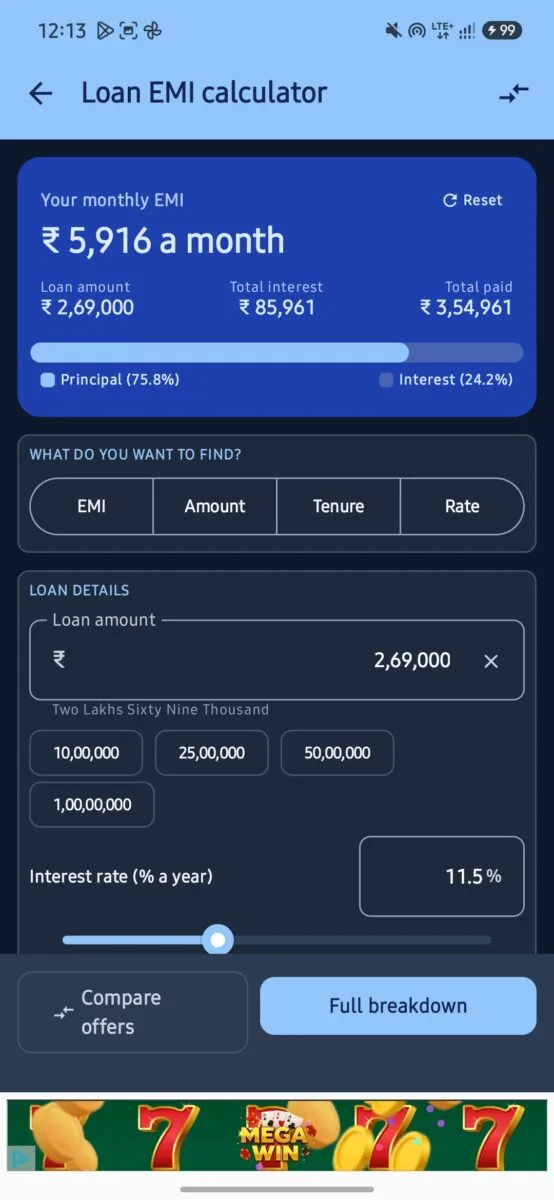
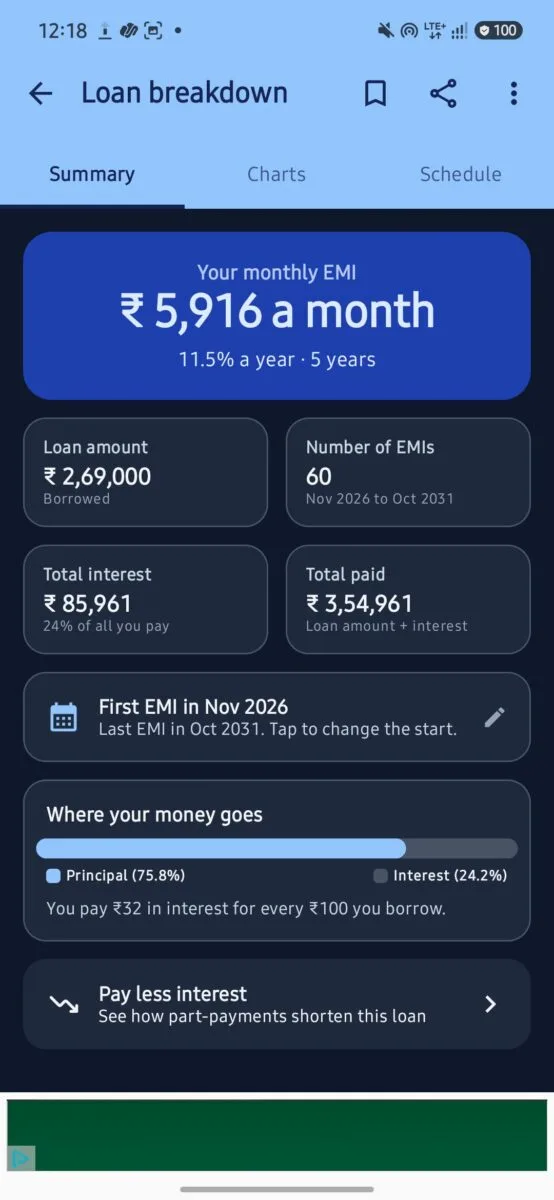
Screenshot : Loan EMI Calculation ON SIP Planner & Calculation APP
Inputs: ₹2,69,000 loan, 11.5% interest, 5 years.
| Item | App | Spreadsheet =PMT(11.5%/12,60,-269000) |
|---|---|---|
| Monthly EMI | ₹5,916 | ₹5,915.9 |
| Total interest | ₹85,961 | ₹85,961 |
| Total paid | ₹3,54,961 | ₹3,54,961 |
The EMI, total interest and total payment all match. The schedule runs from November 2026 to October 2031, which is exactly 60 payments.
Test 3: Gold loan calculator
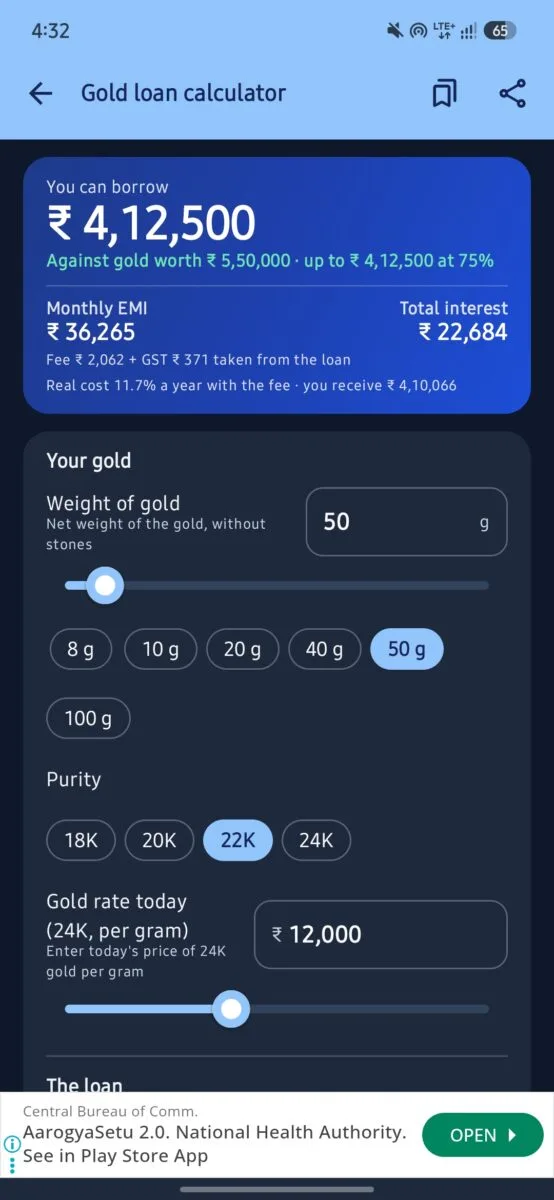
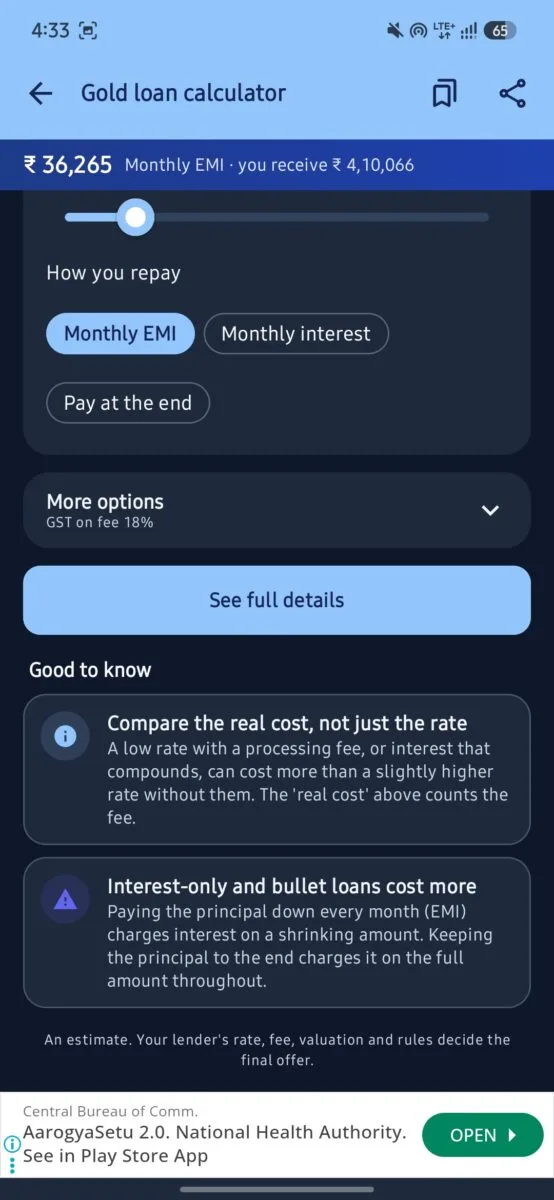
Screenshot : Gold Loan Calculation On SIP Planner & SIP Calculator
Inputs: 50 g of 22K gold, 24K rate entered as ₹12,000 per gram, 75% loan-to-value, 10% interest, 1 year, monthly EMI, 0.5% processing fee and 18% GST on the fee.
| Item | App | My check |
|---|---|---|
| Gold value | ₹5,50,000 | 50 × 12,000 × 22/24 = ₹5,50,000 |
| Loan at 75% | ₹4,12,500 | ₹5,50,000 × 75% |
| Monthly EMI | ₹36,265 | =PMT(10%/12,12,-412500) = ₹36,265 |
| Total interest | ₹22,684 | ₹36,265.4 × 12 − ₹4,12,500 ≈ ₹22,685 |
| Fee + GST | ₹2,062 + ₹371 | 0.5% of ₹4,12,500 = ₹2,062.5; 18% of that = ₹371 |
| You receive | ₹4,10,066 | ₹4,12,500 − ₹2,433.75 |
| Real cost | 11.7% a year | Yearly equivalent of the cash flows with the fee; my own check gives about 11.7% |
Every figure matches within ₹1. The most useful line on this screen is the “real cost”: a loan advertised at 10% costs about 11.7% a year once the processing fee is counted. The calculator also lets you compare three repayment styles (monthly EMI, monthly interest, pay at the end), and its “good to know” notes explain that interest-only and bullet loans cost more because interest is charged on the full amount throughout.
Two things to keep in mind. The gold rate is typed in by you (“enter today’s price of 24K gold per gram”), not fetched live, so check the current price yourself. And the app notes that your lender’s rate, fee and valuation decide the final offer.
One detail to update: the loan-to-value help text says RBI’s limit is 75% for most gold loans. Under RBI’s Lending Against Gold and Silver Collateral Directions, 2025, which took effect on 1 April 2026, the limits are tiered: 85% for loans up to ₹2.5 lakh, 80% up to ₹5 lakh and 75% above that. The ₹4.1 lakh example would therefore fall under the 80% limit, and the app’s 75% is a safe default. Some lenders may still follow older practice, so ask yours.
Verdict on accuracy: in all three tests the arithmetic was correct. For the SIP calculator, the difference from SEBI comes from a timing assumption, not from an error.
Features I liked
Tax and inflation in the result
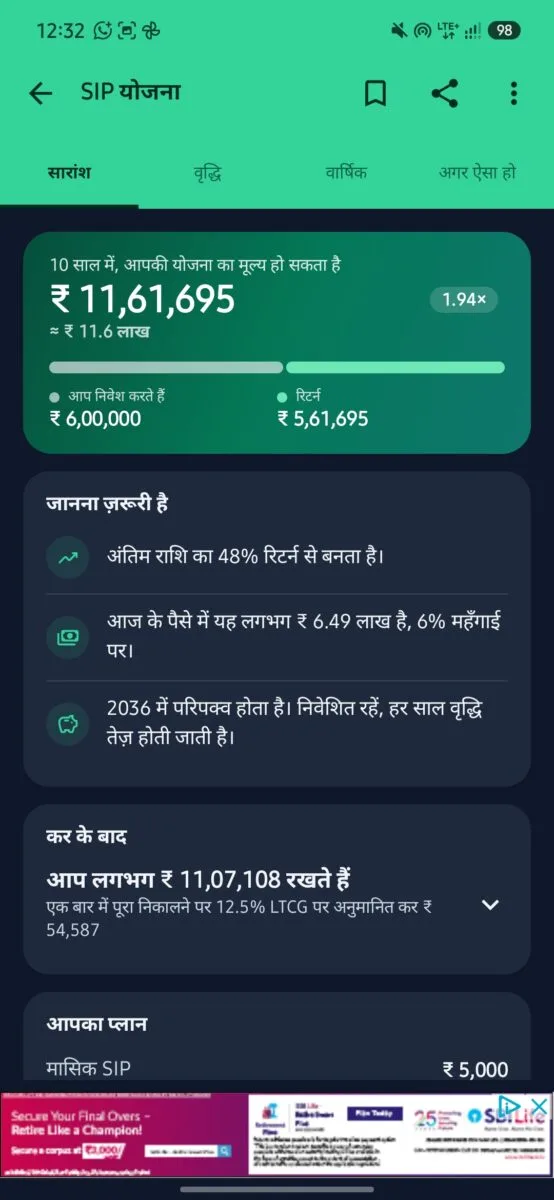
This is the feature that sets it apart from basic calculators. After the maturity value, the app shows:
- Value in today’s money at 6% inflation: ₹6,48,685 for the example above
- Estimated LTCG tax: ₹54,587, calculated at 12.5% on gains above ₹1.25 lakh
- Estimated post-tax value: ₹11,07,108
The tax figure is an estimate that assumes one full redemption at the end. The app says clearly that actual tax depends on your holding period and other gains, so treat it as a guide, not as tax advice, and check current rules before you rely on it.
Hindi support, including shared reports
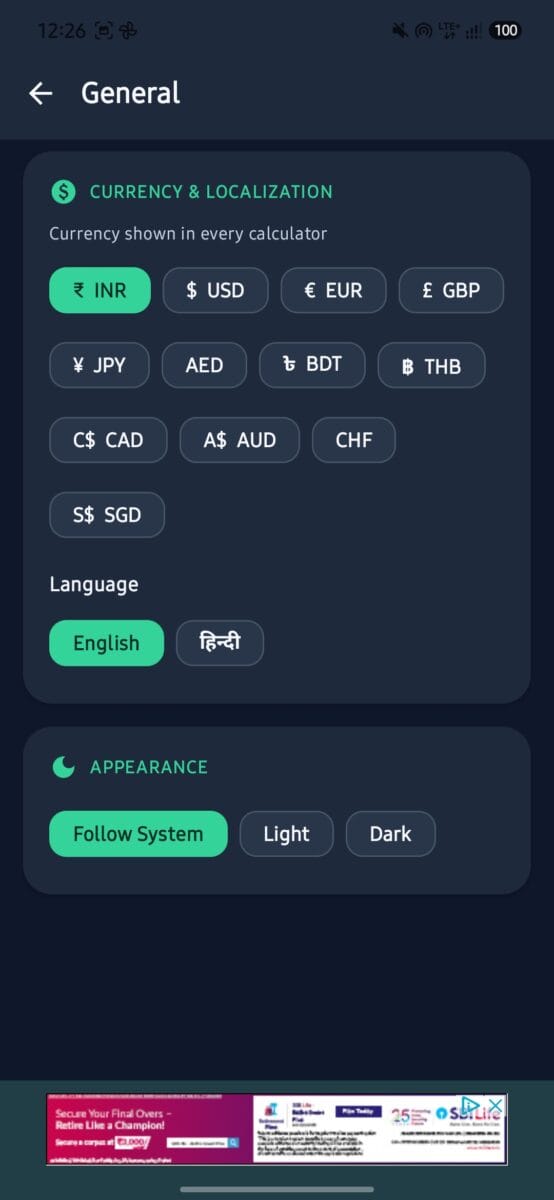
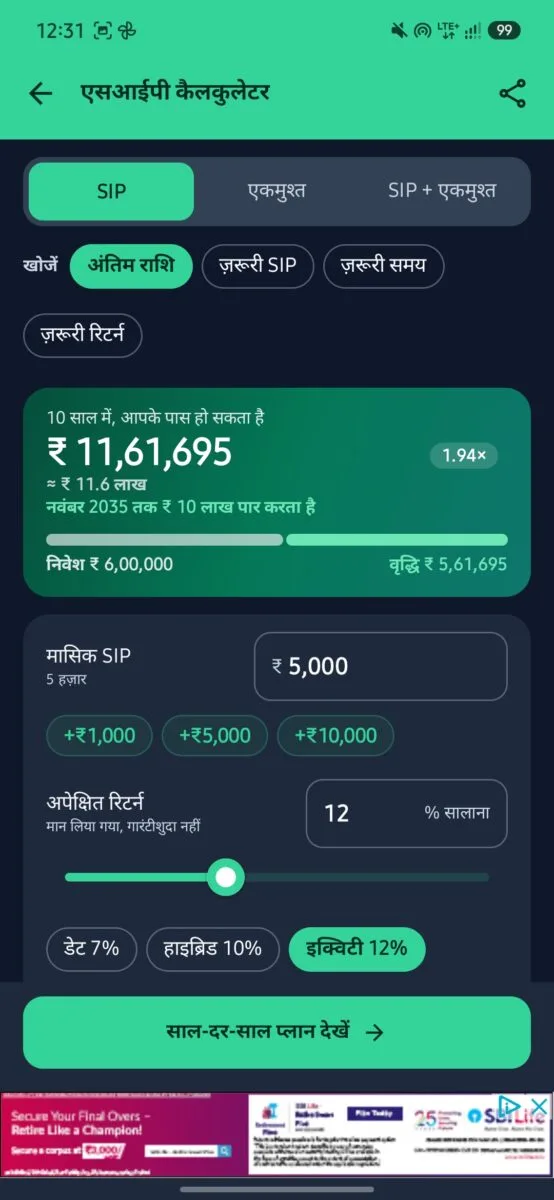
Screenshot : General Settings to set Hindi & also SIP calculator in Hindi
The interface works fully in Hindi, with labels such as अंतिम राशि and जानना ज़रूरी है, while terms like SIP and LTCG stay in English, which is how most people use them. Results can be shared in English or Hindi.
Reports you can share and export
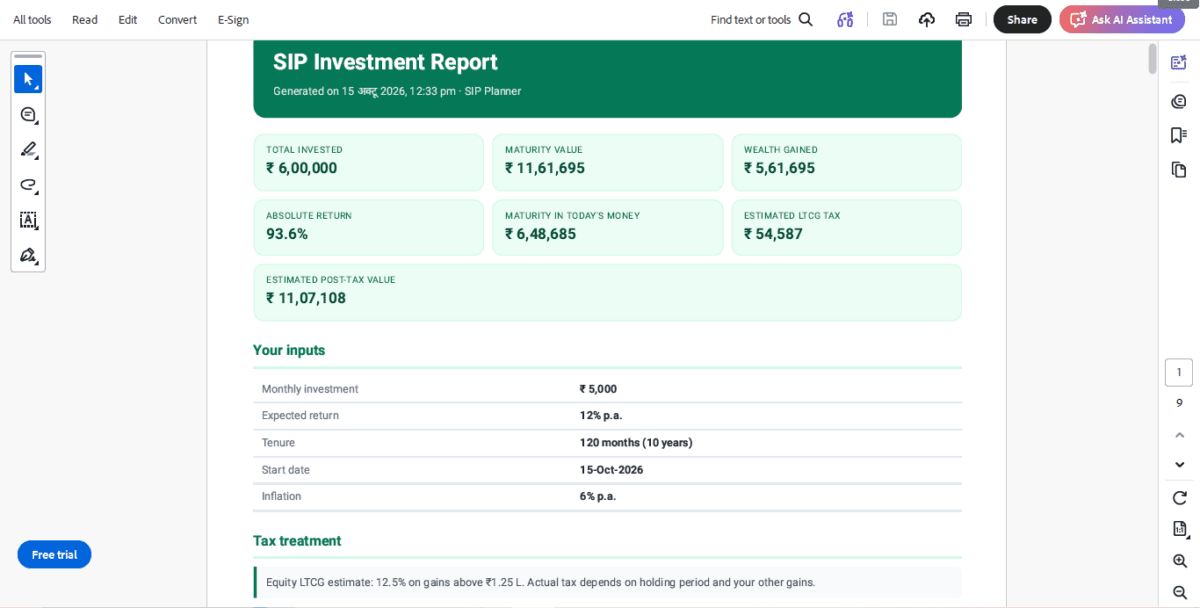
From the three-dot menu you can share a summary (for example as a plain-text report on WhatsApp), export to Excel, or export a PDF. The PDF I generated has:
- Summary cards, your inputs and a tax note
- A growth chart
- Yearly and monthly investment schedules
- What-if tables by monthly amount, by return rate and by duration, with your plan highlighted
- A proper disclaimer that projections are illustrative and mutual funds carry market risk
That is much more than most free calculators export.
Other useful touches
- Find-what-you-need modes: SIP needed, time needed and return needed, not just “final amount”
- Return presets: Debt 7%, Hybrid 10% and Equity 12%, with a note that returns are assumed, not guaranteed
- Loan extras: a “pay less interest” part-payment view and an editable EMI start date
- Old UI mode: a plain list layout for people who prefer the older, simpler version, with a one-tap switch
- App lock and a PDF branding option
- Privacy statement: the app says calculations stay on your device
What needs improvement
The ads are the biggest problem
The app is free, and it earns money from Google ads. In my testing:
- A banner ad sits at the bottom of every screen I opened. It did not cover any buttons on the screens I tested.
- A full-screen ad of about 5 to 10 seconds appears on every screen change, and again when I returned to the app after minimizing it. For a tool you open for a quick number, this gets tiring fast.
- The ads shown were not always a good fit for a finance app. I saw a casino-style game banner on the EMI screen, and insurance, wealth-management and quick-commerce ads elsewhere. On the home screen the banner was for a fitness app, and at the bottom a chat-app ad with a person’s photo, which I did not expect in a finance tool.
A note on those ads: they are served automatically by Google’s ad network. Neither TechMitra nor the app endorses them, and an insurance banner under a returns figure is not a recommendation.
There is a one-time ₹299 “Remove ads” purchase that removes banners, full-screen ads and the ad before a PDF. That is a fair way to avoid the ads for people who use the app often, though some may find the price steep for a calculator. A free tier that shows ads less often, for example one every few minutes and not on every screen change, would feel much better. Blocking casino and betting ad categories would also suit a finance app.
Smaller points
- The SIP timing assumption is not stated on the result screen, as explained above.
- Privacy wording: the app says your calculations stay on your device, but the Google Play listing notes that some app and device information may be shared with third parties, which is typical when ads are used. Both can be true, so read the privacy section on the Play Store page.
- Hindi PDF: the report I exported while the app was in Hindi mode mixed English and Hindi headings. This is a minor polish issue.
Pros and cons
Pros
- Accurate results in the SIP, EMI and gold loan tests
- 40+ calculators in one free app
- Post-tax and inflation-adjusted results
- English and Hindi, with 12 currencies
- Detailed PDF, Excel and WhatsApp sharing
- Works on your device, with an app lock option
Cons
- Full-screen ads on screen changes and on resume
- Some unsuitable ad categories for a finance app
- ₹299 to remove ads
- SIP timing convention not stated
Who should use it?
It suits people who plan SIPs, loans or goals and want one app with many calculators, Hindi support and shareable reports. If you only need an occasional quick number, the SEBI Investor website calculator is a free, ad-free alternative, though it is more basic and shows neither tax nor inflation.
Final verdict
SIP Planner does the job that matters most: its calculations are correct, and it adds useful extras such as tax, inflation, Hindi support and detailed exports. The ad frequency is the main thing holding it back, and the ₹299 option is the way around it. I would recommend it for regular users and suggest the SEBI calculator for one-off checks.
You can find it on the Google Play Store as SIP Planner & SIP Calculator By Ankit Agarwal.
Disclaimer: This review is for information only and is not investment, tax or financial advice. Calculator results are estimates based on the return rate you enter. Mutual fund investments are subject to market risks. Please consult a qualified financial advisor before investing.

Ayush Singhal is the founder and chief editor of TechMitra.in — a tech hub dedicated to simplifying gadgets, AI tools, and smart innovations for everyday users. With over 15 years of business experience, a Bachelor of Computer Applications (BCA) degree, and 5 years of hands-on experience running an electronics retail shop, Ayush brings real-world gadget knowledge and a genuine passion for emerging technology.
At TechMitra, he covers everything from AI breakthroughs and gadget reviews to app guides, mobile tips, and digital how-tos. His goal is simple — to make tech easy, useful, and enjoyable for everyone. When he’s not testing the latest devices or exploring AI trends, Ayush spends his time crafting tutorials that help readers make smarter digital choices.
📍 Based in Lucknow, India
💡 Focus Areas: Tech News • AI Tools • Gadgets • Digital How-Tos
📧 Contact: Get in touch →
🔗 Full Bio: https://techmitra.in/about-us/