

ChatGPT Group Chat is a new OpenAI feature that lets multiple users collaborate with ChatGPT inside a shared conversation. You can create a group, invite up to 20 members, and use AI to plan, brainstorm, or make decisions together. The feature adapts to group behavior, supports custom instructions, and works with image uploads, web browsing, and more.
OpenAI is back with another major upgrade — and this time, it’s all about collaboration. On Friday, the company rolled out a brand-new feature for ChatGPT called Group Chat, marking the first time users can share an AI conversation space with others.
As the name clearly suggests, Group Chat allows you to create a shared chat room inside ChatGPT and invite friends, colleagues, or family members to collaborate on projects, plan something together, or even just use the AI as part of everyday discussions. While the idea isn’t entirely new in the AI world, OpenAI’s implementation comes with some smart twists.
For now, this feature is available only in a few selected regions, but OpenAI says it will expand to more countries based on early user feedback.
Table of Contents
Group Chat: Bringing Collaborative AI to ChatGPT
In a detailed blog post, OpenAI described Group Chat as its first true multi-user experience. The basic idea is simple: you can add multiple people to a single conversation where everyone can talk to each other—and ChatGPT participates intelligently.
OpenAI explains it this way:
“With Group Chats, you can bring friends, family, or coworkers together in a shared space to plan, make decisions, or work on ideas together.”
This concept is already seen in Meta AI, which works inside WhatsApp and Messenger group chats, and in Anthropic’s Claude Projects. But OpenAI’s version comes with more refined controls and deeper AI behavior.
How It Works
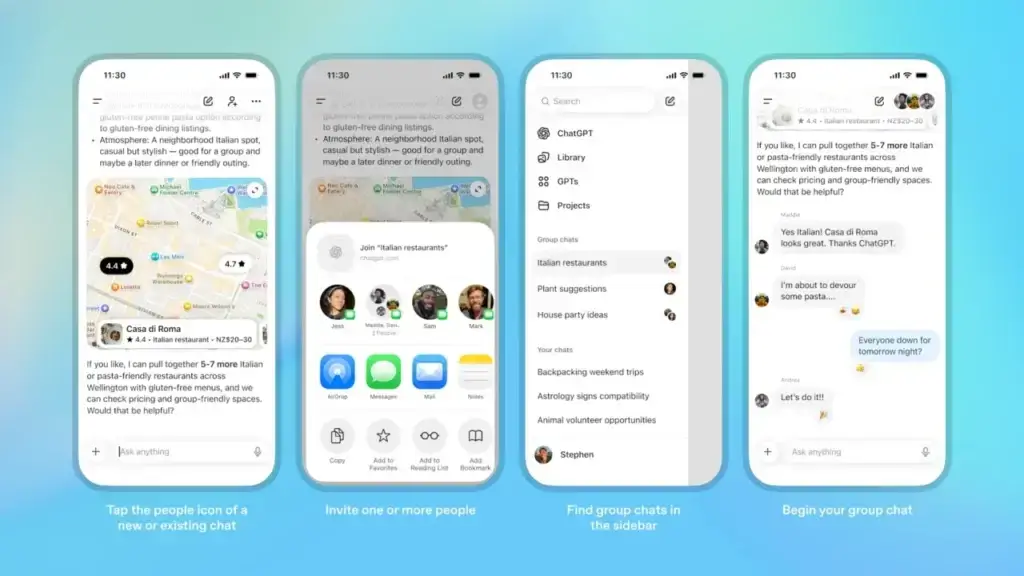
Creating a Group Chat is straightforward:
Tap the “New People” icon in the top-right corner of any chat.
You’ll get a shareable URL.
Anyone with a ChatGPT account (free or paid) can join by clicking the link.
A group can have 1 to 20 members.
If you convert an existing one-on-one conversation into a group, ChatGPT automatically makes a separate copy so your original private chat stays intact.
Before joining, all users must set up a simple profile with name, username, and photo so others can identify who’s sending each message. Once created, your Group Chats appear in a dedicated sidebar section for easy access.
Smarter AI Behavior Inside Groups
One of the most interesting parts: ChatGPT behaves differently in a group environment.
It follows the flow of conversation and decides when to speak or stay silent.
Users can @mention ChatGPT to force a response.
It understands emojis, context clues, and even profile photos.
Each group can set custom instructions to control how ChatGPT behaves.
Importantly, these instructions apply only to that group and do not impact your personal ChatGPT settings.
Group creators can add or remove people anytime. Other members can rename the chat or mute notifications.
Powered by GPT-5.1 Auto
Group Chats run on GPT 5.1 Auto, which automatically chooses the best available model depending on the participants.
This means:
If someone in the group has a Pro plan,
And another is using the free version,
Their responses from ChatGPT may look different, because the system adjusts the model quality per user.
Group chats support all major features:
Web browsing
File and image uploads
Image generation
Voice and dictation
Everything works inside the group thread.
Privacy & Safety: Strong Filters and No Memory
OpenAI has also emphasized privacy:
No personal ChatGPT memories are used inside group chats.
ChatGPT also cannot create new memories based on group discussions.
Anyone can join or leave anytime.
Non-creators can remove other members as well.
If a user under 18 joins the group, a sensitive content filter activates automatically for everyone.
Parents can disable group chats from the app’s parental controls.
Where Is Group Chat Available?
For now, OpenAI is testing Group Chat in:
Japan
New Zealand
South Korea
Taiwan
The rollout applies to all logged-in users, regardless of whether they use the free or paid plan.
More countries are expected soon — likely depending on early adoption and feedback.
FAQs: ChatGPT Group Chats Explained
1. What is the new Group Chat feature in ChatGPT?
Group Chat is a new collaborative feature from OpenAI that allows multiple users to join a shared conversation with ChatGPT. You can plan projects, brainstorm ideas, or simply chat together while the AI assists intelligently.
2. How many people can join a OpenAi ChatGPT Group Chat?
A group can have 1 to 20 members. Anyone with a ChatGPT account — free or paid — can join via the shared invite link.
3. Is the Group Chat feature available for free users?
Yes. OpenAI has made the feature accessible to all logged-in users, regardless of subscription plans.
4. How do I create a Group Chat in ChatGPT?
Just tap the “New People” icon in the top-right corner of any chat. This generates a shareable link. Others can join by clicking the link while logged in.
5. Does ChatGPT respond automatically in group conversations?
ChatGPT observes the flow of the conversation. It responds only when relevant, but you can force a reply by mentioning @ChatGPT.
6. Are the responses the same for all group members?
Not always. Group Chats use GPT-5.1 Auto, which selects the best model available for each user. So paid users may see more advanced responses than free users.
7. Can we set AI behavior for each group?
Yes. You can add custom instructions unique to each group chat. These settings do not affect your personal ChatGPT configuration.
8. What about privacy and ChatGPT memory?
Group Chats do not use your personal ChatGPT memory, and they don’t create new memories from group conversations. Everything remains separate.
9. Can minors participate in Group Chats?
Yes, but if someone under 18 joins, OpenAI automatically enables sensitive content filters for all members. Parents can also disable Group Chat entirely using parental controls.
10. Where is the Group Chat feature available right now?
Currently, it is being piloted in Japan, New Zealand, South Korea, and Taiwan. OpenAI plans to expand it to more regions soon.
11. Can I remove members from the group?
Yes. The group creator can add or remove anyone. Other members (except the creator) can remove participants as well.
12. What features work inside Group Chats?
Most major ChatGPT tools work seamlessly, including:
Web browsing
File & image uploads
Image generation
Voice and dictation
Disclaimer: The information in this article is based on details first reported by official sources and publicly available news, including Google News. We have adapted and rewritten the content for clarity, SEO optimization, and reader experience. All trademarks and images belong to their respective owners.
Trending

Ayush Singhal is the founder and chief editor of TechMitra.in — a tech hub dedicated to simplifying gadgets, AI tools, and smart innovations for everyday users. With over 15 years of business experience, a Bachelor of Computer Applications (BCA) degree, and 5 years of hands-on experience running an electronics retail shop, Ayush brings real-world gadget knowledge and a genuine passion for emerging technology.
At TechMitra, he covers everything from AI breakthroughs and gadget reviews to app guides, mobile tips, and digital how-tos. His goal is simple — to make tech easy, useful, and enjoyable for everyone. When he’s not testing the latest devices or exploring AI trends, Ayush spends his time crafting tutorials that help readers make smarter digital choices.
📍 Based in Lucknow, India
💡 Focus Areas: Tech News • AI Tools • Gadgets • Digital How-Tos
📧 Contact: Get in touch →
🔗 Full Bio: https://techmitra.in/about-us/