
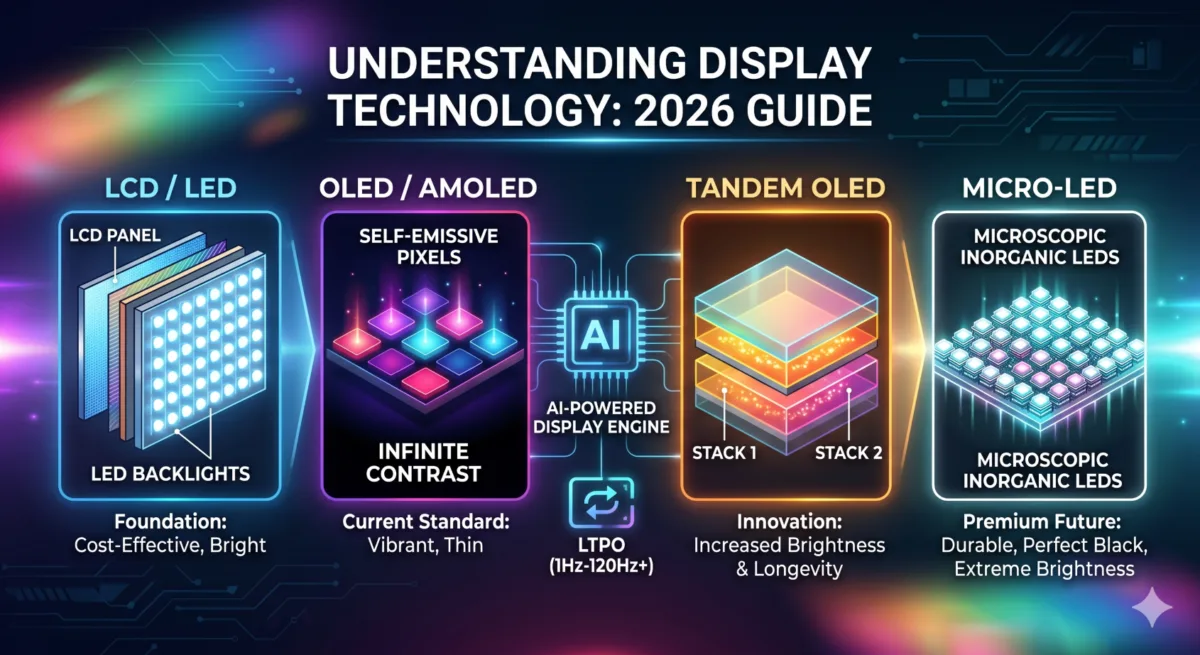
In the modern digital landscape, the display is no longer just a component — it is the primary interface through which we experience the world. Whether it is the smartphone in your pocket, the laptop on your desk, or the cinematic screen in your living room, display technology has undergone a radical transformation. As of 2026, we have moved beyond the simple quest for “more pixels” into an era defined by peak brightness, energy efficiency, and artificial intelligence integration.
Understanding these technologies is essential for making informed purchasing decisions. A screen that looks great in a dark showroom might struggle in bright sunlight, and a display that is perfect for a graphic designer might not be the best choice for a competitive gamer. This guide breaks down the complex world of display panels, from the foundational LCD to the cutting-edge Tandem OLED and Micro-LED — and answers the specific comparison questions people actually search for, like CCFL vs OLED, backlit vs reflective LCD, and LCD TFT vs IPS.
Table of Contents
Also Read: Best Affordable Laptops for Students Under ₹50,000 / ₹60,000 / ₹70,000 (July 2026)
What is Display Technology?
Display technology defines how your screen produces light, colors, and motion.
A better display means:
- More vibrant colors
- Better visibility in sunlight
- Smoother scrolling
- Lower battery consumption
1. The Foundation: LCD and LED Displays
To understand where we are, we must understand the backbone of the industry: LCD (Liquid Crystal Display). Despite the rise of newer technologies, LCDs remain the most widely produced screens in the world due to their cost-effectiveness and versatility.
How LCD Works
An LCD panel does not create its own light. Think of it as a sophisticated set of electronic shutters. At the very back of the device sits a backlight. In front of this light are layers of polarizers and a “sandwich” of liquid crystals. When electricity is applied, these crystals twist or straighten to either block the light or let it pass through a color filter to create the image you see.
The Shift to LED
You will often see screens marketed as “LED TVs” or “LED Monitors.” It is important to clarify that an LED display is still an LCD. The name refers specifically to the backlight. Older LCDs used CCFL (Cold Cathode Fluorescent Lamps), which were bulky and inefficient. Modern LCDs use LEDs (Light Emitting Diodes) as the light source, allowing for thinner designs, better brightness, and lower power consumption.
- Pros: Highly affordable, excellent peak brightness for outdoor use, no risk of “burn-in.”
- Cons: Struggles with “true blacks” (since the backlight is always on to some degree), limited viewing angles, and slower response times compared to OLED.
CCFL vs OLED: Why the Comparison Doesn’t Really Hold Up
This is a common search, so it’s worth addressing directly: CCFL and OLED aren’t really competing technologies anymore — CCFL is a backlight source for old-generation LCDs, while OLED is a completely different, self-emissive panel type with no backlight at all. In practice, any modern screen beats a CCFL-backlit LCD on brightness, thinness, and power draw, and OLED beats it on contrast and color by a wide margin. CCFL panels were phased out of consumer electronics years ago in favor of LED-backlit LCDs, which is the real comparison worth making today (see the LED section above).
2. The Contrast King: OLED and AMOLED
The introduction of OLED (Organic Light Emitting Diode) marked the biggest shift in display history. Unlike LCDs, OLEDs are self-emissive. Every single pixel is its own light source.
The Power of “True Black”
Because every pixel can be turned off individually, OLED displays can achieve perfect black levels. In an LCD, a dark scene often looks slightly grey because the backlight is still glowing behind the panel. In an OLED, the pixel simply shuts off, resulting in an “infinite” contrast ratio. This makes colors pop and provides a level of depth that LCDs cannot match.
This is one of the easiest differences to spot yourself, even without any technical equipment. Put an OLED phone and an IPS LCD device side by side and play the same dark video or dark-mode app on both — the OLED’s “black” areas genuinely disappear into the screen, while the IPS panel’s blacks still look like a dark grey, especially if you’re viewing at an angle or in a dim room. It’s one of those differences that’s subtle in marketing photos but obvious the moment you actually compare two screens in person.
AMOLED: The Smartphone Standard
AMOLED (Active Matrix Organic Light Emitting Diode) is the specific type of OLED used in almost all modern smartphones and smartwatches. The “Active Matrix” refers to the way each pixel is controlled by a thin-film transistor (TFT). This allows for faster refresh rates and better power management, which is why features like “Always-On Display” are possible without draining the battery.
- Pros: Incredible color accuracy, perfect blacks, thin and flexible (allowing for foldable phones), and near-instant response times.
- Cons: More expensive to manufacture, lower peak brightness than top-tier LCDs, and the potential for “burn-in” over many years of static use.
3. The 2026 Standard: Tandem OLED and LTPO
As we move into 2026, the industry has addressed the two biggest weaknesses of OLED: brightness and battery drain.
Tandem OLED: Double the Power
Tandem OLED is the breakthrough technology currently taking over the premium tablet and laptop market. Instead of a single layer of organic light-emitting material, Tandem OLED stacks two layers on top of each other.
- Higher Brightness: By using two layers, the display can reach significantly higher “nits” (brightness levels) without overstressing the pixels.
- Increased Longevity: Because the workload is shared between two layers, each layer can run at a lower intensity, which dramatically reduces the risk of burn-in and extends the life of the panel.
(LG Display’s mass production of Tandem OLED for laptops)
LTPO (Low-Temperature Polycrystalline Oxide)
LTPO is the secret sauce behind the incredible battery life of modern flagship phones. Standard screens traditionally ran at a fixed refresh rate (60Hz or 120Hz). LTPO 4.0 and 5.0 allow the screen to dynamically change its refresh rate from 1Hz to 144Hz depending on what you are doing. If you are reading a static e-book, the screen drops to 1Hz to save power. If you are gaming, it jumps to 144Hz for smoothness.
Also Read: MacBook vs Windows AI Laptops in 2026: Which Should Students Buy in India?
4. The Professional’s Choice: IPS and VA Panels
Within the world of computer monitors and high-end laptops, two specific types of LCD technology dominate: IPS and VA.
IPS (In-Plane Switching)
IPS is the gold standard for color accuracy and viewing angles. In an IPS panel, the liquid crystals are aligned horizontally. When you look at the screen from the side, the colors don’t shift or wash out. This makes IPS the preferred choice for photo editors, graphic designers, and office professionals.
VA (Vertical Alignment)
VA panels align their crystals vertically. While they don’t have the wide viewing angles of IPS, they offer much better contrast ratios (usually 3000:1 compared to 1000:1 for IPS). This makes VA panels a favorite for curved gaming monitors and mid-range TVs where deep blacks are more important than color perfection.
LCD TFT vs IPS LCD: What’s the Actual Difference?
Another frequent point of confusion. TFT (Thin-Film Transistor) is not a separate display type — it’s the switching technology used to control individual pixels in nearly all modern LCDs, including IPS and VA panels. So “TFT LCD” is a broad umbrella term, while “IPS LCD” tells you specifically how the liquid crystals are aligned inside that TFT-driven panel. In short: every IPS LCD is a TFT LCD, but not every TFT LCD is IPS — cheaper phones and monitors often use older TN (Twisted Nematic) TFT panels, which have worse viewing angles and color accuracy than IPS.
Backlit LCD vs Reflective LCD
This comparison comes up a lot around outdoor devices, e-readers, and smartwatches:
- Backlit LCD: Uses an internal light source (LED backlight) shining through the panel. Works great indoors and in low light, but can wash out or become hard to read in direct sunlight.
- Reflective LCD: Has no backlight at all — it reflects ambient light (like sunlight or room light) to display the image, similar to how a printed page works. This is why reflective displays (common in e-readers and some smartwatches) are easiest to read outdoors in bright sun, but nearly unreadable in the dark without an add-on front light.
The short version: backlit is better for indoor and mixed-light use, reflective is better for pure outdoor, sunlight-heavy use and battery life.
5. Next-Gen Lighting: Mini-LED and Micro-LED
The names sound similar, but these two technologies serve very different purposes in the 2026 market.
Mini-LED: The LCD’s Final Form
Mini-LED is an evolution of the traditional LED backlight. Instead of using a few hundred large LEDs to light the screen, Mini-LED uses thousands of microscopic LEDs.
- Local Dimming: These thousands of tiny lights are grouped into “dimming zones.” This allows the screen to keep one part of the image bright while completely dimming the light in a dark part of the image. It bridges the gap between LCD and OLED, offering high brightness and deep (though not “perfect”) blacks.
Here’s the practical way to think about it: the raw number of LED bulbs behind the panel is directly tied to how good the picture looks. A basic LED-backlit LCD might only have a few dozen or a few hundred LEDs lighting the whole screen through one or two dimming zones total — so a bright object on a dark background makes the entire zone glow, creating a visible “halo” around it.
Mini-LED panels push that count into the thousands, split across hundreds of independent zones, so the backlight can react much more precisely to what’s actually on screen. More LEDs and more zones generally means better contrast and less of that halo effect — it’s one of the more reliable numbers to check when comparing two TVs or monitors that otherwise look similar on a spec sheet.
Micro-LED: The Holy Grail
Micro-LED is the technology everyone is watching. Like OLED, it is self-emissive (no backlight). However, unlike OLED, it does not use organic compounds that degrade over time. It uses inorganic Gallium Nitride.
(Check Latest Samsung News: the world’s first 130-inch Micro RGB TV, the R95H)
- The Best of Both Worlds: Micro-LED offers the perfect blacks and contrast of OLED with the extreme brightness and 20-year lifespan of an LCD.
- The Catch: As of 2026, Micro-LED remains incredibly expensive and difficult to manufacture at small sizes, making it a “luxury-only” tech for massive 100-inch+ TVs and high-end wearables.
6. Quantum Dots: Enhancing the Spectrum
You have likely seen the term QLED or QD-OLED. These utilize Quantum Dots — nanocrystals that glow in specific colors when hit by light.
- QLED (Quantum LED): This is a standard LED-LCD with a Quantum Dot filter. It produces much more vibrant and accurate reds and greens than a standard LCD.
- QD-OLED: This is the current “king of displays” for home theaters. It uses a Blue OLED layer as the light source and uses Quantum Dots to convert that light into Red and Green. The result is a screen with the perfect blacks of OLED but with the vibrant, high-volume color of a QLED.
7. Metasurface 3D Display — The Latest Display Technology
The most recent breakthrough in display technology is the Metasurface-based Switchable 2D/3D display. Revealed in April 2026 through research by Samsung and POSTECH, this technology uses an ultra-thin “metalens” (just 1.2mm thick) composed of nanoscale structures.
Unlike older 3D screens that required clunky glasses or forced you to sit in one exact spot, this new tech allows users to:
- Toggle on demand: Switch between a standard high-resolution 2D mode for reading and a deep, immersive 3D mode for gaming and movies using simple voltage control.
- Enjoy wide viewing angles: It offers a viewing angle of up to 100 degrees — six times wider than previous glasses-free 3D attempts — meaning you can move naturally without losing the 3D effect.
- Keep devices slim: Because the lens is microscopic, it fits perfectly into existing OLED and AMOLED stacks without making smartphones or tablets any thicker.
8. What is an Apple “Retina Display” and Why Does It Matter?
A “Retina Display” isn’t a specific type of material like glass or plastic; it is a standard of clarity created by Apple.
In the old days of tech, if you looked closely at a screen, you could see the tiny little square dots (pixels) that made up an image, which often made text look a bit jagged or “blocky.” Apple’s goal with Retina was to pack so many pixels into the screen that your eye — the human retina — can no longer see the individual dots at a normal viewing distance.
Think of it like this:
- A Standard Screen: Like looking at a photo printed on a cheap newspaper where you can see the ink dots.
- A Retina Display: Like looking at a high-quality glossy magazine where everything looks perfectly smooth, sharp, and lifelike.
In 2026, you’ll see different versions of this:
- Liquid Retina: The high-quality version of a standard LCD screen (found on iPads and MacBook Airs).
- Super Retina XDR: The top-tier version that uses OLED technology (found on iPhones), which makes colors more vibrant and blacks much deeper.
- Ultra Retina XDR: The newest 2026 standard that uses “Tandem OLED” to be incredibly bright even in direct sunlight.
The Bottom Line: If a device has a “Retina” label, it’s Apple’s promise that you won’t see any “graininess” and that text will look as sharp as a printed book.
The Intelligence Factor: AI-Driven Displays
In 2026, the hardware is only half the story. The Display Engine — the chip controlling the panel — now uses AI to enhance the viewing experience in real-time.
- AI Upscaling: Modern displays can take a 1080p video and use neural networks to “guess” the missing pixels, making it look almost indistinguishable from native 4K.
- Cognitive Brightness: Using ambient light sensors and AI, the display doesn’t just get brighter or dimmer; it adjusts the “color temperature” to match your room’s lighting, reducing eye strain and mimicking the appearance of paper.
- Predictive Motion: For sports and gaming, AI predicts the path of moving objects to eliminate “ghosting” or motion blur, providing a crystal-clear image even during fast-paced action.
Essential Specs: What the Numbers Mean
When comparing displays, you will encounter several technical terms. Here is what you actually need to know:
- Nits (Brightness): This measures how bright a screen can get. For a good HDR (High Dynamic Range) experience in 2026, look for a peak brightness of at least 1,000 nits. High-end outdoor phones now reach up to 3,000–4,000 nits.
- Refresh Rate (Hz): How many times the image updates per second. 60Hz is standard, 120Hz is the “sweet spot” for smoothness, and 144Hz+ is for competitive gaming.
- Resolution (PPI): Don’t just look at 4K or 1080p; look at Pixels Per Inch (PPI). A 4K resolution on a 27-inch monitor is incredibly sharp, but that same resolution on an 85-inch TV results in a lower PPI.
- Color Gamut (DCI-P3 / sRGB): This tells you how many colors the screen can actually show. For professional work or high-end movies, look for 95% or higher DCI-P3 coverage.
Buyer’s Guide: Which Tech is Right for You?
For the Smartphone Power User
Go for: LTPO AMOLED.
You want the battery-saving benefits of LTPO and the vibrant colors of AMOLED. If you spend a lot of time outdoors, prioritize a screen with high peak nits (2,500+).
For the Home Cinema Enthusiast
Go for: QD-OLED or Tandem OLED.
If you watch movies in a dark room, nothing beats the contrast of OLED. If your living room is very bright with many windows, a high-end Mini-LED (QLED) might be a better choice to fight the glare.
For the Competitive Gamer
Go for: OLED or High-Refresh IPS.
OLED offers the fastest response times (0.03ms), which eliminates motion blur. However, if you are on a budget, an IPS panel with 144Hz or 240Hz remains a fantastic and reliable option.
For the Creative Professional
Go for: IPS or Tandem OLED.
Color accuracy is your priority. IPS has been the industry standard for decades, but the new Tandem OLED laptops offer professional-grade color accuracy with the added benefit of perfect blacks for video editing.
Summary Table
| Technology | Best For | Strength | Weakness |
|---|---|---|---|
| LCD / LED | Budget Buyers | Cheap, Bright | Poor Blacks |
| IPS | Designers | Color Accuracy | Low Contrast |
| AMOLED | Smartphones | Vibrant, Efficient | Burn-in Risk |
| Tandem OLED | Premium Tablets | Bright, Durable | Expensive |
| Mini-LED | Bright Living Rooms | High Contrast & Brightness | “Blooming” (Halos) |
| QD-OLED | Home Theater | Best Image Quality | Expensive |
| Micro-LED | The Future | Perfect Everything | Extremely Costly |
(Check 100+ Tech Abbreviations & Full Forms)
Frequently Asked Questions
What is the most common type of display technology?
LCD (with an LED backlight) remains the most widely produced display type in the world, thanks to its low cost and versatility across phones
What is the newest display technology in 2026?
The Metasurface-based Switchable 2D/3D display (Samsung/POSTECH, April 2026) and Tandem OLED are the two most significant recent breakthroughs.
Is CCFL or OLED better?
OLED is significantly better on every meaningful metric — contrast, color, thinness, and power efficiency. CCFL is an outdated backlight technology found only in very old LCD screens and has been replaced by LED backlighting.
What’s the difference between TFT and IPS?
TFT is the switching technology used inside almost all modern LCD panels, including IPS. IPS is a specific type of TFT LCD known for accurate colors and wide viewing angles.
Which display type lasts longest without degrading?
LCD panels (LED-backlit) generally have no burn-in risk and the longest practical lifespan for static content, followed by Mini-LED. OLED-based panels (AMOLED, QD-OLED) can experience burn-in with years of static, high-brightness use, though this has improved significantly with Tandem OLED.
Final Thoughts
The display technology of 2026 has reached a point where the differences between “good” and “great” are found in the details of energy efficiency and peak brightness. While LCDs continue to offer incredible value for the average user, OLED and its variants (Tandem and QD) have firmly established themselves as the gold standard for quality.
As we look toward the future, the maturation of Micro-LED promises a world where we no longer have to choose between the brightness of an LCD and the contrast of an OLED. Until then, choosing the right display is about matching the technology to your environment — whether that is the bright sun of Lucknow or a dimmed home theater. Stay tuned to TechMitra.in for the latest hands-on reviews as these new panels hit the market.

Ayush Singhal is the founder and chief editor of TechMitra.in — a tech hub dedicated to simplifying gadgets, AI tools, and smart innovations for everyday users. With over 15 years of business experience, a Bachelor of Computer Applications (BCA) degree, and 5 years of hands-on experience running an electronics retail shop, Ayush brings real-world gadget knowledge and a genuine passion for emerging technology.
At TechMitra, he covers everything from AI breakthroughs and gadget reviews to app guides, mobile tips, and digital how-tos. His goal is simple — to make tech easy, useful, and enjoyable for everyone. When he’s not testing the latest devices or exploring AI trends, Ayush spends his time crafting tutorials that help readers make smarter digital choices.
📍 Based in Lucknow, India
💡 Focus Areas: Tech News • AI Tools • Gadgets • Digital How-Tos
📧 Contact: Get in touch →
🔗 Full Bio: https://techmitra.in/about-us/