

India’s first digital census is now in its second phase, and for the first time you can fill in your household’s details online before an enumerator knocks on your door. If you live in Uttar Pradesh, Punjab, Goa or the non-snow-bound parts of Uttarakhand, the self-enumeration window is open from 16 to 30 November 2026 on the official portal, se.census.gov.in. I went through the whole process myself on 17 November 2026, and this guide walks you through each screen, along with the mistakes to avoid and what I found confusing.
Use only the official link: https://se.census.gov.in/
If you search for “census enumeration” or “census self-enumeration” on Google, you will see many different websites, including news sites, blogs and unofficial pages. For filling in your household’s details, use only the official government portal above, which is also printed on the government’s own advertisement (along with a QR code). Never enter your mobile number, OTP or family details on any other site.
Disclaimer: This is an independent, unofficial guide based on my own experience of using the portal. TechMitra is not affiliated with the Government of India, the Ministry of Home Affairs or the Office of the Registrar General & Census Commissioner, and this is not an official government guide. Screens and rules may change, so always follow the instructions on the official portal, its user guide and FAQ, or call the helpline (1855) if anything differs from what is written here.
Table of Contents
Also Read : The Ultimate Guide to DigiLocker: Setup, Fetching Exam Results, CKYC, and Digital IDs (2026 Edition)
What is Census 2027 self enumeration, and do you have to do it?
Self-enumeration (SE) lets you fill in the Population Enumeration questionnaire for every member of your household on your own, at a time that suits you, instead of answering the enumerator’s questions at the door. It is an additional convenience and not a replacement for the house visit. As the government’s own advertisement puts it, if you don’t use it, the enumerator will still visit your home and collect the information.
The dates matter, so here they are in one place. In UP, Punjab, Goa and non-snow-bound Uttarakhand, self-enumeration runs from 16 to 30 November 2026. Door-to-door population enumeration then runs from 1 December 2026 to 4 January 2027, followed by a revisional round from 5 to 9 January 2027, and the reference date for the count is midnight on 5 January 2027. Other states and union territories have different schedules that are notified separately, so if you live elsewhere, check the portal for your dates.
What to keep ready before you start
The official user guide says the process may take about 45 minutes for a household of five members. For my household of seven it took roughly the same, because every person has their own set of questions. It is worth reading the questionnaire on the portal’s landing page first and keeping the information ready, as the portal itself suggests.
Use the mobile number you gave during the first phase of the census (the houselisting phase) if you can. That number lets the portal recognise your household, and as you will see below, it can save you a whole step. Keep a sheet of paper with each member’s details, especially for the last group of questions (Q34 to Q40), which the portal suggests noting down in advance.
In that last group the portal also asks about each person’s Aadhaar, voter ID, passport and driving licence, so keep those documents or numbers handy for every member before you begin and enter a number only for a document the person actually holds. A laptop or desktop is recommended over a phone, mainly because it is easier to see the map clearly.
One more rule: self-enumerate only at the location where your household normally lives. If your family has more than one house, do it at just one location, the one where you normally reside.
Step 1: Select your state and language
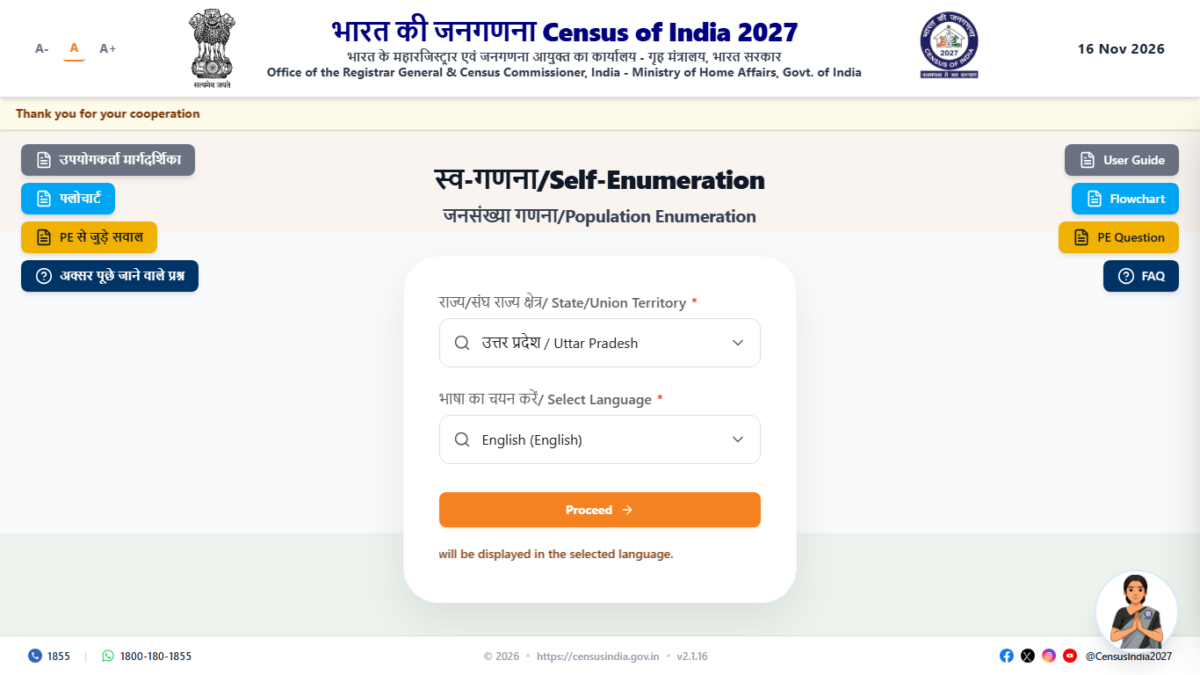
Open the official portal at se.census.gov.in, choose your state or union territory, and pick your language from the 16 available. Think before you click, because once you enter the system, the chosen language cannot be changed later. The portal shows a confirmation popup to remind you of this.
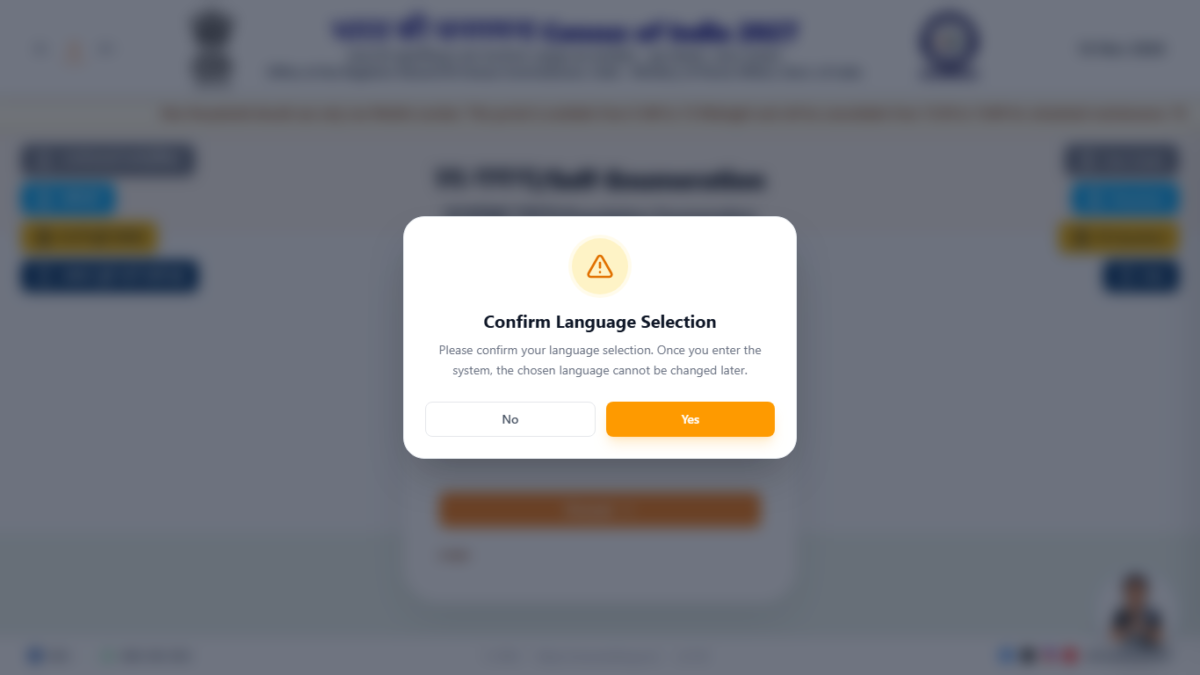
Screenshot : Confirm language selection popup
Step 2: Read the important information and continue
Before you proceed, the portal shows an instructions page that you need to read, tick “I understand” and then continue. In short, it tells you to use the first-phase mobile number, to self-enumerate only at your household’s own location, and to give complete and truthful information for every member, because providing correct information is described as a legal obligation and a civic duty. It also says your data is confidential, will not be disclosed under RTI, cannot be used as evidence and will only be published in aggregate form. The portal adds that your answers do not affect your eligibility for any government scheme.
Step 3: Enter your mobile number, captcha and OTP
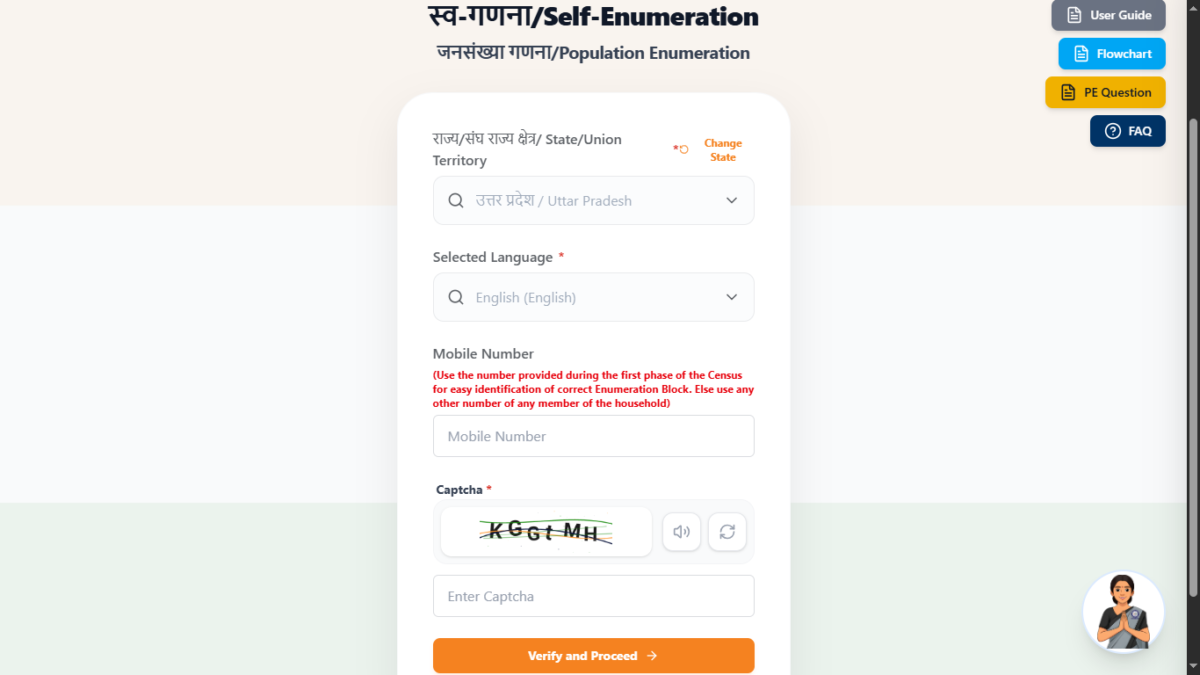
Enter your mobile number and the captcha shown on the screen (there is an audio option if the text is hard to read), then click “Verify and Proceed”. An OTP is sent to that number, and you enter it to continue. This OTP is only for logging in on the official portal, and I will come back to it in the safety section below.
Step 4: Confirm or mark your location
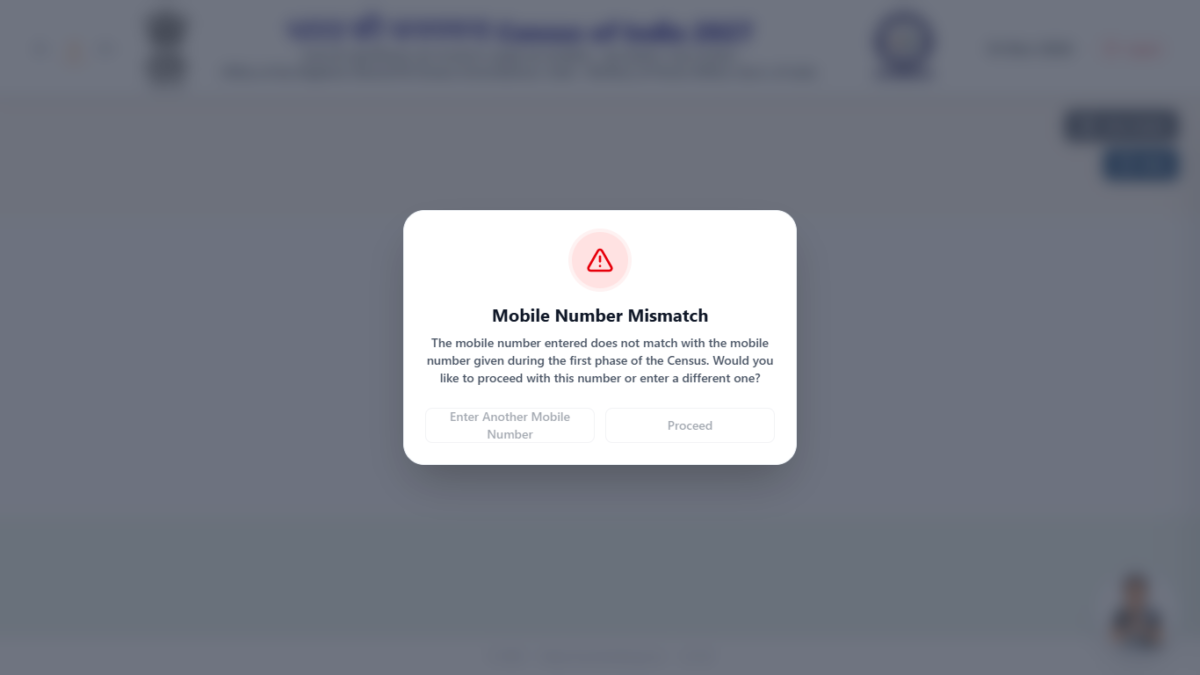
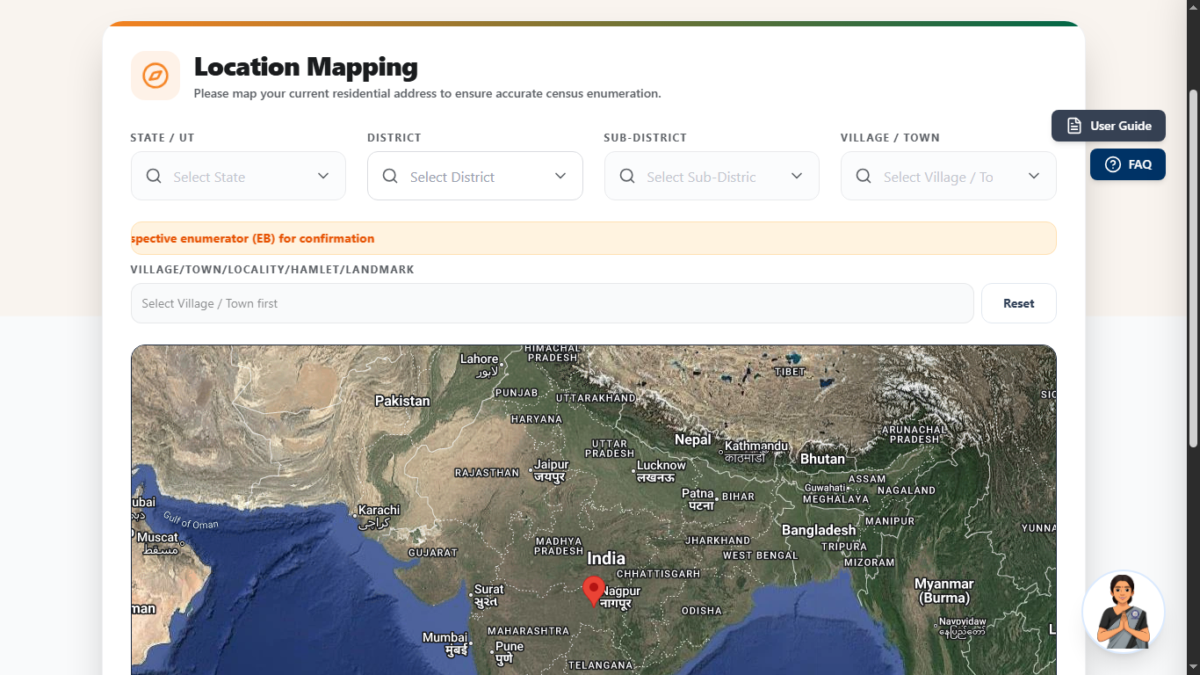
This is the step where your choice of mobile number makes a visible difference. When I logged in on 16 November with a number that was different from the first-phase one, the portal showed me a “Mobile Number Mismatch” popup and then a location mapping page where I had to select my state, district, sub-district and village or town, and then mark my house on a map. On that first day I also hit a server error at this step and could not move ahead. When I came back the next day with the number I had used in the first phase, the portal recognised my household, skipped the map completely and simply asked whether I was still living at the address it showed.
The official user guide describes the same behaviour. If your number matches, you confirm the saved location, and answering “Yes” takes you straight to the Basic Information page, while “No” takes you through the map first. If it does not match, you get the mismatch popup and can either proceed with that number or enter a different one. The map screen is shown only to households whose number did not match, or whose residence changed after the first phase.
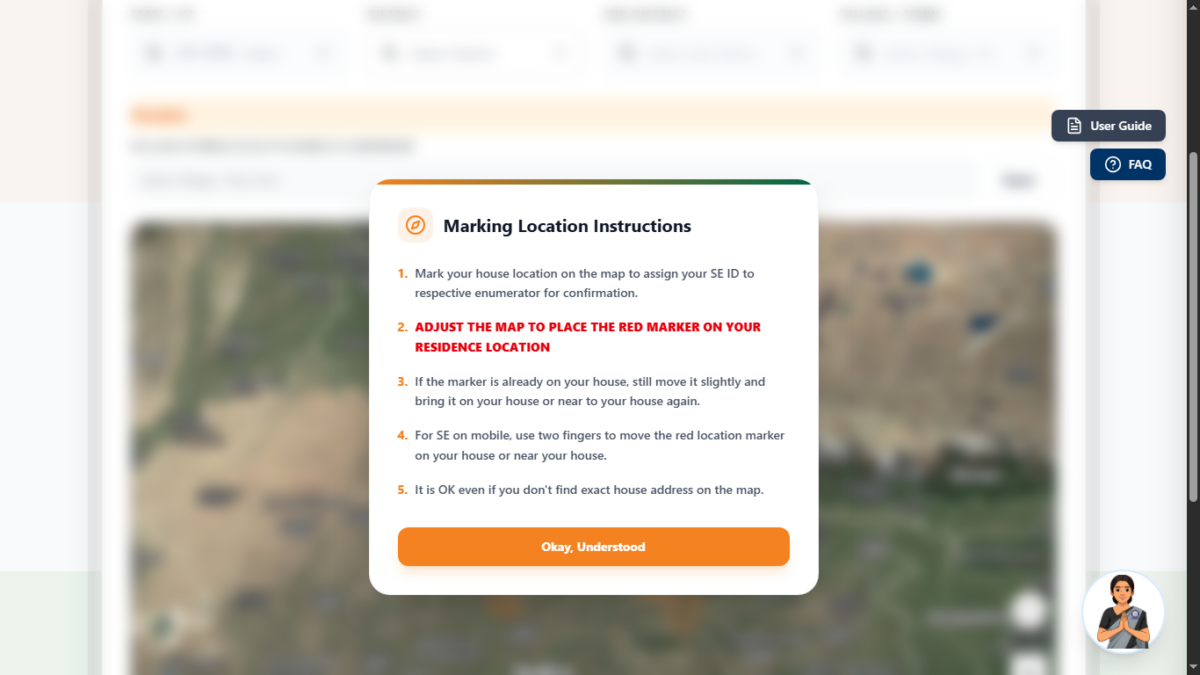
If you do see the map, a popup explains how to use it. Place the red marker on your house or near it, and move it slightly even if it already looks right. You don’t need to find your exact address, since the purpose is only to assign your data to the right enumeration block so that the enumerator can confirm it during the visit. On a phone, use two fingers to zoom and move the map. The portal then shows the details for a final confirmation before saving.
Address confirmation page shown when the first-phase number is used <!– SCREENSHOT 9 (NEEDED): The “is this your address” confirmation shown on 17 Nov with the first-phase number. BLUR the address. –>
Step 5: Fill in the basic information for every member
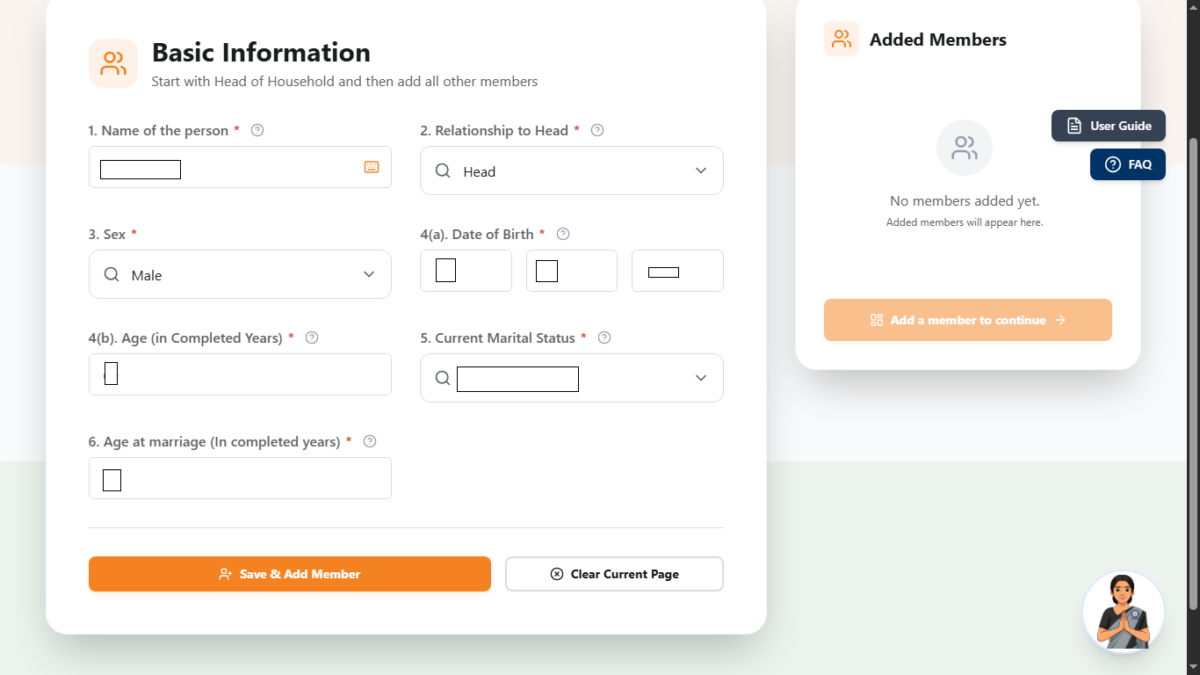
Next comes the Basic Information page, where you enter the first six questions for each person, starting with the head of the household: name, relationship to the head, sex, date of birth, age, marital status and age at marriage. Use “Save & Add Member” after each person. If your household was already recorded in the first phase, the names and relationships may be pre-filled, as they were in mine. Once everyone is added, you move on with the button labelled “Go to dashboard for filling Questions 7 to 40”, and a popup warns that unsaved form data may be lost, so click “Yes, continue” only when you are done here.
Step 6: Complete the questionnaire from the dashboard
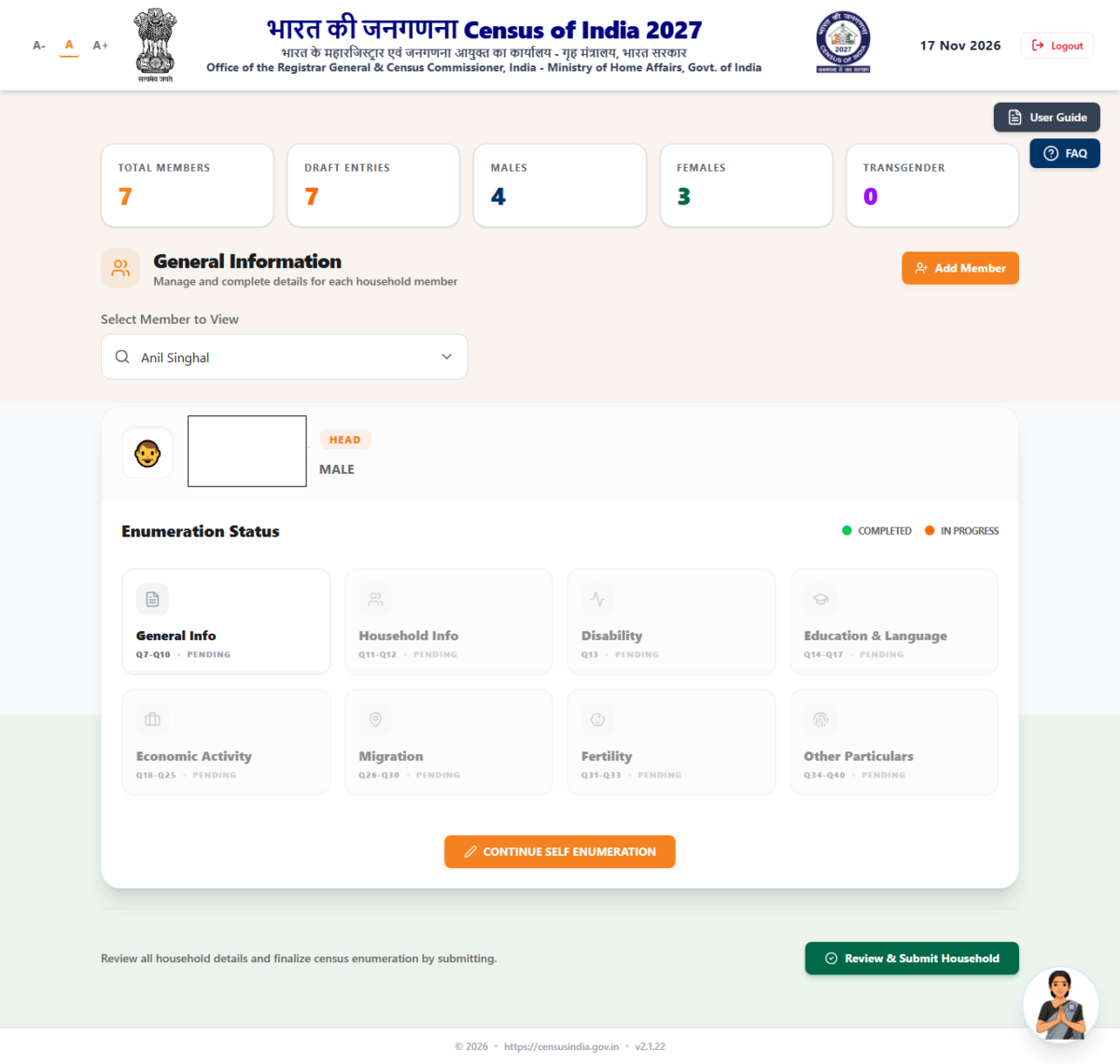
The dashboard is where most of your time goes. It shows how many members you have added, how many entries are still drafts and the male, female and transgender counts, and a dropdown lets you pick each member in turn. The remaining questions are grouped into eight sections: General Info (Q7 to Q10), Household Info (Q11 and Q12), Disability (Q13), Education and Language (Q14 to Q17), Economic Activity (Q18 to Q25), Migration (Q26 to Q30), Fertility (Q31 to Q33) and Other Particulars (Q34 to Q40). A progress bar and colour coding show which sections are pending, in progress or complete, and the “Save Member Details” button stores each person’s answers once you finish.
The last section, Other Particulars, is where I came across the question asking for the Aadhaar number “if available”. It is presented with Yes and No options, and choosing Yes opens a field for the number. The voter ID number is asked in exactly the same way, and the portal asks for the passport number as well, and a separate section (Section AM) asks about the driving licence.
The portal’s own FAQ for that question explains that you should select No if the person does not hold a valid driving licence: owning a car does not count, a learner’s licence alone does not count, and only people who actually hold a valid driving licence should enter its number. Because the portal’s instructions say that correct information is a legal obligation, I’d suggest that you check the portal’s FAQ or call the helpline if you are unsure what to answer when you do have one of these documents.
You do not have to finish in one sitting. You can log out at any point, your completed sections stay saved, and you can log in again later to continue, as long as you submit before the window closes.
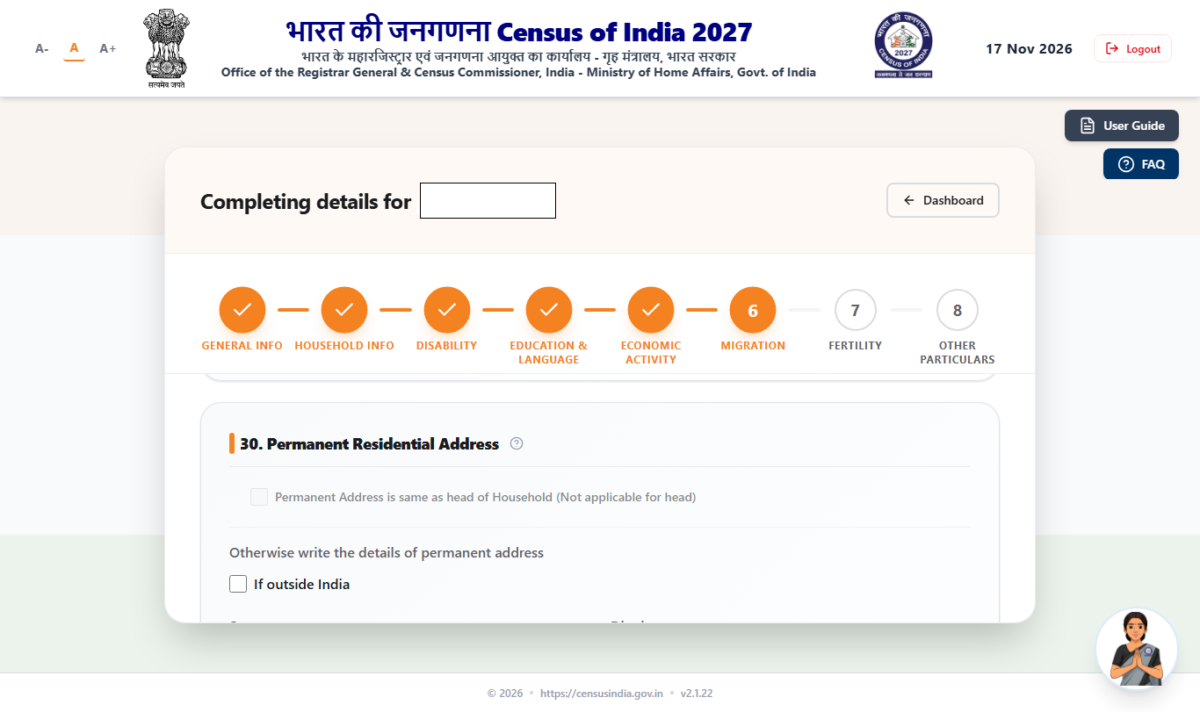
Aadhaar, voter ID, passport and driving licence questions in Other Particulars
Step 7: Review and submit before 30 November
Once every member’s sections are done, click “Review & Submit Household”. The review page lets you pick each member and check what you entered. When you are satisfied, click “Submit Household”, and a confirmation message appears. It warns that you will not be able to edit the data afterwards, although the enumerator can update it during their visit with your consent. You will also see a “Submit Later” option, which takes you back to the review screen.
Please don’t miss the most important detail here: the official guide says that if you do not finally submit before the closing date, your self-enumeration will not be considered complete. Having a household full of saved drafts is not enough, so make sure you actually reach the submit step before 30 November 2026.
Your SE ID: keep it safe
After a successful submission, the portal generates a unique 11-digit Self-Enumeration ID (SE ID) that starts with the letter “P”. It is also sent by SMS to the mobile number you registered with. Take a screenshot, note it down and share it with the other members of your household, so that whoever is at home can give it to the enumerator. If you lose it, you can retrieve it later by logging in again with the same registered mobile number.
What happens when the enumerator visits
From 1 December, when the enumerator comes to your home, give them your SE ID. They will match it against the SE IDs on their mobile, or online with the state database if it isn’t found there. If it matches, your self-enumerated data is confirmed and accepted, and submitted with your signature and theirs. If it does not match, the enumerator will collect the details of your household afresh, so keep your ID ready to avoid doing the work twice. You can also ask to see the enumerator’s identity card, as the government’s advertisement suggests.
Stay safe from census scams
Whenever a new digital process starts, fraudsters try to take advantage of it, so a few reminders are in order. The government’s advertisement says clearly that you will not be asked for any OTP, PIN or documents for the census. The OTP you enter during self-enumeration is the one you receive for logging in, and you should only enter it on the official portal yourself. Never read an OTP, any ID number (Aadhaar, voter ID, passport or driving licence) or your SE ID out to someone who calls or messages you, even if they claim to be from the census office.
Always type se.census.gov.in yourself or scan the official QR code from the government advertisement instead of clicking on links received on WhatsApp or SMS, and since Google also lists many unofficial websites for census searches, check that the address in your browser is exactly se.census.gov.in before you enter anything. If you need help, the official helpline is 1855, and the WhatsApp number is 1800-180-1855. The portal also has a virtual assistant named Pragati.
Frequently asked questions
Is self-enumeration compulsory?
No, it is an additional option. If you skip it, the enumerator will collect the information during the house visit. Whichever way you provide it, the portal stresses that the information should be accurate.
Can I change the language after selecting it?
No, the language cannot be changed once you enter the system.
Which mobile number should I use?
The one you gave in the first phase, if possible. Otherwise you can use any mobile number of a household member, and the portal will show a mismatch warning that you can proceed past.
Can I edit my answers after submitting?
No, but the enumerator can update them during the visit with your consent. Review everything carefully before you click Submit.
I lost my SE ID. What now
Log in again with your registered mobile number to retrieve it. It was also sent to you by SMS.
I own a car but have no driving licence, or I only have a learner’s licence. What should I select?
According to the portal’s own FAQ, select No in both cases. Owning a vehicle does not mean you hold a driving license, and a learner’s license does not count until the permanent driving licence has been issued. Only people who hold a valid driving license should enter its number.
What if my household has more than one house?
Self-enumerate at only one location, the one where the household normally resides.
What is the last date?
In UP, Punjab, Goa and non-snow-bound Uttarakhand, 30 November 2026, and your data must be submitted by then to count as complete.
Final thoughts
Self-enumeration is a genuine time-saver if you set aside about 45 minutes, keep your first-phase mobile number and your family’s details ready, and remember to press the final submit button. The portal was updated during the days I used it, so some screens may look slightly different by the time you read this. I tested it on 17 November 2026, and I will update this guide if anything changes. Please remember that this is an unofficial guide written from my own experience, and the official portal and its user guide remain the final authority.
Sources: the Census 2027 Self-Enumeration portal (se.census.gov.in) and its official user guide for Population Enumeration, the Registrar General of India’s gazette notification for the schedule in Goa, Uttar Pradesh, Punjab and Uttarakhand, and the Government of India’s Census 2027 advertisement published on 16 November 2026.

Ayush Singhal is the founder and chief editor of TechMitra.in — a tech hub dedicated to simplifying gadgets, AI tools, and smart innovations for everyday users. With over 15 years of business experience, a Bachelor of Computer Applications (BCA) degree, and 5 years of hands-on experience running an electronics retail shop, Ayush brings real-world gadget knowledge and a genuine passion for emerging technology.
At TechMitra, he covers everything from AI breakthroughs and gadget reviews to app guides, mobile tips, and digital how-tos. His goal is simple — to make tech easy, useful, and enjoyable for everyone. When he’s not testing the latest devices or exploring AI trends, Ayush spends his time crafting tutorials that help readers make smarter digital choices.
📍 Based in Lucknow, India
💡 Focus Areas: Tech News • AI Tools • Gadgets • Digital How-Tos
📧 Contact: Get in touch →
🔗 Full Bio: https://techmitra.in/about-us/