

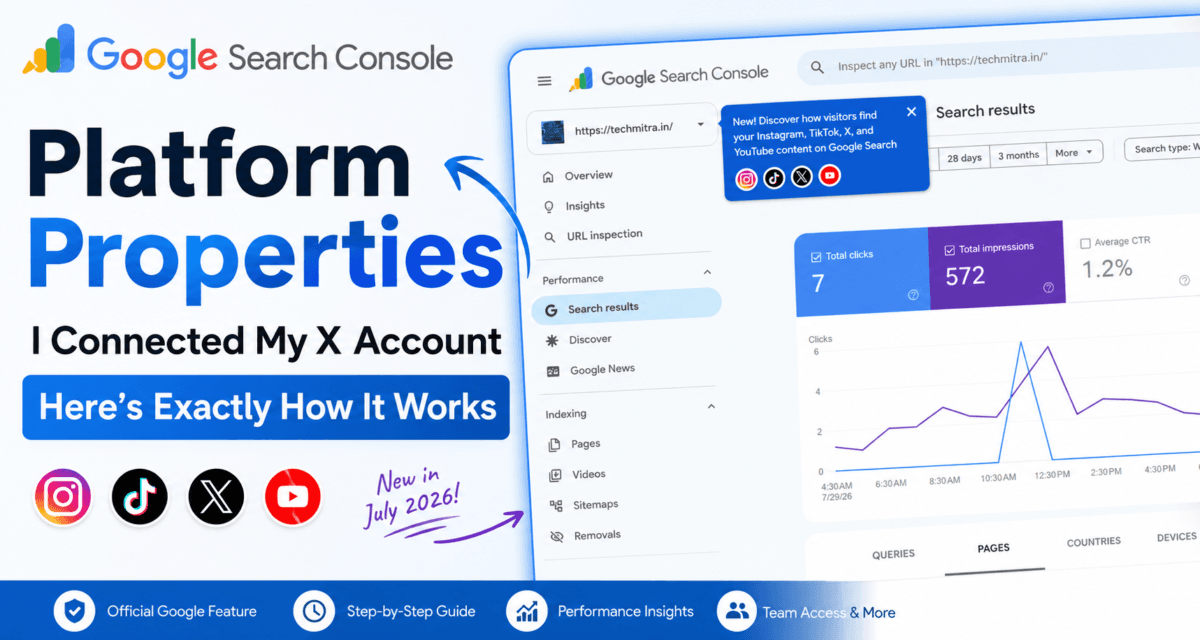
Google first introduced social channels in Search Console back in December 2025 — a quiet experiment that added social performance data into the Insights report for a limited set of sites. That experiment has now grown into a full, public feature called platform properties, officially launched on July 7, 2026. It lets you connect Instagram, TikTok, X, or YouTube directly to Search Console and see how that content performs on Google Search, Discover, and News — separate from your website property.
I connected my X account (@Techmitra2912) to test the current version of social channels in Search Console end-to-end, and I’m documenting the entire process here — real screenshots, no stock images — along with my honest take on whether it’s actually useful.
Table of Contents
Also Read : On-Page SEO and Off-Page SEO: What’s the Difference and Why Both Matter (2026)
From “Social Channels” Experiment to Platform Properties: A Quick Timeline
Social channels in Search Console was Google’s original name for this idea when it launched in December 2025. Back then, it only added social channel data into the existing Insights report — and only for a limited set of websites, for channels Search Console had automatically detected and associated with a site. You couldn’t connect an account yourself; Google had to find it first.
Platform properties, announced seven months later by Moshe Samet, Product Manager Lead for Search Console, is the full, self-serve evolution of that same idea: instead of waiting for Google to auto-detect your channel, you actively connect and verify it yourself, for any of the four supported platforms. The rollout was gradual at first — but as of July 29, 2026, Google confirmed it’s now available to everyone worldwide, so if you haven’t seen it yet, it should reach your account very soon.
What’s New: A Notification Bubble Inside GSC
While checking Search Console for techmitra.in, a blue notification bubble appeared right under the property switcher:
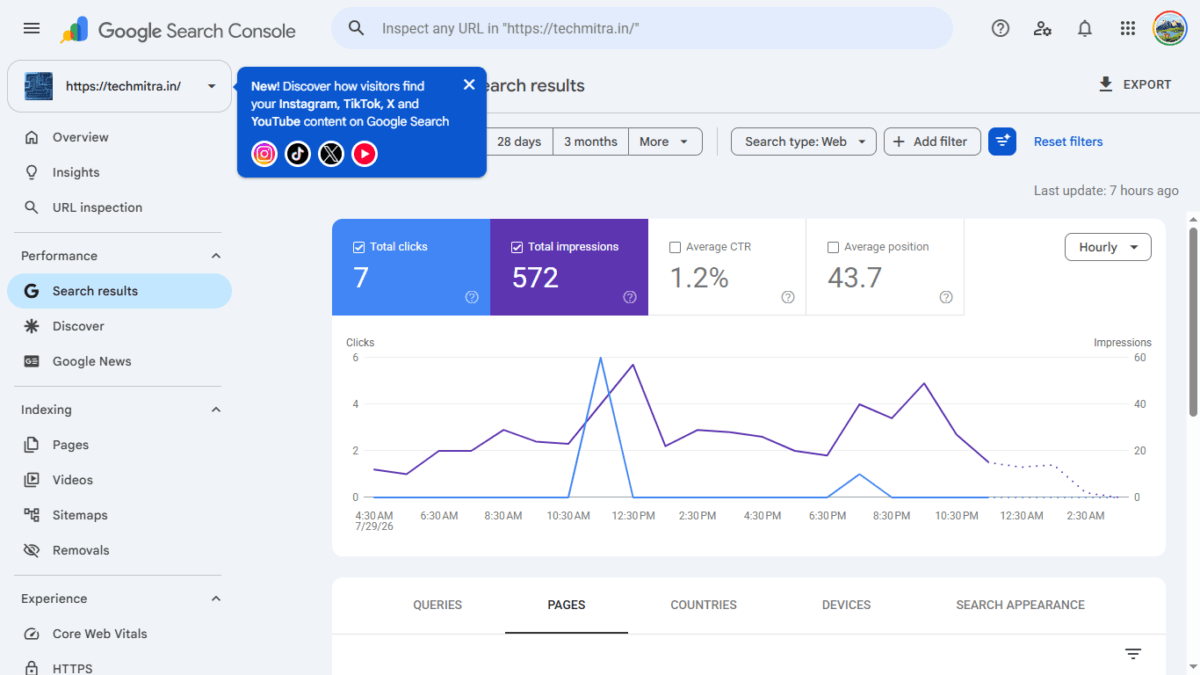
New! Discover how visitors find your Instagram, TikTok, X, and YouTube content on Google Search
This is Google’s rollout notice for platform properties — the successor to December’s social channels experiment, now built as a dedicated property type (alongside your regular website property) that reports how your social media content performs when it shows up in Google Search, Google Discover, or Google News.
Google initially said the rollout would happen gradually over “the coming weeks” — and true to that, it took roughly three weeks from the July 7 announcement to reach full global availability on July 29. If you’re reading this after that date and still don’t see it, check that you’re logged into the right Google account, since it should now be visible everywhere.
Step 1: Open the “Add Property” Menu
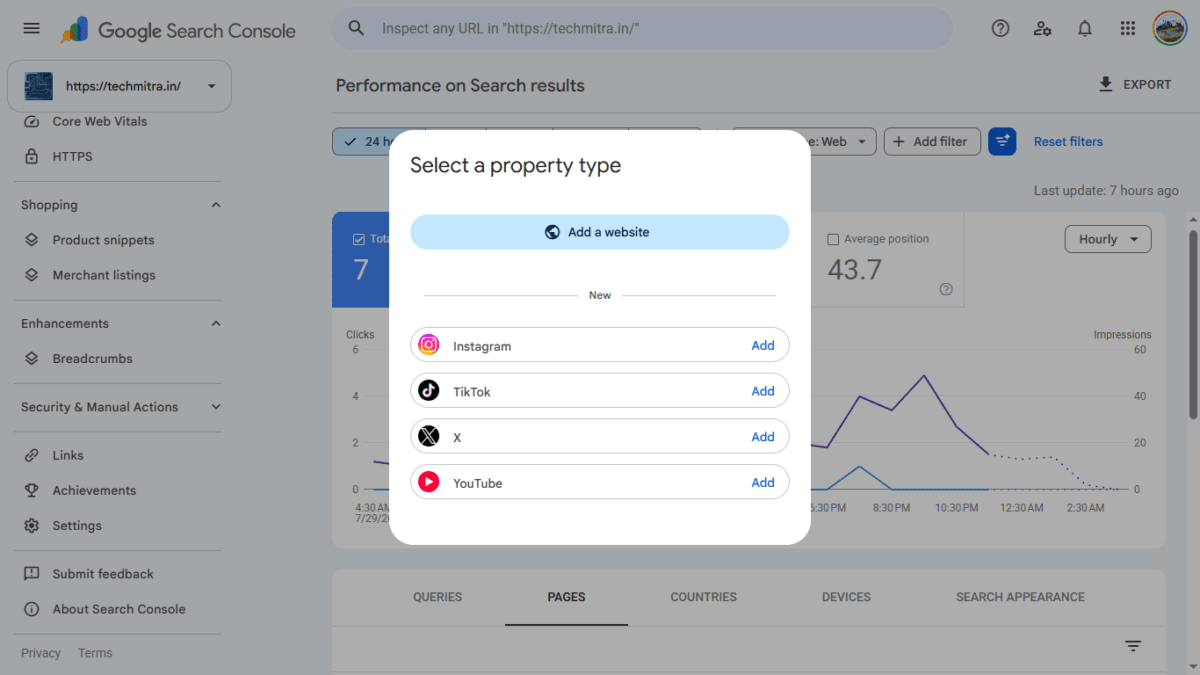
In the property selector dropdown (top-left, where you normally switch between your verified sites), click Add property. Previously this only gave you the option to add a website (via domain or URL prefix). Now, there’s a “New” section listing all four supported platforms:
- TikTok
- X
- YouTube
Each one has an Add button next to it.
Step 2: Choose the Platform and Grant Access
I clicked Add next to X. Google immediately prompted a consent screen:
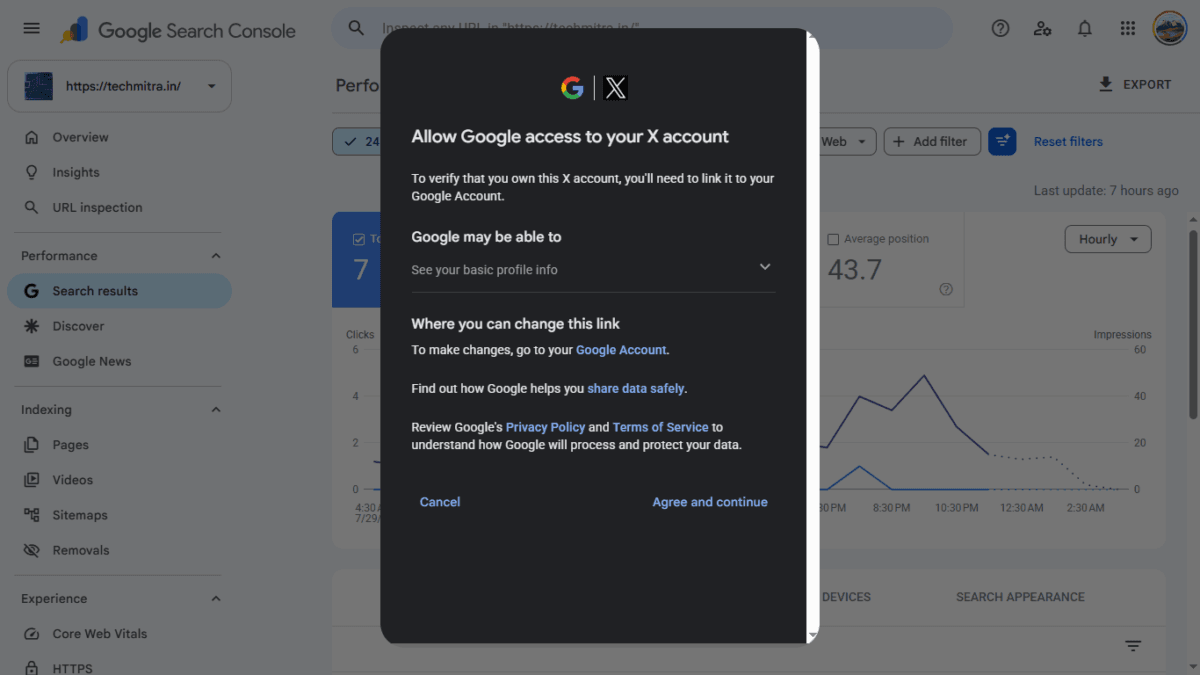
Allow Google access to your X account To verify that you own this X account, you’ll need to link it to your Google Account. Google may be able to: See your basic profile info
This is a standard OAuth-style permission screen — Google is not asking for posting access or DMs, just enough to confirm account ownership and pull public post performance data. I clicked Agree and continue.
Step 3: Authorize on X’s Side
This opened a new browser window pointed at x.com/i/oauth2/authorize, where X asked me to confirm the connection:
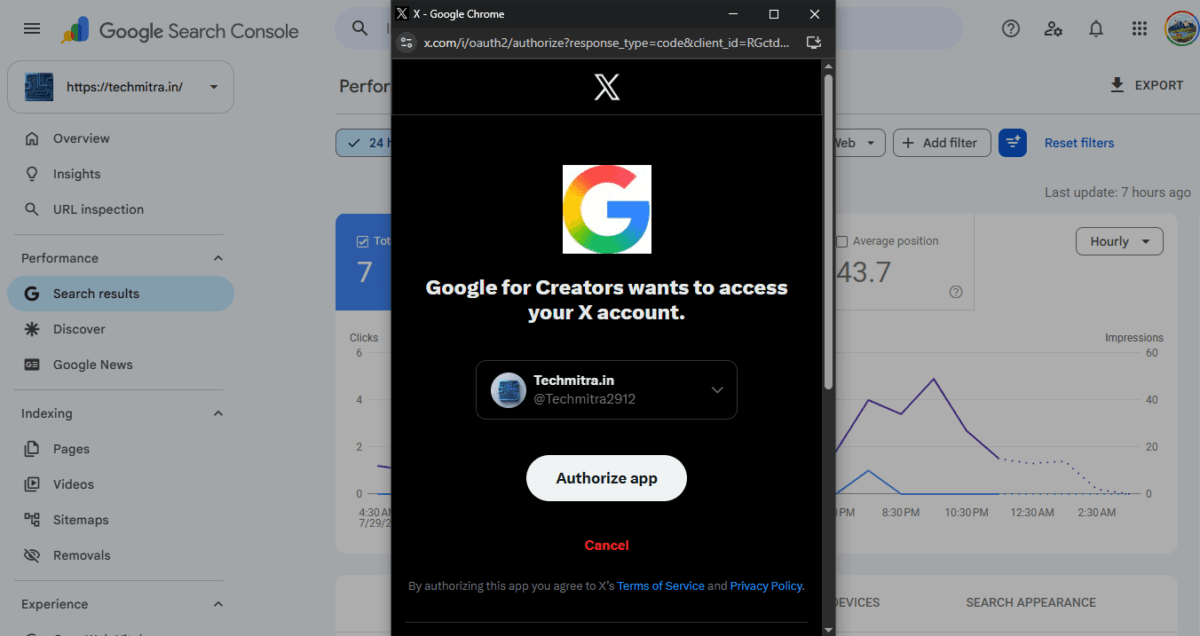
Google for Creators wants to access your X account. Techmitra.in · @Techmitra2912
I clicked Authorize app. Note the app is labeled “Google for Creators” on X’s side — this is the underlying product name for this integration, even though you’re accessing it through Search Console.
Step 4: Confirmation
Back in Search Console, a popup confirmed:
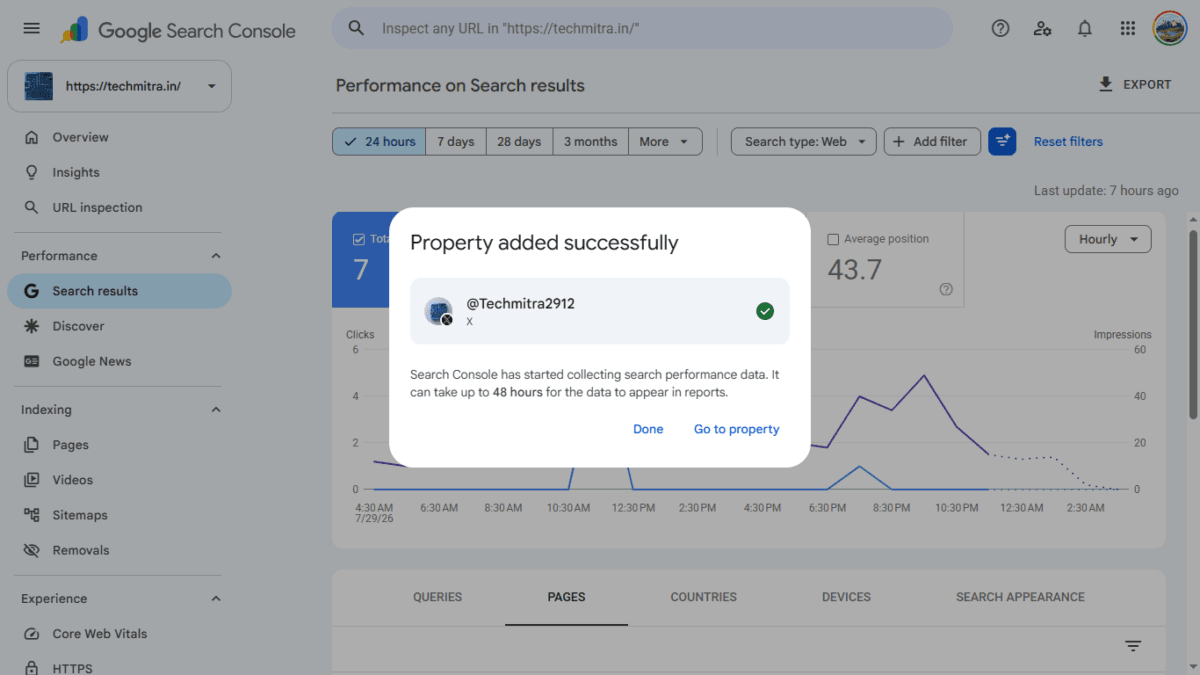
Property added successfully @Techmitra2912 — X Search Console has started collecting search performance data. It can take up to 48 hours for the data to appear in reports.
(Google’s own help center documentation for platform properties says “a few days” more generally — the 48-hour figure above is just what the confirmation popup itself displayed for me.)
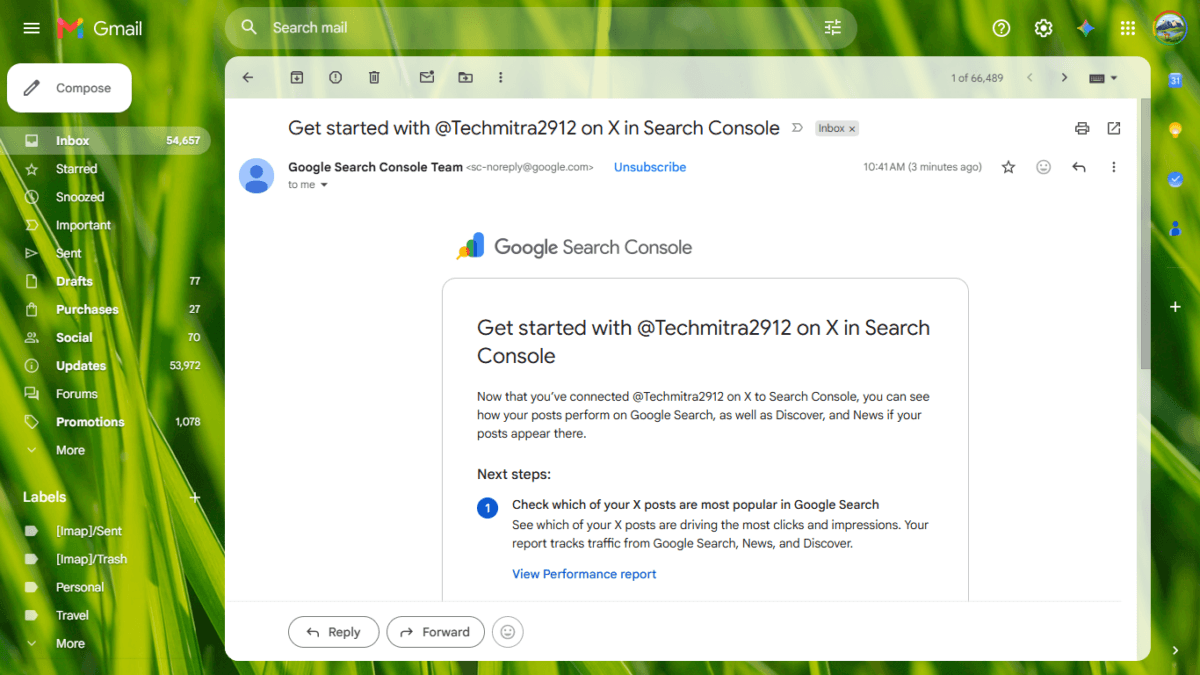
I also received an email within minutes, titled “Get started with @Techmitra2912 on X in Search Console,” from the Google Search Console Team. The email laid out three next steps:
- Check which of your X posts are most popular in Google Search
- See what people are searching for that leads them to your posts
- Share access with your team (via Add users, same as any GSC property)
Step 5: The New Property Tab
Switching to the new @Techmitra2912 property in the sidebar shows a stripped-down GSC interface — much simpler than the website property view. You get:
- Insights
- Performance
- Achievements
- Settings
No Indexing, no Core Web Vitals, no Sitemaps section — makes sense, since there’s no crawlable site structure here, just posts. The three reports map to what Google’s own announcement describes:
- Performance report — total clicks, impressions, average CTR, and average search position; filterable by post and by search type (Web, Image, Video, News)
- Insights report — a higher-level view of recent traffic trends, top-performing posts, and how people are discovering your account on Google
- Achievements — growth milestones, like crossing a new threshold for total clicks from Google Search in a 28-day window
When I opened the Performance tab right after connecting, it showed:
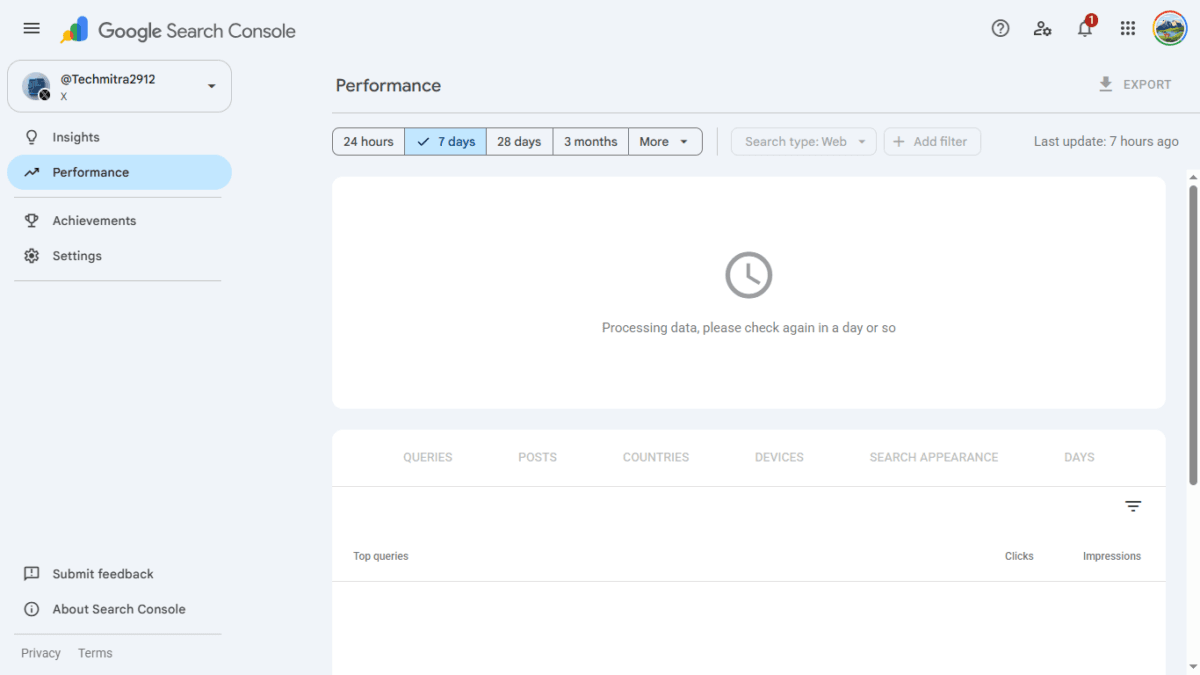
Processing data, please check again in a day or so
Google’s own help documentation confirms this is expected: it can take a few days for data to start appearing after verification, and — importantly — there’s no backfill. Your performance history starts from the moment you verify the account, not before. So there’s no advantage to waiting to connect an account you already plan to link.
One accuracy note worth knowing before you read your own reports: Google counts a “click” a little more loosely for video than you might expect. If your video appears in Search or Discover and someone taps it, that’s logged as a click in Search Console even if it opens inside Google’s own video viewer rather than sending them to X, Instagram, or YouTube directly. So a click here doesn’t always mean a visit landed on the platform itself — some of that traffic is consumed entirely within Google.
Once Data Arrives: What Google Recommends You Actually Do With It
Since the full rollout completed, Google has also published a companion guide on analyzing platform property data — worth knowing about before you connect, so you know what to actually look for once your reports fill in:
- Query groups — the Insights report highlights your top, trending-up, and trending-down search query groups driving traffic to your posts. Google’s suggestion: use these as direct inspiration for your next post’s topic, caption, or hashtags.
- 24-hour filter — lets you catch a sudden Search traffic spike to a recent post while there’s still time to cross-promote it on your other channels.
- Cross-platform export — since each platform is its own separate property, you export each one individually, then compare YouTube, Instagram, X, and TikTok side by side in a single spreadsheet.
- Resurfacing old content — watch for older posts regaining search traction; Google suggests pinning that content to your feed or turning it into a “part two.”
- Annotations — log the date you changed a title or caption, then compare performance before and after that point. Google is explicit that this is a before-and-after record, not a controlled experiment.
- Comparison mode — lets you view two data sets side by side, e.g. long-form YouTube videos against Shorts, or regular posts against Reels.
One more detail worth knowing: if you’ve already verified a Search profile on one of these platforms, Google says it’s automatically included as a platform property — you may not need to go through the connection flow at all.
Is It Actually Useful? My Honest Take
For creators and bloggers who post actively on X: yes, this is genuinely useful — but with a caveat. Most of the value here depends on whether your posts get picked up by Google Search or Discover in the first place. If your X account mostly gets engagement within X (replies, retweets, likes) and rarely surfaces in a Google result, this dashboard is going to sit mostly empty. It’s a measurement tool, not a distribution boost — connecting your account doesn’t make Google index or prioritize your posts, it just gives you visibility into if and when that already happens.
For website owners like me running TechMitra: it’s a nice complementary data point rather than a core traffic driver. My real traffic still comes overwhelmingly from Bing and AI citation channels (Copilot, ChatGPT), not from Google Search directly. This feature won’t change that. But if even a fraction of X posts start showing up in Google Discover, having a dedicated report — separate from the noise of my website property — makes it easy to spot that signal early instead of digging through unrelated site data.
Should you connect it? If you already have an X (or Instagram/TikTok/YouTube) account tied to your brand, there’s essentially no downside — the permission granted is read-only profile verification, it takes two minutes, and worst case the dashboard just stays empty. I’d recommend connecting it and checking back in a week rather than expecting instant insights.
One thing to keep in mind long-term: Google periodically re-checks that you still own the connected account. If the underlying login expires or access is revoked on the platform’s side, your platform property pauses until you re-verify — though re-verifying restores the same report without needing to wait for data to rebuild from scratch. So this isn’t a strict one-time setup; treat it like something to occasionally check if your reports suddenly go quiet.
FAQs: Google Search Console Platform Properties
What is a Google Search Console Platform Property?
It’s a new property type in Search Console, launched officially on July 7, 2026, that lets you connect an Instagram, TikTok, X, or YouTube account and see how that account’s content performs in Google Search, Discover, and News — separate from a regular website property.
What are social channels in Search Console?
Social channels in Search Console was Google’s original name for this feature when it launched in December 2025 as a limited experiment — adding social performance data into the Insights report, but only for sites and channels Google had auto-detected. It’s now evolved into the publicly available platform properties feature, launched July 7, 2026, which anyone can set up themselves for Instagram, TikTok, X, or YouTube.
Does a Platform Property improve SEO?
No. Connecting a platform property doesn’t change how Google indexes or ranks your content — it’s purely a reporting tool. It shows you whether your posts are already surfacing in Google Search or Discover and how people find them; it doesn’t make that surfacing happen or boost it.
Can I connect multiple accounts?
Yes. Each account or channel — even multiple profiles on the same platform — needs to be added as its own separate property. If you run more than one X handle or manage several Instagram accounts, you repeat the setup process for each one individually.
Is historical data imported?
No. There’s no backfill. Your reporting history starts from the moment you verify the account, not before — so it’s worth connecting an account sooner rather than later if you’re planning to track it.
How long does data take to appear?
Google’s own documentation says a few days after verification. In my case, the confirmation popup itself quoted 48 hours, but treat “a few days” as the safer general expectation.
Can I remove a Platform Property later?
Platform properties work like other Search Console properties in terms of management — you can remove access via the property’s settings, or the connection will automatically pause if Google’s periodic ownership check fails (for example, if your login on the platform’s side expires). Re-verifying later restores the same report without losing your accumulated data.
Quick Recap
| Step | What Happens |
|---|---|
| 1 | Notification bubble appears in GSC for your website property |
| 2 | Click Add Property → choose Instagram / TikTok / X / YouTube |
| 3 | Grant Google access via the platform’s OAuth screen |
| 4 | Confirmation popup + email from Google Search Console Team |
| 5 | New simplified property tab appears; data takes ~48 hours |
If you’ve received platform properties in your Search Console, let me know which platform you connected first. I’ll update this guide once my X account starts collecting data.
This article is based on a first-hand walkthrough of the feature as it appeared in Google Search Console on July 30, 2026. Platform properties were officially announced by Google on July 7, 2026, building on the earlier social channels in Search Console experiment from December 2025, and reached full worldwide availability on July 29, 2026.

Ayush Singhal is the founder and chief editor of TechMitra.in — a tech hub dedicated to simplifying gadgets, AI tools, and smart innovations for everyday users. With over 15 years of business experience, a Bachelor of Computer Applications (BCA) degree, and 5 years of hands-on experience running an electronics retail shop, Ayush brings real-world gadget knowledge and a genuine passion for emerging technology.
At TechMitra, he covers everything from AI breakthroughs and gadget reviews to app guides, mobile tips, and digital how-tos. His goal is simple — to make tech easy, useful, and enjoyable for everyone. When he’s not testing the latest devices or exploring AI trends, Ayush spends his time crafting tutorials that help readers make smarter digital choices.
📍 Based in Lucknow, India
💡 Focus Areas: Tech News • AI Tools • Gadgets • Digital How-Tos
📧 Contact: Get in touch →
🔗 Full Bio: https://techmitra.in/about-us/