
Published: 25-05-2025 | Updated: May 2025 | Invideo AI Review 2026 | This post contains affiliate links. If you purchase through my link, I may earn a commission at no extra cost to you.
The trend of running faceless YouTube channels is skyrocketing. Creators worldwide are making thousands of dollars without ever showing their faces on camera. However, the traditional process—writing scripts, recording high-quality voiceovers, sourcing copyright-free stock clips, and editing them together—can take hours, if not days.
What if you could automate this entire workflow?
By combining the brainstorming power of ChatGPT with the automated rendering capabilities of Invideo AI, you can create professional-grade videos in under 5 minutes. In this article, I will share my exact real-world case study of how I generated a viral-ready faceless video in Hindi, and how you can replicate this exact workflow for your own channel.
Table of Contents
Also read: 20 Best ChatGPT Prompts for Travel Planning (2026 Guide)
What is Invideo AI?
Invideo AI is a cutting-edge, cloud-based video creation platform that uses advanced artificial intelligence to turn simple text descriptions into fully polished, professional-quality videos. Unlike traditional video editors that force you to clip video tracks on a complex timeline, track audio, and sync subtitles manually, Invideo AI functions like an automated, full-stack video production crew.
You simply type out an idea, a script, or a specific prompt—specifying the target platform, video length, and language—and the AI automatically handles the research, scriptwriting, voiceover generation, visual matching, and transitions.
Key Features of Invideo AI
What makes Invideo AI a game-changer for content creators, affiliate marketers, and business owners in 2026 is its robust suite of AI-driven capabilities:
1. Full Idea-to-Video Pipeline
The core loop of the platform is true text-to-video automation. Powered by advanced models like OpenAI’s GPT-4, the platform reads a brief text prompt and generates a complete first draft within minutes. The finished asset comes fully loaded with a structurally sound script, contextual background music, relevant stock footage, text overlays, and a matching voiceover.
2. “Magic Box” Text-Based Editing
If you don’t like a specific part of the generated video, you do not need traditional video editing skills. Using the natural language “Magic Box” command editor, you can edit the video by simply typing what you want to change. For example, you can type: “Delete scene 3,” “Make the background music more upbeat,” or “Change the voiceover to an Indian male accent,” and the AI will update the scene instantly.
3. Integration with Next-Gen Generative Models
Standing out from basic stock video software, Invideo AI aggregates frontier generative visual models directly into its dashboard. Premium plan configurations allow creators to render highly specific, cinematic visuals utilizing top-tier visual generators like OpenAI’s Sora 2 and Google’s Veo 3.1, allowing you to bypass static, repetitive stock footage.
4. Over 16 Million Royalty-Free Assets
For standard video generation, Invideo AI integrates a massive library of over 16 million high-quality, royalty-free stock videos, photos, and background tracks. Premium tiers even tap directly into top-tier repositories like iStock, ensuring your clips look highly professional and remain safe from copyright strikes.
5. Multi-Lingual Support & Realistic Voice Cloning
The platform effortlessly breaks down geographical barriers by supporting content creation in over 50 languages and distinct regional accents. It generates human-like narration automatically. For paid accounts, you can even use the Voice Cloning feature: by uploading a simple 30-second audio sample of your own voice, the AI can replicate your voice across all your automated scripts for ultimate brand consistency.
6. Auto-Subtitles and Dynamic Typography
With a massive portion of social media users watching videos on mute, captions are mandatory. Invideo AI builds localized, highly accurate, auto-generated subtitle overlays into every render. You can fully customize font styles, brand colors, and animations with just a few clicks.
Check All Features Of InVideo AI Here
My Real-World Case Study: The PM Surya Ghar Yojana Video
To test this workflow, I decided to target a trending, high-intent topic in India: The PM Surya Ghar Muft Bijli Yojana. Instead of making a generic video about the government scheme, I wanted to address a real pain point—improper solar panel installation and the hidden maintenance costs that occur when panels are mounted in inaccessible places.
Here is the exact step-by-step blueprint of how I brought this video to life without recording a single second of footage.
Step 1: Brainstorming and Prompting inside ChatGPT
Instead of trying to write a complex script or storyboard manually, the best way to start is by heading directly into the ChatGPT sidebar and launching the official Custom GPT titled “Video AI by invideo”.
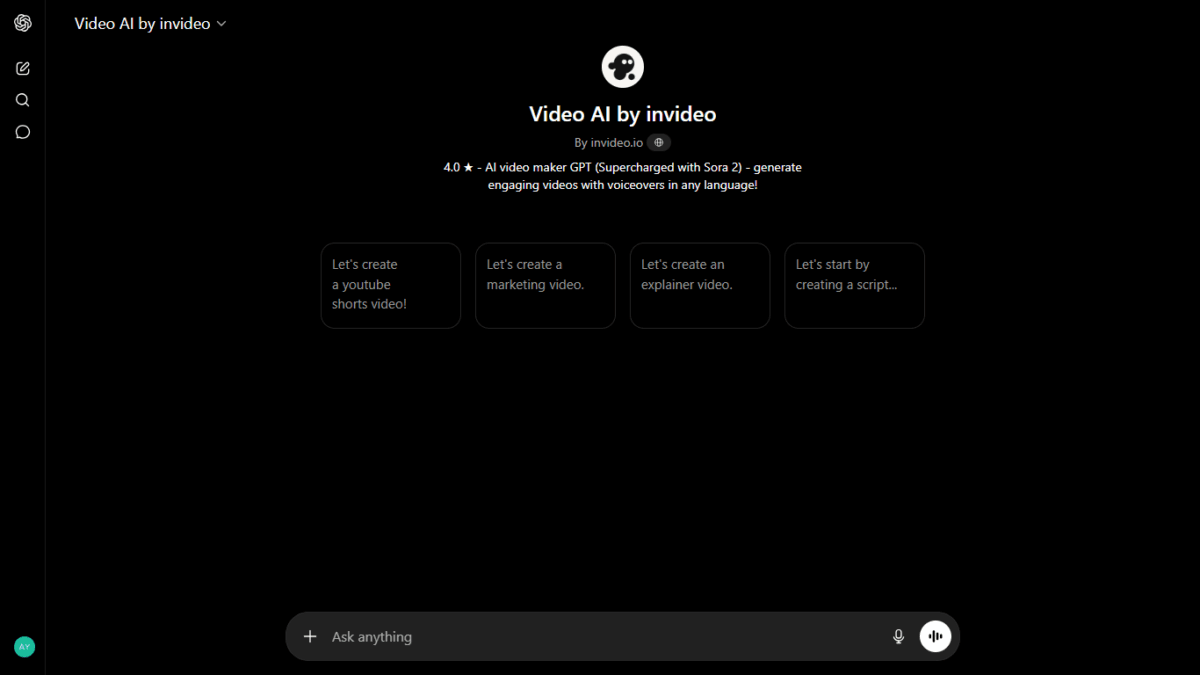
The official “Video AI by invideo” interface inside ChatGPT, supercharged with Sora 2 capability.
As shown in “Invideo GPT in Chat GPT.png”, the interface is incredibly minimalist and welcoming, offering quick-start prompts like “Let’s create a youtube shorts video!” or “Let’s create a marketing video.”
What makes this specific GPT so powerful is its backend capability—it is explicitly noted as being Supercharged with Sora 2, meaning it bridges conversational text prompts directly into frontier generative visual aesthetics.
For my case study, I bypassed the generic templates, went straight to the input bar, and provided my custom conversational prompt in Hindi explaining the core solar panel maintenance problem:
“Let’s create a youtube video from text “आज हमारे देश में पीएम सूर्य घर योजना की मदद से बहुत तेजी से सोलर प्लांट लगवाए जा रहे हैं, लेकिन इस पर कोई ध्यान नहीं देता कि इंस्टॉल कैसे कर रहे हैं, हम सब जानते हैं कि सोलर पैनल को अच्छी तरह से काम करने के लिए उसको एक महीने में एक बार धोना पड़ता है, लेकिन सोलर पैनल ऐसी जगह इंस्टॉल कर दिया जाता है जहां किसी की पहुंच काठिन हो जाता है, इसके लिए प्रोफेशनल को बुलाना पड़ता है जो कुछ भुगतान आपसे लेता है, सोलर प्लांट बचत ना करके खर्चा करा ने लगता है, जो ना सरकार के लिए उपयोगी है ना लगवाने वाले के लिए””
Step 2: Selecting the Perfect Video Format
The Invideo AI GPT immediately analyzed the core message and offered two distinct structural paths:
- Option 1: Informative & Educational (1.5 to 2 minutes): A calm, solution-oriented documentary style focusing on proper maintenance and planning.
- Option 2: Short YouTube Video (60 seconds): A high-energy, fast-paced format optimized for YouTube Shorts or Instagram Reels.
I selected Option 2 for a punchy, highly engaging video. Interestingly, the AI adapted dynamically and drafted a beautifully structured, persuasive voiceover script in Hindi, ensuring the local audience could connect with it effortlessly.
Step 3: Automated Scripting and Handoff
Once the script was finalized, I simply typed “Proceed”.
At this point, ChatGPT initiated its backend integration with video-ai.invideo.io. The system gave a live confirmation status:
“Your video is being generated with cinematic solar visuals, Hindi male narration, and professional documentary-style editing.”
The AI automatically handled the generation of a natural Hindi male voiceover, searched millions of stock assets to match the visual context of solar setups, added cinematic transitions, and compiled a review link instantly.
Also Read : ChatGPT Images 2.0 Launched: Features, Capabilities & Real Comparison with Gemini
Real-World Proof: See the Final AI-Generated Video
Instead of just talking about the theory of AI video generation, it is best to look at the actual output. Below is the exact, unedited 60-second video—“invideo-ai-1080 सोलर पैनल की सही इंस्टॉलेशन और सफाई के सुझाव 2025-01-18 (1).mp4”—created by the AI in a single pass using the Hindi prompt mentioned above:
🔍 Key Details to Notice in This Video:
When you watch the clip, pay close attention to how a premium multi-agent AI system processes a single text prompt into a cohesive marketing or educational asset:
- Contextual B-Roll Selection: Notice how the video dynamically cuts between aerial drone shots of solar fields, close-ups of engineers reviewing blueprints, and technicians actively cleaning panel surfaces. The AI automatically matched these visuals to the voiceover theme without any manual searching.
- Professional Voiceover & Audio Control: The Hindi male narration sounds natural and clear. Furthermore, the background music features automated audio ducking—meaning the music volume automatically lowers when the narrator speaks and rises slightly during transitions.
- The Premium Branding Element: In the top right corner, you will notice the platform’s user watermark overlay (
invideo/ayush). While this looks incredibly clean, it serves as a reminder of why serious creators upgrade. To completely remove platform text and display your own custom channel logo, moving to a premium plan is essential. - Monetization Readiness: From start to finish, the 60-second video feels cohesive, engaging, and structurally sound. This is the exact format used by highly successful, automated faceless channels to rack up millions of views on YouTube Shorts and Instagram Reels.
By utilizing this automated framework, you completely eliminate the bottleneck of traditional video production. You don’t need to purchase expensive editing software, spend hours aligning audio tracks, or buy thousands of rupees worth of individual stock clips—the AI factory delivers a deployment-ready file in minutes.
Analyzing the Invideo AI Free Tier: What to Expect
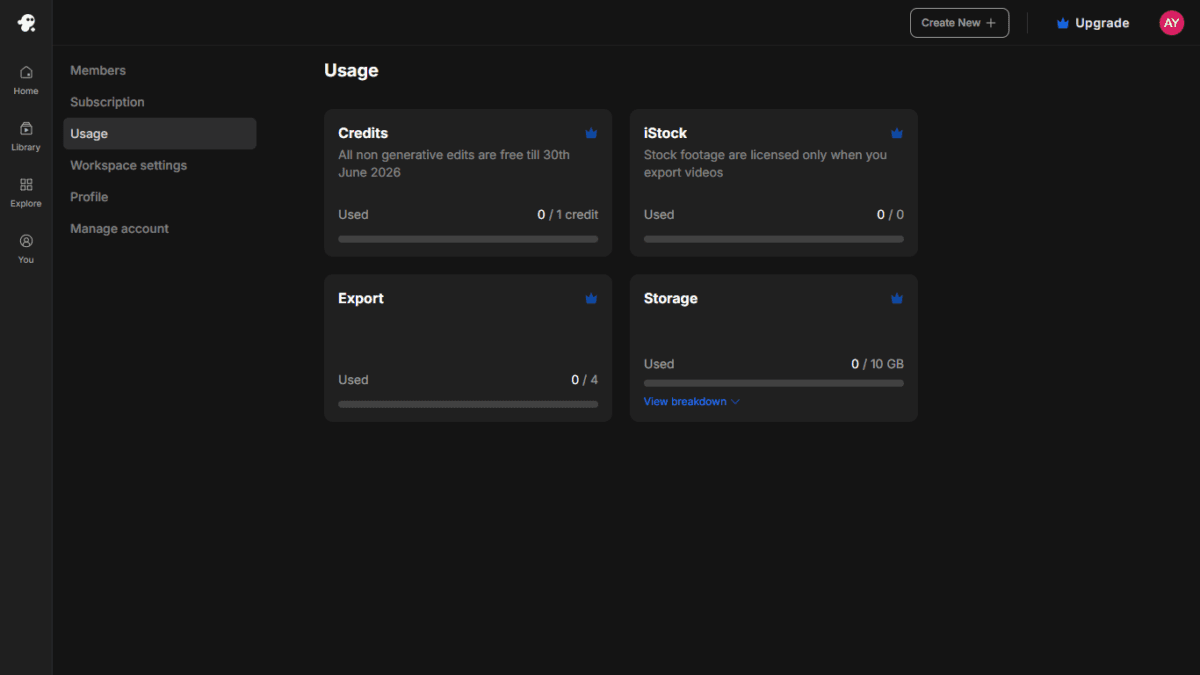
Upon opening your newly created account, you will land on your main dashboard. Let’s take an honest look at what the free account offers, referencing “New account dashboard.png”:
- The Generation Credit Bottleneck: As displayed in “New account dashboard.png”, a fresh free registration gives you 0 / 1 Credit for generative edits. This means while you can quickly sample the tool, you won’t have the freedom to heavily customize, tweak, or generate multiple variations of automated scripts without hitting a wall.
- The Export Limitations: The dashboard shows an allotment of 0 / 4 Exports. However, keep in mind that free exports carry prominent platform watermarks and standard definitions. If your goal is to pass YouTube Partner Program requirements and monetize your channel, watermarked videos are highly discouraged.
- Storage Allocation: You receive a basic 10 GB Storage bucket to hold your active media assets.
The Bottom Line: The free trial is an excellent playground to witness the raw power of the AI, but upgrading to a premium tier is essential if you want to publish polished, unwatermarked content that ranks and monetizes.
Finding Your Ideal Tier: Premium Plan Breakdown
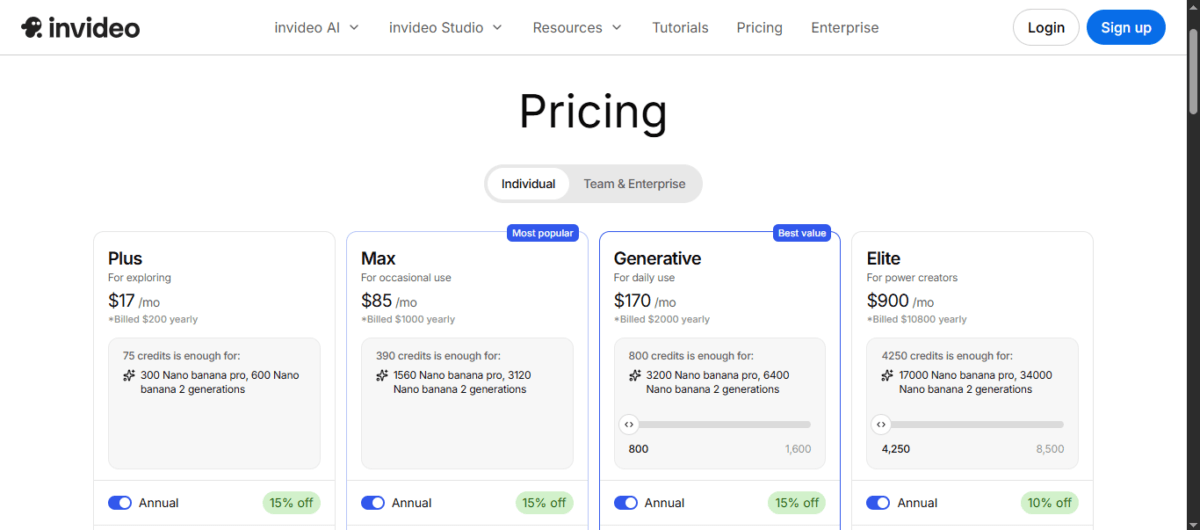
When you are ready to scale your faceless channel strategy, Invideo AI offers several individual plan structures. Referencing “Invideo Pricing Plans”, here is a look at how the tiers stack up to fit different creation scales (Note: Precise pricing details fluctuate based on active promotional deals, so we will focus purely on structural value):
- Plus Plan (The Aspiring Creator Starter Pack): Designed for individual creators testing out the video automated landscape. It unlocks watermark-free exports, expands your cloud workspace, and offers a robust baseline of generation credits to get your channel moving.
- Max Plan (The Ultimate Sweet Spot): Labeled as the “Most Popular” option in “Invideo Pricing Plans”, this tier is built for serious content publishers. It offers a massive jump in generation credits (hundreds per month), allowing you to drop short-form and long-form videos consistently across multiple platforms without credit exhaustion.
- Generative & Elite Plans (The Powerhouses): As showcased in “Invideo Pricing plans”, these top tiers scale all the way up to thousands of credits. They are tailor-made for agency owners, heavy daily publishers, and corporate media teams who need high-throughput rendering every single day.
Check Invideo Prices Details Here
Google’s Video Generation: How Long Can It Render?
If you are tracking the broader artificial intelligence landscape, you might wonder about Google’s flagship video capabilities—specifically models like Gemini Omni and Veo 3.1. While Google’s technology is highly advanced, it handles video length and production in a fundamentally different way:
1. Gemini Omni (The Quick Iteration Model)
- Maximum Length: Capped at a strict 10 seconds per individual clip.
- How it works: It acts as a true world-simulator, generating high-quality video with natively synchronized audio and realistic lip-sync in a single pass.
- The Standout Feature: You can edit these 10-second clips continuously through chat prompts (e.g., typing “change the background to a rainy city”), making it perfect for rapid prototyping or short YouTube Shorts loops.
2. Veo 3.1 (The Cinematic Camera Engine)
- Maximum Length: Generates scenes up to 60 seconds using advanced clip extension features.
- How it works: This is Google’s dedicated high-resolution rendering powerhouse, designed for native 4K output and complex, cinematic motion. However, it lacks the multi-turn conversational editing flexibility of the Omni model.
Also Read : Google I/O 2026: Google Unveils Gemini 3.5 Flash and Powerful New Gemini Omni AI Model
Invideo AI vs Google Video Models: Why Pay for a Subscription?
This raises a massive question for creators and digital entrepreneurs: If Google offers cutting-edge AI video models, why should anyone pay for an Invideo subscription?
The answer comes down to a simple reality: Google’s models are an incredible engine, but Invideo AI is a complete factory. The comparison reflects two entirely distinct philosophies—Pure Generative Power vs. Complete Production Automation.
1. Raw Materials vs. The Final Product
Imagine you want to make a 3-minute YouTube explainer video about solar panel maintenance under the PM Surya Ghar Yojana.
- With Google’s Models: You can generate a stunning, hyper-realistic 10-second clip of a solar setup. However, when it finishes rendering, you are left with a folder full of disconnected, silent video clips. You still have to manually write a script, jump to a separate tool for voiceovers, and piece everything together in a traditional video editor.
- With Invideo AI: You provide a simple prompt, and it builds the entire final product in one single shot. It handles the scripting, pairs all 3 minutes with seamless footage, generates human-like narration, maps out smooth transitions, and bakes in synchronized captions automatically. It does 90% of the manual labor for you.
2. Multi-Agent Production Team vs. A Standalone Camera
Google Omni is a foundational multimodal model—it understands text, pixels, and sound flawlessly. However, it does not feature an automated content pipeline.
Invideo AI utilizes a multi-agent architecture that breaks down your prompt exactly like a real production crew:
- Agent A acts as your Copywriter to lay out a structured script.
- Agent B acts as your Asset Manager, combing through millions of premium stock assets to find immediate cultural and contextual matches.
- Agent C acts as your Audio Engineer to layer narration, effects, and music seamlessly.
3. Commercial Safety and Copyright (The iStock Advantage)
For anyone looking to safely monetize their content on YouTube or run paid business ads, legal safety is critical. Pure AI-generated human faces can occasionally fall into copyright gray areas or hit the “uncanny valley” effect.
Invideo AI solves this by relying on its deep integration with iStock. When you upgrade to an Invideo premium plan, you gain direct commercial clearance for real stock footage featuring real actors and authentic locations. That built-in legal safety net easily justifies the subscription cost for business channels.
Summary: Quick Comparison
| Feature / Need | Choose Invideo AI | Choose Google Models |
| Primary Goal | High-volume social marketing, faceless YouTube channels, turning text scripts into completed projects fast. | High-fidelity b-roll, commercial visual storytelling, original cinematic art. |
| Output Type | A finished, fully edited video file with voice, text overlay, and music tracks. | Short, highly cinematic individual visual clips to be imported into a timeline. |
| Effort Level | Low. The AI makes 80% of the production decisions for you. | Medium to High. Requires storyboarding, custom prompting, and manual compiling. |
For hobbyists or high-end cinematic creators, Google’s standalone engines are a remarkable tool. But for affiliate marketers and creators who value speed, total automation, and turn-key publishing layouts, Invideo’s paid plans remain a highly profitable business investment.
Also Read : Catalister Review 2026: Can This AI Tool Really Build a Profitable Shopify Store?
Final Thoughts: Should You Try It?
Using ChatGPT alongside Invideo AI completely eliminates the friction of video creation. You don’t need a high-end camera, an expensive microphone, or deep video editing experience to run a highly profitable YouTube channel. Take a trending niche, tell the AI what you want, and let it build the assets for you.
Are you ready to build your automated video empire? Don’t rely on restricted free accounts. Click the link below to get started and unlock premium, watermark-free rendering today!
👉 Start Creating Professional AI Videos Instantly with Invideo AI
Invideo AI Review 2026 : My Final Verdict
⭐ Overall Rating
★★★★☆
InVideo AI is genuinely one of the most complete AI video tools available today. I used it myself to create 4 real YouTube videos — and the output was professional enough to publish without embarrassment.
The free plan gives you a real taste of the platform, but if you’re serious about video content, the Plus plan ($200/year annual) is the sweet spot — no watermark, 50 minutes/month, and 1080p quality.
My recommendation: Start with the free plan to test it with your content type. If the output quality works for your niche, lock in annual Plus pricing for the best value.
Frequently Asked Questions (FAQs)
Q: Does InVideo AI work on mobile?
InVideo AI is primarily a web-based cloud platform accessible from any standard browser. While you can log in and view your dashboard on a mobile screen, it works best on a desktop or laptop for detailed prompt editing, script tweaks, and exporting high-resolution video files.
Q: Can I realistically monetize faceless videos generated by InVideo AI?
Yes, you can. YouTube’s monetization policy allows AI-generated content as long as it provides unique value, narrative structure, and high-quality editing. Because InVideo AI sets up a cohesive flow with synchronized subtitles, natural voice narration, and real stock footage, your videos stand out significantly compared to low-effort automated clips that get rejected for “repetitive content.”
Q: Why shouldn’t I just use Google Gemini Omni or Veo 3.1 for free?
While Google’s foundational video engines (like Gemini Omni) are incredibly advanced for rendering raw, 10-second cinematic clips from scratch, they do not provide a timeline or a complete production crew architecture. With Google’s models, you are left with scattered, silent visual clips. You still have to manually write the script, generate a separate voiceover, buy background music tracks, and stitch everything together yourself. InVideo AI acts as a complete automated factory—it handles all of those steps simultaneously to give you a finished, ready-to-upload file in minutes.
Q: Is the text-to-video prompt feature available in Hindi?
Absolutely. As shown in my real-world case study on the PM Surya Ghar Yojana, you can type your core concepts in conversational Hindi. The specialized Video AI by Invideo GPT inside ChatGPT will automatically process your text layout, structure a professional script, and generate natural Hindi male or female narration tracks automatically.
Q: What are the main limitations of the InVideo AI Free Plan?
A fresh free registration limits your workspace to 0 / 1 Credit for generative AI edits and caps your rendering capacity to 0 / 4 Exports with highly visible platform watermarks. Furthermore, your projects are limited to a basic 10 GB cloud storage partition. To publish pristine, watermark-free content that looks professional and qualifies cleanly for commercial use, moving to a premium plan like the Max tier is highly recommended.
Disclosure: This article contains affiliate links. If you purchase InVideo AI through my link, I may earn a commission at no additional cost to you. I only recommend products I have personally used or thoroughly researched. All opinions expressed are my own.

Ayush Singhal is the founder and chief editor of TechMitra.in — a tech hub dedicated to simplifying gadgets, AI tools, and smart innovations for everyday users. With over 15 years of business experience, a Bachelor of Computer Applications (BCA) degree, and 5 years of hands-on experience running an electronics retail shop, Ayush brings real-world gadget knowledge and a genuine passion for emerging technology.
At TechMitra, he covers everything from AI breakthroughs and gadget reviews to app guides, mobile tips, and digital how-tos. His goal is simple — to make tech easy, useful, and enjoyable for everyone. When he’s not testing the latest devices or exploring AI trends, Ayush spends his time crafting tutorials that help readers make smarter digital choices.
📍 Based in Lucknow, India
💡 Focus Areas: Tech News • AI Tools • Gadgets • Digital How-Tos
📧 Contact: Get in touch →
🔗 Full Bio: https://techmitra.in/about-us/