

Introduction
Cloudflare is widely used by website owners for performance, security, and reliability. For many publishers, including blogs and news websites, Cloudflare becomes almost a default choice once traffic starts growing.
One of Cloudflare’s most talked-about security features is Bot Fight Mode. It promises automatic protection against unwanted bots, reduced server load, and better site security — all with a single toggle.
However, after personally experiencing a significant traffic drop, I learned that Bot Fight Mode is not universally safe for every type of website — especially not for content and publishing sites that depend on search visibility, Google Discover, and AI referral traffic.
This article has been rewritten and updated to reflect what happened, why it happened, and — importantly — a real fix that didn’t exist when I first wrote this: Cloudflare’s new AI traffic controls, launched July 1, 2026.
In this article, I’ll cover:
- What Cloudflare Bot Fight Mode does
- Its pros and cons for content-driven websites
- A real-world case study of why I disabled it on 21 December
- What changed after disabling it
- Cloudflare’s new Search / Agent / Training bot controls (July 2026)
- How I’ve configured TechMitra.in using these new controls
- Why I re-enabled Bot Fight Mode in July 2026 for a different reason, and how I avoided repeating the same mistake
Table of Contents
Also read : Cloudflare Cache Everything Case Study: How I Reduced Server Response Time by 60% (Real GSC Data)
What Is a Bot?
A bot (short for “robot”) is an automated software program that performs tasks on the internet without human involvement. Bots can be good or bad, depending on their purpose.
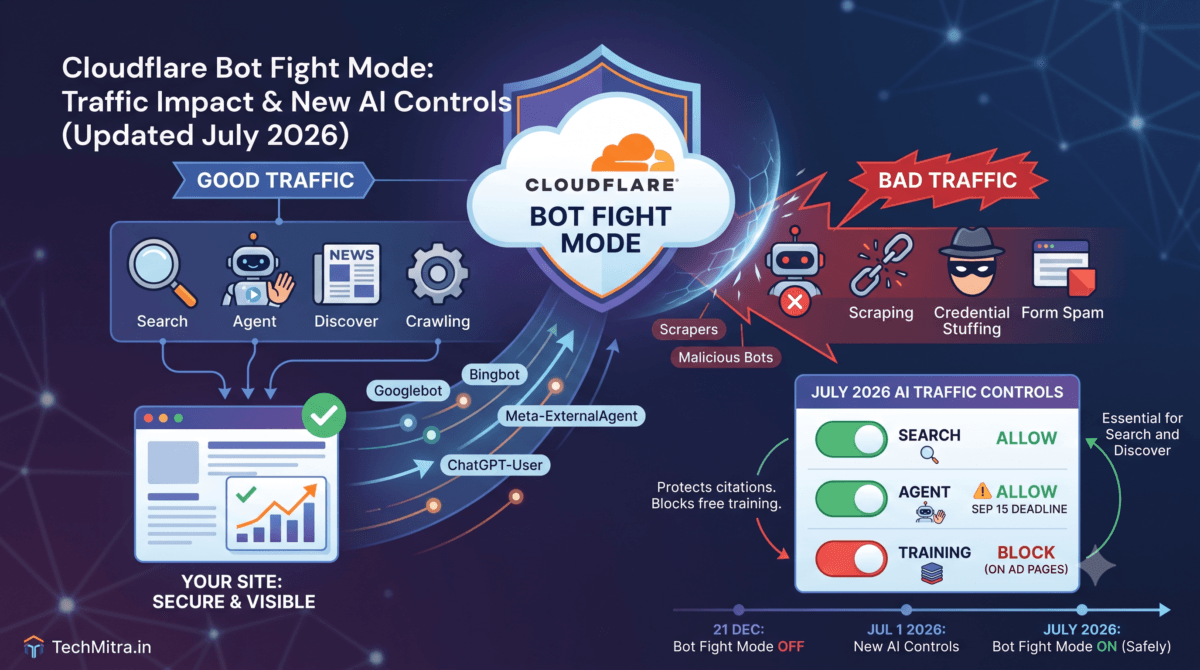
Good bots include search engine crawlers like Googlebot and Bingbot, along with AI assistants that read web pages to index content, generate previews, or answer user queries.
Bad bots, on the other hand, are designed to scrape content aggressively, attempt login attacks, spam forms, or overload servers.
The challenge for platforms like Cloudflare is accurately distinguishing helpful bots from harmful automation — and when that balance is off, legitimate crawlers can get affected along with malicious ones. This article is largely about what happens when that balance goes wrong, and what Cloudflare has since done to fix it.
Click here to generate custom robots.txt file
What Is Cloudflare Bot Fight Mode?
Cloudflare Bot Fight Mode is a security feature designed to identify and mitigate automated traffic that Cloudflare classifies as “bots.”
When enabled, it:
- Analyses visitor behavior
- Assigns bot scores
- Applies JavaScript or managed challenges
- Blocks or slows down suspicious automation
The idea is simple: protect your site from bad bots without manual configuration.
According to Cloudflare’s official documentation, Bot Fight Mode is designed to automatically detect and mitigate unwanted automated traffic.
The Intended Use of Bot Fight Mode
Bot Fight Mode works best for:
- E-commerce websites
- Login-heavy platforms
- SaaS dashboards
- Websites facing scraping or credential-stuffing attacks
In these cases, blocking aggressive automation can reduce server load, protect sensitive endpoints, prevent data scraping, and improve platform stability. For such websites, Bot Fight Mode can be genuinely useful.
Content and publishing websites are a different story, as I found out.
Pros of Cloudflare Bot Fight Mode
1. Easy, One-Click Protection
Bot Fight Mode requires no technical setup. Once enabled, Cloudflare automatically detects suspicious bot behavior. This is attractive for beginners, non-technical site owners, and sites that don’t want to manage firewall rules manually.
2. Reduced Server & Bandwidth Usage
By filtering automated junk traffic, fewer requests reach the origin server, hosting resources are saved, and bandwidth consumption drops. This can be helpful on shared or limited hosting plans.
3. Basic Defense Against Automated Attacks
Bot Fight Mode can slow or block credential-stuffing attempts, basic scraping tools, and repetitive automated requests. For non-content platforms, this adds a useful security layer.
The Hidden Cons for Content & Publishing Websites
This is where problems often begin.
1. Interference With Crawlers (Not Just “Bad Bots”)
Although Cloudflare allows major search engines in theory, in practice, managed challenges may still be applied, some crawlers receive “unsuccessful” fetches, and image and discovery crawlers can be delayed. For content websites, this matters a lot.
2. Impact on Google Discover Visibility
Google Discover is extremely sensitive to clean page fetching, fast image delivery, and zero JavaScript challenges. When Bot Fight Mode is enabled, heavy Discover crawlers may fail intermittently, fetch reliability drops over time, and Discover impressions can slowly decline. This does not happen immediately — which makes the issue harder to detect.
Read Here Google’s own documentation on Google Discover requirements
3. AI and Assistant Traffic Gets Affected
Modern websites increasingly receive traffic from ChatGPT, Perplexity, Bing AI, Meta, and other AI assistants. These systems rely on crawlers that fetch content aggressively, retry frequently, and can look “bot-like” to Cloudflare. With Bot Fight Mode enabled (in its old, blunt form), many of these crawlers experienced high failure rates — reducing AI citations, referral traffic, and external discovery.
4. “Unsuccessful” Requests Are Misleading
Cloudflare often shows requests as Allowed, Unsuccessful, or Blocked. The problem is that JavaScript and managed challenges often appear as “Unsuccessful,” not “Blocked” — but crawlers cannot solve these challenges. From an SEO perspective, unsuccessful fetches are almost as bad as outright blocks. This creates a false sense of safety.
Real-World Case Study: Why I Disabled Bot Fight Mode
Background
My website previously received strong traffic from Google Discover, Search, AI platforms like ChatGPT and Perplexity, and social/Meta previews.
After enabling Cloudflare with Bot Fight Mode, traffic did not drop immediately. Everything looked fine for the first 2–3 weeks. This delay made the issue difficult to diagnose.
What Went Wrong
After around 30–45 days, Google Discover traffic dropped sharply, AI referral traffic almost disappeared, and daily views fell drastically.
When I analysed Cloudflare’s crawler reports, I noticed Meta-ExternalAgent fetches failing repeatedly, ChatGPT-User and GPTBot showing high unsuccessful counts, and PerplexityBot experiencing repeated failures.
These crawlers were not malicious — they were being challenged by Bot Fight Mode. As a result, social previews broke, AI assistants stopped citing pages, Discover confidence degraded, and overall visibility collapsed.
The Fix: Disabling Bot Fight Mode
On 21 December, I disabled Bot Fight Mode, AI crawler blocking rules, and managed challenge triggers. I did not change content, SEO, or publishing frequency — only Cloudflare bot controls.
What Happened Next (Data-Backed)
On 22 December, Google Search Console crawl requests jumped significantly. Total crawl increased sharply, and crawl requests by discovery rose multiple times in a single day.
At the same time, ChatGPT, Perplexity, and Meta crawlers started fetching pages successfully. “Unsuccessful” crawler counts dropped close to zero, and daily views slowly began increasing again.
This confirmed that crawler blocking — not content quality — was the root cause.
How Bot Fight Mode Affected Performance
Crawl & Indexing: Crawl reliability matters more than crawl volume. Intermittent failures reduce Google’s confidence, and discovery crawl drops before Discover traffic disappears.
SEO & Rankings: Bot Fight Mode does not cause penalties, but it can delay rankings for new content, reduce promotion signals, and keep indexed pages from surfacing in Discover as effectively.
What Changed: Cloudflare New AI Traffic Controls (July 2026)
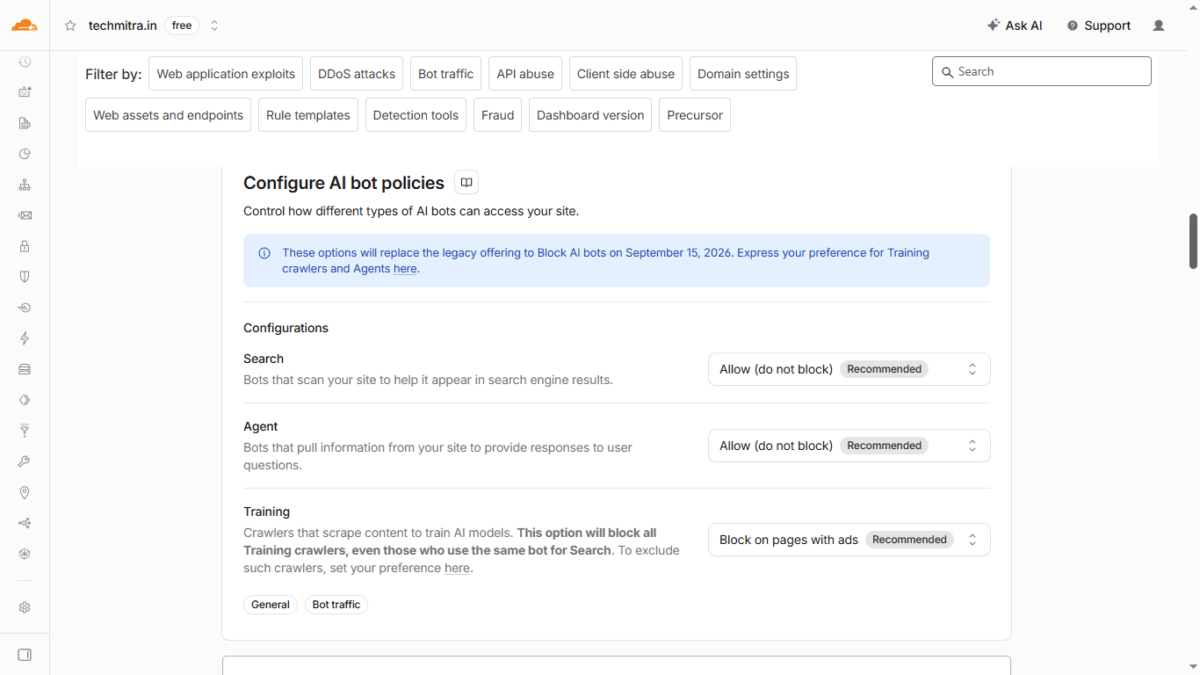
For months, the only real fix for the problem above was the blunt one I used — disable Bot Fight Mode entirely, or manually maintain allowlists for every legitimate crawler. That changed on July 1, 2026, when Cloudflare replaced its single “Block AI Bots” toggle with three independently configurable categories, available to all customers including the Free plan:
- Search — bots that crawl and index your content so AI tools can answer questions about it later. Cloudflare ties this behavior to referral traffic and citations.
- Agent — real-time bots acting on a person’s behalf right now, such as ChatGPT-User or browser-use agents (e.g., Claude or Gemini operating a browser). A human is typically waiting on the other end.
- Training — crawlers that scrape your content to train or fine-tune AI models. This is the category with the weakest return for site owners: content gets absorbed into a model with no real-time citation or referral traffic back to you.
For each category, you can now choose to allow it on all pages, block it on all pages, or block it only on pages that display ads.
Check Cloudflare’s July 1, 2026 changelog what are the updates
Cloudflare’s official blog post announcing the changelog
The Important Catch: Multi-Purpose Crawlers
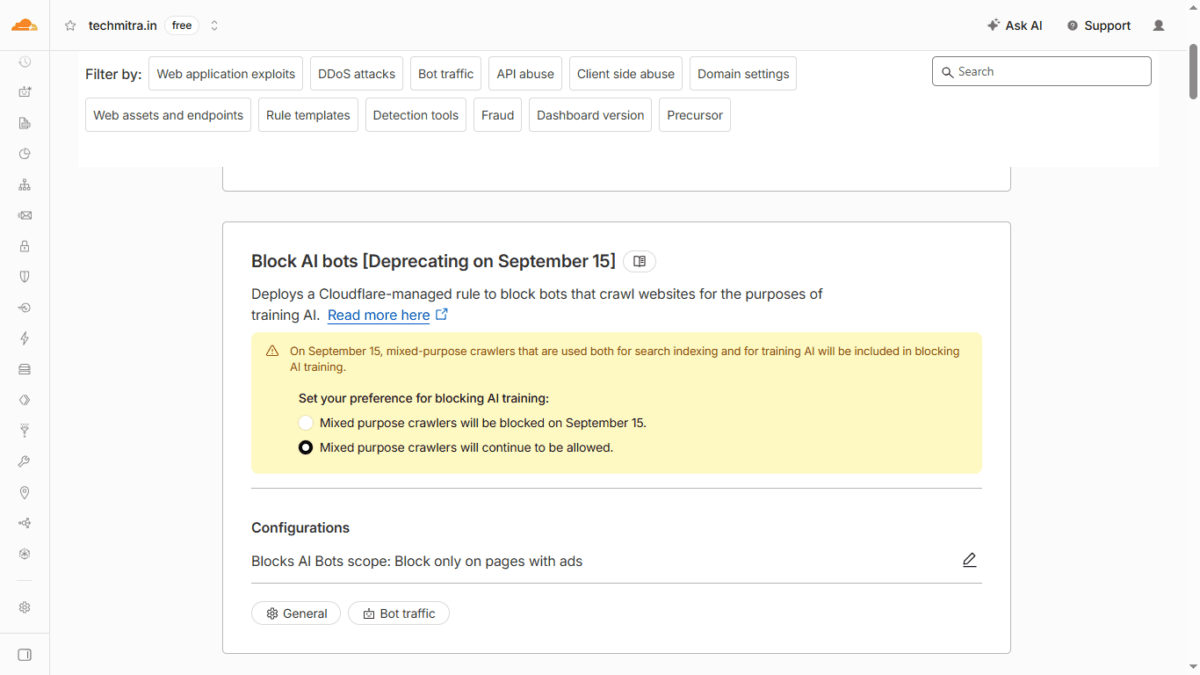
Some crawlers — Googlebot, Bingbot, and Applebot among them — serve more than one purpose at once (Search and Training combined). Cloudflare’s new system applies the strictest rule that matches a crawler’s behavior. This means that if you block Training, a multi-purpose crawler like Googlebot could get blocked too, unless you explicitly set an exception.
Starting September 15, 2026, Cloudflare will also apply new default settings for anyone who hasn’t made an explicit choice: Training and Agent bots will be blocked by default on pages that display ads, while Search stays allowed. This applies automatically to existing free-tier customers who haven’t set a preference — so if you run ads and use Cloudflare, this deadline matters even if you’ve never touched these settings before.
Note on Free vs. Paid plans: The Search / Agent / Training policies described above are available on Cloudflare’s Free tier, and that’s what I’m using on TechMitra. However, standard Bot Fight Mode on Free accounts works as a single global toggle — it doesn’t let you write custom allowlist or bypass rules for specific ASNs, IP ranges, or User-Agents.
If you need that level of control (for example, to challenge one suspicious traffic source while leaving everything else untouched), that typically requires a Pro plan or higher, using custom WAF rules alongside Bot Fight Mode. On Free, the AI bot policies and Bot Fight Mode are the tools you have — which is part of why understanding exactly what each one does, and doesn’t, control matters so much.
How I’ve Configured TechMitra.in
Based on everything above, here is the configuration I’m currently running:
| Category | Setting | Why |
|---|---|---|
| Search | Allow (do not block) | Keeps Googlebot, Bingbot, and other search indexers working normally |
| Agent | Allow (do not block) | Preserves live citations from ChatGPT-User, Claude-User, Perplexity-User — this is the setting that flips to “blocked on ad pages” by default on September 15 if left unconfigured |
| Training | Block on pages with ads | Blocks pure content-scraping bots (like GPTBot, ClaudeBot, CCBot) on monetized pages, since these bots return no referral value |
| Mixed-purpose crawler exception | Mixed-purpose crawlers continue to be allowed | Protects Googlebot, Bingbot, and Applebot from being swept into the Training block, since they perform both Search and Training |
This setup blocks the bots that take content without giving anything back, while explicitly protecting both search visibility and AI citation traffic — the two things that actually matter for a content site.
Why I Re-Enabled Bot Fight Mode (And Why It’s Different This Time)
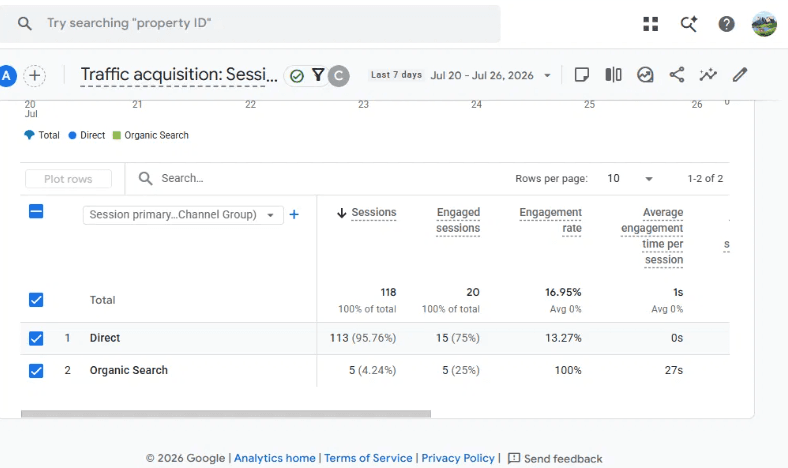
Separately from the AI bot policy work above, I recently identified a real bot traffic problem unrelated to search or AI crawlers: a spike in low-quality automated sessions, largely from Singapore, showing as Direct traffic with near-zero engagement — a clear scraper/bot signature, not real visitors.
To address this, I re-enabled Bot Fight Mode. Given what happened in December, I’m treating this re-enable carefully rather than assuming it’s safe by default:
- I’m monitoring Cloudflare’s AI Crawl Control page weekly, specifically watching “Unsuccessful” counts for ChatGPT-User, Meta-ExternalAgent, PerplexityBot, and GPTBot — the early warning sign that was missed last time.
- I’m cross-checking Google Search Console crawl stats for any drop in total crawl requests or discovery crawl.
- The AI bot policy configuration above (Search/Agent/Training) runs independently of Bot Fight Mode, and gives me a documented, explicit baseline to compare against if crawler failures start climbing again.
This is a genuinely different situation from December: the earlier problem was Bot Fight Mode indiscriminately challenging legitimate AI and search crawlers because there was no way to tell Cloudflare which bots to trust. That gap is now closed by the Search/Agent/Training controls. The current bot traffic issue is a separate, narrower problem — junk sessions with no crawler identity at all — and I’m watching closely to make sure the two don’t collide again.
Key Takeaways
- Bot Fight Mode (the general automated-traffic-detection feature) and Cloudflare’s AI bot policies (Search/Agent/Training) are two different systems. Enabling one doesn’t automatically fix or break the other.
- September 15, 2026 is the deadline that matters most from this article. If your site runs ads on Cloudflare, this default change affects you whether or not you’ve ever touched these settings — check your Agent category setting before then, or risk losing AI citation traffic silently.
- “Unsuccessful” crawler requests are not the same as “not blocked.” If you see high unsuccessful counts for search or AI crawlers, treat it as a real problem, not a rounding error.
- Crawl reliability, not just crawl volume, is what protects Discover and AI citation traffic. A 30–45 day lag between cause and visible impact makes this easy to miss — check crawler-level data regularly, not just overall traffic.
If you’re running a content or publishing site on Cloudflare, I’d recommend reviewing your Security → Settings → Configure AI bot policies page today, regardless of whether you’ve had problems yet — the September 15 deadline is closer than it looks.

Ayush Singhal is the founder and chief editor of TechMitra.in — a tech hub dedicated to simplifying gadgets, AI tools, and smart innovations for everyday users. With over 15 years of business experience, a Bachelor of Computer Applications (BCA) degree, and 5 years of hands-on experience running an electronics retail shop, Ayush brings real-world gadget knowledge and a genuine passion for emerging technology.
At TechMitra, he covers everything from AI breakthroughs and gadget reviews to app guides, mobile tips, and digital how-tos. His goal is simple — to make tech easy, useful, and enjoyable for everyone. When he’s not testing the latest devices or exploring AI trends, Ayush spends his time crafting tutorials that help readers make smarter digital choices.
📍 Based in Lucknow, India
💡 Focus Areas: Tech News • AI Tools • Gadgets • Digital How-Tos
📧 Contact: Get in touch →
🔗 Full Bio: https://techmitra.in/about-us/