

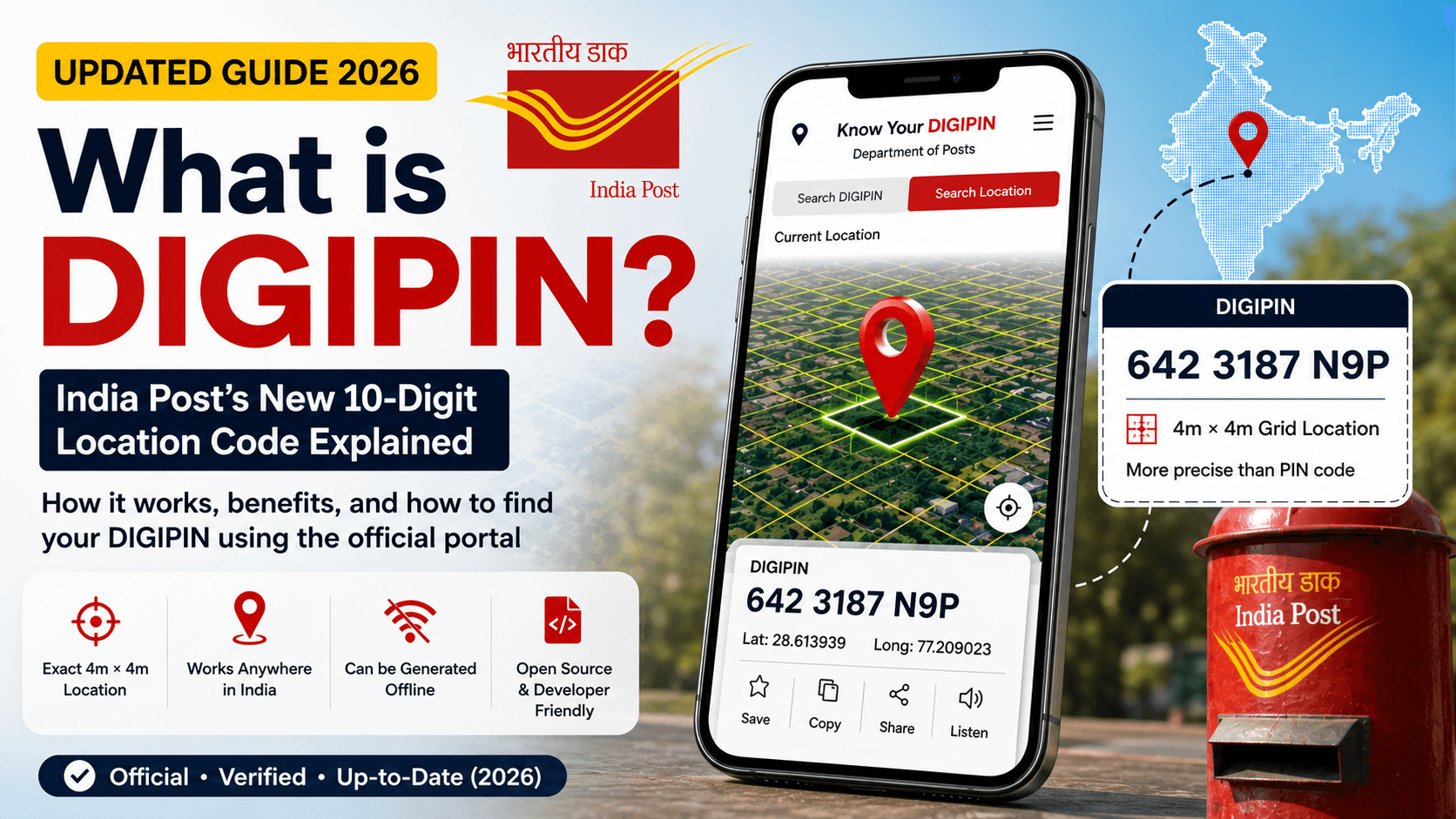
Illustration shown is for demonstration purposes only and uses a sample DIGIPIN, not a real location.
Table of Contents
Introduction
If you’ve filled out a delivery form, checked a courier app, or heard about India’s “new PIN code” recently, you may have come across DIGIPIN. India Post has been rolling this out in phases since May 2025, and a year on, it’s worth revisiting — the official tools have changed, the format has been updated, and adoption has moved from “pilot” to active state-level expansion.
I’ve gone back to India Post’s official Know Your DIGIPIN portal myself, generated real DIGIPIN codes, and worked through the actual search flows — including a few things that trip people up that older explainers (including our original version of this article) got wrong. Here’s the updated, verified guide.
What is DIGIPIN?
DIGIPIN (Digital Postal Index Number) is a 10-character alphanumeric address code developed by the Department of Posts in collaboration with IIT Hyderabad and ISRO’s National Remote Sensing Centre (NRSC). Instead of identifying a broad postal area like a traditional 6-digit PIN code, DIGIPIN pinpoints an exact 4-metre by 4-metre grid square anywhere in India, based on latitude and longitude.
It’s part of a larger Department of Posts initiative to build a Digital Public Infrastructure (DPI) for addressing — essentially, laying the groundwork for “Address as a Service” (AaaS), where any location in the country, however remote or informally described, can have a precise, shareable digital identity.
Importantly: DIGIPIN doesn’t replace your existing address or PIN code. It’s an additional, more precise layer that sits alongside them.
DIGIPIN vs Traditional PIN Code: Quick Comparison
| Feature | Traditional PIN Code | DIGIPIN |
|---|---|---|
| Introduced | 1972 | 2025 |
| Format | 6 digits | 10-character alphanumeric (e.g., 379 6668 K4J) |
| Coverage area | An entire locality or neighbourhood | A precise 4m × 4m grid square |
| Based on | Administrative postal zones | GPS latitude and longitude |
| Works without a formal address | No | Yes (rural areas, forests, unmapped zones) |
| Replaces the other system | N/A | No — both run in parallel |
| Issuing authority | Department of Posts | Department of Posts, IIT Hyderabad, NRSC/ISRO |
| Offline generation | N/A | Yes, via open-source logic |
| Mandatory today | Yes, for postal delivery | No, currently optional |
The core difference in one line: a PIN code tells you which area a location falls in — DIGIPIN tells you exactly where within that area, down to a few metres.
What’s Changed Since Launch (2025 → 2026)
A few things are genuinely different from when DIGIPIN first rolled out:
- Nationwide rollout has progressed. The initial rollout began in May 2025, and by 2026, coverage has expanded state by state, with active piloting in harder-to-address regions — including parts of the Northeast (Meghalaya, Assam, Nagaland), where non-standardized addressing has historically delayed deliveries and emergency response.
- The display format has changed. DIGIPIN codes are now shown grouped as three blocks separated by spaces (e.g.,
379 6668 K4J) rather than the hyphenated format some early tools and articles used. - Two dedicated official portals now exist: Know Your DIGIPIN and Know Your PIN Code, both launched by the Department of Posts as part of a formal push aligned with the National Geospatial Policy, 2022.
- The source code is public. The complete DIGIPIN encoding/decoding logic has been published on GitHub, so developers and logistics platforms can build DIGIPIN support directly into their own apps.
How to Know Your DIGIPIN
The official way to find your DIGIPIN is through India Post’s own portal — Know Your DIGIPIN — at dac.indiapost.gov.in/mydigipin. I went through the actual process myself rather than relying on secondhand descriptions, and it breaks down into three methods. Here’s exactly how each one works.
Method 1: Use Your Current Location (Easiest)
This is the fastest way to know your DIGIPIN and what most people will end up using. On the portal, tap the location-pin/GPS icon, allow location access when your browser or device prompts you, and the portal auto-detects your coordinates and generates your DIGIPIN instantly — no typing required.
Keep in mind: the accuracy of the result depends on your device’s GPS signal at that moment (more on this in the accuracy section below), so it’s worth trying this in an open area for a more precise result.
Method 2: Search by Coordinates
There’s a second option labelled “Search Location” — and this one catches people off guard. It doesn’t accept a place name or street address like a typical map search. It specifically asks for latitude and longitude coordinates (the field placeholders literally show examples like 17.74007 and 83.31712).
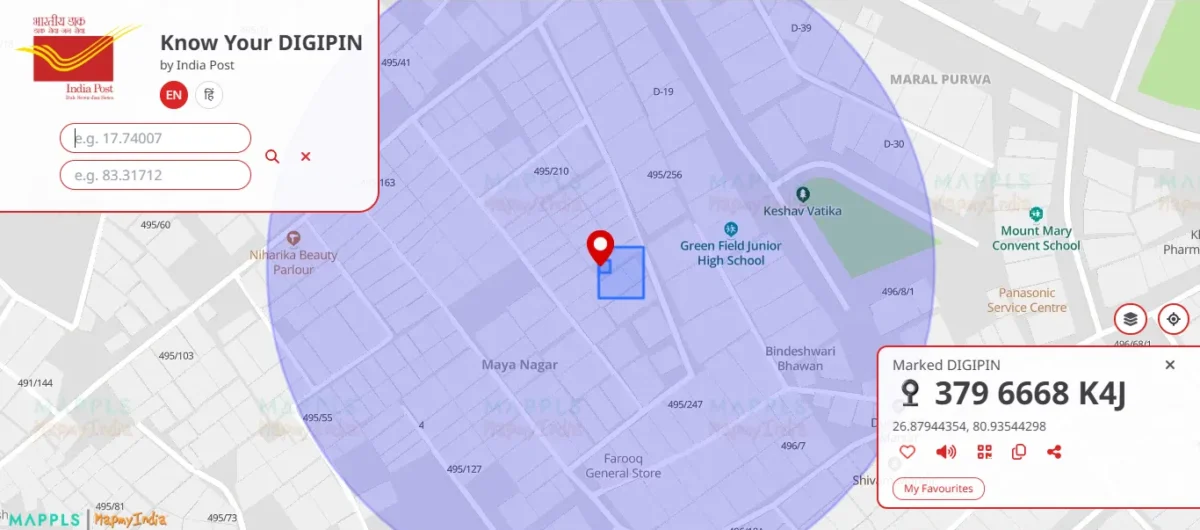
If you don’t already know a location’s coordinates, you can get them by right-clicking any spot on Google Maps, which shows the exact latitude/longitude to paste in here.
Method 3: Search by an Existing DIGIPIN
If you already have someone’s DIGIPIN code and want to see where it points to, the “Search DIGIPIN” option plots that exact location on the map — useful for verifying a code someone has shared with you.
A Real Example: Knowing the DIGIPIN for a Lucknow Post Office
To show the full process end-to-end, I looked up the DIGIPIN for the Nirala Nagar Sub Post Office here in Lucknow using Method 1.
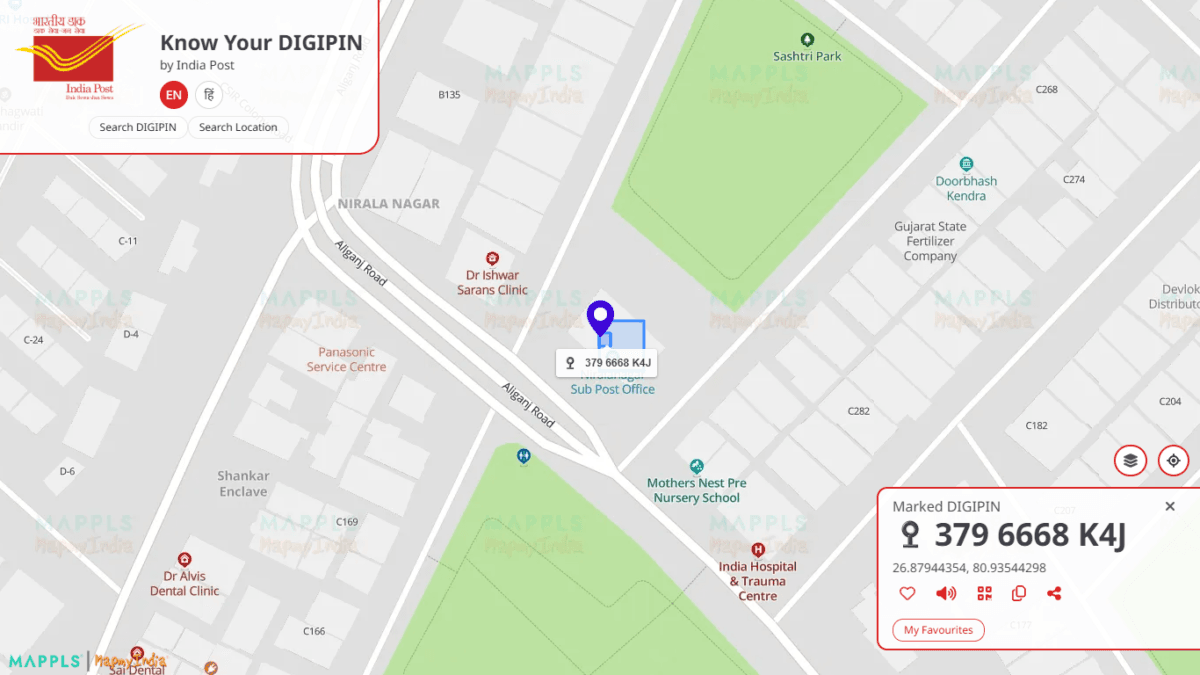
The result:
DIGIPIN: 379 6668 K4J Coordinates: 26.87944354, 80.93544298
Notice the format — three groups separated by spaces. If you’ve seen DIGIPIN written elsewhere as a single hyphenated string, that’s the older format and no longer how India Post displays it.
Alongside the code, the portal also gives you options to save the result to favourites, copy it, share it, or have it read aloud — useful if you’re relaying your DIGIPIN over a call or adding it to a delivery form.
I used a post office for this example deliberately, rather than a private residence — it’s public information, directly relevant since India Post issued the system, and lets you cross-check the result yourself if you’d like.
Quick Recap: How to Know Your DIGIPIN in 3 Steps
Your DIGIPIN appears instantly — no login, no signup required
Go to dac.indiapost.gov.in/mydigipin
Tap the current-location icon (or enter coordinates manually via Search Location)
Why Accuracy Can Vary (Straight from India Post’s Own Disclaimer)
When I generated my own location’s DIGIPIN using the “current location” option, the portal showed a location accuracy of roughly 100 metres — noticeably wider than DIGIPIN’s stated 4m × 4m grid precision. That’s not a flaw in DIGIPIN itself; it’s a limitation of GPS/GNSS positioning at the time of lookup.
India Post’s own disclaimer confirms this directly:
“User location accuracy may vary due to factors such as GNSS signal conditions, atmospheric interference, device hardware limitations, and surrounding obstructions. Precise location details may differ from actual ground truth.”
In practice: the DIGIPIN grid itself is precise to 4 metres, but how accurately your device can determine which 4-metre square you’re standing in depends on your GPS signal, device quality, and surroundings (indoors, dense urban areas, and cloud cover can all reduce accuracy).
The same disclaimer also clarifies a related point worth knowing: having a DIGIPIN for a location doesn’t automatically mean all India Post services are available there. Service availability still needs to be checked separately with your local postal authority.
Is DIGIPIN Mandatory? Does It Replace My Address?
No, on both counts.
- Your existing postal address and PIN code remain valid and unchanged. DIGIPIN is an additional, more precise digital layer — not a replacement.
- It’s not currently mandatory for deliveries or government services, though as adoption grows across e-commerce, logistics, and emergency services, it’s expected to become more commonly requested, similar to how PIN codes became a standard field over time.
- Both systems — traditional PIN codes and DIGIPIN — are expected to run in parallel for the foreseeable future.
Does DIGIPIN Reveal Personal Information?
No. DIGIPIN encodes a location’s coordinates — it doesn’t store or reveal who lives there, contact details, or any personal identity information. It functions the same way a map coordinate would; the privacy consideration is the same as sharing any other address, no more and no less.
Can Developers and Businesses Use DIGIPIN?
Yes — this is one of the more significant parts of the initiative that often gets missed. India Post has published the complete DIGIPIN encoding and decoding logic as open-source code on GitHub, meaning:
- Delivery and logistics companies can integrate DIGIPIN generation directly into their own apps and backend systems
- Developers can build DIGIPIN lookup or conversion tools without needing to rely on the official portal
- As adoption grows, expect DIGIPIN fields to start appearing in e-commerce checkout forms, food delivery apps, and KYC processes — several logistics and fintech platforms have already signaled interest in this direction, though widespread integration is still emerging rather than universal as of writing.
Benefits of DIGIPIN
Pinpoint accuracy. A traditional PIN code can cover a large neighbourhood with thousands of homes; DIGIPIN narrows that down to a single 4m × 4m square, cutting through ambiguity that especially affects apartment complexes, unnumbered lanes, and newly developed areas.
Works where formal addresses don’t exist. Rural areas, forests, construction sites, and even maritime zones within India’s boundaries can get a DIGIPIN, since it’s generated from coordinates rather than street names or house numbers.
Faster emergency response. For ambulances, fire services, and disaster relief teams, the difference between “somewhere in this locality” and an exact 4-metre location can matter significantly — particularly in areas where addressing has historically been inconsistent, such as parts of the Northeast that have already been piloting DIGIPIN for this purpose.
No login or personal data required. You don’t need to create an account to generate or look up a DIGIPIN, and the code itself doesn’t store any personal or identity information — just a location.
Free and open-source. Unlike proprietary geocoding systems some private apps use internally, DIGIPIN’s encoding/decoding logic is publicly available on GitHub, so any developer or business can build support for it without licensing costs.
Works offline. Because the system is coordinate-based and open-source, DIGIPIN codes can be generated and decoded without an internet connection — useful in low-connectivity regions.
Reduces delivery errors and misrouting. For e-commerce and logistics companies, precise location data can mean fewer failed deliveries, less time spent calling customers for directions, and lower operational costs from repeat delivery attempts.
Uses of DIGIPIN
- Postal and courier deliveries — pinpointing exact drop locations, especially in areas with unstructured addressing
- E-commerce and logistics — reducing misrouted or delayed shipments by supplementing address fields with precise coordinates
- Emergency services — helping ambulances, police, and disaster response teams locate accident sites, isolated homes, or affected areas quickly
- Rural and remote service delivery — enabling government schemes, health camps, and welfare services to reach areas that don’t have conventional addresses
- Banking, telecom, and KYC processes — as adoption grows, DIGIPIN is expected to support more accurate address verification alongside existing documentation
- Navigation and mapping — integration into apps for more precise point-to-point directions than a broad PIN-code-level location would allow
- Disaster management and relief coordination — accurately mapping and reaching affected zones during floods, cyclones, or other emergencies
- Digital Public Infrastructure (DPI) initiatives — serving as the foundational addressing layer for India’s broader “Address as a Service” (AaaS) vision, which future government and private-sector services may build on
It’s worth being realistic here: several of these uses — banking/KYC, widespread app integration, disaster-management workflows — are still in early or pilot stages rather than fully deployed nationwide as of writing. The postal, emergency-response, and rural-service use cases have the most concrete evidence of active rollout today.
Frequently Asked Questions
Is DIGIPIN available for rural or remote areas without a formal address?
Yes — this is actually one of its core purposes. DIGIPIN works anywhere within India’s geographic boundaries, including remote, rural, and even maritime regions, as long as coordinates can be determined. It’s specifically designed to help areas with unstructured or non-existent formal addressing.
Can I use India post DIGIPIN offline?
Yes. Since DIGIPIN’s encoding/decoding logic is open-source and coordinate-based, it can be generated and validated without an internet connection using compatible apps or tools, which is useful in low-connectivity areas.
Do I need to log in to find my DIGIPIN?
No. The official portal doesn’t require login or signup — you just need to grant location access (or manually search) to generate a DIGIPIN.
What if my DIGIPIN doesn’t match my exact house?
This usually comes down to GPS accuracy at the time of lookup rather than an error in the system itself — see the accuracy section above. Try generating it again in an open area with a clear sky view for better precision.
Bottom Line
DIGIPIN is a genuinely useful piece of digital infrastructure, and unlike a lot of “Digital India” initiatives, it’s already functional today — you can go to the official portal right now and generate a real code for a real location, which is exactly what I did for this article. The rollout is still expanding, private-app adoption is still early, and GPS accuracy has real limits — but the core system works as described, and it’s worth knowing how to use it before it becomes a more standard part of forms and deliveries.
If you’re exploring other Digital India initiatives, our guide on how to use DigiLocker covers another government-backed digital identity system worth knowing about — including how to fetch documents and academic records like the APAAR ID.
Try it yourself: Know Your DIGIPIN – Official India Post Portal
Screenshots used in this article are from India Post’s official Know Your DIGIPIN portal, Department of Posts, Government of India, and are credited accordingly per the portal’s terms of use.

Ayush Singhal is the founder and chief editor of TechMitra.in — a tech hub dedicated to simplifying gadgets, AI tools, and smart innovations for everyday users. With over 15 years of business experience, a Bachelor of Computer Applications (BCA) degree, and 5 years of hands-on experience running an electronics retail shop, Ayush brings real-world gadget knowledge and a genuine passion for emerging technology.
At TechMitra, he covers everything from AI breakthroughs and gadget reviews to app guides, mobile tips, and digital how-tos. His goal is simple — to make tech easy, useful, and enjoyable for everyone. When he’s not testing the latest devices or exploring AI trends, Ayush spends his time crafting tutorials that help readers make smarter digital choices.
📍 Based in Lucknow, India
💡 Focus Areas: Tech News • AI Tools • Gadgets • Digital How-Tos
📧 Contact: Get in touch →
🔗 Full Bio: https://techmitra.in/about-us/