

Expert Insights by Anushika Singhal, Banking Professional
Updated Aug 2026: Added details on the CKYC 2.0 rollout and DigiLocker-based retrieval.
Important: This article is for general informational purposes only and provides a step-by-step guide to downloading your CKYC card online through the official CKYC portal. TechMitra is not affiliated with, associated with, or officially related to CKYC or its portal. For the latest and official information, please refer to the official CKYC portal.
In India’s digital banking system, completing KYC is mandatory — but many people don’t realize they can now easily find and download CKYC number online in just a few minutes.
If your KYC has already been completed with a bank, mutual fund platform, insurance company, or trading app, you may already have a Central KYC (CKYC) record. Using this record, you can open new financial accounts without repeatedly submitting PAN, Aadhaar, or address proof documents.
In this guide, we tested the official CKYC download process ourselves and explained the exact steps, screenshots, OTP verification process, SMS download link, password format, and common issues users face.
Table of Contents
Also Read : AI for Money Management: How to Get Financial Clarity Without Giving Up Your Privacy
What Is CKYC?
CKYC (Central Know Your Customer) is a centralized KYC system managed by CERSAI (Central Registry of Securitisation Asset Reconstruction and Security Interest of India).
Instead of doing separate KYC verification for every bank or financial institution, your verified identity details are stored in one central registry.
Once your CKYC is created, you receive a unique 14-digit CKYC Identification Number (KIN).
This same CKYC number can be reused for:
- Bank accounts
- Mutual funds
- Demat accounts
- Trading accounts
- Insurance policies
- NBFC services
What Is CKYC Number?
A CKYC Number (KIN) is a unique 14-digit identifier assigned after successful KYC verification.
It acts as a reusable financial identity number that helps institutions fetch your verified KYC details directly from the CKYC database.
Example uses:
- Opening a Demat account
- Starting SIP investments
- Creating a trading account
- Opening another bank account
Since many financial institutions use Aadhaar during KYC verification, users should also understand how the new Aadhaar verification system works through the UIDAI’s new Aadhaar app.
Benefits of CKYC
| Feature | Benefit |
|---|---|
| One-Time Verification | No repeated KYC paperwork |
| 14-Digit KIN | Unique centralized identity |
| Faster Account Opening | Banks can fetch KYC instantly |
| Secure Storage | Documents stored centrally |
| Accepted Across Institutions | Works for RBI, SEBI, IRDAI-regulated entities |
Also Read : 40 Pro AI Prompts for Stock Trading: Excel, PDF Analysis & Live Market Data (2026 Guide)
How to Download CKYC Number Online
We tested the official CKYC download process in 2026 using a registered mobile number linked with an existing KYC record.
The entire process took only a few minutes.
Step 1: Open the Official CKYC Portal
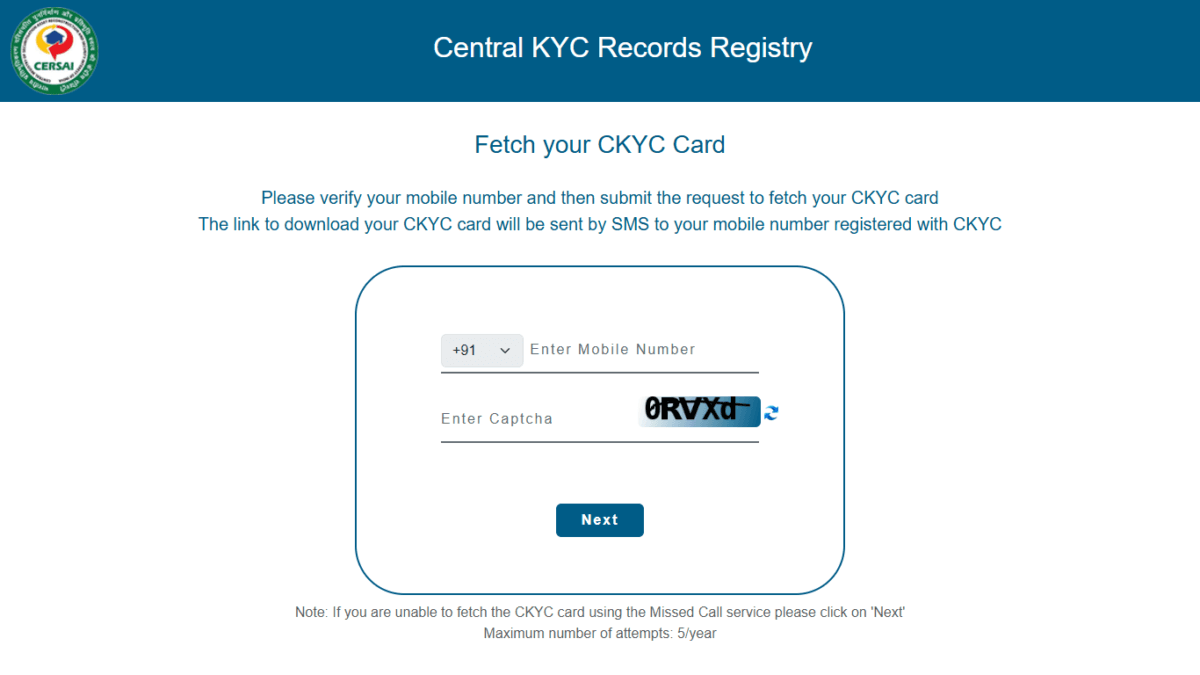
Visit the official CKYC portal:
👉 https://www.ckycindia.in/kyc/getkyccard
You will see the “Fetch your CKYC Card” page.
Important:
Always use the official website only. Never trust third-party apps or unknown SMS links for CKYC access.
Step 2: Enter Your Registered Mobile Number
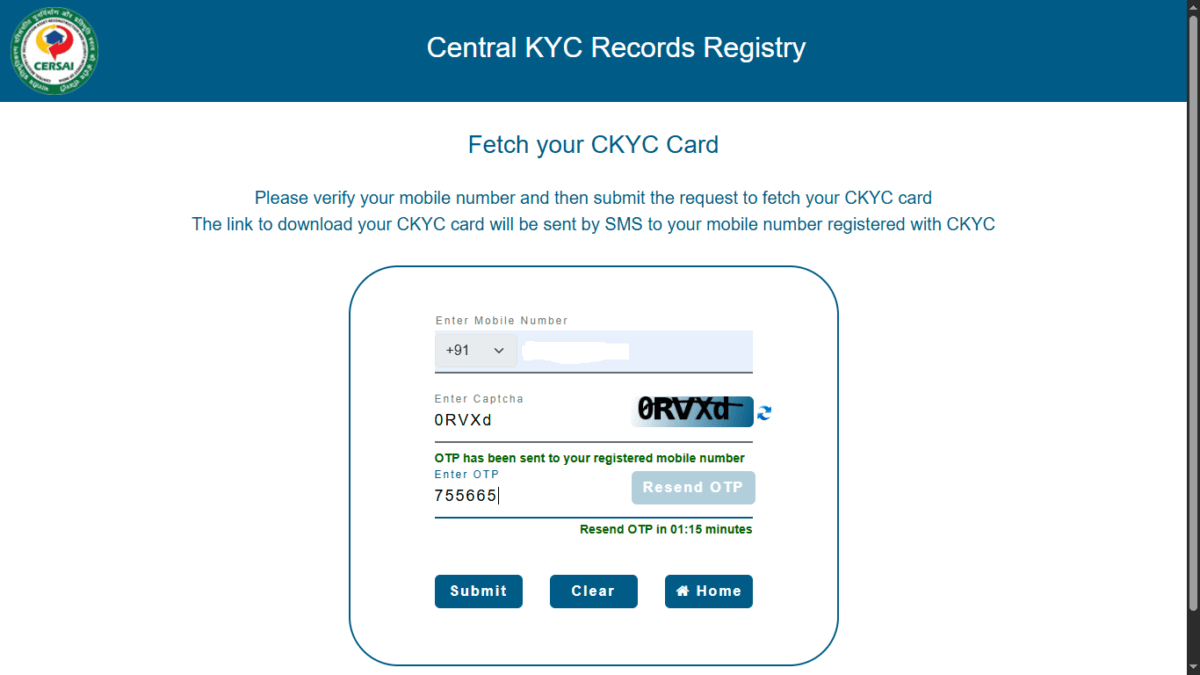
Enter the mobile number linked with your bank or financial KYC record.
Then complete the captcha verification and click Next.
During testing, the portal loaded properly on both desktop and mobile browsers.
Step 3: Verify OTP
An OTP will be sent to your registered mobile number.
Enter the OTP and click Submit.
In our testing, the OTP arrived within around 10–20 seconds.
If OTP does not arrive immediately:
- wait for 1 minute,
- avoid multiple retries,
- check network coverage,
- verify you are using the correct registered number.
Step 4: Request Submitted Successfully
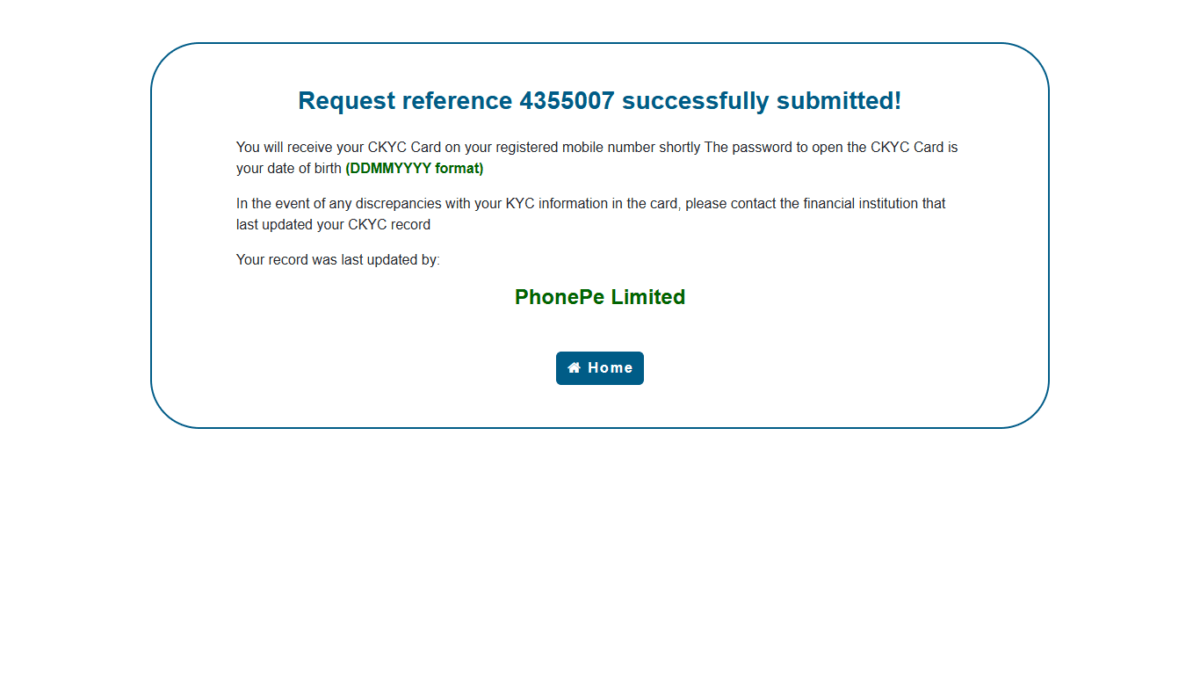
After OTP verification, the portal confirms successful CKYC request submission.
The system also shows:
- your request reference number,
- institution that last updated your CKYC record,
- password instructions for opening the PDF.
In our test, the record showed the last updated institution correctly.
Step 5: Receive SMS with CKYC Download Link
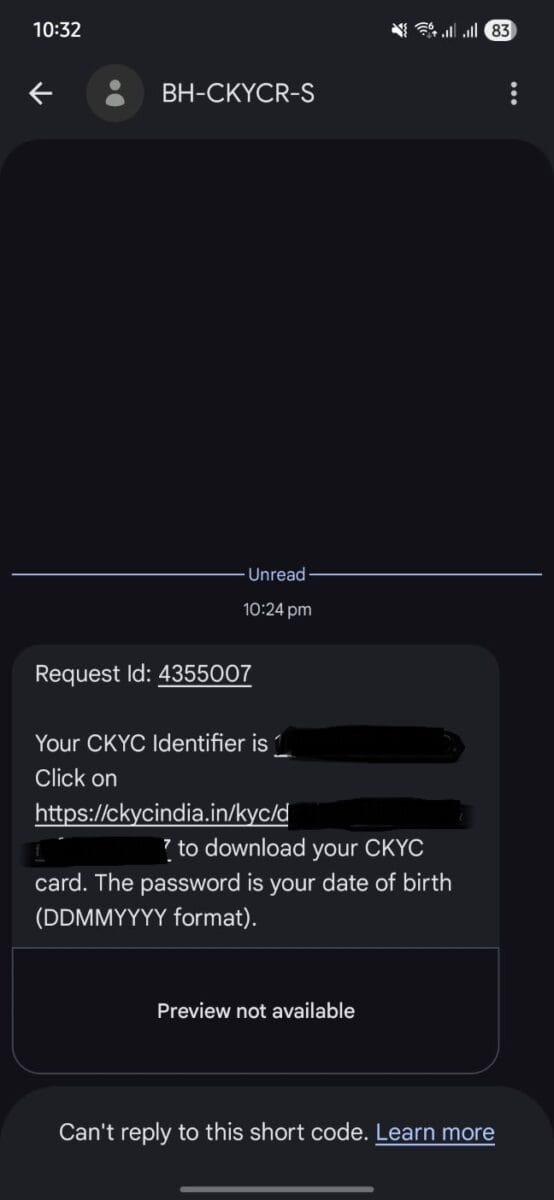
After successful verification, an SMS containing the CKYC download link is sent to your registered mobile number.
The SMS includes:
- CKYC identifier,
- secure download link,
- PDF password instructions.
The download link usually arrives within 1–2 minutes.
Step 6: Password to Open CKYC PDF
Your CKYC PDF password is usually:
DDMMYYYYExample:
If your date of birth is 5 January 1995, the password will be:
05011995After Entering password your CKYC card download starts
What Information Is Available in CKYC Card?
The downloaded CKYC card may contain:
- Name
- Date of birth
- CKYC/KIN number
- Address details
- KYC status
- Institution details
Keep this document secure because it contains sensitive identity information.
Because CKYC is an officially valid document (OVD) authorized by the RBI and SEBI, it is deeply integrated into India’s digital ecosystem. You can bypass manual uploads entirely during bank account openings by setting up an authorized DigiLocker account setup and PC dashboard layout to transfer verified records with a single click
CKYC 2.0 Update (August 2026): What’s Changing
CKYC is currently undergoing its biggest overhaul since the registry launched in 2016. Here’s what’s actually changing and what it means for you as a user — not just compliance jargon for banks.
The rollout timeline:
- Banks and insurers are rolling out the new system, called CKYC 2.0, starting August 2026
- Mutual funds and brokerages are expected to join later in the year, once sector-specific rules are finalized
- CERSAI (the body that runs CKYC) began releasing the technical framework for this in mid-2026, with parts of it already live
What actually changes for you:
- OTP consent for every single pull, not just downloads — Earlier, only your CKYC download required OTP verification. Under CKYC 2.0, any institution that wants to access your CKYC record — even just to open a new account — needs your OTP consent first. No OTP, no access to your data, period.
- DigiLocker integration — You can now retrieve your CKYC Card directly through the DigiLocker app, not just via the CERSAI portal + SMS link method covered in this guide. If you already use DigiLocker for other documents, this is often the faster route. (See our DigiLocker guide for setup steps.)
- Search by mobile number — Institutions can now look up your CKYC record just using your registered mobile number, in addition to the older PAN/KIN-based search. This should reduce cases where a fresh KYC gets created because your existing record wasn’t found.
- Stronger Aadhaar masking — Any CKYC record now only shows the last 4 digits of your Aadhaar number. Full Aadhaar numbers are no longer stored or displayed in the system.
- AI-based duplicate detection — CERSAI is using facial matching and stricter validation to catch and merge duplicate CKYC records — a long-standing problem where the same person ended up with multiple inconsistent KYC entries across different banks.
- A visibility dashboard (rolling out) — A customer-facing feature is being added that lets you see which institutions have queried your CKYC record and when, plus the ability to revoke access. This isn’t fully live everywhere yet, so availability may vary by the time you read this.
Does this change the download steps in this guide?
Not yet. The CERSAI portal, OTP, SMS link, and DDMMYYYY password process described above is still the primary method as of publishing. CKYC 2.0 is being rolled out institution-by-institution rather than as a single switch-over, so expect the process to evolve over the next few months — we’ll update this guide as the new flow becomes standard.
Expert Insight from Banking Professional
“If someone has already completed KYC with any bank or financial institution, they can usually retrieve the CKYC card directly using their registered mobile number and OTP verification. This makes opening additional accounts much faster because institutions can fetch KYC details instantly.”
— Anushika Singhal, Banking Professional
Anushika Singhal works in the banking sector and contributes practical financial verification insights to TechMitra.
Common Problems While Downloading CKYC Number
CKYC Record Not Found
Possible reasons:
- mobile number mismatch,
- KYC not uploaded to CKYC registry yet,
- recent KYC still under processing.
Try contacting the institution where you originally completed KYC.
OTP Not Received
Possible fixes:
- wait for retry timer,
- check mobile signal,
- disable spam filters,
- ensure SIM is active,
- use the same number linked during KYC.
Download Link Not Working
Sometimes the SMS link expires.
In that case:
- repeat the verification process,
- generate a fresh request,
- avoid opening old SMS links.
Wrong Password for CKYC PDF
Most users enter:
- DOB with slashes,
- spaces,
- incorrect format.
Use only:
DDMMYYYYwithout spaces or symbols.
Also Read : UPI Payments Through Smart Devices: NPCI’s Next Big IoT Innovation
Is CKYC Mandatory?
CKYC is increasingly used across:
- banks,
- brokers,
- mutual fund platforms,
- insurance companies.
While some institutions may still use separate KYC workflows, CKYC significantly reduces repeated document submissions.
Safety Tips While Accessing CKYC
- Use only official CKYC portal
- Never share OTP with anyone
- Do not upload CKYC documents on random websites
- Avoid unknown calls asking for CKYC verification
- Keep downloaded PDF secure
Faq’s
How can I find my CKYC number online?
You can retrieve your CKYC number by visiting the official CKYC portal and verifying your registered mobile number using OTP authentication.
Is CKYC already completed for me?
If you opened:
a bank account,
Demat account,
mutual fund account,
insurance policy recently,
there is a good chance your CKYC already exists.Can I update CKYC online?
Usually, CKYC updates must be done through the institution where your KYC was originally completed.
Can CKYC be used for opening trading accounts?
Yes. Many brokers and financial institutions use CKYC records for faster onboarding.
Is CKYC different from Aadhaar verification?
Yes. CKYC is a centralized KYC registry system, while Aadhaar is an identity document.
Final Thoughts
CKYC has made financial onboarding in India much simpler and faster.
Instead of repeatedly uploading PAN, Aadhaar, and address proof documents, users can now rely on a single centralized KYC record across multiple financial institutions.
If your KYC is already completed, you can easily retrieve your CKYC number online using your registered mobile number and OTP verification process through the official portal.

Ayush Singhal is the founder and chief editor of TechMitra.in — a tech hub dedicated to simplifying gadgets, AI tools, and smart innovations for everyday users. With over 15 years of business experience, a Bachelor of Computer Applications (BCA) degree, and 5 years of hands-on experience running an electronics retail shop, Ayush brings real-world gadget knowledge and a genuine passion for emerging technology.
At TechMitra, he covers everything from AI breakthroughs and gadget reviews to app guides, mobile tips, and digital how-tos. His goal is simple — to make tech easy, useful, and enjoyable for everyone. When he’s not testing the latest devices or exploring AI trends, Ayush spends his time crafting tutorials that help readers make smarter digital choices.
📍 Based in Lucknow, India
💡 Focus Areas: Tech News • AI Tools • Gadgets • Digital How-Tos
📧 Contact: Get in touch →
🔗 Full Bio: https://techmitra.in/about-us/
Provision for correction or change of the mobile number, address should be made available for finance institute
Thanks for pointing this out, Joseph — this is a common pain point. Currently, CKYC doesn’t offer a direct self-service option to update your mobile number or address. Since your CKYC record is populated by whichever bank/NBFC/mutual fund last submitted your KYC, you’ll need to request the correction through that institution — they’ll push the updated KYC to CKYC on your behalf. We’ll consider adding a short section on this update process to the article. Appreciate the suggestion!