

The Real Problems Start After the Website Is Live
Many site owners experience this pattern:
Website looks great
PageSpeed score is high
Everything feels fine initially
Then slowly:
Fonts flash on load
Menus become bolder after rendering
Layout shifts appear
Rankings fluctuate
Every “optimization” creates a new problem
This is not because Astra or Elementor is bad.
It happens because both are powerful tools, and power without structure leads to instability.
First Rule of Best Astra Elementor Settings : Stability Over Scores
Before touching any settings, it’s important to change the mindset.
PageSpeed scores are diagnostic tools, not ranking guarantees.
Google cares more about:
Layout stability
Predictable rendering
Smooth interaction
Consistent user experience
A website that feels stable often performs better in search than one that chases perfect lab scores.
A stable site always beats an aggressively optimized but unstable one.
Make Astra the Single Source of Truth (This Is Critical)
The biggest mistake people make is letting multiple systems control the same things.
Fonts, spacing, and colors should not be controlled from:
Theme
Elementor widgets
Global Elementor styles
Custom CSS
all at the same time.
Why typography should come from Astra
Typography affects:
Text height
Line spacing
Element size
Header and menu height
Astra applies typography early, before the page renders.
Elementor often applies typography later, after the first paint.
Even if both use the same font (like Roboto), the timing difference causes:
Flash of unstyled content (FOUC)
Font-weight changes
Layout shifts (CLS)
Correct approach
Set all main typography in Astra Customizer
Base font
Headings
Menu / header
Once done:
Do not re-select fonts inside Elementor widgets
Let Elementor inherit typography
This single decision removes many performance problems.
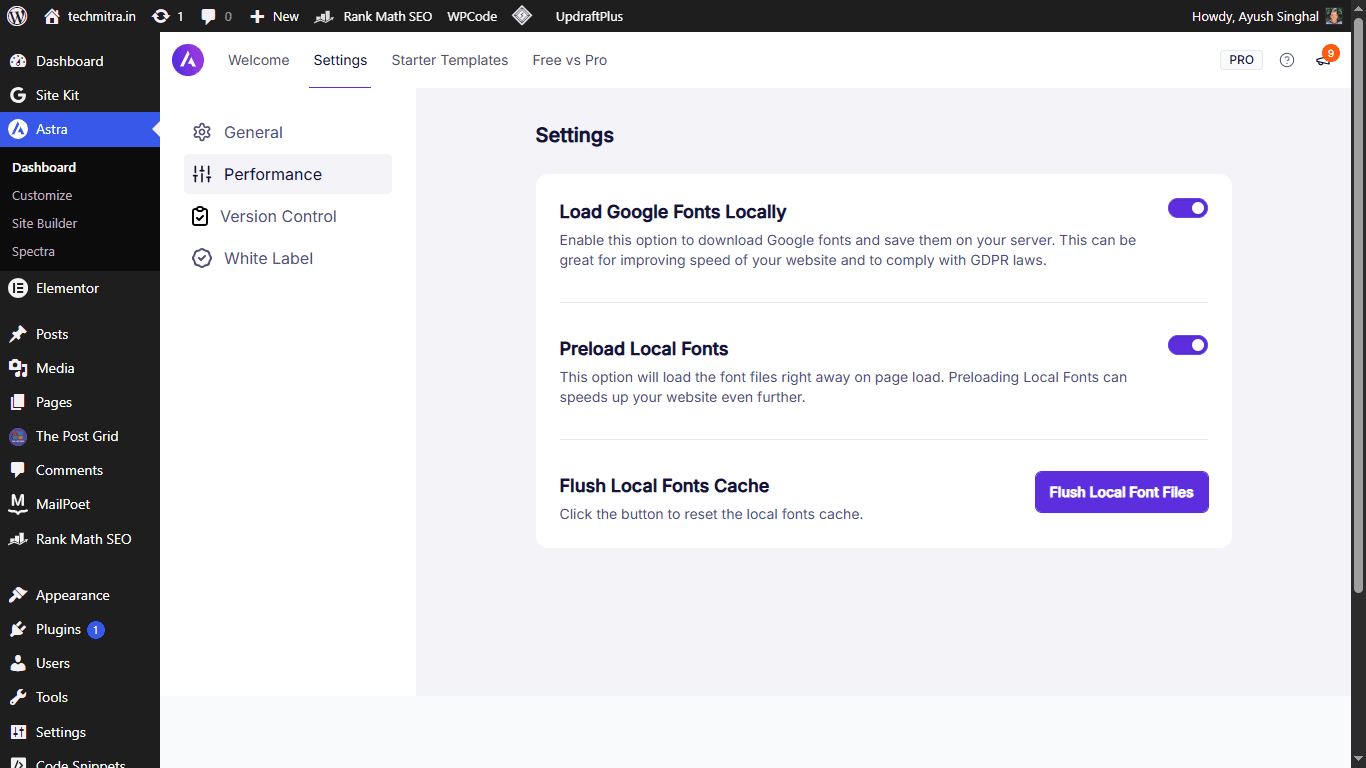 Inside the Astra Dashboard (Settings → Performance), enable “Load Google Fonts Locally” and “Preload Local Fonts.” This serves fonts directly from your server instead of Google, ensuring they render faster and more stably.
Elementor Settings That Help (Without Breaking Things)
Elementor itself is not slow.
Problems usually come from conflicting settings.
Two important Elementor settings
In Elementor → Settings → Advanced:
Disable Default Fonts → ON
This prevents Elementor from injecting late font rules.Disable Default Colors → ON
This simplifies CSS and avoids unnecessary overrides.
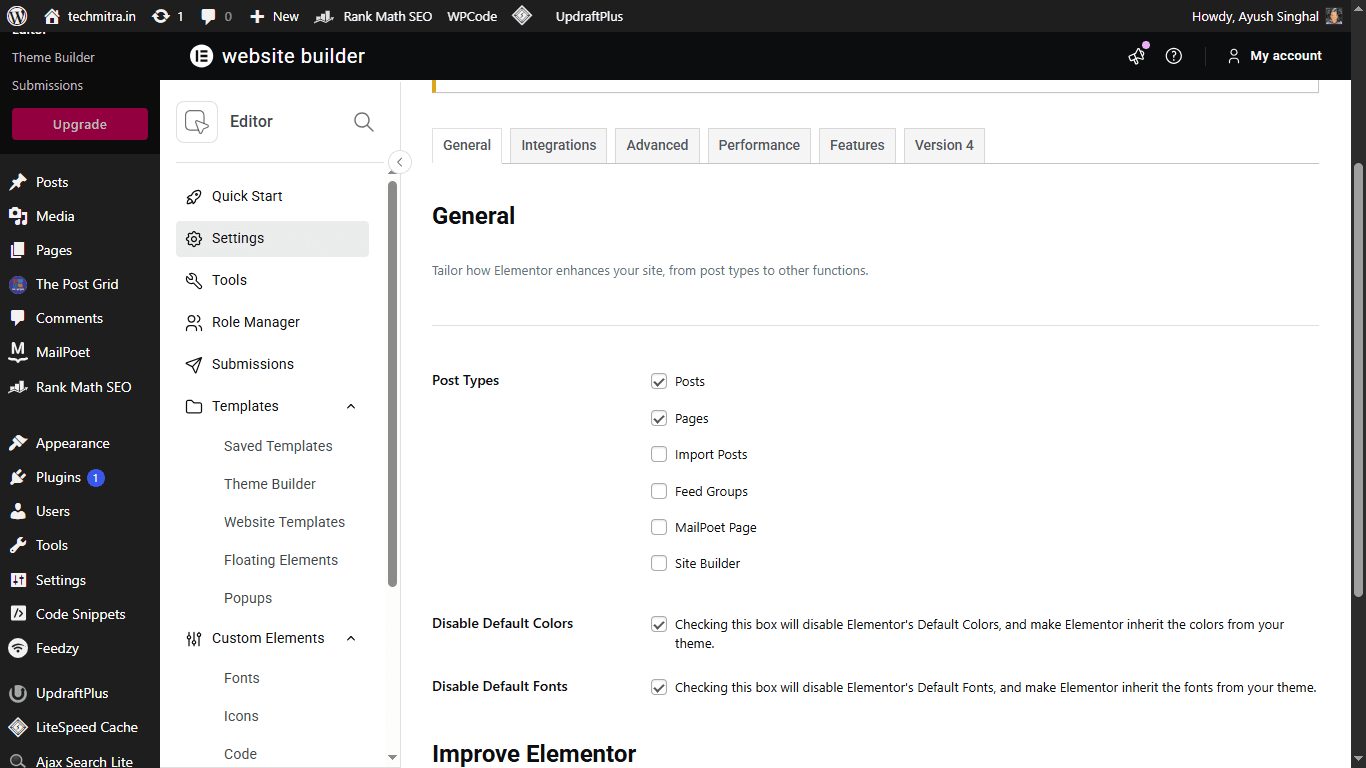 The Critical Fix: Navigate to Elementor → Settings and check both Disable Default Colors and Disable Default Fonts. This stops Elementor from loading unnecessary CSS and forces it to inherit your stable Astra typography.
These settings:
Reduce conflicts
Improve consistency
Help prevent CLS and FOUC
Be careful with Elementor “performance” options
Not every performance toggle improves real-world UX.
Some options:
Improve lab scores
But delay visible elements
Or introduce visual instability
A simple rule:
If a setting changes when or how something appears, think twice.
Why “Default” Font in Elementor Is Actually the Best Choice
Seeing Font Family: Default inside Elementor often scares people.
But “Default” simply means:
Use the theme’s font settings
If Astra is using Roboto:
Elementor Default = Roboto
But without late overrides
And without repainting text
Selecting the same font again inside Elementor often creates the problem, instead of solving it.
Menus: The Most Sensitive Part of the Website
If CLS or FOUC appears anywhere, it’s usually the menu.
Menus:
Are above the fold
Load first
React strongly to font changes
Why menus cause issues
Font weight changes after load
Spacing recalculates
Header height shifts
Even small changes are very noticeable here.
How to keep menus stable
Prefer theme-controlled menus
Avoid very heavy font weights
Avoid unnecessary animations
Let menu typography inherit from Astra
Menus should be boring and predictable — that’s good UX.
How FOUC and CLS Can Happen Even With the Same Font
This confuses many people.
Using the same font everywhere does not guarantee stability.
Roboto 400 and Roboto 500:
Have different heights
Different spacing
Different metrics
If the browser:
Renders one weight
Then applies another later
The layout changes — even though the font name never changed.
That’s why fixing key elements is more effective than changing everything.

Ayush Singhal is the founder and chief editor of TechMitra.in — a tech hub dedicated to simplifying gadgets, AI tools, and smart innovations for everyday users. With over 15 years of business experience, a Bachelor of Computer Applications (BCA) degree, and 5 years of hands-on experience running an electronics retail shop, Ayush brings real-world gadget knowledge and a genuine passion for emerging technology.
At TechMitra, he covers everything from AI breakthroughs and gadget reviews to app guides, mobile tips, and digital how-tos. His goal is simple — to make tech easy, useful, and enjoyable for everyone. When he’s not testing the latest devices or exploring AI trends, Ayush spends his time crafting tutorials that help readers make smarter digital choices.
📍 Based in Lucknow, India
💡 Focus Areas: Tech News • AI Tools • Gadgets • Digital How-Tos
📧 Email: contact@techmitra.in
🔗 Full Bio: https://techmitra.in/about-us/