

Google Android Backup Storage Policy | Photo by BoliviaInteligente on Unsplash
On July 15, I received an email from Google with the subject line “New Android Backup Storage Policy & Controls.” It turned out to be one of the more consequential (if quietly rolled out) policy changes Google has made to Android in 2026.
Here’s what the email actually said, and what I found when I checked my own Google Account storage against it.
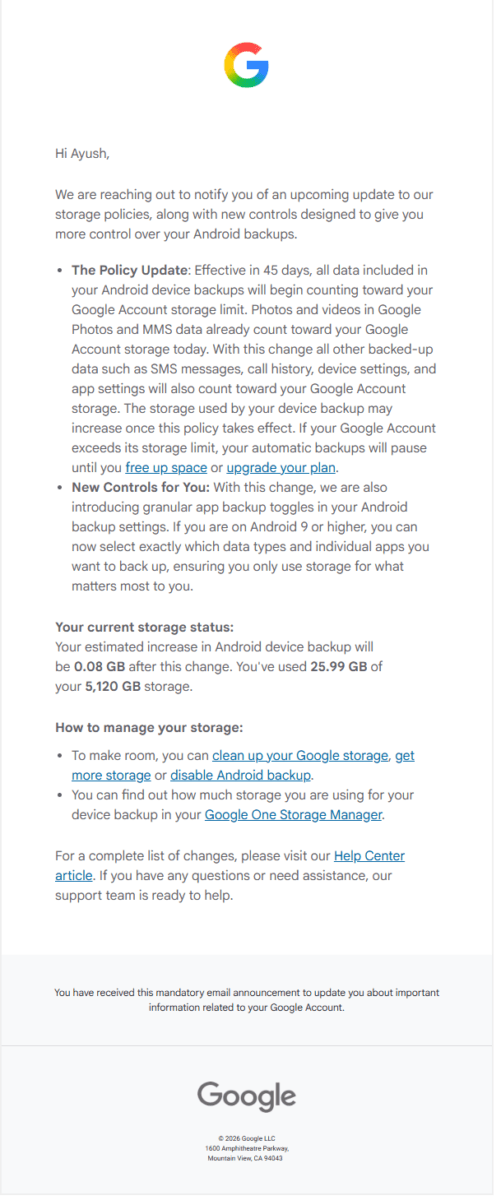
Table of Contents
Also Read : The Google App on Android: What It Actually Does (and Why It’s Not the Same as Chrome)
What the Email Actually Says
Google’s notice explains that, effective in 45 days from when each user receives it, all data included in Android device backups will begin counting toward Google Account storage — not just Google Photos uploads and MMS media, which already counted.
That means these categories are newly included in your storage quota:
- SMS messages (the actual text content)
- Call history
- Device settings
- App settings and app-specific backup data
Previously, only photos/videos backed up to Google Photos and MMS attachments counted against your 15 GB free tier (or your paid Google One plan). Everything else — your texts, call logs, and phone settings — was backed up for free, outside the quota.
That free ride is ending.
When Is This Actually Happening?
I cross-checked the date in my email against Google’s own rollout, and the timeline lines up: Google began rolling this out from July 7, 2026, starting with new Android backup users, with existing accounts — like mine — being migrated over the following weeks and months. So if you haven’t gotten this email yet, don’t assume you’re exempt; it’s a staggered rollout, not a single switch-flip.
How Much Storage Will This Actually Add?
This is the part that had me worried before I checked the numbers — and the part I think most people will skip past too quickly.
My email stated my estimated increase would be 0.08 GB (roughly 80 MB) after the change takes effect. Google’s own public figures back this up: the company has said the average Android backup should only grow by around 40 MB, so my number is in the same range, just on the higher end.
In my case, I’ve used 25.99 GB out of a 5,120 GB (5 TB) Google One plan. An extra 80 MB is, quite literally, a rounding error. If you’re on the free 15 GB tier, though, and you’re already sitting close to that ceiling — say from years of unmanaged Google Photos uploads — this could be the extra nudge that tips you over, even if the absolute number sounds tiny.
What happens if you go over your limit: your automatic backups pause until you free up space or upgrade your plan. Gmail can stop sending/receiving, Drive stops accepting new files, and Photos stops backing up new images. This part isn’t new — it’s how Google storage limits have always worked — but it’s worth knowing the backup itself is now part of what can push you there.
The New Controls Google Is Giving You
To Google’s credit, this change comes bundled with something genuinely useful: granular toggles for exactly what gets backed up.
If your phone runs Android 9 or higher, you can now go into your backup settings and independently switch off:
- SMS and MMS message backup
- Call history backup
- Device settings backup
- Individual app backup (this control already existed for some users, but it’s being expanded)
Where to find it — I checked this myself, and it’s not where you’d expect:
I initially assumed this would be buried in the phone’s Settings app, but it’s actually inside the Google One app:
- Open the Google One app
- Tap the Backup tab
- Tap Other device data
This opens a screen showing two sections — Device data and App data — each with its own toggle.
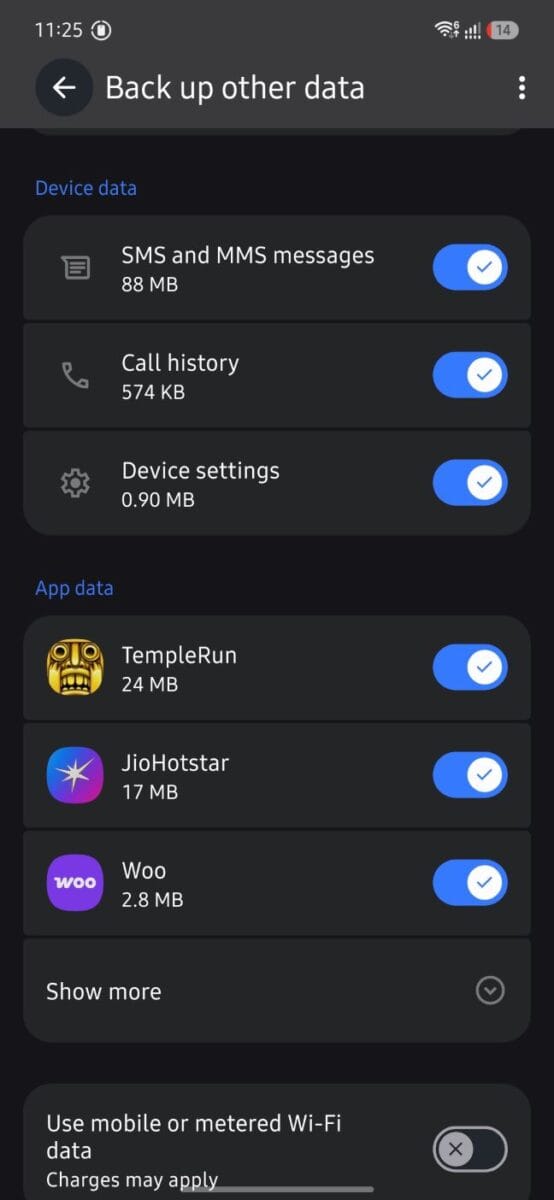
Here’s what my own device showed, broken down by category:
| Category | Size on my device |
|---|---|
| SMS and MMS messages | 88 MB |
| Call history | 574 KB |
| Device settings | 0.90 MB |
That’s roughly 89.5 MB total — noticeably higher than the 0.08 GB (80 MB) Google’s own email estimated for me, and well above the industry-wide “40MB average” figure Google gave to press. Your own number will vary based on how many texts you’ve accumulated over the years, but it’s a useful reminder that “average” figures in these announcements can undersell what a heavy SMS user (or someone who’s never cleared old texts) will actually see.
The other point worth knowing: app-level backup is also toggleable, individually. Below the three device-data categories, there’s a separate App data section listing each app on your phone with its own backup size and toggle — in my case, TempleRun (24 MB), JioHotstar (17 MB), and Woo (2.8 MB) were all listed separately, each switchable on or off. So the “granular control” Google mentions isn’t just about SMS/calls/settings — it extends down to individual apps too, letting you skip backing up ones you don’t care about restoring.
A word of caution before you start switching things off: disabling SMS and call history backup means that data is genuinely gone if you factory reset or switch phones — there’s no “restore” without it. If you rely on having your old texts and call logs when you set up a new device, think twice before turning these off just to save a fraction of a GB you probably don’t need anyway. Device settings is the lower-risk toggle to disable if you want to trim something.
Should You Do Anything Right Now?
For the vast majority of users, the honest answer is: no, not urgently.
- If you’re on Google One with a large plan (100 GB and up), an extra 40–80 MB will not affect you in any meaningful way.
- If you’re on the free 15 GB tier and already close to your limit, this is a good moment to check your actual storage breakdown — but the fix is almost never the backup toggles. Your Google Photos library and large Gmail attachments are far more likely to be the real culprits eating your quota, and clearing those is a much better trade than losing your SMS/call history backup.
- Either way, it’s worth checking your storage page once, out of habit, rather than reacting to the email itself.
Bottom Line
This is a real, Google-confirmed policy change. The practical storage impact is small for almost everyone. The more useful part of this update, honestly, is the new backup toggles — genuine control over what leaves your phone, something Android users have been asking for.
Have you received this email yet? Check your Google Account storage at myaccount.google.com/storage and let us know in the comments if your numbers match Google’s stated average.
Check my article on latest AI’s Pricing – Claude Vs ChatGPT Vs Gemini

Ayush Singhal is the founder and chief editor of TechMitra.in — a tech hub dedicated to simplifying gadgets, AI tools, and smart innovations for everyday users. With over 15 years of business experience, a Bachelor of Computer Applications (BCA) degree, and 5 years of hands-on experience running an electronics retail shop, Ayush brings real-world gadget knowledge and a genuine passion for emerging technology.
At TechMitra, he covers everything from AI breakthroughs and gadget reviews to app guides, mobile tips, and digital how-tos. His goal is simple — to make tech easy, useful, and enjoyable for everyone. When he’s not testing the latest devices or exploring AI trends, Ayush spends his time crafting tutorials that help readers make smarter digital choices.
📍 Based in Lucknow, India
💡 Focus Areas: Tech News • AI Tools • Gadgets • Digital How-Tos
📧 Contact: Get in touch →
🔗 Full Bio: https://techmitra.in/about-us/