


Last updated: November 26, 2026 | Prices checked on the Black Friday sale page, November 23, 2026
Disclosure: This article contains affiliate links to Hostinger. If you purchase through my link, I may earn a commission at no extra cost to you. I use Hostinger for my own websites, and the review is based on my actual experience, invoices, account data and support interactions.
Table of Contents
Also read : I Built Six Games With Hostinger AI Game maker: Here Is What Actually Worked Or Not
The short verdict
Hostinger’s shared hosting is a good choice for WordPress blogs, small business websites and portfolios in India. It is easy to manage, it handled a big traffic day on its cheaper plan, and the first-term price is low. The catch is the renewal: after the sale period, the same plan costs roughly three times as much, and GST is added on top.
Security is another trade-off with shared hosting: your website shares the underlying server environment with other customers, so you have less isolation and server-level control than you would with a VPS or dedicated server. I also needed four contacts over about two weeks to get a real server-side problem solved. I would recommend Hostinger to beginners and small businesses who understand the renewal price and the security trade-offs before they buy. I would not recommend shared hosting, from Hostinger or anyone else, for busy online stores, very high-traffic websites, or projects that require stronger server isolation.
Want to try Hostinger?
You can get Hostinger through my affiliate link and use the coupon code TECHMITRA10 for an additional 10% off. The coupon works alongside my affiliate link.
Coupon code: TECHMITRA10
How I tested it
I bought the Premium plan on February 4, 2025, on a 24-month term. On January 31, 2026, I upgraded to the Business plan, which Hostinger now calls Unlimited. That plan runs four of my websites, including TechMitra, on a server in India. Everything in this article comes from my own invoices, hPanel screens and support chats. I checked the hosting setup and pricing on November 23, 2026, and tested the TECHMITRA10 coupon at checkout on November 26, 2026. My hosting renews on January 31, 2027, and I will update this article with what I am actually charged.
This review focuses on Hostinger’s shared hosting plans (Single, Premium and Unlimited) for WordPress websites. I briefly mention Cloud Startup as Hostinger’s separate cloud-hosting upgrade path, but this is not a hands-on review of its cloud hosting. I don’t cover VPS or the website builder. TechMitra, my main site on this plan, runs on WordPress with LiteSpeed caching and the object cache switched on.
Shared hosting in plain words
Shared hosting is like renting a flat in a large building. Your website has its own space, but you share the building’s power, water and lifts with other tenants, so the rent is low and the building sets rules about how much each tenant can use. For a blog or a small business site that is a sensible arrangement. The rules are the part to understand, and I show the real limits of my plan below.
What Hostinger really costs
The prices you see of Hostinger Shared hosting Plans India
Hostinger shared hosting prices by term
In ₹, before 18% GST. Black Friday sale prices on Hostinger’s India pricing page, checked November 26, 2026.
Swipe the table sideways to see every column.
| Plan | 1 month | 12 months | 24 months | 48 months | Renews at |
|---|---|---|---|---|---|
| Single | ₹399 a monthPay ₹399 | ₹159 a monthPay ₹1,90860% off | ₹119 a monthPay ₹2,85670% off | ₹69 a monthPay ₹3,31283% off | ₹289 a month |
| Premium | ₹679 a monthPay ₹679 | ₹139 a monthPay ₹1,66880% off | ₹139 a monthPay ₹3,33680% off | ₹139 a monthPay ₹6,67280% off | ₹449 a month |
| Unlimited | ₹799 a monthPay ₹799 | ₹199 a monthPay ₹2,38875% off | ₹199 a monthPay ₹4,77675% off | ₹199 a monthPay ₹9,55275% off | ₹649 a month |
“Pay” is the amount charged today for the whole term. Hostinger bills all plans upfront. The percentage off is measured against the 1-month price.
Premium and Unlimited cost the same per month on 12, 24 and 48 months. A longer term locks that price in for longer, and only Single gets cheaper with a longer term.
The renewal rates were the same ₹289, ₹449 and ₹649 a month on the 12, 24 and 48-month pages, each for the same term. The 1-month page did not show renewal prices.
What each plan includes
As listed on Hostinger’s India pricing page, checked November 26, 2026.
| Feature | Single | Premium | Unlimited |
|---|---|---|---|
| Websites | 1 | 3 | Unlimited* |
| Storage | 10 GB SSD | 20 GB SSD | 50 GB NVMe |
| Free domain | Not included | Free for 1 year | Free for 1 year |
| Free mailboxes | Not included | 2 per website, free for 1 year | Unlimited per website, free for 1 year* |
| Ecommerce | Not included | Not included | Free for 1 year |
| Backups | Free weekly backups | Free weekly backups | Daily backups with easy data restore |
| CDN | Included | Included | Included |
| Priority 24/7 expert support | Not included | Not included | Included |
| AI email marketing | Not included | Not included | Free for 1 year, up to 100 subscribers |
* “Unlimited” is subject to Hostinger’s fair usage policy. For example, my own Unlimited-level plan shows 100 mailboxes per website.
Plan limits can differ for accounts bought earlier. My Business plan, bought in January 2026, shows 200 GB of storage, so check the figures on the checkout page.
My readers’ code TECHMITRA10 took 10% off the 48-month Premium plan in my cart on November 26, 2026. I have not tested it on other plans or terms.
These are the Black Friday prices on Hostinger’s India page on November 23, 2026, for the 48-month term. They are shown before 18% GST, and all plans are paid upfront.
Hostinger Single shared hosting plan: ₹69 a month. You pay ₹3,312 today and the plan renews at ₹289 a month.
Hostinger Premium hosting plan: ₹139 a month. You pay ₹6,672 today and it renews at ₹449 a month.
Hostinger Unlimited hosting plan ( Earlier Business plan): ₹199 a month. You pay ₹9,552 today and it renews at ₹649 a month.
Cloud Startup: ₹599 a month. Cloud Startup is Hostinger’s separate cloud-hosting option, shown alongside the shared hosting plans as an upgrade path. You pay ₹28,752 today and it renews at ₹1,599 a month.
The struck-through “was” price on the page is not what you will pay at renewal, so compare the sale price with the renewal price instead. Premium renews at about 3.2 times its sale price and Unlimited at about 3.3 times. On Unlimited, the first four years cost ₹9,552 (about ₹11,271 with GST). The next four years would cost ₹31,152 (about ₹36,759 with GST) at today’s renewal rate.
What I actually paid
What I paid Hostinger for hosting, in ₹, from my own billing records.
Swipe the table sideways to see every column.
| Plan and date | Term | List price (₹) | Discount (₹) | Price before GST (₹) | GST at 18% (₹) | Invoice total (₹) | Account credit (₹) | Paid (₹) |
|---|---|---|---|---|---|---|---|---|
| Premium Web HostingBought February 4, 2025 | 24 months | 8,136.00 | 4,269.60 | 3,866.40 | 695.95 | 4,562.35 | None | 4,562.35 |
| Business Web Hosting (upgrade)Bought January 31, 2026 | 12 months | 7,788.00 | 2,760.00 | 5,028.00 | 905.04 | 5,933.04 | 2,306.86 | 3,626.18 |
| Business renewalDue January 31, 2027 | 12 months | 7,788.00 | None | 7,788.00 | 1,401.84 | 9,189.84 | None | Due on renewal |
The Business invoice deducted an account credit of ₹2,306.86, which appears to be the unused part of my Premium plan, so I paid ₹3,626.18 on the day.
Over two years I have paid about ₹8,189 for hosting, roughly ₹341 a month including GST.
The renewal row uses the price shown in my hPanel Subscriptions page (₹649 a month for 12 months, with 18% GST added by me). I will replace it with the amount actually charged after January 31, 2027.
My Premium plan, bought on February 4, 2025 for 24 months, had a list price of ₹8,136. With Hostinger’s discount my invoice came to ₹4,562.35 including GST, or about ₹190 a month.
When I upgraded to Business on January 31, 2026, the 12-month term had a list price of ₹7,788 and a discount of ₹2,760. The invoice came to ₹5,933.04 including GST. Hostinger deducted an account credit of ₹2,306.86, which appears to be the unused part of my Premium plan, so I paid ₹3,626.18 on the day. In total, two years of hosting cost me about ₹8,189 in cash, roughly ₹341 a month including GST.
What renewal will cost me
The Subscriptions page in hPanel shows my Business renewal at ₹7,788 before tax for 12 months, which is about ₹9,190 with GST. That is roughly 55% more than my January 2026 invoice and about 2.5 times what I paid out of pocket. I will update this section after my January 31, 2027 renewal with the actual amount charged.
Domains and email add to the bill
A free domain is free only for the first year. My free .com domain cost ₹1,553.40 in its second year (₹1,299 plus an ICANN fee plus GST). The next renewal is ₹1,499 before tax, about ₹1,789 with taxes and fees, and Hostinger charges it automatically on January 9, 2027, almost four weeks before the expiry date. Domain renewals are not refundable. Domain privacy protection is free. My TechMitra .in domain cost ₹506.22 in its first year (₹729 list price, ₹300 discount, plus GST) and ₹1,060.82 at renewal (₹899 plus GST), about 2.1 times more.
Email is covered below. Put together, January 2027 will bring about ₹1,789 for a domain, about ₹9,190 for hosting and, if I keep two mailboxes, about ₹2,804 for email, around ₹13,780 in total. That is why I tell people to look at the renewal price, not only the sale price.
Which plan should you choose?
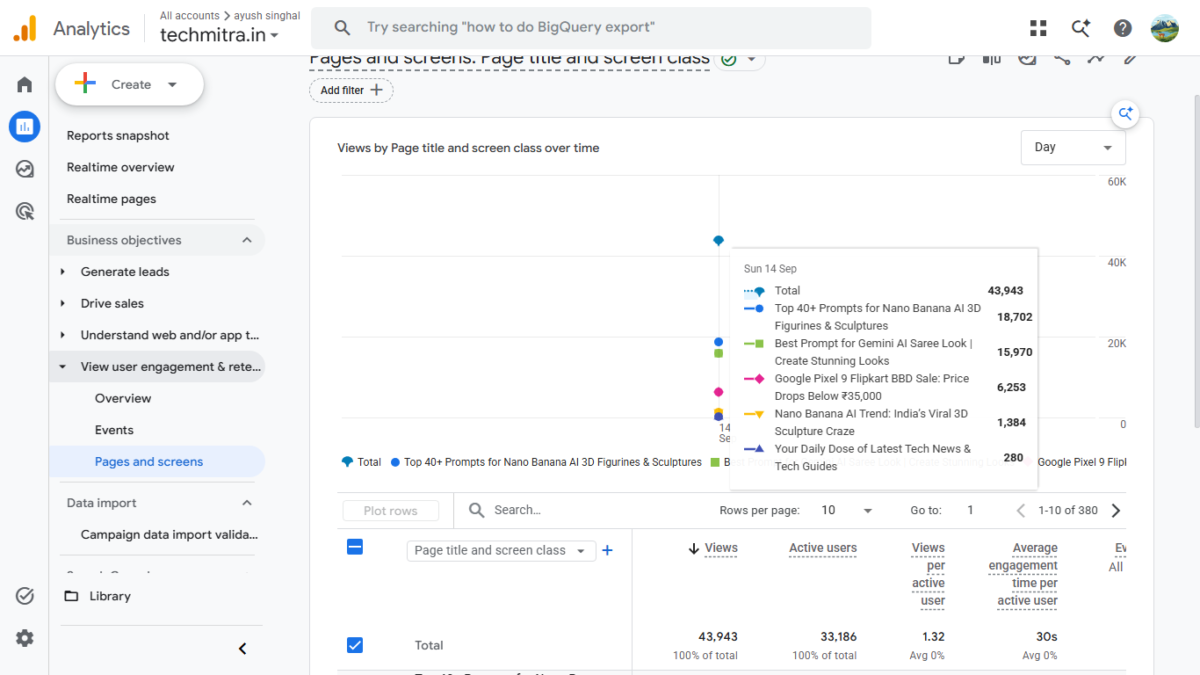
For one blog or small business site, Premium is enough. On September 14, 2025, TechMitra recorded 43,943 page views and 33,186 active users in a single day on my Premium plan. Of those active users, 31,912 were from India. What pushed me to Business was growth, not that traffic spike. By the time the site had about 450 posts I was running short of storage, and from December the server’s memory (RAM) and disk speed (IOPS) limits started slowing it down. I upgraded on January 31, 2026.
Part of that slowdown was my own setup, because some heavy plugin features were loading the server. So fix your caching and plugins first, and upgrade when you really reach storage or resource limits. Choose Unlimited if you run several sites, an online shop or a site with a lot of content.
Two warnings. First, “unlimited” has limits. My hPanel shows a 3 GB memory cap, 60 PHP workers, 600,000 files and 512 disk operations a second, and Hostinger’s plan page says unlimited features are subject to its Fair Usage Policy. Second, the sale page lists 50 GB of NVMe storage for Unlimited, but my account shows 200 GB, probably because I bought earlier. Always check the storage on the checkout page.
Hostinger vs MilesWeb vs Bluehost vs GoDaddy: Price comparison
Over three years, MilesWeb’s listed prices come out lowest and Hostinger’s Premium sits in the middle, but Hostinger wins if you pay for four years upfront. I haven’t used Bluehost, MilesWeb or GoDaddy, so I compared only their published India prices on November 23, 2026, before GST, on a 12-month term. The “3 years” column is the sale price for year one plus two years at the listed renewal rate.
These are selected plans at different price points, not like-for-like performance comparisons. They are useful for comparing published pricing and headline limits, not for judging speed, uptime or support.
12-month plans, in ₹, before 18% GST. Sale prices checked on November 23, 2026 (Black Friday offers).
Swipe sideways to see every column.
| Plan | Sale price (₹/month) | First year (₹) | Renews at (₹/month) | 3-year cost (₹) | Websites | Storage | Free domain | Backups and extras |
|---|---|---|---|---|---|---|---|---|
| Hostinger | ||||||||
| Single | 159 | 1,908 | 289 | 8,844 | 1 | 10 GB SSD | Not included | Weekly backups, CDN |
| Premium | 139 | 1,668 | 449 | 12,444 | 3 | 20 GB SSD | Free for 1 year | Weekly backups, CDN |
| Unlimited (formerly Business) | 199 | 2,388 | 649 | 17,964 | Unlimited* | 50 GB NVMe | Free for 1 year | Daily backups with easy restore, CDN, ecommerce free for 1 year |
| Cloud Startup | 599 | 7,188 | 1,599 | 45,564 | Unlimited* | 100 GB NVMe | Free for 1 year | Daily and on-demand backups, CDN |
| MilesWeb | ||||||||
| Starter | 159 | 1,908 | 229 | 7,404 | 1 | 10 GB NVMe | Free for 1 year | 1 free email account |
| Premium | 189 | 2,268 | 289 | 9,204 | 25 | 50 GB NVMe | Free for 1 year | 50 free email accounts |
| Unlimited | 249 | 2,988 | 449 | 13,764 | Unlimited* | 75 GB NVMe | Free for 1 year | Unlimited email accounts, daily and on-demand backups, 1 Node.js app |
| Cloud Startup | 749 | 8,988 | 1,199 | 37,764 | Unlimited* | 100 GB NVMe | Free for 1 year | 5 CPU and 5 GB RAM, daily and on-demand backups, 3 Node.js apps |
| Bluehost | ||||||||
| Starter | 209 | 2,508† | 455 | 13,428 | 10 | 10 GB NVMe | Free for 1st year | Free SSL and CDN, staging site, chat support, no phone support, about 40k monthly visits |
| Business | 349 | 4,188 | 717 | 21,396 | 50 | 50 GB NVMe | Free for 1st year | Malware scan and removal, domain privacy (1st year), phone support, about 200k monthly visits |
| eCommerce Essentials | 749 | 8,988† | 1,709 | 50,004 | 100 | 100 GB NVMe | Free for 1st year | WooCommerce included, domain privacy (1st year), phone support, about 400k monthly visits |
| GoDaddy | ||||||||
| Starter | 169 | 2,028 | 299‡ | 9,204 | 1 | 10 GB NVMe | Not listed | cPanel |
| Economy | 199 | 2,388 | 599‡ | 16,764 | 1 | 25 GB NVMe | Listed, terms apply | cPanel, Node.js, free email, free SSL for 1 year |
| Deluxe | 449 | 5,388 | 849‡ | 25,764 | 10 | 50 GB NVMe | Listed, terms apply | cPanel, Node.js, free unlimited SSL, free professional email for 1 year |
| Ultimate | 599 | 7,188 | 1,099‡ | 33,564 | 25 | 75 GB NVMe | Listed, terms apply | cPanel, Node.js, free unlimited SSL, free professional email for 1 year |
3-year cost is the first-year price plus two years at the listed renewal rate. Add 18% GST to every figure.
* “Unlimited” is subject to each host’s fair usage policy.
† Bluehost totals that were not shown on screen are calculated as 12 times the monthly price.
‡ GoDaddy shows a struck-through standard price but no printed renewal price. I used the standard price and have not confirmed it as the renewal rate.
Plan limits come from each host’s pricing page and can differ by term or by when you bought. For example, my own Hostinger Business plan, bought in January 2026, shows 200 GB. Hostinger’s renewal rates were the same on 12-month and 48-month terms. These are listed prices and specifications, not tests of speed, uptime or support.
Hostinger’s advantage is the long term. The same ₹139 a month for Premium is available on a 48-month plan, which costs ₹6,672 for four years. Buying 12 months and then renewing for three more years would cost about ₹17,832, and MilesWeb’s Premium over four years would be about ₹12,672. The catch is that the long term is paid upfront, and the renewal after it is the same ₹449 a month, whichever term you choose.
Two more things to check before you decide. MilesWeb advertises an unchanged price at renewal on its 36-month term, and Bluehost’s renewal price depends on the term, so look at the exact term you plan to buy. These are listed prices and specifications, not tests of speed, uptime or support.
Performance and reliability: What I observed
My experience with Hostinger has been very positive in terms of uptime and day-to-day performance. I have been using the hosting for around 22 months, and during that period my website has been down only once for about five minutes. Apart from that brief incident, I have not experienced any noticeable downtime.
I also find the overall website speed good for shared hosting. TechMitra runs on Hostinger’s LiteSpeed-based server environment, and the combination of LiteSpeed, caching and WordPress optimization has provided good day-to-day performance.
One feature I particularly notice is object cache. It improves the responsiveness of the WordPress dashboard by caching frequently accessed data, which makes tasks inside WordPress feel faster and helps reduce repeated database processing.
However, speed depends heavily on caching and website configuration, not just the hosting provider. TechMitra’s average server response time fell from about 779 ms to a few hundred milliseconds after I set up Cloudflare caching properly. I explain the details, configuration and results in my Cloudflare Cache Everything case study.
On the server side, Hostinger uses LiteSpeed, which has also worked well for my WordPress setup. In my experience, the combination of the LiteSpeed server environment, caching and WordPress optimization provides good data transfer and overall responsiveness. Actual page speed will still depend on factors such as your theme, plugins, images, caching configuration, CDN and website setup.
Hostinger also has a public status page where it publishes incidents and maintenance information. Times are shown in UTC, so a maintenance window from 19:00 to 21:00 UTC, for example, corresponds to 12:30 to 2:30 a.m. in India. When I checked the status page on November 22, 2026, it showed all systems operational.
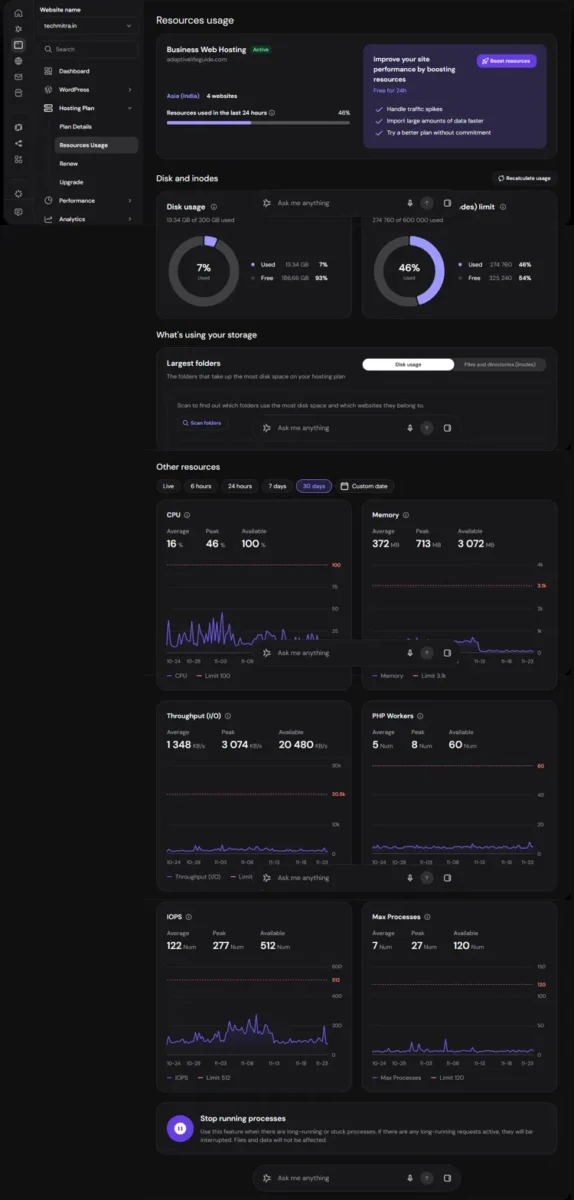
My own server resource usage has also been comfortable on the current plan. Over the last 30 days, hPanel showed average CPU usage of 16%, with a peak of 46%. Memory averaged 372 MB and peaked at 713 MB out of 3 GB, while the busiest moment used 8 of the available 60 PHP workers.
So, while I would not use my experience to promise a particular uptime percentage or page-load time for every Hostinger customer, 22 months of real-world use with only one roughly five-minute outage is a strong reliability record in my case.
hPanel: easy enough for beginners
Hostinger’s control panel, hPanel, is one of its strongest points. The main tasks, such as activating SSL, installing WordPress on a domain, opening WordPress, clearing the cache, checking how your site is performing, or restoring a backup, are usually a click or two away and explained in plain language. The Resources Usage page shows live graphs of CPU, memory, disk speed and processes with your plan’s limits drawn on them, and Analytics shows your visitors without any extra plugin.
On the Business plan(Unlimited plan) and above you also get an object cache, switched on with one toggle next to LiteSpeed. It remembers frequent database lookups so WordPress doesn’t repeat them, and Hostinger says it is based on LiteSpeed Memcached. The new Anti-DDoS events page under Security lists attacks on your plan’s servers that Hostinger has stopped, and mine shows none in the last 30 days. The built-in file manager lets you upload, search, download and delete files without extra software, and it has a trash bin. Hostinger also includes a CDN with image optimization, but it needs your domain to use Hostinger’s nameservers, and TechMitra uses Cloudflare instead, so I can’t speak from experience about it.
Business also includes daily backups that you can restore or download from hPanel, so you don’t need a backup plugin. They appear on my invoice at ₹0. Hostinger says lower plans get weekly backups, so on those I would also keep my own copies.
WordPress on Hostinger: what to set up and watch
Because this review is about WordPress on shared hosting, here is what matters most for a WordPress site. hPanel shows which PHP and WordPress versions your site runs (mine shows PHP 8.5 and WordPress 7.1.5, both marked as compatible) and lets you choose how updates work. Mine is set to security updates only, which keeps the site patched without surprise changes to themes and plugins. The LiteSpeed toggle turns on server-level page caching, and my optimization setting is Advanced. The object cache toggle sits next to it on Business and above. Together they do most of the work of making WordPress fast on a shared plan, so you don’t need to build a caching setup from scratch.
On shared hosting, a WordPress site’s speed depends as much on its plugins and caching as on the plan itself. In my case, heavy plugin features loaded the server, and proper caching made a big difference to speed. PHP workers, which are the number of page requests WordPress can process at once, are also a plan limit: mine allows 60, and my busiest moment in 30 days used 8. Install only the plugins you need, keep PHP and WordPress up to date, and check the Resources Usage page now and then, so you see a problem before your visitors do.
Hostinger also suggests its own plugins on the same screen, including an AI content tool and an email marketing tool. They are optional extras, not requirements.
Email on your own domain
A business address such as [email protected] looks more trustworthy than a free Gmail address, and Hostinger includes free mailboxes with its plans. Mine were created on February 9, 2025, with 1 GB each, and they have worked without trouble, including through my plan upgrade. The free email is not permanent. My hPanel shows it expiring on January 31, 2027, which is longer than the one year Hostinger’s current pages describe, and Hostinger’s assistant could not explain the difference.
After the free period, Hostinger’s assistant told me the service can continue automatically as a paid plan if a valid payment method is saved. It quoted ₹1,188 per mailbox per year before tax, which is about ₹2,804 a year with GST for my two mailboxes. It could not confirm any grace period, so before the free period ends I will export my important emails and decide whether to pay. The price is per mailbox, so a team of five pays five times.
Also read : I Connected My Hostinger Mailbox to ChatGPT — Here’s What Actually Happened
Support: what happened when I had a real server problem
In April 2026, after I put Cloudflare in front of my site with a Cache Everything rule, some visitors saw a “prove you’re human” CAPTCHA page. It came from the server’s own bot protection, which was treating Cloudflare’s few IP addresses as one aggressive visitor, and Cloudflare was storing that page and showing it to everyone.
I contacted Hostinger four times between April 12 and April 27. Its AI assistant was quick and gave me a useful test for checking whether the server sees real visitor addresses, but at first it blamed a WordPress plugin and then offered to change a CDN setting I don’t use. Live-chat agents replied every few minutes once they joined. Their first answers were generic, such as clearing my browser cache and restarting my router, and the main suggestion, bypassing HTML caching in Cloudflare, would have removed the speed gain that was the whole point. A ticket produced a better technical reply about nine hours later, asking me to make Cloudflare respect the page’s no-cache header.
I eventually got the issue resolved, but I don’t have enough evidence from the support conversation to say confidently which specific change fixed it. I therefore would not claim that one particular Hostinger or Cloudflare setting was the definitive fix.
My honest summary: support was friendly and quick to reply, but slow to reach the real cause. If your problem is on the server, describe the exact mechanism in your first message, keep screenshots, and be ready to push past the first-line answers.
Who should choose Hostinger shared hosting, and what are the alternatives?
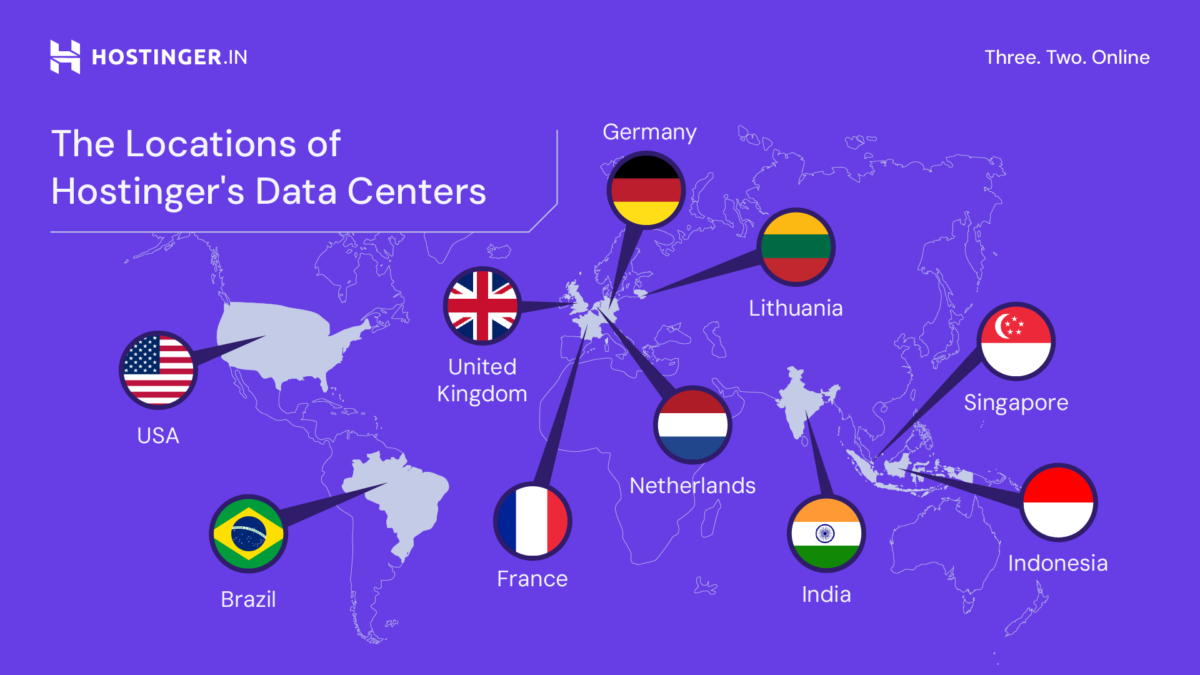
Hostinger shared hosting fits people who want an easy, low-cost start for a WordPress site and can plan for the renewal price. It suits beginners, bloggers, small businesses with a handful of pages and portfolio sites, especially if most visitors are in India and you want a server there. It also suits anyone willing to pay for a long term upfront, because the 48-month deals are where Hostinger’s price is hardest to beat. My own site shows the limits: TechMitra reached about 450 posts on Premium and recorded 33,186 active users and 43,943 page views in a single day before storage and resource limits pushed me to Business.
Think twice if you want a price that stays flat at renewal, if you need phone support, or if your site is a busy WooCommerce store or an application. Hostinger’s renewal is about three times the sale price, and I needed four contacts to get a server-side problem solved.
Here is what I would look at instead, depending on what matters most. I haven’t used these hosts, so this is based on their published India prices on November 23, 2026, before GST.
If you want the most predictable price: MilesWeb. Its Premium plan lists 25 websites and 50 GB at ₹189 a month, renewing at ₹289 on a 12-month term, and it advertises an unchanged price at renewal on its 36-month term. Check the exact terms before you rely on that.
If you want phone support or malware removal: Bluehost. Its Business plan lists both, along with 50 websites and 50 GB, at ₹349 a month on a 12-month term, renewing at ₹717.
If you want domain, email and hosting from one company: GoDaddy. Its Economy plan (₹199 a month, one website) and Deluxe plan (₹449 a month, ten websites) list a free domain and free email, but renewal is listed at ₹599 and ₹849 a month if the standard price applies. Check the free-period terms.
If you are outgrowing shared hosting: a cloud plan or a VPS, which I compare in my Top 5 Cloud VPS Hosting Providers in India guide. Hostinger’s own Cloud Startup is ₹599 a month at the sale price and renews at ₹1,599, and a managed WordPress or WooCommerce host may suit a busy shop better than any shared plan.
Security: The biggest limitation of shared hosting
Security is one of the main limitations you should understand before choosing shared hosting. Your website is hosted on a server that also runs other customers websites. Hostinger provides several security features on its shared hosting plans, including standard DDoS protection, a malware scanner, a web application firewall (WAF), Cloudflare-protected nameservers and a Secure Access Manager. These features help protect websites against common threats, although shared hosting still provides less server-level isolation and control than a VPS or dedicated server.
For a normal WordPress blog or small business website, this does not automatically make shared hosting unsafe. The bigger issue is that you are sharing the underlying hosting environment with other customers, so you have less control over the server and its security configuration.
There is also a second layer of responsibility: your WordPress installation, themes, plugins and passwords. A vulnerable or poorly maintained plugin can compromise your website regardless of how good the hosting provider’s server security is. On shared hosting, recovering from a compromised site can also be more complicated because you do not have the same level of server-level control that you would have with a VPS.
For a personal blog, portfolio or small business website, I would not consider shared hosting a reason to avoid Hostinger shared hosting altogether. But if you are running a high-value online store, handling sensitive customer information, or need stronger server isolation and more control over security, a VPS or managed hosting environment is worth considering.
My view: shared hosting is convenient and affordable, but security isolation is one of the trade-offs you accept in exchange for the lower price and simpler management.
Who should look elsewhere
Look at Cloud or VPS hosting if you run a busy WooCommerce shop, a custom application, or a site with very heavy traffic. Look elsewhere if you can’t accept a big jump at renewal, or if you need hands-on help with server-level problems. Shared hosting also means no root access to the server, so you can’t change server settings yourself.
Before you buy
Choose the term knowing the renewal price, and remember that all plans are paid upfront and monthly prices exclude GST. Write your renewal dates in your calendar a month ahead, because Hostinger charged my domain renewal almost four weeks before it expired. Check the storage and limits on the checkout page, read the 30-day money-back terms and the refund policy before you pay, and keep your own backups. Screenshot your invoices and plan details as you go.
My verdict
Hostinger gives beginners and small businesses an easy, capable WordPress hosting plan at a low starting price, and my Business plan has plenty of headroom for four sites. The renewal prices, the extra costs for domains and email, and the slow route to fixing a server-side problem are the things to plan for. If that fits you, you can see Hostinger’s current plans through my affiliate link. Hostinger has also given my readers the code TECHMITRA10 for 10% off.
Frequently asked questions
Is Hostinger good for WordPress?
Yes, for blogs, small business sites and small shops. hPanel has built-in LiteSpeed caching, an object cache on Business and above, and daily backups on Business, but a busy WooCommerce store should look at Cloud hosting.
Is Hostinger good for beginners?
Yes. hPanel is simple, and most everyday tasks take a click or two.
Is Hostinger good for visitors in India?
My plan runs on a server in India. On September 14, 2025, TechMitra recorded 33,186 active users and 43,943 page views in a single day on the Premium plan.
How much does Hostinger cost after the first term?
At today’s rates, Premium renews at ₹449 a month and Unlimited at ₹649 a month before GST, about three times the sale price.
Is the domain really free?
For the first year only. My free .com domain cost ₹1,553.40 in its second year.
Does the free email last forever?
No. Mine expires on January 31, 2027 and then costs about ₹1,188 per mailbox per year before tax.
Can I get a refund?
Hostinger advertises a 30-day money-back guarantee, but domain renewals are not refundable. Read the refund policy before you pay.
Premium or Unlimited?
Premium for one small site, Unlimited for several sites, a shop or a lot of content.
Prices and plan details were checked on November 23, 2026; the TECHMITRA10 discount was tested at checkout on November 26, 2026. Prices can change, and I will update this review after my January 31, 2027 renewal.

Ayush Singhal is the founder and chief editor of TechMitra.in — a tech hub dedicated to simplifying gadgets, AI tools, and smart innovations for everyday users. With over 15 years of business experience, a Bachelor of Computer Applications (BCA) degree, and 5 years of hands-on experience running an electronics retail shop, Ayush brings real-world gadget knowledge and a genuine passion for emerging technology.
At TechMitra, he covers everything from AI breakthroughs and gadget reviews to app guides, mobile tips, and digital how-tos. His goal is simple — to make tech easy, useful, and enjoyable for everyone. When he’s not testing the latest devices or exploring AI trends, Ayush spends his time crafting tutorials that help readers make smarter digital choices.
📍 Based in Lucknow, India
💡 Focus Areas: Tech News • AI Tools • Gadgets • Digital How-Tos
📧 Contact: Get in touch →
🔗 Full Bio: https://techmitra.in/about-us/