
Table of Contents
Introduction: Meet Mico — Microsoft’s New Animated AI Revolution
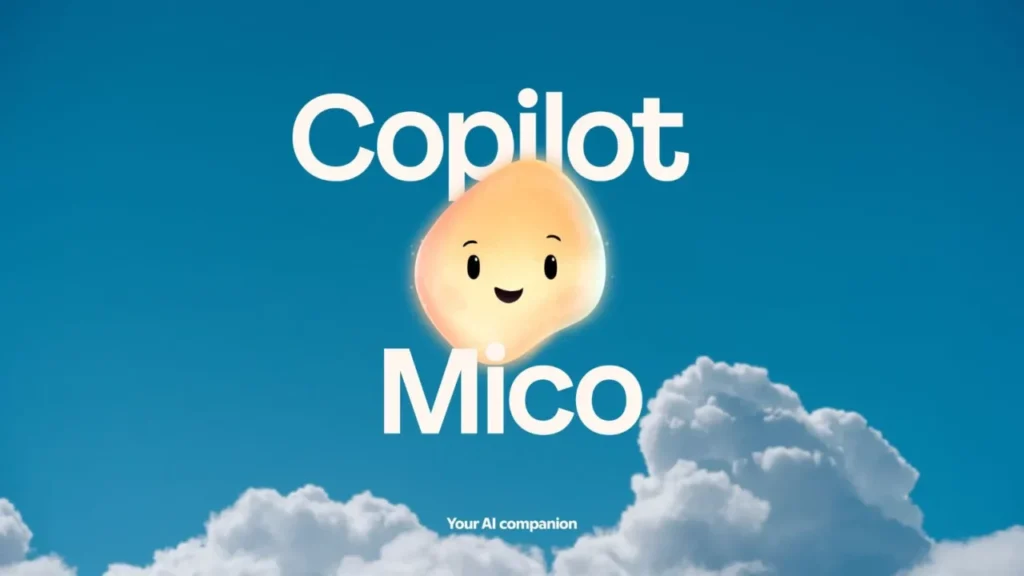
Microsoft has officially unveiled Mico (pronounced MEE-koh), a charming animated AI assistant that brings a human touch to artificial intelligence. Integrated within Microsoft Copilot, Mico transforms everyday digital interactions into lively, conversational experiences.
Forget robotic chatbots — Mico smiles, reacts, listens, and even changes facial expressions as you talk. It’s not just a tool; it’s an expressive companion that lives inside your apps, browsers, and even Windows itself.
With this launch, Microsoft seems to be saying: AI doesn’t have to feel mechanical — it can feel alive.
What Is Microsoft Mico AI Assistant ?
Mico is Microsoft’s new animated AI avatar built directly into the Copilot ecosystem. It’s designed to make interacting with AI more natural, emotional, and visually engaging.
When you activate voice mode in Copilot, Mico appears as a 3D-style animated character that listens, reacts, and emotes in real time.
According to Microsoft’s official blog and WindowsCentral reports, Mico is part of a “human-centered AI initiative” aimed at making digital communication more intuitive and expressive.
Key Features:
Voice + Visual Interface — Mico listens and visually reacts as you speak.
Expressive Animations — Real-time facial changes for emotion-aware responses.
Built on Copilot Intelligence — Uses GPT-based models for deep reasoning.
Fully Optional — You can turn the avatar off if you prefer a text-only interface.
Fun Easter Egg — Tap Mico repeatedly and it morphs into Clippy, Microsoft’s iconic 1990s assistant — a nostalgic nod to the past!
Mico’s Role in Microsoft Copilot
Mico isn’t a replacement for Copilot — it’s the face of it.
Microsoft describes Mico as a visual personality layer that sits on top of the Copilot engine. In other words, everything Copilot can do — summarizing documents, writing code, creating slides, planning trips — Mico can do with style.
When you speak to Copilot, Mico becomes your interactive counterpart: listening attentively, nodding, smiling, and even tilting its head thoughtfully while processing a complex question.
It’s the first time Microsoft has given AI a face since Clippy, but this time, it’s backed by real generative intelligence, not canned animations.
What Makes Mico Different from ChatGPT, Siri, and Gemini?
| Feature | Microsoft Mico | ChatGPT (OpenAI) | Google Gemini | Apple Siri |
|---|---|---|---|---|
| Animated Avatar | ✅ Yes | ❌ No | ❌ No | ❌ No |
| Emotion Recognition | ✅ Real-time | ⚙️ Limited | ⚙️ Experimental | ❌ No |
| Voice + Visual Interaction | ✅ Seamless | ✅ Voice only | ✅ Voice/Visual (limited) | ⚙️ Voice only |
| Integration | ✅ Deep in Windows & 365 | ⚙️ Web/app only | ⚙️ Web ecosystem | ✅ iOS |
| Personality & Memory | ✅ Personalized | ✅ Advanced | ✅ Adaptive | ⚙️ Limited |
Unlike other assistants, Mico’s uniqueness lies in blending productivity and personality. It’s not just “helpful” — it’s relatable.
Features Launched Alongside Mico
Mico is part of Microsoft’s Fall 2025 Copilot Update, which also introduced powerful collaboration and memory features.
Major Highlights:
Mico Avatar: The expressive face of Copilot for natural voice conversations.
Copilot Groups: Collaborate with up to 32 people inside Copilot for brainstorming, summaries, and voting.
Real-Talk Mode: Copilot can challenge misinformation or gently push back when needed.
Memory & Personalization: Copilot can now remember preferences, tone, and user habits.
Broader Integration: Works across Windows 11, Edge, Outlook, Word, and Microsoft 365 tools seamlessly.
Together, these updates make Copilot a true ecosystem — and Mico its welcoming front face.
Why Microsoft Launched Mico Now
The timing of Mico’s debut isn’t random. The AI market in 2025 is incredibly competitive, with OpenAI’s ChatGPT, Google’s Gemini 2.5, and xAI’s Grok 3 all vying for user attention.
Microsoft’s answer? Emotion. Engagement. Familiarity.
Satya Nadella’s team is positioning Mico as the “friendly bridge between humans and machines.” Instead of relying on sterile text or monotone voice replies, Mico creates a more human-like bond — something that could redefine the UX of AI interactions.
Plus, with Mico, Microsoft extends its AI-everywhere strategy, ensuring Copilot doesn’t just live in your taskbar but feels like a digital colleague beside you.
Availability and Roll-Out
Mico has officially launched in the United States and is gradually rolling out to other regions including the UK, Canada, and India in the coming weeks.
How to Access Mico:
Update your Windows 11 or Copilot app to the latest version (October 2025 update).
Open Copilot and switch to voice mode.
Enable “Animated Avatar” from settings.
You’ll see Mico appear on the screen — ready to listen, learn, and chat.
Tip: Users in India might see the update a few weeks later, depending on Microsoft’s regional release schedule.
Reactions from Users and Tech Experts
The tech community has welcomed Mico with enthusiasm — and a hint of nostalgia.
The Verge called it “Microsoft’s smartest design move since Copilot — it gives AI a face worth talking to.”
Windows Central noted, “Mico’s animation quality and responsiveness bring back Clippy memories — in the best way possible.”
Early users on Reddit report, “It feels like talking to a Pixar character that’s actually helpful.”
Of course, not everyone’s on board — some users prefer a minimalist, non-animated interface. Thankfully, Microsoft made the avatar entirely optional.
Potential Impact on Future AI Design
Mico could set the tone for the next generation of AI assistants:
Emotionally aware
Visually expressive
Deeply integrated across software
Customizable for personal and professional use
If successful, this approach might push Apple, Google, and OpenAI to give their assistants visual personas too — ushering in an era where AI assistants are seen, not just heard.
FAQs About Microsoft Mico
Q1. What is Microsoft Mico?
Mico is a new animated AI assistant integrated with Microsoft Copilot. It combines voice interaction with expressive animation to create a human-like digital companion.
Q2. Is Mico replacing Copilot?
No. Mico is an extension of Copilot — a visual, optional persona that makes conversations more engaging.
Q3. How can I enable Mico?
Update your Windows 11 or Copilot app and switch to voice mode. You’ll find an option to activate “Animated Avatar.”
Q4. Can I use Mico in India?
Yes, Microsoft has confirmed global rollout — India users are expected to receive it in phases over the coming weeks.
Q5. What’s special about Mico compared to Clippy?
Mico is powered by real AI models, enabling natural conversation and emotion recognition — Clippy was scripted and static.
Final Thoughts: A New Face for AI
With Mico, Microsoft has given AI something it’s long been missing — a soulful interface.
It’s friendly, expressive, and intelligent — a fusion of nostalgia and innovation. Whether you love the charm of animated assistants or prefer silent productivity, Mico is proof that AI doesn’t have to feel cold or distant anymore.
The future of AI isn’t just smart — it’s smiling.
Disclaimer: The information in this article is based on details first reported by official sources and publicly available news, including Google News. We have adapted and rewritten the content for clarity, SEO optimization, and reader experience. All trademarks and images belong to their respective owners.
Trending

Ayush Singhal is the founder and chief editor of TechMitra.in — a tech hub dedicated to simplifying gadgets, AI tools, and smart innovations for everyday users. With over 15 years of business experience, a Bachelor of Computer Applications (BCA) degree, and 5 years of hands-on experience running an electronics retail shop, Ayush brings real-world gadget knowledge and a genuine passion for emerging technology.
At TechMitra, he covers everything from AI breakthroughs and gadget reviews to app guides, mobile tips, and digital how-tos. His goal is simple — to make tech easy, useful, and enjoyable for everyone. When he’s not testing the latest devices or exploring AI trends, Ayush spends his time crafting tutorials that help readers make smarter digital choices.
📍 Based in Lucknow, India
💡 Focus Areas: Tech News • AI Tools • Gadgets • Digital How-Tos
📧 Email: contact@techmitra.in
🔗 Full Bio: https://techmitra.in/about-us/