
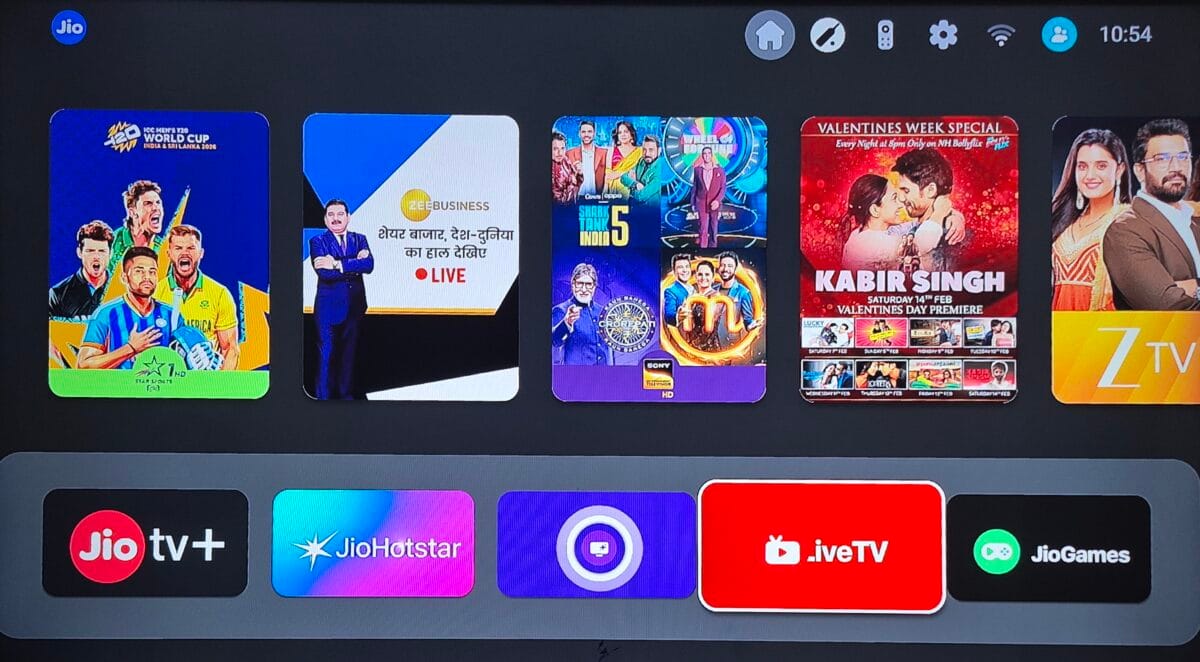
Jio Launches Live TV it is a new service from Reliance Jio that lets JioFiber and AirFiber users stream 800+–1000+ live TV channels directly over broadband — without a traditional DTH connection.
Table of Contents
⚡ Quick Answer: What Is Jio Live TV?
Jio Live TV lets JioFiber and AirFiber users watch 1000+ live TV channels directly on their TV — without traditional DTH.
You get:
- 📺 Live channels with EPG guide
- 📡 Works on JioFiber & AirFiber set-top box
- 📱 Also accessible via JioTV+ app
- 💰 No separate DTH connection required
👉 In short: Jio Live TV is Jio’s broadband-based alternative to cable/DTH TV.
🔑 Key Features of Jio Live TV
- Watch live TV instantly (no buffering like OTT apps)
- Full Electronic Program Guide (EPG)
- Works with JioFiber & AirFiber STB
- Supports HD channels
- One remote control navigation
- No extra dish or cable wiring
Yesterday marked a major turning point in India’s home entertainment space.
Reliance Jio launches Live TV for JioFiber and Jio AirFiber users, and this isn’t just another small update — it’s a full-scale DTH-style experience with 1000+ live channels available directly on your TV.
Until now, users relied on JioTV+, which frankly felt incomplete. The new Live TV app changes everything.
Let me explain why this is a huge upgrade.
Also Read : Jio Airfiber Review (2026) – Honest Real User Experience After Long Term Use
How to Access Jio Live TV (Step-by-Step)
- Turn on your JioFiber / AirFiber Set-Top Box
- Open Live TV or JioTV+
- Press the red button to open channel guide
- Select any channel and start watching
That’s it — no additional setup needed.
From JioTV+ to Real Live TV: What Actually Changed?
Earlier, JioTV+ worked more like an OTT bridge than a proper Live TV platform.
Problems with JioTV+ (Old Experience)
- Limited channel availability
- No English movie channels
- Many popular channels missing
- Clicking a channel often opened another OTT app
For example:
- Watching Zee TV would redirect you to ZEE5
- Sports content pushed users to JioHotstar instead of opening channels like Star Sports directly
So technically, you weren’t watching Live TV — you were jumping between apps.

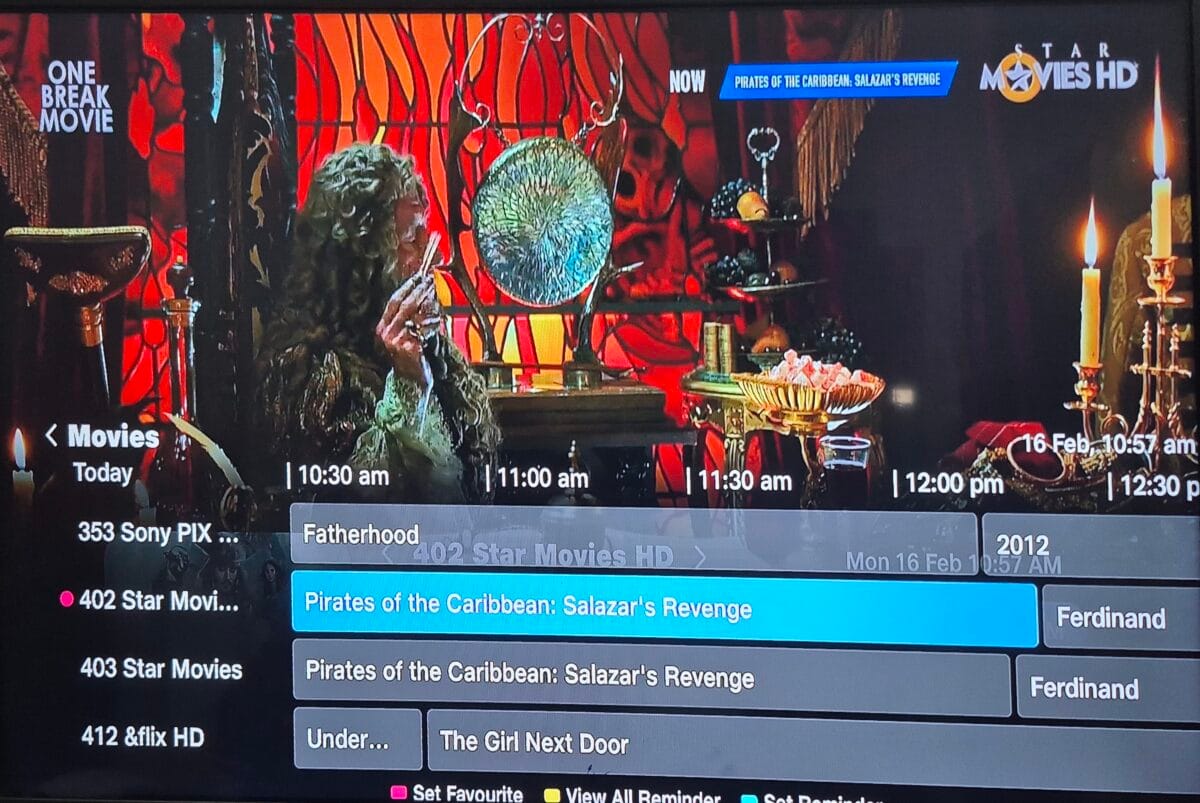
New Jio Live TV = Direct Channel Playback (Like Traditional DTH)
With the new Live TV rollout:
- Channels open instantly inside the Live TV app
- No forced OTT redirections
- Star Sports now plays directly
- Zee channels open natively
- English movie channels are finally present
- Both HD and SD versions are listed
- Every channel has a proper channel number
In short: this now feels exactly like Tata Sky / Airtel DTH — but over internet.
Jio Live TV vs Traditional DTH
| Feature | Jio Live TV | Traditional DTH |
|---|---|---|
| Installation | No dish needed | Requires dish |
| Channel access | Via broadband | Via satellite |
| EPG | Yes | Yes |
| Extra wiring | No | Yes |
| Monthly packs | Currently included | Required |
Built-In Channel Guide (EPG) Using Remote
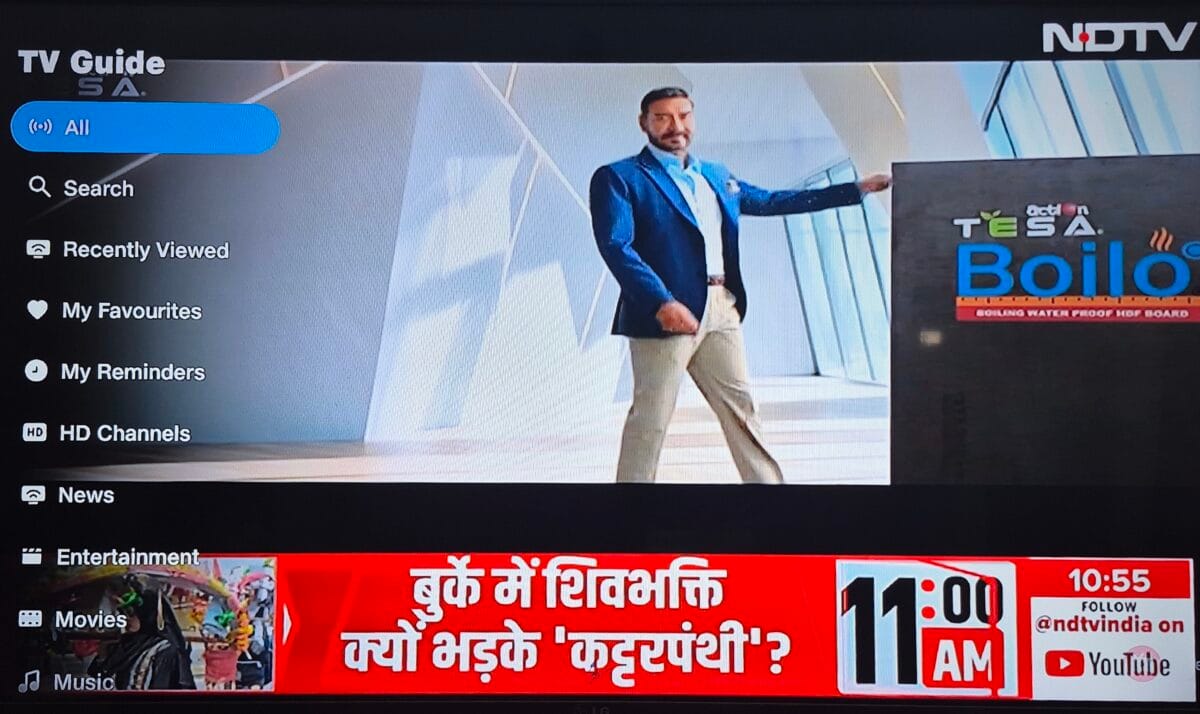
One of my favorite additions:
You can press the red button on the Jio remote to open the full Electronic Program Guide (EPG).
From there, you can:
- Browse by Genre
- Filter by Language
- Jump to channels using numbers
- See what’s currently playing
- Scroll through upcoming programs
This makes channel discovery incredibly easy, especially for family users.
Also Read : My Jio Postpaid Experience: A Deep Dive into the Rs 449 Family Plan
Get Techmitra Updates
Important Tech News, AI Updates – No Spam
JioTV+ vs New Jio Live TV – One More Key Difference
After further checking:
Even though JioTV+ now also shows almost all channels, there’s still a major functional difference between JioTV+ and the new Live TV app on JioFiber / Jio AirFiber:
✅ JioTV+ allows non-live TV playback
You can watch previously aired shows (catch-up content) on many channels.
❌ Jio Live TV is strictly real-time only
There’s no rewind or past episodes — it behaves exactly like traditional DTH.
So basically:
- JioTV+ = Live TV + Catch-up (OTT-style)
- Jio Live TV = Pure Live Channels (DTH-style)
Even though JioTV+ now lists most channels, it still relies on OTT-style playback for many of them, while Live TV plays everything directly with channel numbers and EPG.
This confirms Jio’s strategy:
- JioTV+ is for OTT viewing
- Jio Live TV is for classic television users
Jio Is Now Directly Competing With DTH Operators
This update clearly signals Jio’s intent:
👉 Replace traditional DTH with broadband-based Live TV.
Right now:
- No separate pay-per-channel packs
- All channels bundled together
- Works over JioFiber / AirFiber
Of course, we don’t yet know whether Jio will introduce paid channel packs in the future — but as of today, this is a massive value proposition.
For many homes, this could mean:
❌ No dish antenna
❌ No extra DTH box
✅ Just one Jio set-top box for everything
One Small Con (That Can Be Confusing)
There’s only one usability issue I noticed:
- Pressing the Back button doesn’t exit Live TV
- Instead, it switches to the previous channel
To exit Live TV, you must:
- Press the Home button, OR
- Open the guide and scroll to the last tab → Exit
Not a dealbreaker — but slightly unintuitive.
Final Thoughts: A Game-Changing Update
This is easily one of Jio’s biggest home entertainment upgrades in recent years.
With:
- 1000+ live channels
- Direct playback (no OTT hopping)
- Proper EPG + channel numbers
- HD & SD listings
- Zero extra channel charges (for now)
Jio Live TV is a big step toward replacing traditional cable and DTH systems. For existing JioFiber and AirFiber users, it delivers live TV, channel guides, and simple navigation — all through one broadband connection.
If Jio continues expanding channel availability, this could become a complete home TV solution.
TechMitra Take
Jio isn’t just providing internet anymore — it’s quietly building an all-in-one digital TV ecosystem. Traditional DTH players should be worried.
Frequently Asked Questions (FAQs)
What is Jio Live TV on JioFiber and Jio AirFiber?
Jio Live TV is a new built-in TV service that offers 1000+ live channels directly on your Jio set-top box. Unlike earlier solutions, channels now play instantly inside the Live TV interface — similar to traditional DTH.
How is Jio Live TV different from JioTV+?
JioTV+ mainly worked as an OTT aggregator and often redirected users to other apps for content.
Jio Live TV, on the other hand:
- Plays channels directly
- Includes many more channels
- Adds English movie channels
- Supports Star Sports natively
- Shows proper channel numbers
- Feels like a real DTH experience
Are all channels included for free right now?
As of now, Jio is providing all available Live TV channels without any separate pay-per-channel packs. Everything is bundled with your JioFiber/AirFiber connection. However, Jio has not officially confirmed whether this will remain free forever.
Can I watch Star Sports and other premium channels directly?
Yes. Star Sports and many premium channels now open directly inside Jio Live TV, without forcing you to switch to other OTT apps.
Does Jio Live TV support HD channels?
Yes. Both HD and SD versions of channels are listed, and each channel has a dedicated number so you can tune just like on DTH.
How do I open the channel guide?
Press the red button on your Jio remote to open the Electronic Program Guide (EPG). From there, you can browse channels by:
- Genre
- Language
- Channel number
- Currently playing programs
How do I exit Jio Live TV?
This is one small limitation:
- Pressing the Back button switches to the previous channel
- To exit Live TV, you must press the Home button
- Or open the guide and select Exit (last tab)
Does this mean I no longer need a DTH connection?
For most users — yes.
With 1000+ channels, HD support, and a full EPG, Jio Live TV can completely replace traditional DTH, provided you already use JioFiber or AirFiber.
Is Jio Live TV available on mobile?
No. This Live TV experience is currently designed for Jio set-top boxes connected to JioFiber or AirFiber, not smartphones.

Ayush Singhal is the founder and chief editor of TechMitra.in — a tech hub dedicated to simplifying gadgets, AI tools, and smart innovations for everyday users. With over 15 years of business experience, a Bachelor of Computer Applications (BCA) degree, and 5 years of hands-on experience running an electronics retail shop, Ayush brings real-world gadget knowledge and a genuine passion for emerging technology.
At TechMitra, he covers everything from AI breakthroughs and gadget reviews to app guides, mobile tips, and digital how-tos. His goal is simple — to make tech easy, useful, and enjoyable for everyone. When he’s not testing the latest devices or exploring AI trends, Ayush spends his time crafting tutorials that help readers make smarter digital choices.
📍 Based in Lucknow, India
💡 Focus Areas: Tech News • AI Tools • Gadgets • Digital How-Tos
📧 Email: contact@techmitra.in
🔗 Full Bio: https://techmitra.in/about-us/