
Table of Contents
Introduction
Cloudflare is widely used by website owners for performance, security, and reliability. For many publishers, including blogs and news websites, Cloudflare becomes almost a default choice once traffic starts growing.
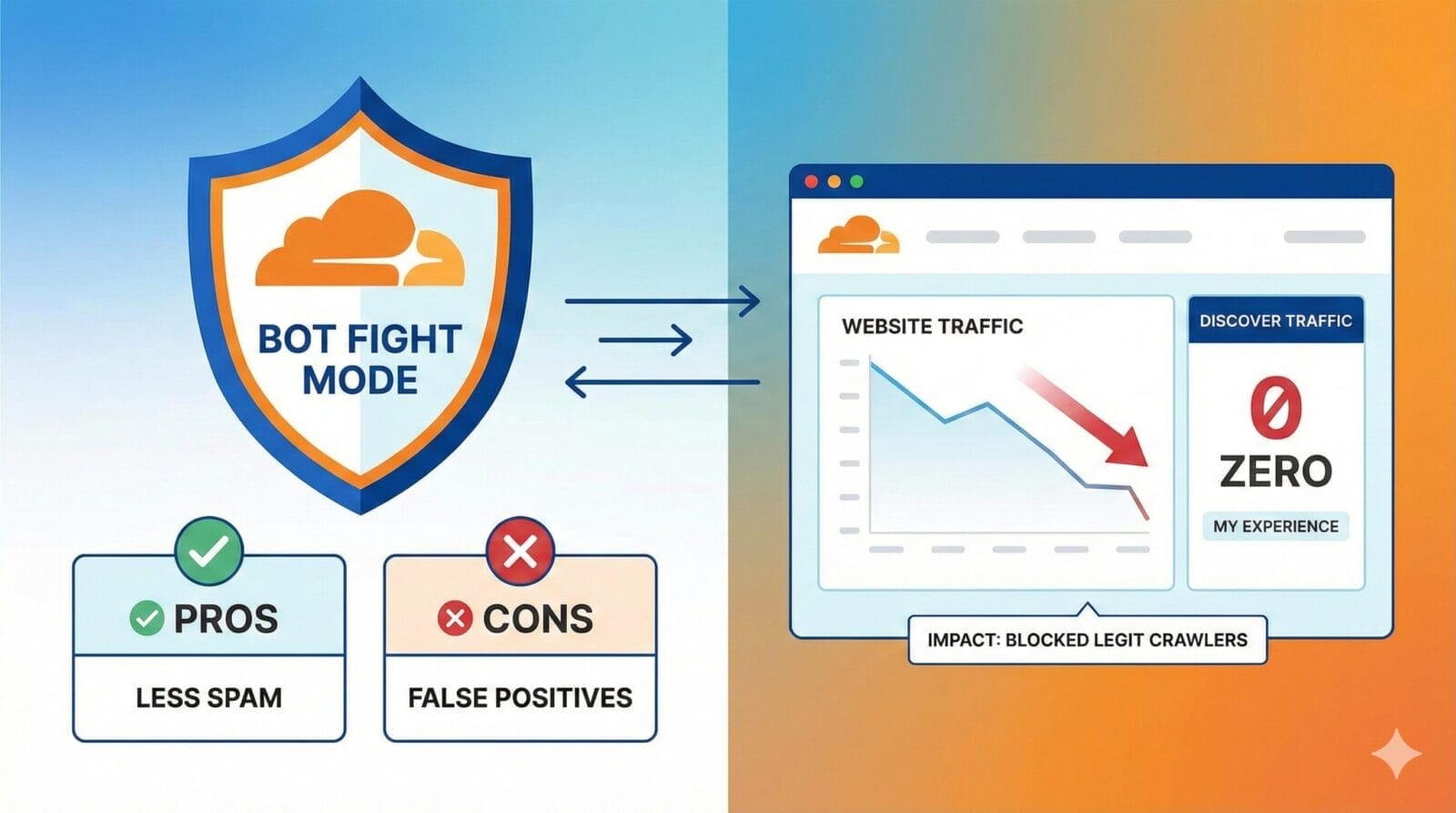
One of Cloudflare’s most talked-about security features is Bot Fight Mode. It promises automatic protection against unwanted bots, reduced server load, and better site security — all with a single toggle.
However, after personally experiencing a significant traffic drop, I learned that Bot Fight Mode is not universally safe for every type of website.
In this article, I’ll explain:
What Cloudflare Bot Fight Mode does
Its pros and cons
How it affects SEO, Google Discover, and AI traffic
And most importantly, a real-world case study of why I disabled it on 21 December and what changed immediately after
This article shares a real-world experience with Cloudflare Bot Fight Mode and examines when the feature helps—and when it can unintentionally impact visibility for content-driven websites.
What Is a Bot?
A bot (short for “robot”) is an automated software program that performs tasks on the internet without human involvement. Bots can be good or bad, depending on their purpose. Good bots include search engine crawlers like Googlebot, Bingbot, and AI assistants that read web pages to index content, generate previews, or answer user queries. Bad bots, on the other hand, are designed to scrape content aggressively, attempt login attacks, spam forms, or overload servers. The challenge for platforms like Cloudflare is accurately distinguishing helpful bots from harmful automation—and when that balance is off, legitimate crawlers can get affected along with malicious ones.
What Is Cloudflare Bot Fight Mode?
Cloudflare Bot Fight Mode is a security feature designed to identify and mitigate automated traffic that Cloudflare classifies as “bots”.
When enabled, it:
Analyses visitor behavior
Assigns bot scores
Applies JavaScript or managed challenges
Blocks or slows down suspicious automation
The idea is simple:
protect your site from bad bots without manual configuration.
According to Cloudflare’s official documentation, Bot Fight Mode is designed to automatically detect and mitigate unwanted automated traffic.
The Intended Use of Bot Fight Mode
Bot Fight Mode works best for:
E-commerce websites
Login-heavy platforms
SaaS dashboards
Websites facing scraping or credential-stuffing attacks
In these cases, blocking aggressive automation can:
Reduce server load
Protect sensitive endpoints
Prevent data scraping
Improve platform stability
For such websites, Bot Fight Mode can be genuinely useful.
Pros of Cloudflare Bot Fight Mode
1. Easy, One-Click Protection
Bot Fight Mode requires no technical setup. Once enabled, Cloudflare automatically detects suspicious bot behavior.
This is attractive for:
Beginners
Non-technical site owners
Sites that don’t want to manage firewall rules manually
2. Reduced Server & Bandwidth Usage
By filtering automated junk traffic:
Fewer requests reach the origin server
Hosting resources are saved
Bandwidth consumption drops
This can be helpful on shared or limited hosting plans.
3. Basic Defense Against Automated Attacks
Bot Fight Mode can slow or block:
Credential-stuffing attempts
Basic scraping tools
Repetitive automated requests
For non-content platforms, this adds a useful security layer.
The Hidden Cons for Content & Publishing Websites
This is where problems often begin.
1. Interference With Crawlers (Not Just “Bad Bots”)
Although Cloudflare allows major search engines in theory, in practice:
Managed challenges may still be applied
Some crawlers receive “unsuccessful” fetches
Image and discovery crawlers can be delayed
For content websites, this matters a lot.
2. Impact on Google Discover Visibility
Google Discover is extremely sensitive to:
Clean page fetching
Fast image delivery
Zero JavaScript challenges
When Bot Fight Mode is enabled:
Heavy Discover crawlers may fail intermittently
Fetch reliability drops over time
Discover impressions can slowly decline
This does not happen immediately — which makes the issue harder to detect.
Google Discover relies heavily on reliable crawling, fast image delivery, and clean page rendering, as explained in Google’s official documentation.
3. AI and Assistant Traffic Gets Affected
Modern websites increasingly receive traffic from:
ChatGPT
Perplexity
Bing AI
Meta and other AI assistants
These systems rely on crawlers that:
Fetch content aggressively
Retry frequently
Look “bot-like” to Cloudflare
With Bot Fight Mode enabled, many of these crawlers experience high failure rates — reducing:
AI citations
Referral traffic
External discovery
4. “Unsuccessful” Requests Are Misleading
Cloudflare often shows:
Allowed
Unsuccessful
Blocked
The problem is that:
JavaScript and managed challenges often appear as “Unsuccessful”, not “Blocked”
Crawlers cannot solve these challenges
From an SEO perspective, unsuccessful fetches are almost as bad as blocks
This creates a false sense of safety.
Real-World Case Study: Why I Disabled Bot Fight Mode
Background
My website previously received strong traffic from:
Google Discover
Search
AI platforms like ChatGPT and Perplexity
Social and Meta previews
After enabling Cloudflare with Bot Fight Mode:
Traffic did not drop immediately
Everything looked fine for the first 2–3 weeks
This delay made the issue difficult to diagnose.
What Went Wrong
After around 30–45 days:
Google Discover traffic dropped sharply
AI referral traffic almost disappeared
Daily views fell drastically
When I analysed Cloudflare’s crawler reports, I noticed:
Meta-ExternalAgent fetches failing repeatedly
ChatGPT-User and GPTBot showing high unsuccessful counts
PerplexityBot experiencing repeated failures
These crawlers were not malicious — they were being challenged by Bot Fight Mode.
As a result:
Social previews broke
AI assistants stopped citing pages
Discover confidence degraded
Overall visibility collapsed
The Fix: Disabling Bot Fight Mode
On 21 December, I disabled:
Bot Fight Mode
AI crawler blocking rules
Managed challenge triggers
I did not change content, SEO, or publishing frequency — only Cloudflare bot controls.
What Happened Next (Data-Backed)
On 22 December:
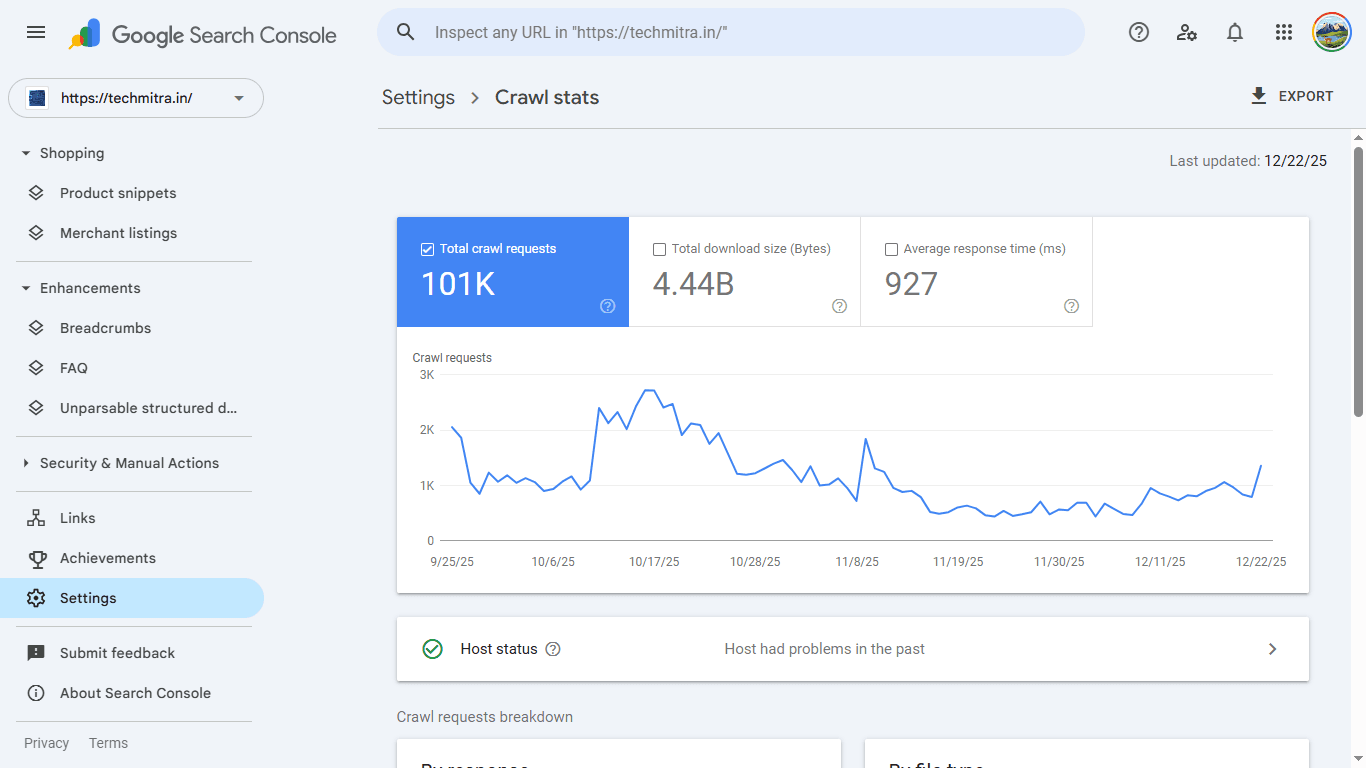
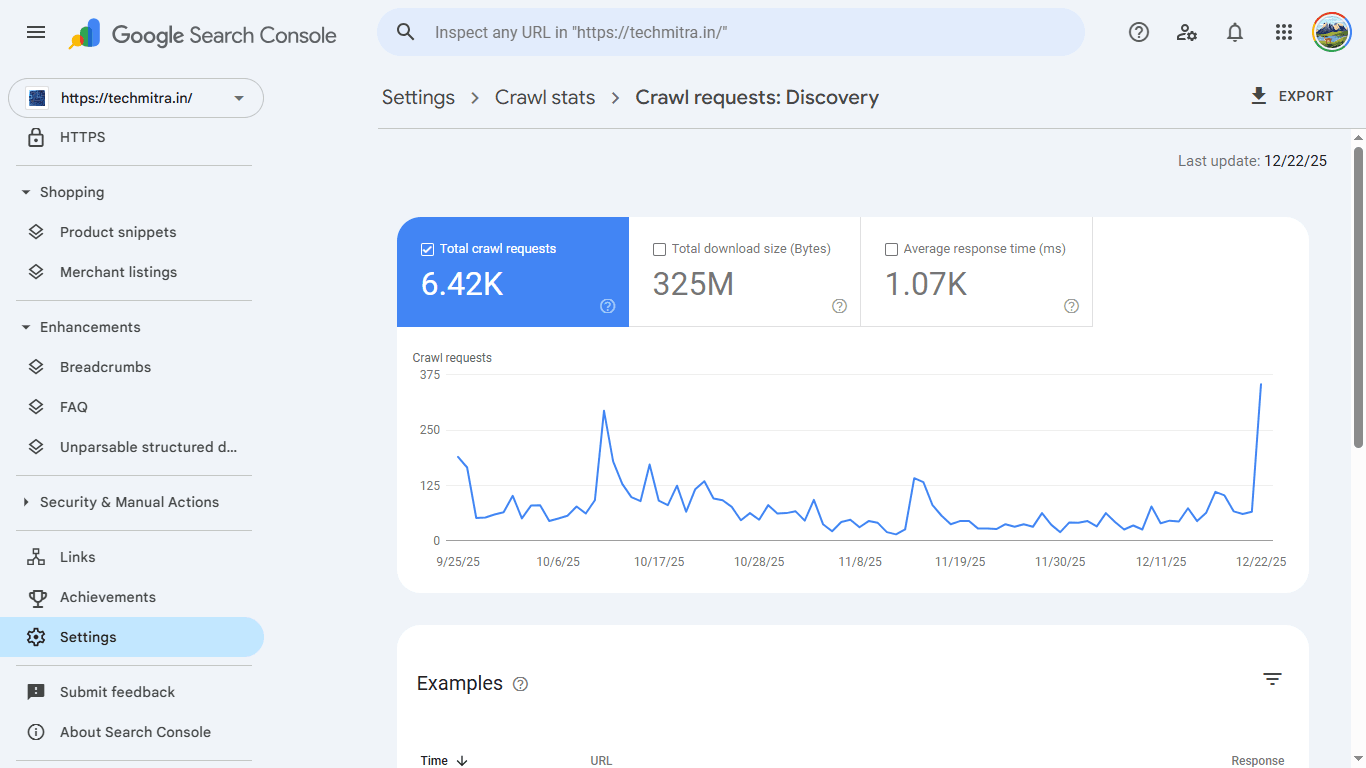
Google Search Console crawl requests jumped significantly
Total crawl increased sharply
Crawl requests by discovery rose multiple times in a single day
At the same time:
ChatGPT, Perplexity, and Meta crawlers started fetching pages successfully
“Unsuccessful” crawler counts dropped close to zero
Daily views slowly began increasing again
This confirmed that crawler blocking — not content quality — was the root cause.
How Bot Fight Mode Affects Website Performance
Crawl & Indexing
Crawl reliability matters more than crawl volume
Intermittent failures reduce Google’s confidence
Discovery crawl drops before Discover traffic disappears
SEO & Rankings
Bot Fight Mode does not cause penalties, but it can:
Delay rankings for new content
Reduce promotion signals
Keep indexed pages from surfacing
Ads & Monetization
While ads are not blocked:
Ad-measurement crawlers may fail
Viewability data becomes unreliable
RPM can decline indirectly
When Bot Fight Mode Makes Sense — and When It Doesn’t
Recommended For
E-commerce websites
SaaS platforms
Login-heavy systems
API-based applications
Not Recommended For
Blogs
News websites
Content publishers
Discover-dependent sites
AI-traffic-friendly platforms
For publishers, visibility is more valuable than aggressive bot blocking.
Safer Alternatives for Content Websites
Instead of Bot Fight Mode, publishers should rely on:
Cloudflare WAF (default managed rules)
Rate limiting on login endpoints
JS detections (not challenges)
DDoS protection (always on)
CMS-level security plugins
This approach protects the site without harming discoverability.
Final Verdict
Cloudflare Bot Fight Mode is not a bad feature, but it is often misused.
For content websites, it can:
Block or disrupt legitimate crawlers
Reduce Google Discover exposure
Kill AI referral traffic
Cause slow, confusing traffic declines
In my case, disabling Bot Fight Mode on 21 December led to:
Immediate crawl recovery on 22 December
Restoration of AI and social crawler access
Early signs of traffic recovery
Conclusion
Cloudflare should act as a performance and stability layer, not a visibility gatekeeper.
If your website depends on:
Search engines
Google Discover
AI assistants
Social previews
then aggressive bot blocking can quietly hurt performance.
Security should protect your site — not hide it from the internet.
Final Note
This article is based on real-world data and experience.
Your results may vary depending on website type — but for publishers, caution with Bot Fight Mode is essential.
Trending

Ayush Singhal is the founder and chief editor of TechMitra.in — a tech hub dedicated to simplifying gadgets, AI tools, and smart innovations for everyday users. With over 15 years of business experience, a Bachelor of Computer Applications (BCA) degree, and 5 years of hands-on experience running an electronics retail shop, Ayush brings real-world gadget knowledge and a genuine passion for emerging technology.
At TechMitra, he covers everything from AI breakthroughs and gadget reviews to app guides, mobile tips, and digital how-tos. His goal is simple — to make tech easy, useful, and enjoyable for everyone. When he’s not testing the latest devices or exploring AI trends, Ayush spends his time crafting tutorials that help readers make smarter digital choices.
📍 Based in Lucknow, India
💡 Focus Areas: Tech News • AI Tools • Gadgets • Digital How-Tos
📧 Email: contact@techmitra.in
🔗 Full Bio: https://techmitra.in/about-us/