
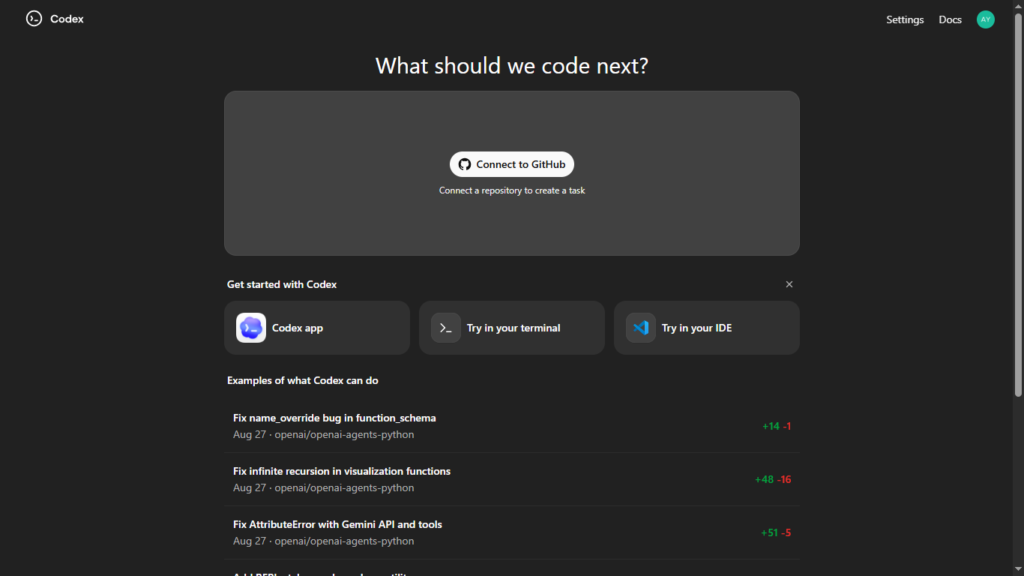
If you use ChatGPT regularly, you might have noticed something new recently — Codex appearing in the sidebar. For many users in India, this was the first time they saw it, which naturally raised questions: What exactly is ChatGPT Codex? Is it different from normal ChatGPT? And is it only for software engineers, or can publishers and website owners also use it?
In this article, we’ll break down ChatGPT Codex in simple language, without hype or unnecessary jargon. Whether you are a developer, blogger, AdSense publisher, or website owner, you’ll clearly understand what Codex does and how it can actually help you in real-world work.
Table of Contents
Also Read – OpenAI May Bring “Skills” to ChatGPT, Making Repeated Prompts a Thing of the Past
What Is ChatGPT Codex?
ChatGPT Codex is a specialized coding-focused mode inside ChatGPT.
While normal ChatGPT is great for explanations, writing, and ideas, Codex is designed to build, modify, and fix software-related things.
In short:
- ChatGPT = conversation + knowledge
- Codex = planning + coding + debugging
Codex is developed by OpenAI and is optimized to understand programming logic, file structures, and development workflows.
You don’t need to be a hardcore programmer to use it. Codex is built to work with natural language instructions, which means you can describe what you want, not how to code it line by line.
Why Did Codex Suddenly Appear in the Sidebar?
Codex is not brand new, but its visibility inside ChatGPT is new for many users.
OpenAI rolls out major features gradually, not all at once. Access depends on:
- Your ChatGPT plan
- Account eligibility
- Gradual UI updates
That’s why many Indian users saw Codex appear only recently, even though it had been available to other users earlier. This is normal behavior for large platforms and does not mean Codex launched “today” only for India.
What Can ChatGPT Codex Do?
Codex is best understood by looking at what problems it solves.
1. Turns plain English into working code
You can say:
“Create a WordPress plugin that calculates solar panel wattage for Indian homes”
Codex can:
- Decide the plugin structure
- Write PHP, JavaScript, and HTML
- Explain how to install it
No need to know coding syntax in advance.
2. Fixes errors and bugs
If your site shows:
- PHP errors
- White screen after plugin activation
- JavaScript not loading
- Android build failures
You can paste the error into Codex and ask:
“Why is this happening and how do I fix it?”
Codex analyzes the problem like a developer and suggests practical fixes, not just theory.
3. Explains existing code in simple terms
You can paste confusing code and ask:
“Explain this in simple language”
This is extremely helpful if:
- You’re editing theme files
- You’re modifying plugins
- You inherited old or messy code
4. Optimizes and cleans up code
Codex can:
- Remove unused code
- Replace heavy libraries
- Improve performance
- Make scripts more secure
This is useful for PageSpeed optimization, CLS fixes, and reducing plugin dependency.
5. Converts code between languages
Examples:
- Java → Kotlin
- PHP → JavaScript logic
- Old-style JS → modern JS
This is especially useful for Android developers and WordPress users who want cleaner code.
How Software Engineers Use ChatGPT Codex
For professional developers, Codex is a productivity multiplier, not a replacement.
Common developer use cases
- Rapid prototyping of ideas
- Writing boilerplate code
- Debugging production issues
- Refactoring old projects
- Generating test cases
- Understanding unfamiliar codebases
Instead of starting from scratch, developers use Codex to speed up repetitive tasks and focus on logic and architecture.
Important reality check
Good engineers:
- Review Codex output
- Test everything
- Treat it as an assistant, not an authority
Codex helps you work faster — it doesn’t remove responsibility.
How Publishers and Website Owners Can Use Codex (Most Ignored Part)
This is where things get interesting — and where most articles stop short.
You don’t need to be a software engineer to benefit from Codex.
1. Creating online tools for your website
Publishers can use Codex to build:
- Calculators
- Generators
- Converters
- Interactive forms
- Small utilities
Examples:
- PageSpeed score estimator
- Image size calculator
- SEO checklist tool
- AI prompt generator
These tools:
- Increase time-on-page
- Improve user engagement
- Help AdSense performance
- Strengthen topical authority
2. Reducing dependency on heavy plugins
Many WordPress sites slow down because of:
- Too many plugins
- Overloaded page builders
- Heavy JS libraries
Codex can create lightweight custom tools using:
- Plain HTML
- Clean CSS
- Minimal JavaScript
Result:
- Better Core Web Vitals
- Lower CLS and TBT
- Faster real-world performance
3. Building custom shortcodes and features
Instead of installing plugins for everything, Codex can help you create:
- Custom shortcodes
- Simple admin panels
- Form handlers
- Data calculators
This is especially useful for niche sites like tech blogs, affiliate sites, or utility-based platforms.
4. Fixing website issues without hiring a developer
Many publishers face issues like:
- Theme conflicts
- Broken layouts
- Script errors
- Mobile responsiveness problems
With Codex:
- You paste the problem
- Ask what’s wrong
- Get step-by-step guidance
This saves time and money, especially for solo site owners.
Real-World Examples for Publishers
Let’s make this practical.
A tech publisher can use Codex to:
- Add a “Website Speed Estimator” tool
- Embed a “Hosting Cost Calculator”
- Create an “AI Prompt Generator for Bloggers”
- Build an “Image Compression Estimator”
Each tool becomes:
- A separate SEO landing page
- A linkable asset
- A long-term traffic source
This is how blogs slowly turn into tool-based authority websites.
Is ChatGPT Codex Free?
Access to Codex depends on:
- Your ChatGPT plan
- Current rollout stage
Codex is not region-restricted and works globally, including India. If you see it in your sidebar, it means your account now has access.
Even if access changes in the future, the skills and workflows you learn using Codex remain valuable.
Codex App: How It’s Different from Codex Inside ChatGPT
Recently, OpenAI introduced the Codex app for macOS, which turns Codex from a built-in ChatGPT feature into a standalone desktop application for developers. The Codex app is designed to run alongside professional tools like code editors and IDEs, allowing software engineers to generate, edit, and debug code without switching contexts.
While Codex inside ChatGPT focuses on guided, conversational coding and is ideal for beginners, publishers, and website owners, the Codex macOS app targets power users who want deeper integration into their daily development workflow. At its core, both use the same Codex intelligence — the difference lies in how and where developers choose to work.
Limitations You Should Know
Codex is powerful, but not magical.
- It can make mistakes
- It doesn’t “understand business context” fully
- Code should always be tested
- Security best practices still matter
Used correctly, it saves time. Used blindly, it can cause problems — just like any tool.
Should You Use ChatGPT Codex?
Use Codex if you:
- Run a WordPress website
- Publish tech or utility content
- Want online tools on your site
- Care about performance and speed
- Want more control without deep coding
Also Read – Technology in 2025: How Artificial Intelligence – AI Reshaping the World Around Us
You may skip Codex if you:
- Only write pure content
- Never touch website structure
- Don’t plan interactive features
Final Thoughts
ChatGPT Codex is not just for software engineers.
It’s a practical tool for anyone who builds or manages things on the web.
For developers, it improves speed and efficiency.
For publishers, it opens doors to interactive content, custom tools, and better-performing websites — without needing to become a full-time coder.
If you’re running a tech-focused site like TechMitra, Codex can quietly become one of the most useful tools in your workflow.
The key is simple:
👉 Don’t ask it to replace you.
👉 Ask it to assist you.
Frequently Asked Questions (FAQs)
1. What is ChatGPT Codex used for?
ChatGPT Codex is mainly used for writing, editing, and fixing code using natural language instructions. It helps developers build software faster, debug errors, and understand complex code, while also allowing non-coders to create simple tools, calculators, and website features.
2. Is ChatGPT Codex only for software developers?
No. While Codex is designed for developers, publishers, bloggers, and website owners can also use it. Non-coders can rely on Codex to build lightweight online tools, WordPress features, and interactive elements without deep programming knowledge.
3. Why did Codex suddenly appear in the ChatGPT sidebar?
Codex appeared in the ChatGPT sidebar due to a gradual rollout by OpenAI. Many users noticed it recently after OpenAI introduced the Codex app for macOS, which increased visibility and interest in Codex across platforms.
4. What is the difference between the Codex app and Codex inside ChatGPT?
The Codex app for macOS is a standalone desktop application built for professional developers and deeper workflows. Codex inside ChatGPT is more conversational and beginner-friendly, making it easier for publishers and non-technical users to work with code.
5. Is the Codex app available for Windows or Android?
As of now, the official Codex app is available only for macOS. There is no native Windows or Android Codex app, but Codex can still be accessed through ChatGPT on the web or mobile apps.
6. Can publishers use ChatGPT Codex to create online tools?
Yes. Publishers can use Codex to create SEO-friendly online tools such as calculators, generators, and converters. These tools help improve user engagement, increase time-on-page, and strengthen a website’s overall authority.
7. What are the ChatGPT Codex limits?
ChatGPT Codex does not have a separate visible daily usage counter, but its limits depend on your ChatGPT subscription plan and system load. Large tasks such as building full applications or generating long code blocks may consume more resources, while smaller tasks like fixing bugs or creating short scripts can be used frequently. Usage limits typically reset over time and may vary as OpenAI updates Codex.
Disclaimer: This article is for informational purposes only. ChatGPT Codex features, availability, and usage limits may change over time as OpenAI updates the product. Readers are advised to verify details from official sources before relying on any specific functionality.

Ayush Singhal is the founder and chief editor of TechMitra.in — a tech hub dedicated to simplifying gadgets, AI tools, and smart innovations for everyday users. With over 15 years of business experience, a Bachelor of Computer Applications (BCA) degree, and 5 years of hands-on experience running an electronics retail shop, Ayush brings real-world gadget knowledge and a genuine passion for emerging technology.
At TechMitra, he covers everything from AI breakthroughs and gadget reviews to app guides, mobile tips, and digital how-tos. His goal is simple — to make tech easy, useful, and enjoyable for everyone. When he’s not testing the latest devices or exploring AI trends, Ayush spends his time crafting tutorials that help readers make smarter digital choices.
📍 Based in Lucknow, India
💡 Focus Areas: Tech News • AI Tools • Gadgets • Digital How-Tos
📧 Email: contact@techmitra.in
🔗 Full Bio: https://techmitra.in/about-us/