
In India, personal finance has always been human-led. Even today, most people rely on chartered accountants (CAs) and accountants for tax filing, compliance, and investment decisions. However, with growing concerns around data privacy, paid subscriptions, and bank-account linking in finance apps, many users are now exploring AI for money management as a safer and more controlled way to understand their finances. Instead of replacing professionals, AI is increasingly being used as a thinking and understanding assistant that helps people make sense of budgets, taxes, and financial choices—while staying fully in control of what data they share.
This is where AI is quietly becoming useful — not as a replacement for professionals or apps, but as a thinking and understanding tool.
Instead of tracking users in the background, AI helps people understand their money, prepare better, and ask the right questions — while staying in control of what data they share.
Table of Contents
Why Many People Avoid Finance Apps (The Ground Reality)
Finance apps offer convenience, but hesitation is real and widespread.
Common concerns include:
Sharing full bank statements and transaction history
Granting continuous SMS or email access
Useful features locked behind paid plans
Multiple apps doing almost the same thing
Dashboards that confuse non-technical users
For many households, clarity, control, and trust matter more than automation.
How AI Is Fundamentally Different
The biggest difference lies in data control.
Finance apps usually work like this:
“Give me access to everything. I’ll analyse it for you.”
AI works like this:
“Share only what you are comfortable with. I’ll help you understand it.”
With AI:
You decide how much data to share
You choose the time range (one week, one month, etc.)
You can use approximate or rounded figures
Data can be shared as text, Excel, PDF, or even images
There is no permanent access and no background tracking.
How Can AI Help With Budgeting (Without Tracking You)
AI does not need your bank login to help with budgeting.
If you share:
Monthly income (even approximate)
Major expense categories
A savings goal
AI can:
Create a realistic monthly budget
Identify overspending areas
Suggest practical saving targets
Adjust plans when income changes
This works especially well for people who want guidance without surveillance.
AI Explains Financial Behaviour (Not Just Numbers)
Most apps show charts.
AI explains why things are happening.
Instead of:
“Your expenses increased by 10%”
AI explains:
“Your discretionary spending is rising faster than income, which is why savings feel inconsistent.”
This explanation helps users learn, not just observe.
AI For Tax Understanding (Not Tax Filing)
Most people don’t want to file taxes themselves — they want to understand them.
AI can help by:
Explaining tax sections in simple language
Clarifying old vs new tax regime logic
Explaining deductions and exemptions
Preparing users before meeting their CA
This leads to:
Better conversations with professionals
Fewer last-minute mistakes
More confidence in decisions
The CA still files the return. AI only helps with understanding and preparation.
AI can help explain tax concepts, but official rules and filings should always follow guidance from the Income Tax Department of India.
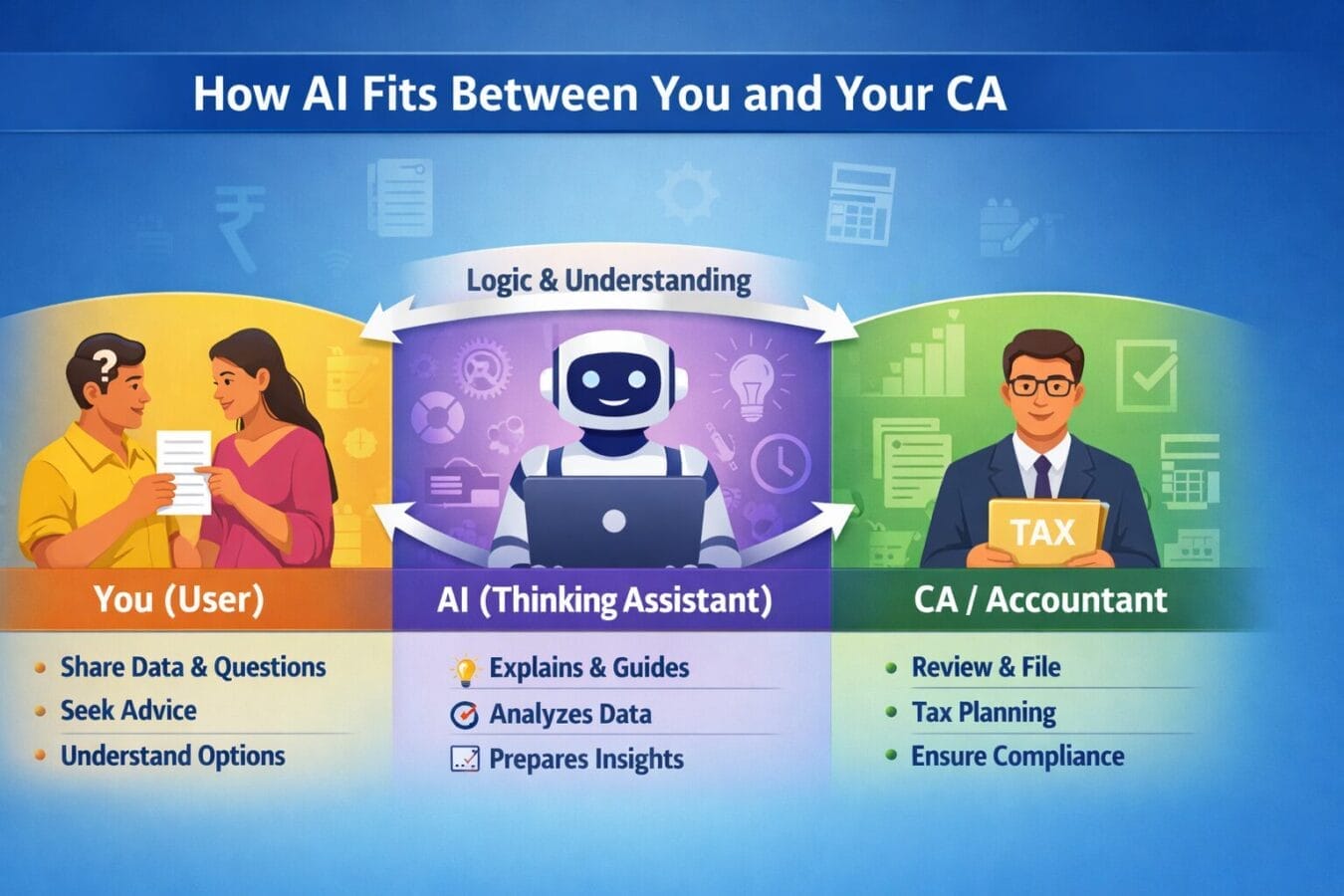
Logic Flow: How AI Fits Between You and Your CA
You (User):
Share limited information
Ask questions
Decide what you are comfortable sharing
AI (Thinking Assistant):
Explains concepts clearly
Highlights options and trade-offs
Prepares you to ask the right questions
CA / Accountant (Final Authority):
Reviews documents
Applies tax laws
Files returns
Ensures compliance
Key point:
AI does not replace the CA.
AI sits between confusion and clarity.
Privacy Pro-Tip: Share Only “Safe Data”
One of the biggest advantages of using AI for finance is controlled data sharing.
Pro-Tip: Scrub Sensitive Details Before Sharing
Before pasting any data into AI, always remove:
Name
Bank account number
UPI ID
Mobile number
Exact transaction references
What to keep:
Dates (optional)
Amounts
Categories (rent, groceries, EMI, etc.)
Approximate income or expense ranges
Example:
Instead of:
“₹4,500 spent via HDFC Account 1234 at XYZ Store on 12 June”
Use:
“₹4,500 spent on shopping on 12 June”
AI does not need identity details to detect patterns or give insights.
Government agencies like CERT-In regularly advise users to limit unnecessary data sharing online
Gemini / ChatGPT Prompts For Money Management (Practical & Safe)
Readers can copy-paste these prompts directly.
1. Budget Planning
“My monthly income is around ₹55,000. Fixed expenses are rent ₹15,000, EMI ₹8,000, groceries ₹7,000. I want to save ₹8,000 monthly. Create a realistic budget.”
2. Expense Understanding
“Here are my expenses for the last 7 days. Can you identify unnecessary spending and suggest improvements?”
3. Tax Understanding
“I am a salaried employee earning around ₹9 lakh per year. Explain which tax deductions I should understand before meeting my CA.”
4. Old vs New Tax Regime
“Explain the difference between old and new tax regimes for income around ₹10 lakh, without giving filing advice.”
5. Savings Habit
“I save money irregularly. Suggest a simple saving strategy based on my income and expenses.”
6. Pre-CA Meeting
“What questions should I ask my CA to ensure I am not missing any legal tax-saving opportunities?”
Common Mistakes People Make When Using AI for Money Management
1. Treating AI as a Replacement for a CA
AI prepares you; the CA executes.
2. Sharing Too Much Sensitive Data
AI does not need names or account numbers.
3. Expecting Exact Numbers or Guarantees
AI explains logic, not certainty.
4. Asking Vague Questions
More context = better guidance.
5. Blindly Following AI Output
Always understand and verify.
6. Using AI in Panic Mode
AI supports calm, rational thinking.
7. Thinking Perfect Data Is Required
Approximate data works well.
What AI Cannot and Should Not Do
AI cannot:
Access live bank accounts
Execute transactions
File tax returns
Replace licensed professionals
AI is best used for:
Understanding
Planning
Learning
Decision support
The Indian Way Forward: AI + Human Experts
India trusts human expertise — and rightly so.
AI fits naturally as:
A learning companion
A preparation tool
A confidence builder
The future is:
AI for understanding + professionals for execution
Final Thoughts
Finance apps manage data.
CAs manage compliance.
AI helps people understand both.
For users worried about:
Data privacy
Paid subscriptions
App overload
AI offers a controlled, human-centric way to become financially smarter — without replacing anyone.
Disclaimer
AI tools are for informational and educational purposes only. They do not replace professional financial or tax advice. Always consult a qualified CA or financial expert for final decisions.
Trending

Ayush Singhal is the founder and chief editor of TechMitra.in — a tech hub dedicated to simplifying gadgets, AI tools, and smart innovations for everyday users. With over 15 years of business experience, a Bachelor of Computer Applications (BCA) degree, and 5 years of hands-on experience running an electronics retail shop, Ayush brings real-world gadget knowledge and a genuine passion for emerging technology.
At TechMitra, he covers everything from AI breakthroughs and gadget reviews to app guides, mobile tips, and digital how-tos. His goal is simple — to make tech easy, useful, and enjoyable for everyone. When he’s not testing the latest devices or exploring AI trends, Ayush spends his time crafting tutorials that help readers make smarter digital choices.
📍 Based in Lucknow, India
💡 Focus Areas: Tech News • AI Tools • Gadgets • Digital How-Tos
📧 Email: contact@techmitra.in
🔗 Full Bio: https://techmitra.in/about-us/