

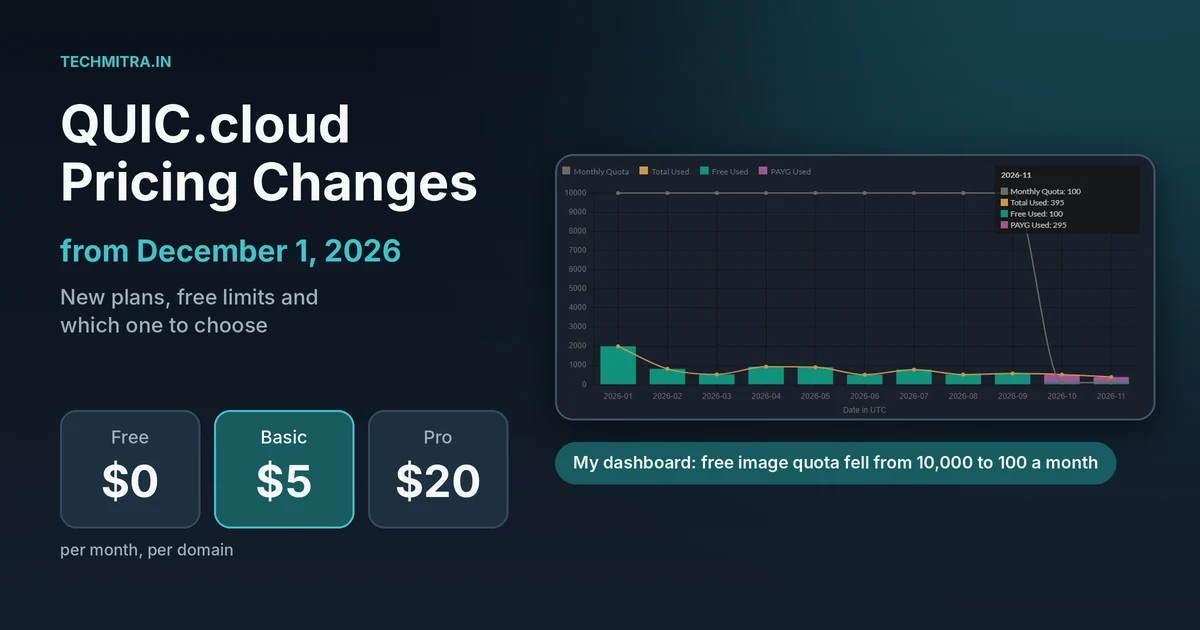
Last checked: 27 November 2026
If your WordPress site uses LiteSpeed Cache, there is a good chance QUIC.cloud is quietly doing work for you. It optimizes your images, generates Critical CSS and keeps your pages loading quickly. On December 1, 2026, QUIC Cloud pricing changes, and my dashboard has been warning me about it for weeks. I run TechMitra on this setup, and I have already been through the first part of the change, so here is what happened, what is coming next and what I would choose.
Table of Contents
What changed in October
QUIC.cloud used to give every domain a very generous free monthly quota. On my domain it was 10,000 image optimizations and 2,000 page optimization requests. In early October 2026 that was cut sharply. The free quota is now 100 images, 20 page optimization requests and 20 LQIP requests a month. That is a reduction of about 99 percent.
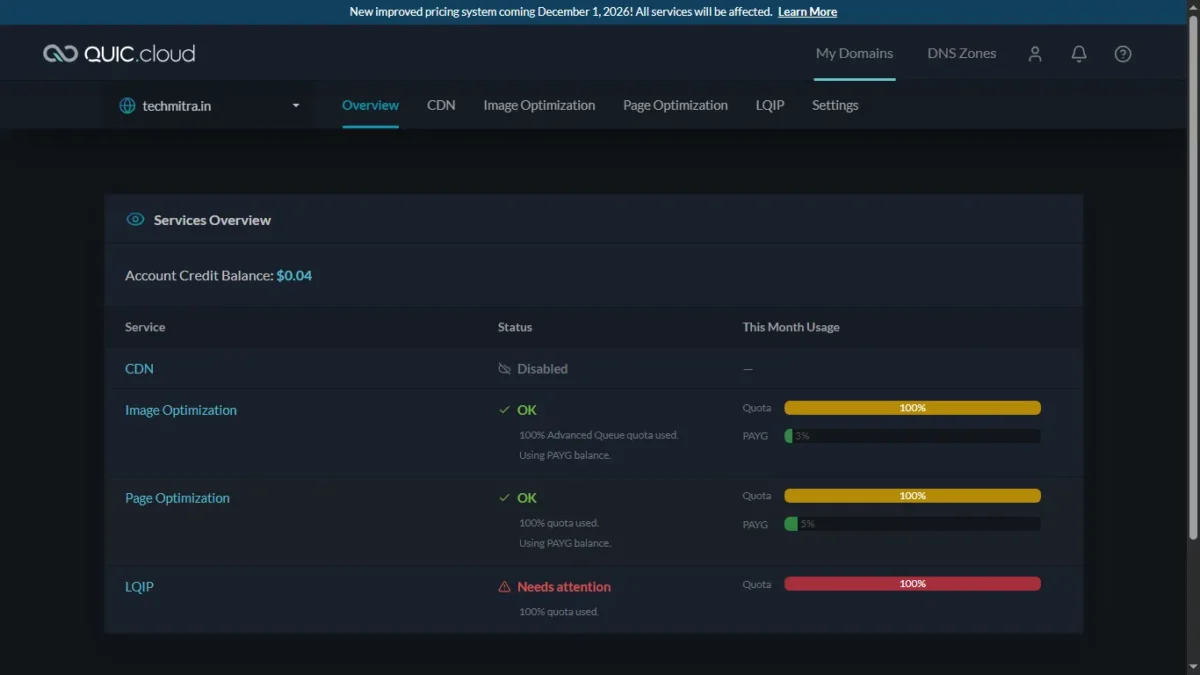
The cut hit me quickly. My dashboard now shows the free quota for images, page optimization and LQIP at 100 percent used. Image and page optimization keep running only because I had bought $5 of Pay-As-You-Go credit earlier, and it is covering the difference. LQIP, which has nothing behind it, shows “Needs attention.” Without image optimization and Critical CSS, TechMitra does not perform as well, so I could not simply ignore it.
I looked at my usage charts to see how much I really needed. Image optimization ran at roughly 500 to 1,000 images a month through most of this year, with a peak of about 2,000 in January. In November so far I have used 395 images, of which only 100 came from the free quota and 295 from my Pay-As-You-Go balance.
Page optimization has been lower recently: 75 requests so far in November, with 20 free and 55 paid. In a few earlier months it went above 2,000 requests. So I was nowhere near the old limits most of the time, but I am well above the new free ones.
How the new QUIC Cloud pricing system works
QUIC.cloud first said the new billing would begin on November 10, then moved it. The plan-based system now starts on December 1, 2026, and the old CDN-only Free and Standard plans are discontinued. Instead of buying credit and spending it on separate quotas, you choose one monthly plan for each domain. That plan covers both the CDN and the optimization services.
The Free plan costs nothing and includes 100 optimization units. Basic is $5 a month with 5,000 units, Pro is $20 with 20,000 units, Business is $100 with 100,000 units, and Enterprise starts at $250 with 250,000 units. The plans also include CDN bandwidth. That is unlimited on a smaller US and EU network for Free, then 100 GB on Basic, 500 GB on Pro and 4 TB on Business. Every domain starts on the Free plan unless you choose another.
How far the units really go
The unit count is shared by all the optimization services, and they do not all cost the same. An image costs one unit, Critical CSS costs three, Unique CSS costs five, Viewport Images cost one, and LQIP costs twenty. So 5,000 units on the Basic plan is not 5,000 pages. The table below shows how many requests of each type each plan would cover if you used all of its units on that one service.
| Service | Units per request | Free (100 units) | Basic (5,000 units) | Pro (20,000 units) |
|---|---|---|---|---|
| Image optimization | 1 | 100 | 5,000 | 20,000 |
| Viewport Images | 1 | 100 | 5,000 | 20,000 |
| Critical CSS | 3 | 33 | 1,666 | 6,666 |
| Unique CSS | 5 | 20 | 1,000 | 4,000 |
| LQIP | 20 | 5 | 250 | 1,000 |
Request counts are my own calculation from QUIC.cloud’s published unit costs. Real sites use a mix of services, so the numbers in practice will be lower for each one.
The table shows why LQIP and Unique CSS use up units so quickly. A page that uses both Critical CSS and Unique CSS takes eight units before you count its images, and a single LQIP request costs as much as twenty images. On the Free plan, five LQIP requests would use the whole month’s allowance.
When a domain uses up its allowance, optimization pauses until the next month, but you can add a $20 pack of 10,000 units at any time. Packs do not expire. Your home page is optimized once a week at no extra cost on every plan.
What happens to your existing balance
This part is reassuring if you are already on Pay-As-You-Go, as I am. Pay-As-You-Go bandwidth or quota stays with the domain and is used once the new plan’s monthly allowance runs out. Account-level credit is moved to your billing account on December 1 and can be used to pay for plans and packs. Existing add-on subscriptions for Online Services end on November 30. If you have one, decide before that date whether to switch plans.
Cloudflare or QUIC.cloud: do you need both?
The two services overlap in one area and not in the other, and that is where most of the confusion comes from. Both can act as a CDN and DNS layer in front of your site. Only QUIC.cloud offers the optimization services that LiteSpeed Cache uses. The Load CSS Asynchronously option uses the QUIC.cloud Page Optimization service to generate Critical CSS, so you must enable QUIC.cloud services, and a fee may apply. Cloudflare lists image optimization among its features, but as far as I know it does not generate Critical CSS the way LiteSpeed Cache does through QUIC.cloud. So this is not a choice between the two. It is a question of which jobs go to which service.
The CDN side is where Cloudflare stays strong. It has a permanent free plan, and its paid plans start at $20 a month, with a 20 percent saving if you pay annually. Plans are priced per domain, and standard cached traffic is not charged per GB. QUIC.cloud’s new Free plan also has unlimited bandwidth, but it runs on a smaller network of US and EU nodes.
That matters for readers in India. Cloudflare has data centres here, so visitors are likely to get a shorter path from it than from QUIC.cloud’s free network. The docs do not say whether the paid QUIC.cloud plans use a larger network, so I would not count on that without asking support. Please confirm Cloudflare’s current prices on its own plans page before relying on the figures here.
The setup that makes sense for me is to keep Cloudflare for DNS, CDN and security, and to use QUIC.cloud only for its Online Services. QUIC.cloud itself says you should not change your DNS if you only want the Online Services. That is why the CDN is switched off on my domain, and it means the bandwidth numbers on the new plans do not matter to me. What matters is the optimization units.
There is one catch. Every domain using QUIC.cloud must allow QUIC.cloud’s IP addresses through its firewall, and Cloudflare’s firewall can block them. QUIC.cloud’s documentation warns that a reverse proxy like Cloudflare can make it hard to validate the server IPs.
QUIC.cloud offers a free script that automatically allowlists its IPs in Cloudflare, and it can run daily from cron. If you skip this step, image or Critical CSS requests may fail without an obvious reason.
TechMitra runs on Hostinger shared hosting with a LiteSpeed server, and I put Cloudflare in front of it. I describe the hosting side of this setup, including the costs and limits, in my Hostinger shared hosting review.
Is there a cheaper alternative?
If you stay with LiteSpeed Cache, there is no substitute for QUIC.cloud’s optimization services, because those features are tied to it. To avoid paying for QUIC.cloud, you would have to replace the pieces with other tools.
For images, ShortPixel is the best-known alternative. It gives 100 free credits a month and lists an unlimited monthly plan at $9.99. One-time credit packs start at $19.99, and one-time credits never expire. These prices come from the plugin’s own listing, so check ShortPixel’s pricing page, because the company has changed its plans before. ShortPixel only covers images, so for image optimization alone it costs more than QUIC.cloud’s $5 Basic plan unless you upload very few images. Compressing and converting images to WebP before you upload them costs nothing, but it takes manual work.
For Critical CSS, some other plugins generate it themselves, including BerqWP and FastPixel. BerqWP describes itself as a single plugin with cached Critical CSS, WebP and AVIF delivery and a CDN at one flat monthly price. FastPixel is described as handling caching, Critical CSS, image optimization and CDN delivery in one cloud-powered plugin. These descriptions come from the vendors and from comparison articles, so treat them as marketing until you test them. Switching your caching plugin on a live site is a big step, so try it on a staging copy first and compare PageSpeed scores before deciding.
Which plan should you choose?
If you run a small blog with a handful of images each month, the Free plan is enough. If you publish regularly and use Critical CSS, the 100 free units will not last more than a few days, and the $5 Basic plan is the realistic starting point.
For my own numbers, that works out well. A recent month for TechMitra is roughly 400 images plus a few dozen page optimization requests. At 3 to 5 units for each page request, that is well under 1,000 units, and Basic gives 5,000. The risk is a spike month like the ones I had earlier this year, when page optimization reached 2,400 to 2,700 requests.
At 3 to 5 units each, that could use more than Basic includes. In that case a $20 pack would cover it, and my Pay-As-You-Go balance is there as a backup. Pro at $20 a month looks unnecessary unless those spikes happen often. If you want to stay under 5,000 units, avoid purging and regenerating all your CSS at once.
Larger WooCommerce stores with many product images should look at Pro. For Indian readers, the new plans also remove the old regional pricing. The old Standard plan charged $0.08 per GB for Asia and several other regions, four times the North America and Europe rate, and the new plans replace that with a flat monthly allowance. The documentation does not say how GST or payment in rupees will work, so check the checkout page before you commit.
Final word
The October cut left a free tier that is too small for any site that publishes regularly. From December 1, the choice is simple: Free for very small sites, Basic at $5 for most blogs, and larger plans only if your usage proves you need them. QUIC.cloud says its dashboard is the final authority on pricing and that more details may still be added, so check your own dashboard before you pay. I will update this article after December 1 with the final plan details and my own experience.

Ayush Singhal is the founder and chief editor of TechMitra.in — a tech hub dedicated to simplifying gadgets, AI tools, and smart innovations for everyday users. With over 15 years of business experience, a Bachelor of Computer Applications (BCA) degree, and 5 years of hands-on experience running an electronics retail shop, Ayush brings real-world gadget knowledge and a genuine passion for emerging technology.
At TechMitra, he covers everything from AI breakthroughs and gadget reviews to app guides, mobile tips, and digital how-tos. His goal is simple — to make tech easy, useful, and enjoyable for everyone. When he’s not testing the latest devices or exploring AI trends, Ayush spends his time crafting tutorials that help readers make smarter digital choices.
📍 Based in Lucknow, India
💡 Focus Areas: Tech News • AI Tools • Gadgets • Digital How-Tos
📧 Contact: Get in touch →
🔗 Full Bio: https://techmitra.in/about-us/