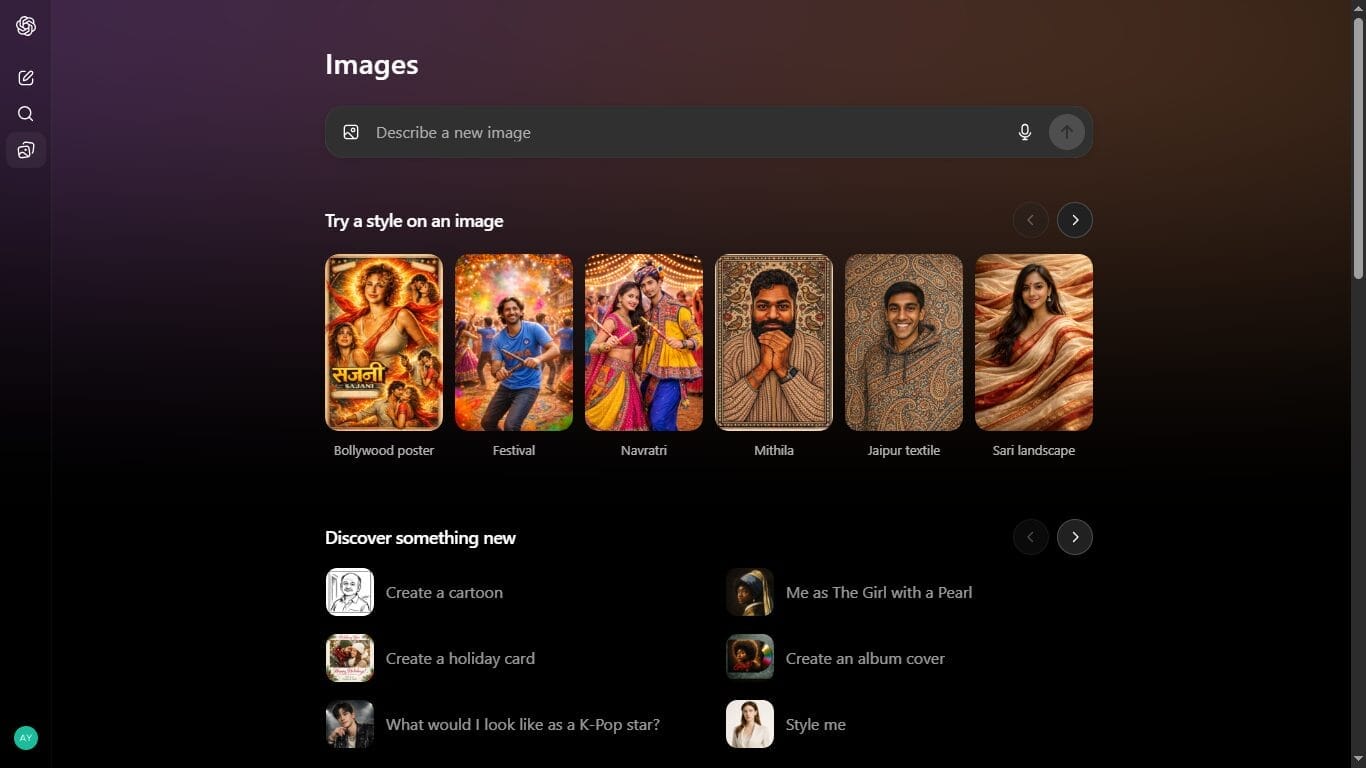
OpenAI has officially rolled out a major upgrade to ChatGPT Images model, marking one of the most significant improvements to its visual generation capabilities so far. The new system is powered by a flagship image generation model called GPT Image 1.5 , designed to deliver faster results, better instruction-following, and far more precise image editing.
According to OpenAI, image creation and modification are now up to four times faster than before. This performance boost, combined with improved consistency and editing control, places ChatGPT Images on the same competitive level as Google’s recently launched Nano Banana Pro image model.
For creators, designers, developers, and everyday users, this update changes how quickly and accurately ideas can be turned into visuals.
What’s New in ChatGPT Images Model (GPT Image 1.5)
1. Much Better Instruction Understanding
One of the biggest complaints with older AI image tools was that they often misunderstood prompts or made unnecessary changes. GPT Image 1.5 significantly improves this.
The model now follows user intent more accurately
Complex instructions are interpreted more reliably
Results closely match what the user actually asks for
Whether you are generating an image from scratch or editing an existing one, the output now aligns far better with expectations.
2. Precision Image Editing (No Unwanted Changes)
Editing has received a major upgrade.
With the new model:
Only the requested area is modified
Unrelated parts of the image remain unchanged
Consistency is maintained across multiple edits
This includes abstract details such as:
This makes iterative design work smoother and far less frustrating.
3. Four Times Faster Image Generation
Speed is where GPT Image 1.5 truly shines.
OpenAI confirms that:
Image generation is 4× faster
Editing iterations take significantly less time
Creative workflows feel more fluid and responsive
This is especially useful for:
Designers testing multiple variations
Marketers refining creatives
Content creators experimenting with styles
Less waiting means more creativity in less time.
4. Dedicated Images Interface Inside ChatGPT
OpenAI has introduced a separate Images interface within ChatGPT, instead of mixing image generation with regular chat.
Key highlights:
Accessible directly from the sidebar (web and app)
Dedicated workspace for visual creation
Cleaner, distraction-free experience
This space acts as both a creation hub and inspiration zone.
5. Preset Filters and Style-Based Editing
Users no longer need to write long, technical prompts every time.
The new Images interface includes:
Ready-made preset filters
One-tap style transformations
Upload an image → apply a style → refine
This makes image editing approachable even for non-technical users.
6. Available to Free Users and Developers
Another big win: ChatGPT Images is rolling out globally to all users, including those on the free tier.
For developers:
GPT Image 1.5 is selectable in the OpenAI API
Ideal for apps, design tools, and creative platforms
The older image model remains available as a custom GPT
How to Use ChatGPT Images (Step-by-Step)
Step 1: Open the Images Interface
Step 2: Choose What You Want to Do
You can:
Generate an image from scratch
Upload an image for editing
Apply a preset style or filter
Step 3: Enter Your Prompt (or Use Presets)
Step 4: Refine with Follow-Up Edits
What Type of Prompts Work Best?
GPT Image 1.5 responds best to clear, structured, and intent-focused prompts.
1. Image Creation Prompts (From Scratch)
Example:
“Create a clean, modern illustration of a smart home living room with solar panels visible through the window, soft daylight, and neutral colors.”
Tips:
2. Image Editing Prompts (Targeted Changes)
Example:
“Change the wall color to light grey and add a wooden coffee table. Do not alter lighting or furniture placement.”
Tips:
3. Style Transformation Prompts
Example:
“Apply a watercolor painting style while keeping facial features realistic and proportions unchanged.”
Tips:
4. Iterative Refinement Prompts
Example:
“Make the image slightly warmer and increase contrast, but keep the composition exactly the same.”
Tips:
Why This Update Matters
With GPT Image 1.5, OpenAI is no longer just experimenting with image generation—it’s clearly positioning ChatGPT Images as a serious creative tool. Faster speed, better instruction-following, precise editing, and a dedicated interface bring it closer to professional design workflows.
As competition with models like Google Nano Banana Pro heats up, users are the real winners—getting powerful visual tools without complexity, and now, even without a paid plan.
Bottom line:
ChatGPT Images with GPT Image 1.5 isn’t just an upgrade—it’s a major step toward making AI image creation faster, more predictable, and genuinely useful for real-world creativity.
Disclaimer: The information in this article is based on details first reported by official sources and publicly available news, including Google News. We have adapted and rewritten the content for clarity, SEO optimization, and reader experience. All trademarks and images belong to their respective owners.