
ChatGPT Group Chat launch in India brings real-time shared AI conversations. Learn who gets access, how it works, and why it’s a game-changer.
OpenAI has quietly activated one of its most useful collaboration features in India — the ChatGPT Group Chat. If you’ve recently noticed an “Add People” button on the left sidebar of your ChatGPT interface, then congratulations — the feature is now available on your account.
What makes this launch even more interesting is that the feature works only on the ChatGPT Go Plan, which is currently free for one year for users in India. This means millions of Indian users suddenly have access to a powerful collaboration tool that was previously limited to paid subscribers in other regions.
In this complete guide, we’ll break down what ChatGPT Group Chat is, how it works, who can use it, step-by-step instructions with real user experience, and why this update is more important than it looks.
Table of Contents
What Exactly Is OpenAI ChatGPT Group Chat?
Group Chat in ChatGPT is a new feature that lets multiple users join a shared conversation — all powered by AI. Think of it as:
A WhatsApp group
But instead of friends chatting, you collaborate inside ChatGPT
And the AI responds to everyone in the same thread
This is extremely useful for:
Study groups
Teams working on a project
Writers collaborating on ideas
Developers debugging code together
Friends exploring AI tools
Content creators brainstorming topics
In the past, if you wanted to share a ChatGPT output, you had to take screenshots, crop them, and send them manually. Group Chat eliminates all of that. Now, you can simply send an invite link, and the other person joins your ongoing ChatGPT conversation instantly.
Who Can Use Group Chat in India? (Important!)
While the feature is now visible across India, there’s one major limitation that users need to understand:
Group Chat works only on the ChatGPT Go Plan
The Go plan is currently free for one year for Indian users and includes access to:
GPT-4.1
Image generation
Voice mode
Group Chat
Group Chat does NOT work on the free plan
If you are still on the free plan, the “Add People” button will not appear.
Users need to activate Go Plan (which costs ₹0 for one year) to unlock access.
This is an important detail because many users assume it’s a global rollout for everyone. Technically yes — but practically, only Go plan users in India can start or join group chats.
How to Create a Group Chat in ChatGPT (Step-by-Step Guide)
Below are the exact steps based on your real experience. You can add screenshots at each point when publishing the article.
1. Click “Add People” from the Left Sidebar
Once you login to ChatGPT (web or mobile), you will see a new option on the left panel called “Add People”.
This is the entry point for creating a group chat.
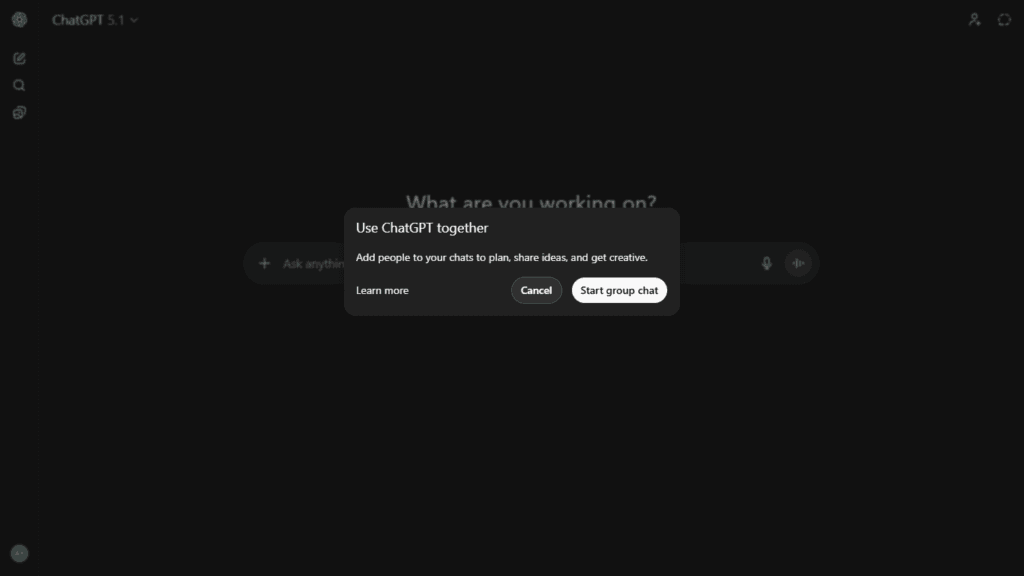
2. A “Start Group Chat” Popup Appears
After clicking Add People, a small window opens.
Here, you simply click “Start Group Chat”.
This confirms that you want to create a group conversation and not just invite someone to a standalone chat.
3. The Invite Link Screen Opens
Next, ChatGPT automatically generates a unique invite link.
This screen also provides sharing options like:
Gmail
WhatsApp
Google Drive
Messages
Copy Link
More sharing apps depending on your device
Just tap the method you prefer.
4. Share the Invite Link With Anyone You Want to Add
Once you share the link, the other person only needs to open it.
It works in one click — no complicated login or extra confirmation steps.
5. Group Chat Opens Instantly on All Devices
After they accept the invite, the group chat loads instantly on both devices.
You’ll see the same conversation, the same AI response, and the same prompts in real time.
For example, you typed:
“Latest tech news today”
And the response appeared simultaneously on both screens.
This makes ChatGPT feel like a live collaborative workspace — something users have wanted for a long time.
Why ChatGPT Group Chat Is a Clever Move by OpenAI
The idea behind Group Chat is simple, but incredibly powerful. Here’s why:
1. It Makes Sharing ChatGPT Responses Instant
Until now, if you wanted to show someone a ChatGPT chat, you had to:
Take screenshots
Crop or edit them
Send them over WhatsApp or email
With Group Chat, this entire process disappears.
You can share live, ongoing conversations directly.
2. It Enables Real-Time Collaboration
This is a major advantage for:
Students
Colleagues
Friends
Content creators
Researchers
Imagine two students preparing for an exam. They both join the same AI chat.
One asks a question, the other reads the answer instantly.
No screenshots, no forwarding — it’s like studying together in a smart classroom.
3. It Helps Teams Work Faster
Developers can debug code together.
Writers can brainstorm ideas together.
Startups can plan strategy together.
Because the conversation is shared, everyone stays on the same page.
4. It Makes ChatGPT More Social
OpenAI is slowly moving ChatGPT from a “personal AI tool” to a collaborative AI platform.
Group Chat is one of the first steps in that direction.
Real-World Use Cases for ChatGPT Group Chat
Here are some actual scenarios where the feature becomes incredibly useful:
Content Writers & Bloggers
One user can ask ChatGPT to generate an outline.
Another can refine it.
The AI responds to both.
Perfect for websites like TechMitra.
Students Preparing Together
Two students can join the same group and revise topics like:
Chemistry formulas
History summaries
Maths problem solutions
Business Teams
Teams can ask ChatGPT to:
Analyze data
Draft emails
Create marketing plans
Everything stays inside one shared chat.
Developers & Tech Users
Two or more developers can work together:
Debug errors
Generate code
Test outputs
Document processes
Family or Friends Exploring AI
Even simple fun tasks — like recipe ideas, travel planning, or generating images — can be done together.
My Experience Using Group Chat in India
After testing the feature on the ChatGPT Go Plan, the experience was smooth and surprisingly fast. The chat syncs in real time across devices with almost no lag.
The invite link sharing was especially convenient — Gmail, Drive, WhatsApp, everything worked without any issue.
The biggest improvement I personally noticed is the ability to share live AI results instantly.
Earlier, I had to take multiple screenshots whenever I wanted to share a ChatGPT output with someone.
Now, I can simply create a group, drop a link, and both people can continue chatting with the AI together.
This single change makes ChatGPT feel far more collaborative and practical.
Limitations You Should Know
While the feature is impressive, there are a few important limitations:
Available only on ChatGPT Go Plan
Not on the free version.
Works only when all participants use supported plans
If the person joining doesn’t have access, they won’t be able to open the link.
No long list of features yet
Currently, it’s more like shared chat — not a full group management system.
Still, considering it’s the first version, the experience is surprisingly polished.
Final Thoughts
The launch of ChatGPT Group Chat in India is one of the most practical updates OpenAI has introduced. It turns ChatGPT from a solo tool into a shared AI workspace — perfect for students, creators, professionals, and everyday users.
With the ability to:
Share live conversations
Invite people through links
Collaborate in real time
Sync across devices
Group Chat solves a major pain point — no more screenshots needed to share ChatGPT outputs.
And since the feature is available on the ChatGPT Go Plan, which is free in India for one year, this is the perfect time to try it.
Trending

Ayush Singhal is the founder and chief editor of TechMitra.in — a tech hub dedicated to simplifying gadgets, AI tools, and smart innovations for everyday users. With over 15 years of business experience, a Bachelor of Computer Applications (BCA) degree, and 5 years of hands-on experience running an electronics retail shop, Ayush brings real-world gadget knowledge and a genuine passion for emerging technology.
At TechMitra, he covers everything from AI breakthroughs and gadget reviews to app guides, mobile tips, and digital how-tos. His goal is simple — to make tech easy, useful, and enjoyable for everyone. When he’s not testing the latest devices or exploring AI trends, Ayush spends his time crafting tutorials that help readers make smarter digital choices.
📍 Based in Lucknow, India
💡 Focus Areas: Tech News • AI Tools • Gadgets • Digital How-Tos
📧 Email: contact@techmitra.in
🔗 Full Bio: https://techmitra.in/about-us/