
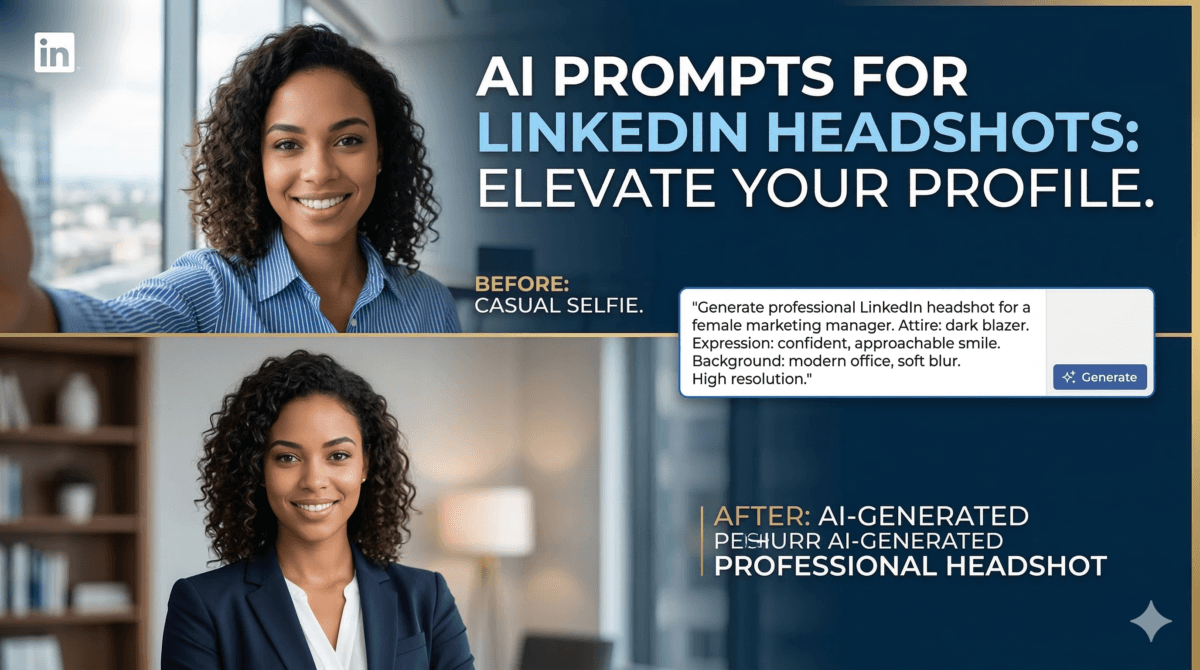
AI Generated Image
First impressions count, and your LinkedIn profile is your digital handshake in the professional world. In a crowded landscape, a compelling and professional headshot can significantly enhance your visibility and credibility. While traditional professional photography has long been the gold standard, the landscape is evolving. AI-powered image generation has emerged as a viable and cost-effective solution, offering a unique opportunity to create impressive headshots that align with your professional brand.
This article explores the art of crafting effective and polished prompts to generate AI LinkedIn headshots. We’ll delve into the key components of a successful prompt, provide diverse examples tailored to various industries, and share essential tips to ensure you achieve the desired results.
Table of Contents
Also Read : Best AI Prompts for Resume Writing in 2026: Land Your Dream Job with ChatGPT, Gemini, & Claude
The Power of a Professional Headshot on LinkedIn
Before we dive into the world of AI, let’s briefly reinforce the importance of a strong LinkedIn headshot. According to LinkedIn, profiles with photos receive 14 times more profile views. Beyond simple visibility, a professional headshot can:
- Enhance Credibility and Trust: A well-presented headshot demonstrates professionalism and attention to detail, instilling confidence in potential connections, employers, and clients.
- Convey Your Brand: Your photo can subtly communicate aspects of your personality, industry, and seniority.
- Increase Recruiter Engagement: Recruiters often use photos as a preliminary screening tool, and a polished headshot can make a positive first impression.
- Boost Search Visibility: While not a direct ranking factor, a high-quality photo can improve the overall perception of your profile, which can indirectly impact search performance.
Crafting the Perfect AI Prompt for Your Headshot
Creating an effective AI prompt is akin to directing a professional photographer. The more specific and detailed your instructions, the closer the final result will align with your vision. Here are the essential components to include:
- Core Subject: Clearly state who or what the primary focus is. (e.g., “A professional headshot of a middle-aged woman with short brown hair”)
- Style and Mood: Define the desired aesthetic. (e.g., “Professional portrait,” “Natural lighting,” “Confident expression,” “Modern and clean”)
- Context and Industry: While the focus should be on you, a hint of context can be helpful. (e.g., “Suitable for a corporate environment,” “Tech startup aesthetic,” “Creative agency vibe”)
- Specific Details: Add details that enhance the result. (e.g., “Wearing a dark navy blazer,” “Slight smile,” “Blurred background with bookshelf”)
- Technical Requirements: If possible, specify constraints like image quality or composition. (e.g., “High-resolution,” “Professional camera settings,” “Close-up shot”)
AI Headshot Prompts Examples for Different Professional Personas
To illustrate how to create a professional LinkedIn headshot with AI, let’s explore prompt examples for a range of professional roles:
Corporate Executive
- Prompt: “A professional headshot of a confident, middle-aged man with short, graying hair, wearing a charcoal gray three-piece suit and a classic silver tie. Natural, soft studio lighting. Minimalist background, slightly blurred, resembling a modern office. Serious, determined, yet approachable expression. Close-up, professional portrait photography.”
- Focus: Authority, professionalism, traditional corporate aesthetic.
Tech Startup Founder
- Prompt: “A modern, high-quality headshot of a young woman with curly brown hair, wearing a stylish dark blazer over a simple white T-shirt. Relaxed but professional pose, leaning slightly on a table with a laptop. Background is a bustling coworking space with plants and glass walls, blurred. Confident smile, intelligent gaze. Professional portrait, natural lighting, crisp and sharp.”
- Focus: Innovation, modern professional, collaborative spirit.
Creative Director (e.g., in Marketing)
- Prompt: “A stylish and creative professional headshot of a woman in her late 30s with asymmetric bob hair and bold glasses. Wearing a tailored blazer in a deep emerald green, with a unique artistic pin. Set against a blurred wall in an art gallery or creative studio, with subtle splashes of color. Looking directly at the camera with a warm, confident smile. Artistic portrait, interesting angles, natural light.”
- Focus: Creativity, unique perspective, professional yet artistic.
Finance Professional
- Prompt: “A traditional, professional headshot of a man with short, dark hair, wearing a crisp dark navy suit and a pinstripe shirt with a subtle blue tie. Polished look. Set against a blurred background with classic wooden shelves and a few financial textbooks. Attentive, professional expression. High-resolution, professional studio photography.”
- Focus: Precision, stability, traditional professionalism.
Freelance Writer
- Prompt: “A warm, approachable professional headshot of a woman with long, chestnut hair, sitting in a cozy home office or library setting. Wearing a soft, knit sweater in a professional color (e.g., burnt orange). Natural window light. Background is a shelf filled with books and perhaps a small succulent. Genuine, friendly smile. Lifestyle professional portrait, natural lighting.”
- Focus: Authenticity, friendliness, expertise in a specific field (e.g., writing).
Also Read : 40 Pro AI Prompts for Stock Trading: Excel, PDF Analysis & Live Market Data (2026 Guide)
The 15 Copy Paste AI Prompts For Headshots From Your Uploaded Photo
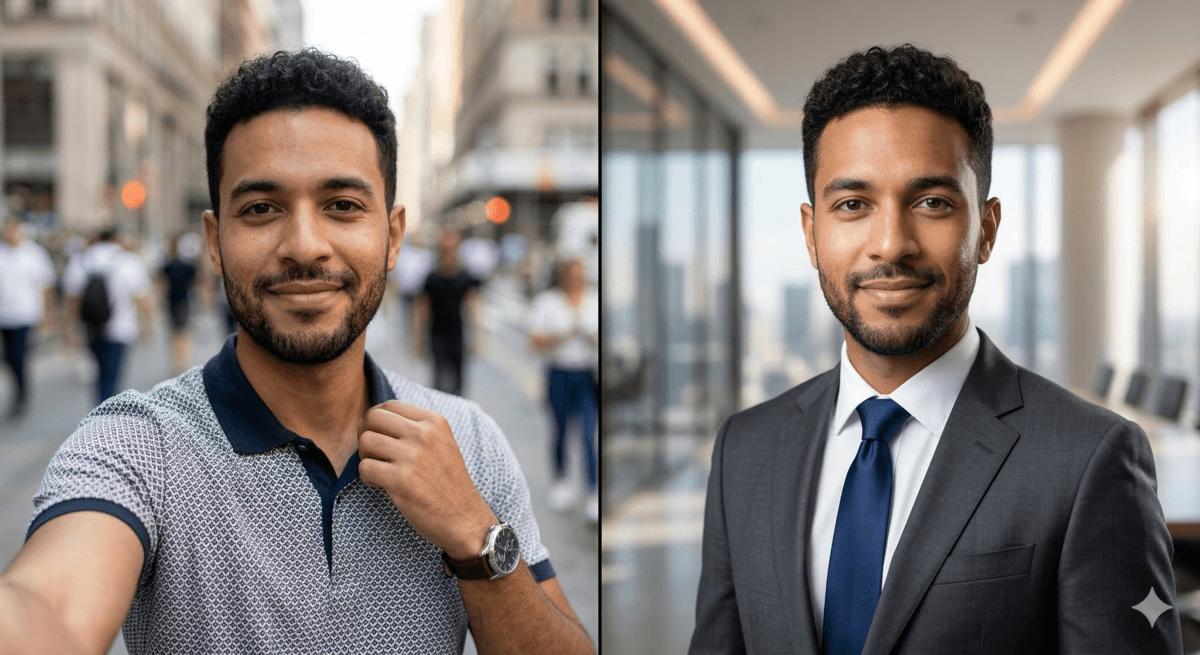
Here is the list of 15 prompts rewritten specifically to be used with an uploaded image. These are designed to be short, effective editing instructions. Copy and paste them into the AI image generator Gemini, Midjourney, Canva along with your photo:
Corporate & Executive
- The Modern CEO: “Using the provided photo as the only reference, keep the person’s face and expression identical, but change their outfit to a tailored charcoal grey suit and white dress shirt. Move them to a blurred modern corporate office with high-end studio lighting.”
- The Legal Professional: “Apply a strict professional professional portrait aesthetic to the person in the uploaded image. Maintain their exact face. Change their clothing to a navy blue blazer. Use a sophisticated, blurred background of a high-end law library.”
- The Finance Expert: “Generate a polished headshot keeping the person’s face from the uploaded photo identical. Change their attire to a dark grey suit and add a classic silver tie. The background should be a blurred modern financial trading floor with subtle blue lighting.”
Tech & Innovation
- The Software Engineer: “Transform the uploaded person into a polished professional while keeping their face exact. Change their clothing to a dark crew-neck t-shirt and a light grey bomber jacket. Set them against a blurred, minimalist tech office with bright, natural lighting.”
- The Startup Founder: “Keep the exact facial identity of the person in the provided photo. Update their clothes to a stylish blazer over a premium white tee. Place them in a blurred, vibrant coworking space with indoor plants and natural light. Approachable and intelligent expression.”
- The Cyber Security Lead: “Create a sharp, hyper-realistic professional portrait of the person in the uploaded image, maintaining their precise identity. Change their outfit to a black turtleneck. Use dynamic ‘Rembrandt’ lighting against a dark, minimalist, blurred background.”
Creative & Media
- The Art Director: “Maintain the person’s exact face and identity from the uploaded photo. Change their outfit to creative, professional attire (e.g., tailored black shirt with bold glasses). Place them against a blurred art gallery background. Use soft, warm lighting.”
- The Marketing Strategist: “Transform the uploaded person while keeping their face exact. Change their clothes to an intelligent, smart-casual outfit (e.g., a mustard yellow silk top or forest green blazer). Place them in a blurred urban cafe setting with natural golden hour lighting.”
- The Architect/Designer: “Keep the person’s facial features identical. Change their attire to a minimalist black blazer. Apply dramatic, sophisticated lighting against a blurred background of a modern concrete architectural building.”
Service & People
- The HR Director: “Maintain the person’s exact friendly face from the provided image. Change their clothing to a professional, warm beige cardigan over a simple top. Place them in a bright, inviting office with soft bokeh lighting.”
- The Medical Professional: “Generate a clean professional portrait preserving the person’s identical face. Change their attire to a crisp white lab coat in a modern medical setting. Use bright, even, clinical lighting against a clean blue background.”
- The University Professor: “Keep the person’s exact identity and expression. Change their outfit to a tweed blazer. Set them in a blurred university campus background (e.g., a courtyard or old library) with natural autumn lighting.”
Universal Professional
- The ‘Outdoor Professional’: “Maintain the person’s face and original friendly smile. Change their clothes to professional business casual. Transform the background to a blurred park greenery during the golden hour with natural sunlight effects.”
- The ‘Classic Studio’: “Apply a standard, perfect corporate headshot style to the person from the uploaded photo. Keep their identity identical. Change their clothing to a dark navy suit and tie. Set them against a seamless, soft grey studio background.”
- The ‘Bright & Modern’: “Maintain the person’s exact face. Change their clothing to a professional white blazer or white button-down. Place them against a seamless white studio background with high-key, very soft shadows.”
**Just upload your photo, pick one of the numbers above, and paste the prompt to see your own transformation!**
Additional Tips for Success
- Be Specific but Allow for Creativity: Provide clear instructions, but give the AI room to produce a visually appealing image. Avoid overly rigid commands that might limit the output.
- Refine and Iterate: Don’t expect perfection on the first try. Generate several variations using different variations of your prompt. Analyze the results, adjust the wording, and try again until you achieve a photo you’re proud of.
- Focus on Lighting: Good lighting is crucial for any portrait. Ask for natural light or professional studio lighting to ensure the best results.
- Choose Appropriate Clothing: Think about the dress code of your industry and select a prompt that directs the AI to dress you accordingly.
- Consider the Background: While you want the focus to be on you, a carefully chosen blurred background can add context and professionalism.
- Mind the Aspect Ratio: LinkedIn profile photos are square. If possible, prompt for a square output or be prepared to crop the generated image.
- Human Edit is Key: Even the best AI-generated photos benefit from subtle human editing. Consider adjusting color balance, contrast, and brightness, or removing minor imperfections before uploading.
Ethical Considerations and Platform Guidelines
It’s important to be aware of the ethical considerations surrounding AI-generated imagery and the guidelines of individual platforms.
- Transparency: Consider disclosing that your headshot was generated by AI, especially if requested or relevant to your professional brand. This maintains transparency and manages expectations.
- Platform Terms: Familiarize yourself with LinkedIn’s terms of service regarding profile photos and AI content generation. While AI headshots are generally accepted, ensure they don’t violate specific policies on deception or misrepresentation.
- Misrepresentation: The ultimate goal is to represent yourself accurately. Ensure the AI-generated headshot reflects your overall appearance and professional persona without excessive embellishment or misrepresentation.
Conclusion
AI-powered image generation provides a innovative and efficient way to create a compelling professional headshot for your LinkedIn profile. By mastering the art of crafting specific, detailed, and targeted prompts, you can generate high-quality images that effectively convey your personal brand, boost your visibility, and enhance your professional credibility. While AI is a powerful tool, it’s essential to use it strategically, refine the results, and ensure the final product aligns with your professional identity and the expectations of your industry.
Disclaimer: The AI portrait prompts and techniques shared in this article are for educational purposes. AI image generation results can vary significantly based on the tool used and the base image provided. Always ensure your LinkedIn profile picture accurately represents your current appearance. Please review the privacy policies of any AI tool before uploading personal photos, and adhere to LinkedIn’s latest Terms of Service regarding AI-generated content.
“LinkedIn is a trademark of LinkedIn Corp. TechMitra.in is an independent publication and is not affiliated with or endorsed by LinkedIn Corp.”

Ayush Singhal is the founder and chief editor of TechMitra.in — a tech hub dedicated to simplifying gadgets, AI tools, and smart innovations for everyday users. With over 15 years of business experience, a Bachelor of Computer Applications (BCA) degree, and 5 years of hands-on experience running an electronics retail shop, Ayush brings real-world gadget knowledge and a genuine passion for emerging technology.
At TechMitra, he covers everything from AI breakthroughs and gadget reviews to app guides, mobile tips, and digital how-tos. His goal is simple — to make tech easy, useful, and enjoyable for everyone. When he’s not testing the latest devices or exploring AI trends, Ayush spends his time crafting tutorials that help readers make smarter digital choices.
📍 Based in Lucknow, India
💡 Focus Areas: Tech News • AI Tools • Gadgets • Digital How-Tos
📧 Email: contact@techmitra.in
🔗 Full Bio: https://techmitra.in/about-us/